
HuangYincan/VideoNote-MCP
HuangYincan/VideoNote-MCP has 103 GitHub stars and 5 forks. GitHot measured 0 stars in 24 hours. Last checked 2026-11-18 08:50 UTC. Last push 2026-10-21.
Measured star growth
- in 24h
- 0
- in 7 days
- Collecting history
- in 15 days
- Collecting history
- in 1 month
- Collecting history
Net star changes over overlapping periods, not daily totals. Missing measurements are left blank. Stars measure attention, not software quality.
About
VideoNote:将视频转成文字或笔记。理解画面/弹幕/评论;支持本地音视频或主流平台;工具解耦;多格式导出。
ProductivityREADME_EN.md
Original
VideoNote-Mcp
Video link → multi-format notes
One link → one note · end-to-end or decoupled, any combination
中文 | English
Quick Start • Input Data • Docs • Real-world Examples • Pipeline Map • Task Management • Best Practices • Contribute
VideoNote-Mcp packages the whole "video link → multi-format notes" pipeline into an MCP Server: give it a link and it automatically runs download → transcription → frame understanding → danmaku/comments, then produces a transcript or note.
Repository: HuangYincan/VideoNote-MCP.
It works end-to-end (one link → one note) and is also decoupled: pick and choose among generation, material, task and media-processing tools. No backend required.





Quick Start
Windows / Linux / macOS: install uv and FFmpeg, then run the installer:
uvx videonote@latest install
Choose your client and transcription setup, then restart the client or reconnect MCP. Provide a link, a local audio/video file path, or existing subtitles / transcripts for the conversation assistant to organize into notes. The default workflow needs no LLM API key.
Full installation guide (Chinese) · Configuration and platform login (Chinese)
Input Data
- Online links: video links from Bilibili, YouTube, Douyin, TikTok, Kuaishou, Xiaohongshu and other sites, plus podcast / audio links such as Xiaoyuzhou.
- Local video: MP4, MKV, MOV, WebM and other files, with audio extraction for transcription and optional frame extraction.
- Audio / recordings: MP3, WAV, M4A, FLAC and other files for podcasts, lectures and meetings; multiple recordings can be merged before transcription.
- Subtitles / transcripts: SRT, VTT, JSON transcript results or text such as TXT. Provide a file or paste the content for the conversation assistant to organize directly into notes, without transcribing again.
Export Formats
- Subtitles: SRT, VTT and JSON for preserving timestamps or importing into other tools.
- Markdown notes: organize the transcript, frames and comments into notes that are easy to read and edit.
- LaTeX / Typst: the package includes Math Note, English Article and zju-lab templates. An MCP client can list, read and copy them to a new directory.
- Template copies never overwrite an existing directory. Install the required LaTeX / Typst compiler, fonts and packages locally; MCP provides the materials and templates but does not compile PDFs automatically.
See the user manual for the complete export guide.
Docs
Full installation / configuration / usage / env vars / updating / security docs now live in docs/ (this README keeps just the overview):
- Document Index
- Architecture
- User Manual — install (4 methods) · config (setup wizard + CLI) · env vars · updating · security
- Changelog
- Editable architecture diagram
Real-world Examples
Two end-to-end examples: one uses direct conversation-assisted generation to produce a LaTeX mathnote PDF; the other runs fully automatic LLM generation and produces portable Markdown.
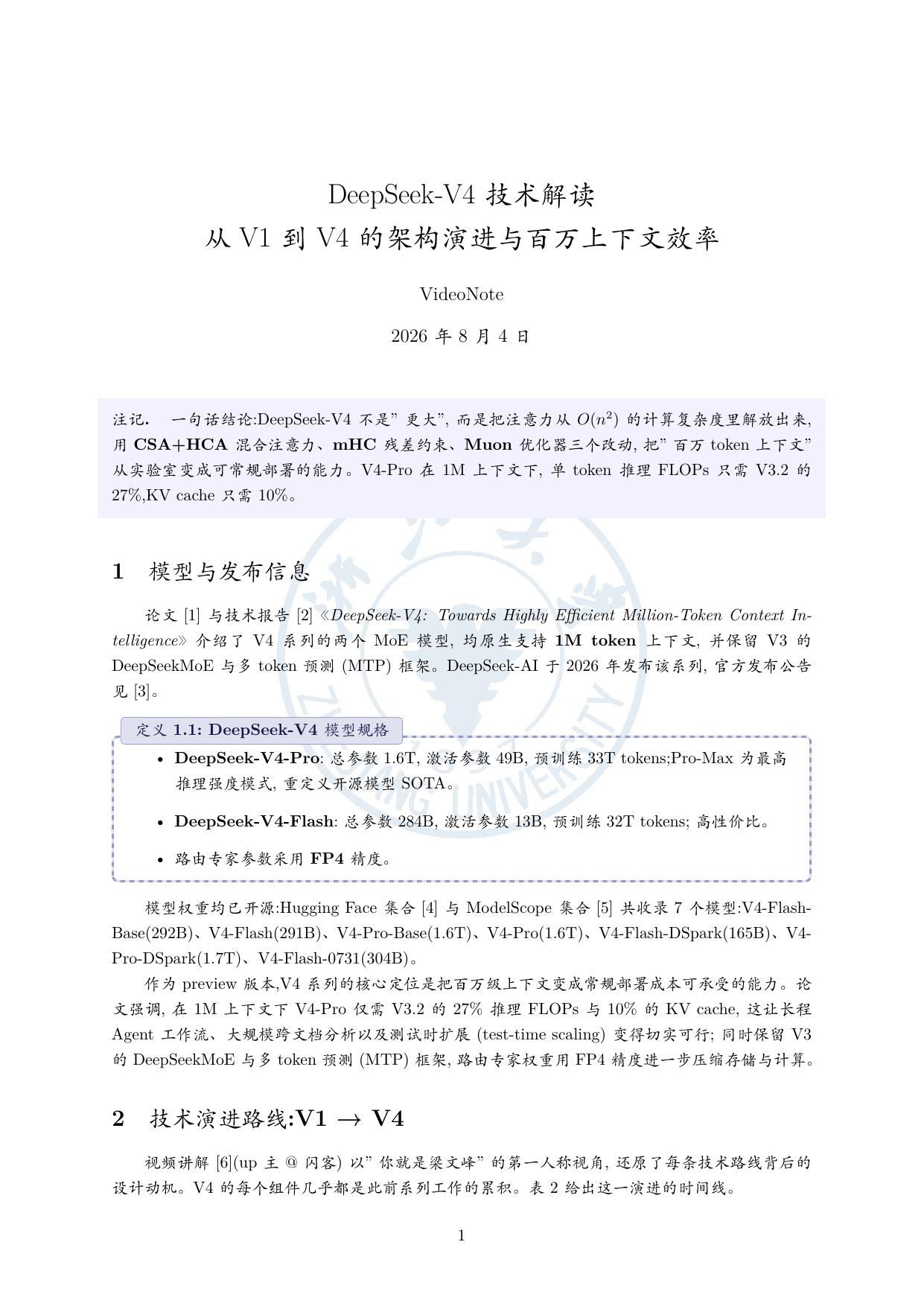
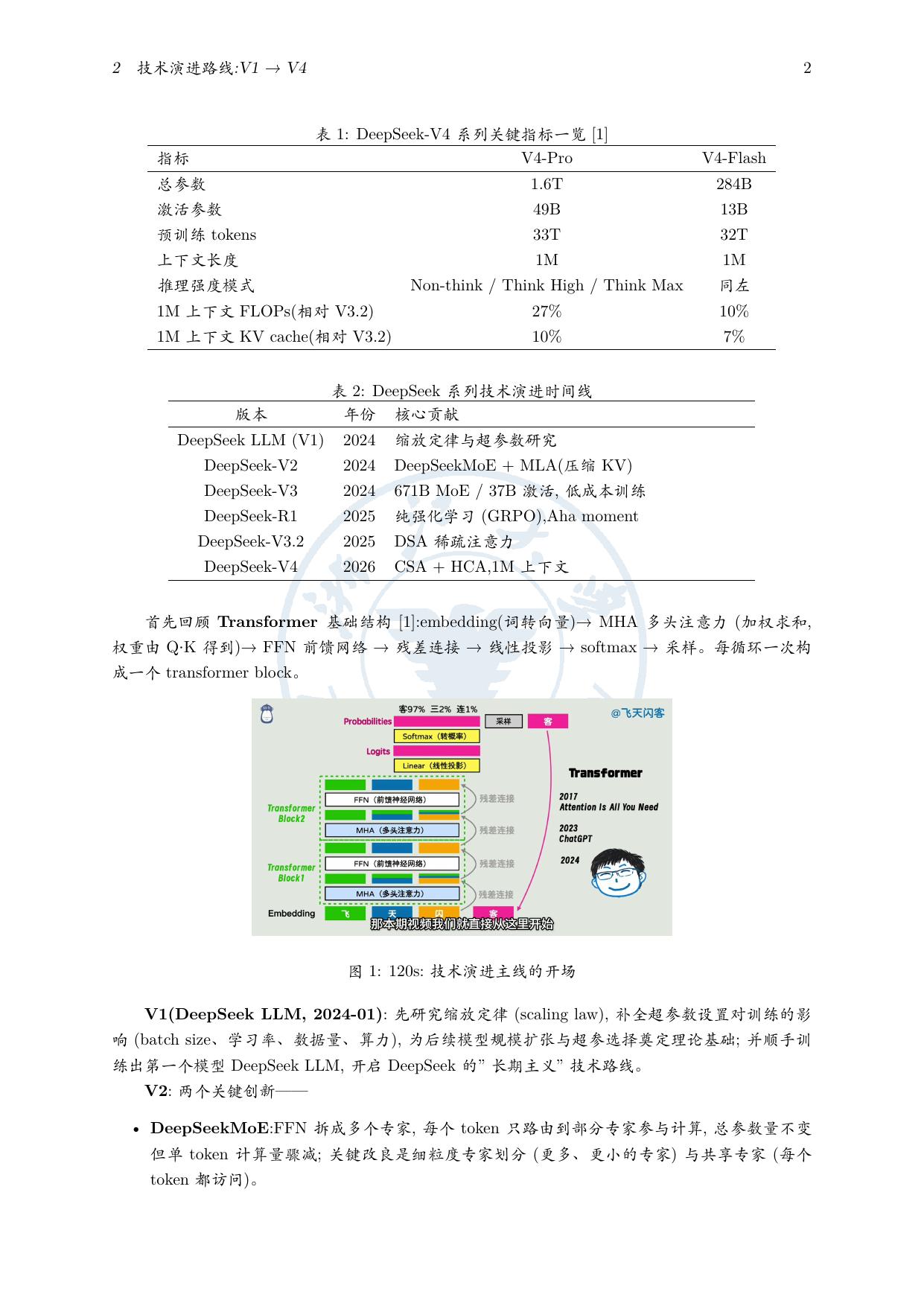
Example 1 · agent_direct + LaTeX mathnote (DeepSeek-V4 video)
One video + four kinds of external sources (paper / tech report / WeChat announcement / open-source collections) → conversation-assisted generation of a refined note, output as a LaTeX mathnote PDF (Chinese KaiTi template):
| Page1 | Page2 | Page3 |
|---|---|---|
 |
 |
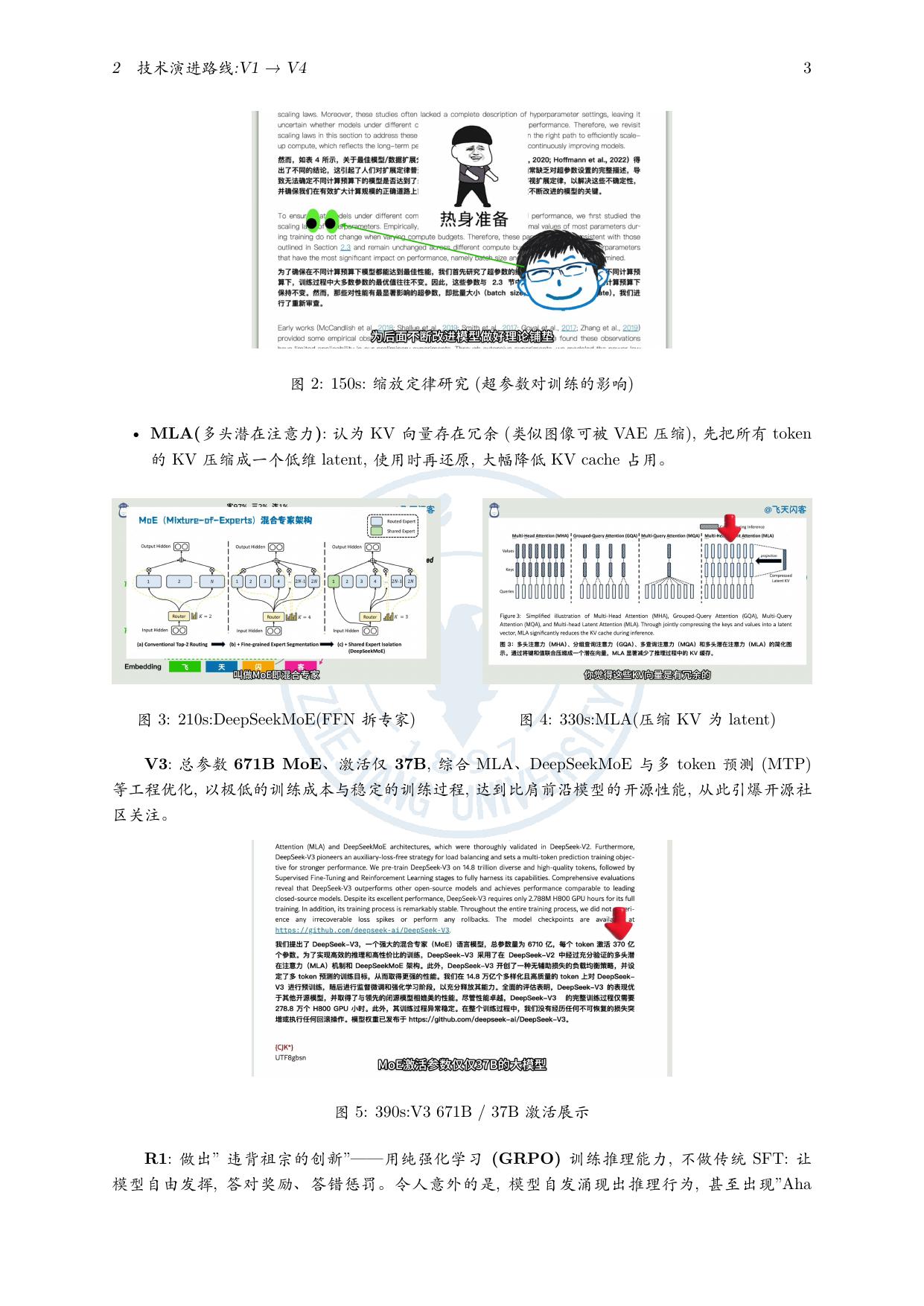 |
- No LLM key: the note is organized from the transcript, frames and comments
- Multi-source cross-integration: video × paper × tech report × open-source list
- Refined copy keeps the original:
note.md/note_original.mdpair - LaTeX mathnote PDF: auto-fixes missing fonts / line-overflow / citation dedup
Full run record: examples/agent-direct-deepseek-v4-mathnote/README.md.
Example 2 · Fully automatic LLM generation + portable Markdown (multi-video parallel)
A minimal prompt (3 Bilibili links + an output dir, not a single parameter given) → fully automatic run of env check → link detection → provider/model discovery → parameter confirmation → multi-video parallel → post-generation refinement from the transcript, producing 3 portable refined notes (note.md + Assets/ screenshots + a "Viewer Opinions" section, keeping note_original.md for comparison).
- IELTS: myth-busting + listening/reading/writing/speaking breakdown + 179 high-frequency exam words + 15-sentence logic framework
- Forensics: a 43-year forensic pathologist "reacts" to film vs. reality; refined into 12 sections
- Transformer: self-attention deep dive, 18 screenshots distributed along the lecture timeline
Full run record: examples/note-generation-example/README.md.
Pipeline Map
flowchart TB
    URL(["Video link"])
    LOCAL(["Local audio/video file"])

    subgraph COLLECT["01 · Material preparation"]
        FETCH["Platform detection & download"]
        TRANSCRIPT["Platform subtitles / transcription<br/>Subtitles first; ASR otherwise"]
        LOCAL_ASR["Local transcription<br/>Audio extraction / conversion · ASR"]
        VISION["Visual understanding<br/>Keyframes / multimodal analysis"]
        COMMENTS["Danmaku & comments<br/>Bilibili · on demand"]

        FETCH --> TRANSCRIPT
        FETCH -.-> VISION
        FETCH -.-> COMMENTS
    end

    subgraph WRITE["02 · Note generation"]
        MATERIAL["Material pack<br/>Transcript · frames · optional comments"]
        AGENT["Conversation assistant<br/>Direct writing · no LLM key"]
        LLM["Configured LLM<br/>generate_note · fallback"]

        MATERIAL -->|prepare_note_material| AGENT
        MATERIAL -.-> LLM
    end

    subgraph OUTPUT["03 · Outputs"]
        NOTE["Portable note<br/>note.md + Assets/ screenshots"]
        DOCUMENT["Assistant-created formats<br/>LaTeX / Typst / mind map"]
        SUBTITLE["Subtitle export<br/>SRT / VTT / JSON"]

        NOTE -.-> DOCUMENT
    end

    URL --> FETCH
    LOCAL --> LOCAL_ASR
    LOCAL -.->|Video files| VISION
    TRANSCRIPT --> MATERIAL
    LOCAL_ASR --> MATERIAL
    VISION -.-> MATERIAL
    COMMENTS -.-> MATERIAL
    AGENT --> NOTE
    LLM -.-> NOTE
    TRANSCRIPT -.->|process_media · export| SUBTITLE
    LOCAL_ASR -.->|process_media · export| SUBTITLE

    classDef entry fill:#4f46e5,stroke:#4338ca,color:#fff
    classDef primary fill:#eef2ff,stroke:#818cf8,color:#312e81
    classDef optional fill:#f8fafc,stroke:#94a3b8,color:#334155,stroke-dasharray:5 4
    classDef result fill:#ecfdf5,stroke:#6ee7b7,color:#064e3b
    class URL,LOCAL entry
    class MATERIAL,AGENT primary
    class VISION,COMMENTS,LLM,DOCUMENT,SUBTITLE optional
    class NOTE result
    style COLLECT fill:transparent,stroke:#cbd5e1,rx:12,ry:12
    style WRITE fill:transparent,stroke:#cbd5e1,rx:12,ry:12
    style OUTPUT fill:transparent,stroke:#cbd5e1,rx:12,ry:12
Video links go through platform detection and download, using platform subtitles first and ASR otherwise, with optional Bilibili danmaku and comments. Local audio/video files go directly through audio extraction / conversion and ASR, skipping platform download, subtitle fetching, and danmaku / comment collection. Local video files also support optional visual understanding.
Solid lines show the default flow: prepare_note_material prepares the pack, and the conversation assistant organizes the note. Dashed lines show optional capabilities or fallback paths: use generate_note with the configured LLM when the assistant cannot view images or the user requests it. Both platform subtitles and ASR transcripts can be exported independently; the assistant creates other formats on demand. Stage details live in docs/02-架构设计.md.
Task Management
One folder per task note_results/{task_id}/: raw/ (downloaded media) + gen/ (transcript/note/frames/exports) + control files; a global task index lives in the SQLite video_tasks table (with semantic titles). list_tasks enumerates all tasks (identify by semantic title), cleanup(task_id, dry_run=True) inspects a task before cleanup, cleanup does per-task / global cleanup (config & models kept by default), and health_check verifies FFmpeg / database / whisper readiness.
flowchart TB
    DATA["data/ root"] --> R["note_results/ tasks"]
    DATA --> DB[("video_note.db<br/>SQLite global task index")]
    R --> T1["Task A<br/>note_results/{task_id}/"]
    R --> T2["Task B<br/>…"]
    R --> T3["Task C<br/>…"]
    T1 --> RAW["raw/ original material<br/>audio/video · cover"]
    T1 --> GEN["gen/ generated material"]
    T1 --> CTRL["status.json · result.json · manifest.json"]
    GEN --> T1A["transcript.json full transcript"]
    GEN --> T1B["note.md finished note"]
    GEN --> T1C["Assets/ screenshots in the note"]
    GEN --> T1D["frames/ keyframe originals"]
    GEN --> T1E["srt / vtt / json subtitle exports"]
    DB -. index .-> T1
| Tool | Description | Type |
|---|---|---|
list_tasks |
List all tasks (global index, with semantic titles) | MCP tool |
cleanup |
Per-task cleanup (with task_id) / global cleanup (factory reset, without) |
MCP tool |
health_check |
FFmpeg / database / whisper readiness | MCP tool |
Best Practices
- Study & exam prep: end-to-end + video understanding + transcript-based follow-up refinement.
- Meeting minutes:
process_media(action="merge")to join recorded segments →process_media(action="diarize")for speakers →meeting_minutesstyle. - Deep-reading a lecture: after end-to-end generation, refine from the full transcript, filling in section by section.
- Video appreciation: enable danmaku + comment integration for an "Audience viewpoints" section.
- Default path: one link uses
prepare_note_material, and the conversation assistant organizes the note; usegenerate_notewhen image understanding requires the configured LLM or the user asks for it. Useprocess_mediafor media operations (merge / diarize / export). - Real example: full run records for both cases live in
examples.
How to Contribute
Issues, improvement ideas and pull requests are welcome. See CONTRIBUTING.md for the development environment, tests, branch policy and code navigation.
Acknowledgements
Thanks to the community and all contributors, to Glama for listing this MCP server, and to all open-source dependencies and the upstream pipeline project that inspired this work.