
Hisn00w/ASu-skills
Hisn00w/ASu-skills has 6,346 GitHub stars and 332 forks. GitHot measured +22 stars in 24 hours and +125 in 7 days. Last checked 2026-11-11 11:48 UTC. Last push 2026-10-28.
🚀 A collection of practical AI skills for job searching and software development, supporting résumé optimization, job applications, interview preparation, and more efficient development.
Measured star growth
- in 24h
- +22
- in 7 days
- +125
- in 15 days
- Collecting history
- in 1 month
- Collecting history
Net star changes over overlapping periods, not daily totals. Missing measurements are left blank. Stars measure attention, not software quality.
README_en.md
OriginalASu-skills

A job-search workflow plugin for Chinese job seekers
Nine standalone entry points for open-source contributions, AI coding conversation review, project interview prep, resume improvement, resume building, job matching, job-application autofill, interview preparation, and campus recruitment tracking.




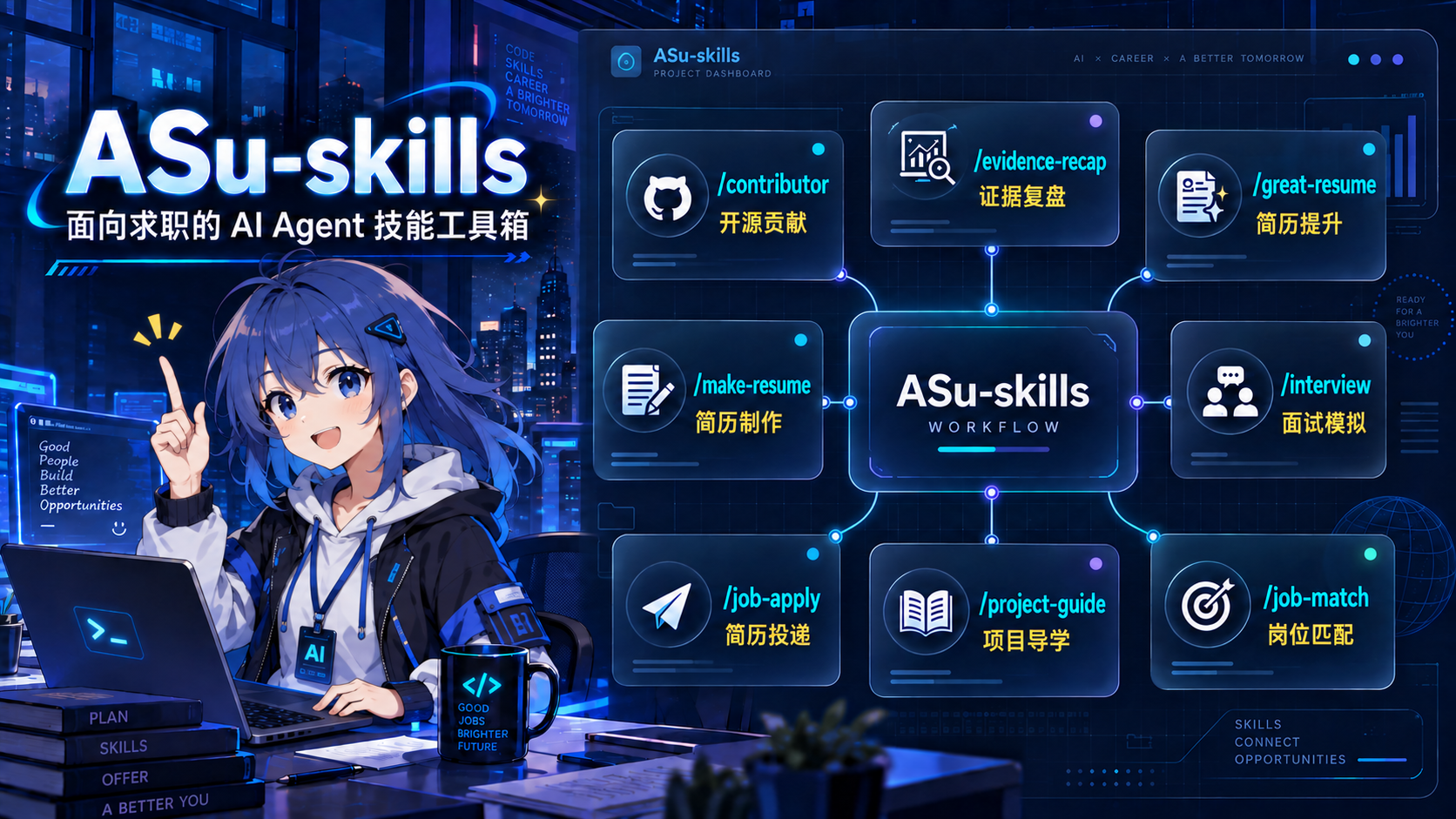
Selected entries are shown here; see below for the complete list of nine.
Contents
- Harness Project Update
- Installation
- First time: where to start
- Nine skills
/contributor: Make real open-source contributions/project-guide: Project Study Notes And Interview Answers/great-resume: Improve your experience/make-resume: Build a resume/evidence-recap: Turn AI coding conversations into evidence chains/interview: Stress-test your resume/offer: Campus recruitment progress management/job-match: Job-match analysis/job-apply: Job-application autofill
- How the nine entries work together
- Truthfulness boundaries
- File structure
- Contributing
- Acknowledgments
- Contributors
- License
- Star History
A Harness Project Update
ASu is building a Harness project tailored to the job-search journey. We welcome real application cases, skills, and terminal experiences via Issues and PRs.
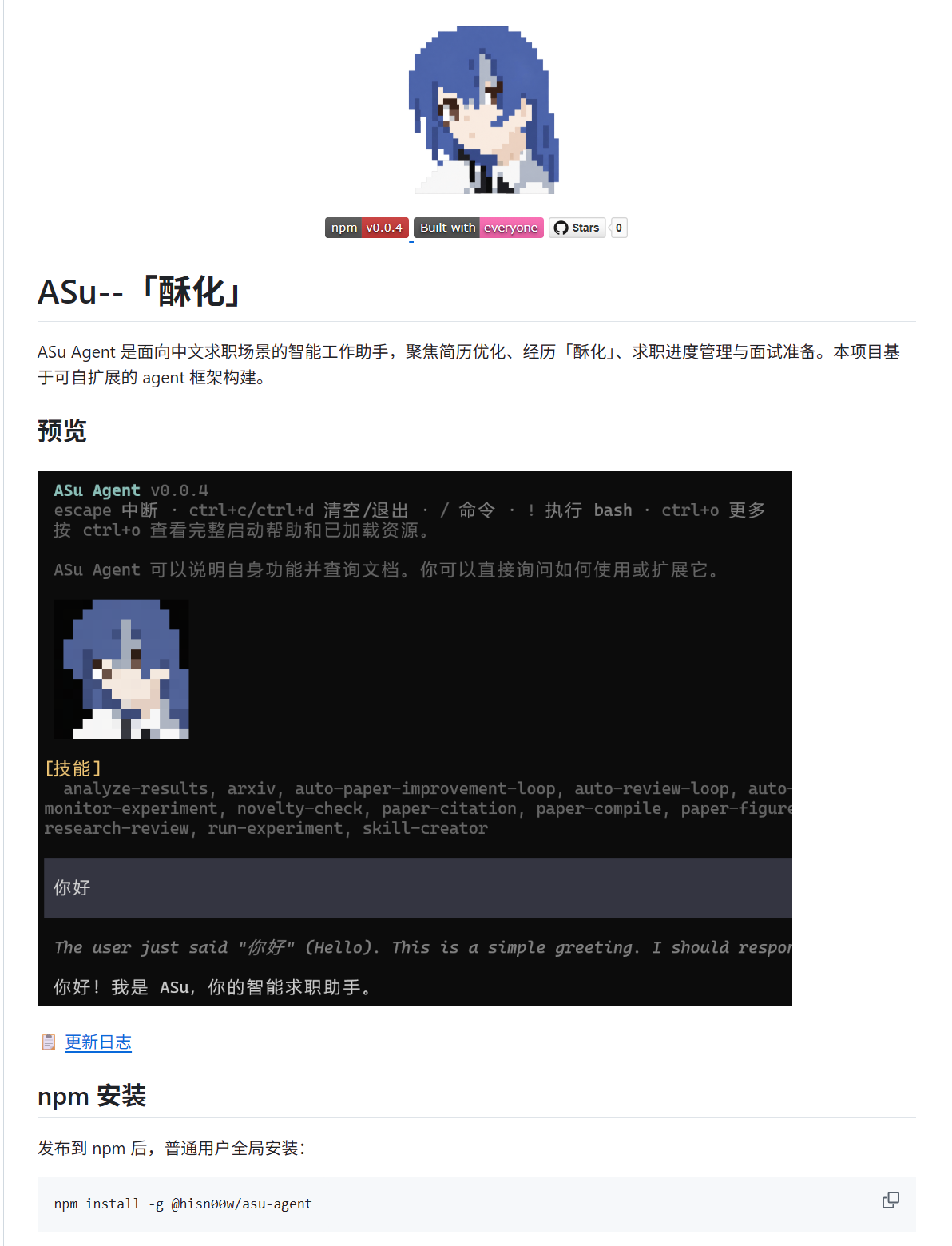
Check out the ASu Harness project on GitHub
ASu-skills is now a plugin pack. Installing it provides nine individually callable entry points:
| Entry | Purpose | Primary deliverables |
|---|---|---|
/contributor |
Open-source contributions | Finds candidates, shows diffs, submits a PR after your confirmation, and hands the contribution to /great-resume |
/evidence-recap |
Conversation review | Turns AI coding conversations and delivery records into a verifiable nine-part evidence chain |
/project-guide |
Project interview prep | Creates tutorial.md and practice.md on demand, or project study notes, interview answers, and handoff evidence |
/great-resume |
Resume improvement | Role targeting, project bullet rewrites, evidence of results, HR opener |
/make-resume |
Resume building | Generates an editable HTML resume from the ASu or a specified template, with PDF export and optional LaTeX source |
/job-match |
Job matching | Compares a JD with verified experience and returns an evidence matrix, hard constraints, and an application recommendation |
/job-apply |
Job-application autofill | Connects to a browser, fills an application, and stops for review before submission |
/interview |
Interview preparation | Interview prediction, contract-driven drilling, evidence review, and targeted retry |
/offer |
Campus recruitment tracking | Tracks applications, assessments, interviews, offers, rejections, and recruiting emails |
Installation
ASu-skills works with Codex, Claude Code, DeepSeek Harness Desktop, TraeWork, and Qoder, plus lightweight Cursor, OpenCode, and WorkBuddy bridges. All entry points share the same skills/, assets/, and references/; the entry catalog is maintained in skills.registry.json as the single source of truth and is regenerated/reconciled by npm run sync:skills (CI checks it with --check).
| Platform | Installation entry | After installation | Uninstall |
|---|---|---|---|
| Codex | Send the GitHub repository link to Codex and ask it to install the plugin | Start a new conversation and choose an entry from the / menu |
Remove ASu-skills from Codex's plugin manager |
| Claude Code | Run /plugin marketplace add Hisn00w/ASu-skills and /plugin install asu-skills@asu |
Run /reload-plugins when prompted |
Run /plugin uninstall asu-skills |
| DeepSeek Harness Desktop | Open the plugin panel, choose Add plugin, paste https://github.com/Hisn00w/ASu-skills.git, and install it |
Enable ASu-skills in the plugin panel, then start a new conversation and choose an entry from the / menu |
Uninstall ASu-skills from the plugin panel |
| Cursor | Read the Skill bridge installation guide | Start a new Agent chat and type / or /contributor, etc. |
Remove the skill directories under the project .cursor/skills/ or user ~/.cursor/skills/ |
| TraeWork | Copy the repository to ~/.trae-cn/plugins/<publisher>/asu-skills/<version>/ |
Restart TraeWork and choose an entry from the / menu |
Delete the corresponding TraeWork plugin directory |
| OpenCode | Read the installation guide | Restart OpenCode or run /reload-plugins |
Delete the installed skills and resource directories according to the installation method |
| WorkBuddy | Read the bridge installation guide | Restart WorkBuddy or refresh the skill list | Delete the corresponding directory or symlink under ~/.workbuddy/skills/ |
| Qoder | Read the installation guide | Restart Qoder or start a new conversation and choose an entry from the / menu |
Uninstall with qodercli plugin uninstall or delete the plugin directory according to the installation method |
For contributor checks, tests, and the PR workflow, see the contributing guide.
First time: where to start
Pick your first entry based on the problem you most need to solve right now:
| Situation | Start with |
|---|---|
| No verifiable projects or collaboration experience yet | /contributor |
| Have AI coding conversations or delivery records that need evidence review | /evidence-recap |
| Have a project repository and need source lessons, a reading path, or interview talking points | /project-guide |
| Have experience, but unsure how to match it to a target role | /great-resume |
| Resume content is settled; need a regular editable resume | /make-resume |
| Want to recreate the ASu-style high-density technical resume | /make-resume (default template) |
| Have a JD and resume; need to assess fit and evidence gaps | /job-match |
| Have a job URL and need to fill its application form | /job-apply |
| Interviews coming up; want to predict questions and drill the weak spots | /interview |
| Already applying; need to organize recruiting emails and follow-ups | /offer |
You can also combine entries:
- No internships, want real experience: use
/contributorto make role-relevant open-source contributions first, then hand them to/great-resumeto turn into verifiable resume statements; - Have AI project records, need to establish the facts: use
/evidence-recapto separate personal actions, delivery stage, and evidence of impact before deciding whether to hand the result to/great-resume; - Have projects, ready to apply: use
/project-guideto turn the repository into study notes and interview answers, then use/great-resumeto align with the target role and/make-resumeto generate the resume; it defaults to the ASu template but accepts a specified template; - Have a resume and a specific JD, need an application decision: use
/job-matchto separate verified matches, presentation gaps, and real gaps; hand confirmed presentation gaps to/great-resumewhen rewriting is needed; - Already applying, tracking ongoing progress: use
/offerdirectly to organize emails and statuses; come back to/great-resumeand/make-resumewhenever the resume needs an update. - Ready to fill an application form: use
/job-applywith a connected browser for one specific role, then use/offerto record the application status.
/contributor: Make real open-source contributions
You don't need to start by refactoring Kubernetes. /contributor finds active projects that match your target company and role, prioritizing typos, punctuation, Markdown, formatting, broken links, and small README fixes. It shows candidates, proposed changes, and verification results first; it only forks, pushes, and opens a PR after you explicitly confirm.
Small changes can still tell a big story: a typo fix is documentation quality governance, a broken-link fix is developer-experience optimization, and touching multiple repositories is a cross-project collaboration loop. Keep the PR itself normal; once merged, hand the real links and data to /great-resume for resume improvement. Anything unmerged simply goes down as “collaborating”.
Typical usage:
/contributor

Target role: AI Application Engineer
Tech stack: TypeScript, React, Python
Weekly availability: 4 hours
Start with 3 small PRs that are easy to merge, then add 1 technical contribution I can expand on in an interview.
/project-guide: Project Study Notes And Interview Answers
/project-guide works from an existing project repository or project materials. For systematic source learning, it first designs an outline in tutorial.md, then expands selected lessons and creates matching questions in practice.md on demand. For job-search preparation, it generates 导学-{short-name}.md and 面经-{short-name}.md with reading paths, technical highlights, design trade-offs, STAR answers, and source evidence.
Typical usage:
/project-guide

Short name: BI
Project description: This is a React, Node.js, and LLM API based data Q&A project. I owned query orchestration, result visualization, and graceful fallback.
Target role: Front-end / AI application

You can also ask it to design a source-reading course outline first, without expanding every lesson, then request lesson 1 or its matching comprehension questions later.
/great-resume: Improve your experience
Great-resume — improving your real experience so it reads sharp, confident, and aligned with your target role through strong positioning, strong evidence, and clear expression. Never fabrication.
Suitable for:
- Re-positioning your experience against a target role;
- Translating low-level work like pages, APIs, and data binding into hiring language;
- Rewriting project bullets, resume summaries, and personal introductions;
- Generating HR openers for LinkedIn or Line;
- Preparing interview follow-up questions, evidence checklists, and the boundary between fact and framing.
For best results, provide the target role, job description, current resume, project descriptions, real responsibilities, and measurable outcomes. When information is missing, the skill drafts what it can and marks the gaps with a 【待补】 (“to be filled in”) placeholder — it never invents titles, companies, tech stacks, or numbers.
Typical usage:
/great-resume

Target role: AI Application Engineer
Based on my internship and project experience below, give me a steady framing and a bold framing, rewrite the resume bullets, and draft an opener to send to HR.
Example HR opener

/make-resume: Build a resume
/make-resume handles all resume-file deliverables. Unless you specify another template, it uses the ASu single-column high-density technical resume as a read-only master. You can specify a repository template, local HTML, or reference screenshot; it always produces a genuinely editable HTML, never an image of the original embedded in a page.
Supported:
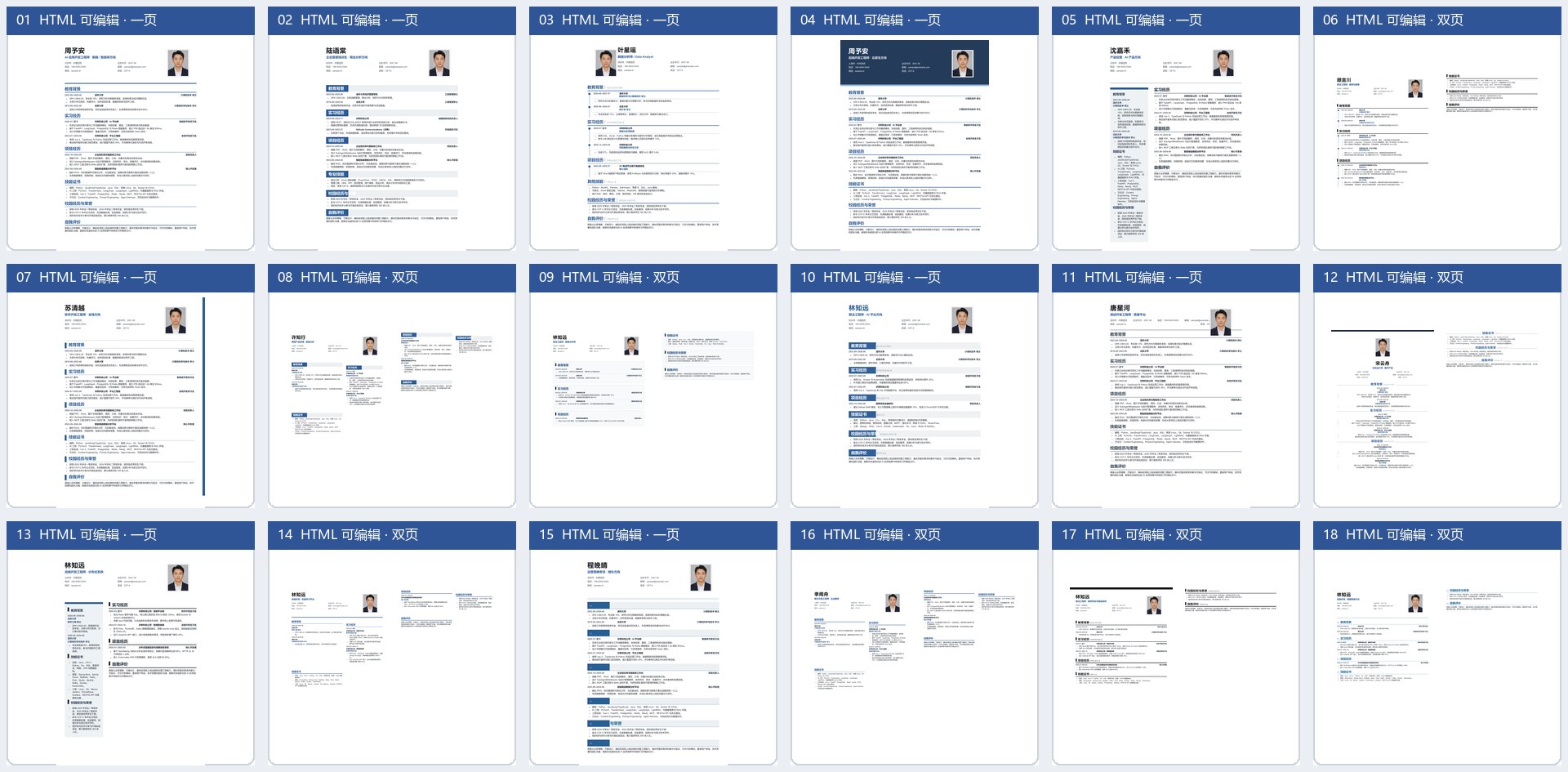
- 18 Chinese HTML templates;(ask ur agent for a English ver if u like :)
- A4 single- or two-page layout;
- In-browser editing of text, photo, fonts, colors, and bold;
- Save the current edits as a local HTML file;
- “Local fonts” reads fonts installed on your system (Chrome 103+, requires browser permission); “Import fonts” loads local font files (TTF/OTF/WOFF/WOFF2) as a supplement;
- Print-to-PDF export;
- Optional LaTeX
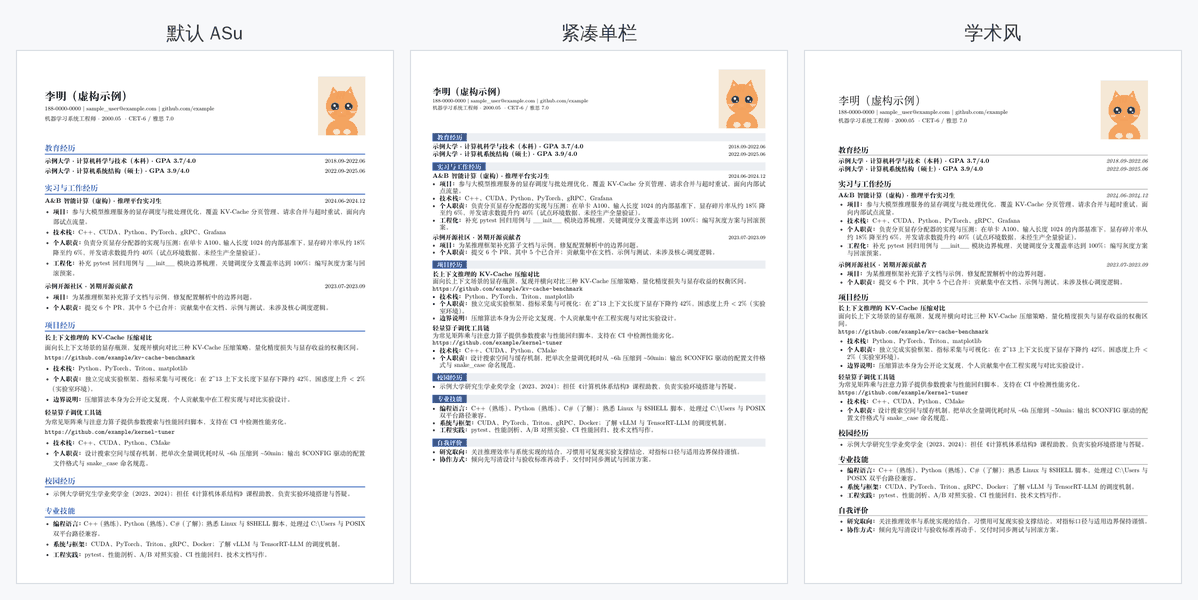
.texexport in three layouts — default ASu, compact, and academic — for continued editing in Overleaf (on request); - Layout analysis from screenshots: columns, spacing, font size, colors, and pagination;
- Fictional placeholder photos by default; swap in your own for the real resume.
The default ASu template is copied from assets/asu-resume-template.html into a user-specific file and is never modified. “I want an ASu-style resume” is handled by /make-resume; if you name another template, that template takes precedence.
Typical usage:
/make-resume

Using the education, internship, and project experience I provide, pick a template suited to a back-end developer role, generate an editable HTML resume, and tell me how to export it as PDF.
Template preview
LaTeX output preview
When you ask for a LaTeX resume or one suited to Overleaf, a .tex source file is exported alongside the HTML, ready to compile and fine-tune in Overleaf. Three layouts are available: the default ASu, a compact one for denser content, and an academic one for black-and-white printing. None of them need extra style files or font configuration.
Overleaf is the recommended way to compile — no local TeX installation required, three steps:
- New Project → Blank Project, name it and click Create;
- Upload the generated .tex file; if the resume uses a photo, upload it to the same project (next to the .tex, keeping the filename unchanged);
- Top-left File → Settings: set Main document to the uploaded file and Compiler to XeLaTeX, then Recompile.
Below is sample data compiled in all three layouts.
/evidence-recap: Turn AI coding conversations into evidence chains
/evidence-recap reviews AI coding conversations, project delivery records, and implementation evidence. It organizes the material into nine parts: problem context, solution decisions, personal actions, delivery status, rollout scope, evidence of impact, ownership boundaries, missing evidence, and interview follow-ups. Sensitive details such as secrets, email addresses, customer identifiers, and internal paths are generalized by default.
Typical usage:
/evidence-recap

Turn this AI coding conversation into a verifiable project evidence chain. Separate my actions, the AI's work, the delivery stage, and evidence of impact.
/interview: Stress-test your resume
/interview extracts claims and role competencies from your resume and target role, then establishes the interview round, time budget, and feedback policy before asking exactly one question at a time. Each core question uses a locked scoring contract, while a session ledger records verified evidence and remaining gaps. The review flags high-risk wording and knowledge gaps; targeted retry uses variant, counterfactual, and failure questions instead of repeating the same prompt. It never fabricates interview answers or hides weak evidence behind an uncalibrated precise score.
Typical usage:
/interview grill

Here is my resume; my target role is AI Application Engineer. Start from the highest-risk project and ask me one question at a time; if my answer is vague, keep drilling.
Retry only the weak claims from the previous review:
/interview retry

Use variant questions to retry only metric definitions and personal ownership. Do not repeat the original questions verbatim.
/offer: Campus recruitment progress management
/offer turns information from job boards, emails, chat records, and screenshots into an application funnel, logging by default:
- Date;
- Company;
- Role;
- Current status;
- Next step;
- Necessary notes and sources of evidence.
Default statuses are: Applied, Under review, In assessment, Interview, Offer, Rejected/Closed, Needs confirmation. A plain automatic reply receipt is never treated as evidence of an interview or offer; anything without sufficient evidence is marked Needs confirmation.
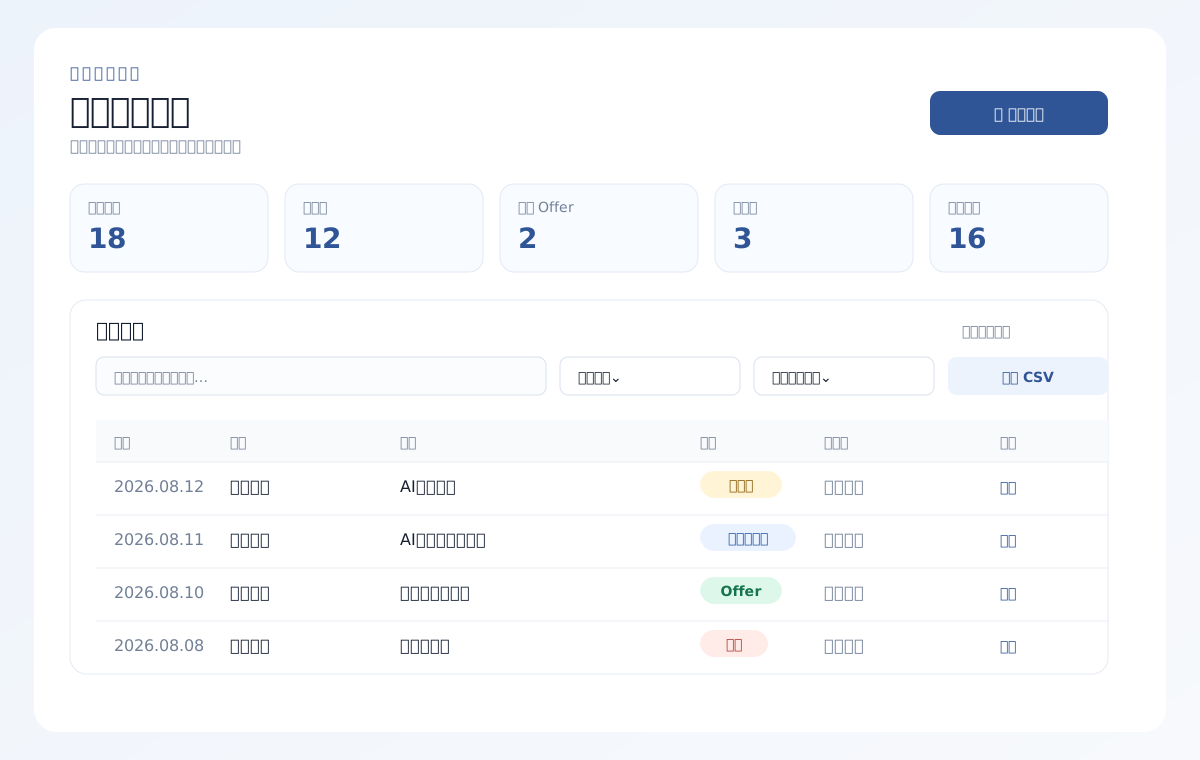
Unless you specify a location, the tracker is copied to your desktop as application-tracker.html. It supports search, filtering, statistics, CSV/JSON backups, and print-to-PDF.
Typical usage:
/offer

Organize the recruiting emails and screenshots I uploaded into a campus recruitment tracker, merge duplicate applications, and list the next step for each company.
Tracker preview
/job-match: Job-match analysis
/job-match separates a target JD into hard constraints, core capabilities, and preferred qualifications, then compares each item with the user's verified resume, experience, or claim–evidence ledger. It distinguishes verified matches, presentation gaps, insufficient evidence, real gaps, and unknowns instead of inventing a precise score from keyword overlap.
Its default output includes a requirement–evidence matrix, hard constraints, up to five priority improvements, and an explainable recommendation: apply, apply after adding evidence, apply cautiously, or do not prioritize. The analysis does not edit a resume, fill a web form, or submit an application.
Typical usage:
/job-match

Compare this JD with my resume. For each requirement, identify verified evidence, presentation gaps, and capability gaps, then tell me whether the role is worth applying to. Do not rewrite my resume yet.
/job-apply: Job-application autofill
Important: this project forbids abusing the skills for mass applications, harassing HR, or sending generic, exaggerated opening messages. Use only real experience and tailor communication moderately to the specific role; piling up GitHub stars, over-packaging experience, and sending the result without review can alienate HR and damage the reputation of both the candidate and the project. /job-apply is only for one specific application explicitly confirmed by the user; it never bypasses confirmation, submits applications in bulk, or sends unreviewed messages on the user's behalf.
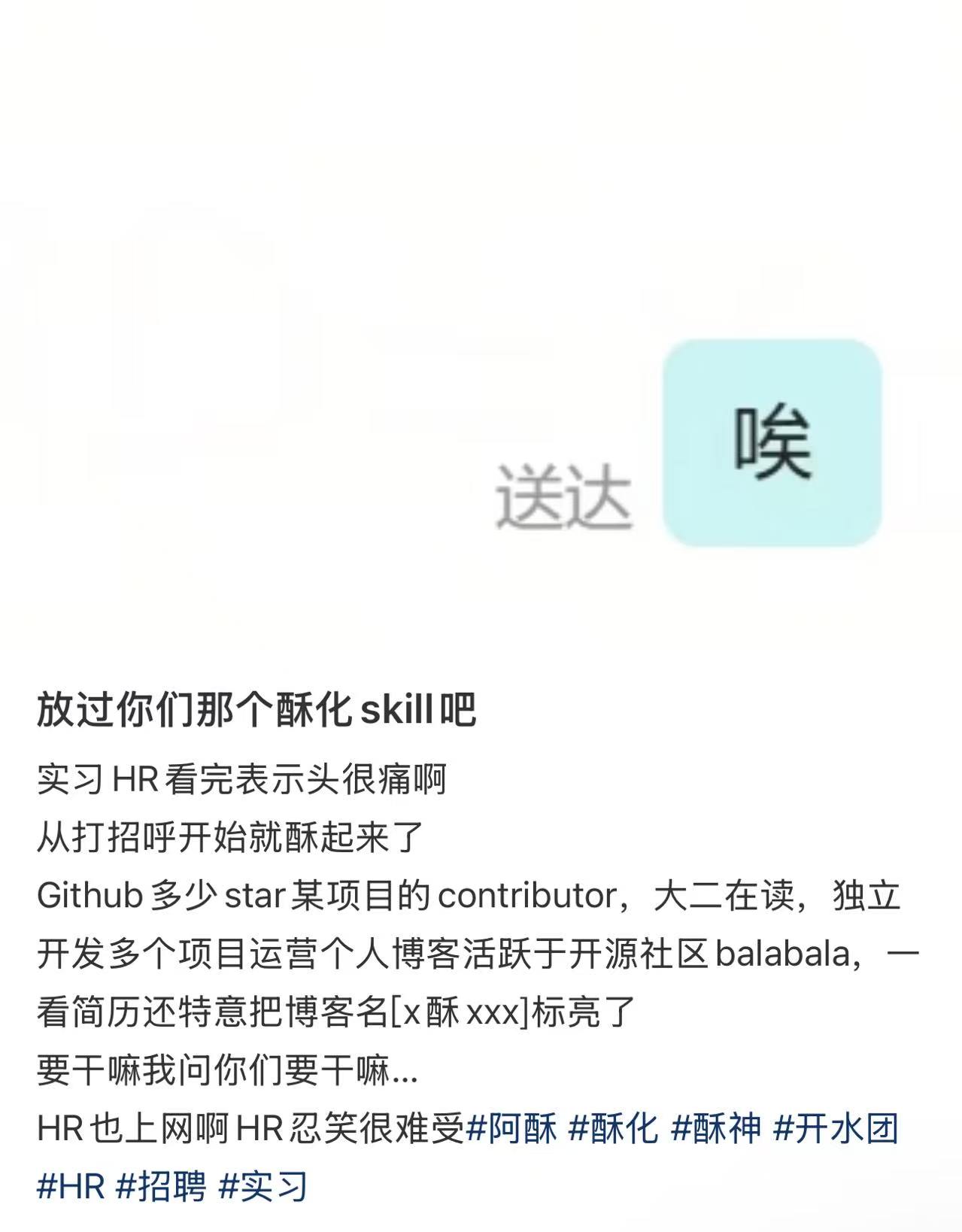
Negative example: templated and exaggerated opening messages can cause a negative reaction. Do not copy this style.
/job-apply uses confirmed resume data to fill one specific recruitment or application form. It supports page inspection, field mapping, text input, dropdowns, resume/portfolio uploads, and a final pre-submission review. It stops before the final submit button by default; asking to “fill my resume” does not imply permission to submit an application.
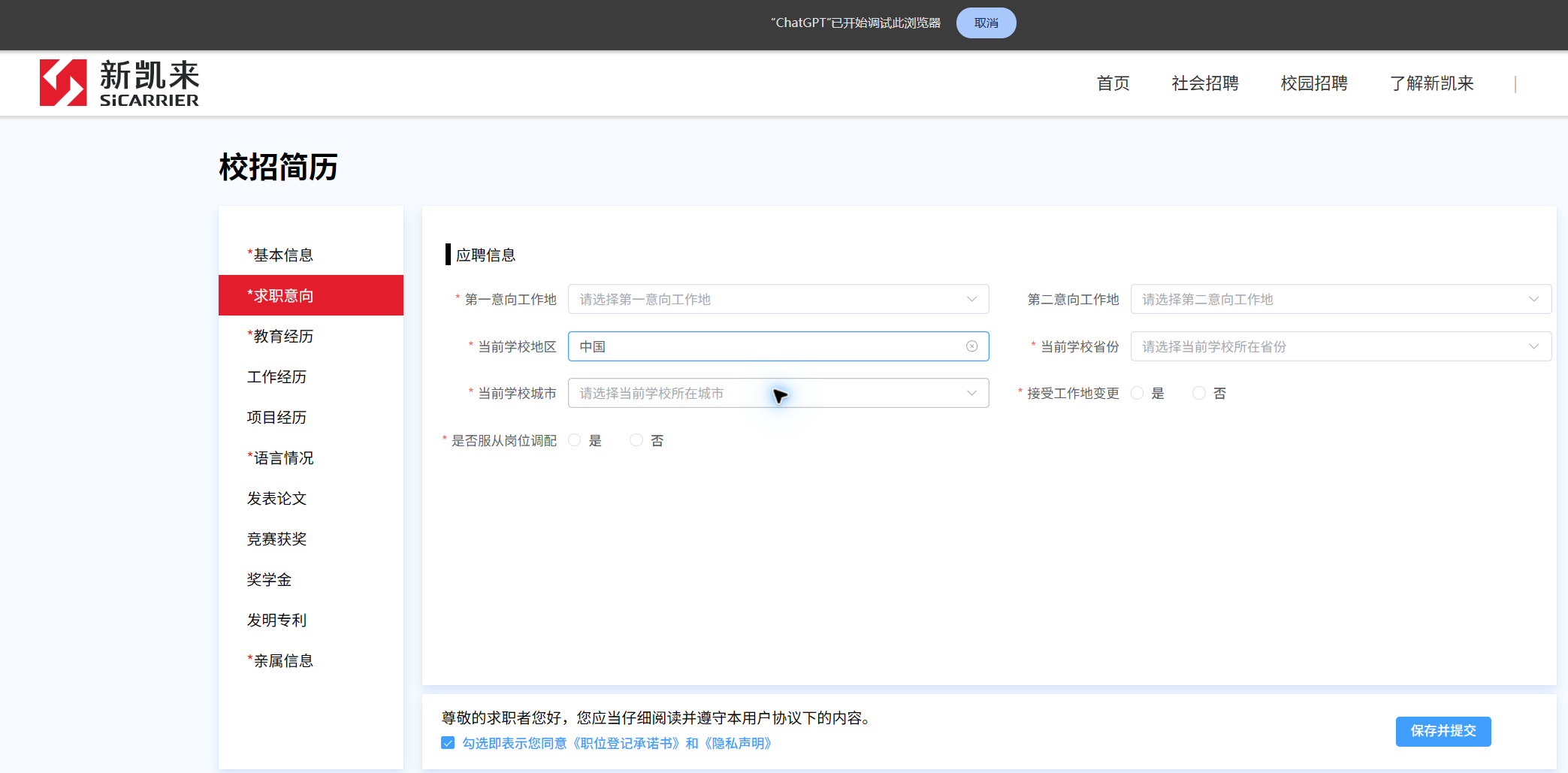
Connect a browser with Kimi WebBridge
Before using /job-apply, install and enable a browser-control extension and confirm that it is connected to the corresponding browser-control service. ASu does not read or fill a recruitment page until the extension and connection have been checked.
To operate a Chrome or Edge browser where you are already signed in, install and enable the official Kimi WebBridge. It connects a browser extension, a local daemon, and the Chrome DevTools Protocol; login sessions and page content stay on the local machine.
If you use ChatGPT/Codex browser control, you can instead install and enable the ChatGPT browser extension (Microsoft Edge Add-ons) (the Chrome Web Store listing has been removed; use Edge Add-ons), then follow the browser-control setup shown in the host application. Choose either connection method; installing both is unnecessary.
Typical usage
/job-apply

Use my confirmed resume to open this job application, fill the fields and resume attachment that can be verified, ask me about anything missing, and stop before submission for my review.
The user must handle passwords, SMS/email codes, MFA, passkeys, and CAPTCHAs. ASu separately confirms personal-data input, file uploads, and final submission; it does not read cookies, tokens, or password storage, and does not bypass anti-bot or access controls.
How the nine entries work together
Recommended order:
- Use
/contributorto make real open-source contributions relevant to your target role, and generate an evidence card once the PR merges; - When you have AI coding conversations or delivery records, use
/evidence-recapto recover project facts, ownership boundaries, and evidence gaps; - Use
/project-guideto turn an existing project repository into study notes, interview answers, and source evidence; - Use
/great-resumeto lock in role targeting from the evidence card and your existing experience, and to improve resume phrasing and HR talking points; - Use
/make-resumeto turn the confirmed copy into an editable resume and export PDF; - Use
/job-matchto compare a specific JD with verified evidence, hard constraints, and application priority; - Use
/job-applyto connect a browser, fill one specific application, and review it before submission; - Use
/interviewto predict likely questions and verify through follow-up drilling that the resume holds up in interviews; - Use
/offerto record the status of applications, assessments, interviews, and offers.
You can also state a combined goal in a single request, e.g.: “first use /project-guide to generate project study notes and interview answers, then /great-resume to improve the experience, and finally /make-resume to generate an HTML resume”.
When combining multiple entries, when your materials conflict, or when a resume contains strong claims, you can copy assets/career-claim-ledger-template.json to set up a claim–evidence ledger. It lets open-source contributions, experience improvements, and resume files share the same facts, confirmation statuses, and personal boundaries; see skills/great-resume/references/claim-evidence-ledger.md for the detailed rules.
To see how one person's materials flow through the entries, read the end-to-end fictional job-search case. Starting from course projects and an open-source contribution, it walks through the evidence card, the experience rewrite, the editable resume, and the application tracker, clearly distinguishing completed, in-progress, and to-be-filled items.
Truthfulness boundaries
ASu-skills' “great-resume” approach means strong positioning, strong evidence, and clear expression — never fabricated experience. Please keep to these rules:
- Keep real titles, companies, dates, and education;
- Distinguish team results from personal contributions;
- Only use strong wording like “led”, “owned”, or “Owner” when you have the evidence;
- Use verifiable qualitative results when no reliable numbers exist;
- Never write planned work as completed work;
- Never claim AI-generated code as unverified personal capability;
- Never write real names, phone numbers, emails, passwords, verification codes, or recruiting privacy into public skill files.
File structure
asu-skills/
├── .claude-plugin/
│   ├── plugin.json              # Claude Code plugin manifest
│   └── marketplace.json         # Claude Code plugin marketplace manifest
├── .codex-plugin/
│   └── plugin.json              # Codex plugin manifest
├── .trae-plugin/
│   └── plugin.json              # TraeWork plugin manifest
├── .opencode-plugin/
│   ├── plugin.json              # OpenCode plugin manifest (skills.entries generated from the registry)
│   ├── install-opencode.py      # OpenCode installer (skill list generated from the registry)
│   └── installation-guide.md    # OpenCode manual installation guide
├── .workbuddy-plugin/
│   ├── install.md               # WorkBuddy bridge guide (catalog blocks generated from the registry)
│   ├── install.sh               # macOS / Linux bridge script
│   └── install.ps1              # Windows bridge script
├── .qoder-plugin/
│   ├── install.md               # Qoder installation guide (CLI / Agent methods)
│   └── plugin.json              # Qoder plugin manifest (interface and other metadata)
├── skills.registry.json        # ★ Single source of truth for the entry catalog; run npm run sync:skills after changing it
├── package.json                # DSH plugin pack manifest (bundle patch entry)
├── cordis.patch.yml            # Registers the DSH filesystem skill provider
├── lib/
│   └── index.js                # DSH plugin entry module
├── skills/                     # Every entry directory (one-to-one with skills.registry.json)
│   ├── contributor/            # /contributor open-source contributions
│   ├── evidence-recap/         # /evidence-recap AI coding conversation review
│   ├── great-resume/           # /great-resume resume improvement
│   ├── interview/              # /interview prediction, drilling & targeted retry
│   ├── job-apply/              # /job-apply job-application autofill (browser bridge)
│   ├── job-match/              # /job-match job-match analysis
│   ├── make-resume/            # /make-resume resume building
│   ├── offer/                  # /offer campus recruitment tracking
│   └── project-guide/          # /project-guide project study notes and interview answers
├── scripts/
│   ├── sync-skill-catalog.mjs  # ★ Generates/reconciles every entry catalog from the registry (npm run sync:skills)
│   └── kimi-webbridge.mjs      # Kimi WebBridge local HTTP client
├── assets/                     # Templates, images, tracker, and example resources
│   ├── asu-resume-template.html # Read-only master for the ASu-style editable resume
│   ├── icons/                   # Personal & general information SVG icons
│   └── logos/                   # LobeHub Icons static SVG logos
├── references/                  # Reference for organizing recruiting emails
├── .github/
│   ├── CONTRIBUTING.md          # Contribution guide
│   ├── CONTRIBUTING_en.md       # English contribution guide
│   └── PULL_REQUEST_TEMPLATE.md # Pull request template
└── README.md
Contributing
Issues and PRs are welcome. See the contributing guide, or browse the repository's Pull Requests.
When adding, removing, or renaming an entry, first update skills.registry.json, then run npm run sync:skills to regenerate every plugin manifest, installer, issue template, and the README overview; CI verifies consistency with npm run sync:skills -- --check.
Acknowledgments
Thanks to the following Xiaohongshu(Chinese IG) creators for their public sharing and inspiration:
- 阿酥在coding: sharing on Coding interview experience;
- Hi Mr Lonely: sharing on resume presentation and job-search communication.
This plugin has organized, structured, and compliance-adjusted the relevant content and turned it into a reusable job-search workflow.
Thanks to LobeHub/lobe-icons for the open-source brand icon resources; following its skill guide, this plugin prefers @lobehub/icons and static SVG/CDN assets.
Thanks to Kimi WebBridge for the local browser-connection capability that lets /job-apply drive a browser you are already signed into via the Chrome DevTools Protocol, keeping login sessions and page content on your machine.
Contributors
Thanks to everyone who contributes to ASu-skills.
License
This project is released under the MIT License. Free to use, modify, and distribute; forks and PRs are welcome. The open-source governance is led by community Owners, with 100% license coverage across the entire pipeline.
Star History
Explore related projects
codecrafters-io/build-your-own-x
Master programming by recreating your favorite technologies from scratch.
561,860 starspublic-apis/public-apis
A collective list of free APIs
498,219 starsmorluto/rea
Reverse engineer anything with agents, from app behavior down to native binaries.
452,559 starsopenclaw/openclaw
The AI that really does things. Any OS. Any Platform. The lobster way. 🦞
394,366 stars