
HimalayanNomads/drawa has 41 GitHub stars and 13 forks. Star changes are not measured yet. Last checked 2026-11-18 04:52 UTC. Last push 2026-11-14.
What you can do
- Parallel sessions. Each card is a live agent process: Claude Code, OpenCode, Codex or Antigravity, picked per session. Type any time; messages queue while the agent or its sub-agents work.
- Your work, drawn as a map. Files the agent reads, edits and writes are linked to its card and colored by action. Commands it runs collect in their own window.
- Review in place. An edit waiting for approval shows its diff inside the card. Click any file for its changes from every session, plus the file itself with Markdown and Mermaid preview. Relative links in Markdown open the linked project file in the viewer; heading fragments on file links are ignored.
- Sub-agents in the open. Each sub-agent gets its own window showing its work as it happens, and you can message it directly.
Measured star growth
- in 24h
- Update delayed
- in 7 days
- Collecting history
- in 15 days
- Collecting history
- in 1 month
- Collecting history
Net star changes over overlapping periods, not daily totals. Missing measurements are left blank. Stars measure attention, not software quality.
About
A browser canvas for coding agents: run Claude Code, OpenCode and Codex sessions side by side, watch what they touch, review every change.
Developer ToolsREADME.md
Original
Drawa
Your coding agents, on a canvas.
Run Claude Code, OpenCode, Codex and Antigravity side by side, watch every file they read, edit and run as a live map, and review each change without leaving the browser.



Install · Quick start · Features · Shortcuts · Contributing
Why Drawa
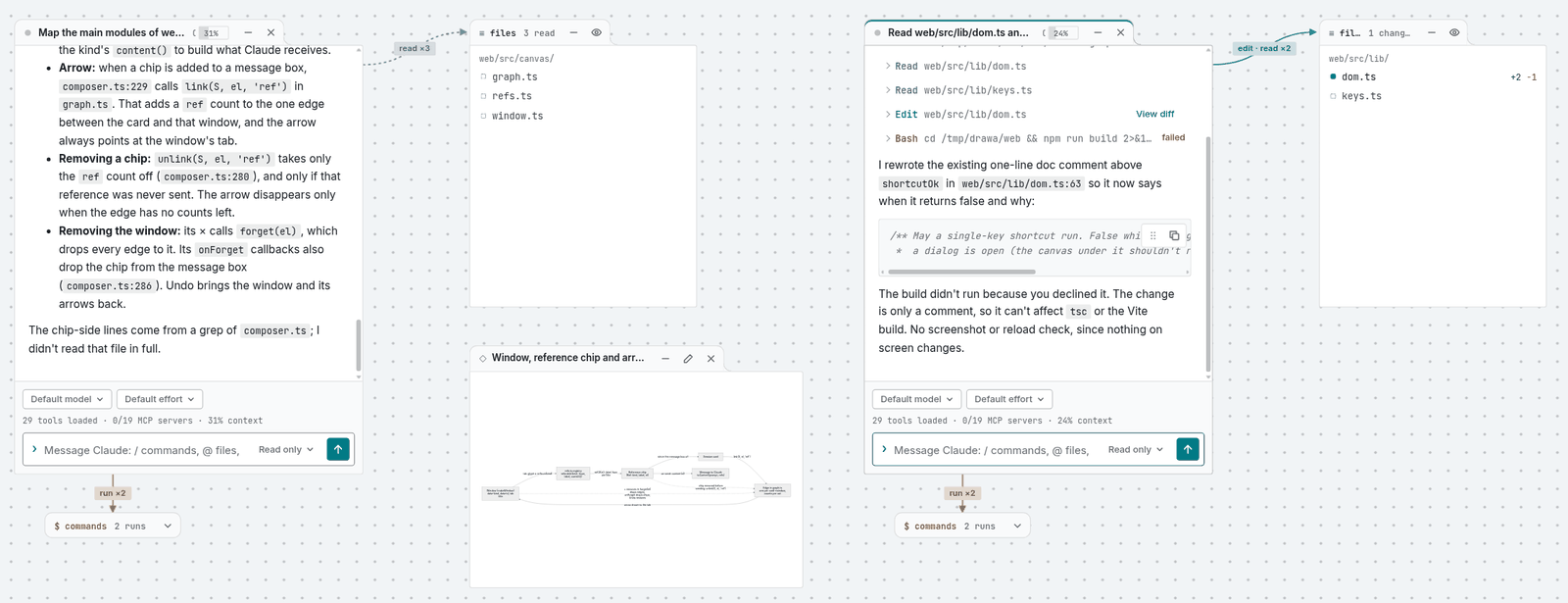
In a terminal, an agent's work scrolls past as a transcript. Drawa lays it out as a map instead.
- Several agents at once. Each session is a card on the canvas: Claude Code, OpenCode, Codex or Antigravity, side by side, on the same project.
- Work drawn as a map. The files each agent reads, edits and writes appear in a window wired to its card, colored by what happened to them. The commands it runs collect beside it.
- Review in place. Click any file for its diff from every session, and approve or answer the agent from the card it's running in.
Drawa runs entirely on your machine. It drives the agent CLIs you already have, with your logins, settings, skills and MCP servers, and serves the UI on 127.0.0.1.
Requirements
| Claude Code | One agent is required. claude on PATH and logged in, for your Claude subscription. |
| OpenCode | Or, instead or as well: opencode on PATH, for any other provider or its free models. See below. Tested with OpenCode 1.18.32. |
| Codex | Or: codex on PATH and logged in, for your ChatGPT plan or an OpenAI API key. See below. Tested with Codex 0.158.0. |
| Antigravity | Or: agy on PATH, signed in once by running agy in a terminal. Limited: see below. Tested with agy 1.2.16. |
git |
Optional, 2.36 or later. Powers the Git window and file history. |
gh |
Optional. Powers the GitHub window. |
| universal-ctags | Optional. Code symbols: Ctrl+K finds functions, classes and the like by name, and clicking a name in a diff shows where it's defined. brew install universal-ctags on a Mac. Turn it off in Settings. |
| OS | macOS or Linux. Windows isn't supported yet. |
Choosing an agent
No Claude subscription? OpenCode is an open-source coding agent that works with most model providers (OpenRouter, Google, OpenAI, local models and more), Codex is OpenAI's, and Antigravity is Google's. With any installed, New session ▾ in the toolbar offers it next to Claude Code, and each session card picks its model from that agent's list. Drawa's startup check lists the agents it finds, and warns if a version isn't the one Drawa was tested with.
| Claude Code | OpenCode | Codex | Antigravity | |
|---|---|---|---|---|
| Sign in with | Your Claude subscription | Any provider, via opencode auth login; its own free models need no key |
Your ChatGPT plan or an OpenAI API key, via codex login |
Your Google sign-in, via agy in a terminal |
| Install | claude.com/claude-code | curl -fsSL https://opencode.ai/install | bash (docs) |
Codex CLI docs | antigravity.google |
| Tested with | Not pinned | 1.18.32 | 0.158.0 | 1.2.16 |
| Approvals, files and commands windows, canvas tools, history | ✓ | ✓ | ✓ (looking at the canvas never asks) | Files, commands and history; no approvals (turns down edits) unless in Allow everything; no canvas tools |
| Pasted images | ✓ | ✓ | ✓ | – |
| Sub-agents | Own window | Own window | One row, not their own window | – |
| Auto mode | ✓ | – | – | – |
| Effort setting | ✓ | – | – (uses its default) | – (models name their own level) |
| Usage windows in the status line | ✓ | – | ✓ (ChatGPT plan; none with an API key) | – |
| Take back a queued message | ✓ | – | – | – |
| Memory per session | Its own claude process |
About 300 MB (its own opencode server) |
About 250 MB (its own codex app-server) |
Its own agy process |
Neither OpenCode, Codex nor Antigravity has an agent-specific process limit: set DRAWA_MAX_LIVE if your machine needs one. The Git window's Write with ▾ picks which agent writes commit messages and pull request descriptions.
- OpenCode privacy. A session's prompts, and the files it reads, go to the provider you pick. OpenCode's free models are run by third parties that may use what you send to improve their models (check OpenCode Zen's terms), so don't use them on code you can't share.
- Antigravity is limited.
agycan't ask for approval when run headless, so a card streams replies, shows the tools it calls, resumes and reopens past sessions, and writes commit messages, but anything that needs approval (edits, most commands) is turned down and listed under the reply, unless you start the session in Allow everything (agy --dangerously-skip-permissions: every tool runs without asking). There's no Stop, no mode or model switch mid-session (pick both before the first message), no pasted images, no slash commands, no canvas tools and no cost. Drawa keeps its own list of the project's Antigravity sessions in~/.drawa/agy/, and doesn't start one in a cloned repo you didn't trust. See #34. - Codex trust. For a local folder, Drawa marks it trusted for Codex, so, as with Claude Code, its
.codex/settings andAGENTS.mdload. A cloned GitHub repo you didn't trust is marked untrusted, so they don't. Either way nothing is written to~/.codex/config.toml.
How the permission modes map onto Codex
Ask first asks before edits and before any command Codex doesn't consider safe. Plan only never asks, nothing it runs can write, and it doesn't hand you a plan to approve: it answers in the chat. Allow edits approves file changes inside the project only (not in .git, .codex, .agents or .claude, and not renames out of it). Always allow covers a command or edit until the card's Codex process closes (after 30 idle minutes, or to stay under DRAWA_MAX_LIVE; it asks again after resuming), and Drawa doesn't save Codex's permanent command rules; canvas changes ask each time. A mode change applies from the next turn (a message sent mid-turn joins the running one), except that leaving Allow everything stops a running turn, since it can't lose full access mid-turn.
How the permission modes map onto Antigravity
Headless agy cannot prompt for approval during a turn. Ask first (the default) allows read-only tools, but any action requiring confirmation (file edits, mutating commands) is automatically turned down and listed under the reply. Allow everything starts the session with --dangerously-skip-permissions, letting all tools run without asking. Modes cannot be switched mid-session; pick either before sending your first message. Other modes (Plan only, Allow edits, Auto) are not supported.
Install
curl -fsSL https://raw.githubusercontent.com/HimalayanNomads/drawa/main/install.sh | sh
This downloads the right release binary for your OS and architecture and installs it to ~/.local/bin/drawa. You don't need Go or Node.
Update later with drawa --update. For manual downloads, custom install locations and uninstalling, see INSTALL.md.
Build from source
Needs Go 1.22+, Node 20.19+ (or 22.12+) and pnpm (npm install -g pnpm, or corepack enable).
git clone https://github.com/HimalayanNomads/drawa.git
cd drawa/web && pnpm install && pnpm run build
cd .. && go build -o drawa .
Quick start
cd ~/my/project
drawa
Drawa opens http://127.0.0.1:8765 in your browser, and Claude works in that folder. Press N for a new session and start typing.
drawa                  # the current folder
drawa ~/some/project   # any other folder
drawa --net .          # also reachable from other devices on the network
drawa https://github.com/owner/repo   # clones it into a cache folder and opens it (reruns reuse the clone)
drawa --clean          # removes cached clones (or pass one repo's URL)
Opening a GitHub URL, or a folder inside its clone, asks on each launch whether to trust the repo (only the server's own restarts after code changes reuse the answer). Answer n (the default) and its own .claude/ settings, hooks, .mcp.json, CLAUDE.md, OpenCode project config, and Codex's .codex/ config and AGENTS.md are ignored, since they could run commands on your machine.
--clean keeps any clone with uncommitted, unpushed, stashed or ignored files. Don't run it while a Drawa is open on that clone. A GitHub folder link (/tree/main/docs) opens the repo on its default branch.
In the message box, / opens skills and slash commands and @ references files or canvas items. The toolbar picks the model and permission mode.
By default Drawa only answers on localhost. Pass --net (in any position) and, like a Vite or Next.js dev server, it also listens on the machine's network address and prints both:
  - Local:   http://127.0.0.1:8765
  - Network: http://192.168.1.23:8765/?token=fpKZrzCN
It also prints a QR code of the Network link, so a phone can open it with its camera. The Network link lets another device on the same network — a laptop, a phone — open the same workspace. It only works with its ?token= (a fresh one each run, checked once, then kept in a cookie and dropped from the address), and an address that guesses wrong 5 times locks out for a few minutes. See Security.
Features
- Parallel sessions. Each card is a live agent process: Claude Code, OpenCode, Codex or Antigravity, picked per session. Type any time; messages queue while the agent or its sub-agents work.
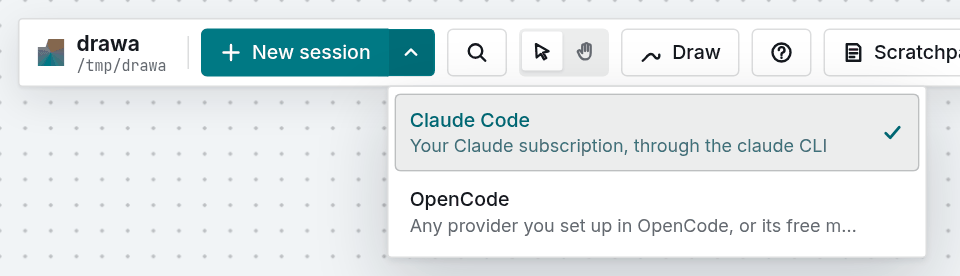
- Your work, drawn as a map. Files the agent reads, edits and writes are linked to its card and colored by action. Commands it runs collect in their own window.
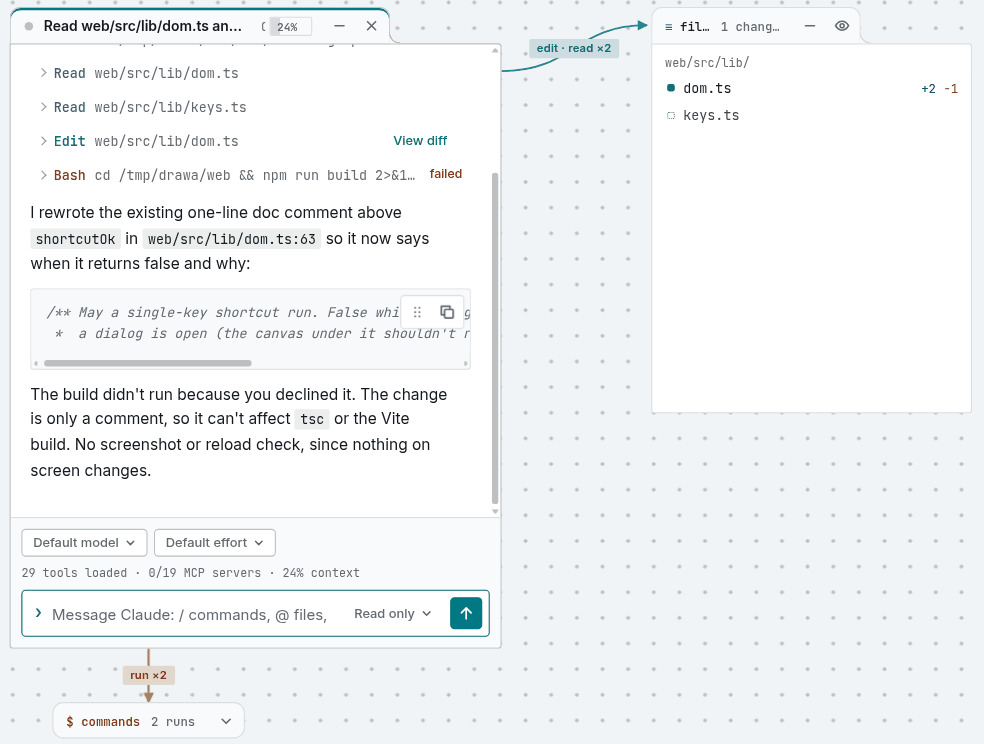
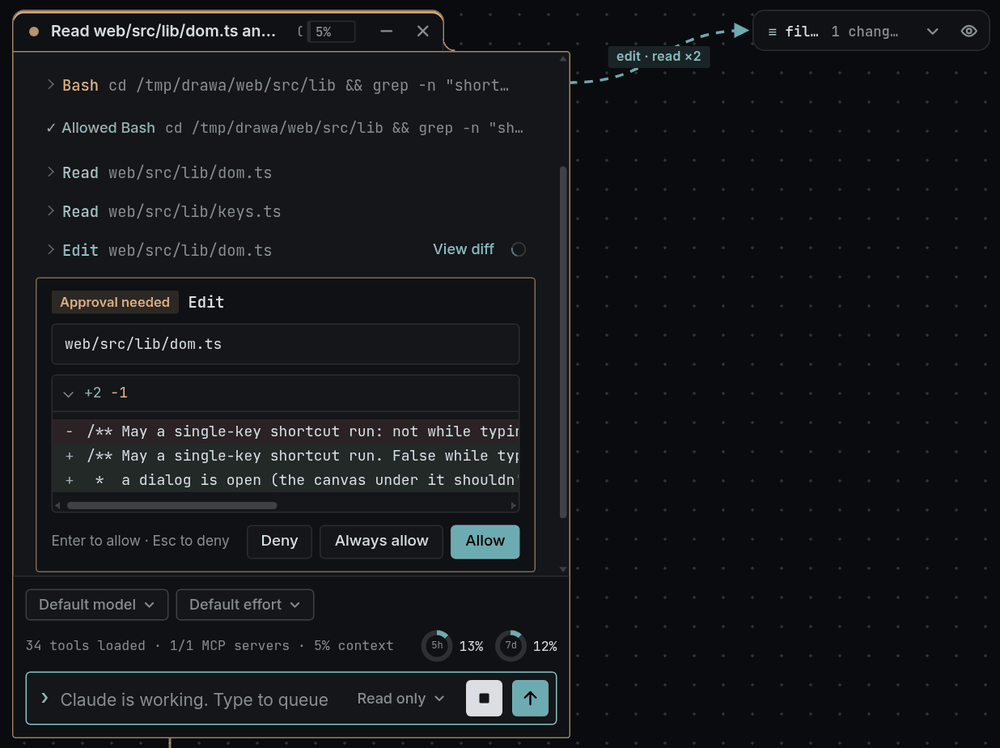
- Review in place. An edit waiting for approval shows its diff inside the card. Click any file for its changes from every session, plus the file itself with Markdown and Mermaid preview. Relative links in Markdown open the linked project file in the viewer; heading fragments on file links are ignored.
- Sub-agents in the open. Each sub-agent gets its own window showing its work as it happens, and you can message it directly.
- Agents can use the canvas too. They can read, create, edit and link canvas items through built-in tools, with changes going through the normal approval flow.
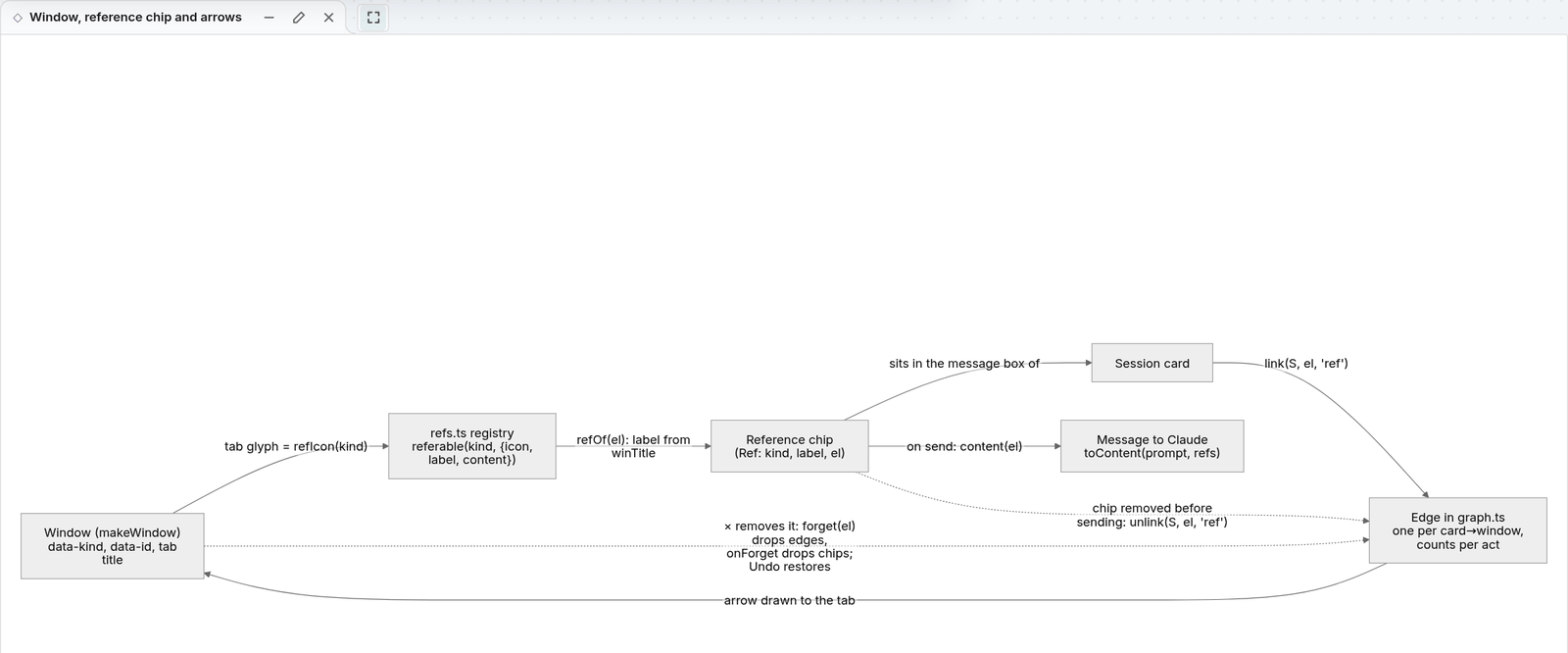
- A whiteboard around your code. Sticky notes, a Markdown scratchpad, Mermaid diagrams, pictures, pinned snippets, shapes, arrows and freehand ink.
@-reference any of them in a message, or drop them on a card.
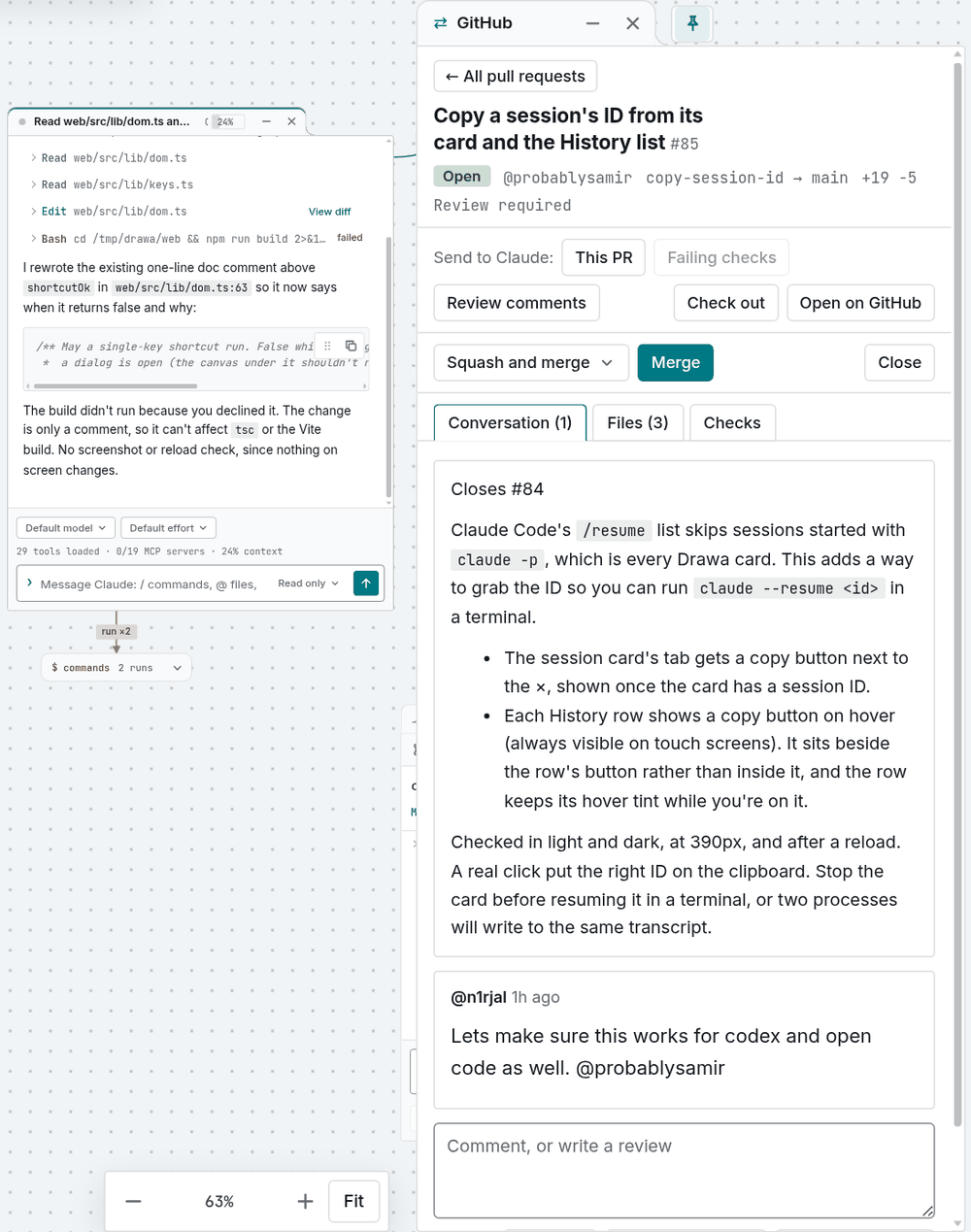
- Git and GitHub built in. Browse status and history, commit and push. Repos in subfolders (a folder of cloned repos, or repos inside your project) get a group each in the Git window, with their own pull request, and the GitHub window switches between them. Open pull requests and issues through
gh, and send a PR, its failing checks or its reviews straight to a session.
- Terminals on the canvas. A real shell in a window: the Terminal button,
Ctrl+`or the right-click menu opens one in your project folder, as your own user with your aliases. Run vim, htop, tmux or a dev server; a reload replays its output and picks up the same shell. While you type in it, every key goes to the shell (the window lights up);Ctrl+\hands the keys back to the canvas, andireturns. Font, size, cursor and shell are in Settings → Terminal.- Ctrl+W, Ctrl+T and Ctrl+N never reach a web page, so in a normal tab they act on the browser (Drawa asks before the tab closes). The ⤢ button on a terminal's tab goes fullscreen with the keyboard locked (Chrome, Edge), where they reach the shell.
- Stuck in fullscreen? Press and hold Esc until the browser leaves fullscreen (about two seconds), or click the × that appears at the top of the screen.
Ctrl+\, the shell exiting and the server stopping also leave it.
- Picks up where you left off. Resume past sessions from history. The whole layout survives a reload, and a reload re-attaches to sessions that are still running.
- Find finished work. Settings → Notifications → Upon completion defaults to Show alerts: a three-second toast with Show to focus and center the session while you're in Drawa, or a system notification while you're away (if allowed). Toasts skip a card already visible and focused. Do nothing turns completion alerts off; the unread tab count and question, approval and plan alerts stay on.
- Works on your phone. Start with
--netand open the printed link or QR code: the same canvas, starting in Hand mode so a drag pans.
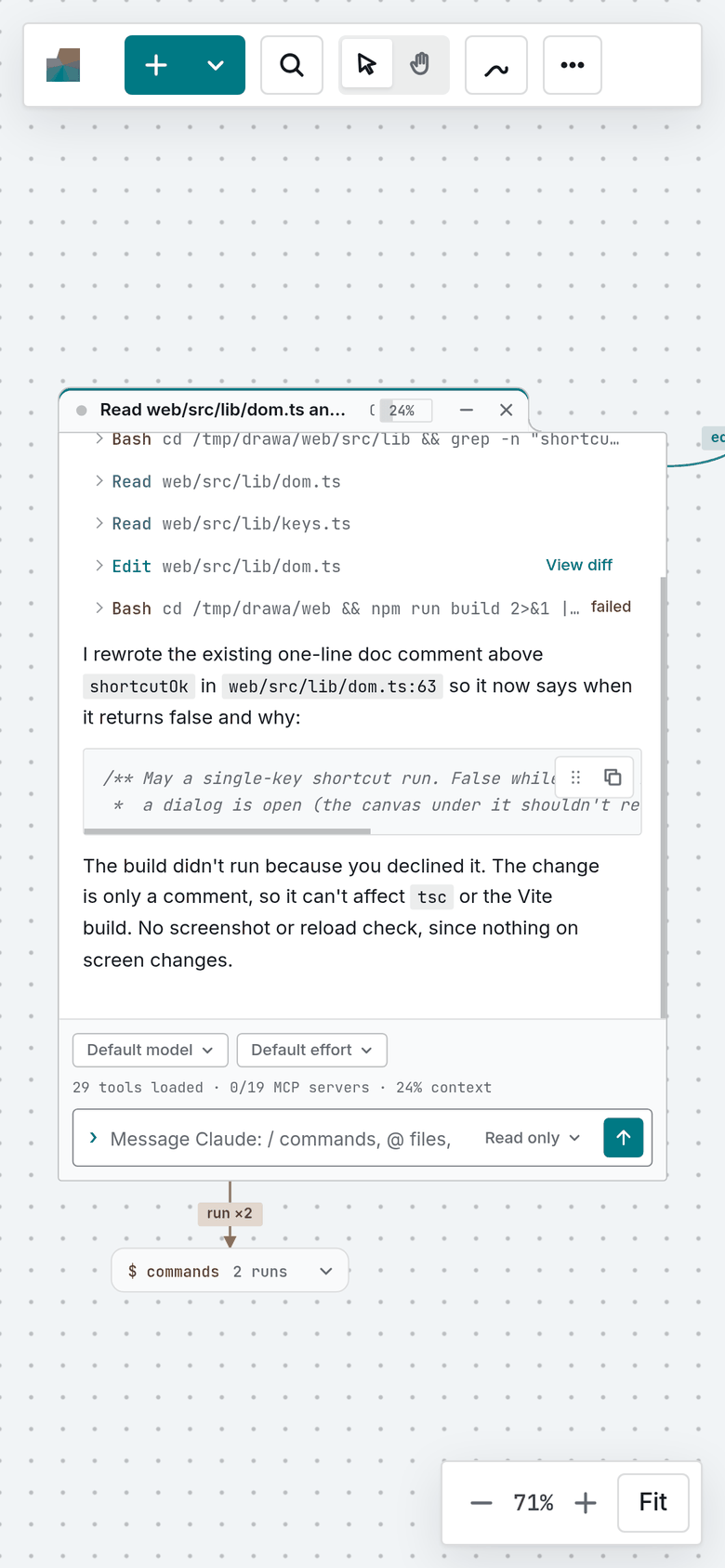
- Themes. Light and dark, with Rosé Pine, Catppuccin, Tokyo Night, Gruvbox, Nord, Kanagawa, Everforest, Solarized and GitHub color schemes.
Configuration
| Variable | Default | Purpose |
|---|---|---|
DRAWA_PORT |
8765 |
Port to serve on. Set it to run two projects at once. |
CLAUDE_CONFIG_DIR |
~/.claude |
Claude Code's config directory, if you keep a separate login or set of skills for Drawa. |
DRAWA_NET_TOKEN |
a fresh one per run | The --net token. Drawa sets it itself so the token survives its self-restarts; set it only to pick your own. |
DRAWA_MAX_LIVE |
unset (no cap) | Most agent processes kept running at once, of any agent (each takes a few hundred MB). Past it, the least recently used idle session is closed; its next message resumes it. Idle sessions close after 30 minutes either way. |
DRAWA_DEV |
unset | 1 trusts the Vite dev server's origin (port 5173). pnpm run dev sets it; see CONTRIBUTING.md. |
DRAWA_PORT=8766 CLAUDE_CONFIG_DIR=$HOME/.claude-work drawa ~/other/project
Settings file
Settings that follow you to every project and browser live in ~/.drawa/config.json. Drawa writes it with the defaults the first time it starts, and the Settings panel (the gear in the toolbar) changes it. You can also edit it by hand: the change applies the next time you reload the page. A file that isn't valid JSON is left alone, and the defaults apply until it's fixed.
{
  "completion": "toast",
  "darkScheme": "claude-dark",
  "lightScheme": "claude-light",
  "symbols": "auto",
  "theme": "system",
  "ui": "full",
  "vim": "off"
}
| Key | Default | Values |
|---|---|---|
completion |
toast |
Show alerts (toast) shows a three-second notice while present and a system notification while away (if allowed); none turns completion alerts off. Missing values use toast; the old browser value migrates to toast, while an existing none stays off. Invalid values use the default without overwriting the hand edit. Question, approval and plan alerts and the unread tab count are unchanged. Play sound is unavailable pending #151. |
ui |
full |
full shows every window's title tab; minimal shows a window's tab only when you hover or focus it. A session card waiting for your approval keeps its tab either way. |
theme |
system |
system follows your computer's light or dark mode; light or dark fixes it. |
lightScheme, darkScheme |
claude-light, claude-dark |
The color scheme for each mode: the ids in web/src/lib/theme.ts, such as rose-pine-dawn, catppuccin-mocha or nord. |
symbols |
auto |
auto reads code symbols with universal-ctags when it's installed; off never runs it. |
vim |
off |
on gives the file editor and scratchpads Vim motions (:w saves, :q stops editing, :q! drops unsaved changes). Yanked text flashes so you see what was taken. Yanks and deletes go to the system clipboard, and p pastes what you copied elsewhere (once the browser lets the page read the clipboard). |
terminalFont |
"" |
A font list for terminals, such as "Fira Code"; empty uses an installed Nerd Font, else the code font. Nerd Font icons show with any choice. |
terminalFontSize |
13 |
Terminal text size in px: 10–24. |
terminalCursor |
block |
block, bar or underline. |
terminalShell |
"" |
The shell new terminals start; empty uses your login shell ($SHELL). Only shells listed in /etc/shells are accepted. |
terminalClipboard |
off |
on lets programs in a terminal copy to your clipboard (OSC 52, as vim and tmux do). Off by default: anything a terminal prints can carry it, a file you cat included. |
Fonts and which key sends a message are kept per browser.
Keyboard shortcuts
Shortcuts follow Excalidraw's where the tool exists, and don't fire while you're typing. Press ? in the app for this list, and Ctrl+K to run any action by name. A short tip shows in the corner at launch; Hide tips turns them off.
| Area | Keys |
|---|---|
| Canvas | V/1 select · H hand (hold Space to pan) · Shift+1 fit all · Shift+2 zoom to selection · Shift+0 zoom 100% · F fit · +/- zoom in/out · arrows pan (Shift: bigger steps; with a selection they nudge it instead) |
| Items | N new session · C/Shift+C next/previous session (Enter to type) · T sticky note · S scratchpad · 9 insert picture · G Git · Shift+G GitHub · Ctrl/Cmd+Shift+H history (search past sessions, or continue one by its ID) · Ctrl/Cmd+Shift+E files (search by name or code symbol) · Ctrl+K find a window, file, code symbol or command · ? all shortcuts |
| Windows | W/Shift+W next/previous window (selects it, so Delete, arrows and Ctrl+G act on it) · M collapse/expand · Shift+F full view · F2 rename · Shift+P pin to the sidebar · Shift+S stick to the screen. They act on the selected window, else the one in front |
| Terminal | Ctrl+` new terminal · typing in one sends every key to the shell · Ctrl+\ back to the canvas (normal mode: j/k, Ctrl+D/Ctrl+U, gg/G scroll) · i, a or Enter back to the shell · stuck in fullscreen: hold Esc |
| File editor | the pencil on a file window, a double-click on its text, or Edit at the top of the file inspector edits it · Ctrl/Cmd+S save · the pencil again stops editing (asks first if there are unsaved changes) · with Vim motions on (Settings): :w save · :q stop · :q! drop changes · :wq or :x save and stop · gd / gD the name's first use in the function / file (where it's declared), Ctrl+O back · Esc then Tab leaves the editor |
| Draw | D toggle Draw mode · P/7 pen · A/5 arrow between items · E/0 eraser · T/8 text · R/2 rectangle · 3 diamond · O/4 ellipse · L/6 line (Shift for square, circle, 45°) · Ctrl+Z undo · Ctrl+Shift+Z/Ctrl+Y redo · Esc stop |
| Selection | Ctrl/Cmd+A select all · arrows nudge (Shift: 10px) · Delete remove · Esc clear · Ctrl/Cmd+G group the selected windows (groups in it merge; nothing selected: an empty group) · Ctrl/Cmd+Shift+G ungroup the selected groups |
| Message box | Enter send · Shift+Enter new line (or Ctrl+Enter send and Enter new line: pick in Settings, the gear) · Esc leave the box · ↑ at the start / ↓ at the end: previous/next message or ! command you sent in this session (past the newest: your draft) |
Mouse: drag the background to select (Select mode) or pan (Hand mode). The middle button and the wheel always pan. Ctrl/Cmd+scroll or pinch zooms; Shift+scroll scrolls sideways. The zoom is saved with the canvas. Jumping to a window (Ctrl+K, C, a notification) keeps the zoom unless the window would be under 50% or wouldn't fit, then it zooms to fit that window (at most 100%). Click a picture or diagram for full view, and click it again to zoom and pan it. Phones start in Hand mode.
Security
Drawa is built to run locally for one user:
- The server listens on
127.0.0.1only, unless you pass--net(see Quick start), and checks theHostheader on every request either way. - With
--net, the network address additionally needs its one-time?token=; wrong guesses lock that address out after 5 tries. Still only pass--neton a network you trust, and treat the printed link like a password — don't post it anywhere public. - Changing requests must come from Drawa's own page (a matching
Origin). - File access is confined to the project folder you opened.
- Claude's canvas tools use a per-process token, so only that session's own
claudeprocess can call them. - Terminals run as you, in the project folder, with no extra rights. With
--netthey open only on the machine running Drawa, and a shell never sees the--nettoken.
To report a vulnerability, see SECURITY.md: please open a private security advisory rather than a public issue.
Contributing
Questions, ideas and things you built with Drawa go to Discussions. Issues and pull requests are welcome. Maintainers cut the releases; a merged pull request ships in the next one. See CONTRIBUTING.md for the development setup and an architecture overview, and CLAUDE.md for the conventions the codebase follows. Everyone taking part is expected to follow the Code of Conduct.
License
Drawa is licensed under the GNU Affero General Public License v3.0.