
HellterEnjoy/Lilo has 27 GitHub stars and 0 forks. GitHot measured +1 stars in 24 hours. Last checked 2026-11-14 16:44 UTC. Last push 2026-09-18.
Measured star growth
- in 24h
- +1
- in 7 days
- Collecting history
- in 15 days
- Collecting history
- in 1 month
- Collecting history
Net star changes over overlapping periods, not daily totals. Missing measurements are left blank. Stars measure attention, not software quality.
About
Compact Markdown note-taking widget with a built-in knowledge graph, written in Rust.
ProductivityREADME.md
Original
Lilo
A compact Markdown notebook for quick thoughts and connected knowledge.




winget install --id HellterEnjoy.Lilo --exact
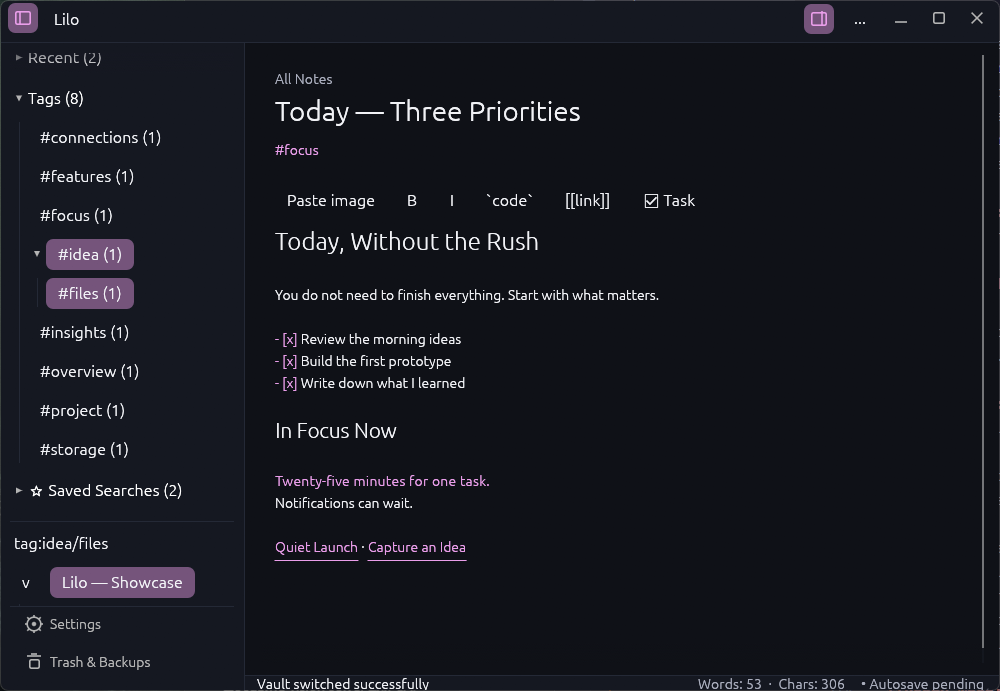
Lilo is a fast desktop note-taking widget built with Rust and egui. It opens as a small writing surface and expands into a full workspace with folders, tags, backlinks, search and a knowledge graph. Notes remain ordinary local Markdown files in a directory you choose.
Screenshots
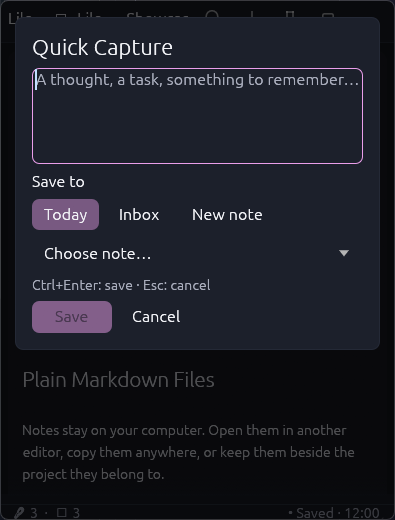
Quick Capture Send a thought to Today, Inbox, a new note or an existing note. |
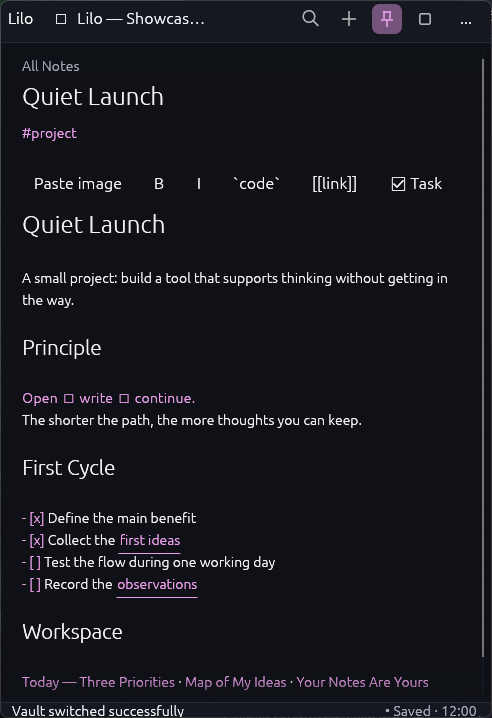
Compact widget Keep one note beside your work and write without changing context. |
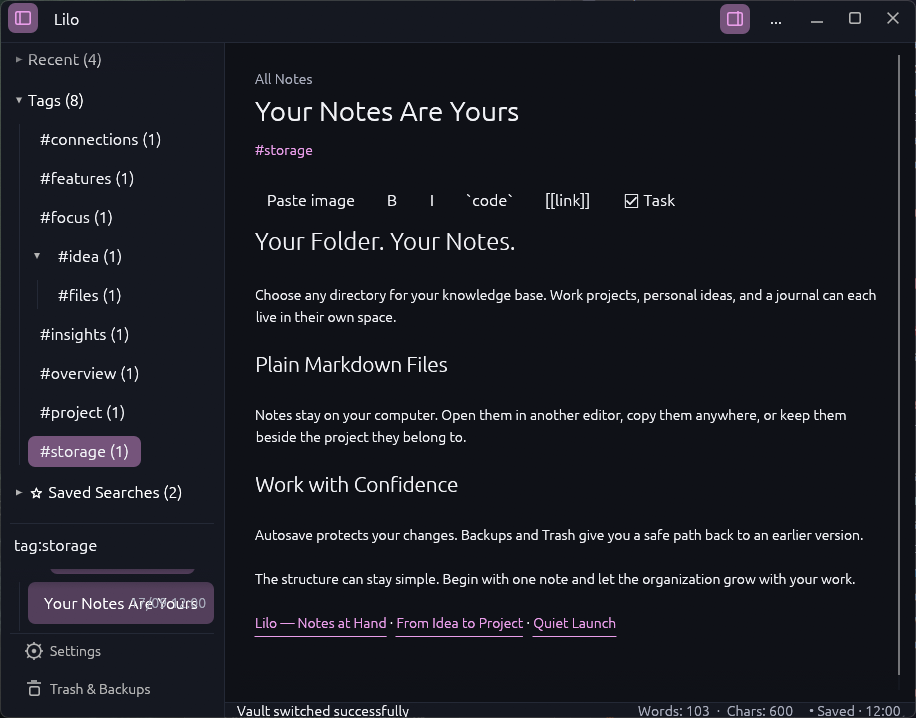
What Lilo includes
- one live Markdown editor with headings, lists, tasks, code, links and inline local images;
- Daily Notes, templates and Quick Capture with a global Windows shortcut;
- Obsidian-style
[[wiki links]], aliases, backlinks and unresolved-link inspection; - hierarchical tags, structured search and reusable saved searches;
- local, folder and vault knowledge graphs;
- any directory as a vault, with quick switching between saved vaults;
- autosave, rotating backups, recoverable Trash and external-change protection;
- compact and expanded layouts, themes, typography, Zen mode and configurable shortcuts.
Local Markdown, by design
Lilo does not put note content in an embedded database. A new vault uses the selected directory directly:
My Vault/
├── Daily/
├── Templates/
├── Attachments/
├── Project notes.md
└── .lilo/
    ├── Backups/
    ├── Trash/
    └── cache/
Existing vaults from Lilo 0.2.1 and earlier keep their original Notes, Trash and Backups layout. Lilo does not move those files automatically.
Install
Windows
Install from the official WinGet community source:
winget install --id HellterEnjoy.Lilo --exact
Update later with:
winget upgrade --id HellterEnjoy.Lilo --exact
The WinGet catalog can briefly lag behind the newest GitHub release. The latest Windows installer and portable ZIP are always available from GitHub Releases. The current binaries are unsigned, so Windows SmartScreen may show a warning.
Linux
GitHub Releases provide x86-64 archives for Ubuntu 22.04+ and current Arch Linux. Download the matching archive and .sha256 file, verify it, then install the executable in a stable location such as ~/.local/bin/Lilo.
Keyboard shortcuts
| Action | Default |
|---|---|
| Search and commands | Ctrl+K or Ctrl+P |
| Quick Capture | Ctrl+Shift+C |
| Today's note | Alt+D |
| New note | Ctrl+N |
| Save | Ctrl+S |
| Editor / Notes / Graph | Ctrl+1 / Ctrl+2 / Ctrl+3 |
| Explorer / Inspector | Ctrl+Shift+B / Ctrl+Shift+I |
| Zen mode | F11 |
Shortcuts can be changed in Settings. The system-wide Quick Capture shortcut is currently Windows-only.
Build from source
Install the stable Rust toolchain, then run:
git clone https://github.com/HellterEnjoy/Lilo.git
cd Lilo
cargo run --release
Project checks:
cargo fmt --all -- --check
cargo test
cargo clippy --all-targets -- -D warnings
Ubuntu also requires the native Wayland/X11 development packages listed in RELEASE.md.
Privacy
Lilo works without an account. Notes, titles, paths, tags, searches and attachments stay on the device. Optional usage analytics are disabled until explicit consent and contain only a random installation ID, app version, local date and counters from a public feature whitelist. See PRIVACY.md.
Project information
- CHANGELOG.md — release history;
- ROADMAP.md — planned direction;
- RELEASE.md — installation, updates, packaging and recovery;
- PERFORMANCE.md — performance guardrails;
- CONTRIBUTING.md — feedback and contribution policy.
Lilo is maintained as a single-author project. Bug reports and product suggestions are welcome through GitHub Issues; code pull requests are not accepted into the official repository.
License
Lilo is source-available under the PolyForm Noncommercial License 1.0.0. Non-commercial use, study, modification and redistribution are allowed under its terms. Commercial use requires separate permission.
Copyright © 2026 Kyrylo Yazynin