
Headmaster218/MoE4All
Headmaster218/MoE4All has 369 GitHub stars and 51 forks. GitHot measured +7 stars in 24 hours. Last checked 2026-11-17 02:57 UTC. Last push 2026-11-16.
Measured star growth
- in 24h
- +7
- in 7 days
- Update delayed
- in 15 days
- Update delayed
- in 1 month
- Update delayed
Net star changes over overlapping periods, not daily totals. Missing measurements are left blank. Stars measure attention, not software quality.
About
Run MoE models beyond VRAM on AMD, NVIDIA & Intel GPUs. Vulkan-powered, portable Windows app with automatic setup. | 让游戏显卡跑起超显存大模型,支持 AMD、NVIDIA、Intel,免安装、自动配置。只需13MB,即下即用!
Developer ToolsREADME_EN.md
Original

MoE4All.com
All-in-one local inference: concurrent LLM serving, vision, embeddings, speech recognition and speech synthesis in one efficient engine.
About 20 MB · Cross-device, cross-platform Vulkan · MoE models far larger than VRAM
The DSH integration plugin is listed in:



Download Engine · Performance · Leaderboard · Developer docs · Research · 简体中文
RX 7900 XTX 24 GB, paired with 64 GB DDR4 RAM:
- 1.3.0 · Qwen3.6 35B 5.91bpw: 154.6 tok/s with one stream and 248.3 tok/s aggregate with four streams at 6K context.
- Previously measured Qwen3.8 Flash-Next 4.27bpw: 50.44 tok/s with one stream and 71.20 tok/s aggregate with three streams at 30K context.
See test conditions and full results ↓
MoE4All is a lightweight local inference engine. VRAM, RAM and SSD work together to run MoE models far larger than VRAM, with computation on the GPU. Extract the program, prepare a model, and start chatting locally or serving an API.
- Across devices. AMD, NVIDIA and Intel have all been tested on Windows and Linux; an experimental Metal package is available for Apple Silicon.
- Multiple modules, shared resources. Text, vision and embeddings share GPU resource management, allocating and releasing resources as needed. Transcription and synthesis use independent CPU modules. Enable the capabilities you need, or run an auxiliary service on its own.
- From automatic setup to detailed control. A graphical launcher, CLI, concurrent generation, persistent session KV caching and an OpenAI-compatible API are included. Use automatic configuration for everyday work and expand advanced settings when needed.
Download and start
1. Download and fully extract
Open the latest release and select your operating system. No separate ROCm, PyTorch or CUDA toolchain installation is required. GPU inference needs a working graphics driver.
| System | Package | Open after extraction |
|---|---|---|
| Windows x86_64 | MoE4All-Windows-x86_64-v*.zip |
Double-click MoE4All Engine.exe; the classic terminal launcher Start-INFR-Wizard.cmd is also included |
| Linux x86_64 | MoE4All-Linux-x86_64-v*.tar.gz |
bash Start-INFR-Wizard-Linux.sh |
| Apple Silicon | MoE4All-macOS-arm64-v*.tar.gz, experimental |
zsh Start-INFR-Wizard-macOS.sh |
2. Open the launcher and start the engine
Choose a task, model, compute device and resource profile, then confirm to start. Automatic conservative suits a machine with other applications running; automatic aggressive uses more available resources to prioritize performance. On Windows, configuration and operation stay in the native window:

Native Windows launcher. Click to enlarge.
Need a model? Expand recommended models and components
Choose a download directory in the launcher, or import existing models. The main models, vision, embedding and transcription components below use direct file links. Download every shard of a split model into the same directory and select its first shard to start.
| Model / component | Purpose | Download |
|---|---|---|
| Qwen3.6 35B APEX-I-Balanced · 5.91bpw | Chat, reasoning and tool use | Main model · Vision mmproj |
| Qwen3.8 Flash-Next 4.27bpw | Large MoE models and long context | Shards 1 / 2 / 3 · Vision mmproj |
| Qwen3 Embedding 0.6B Q8_0 | Vector search and knowledge bases | Model |
| SenseVoice Small Q8_0 | Chinese, English and other supported transcription languages | Model |
| MeloTTS Chinese | Local speech synthesis | Requires conversion to the native format; see the preparation script and the version-specific setup instructions linked from the launcher |
The engine also implements other Qwen, Llama, Gemma, Ling and DeepSeek model families. Vision, KV formats, MTP and other capabilities vary by family; see runtime families and the capability matrix.
Linux / macOS startup notes
The Apple Silicon Metal package is experimental; check its release notes for supported capabilities. The package is not yet Apple-notarized. After verifying its source, you can remove the quarantine attribute from the extracted directory:
xattr -dr com.apple.quarantine /path/to/MoE4All-macOS-arm64-vVERSION
One engine, multiple capabilities
Alongside language models, MoE4All can provide vision, vector search and speech services. Combine the modules you need, or run embeddings, transcription or synthesis independently without first loading an LLM.
| Capability | Purpose | Usage |
|---|---|---|
| Text and reasoning | Chat, reasoning and tool use | Local chat or chat API; concurrent requests have independent KV caches |
| Vision | Image questions and multimodal tasks | Send images through the chat API with a matching vision projector |
| Embeddings | Text retrieval and knowledge bases | A standalone vector API or a service alongside the LLM |
| Transcription | Convert recordings into text | SenseVoice Small on CPU, with chunked processing for long WAV recordings |
| Speech synthesis | Convert text into audio | Native MeloTTS on CPU, with a matching model and language assets |
Vision weights load for requests, and embeddings can unload after an idle timeout. Both share unified VRAM management with the language model, allowing resources to be reused within one process instead of reserving a separate engine's GPU footprint for every capability.
Speech modules manage their CPU resources independently and do not allocate an additional LLM VRAM pool. Transcription formats and API · Speech model preparation
Connect applications and agents
Connect an existing client
Start API service in the launcher, then enter the displayed address in a client that supports the OpenAI-compatible API. The default Base URL is:
http://127.0.0.1:8080/v1
Get the model ID from the client's model list or GET /v1/models. For LAN access, configure the listening address and an API key in the launcher.
Already using DeepSeek Harness (DSH)? Install the MoE4All integration plugin to manage the engine, download and select models, configure inference and view speed inside DSH, or connect to an existing server. Automatic Engine installation from the plugin currently supports Windows; other systems can connect to an existing API.
Developers: endpoints and a request example
| Endpoint | Purpose |
|---|---|
POST /v1/chat/completions |
Text, tool calls and image requests |
POST /v1/embeddings |
Text embeddings |
POST /v1/audio/transcriptions |
WAV transcription, with chunked SSE responses |
POST /v1/audio/speech |
Speech synthesis |
Replace YOUR_MODEL_ID with an ID returned by /v1/models. This is a Bash example; Windows users can also enter the Base URL directly in their client.
curl http://127.0.0.1:8080/v1/chat/completions \
  -H 'Content-Type: application/json' \
  -d '{
    "model": "YOUR_MODEL_ID",
    "messages": [{"role": "user", "content": "Tell me what you can help me with."}],
    "stream": true
  }'
MoE4All Agent: from chat to a workspace
Engine runs models; Agent organizes models, tools and plugins into an everyday workspace. MoE4All Agent provides a desktop workspace, sessions and plugin onboarding, with extensions for memory, scheduled tasks and remote access.
Agent currently ships for Windows. Its separate entry point is MoE4All.exe; Engine and models can be installed or imported. Existing clients can continue connecting directly to the engine.
Explore Agent and plugins on the website → Try the web demo →
Measured performance
Reference hardware: RX 7900 XTX 24 GiB · Ryzen 5 5600X · 64 GiB DDR4 · Windows 11, using the automatic aggressive profile, Q8 K/V, with MTP and CPU miss offload disabled.
Prefill measures input processing; Decode measures response generation. All speeds are tok/s; x2 / x3 / x4 are aggregate throughput across the active streams.
| Model | Context | Prefill | Decode x1 | Decode x2 | Decode x3 | Decode x4 |
|---|---|---|---|---|---|---|
| Qwen3.6 35B Balanced | 6K | 3,023.5 | 154.6 | 195.3 | 229.4 | 248.3 |
| Qwen3.6 35B Balanced | 30K | 2,988.7 | 125.7 | 152.0 | 180.1 | 192.2 |
| Qwen3.6 35B Balanced | 150K | 1,213.5 | 65.1 | 70.5 | 78.0 | 81.0 |
| Flash-Next 4.27bpw | 30K | 1,414.75 | 50.44 | 66.19 | 71.20 | — |
| Flash-Next 4.27bpw | 150K | 1,445.50 | 44.16 | 49.50 | 45.47 | — |
Interactive performance charts → Find results by model and hardware →
Expand the first, middle and last Decode segments for 35B
Exclude the first 512 warmup tokens per stream, then measure 1,024 tokens in segments of 341 / 341 / 342 tokens.
| Context | Test | First | Middle | Last | Overall |
|---|---|---|---|---|---|
| 6K | Decode x1 | 155.1 | 152.5 | 156.2 | 154.6 |
| 6K | Decode x2 | 197.0 | 195.4 | 193.5 | 195.3 |
| 6K | Decode x3 | 232.9 | 231.4 | 224.1 | 229.4 |
| 6K | Decode x4 | 253.2 | 250.2 | 242.0 | 248.3 |
| 30K | Decode x1 | 125.6 | 124.7 | 126.9 | 125.7 |
| 30K | Decode x2 | 153.6 | 154.4 | 148.2 | 152.0 |
| 30K | Decode x3 | 180.7 | 181.3 | 178.2 | 180.1 |
| 30K | Decode x4 | 194.4 | 193.0 | 189.2 | 192.2 |
| 150K | Decode x1 | 65.9 | 62.6 | 67.1 | 65.1 |
| 150K | Decode x2 | 72.4 | 70.8 | 68.4 | 70.5 |
| 150K | Decode x3 | 76.5 | 79.5 | 78.0 | 78.0 |
| 150K | Decode x4 | 80.3 | 80.9 | 81.8 | 81.0 |
Explore other hardware, or share your results
The community leaderboard lets you filter by model, GPU, RAM and context, inspect configurations and open original reports. The website charts provide an interactive view.
The launcher includes Benchmark: Quick tests 6K input, Standard tests 6K / 30K, and Full tests 6K / 30K / 150K. Choose concurrency or arrange manual tests. Automatic suites exclude 512 warmup tokens per stream and measure 1,024 tokens, reporting first, middle, last and overall speed. Full runs each case once.
Keep the local report or follow the upload guide after testing. Once a report is reviewed and merged, CI updates the leaderboard database. Sharing is optional; local testing does not require an account.
Open leaderboard → Upload an existing report Measurement methodology
Limited VRAM. Larger models.
MoE models activate only some experts at each step. MoE4All keeps frequently used experts in VRAM and fetches others from RAM or SSD as needed, while the GPU performs the model computation.
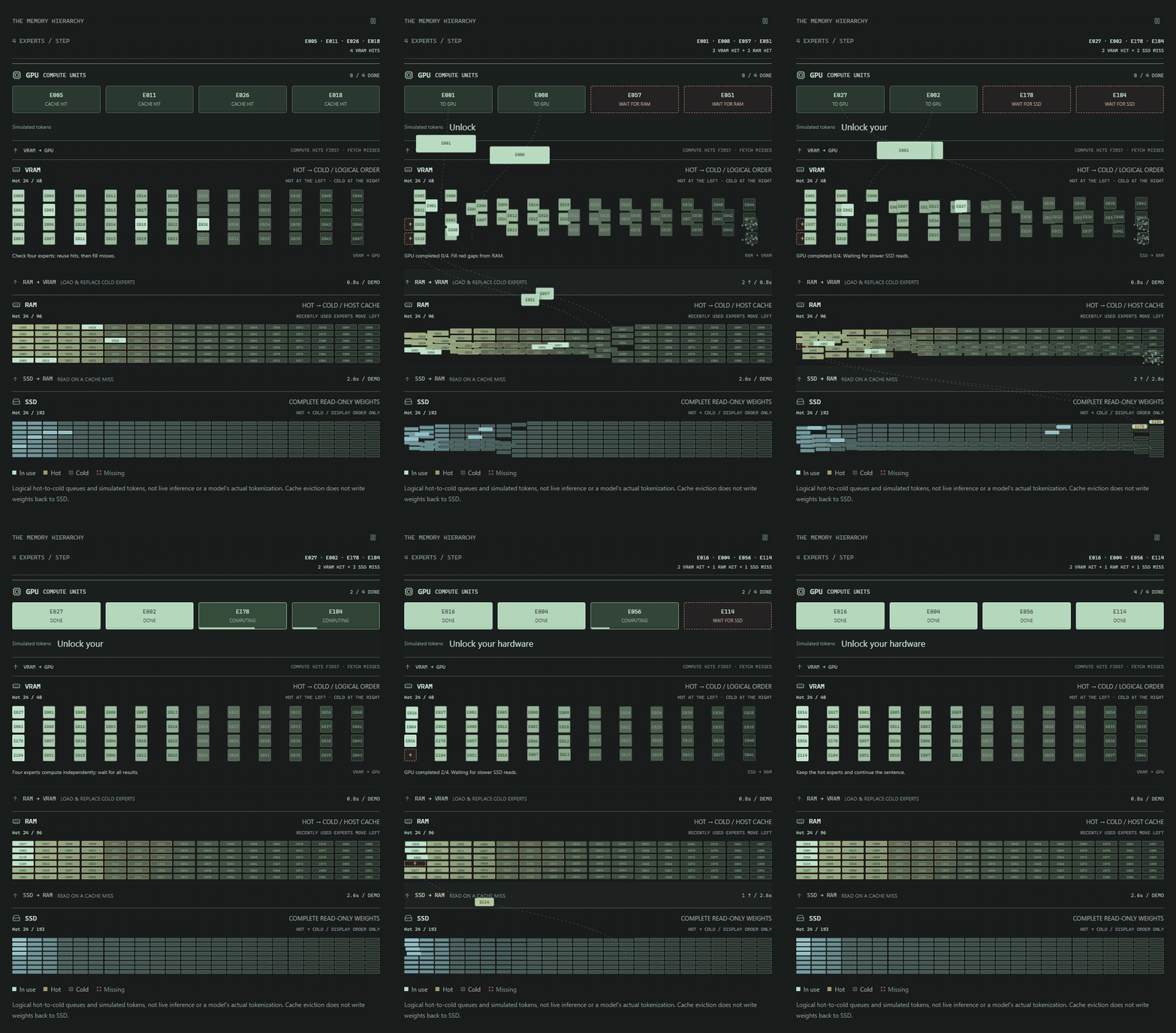
Illustration of expert flow. Click for the interactive website demo.
Developers: resource management and execution
Fixed weights and essential control resources are allocated first. Variable expert caches, KV, runtime workspaces and auxiliary modules are managed through the unified VRAM pool. Integrated GPUs share physical memory with the system, so GPU allocations and system RAM must be budgeted together rather than treated as two independent capacities.
On supported GPU-resident Decode paths, the GPU owns expert residency and LRU management. It copies experts it can access directly and requests CPU uploads otherwise. Prefill overlaps expert loading with computation.
Performance therefore depends on more than total model size: active parameters, quantization, cache hit rate, context length, PCIe bandwidth and RAM / SSD speed all matter.
Explore the expert-flow animation → Resource lifecycle details
Documentation and development
| Topic | Start here |
|---|---|
| Linux usage, builds and startup | Linux guide |
| APIs, clients and session caching | API quick start · Serving and session cache |
| Configuration and automatic budgets | Configuration reference |
| Cache hit rates, resource allocation and performance models | Research summaries |
| Scheduling, concurrency and memory lifetimes | Parallel scheduler · Resource management |
| Model support and compute paths | Runtime families · Codebase map |
| Building, testing and contributing | Build from source · Developer guide |
| Agent and website development | Agent source · Website source |
| Experiments and historical results | Evidence |
Open the full documentation index →
Contribute and support
Report problems through Issues. Include the model, configuration, startup and error logs, and steps to reproduce. Contributions to model support, testing, documentation and evidence-backed performance improvements are welcome.
MoE4All is maintained by John / Headmaster218, building on kryptic-sh/infr. Thanks to the original authors, contributors, upstream communities, and everyone sharing measurements and feedback.
The project uses Apache-2.0. See the repository's license files and NOTICE for inherited code and third-party copyrights and licenses. Models retain their own licenses.
