
Gu-0312/FormatMaster-EN
Gu-0312/FormatMaster-EN has 254 GitHub stars and 12 forks. GitHot measured 0 stars in 24 hours. Last checked 2026-11-19 02:30 UTC. Last push 2026-08-21.
What you can do
- 🎬 Video Convert - MP4, AVI, MKV, WMV, MOV, FLV, WEBM, TS, MPEG, 3GP
- 🎵 Audio Convert - MP3, WAV, WMA, AAC, FLAC, OGG, M4A, AMR, OPUS
- 🖼 Image Convert - JPG, PNG, BMP, GIF, TIFF, WEBP, ICO, TGA
- 📄 Document Convert - PDF ↔ Word ↔ Excel ↔ PPT ↔ WPS ↔ TXT ↔ HTML ↔ Image (168+ combinations)
Measured star growth
- in 24h
- 0
- in 7 days
- Collecting history
- in 15 days
- Collecting history
- in 1 month
- Collecting history
Net star changes over overlapping periods, not daily totals. Missing measurements are left blank. Stars measure attention, not software quality.
About
全能格式转换工具 — 视频、音频、图片、文档一站式转换 All-in-one format converter for video, audio, image & documents.
Creative & MediaREADME.md
Original🔄 FormatMaster / 格式大师
All-in-one format converter for video, audio, image & documents.
全能格式转换工具 — 视频、音频、图片、文档一站式转换




中文
✨ 功能总览
导航:10 组 35 入口 · 内置插件:32 个 · 设置:11 分区
| 模块 | 说明 |
|---|---|
| 🎬 视频转换 | MP4、AVI、MKV、WMV、MOV、FLV、WEBM、TS、MPEG、3GP |
| 🎵 音频转换 | MP3、WAV、WMA、AAC、FLAC、OGG、M4A、AMR、OPUS |
| 🖼 图片转换 | JPG、PNG、BMP、GIF、TIFF、WEBP、ICO、TGA |
| 📄 文档转换 | PDF ↔ Word ↔ Excel ↔ PPT ↔ WPS ↔ TXT ↔ HTML ↔ 图片(168+种组合) |
| ✂ 视频处理 | 剪辑片段、多文件合并、字幕烧录、变速(0.5x-2.0x) |
| 📦 视频压缩 | 高/中/低质量预设,支持分辨率限制 |
| 🎬 视频抽帧+缩略图 | 单张序列 / N×M 缩略图墙 双模式 |
| ⊙ 视频转GIF | 自定义宽度、帧率、时间区间 + 双滑块选段 |
| ⊞ PDF合并/拆分 | 多个PDF合并为一个,按页码范围拆分 |
| 🔒 PDF加密/解密 | AES-256/AES-128加密,密码历史记录 |
| 🗜 PDF压缩 | 降低PDF体积,支持DPI和图片质量控制 |
| 📖 PDF预览 | 应用内 QPdfView 预览:翻页、页码跳转、缩放 |
| 🖼 证件照 | 换底色、尺寸预设、A6 相纸排版(1寸16张/2寸9张)+ 直接打印 |
| ⊡ 图片压缩 | 质量控制、分段切换(按质量 / 按目标大小) |
| ✏ 批量重命名 | 模板支持 {n} 序号、{name} 原名、{date} 日期占位符 |
| 🏷 图片水印 | 文字/图片水印,5种位置选择 |
| 🔊 音频增强 | 音量、响度归一化、效果处理 |
| 🎵 音频波形 | 应用内波形预览(FFmpeg 解码 + pyqtgraph) |
| 🔍 格式检测 | 批量扫描文件夹,按格式自动分类,支持文件头魔数检测 |
| 📊 媒体信息 | 容器 / 编码器 / 分辨率 / 码率 / 音视频流详情 |
| 📥 视频下载 | 支持 B站/YouTube/微博/Instagram 等数百个平台(基于yt-dlp) |
| 📦 M3U8下载 | 链接解析、画质解析、批量队列(独立面板) |
| 🖼 视频预览 | 应用内播放器(播放/暂停/进度/倍速) |
| ☐ 表格识别 | 图片表格 OCR → CSV / Excel(RapidTable 结构还原) |
| 📁 文件夹监视 | 监视目录自动转换新文件(视频→MP4 / 音频→MP3 / 图片→PNG) |
| 🎬 视频反挤压 | 修复画面被压扁拉长(自动修 SAR / 手动目标比例) |
| 🧩 插件中心 | 32 个内置插件(哈希/进制/JSON/URL/编码/简繁转换等)+ 安装/编辑源码 |
| 💻 代码编辑器 | 语法高亮查看/编辑(Python/JSON/JS)——插件右键「编辑源码」 |
| 📊 数据大屏 | ECharts 交互图表(近30天趋势、类型分布)——历史页 |
| 🌫 毛玻璃质感 | Win11 Mica 云母窗口 + 毛玻璃工具条 |
| 💾 任务队列持久化 | 退出自动恢复中断任务、一键重试、并行 1–8 |
| 🔁 失败自动恢复 | 转换失败自动修复源文件/降级重试(全程落日志) |
| 🌐 中英双语 | 简体中文 / English 界面语言切换 |
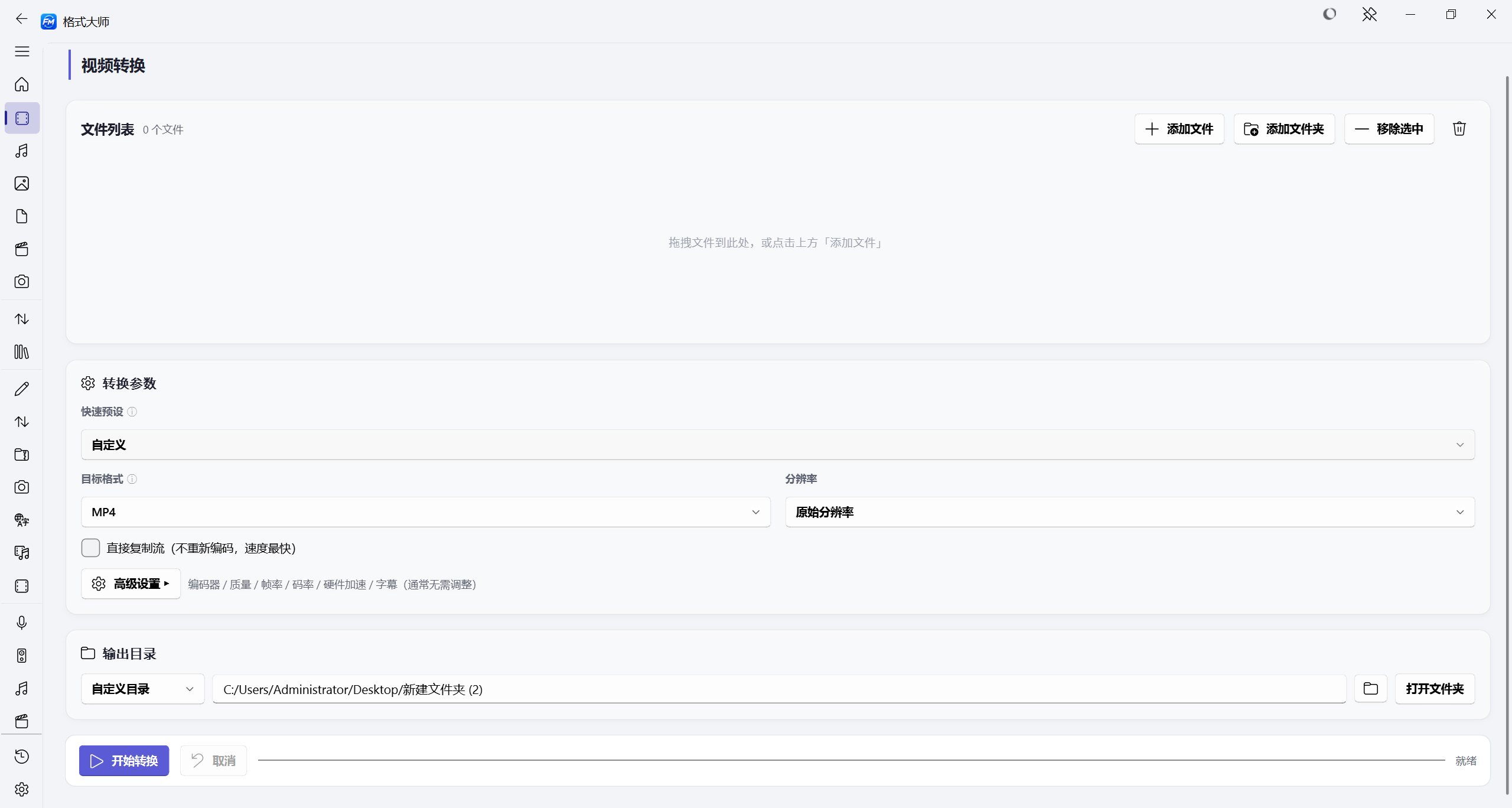
🎬 视频转换 — 详细说明
支持格式:MP4、AVI、MKV、WMV、MOV、FLV、WEBM、TS、MPEG、3GP
| 设置项 | 选项 |
|---|---|
| 目标格式 | MP4、AVI、MKV、WMV、MOV、FLV、WEBM、TS、MPEG、3GP |
| 视频编码 | 默认、H.264、H.265/HEVC、VP9、MPEG4 |
| 画质预设 | 原始质量、高质量(大文件)、中等质量、低质量(小文件)、手机、网络分享 |
| 分辨率 | 原始、4K (3840×2160)、2K (2560×1440)、1080p、720p、480p、360p |
| 帧率 | 原始帧率、24、25、30、60 fps |
| 码率 | 自动、1M、2M、5M、8M、10M、20M |
| 仅转封装(无损) | 开/关 — 仅重封装不重编码(仅限 MP4/MKV/TS/FLV/MOV) |
| 快速预设 | 自定义 + 用户预设模板 |
| 输出目录 | 与源文件同目录 / 自定义目录 |
特殊能力:
- 流选择:可选择性保留/移除音视频流
- 编码兼容性校验:自动检测无损模式下的编码兼容性(如 H.265→FLV)
- 自动重命名:输出文件与输入同名时自动加
_1后缀
🎵 音频转换 — 详细说明
支持格式:MP3、WAV、WMA、AAC、FLAC、OGG、M4A、AMR、OPUS
| 设置项 | 选项 |
|---|---|
| 目标格式 | MP3、WAV、WMA、AAC、FLAC、OGG、M4A、AMR、OPUS |
| 比特率 | 128k、192k、256k、320k |
| 采样率 | 原始、22050、44100、48000、96000 |
| 声道 | 原始、单声道、立体声 |
| 音量调节 | 20% ~ 200%(滑块控制) |
| 输出目录 | 与源文件同目录 / 自定义目录 |
🖼 图片转换 — 详细说明
支持格式:JPG、PNG、BMP、GIF、TIFF、WEBP、ICO、TGA
| 设置项 | 选项 |
|---|---|
| 目标格式 | JPG、PNG、BMP、GIF、TIFF、WEBP、ICO、TGA |
| 质量 | 100(无损)、95(高质量)、85(中等)、70(低质量)、50(压缩) |
| 缩放 | 原始大小、50%、25%、200% |
| 旋转 | 0°、90°、180°、270° |
| 裁剪 | 原始比例、裁剪为正方形 |
| 灰度 | 开/关 — 转为黑白 |
| 水印文字 | 自定义输入 |
| 水印位置 | 右下角、左下角、右上角、左上角、居中 |
| 输出目录 | 与源文件同目录 / 自定义目录 |
📄 文档转换 — 详细说明
支持格式:PDF、DOCX、DOC、WPS、XLSX、XLS、ET、CSV、PPTX、PPT、DPS、TXT、HTML、HTM、MD、EPUB、RTF、ODT、JPG、JPEG、PNG、BMP、TIFF、WEBP
168+ 种转换组合:
| 源格式 | 可转目标 |
|---|---|
| DOCX、DOC、TXT、JPG、PNG、HTML、PPTX、XLSX | |
| DOCX | PDF、TXT、HTML、JPG、PNG、PPTX、MD、DOC、WPS |
| DOC | PDF、TXT、DOCX、HTML、MD |
| WPS | DOCX、PDF、TXT、HTML、MD |
| XLSX | PDF、CSV、TXT、JPG、PNG、HTML、MD、ET |
| XLS | XLSX、PDF、CSV、TXT、JPG、PNG、HTML、MD |
| CSV | XLSX、PDF、TXT、HTML、MD |
| PPTX | PDF、TXT、JPG、PNG、PPT、DPS、DOCX、HTML、MD |
| PPT | PPTX、PDF、TXT |
| TXT | PDF、XLSX、DOCX、PPTX、HTML、MD |
| HTML | PDF、DOCX、TXT、XLSX、MD |
| MD | HTML、PDF、DOCX、TXT |
| EPUB | PDF、TXT、HTML、DOCX |
| RTF | TXT、PDF、DOCX |
| ODT | PDF、DOCX、TXT |
| 图片 | PDF、DOCX |
特殊能力:
- 格式检测:自动识别源文件格式并列出可转换目标
- Word转PDF:通过 Microsoft Word COM 自动化
- PPT转PDF:通过 Microsoft PowerPoint COM 自动化
- 格式兼容性实时提示:显示当前源/目标格式是否兼容
⊙ 视频转GIF — 详细说明
| 设置项 | 选项 |
|---|---|
| 宽度 | 原始、640、480、320、240 |
| 帧率 | 10、15、20、24、30 fps |
| 开始时间(秒) | 0 |
| 时长(秒) | 5、10、15、30、60、全部 |
| 输出目录 | 与源文件同目录 / 自定义目录 |
🔒 PDF工具 — 详细说明
5种操作模式:
| 模式 | 功能 | 参数 |
|---|---|---|
| 合并(多个→一个) | 多PDF合并 | — |
| 拆分(一个→多个) | 按页码范围拆分 | 页码范围:1-3,5,7-10 |
| 加密(设置密码) | PDF加密 | 打开密码、权限密码、加密方式(AES-256/AES-128) |
| 解密(移除密码) | PDF解密 | 输入密码 |
| 压缩 | 降低PDF体积 | 目标分辨率(72/100/150/200dpi)、图片质量(60-90) |
附加功能:
- 密码历史记录:保存最近10条密码,支持复用
- 密码显示/隐藏切换:点击眼睛图标切换
📥 视频下载 — 详细说明
支持平台:B站、YouTube、微博、Instagram 等数百个平台(基于 yt-dlp)
| 功能 | 说明 |
|---|---|
| URL解析 | 自动提取有效URL,过滤中文等非ASCII字符 |
| 格式获取 | 列出所有可用格式(分辨率、大小、格式ID) |
| 格式选择 | 从列表中选择目标格式 |
| 保存目录 | 默认 ~/Downloads,可自定义 |
| 抖音/TikTok提示 | 检测到抖音链接时显示平台限制警告 |
| yt-dlp版本检测 | 侧边栏显示版本,有新版本时提示更新 |
🔍 格式检测 — 详细说明
| 功能 | 说明 |
|---|---|
| 文件夹扫描 | 递归遍历所有文件 |
| 扩展名分类 | 按视频/音频/图片/文档/PDF/其他自动分类 |
| 文件头魔数检测 | 通过二进制头识别真实格式(PDF、JPEG、PNG、GIF、BMP、RIFF、MKV、MP4、ID3、FLAC、OGG、OLE、ZIP等) |
| 格式不匹配警告 | 扩展名与内容不符时标红提示 |
| 选择性批量转换 | 勾选文件后一键批量转换 |
| 全选/取消全选 | 批量操作控制 |
| 重新检测 | 重置并重新扫描 |
| 自动添加到对应面板 | 检测结果自动分发到各功能面板 |
🖼 预设裁剪 — 详细说明
| 设置项 | 选项 |
|---|---|
| 预设尺寸 | 社交媒体标准尺寸(1:1 1080×1080 等) |
| 裁剪模式 | cover(裁剪填充)/ fit(等比适应) |
| 输出目录 | 与源文件同目录 / 自定义目录 |
📊 任务系统
| 功能 | 说明 |
|---|---|
| 任务队列 | FIFO串行处理,每500ms轮询 |
| 任务状态 | waiting → processing → success / failed |
| 进度显示 | Treeview表格 + 进度条 + 状态文本 |
| 任务清空 | 清空所有已完成任务 |
| 取消转换 | 立即终止当前任务 |
📝 日志系统
| 功能 | 说明 |
|---|---|
| 实时日志 | 底部Notebook面板,最多保留50行 |
| 日志级别 | success(绿)、error(红)、warning(黄)、info(蓝) |
| 日志清空 | 清空所有日志 |
| 双击复制 | 双击单行日志复制到剪贴板 |
⚙️ 用户偏好
| 功能 | 说明 |
|---|---|
| 面板参数保存 | 切换面板时自动保存所有设置 |
| 面板参数恢复 | 切换回来时恢复上次设置 |
| 持久化存储 | %APPDATA%/FormatMaster/data/user_prefs.json |
🔄 更新检查
| 功能 | 说明 |
|---|---|
| 启动自动检查 | 后台线程检查GitHub releases |
| 手动检查 | 关于窗口中可手动触发 |
| 更新通知 | 顶部蓝色横幅,点击跳转下载页 |
| 版本比较 | 支持语义化版本 |
🚀 快速开始
下载使用
从 Releases 页面下载最新版本,解压后双击 格式大师.exe 即可使用。
从源码运行
# 克隆仓库
git clone https://github.com/Gujh/FormatMaster.git
cd FormatMaster

# 安装依赖
pip install -r requirements.txt

# 运行应用
python main_qt.py

# 打包为exe
python build.py
🛠 技术栈
- 界面: Python PySide6 + qfluentwidgets(Fluent Widgets,Prism 设计系统)
- 视频/音频: FFmpeg(自动下载或使用系统PATH)
- 图片: Pillow
- 文档: python-docx、openpyxl、python-pptx、pypdf、pdf2docx、reportlab、PyMuPDF
- Word转PDF: 调用本地 Microsoft Word COM 自动化
- PPT转PDF: 调用本地 Microsoft PowerPoint COM 自动化
- 视频下载: yt-dlp
- OCR: RapidOCR + RapidTable(onnx)
- 高级控件: QtPdf / QtWebEngine / QtMultimedia / QtDataVisualization(PySide6 内置)、pyqtgraph、superqt
- 图表: ECharts(本地离线资源)
- 文字转换: opencc(简繁词汇级转换)
- 打包: PyInstaller
📁 项目结构
FormatMaster/
├── main_qt.py           # 主程序入口(PySide6 界面)
├── build.py             # PyInstaller打包脚本
├── requirements.txt     # Python依赖
├── assets/
│   ├── icon.ico         # 应用图标
│   └── echarts/         # ECharts 本地离线资源(数据大屏)
├── gui_qt/              # PySide6 + Fluent Widgets 界面
│   ├── app.py           # MainWindow(FluentWindow + Mica)
│   ├── nav_registry.py  # 导航注册真源
│   ├── services.py      # QtServices 服务容器
│   ├── task_manager.py  # 任务队列(信号驱动,并行 1-8)
│   ├── pages/           # 首页/任务/历史/设置/关于
│   ├── panels/          # 功能面板(视频、音频、PDF、OCR 等)
│   └── components/      # 侧边栏、主题管理、设计系统、通用控件
├── plugins/             # 32 个内置插件(声明式 PLUGIN_INFO)
├── core/                # 业务逻辑(无 UI 依赖)
│   ├── video_converter.py   # 视频转换(FFmpeg)
│   ├── audio_converter.py   # 音频转换(FFmpeg)
│   ├── image_converter.py   # 图片转换(Pillow)
│   ├── doc_converter.py     # 文档转换(168+种组合)
│   ├── video_downloader.py  # 视频下载(yt-dlp)
│   ├── pdf_editor.py        # PDF编辑
│   ├── ocr_tool.py          # OCR识别(RapidOCR)
│   ├── auto_recover.py      # 失败自动恢复(修复/降级重试)
│   └── tools.py             # PDF合并/拆分/加密/压缩、图片压缩、批量重命名
├── utils/
│   ├── config.py            # 配置与格式定义
│   ├── ffmpeg_manager.py    # FFmpeg下载管理
│   ├── hardware_accel.py    # NVENC / QSV / AMF 硬件加速检测
│   └── format_helpers.py    # 格式辅助工具
└── app/
    ├── logger.py            # 线程安全轮转日志
    ├── exceptions.py        # EX_HINT 异常中文映射
    └── crash_report.py      # 全局异常钩子
🖥 技术特性
| 特性 | 实现方式 |
|---|---|
| DPI高分屏适配 | SetProcessDpiAwareness(2) |
| 双缓冲渲染 | DWM API,消除界面闪烁 |
| 黑边修复 | 窗口映射事件触发强制重绘 |
| 异常中文映射 | 20+种异常→中文用户提示 |
| 窗口自适应 | 80%屏幕,最小880×620 |
| 线程安全 | 所有耗时操作在子线程,UI更新通过 root.after() |
| 拖拽支持 | ctypes(优先)+ windnd(降级)双重支持 |
📝 更新日志
v1.4.1 (2026-08-21)
- 🛠 工具更新文件改存软件 bin 目录(不再与 C 盘双份占用),历史副本自动清理
- 📌 侧边栏展开/折叠状态与上次停留页面记忆,重启自动恢复
- 💾 偏好落盘全面加固:退出统一收尾 + fsync 物理落盘,断电/强杀进程不丢配置
- 🔐 补全 PDF 密码历史(最近 10 条一键复用)
- 🧹 应用自更新与 FFmpeg 下载中断残留自动清理
- ⚡ 修复页面切换动画信号重复连接泄漏、面板参数自动保存失效(Fluent 控件)
- 🪟 新增「毛玻璃效果」开关(设置 → 外观),性能敏感场景可关闭 Win11 Mica
- 🛡 坏配置容错:配置损坏不再导致启动崩溃
v1.4.0 (2026-08-19)
- 📖 新增应用内预览三件套:PDF 预览(QtPdf)、HTML 预览(QtWebEngine)、视频预览(QtMultimedia)
- 🎵 新增音频波形预览(pyqtgraph)与 GIF 双滑块选段(superqt,与游标双向同步)
- 🖼 证件照升级:A6 相纸排版(1寸16张/2寸9张)
- 📊 历史页新增 ECharts 数据大屏(30 天趋势 + 类型分布)
- 💻 插件中心新增「编辑源码」(语法高亮);全量补全插件能力
- 🧭 侧边栏导航精简 41→35:删除冗余入口,抽帧与缩略图墙合并双模式
- 🎛 图片压缩分段切换、设置页面包屑、历史清空二次确认、M3U8 添加链接自动解析画质
- ⚡ 明暗主题切换提速 2.6s→60ms、全局滚轮流畅度优化、FFmpeg/yt-dlp 更新体验增强
- 🐛 修复 SpinBox 微调箭头灰块、转换失败误报、任务状态卡重复刷新等
- 🛡 QA 加固:配置损坏容错、ffprobe 时长清洗、Image.open 句柄管理、失败自动恢复落日志
v1.3.6 (2026-08-08)
- 🎭 新增幻影坦克:一张图片白底显示一张、黑底显示另一张(制作 / 解密,numpy 透明通道编码)
- 🎬 新增视频反挤压:修复画面被压扁拉长(自动按 DAR 修 SAR 流复制 / 手动目标比例重编码)
- 📊 新增媒体信息:容器 / 编码器 / 分辨率 / 帧率 / 码率 / 音视频流详情(MediaInfo 风格)
- ⚡ 新增场景化转换:8 个使用场景(抖音 / 微信 / 邮件 / 公众号 / B站 / 网课 / 存档 / 极速)一键自动匹配参数
- 📋 剪贴板监视增强:独立目标类型与格式选择 + 截图动作(仅保存 / OCR 识别 / 保存并 OCR)
- 🐛 修复转换失败通知误报:跨面板不再误弹通知、批量完成只统计本次失败(历史失败任务不再误报)
- 🐛 修复剪贴板监视输出目录浏览不显示、无音轨视频变速失败等问题
v1.3.5 (2026-08-06)
- 🌐 全站中英双语:导航/面板/按钮/下拉选项/任务提示 400+ 文案双语化
- 💾 任务队列持久化:应用退出后自动恢复中断任务,任务中心可一键重试
- 🔁 失败任务一键重试:任务中心新增重试按钮(失败/取消任务直接重新入队)
- 🖼 新增视频抽帧:按固定间隔批量截取关键帧(封面、预览、场景截图)
- 🚫 新增视频去水印:FFmpeg delogo 滤镜,区域自动钳制防止越界
- ⚡ 并发任务数按 CPU 核数自适应推荐(≥8 核推荐 4)
- 📦 打包瘦身:排除 onnxruntime 可选子模块(transformers/quantization/tools)
v1.3.1 (2026-08-03)
- 🏗 架构重构:16 个功能面板 DI 化迁移至独立模块,main.py 瘦身
- 🔧 接入 app.exceptions/app.theme/utils.format_helpers 公共模块,消除内联重复
- 🐛 修复批量重命名大小写转换误改扩展名问题(
photo.jpg→PHOTO.JPG→PHOTO.jpg) - 🧪 新增 pytest 单元测试套件(72 测试覆盖纯函数与 _fmt_n 回归)
- ⚡ 新增硬件加速支持(NVIDIA NVENC / Intel QSV / AMD AMF)
- 🔧 FFmpeg 下载失败增强 UX(重试 + 错误详情 + 手动选择 + 下载页)
- 📦 PyInstaller 打包配置增强(onedir + collect-all fitz/PIL/rapidocr)
v1.3.0 (2026-07-23)
- 📥 新增视频下载功能(基于yt-dlp,支持数百个平台)
- 🎬 新增视频快速预设(一键应用常用配置组合)
- 🔒 新增PDF密码历史记录(保存最近10条密码,支持一键复用)
- 🔍 格式检测新增文件头魔数识别(通过二进制头判断真实格式,不受扩展名误导)
- 📄 文档格式兼容性实时提示(自动判断源/目标格式是否可转换)
- 🖼 文件属性预览(选中文件后异步显示时长、分辨率、编码信息)
- 🔒 新增PDF加密/解密功能(AES-256/AES-128)
- 🗜 新增PDF压缩功能(DPI + 质量控制)
- 🔄 启动自动更新检查(后台检测GitHub最新版本,发现新版本顶部横幅通知)
- 🖼 新增图像预设裁剪功能(社交媒体尺寸)
- 🐛 修复输出文件与输入同名时自动重命名(加
_1后缀避免覆盖)
v1.1.0 (2026-07-16)
- 🔊 新增音频音量调节功能(20%-200%)
- 🏷 新增图片水印添加功能(支持5种位置)
- 📊 新增底部状态流面板(实时进度日志、自动滚动、错误标红)
- 🔍 新增格式检测功能(批量扫描文件夹,按格式自动分类)
- 📋 新增关于窗口(包含GitHub链接和免责声明)
- 🐛 修复拖拽功能、进度条卡顿等已知问题
v1.0.0 (2026-05-31)
- 🎉 首次发布
- 视频/音频/图片/文档格式转换
- 提取音频、视频压缩、视频转GIF
- PDF合并/拆分、图片压缩、批量重命名
- 内置REST API接口
- 白色主题UI + DPI高分屏适配
Made with ❤️ by Gujh
## English
✨ Features Overview
Navigation: 10 groups / 35 entries · Built-in plugins: 32 · Settings: 11 sections
| Module | Description |
|---|---|
| 🎬 Video Convert | MP4, AVI, MKV, WMV, MOV, FLV, WEBM, TS, MPEG, 3GP |
| 🎵 Audio Convert | MP3, WAV, WMA, AAC, FLAC, OGG, M4A, AMR, OPUS |
| 🖼 Image Convert | JPG, PNG, BMP, GIF, TIFF, WEBP, ICO, TGA |
| 📄 Document Convert | PDF ↔ Word ↔ Excel ↔ PPT ↔ WPS ↔ TXT ↔ HTML ↔ Image (168+ combinations) |
| ✂ Video Processing | Clip, merge, subtitle burn-in, speed (0.5x–2.0x) |
| 📦 Video Compress | High / Medium / Low quality presets with resolution limit |
| 🎬 Video Frame Extract + Thumbnails | Single-frame sequences or N×M thumbnail sheets |
| ⊙ Video to GIF | Custom width, fps, start time, duration + dual-slider range selection |
| ⊞ PDF Merge / Split | Merge multiple PDFs, split by page ranges |
| 🔒 PDF Encrypt / Decrypt | AES-256/AES-128 encryption with password history |
| 🗜 PDF Compress | Reduce PDF size with DPI and quality control |
| 📖 PDF Preview | In-app QPdfView preview with page navigation & zoom |
| 🖼 ID Photo | Background change, size presets, A6 photo-paper layout (1-inch ×16 / 2-inch ×9) + direct print |
| ⊡ Image Compress | Quality control, max resolution, segmented mode switch (quality / target size) |
| ✏ Batch Rename | Templates with {n} serial, {name}, {date} placeholders |
| 🏷 Image Watermark | Text / image watermark, 5 position choices |
| 🔊 Audio Enhance | Volume, loudness normalization, effects (filters, etc.) |
| 🎵 Audio Waveform | In-app waveform preview (FFmpeg decode + pyqtgraph) |
| 🔍 Format Detect | Batch scan folder, auto-classify by format, content header detection |
| 📊 Media Info | Container, codec, resolution, bitrate & streams |
| 📥 Video Download | Bilibili, YouTube, Weibo, Instagram, etc. (via yt-dlp) |
| 📦 M3U8 Download | Parse, quality resolution, batch queue (dedicated panel) |
| 🖼 Video Preview | In-app video player (play / pause / progress / speed) |
| ☐ Table OCR | Image table recognition → CSV / Excel (RapidTable structure restore) |
| 📁 Folder Monitor | Auto-convert new files in a watched folder |
| 🎬 Unwarp Video | Fix squashed/stretched aspect ratio (auto SAR repair / manual target ratio) |
| 🎬 Unwarp Video | Fix squashed/stretched aspect ratio (auto SAR repair / manual target ratio) |
| 🧩 Plugin Center | 32 built-in plugins (hash, base convert, JSON/URL/encoding tools, 简繁 convert, …) + install / edit source |
| 💻 Code Editor | Syntax-highlighted viewer/editor (Python/JSON/JS) — right-click "Edit Source" on plugins |
| 📊 Data Dashboard | ECharts interactive charts (30-day trends, type distribution) on History page |
| 🌫 Glass UI | Mica (Win11) window + GlassBar frosted toolbar |
| 💾 Task Queue Persistence | Interrupted tasks restored after restart, one-click retry, parallel 1–8 |
| 🔁 Auto Recover | Failed conversions auto-repair source / retry with fallback params (logged) |
| 🌐 Bilingual UI | Full Chinese / English switching across navigation, panels, toasts & task hints |
🎬 Video Convert — Details
Supported formats: MP4, AVI, MKV, WMV, MOV, FLV, WEBM, TS, MPEG, 3GP
| Setting | Options |
|---|---|
| Target Format | MP4, AVI, MKV, WMV, MOV, FLV, WEBM, TS, MPEG, 3GP |
| Video Codec | Default, H.264, H.265/HEVC, VP9, MPEG4 |
| Quality Preset | Original, High (large file), Medium, Low (small file), Mobile, Web Share |
| Resolution | Original, 4K (3840×2160), 2K (2560×1440), 1080p, 720p, 480p, 360p |
| Frame Rate | Original, 24, 25, 30, 60 fps |
| Bitrate | Auto, 1M, 2M, 5M, 8M, 10M, 20M |
| Stream Copy (Lossless) | ON/OFF — remux without re-encoding (MP4/MKV/TS/FLV/MOV only) |
| Quick Presets | Custom + user-defined preset templates |
| Output Dir | Same as source / Custom directory |
Special capabilities:
- Stream selection: Choose which audio/video streams to keep
- Codec compatibility check: Auto-detects incompatible codec+container combos (e.g. H.265→FLV)
- Auto-rename: Output file automatically gets
_1suffix if name conflicts with input
🎵 Audio Convert — Details
Supported formats: MP3, WAV, WMA, AAC, FLAC, OGG, M4A, AMR, OPUS
| Setting | Options |
|---|---|
| Target Format | MP3, WAV, WMA, AAC, FLAC, OGG, M4A, AMR, OPUS |
| Bitrate | 128k, 192k, 256k, 320k |
| Sample Rate | Original, 22050, 44100, 48000, 96000 |
| Channels | Original, Mono, Stereo |
| Volume | 20% ~ 200% (slider control) |
| Output Dir | Same as source / Custom directory |
🖼 Image Convert — Details
Supported formats: JPG, PNG, BMP, GIF, TIFF, WEBP, ICO, TGA
| Setting | Options |
|---|---|
| Target Format | JPG, PNG, BMP, GIF, TIFF, WEBP, ICO, TGA |
| Quality | 100 (lossless), 95 (high), 85 (medium), 70 (low), 50 (compressed) |
| Resize | Original, 50%, 25%, 200% |
| Rotate | 0°, 90°, 180°, 270° |
| Crop | Original ratio, Crop to square |
| Grayscale | ON/OFF — convert to black & white |
| Watermark Text | Custom input |
| Watermark Position | Bottom-right, Bottom-left, Top-right, Top-left, Center |
| Output Dir | Same as source / Custom directory |
📄 Document Convert — Details
Supported formats: PDF, DOCX, DOC, WPS, XLSX, XLS, ET, CSV, PPTX, PPT, DPS, TXT, HTML, HTM, MD, EPUB, RTF, ODT, JPG, JPEG, PNG, BMP, TIFF, WEBP
168+ conversion combinations:
| Source | Target Formats |
|---|---|
| DOCX, DOC, TXT, JPG, PNG, HTML, PPTX, XLSX | |
| DOCX | PDF, TXT, HTML, JPG, PNG, PPTX, MD, DOC, WPS |
| DOC | PDF, TXT, DOCX, HTML, MD |
| WPS | DOCX, PDF, TXT, HTML, MD |
| XLSX | PDF, CSV, TXT, JPG, PNG, HTML, MD, ET |
| XLS | XLSX, PDF, CSV, TXT, JPG, PNG, HTML, MD |
| CSV | XLSX, PDF, TXT, HTML, MD |
| PPTX | PDF, TXT, JPG, PNG, PPT, DPS, DOCX, HTML, MD |
| PPT | PPTX, PDF, TXT |
| TXT | PDF, XLSX, DOCX, PPTX, HTML, MD |
| HTML | PDF, DOCX, TXT, XLSX, MD |
| MD | HTML, PDF, DOCX, TXT |
| EPUB | PDF, TXT, HTML, DOCX |
| RTF | TXT, PDF, DOCX |
| ODT | PDF, DOCX, TXT |
| Images | PDF, DOCX |
Special capabilities:
- Format detection: Auto-identify source format and list convertible targets
- Word→PDF: Via Microsoft Word COM automation
- PPT→PDF: Via Microsoft PowerPoint COM automation
- Real-time compatibility hints: Shows if current source/target pair is supported
⊙ Video to GIF — Details
| Setting | Options |
|---|---|
| Width | Original, 640, 480, 320, 240 |
| Frame Rate | 10, 15, 20, 24, 30 fps |
| Start Time (sec) | 0 |
| Duration (sec) | 5, 10, 15, 30, 60, All |
| Output Dir | Same as source / Custom directory |
🔒 PDF Tools — Details
5 operation modes:
| Mode | Description | Parameters |
|---|---|---|
| Merge (many→one) | Combine multiple PDFs | — |
| Split (one→many) | Split by page ranges | Page range: 1-3,5,7-10 |
| Encrypt | Password-protect PDF | Open password, Owner password, Method (AES-256/AES-128) |
| Decrypt | Remove password | Input password |
| Compress | Reduce PDF size | Target DPI (72/100/150/200), Image quality (60–90) |
Additional features:
- Password history: Saves last 10 passwords for reuse
- Password show/hide toggle: Click eye icon to reveal
📥 Video Download — Details
Supported platforms: Bilibili, YouTube, Weibo, Instagram, and hundreds more (via yt-dlp)
| Feature | Description |
|---|---|
| URL Parsing | Auto-extract valid URL, filter non-ASCII characters |
| Format Listing | Show all available formats (resolution, size, format ID) |
| Format Selection | Choose target format from list |
| Save Directory | Default ~/Downloads, customizable |
| Douyin/TikTok Warning | Alert when platform is unsupported |
| yt-dlp Version Check | Sidebar displays version, update notification available |
🔍 Format Detect — Details
| Feature | Description |
|---|---|
| Folder Scanning | Recursive traversal of all files |
| Extension Classification | Auto-sort into Video/Audio/Image/Document/PDF/Other |
| Magic Number Detection | Binary header detection (PDF, JPEG, PNG, GIF, BMP, RIFF, MKV, MP4, ID3, FLAC, OGG, OLE, ZIP, etc.) |
| Mismatch Warning | Highlights when extension doesn't match actual content |
| Selective Batch Convert | Check files then one-click batch convert |
| Select All / Deselect All | Batch selection controls |
| Re-detect | Reset and rescan |
| Auto-add to Panels | Detection results auto-distributed to respective panels |
🖼 Image Crop Presets — Details
| Setting | Options |
|---|---|
| Preset Sizes | Social media standards (1:1 1080×1080, 4:5, 16:9, etc.) |
| Crop Mode | Cover (crop to fill) / Fit (scale to fit) |
| Output Dir | Same as source / Custom directory |
📊 Task System
| Feature | Description |
|---|---|
| Task Queue | FIFO serial processing, polls every 500ms |
| Task States | waiting → processing → success / failed |
| Progress Display | Treeview table + progress bar + status text |
| Task Clear | Clear all completed tasks |
| Cancel Conversion | Terminate current task immediately |
📝 Log System
| Feature | Description |
|---|---|
| Real-time Logs | Bottom Notebook panel, max 50 lines |
| Log Levels | success (green), error (red), warning (yellow), info (blue) |
| Log Clear | Clear all log entries |
| Double-click Copy | Copy single log line to clipboard |
⚙️ User Preferences
| Feature | Description |
|---|---|
| Panel Settings Save | Auto-saves all settings when switching panels |
| Panel Settings Restore | Restores last settings when returning |
| Persistent Storage | %APPDATA%/FormatMaster/data/user_prefs.json |
🔄 Update Check
| Feature | Description |
|---|---|
| Auto-check on Launch | Background thread checks GitHub releases |
| Manual Check | Trigger from About window |
| Update Notification | Top blue banner with download link |
| Version Comparison | Semantic versioning support |
🚀 Quick Start
Download
Download the latest release from Releases page — no installation required, just double-click 格式大师.exe.
Build from Source
# Clone the repository
git clone https://github.com/Gujh/FormatMaster.git
cd FormatMaster

# Install dependencies
pip install -r requirements.txt

# Run the application
python main_qt.py

# Build executable
python build.py
📡 REST API
已移除:旧的 Flask REST API(
api_server.py)已随 v1.3.x 的 PySide6 迁移删除(Flask 依赖已不在 requirements 中)。
🛠 Tech Stack
- GUI: PySide6 + qfluentwidgets (Fluent Widgets, Prism design system)
- Video/Audio: FFmpeg (auto-download or system PATH)
- Image: Pillow
- Document: python-docx, openpyxl, python-pptx, pypdf, pdf2docx, reportlab, PyMuPDF
- Word → PDF: Microsoft Word COM automation
- PPT → PDF: Microsoft PowerPoint COM automation
- Video Download: yt-dlp
- OCR: RapidOCR + RapidTable (onnx)
- Advanced widgets: QtPdf / QtWebEngine / QtMultimedia / QtDataVisualization (PySide6 built-in), pyqtgraph, superqt
- Charts: ECharts (local offline assets)
- Text conversion: opencc (traditional/simplified, vocabulary-level)
- Packaging: PyInstaller
📁 Project Structure
FormatMaster/
├── main_qt.py           # Application entry point (PySide6 GUI)
├── build.py             # PyInstaller build script
├── requirements.txt     # Python dependencies
├── assets/
│   ├── icon.ico         # Application icon
│   └── echarts/         # Offline ECharts assets (dashboard)
├── gui_qt/              # PySide6 + Fluent Widgets UI
│   ├── app.py           # MainWindow (FluentWindow + Mica)
│   ├── nav_registry.py  # Navigation registry (single source of truth)
│   ├── services.py      # QtServices container
│   ├── task_manager.py  # Task queue (signal-driven, FIFO, 1-8 parallel)
│   ├── pages/           # Home / Tasks / History / Settings / About
│   ├── panels/          # Feature panels (video, audio, pdf, ocr, ...)
│   └── components/      # Sidebar, theme manager, design system, widgets
├── plugins/             # 32 built-in plugins (declarative PLUGIN_INFO)
├── core/                # Business logic, no UI dependency
│   ├── video_converter.py   # Video conversion (FFmpeg)
│   ├── audio_converter.py   # Audio conversion (FFmpeg)
│   ├── image_converter.py   # Image conversion (Pillow)
│   ├── doc_converter.py     # Document conversion (168+ combos)
│   ├── video_downloader.py  # Video download (yt-dlp)
│   ├── pdf_editor.py        # PDF editing
│   ├── ocr_tool.py          # OCR via RapidOCR
│   ├── auto_recover.py      # Failure auto-recovery (repair / fallback retry)
│   └── tools.py             # PDF merge/split/encrypt/compress, image compress, batch rename
├── utils/
│   ├── config.py            # Configuration & format definitions
│   ├── ffmpeg_manager.py    # FFmpeg download & management
│   ├── hardware_accel.py    # NVENC / QSV / AMF detection
│   └── format_helpers.py    # Format helpers
└── app/
    ├── logger.py            # Thread-safe rotating logger
    ├── exceptions.py        # EX_HINT Chinese error mapping
    └── crash_report.py      # Global exception hooks
🖥 Technical Features
| Feature | Implementation |
|---|---|
| DPI Awareness | SetProcessDpiAwareness(2) for high-DPI displays |
| Double Buffering | DWM API for flicker-free rendering |
| Black Border Fix | Forced redraw on window map events |
| Chinese Error Mapping | 20+ exception types → user-friendly Chinese messages |
| Window Sizing | 80% of screen, min 880×620 |
| Thread Safety | All heavy operations on background threads, UI updates via root.after() |
| Drag & Drop | ctypes (primary) + windnd (fallback) support |