
GrenderG/Toasty
GrenderG/Toasty has 6,563 GitHub stars and 802 forks. GitHot measured -1 stars in 24 hours. Last checked 2026-11-07 10:37 UTC. Last push 2022-09-28.
The usual Toast, but with steroids 💪
Measured star growth
- in 24h
- -1
- in 7 days
- Collecting history
- in 15 days
- Collecting history
- in 1 month
- Collecting history
Net star changes over overlapping periods, not daily totals. Missing measurements are left blank. Stars measure attention, not software quality.
README.md
Original
Toasty



The usual Toast, but with steroids.
Prerequisites
Add this in your root build.gradle file (not your module build.gradle file):
allprojects {
	repositories {
		...
		maven { url "https://jitpack.io" }
	}
}
Dependency
Add this to your module's build.gradle file (make sure the version matches the JitPack badge above):
dependencies {
	...
	implementation 'com.github.GrenderG:Toasty:1.5.2'
}
Configuration
This step is optional, but if you want you can configure some Toasty parameters. Place this anywhere in your app:
Toasty.Config.getInstance()
    .tintIcon(boolean tintIcon) // optional (apply textColor also to the icon)
    .setToastTypeface(@NonNull Typeface typeface) // optional
    .setTextSize(int sizeInSp) // optional
    .allowQueue(boolean allowQueue) // optional (prevents several Toastys from queuing)
    .setGravity(int gravity, int xOffset, int yOffset) // optional (set toast gravity, offsets are optional)
    .supportDarkTheme(boolean supportDarkTheme) // optional (whether to support dark theme or not)
    .setRTL(boolean isRTL) // optional (icon is on the right)
    .apply(); // required
You can reset the configuration by using reset() method:
Toasty.Config.reset();
Usage
Each method always returns a Toast object, so you can customize the Toast much more. DON'T FORGET THE show() METHOD!
To display an error Toast:
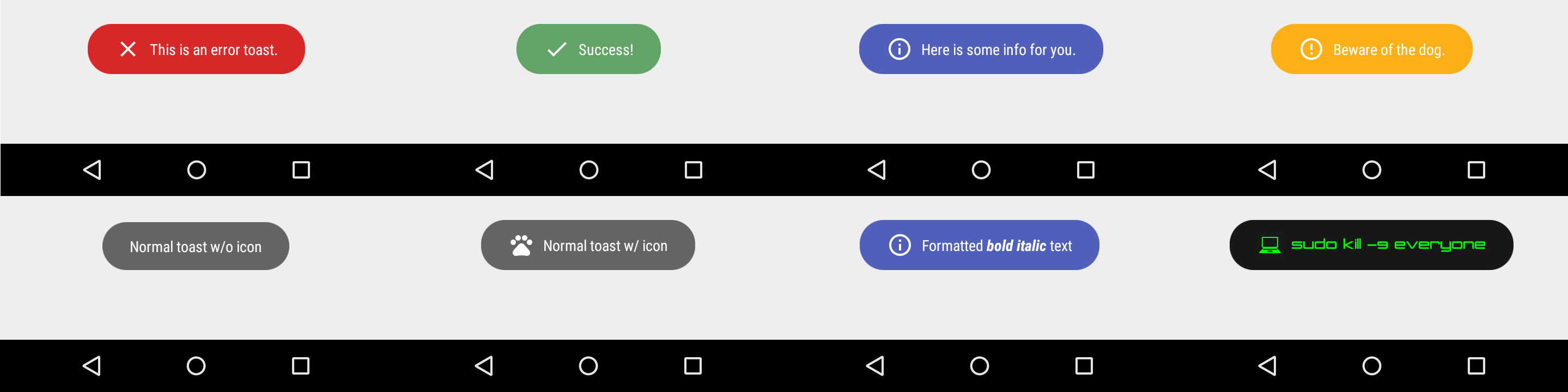
Toasty.error(yourContext, "This is an error toast.", Toast.LENGTH_SHORT, true).show();
To display a success Toast:
Toasty.success(yourContext, "Success!", Toast.LENGTH_SHORT, true).show();
To display an info Toast:
Toasty.info(yourContext, "Here is some info for you.", Toast.LENGTH_SHORT, true).show();
To display a warning Toast:
Toasty.warning(yourContext, "Beware of the dog.", Toast.LENGTH_SHORT, true).show();
To display the usual Toast:
Toasty.normal(yourContext, "Normal toast w/o icon").show();
To display the usual Toast with icon:
Toasty.normal(yourContext, "Normal toast w/ icon", yourIconDrawable).show();
You can also create your custom Toasts with the custom() method:
Toasty.custom(yourContext, "I'm a custom Toast", yourIconDrawable, tintColor, duration, withIcon,
shouldTint).show();
Extra
You can pass formatted text to Toasty!
There are variants of each method, feel free to explore this library.
Screenshots
Please click the image below to enlarge.
Third Party Bindings
React Native
You may now use this library with React Native via this module.
Apps using Toasty
Want to be here? Open an issue or make a pull request.


Explore related projects
codecrafters-io/build-your-own-x
Master programming by recreating your favorite technologies from scratch.
560,693 starspublic-apis/public-apis
A collective list of free APIs
496,935 starsmorluto/rea
Reverse engineer anything with agents, from app behavior down to native binaries.
440,161 starsopenclaw/openclaw
The AI that really does things. Any OS. Any Platform. The lobster way. 🦞
394,113 stars