
Gleek/org-timegrid
Gleek/org-timegrid has 219 GitHub stars and 6 forks. GitHot measured 0 stars in 24 hours, +27 in 7 days, and +30 in 15 days. Last checked 2026-11-15 14:15 UTC. Last push 2026-11-15.
Measured star growth
- in 24h
- 0
- in 7 days
- +27
- in 15 days
- +30
- in 1 month
- Update delayed
Net star changes over overlapping periods, not daily totals. Missing measurements are left blank. Stars measure attention, not software quality.
About
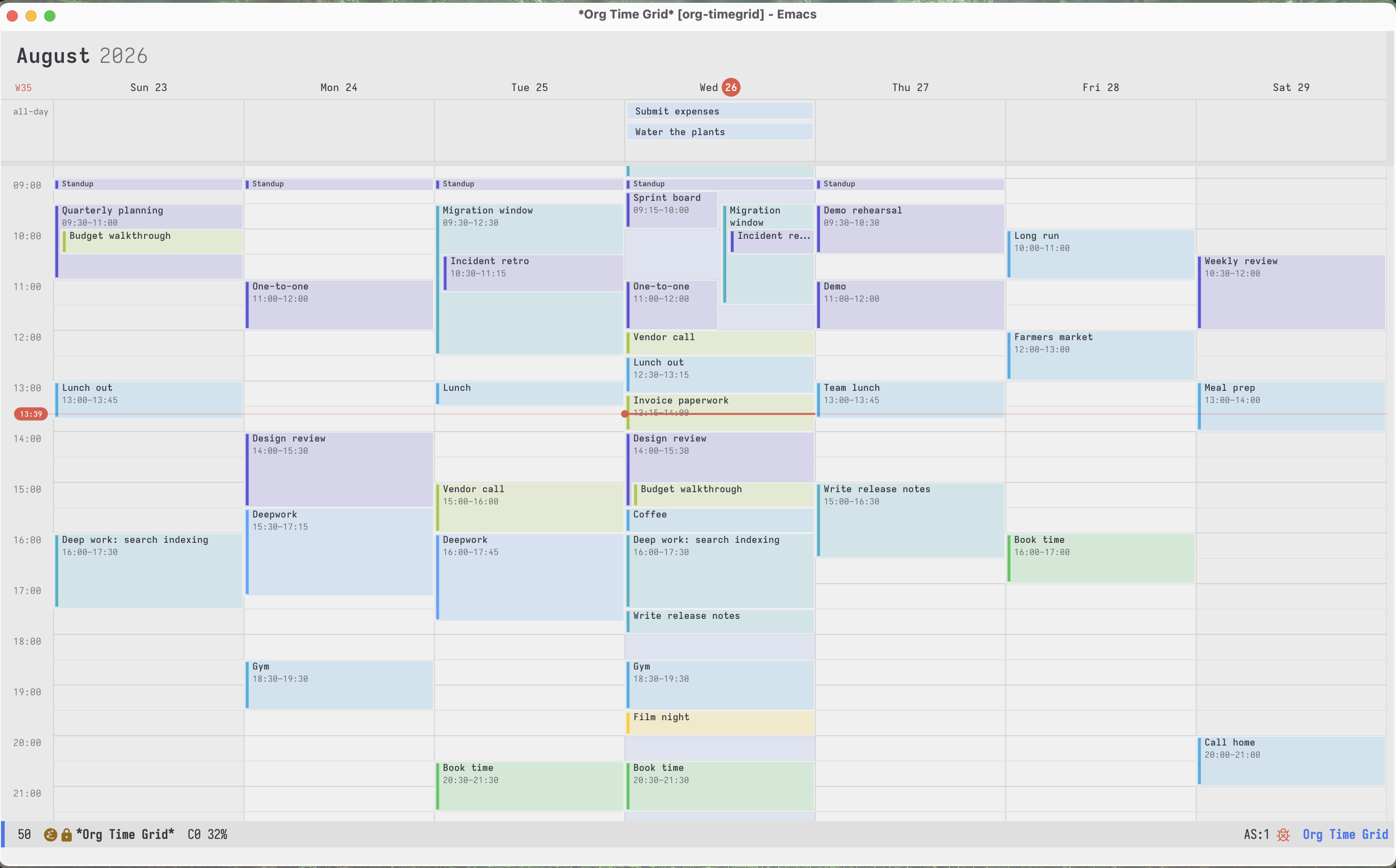
An SVG week calendar for Emacs, backed by Org files. Drag to create, move and resize; a read-only day strip for Org Agenda.
ProductivityREADME.md
Originalorg-timegrid

org-timegrid is an SVG calendar for Org mode. It reads active timestamps
and clock records from your Org files and writes edits back to their source headings.
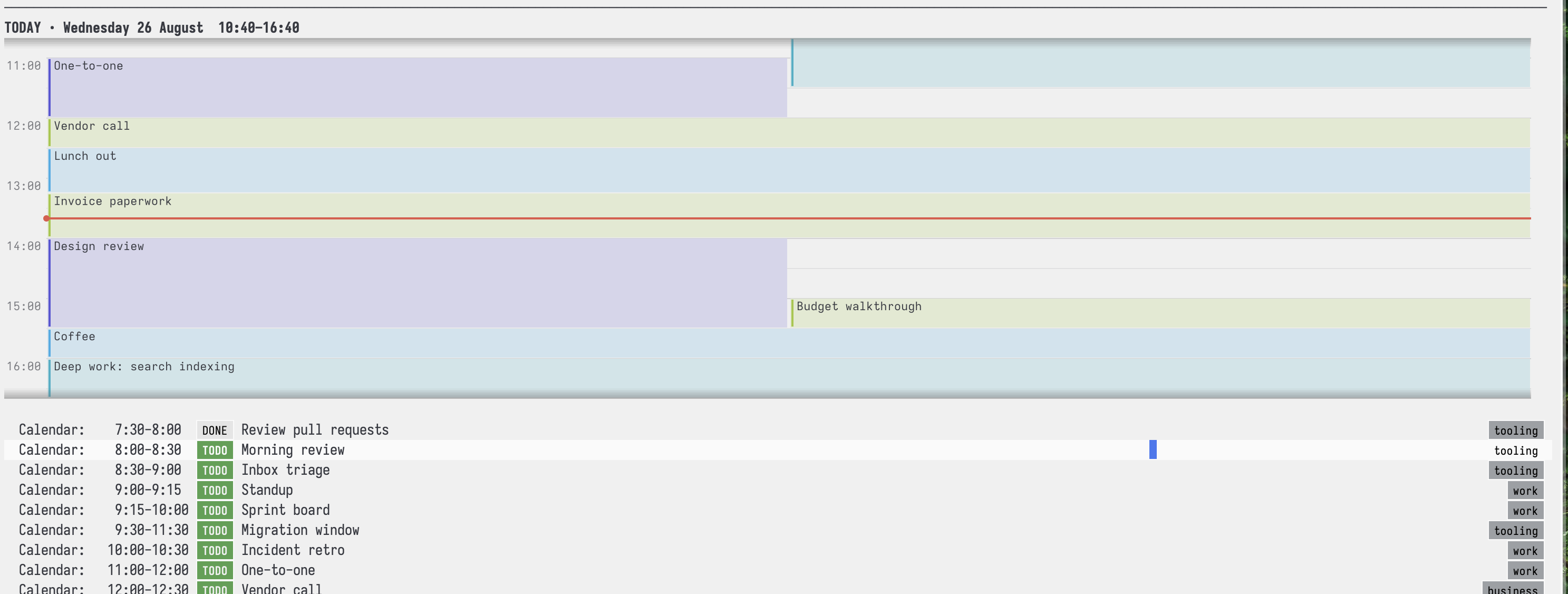
Create, move, resize, copy, rename, and remove calendar blocks with the mouse or keyboard. The same renderer can add a compact, read-only day view to an existing Org Agenda.
https://github.com/user-attachments/assets/2e1df1c3-d0f0-419d-b5f2-66d876753872
Screenshots
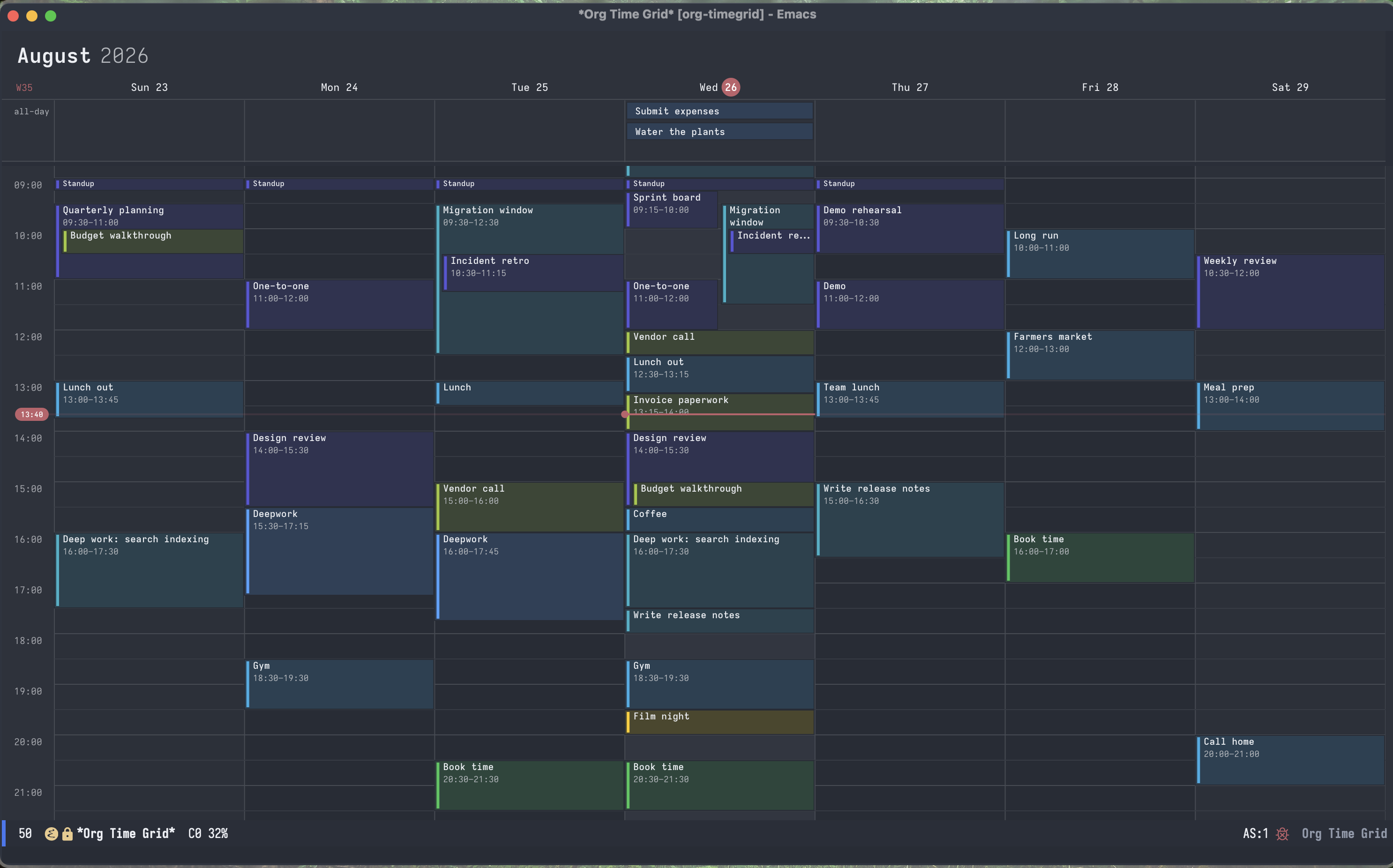
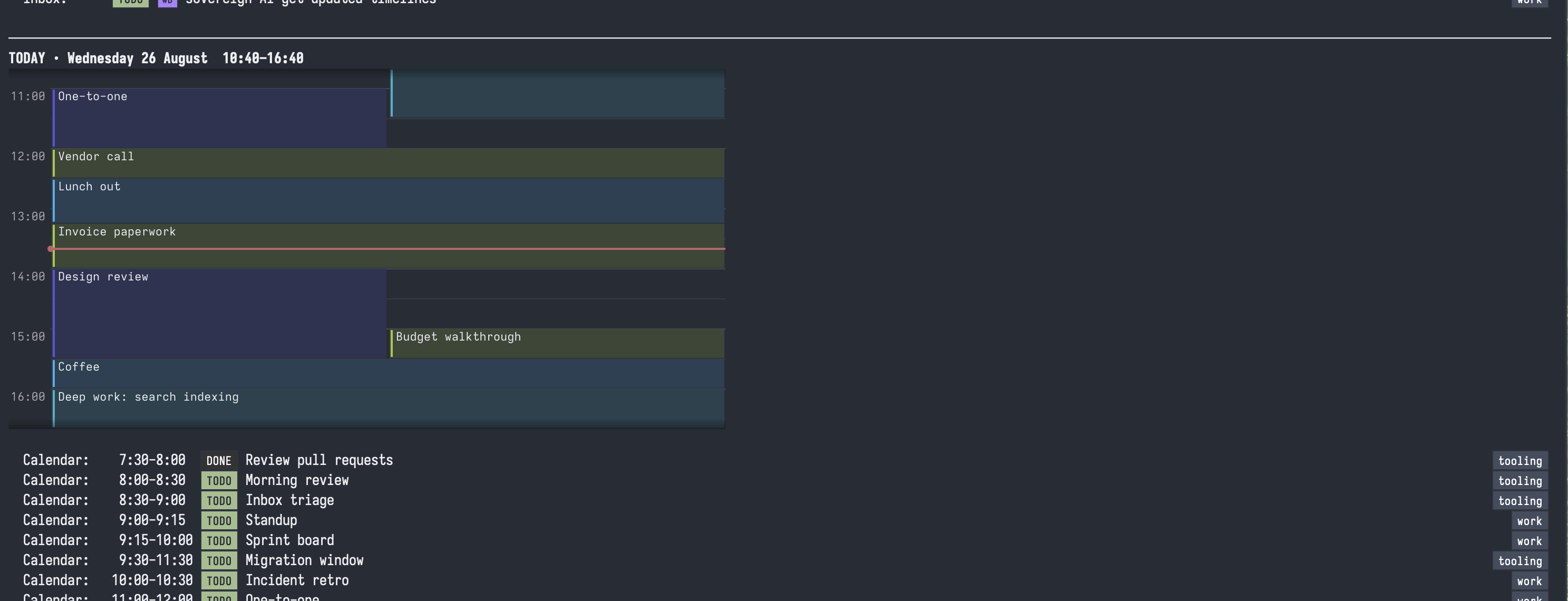
The palette comes from the theme, and is redrawn when the theme changes.
 |
 |
Agenda view:
 |
 |
Requirements and installation
You need Emacs 29.1 or later with SVG support and Org 9.6 or later. Check SVG
support with (image-type-available-p 'svg). There are no other dependencies.
org-timegrid is available on MELPA.
With MELPA configured, run M-x package-refresh-contents, then
M-x package-install RET org-timegrid RET, or use use-package:
(use-package org-timegrid
  :ensure t
  :commands (org-timegrid-week)
  :bind ("C-c c" . org-timegrid-week))
To install directly from GitHub with Elpaca:
(use-package org-timegrid
  :ensure (:host github :repo "Gleek/org-timegrid")
  :commands (org-timegrid-week)
  :bind ("C-c c" . org-timegrid-week))
For a manual install, put the .el files on load-path, evaluate (require 'org-timegrid-org), then run M-x org-timegrid-week.
Complete example configuration
This reads org-agenda-files, saves new entries in ~/org/calendar.org,
and adds the optional Agenda strip.
(use-package org-timegrid
  :ensure t
  :bind ("C-c a c" . org-timegrid-week)
  :init
  (setq org-timegrid-org-capture-file "~/org/calendar.org"
        org-timegrid-org-tag-color-alist
        '(("work" . indigo) ("personal" . green)))
  :config
  (require 'org-timegrid-org))

(use-package org-timegrid-agenda
  :ensure nil
  :after org-agenda
  :config
  (org-timegrid-agenda-mode 1))
The capture file is always included in calendar queries.
Android Emacs
See ANDROID.org for setup. Android uses a one-day view,
native scrolling, and long-press editing. Set
org-timegrid-android-display-keyboard to non-nil to enable the on-screen keyboard.
Resize handles and a short vibration provide feedback during touch editing.
https://github.com/user-attachments/assets/fc368b76-4b29-40d0-8a0a-536ac526f6e0
What appears on the calendar
The Org backend reads active timestamps with a start time. They may be plain
timestamps or values attached to SCHEDULED and DEADLINE.
* TODO Design review :work:
<2026-08-24 Mon 14:00-15:30>

* TODO Standup
SCHEDULED: <2026-08-24 Mon 09:00-09:15>

* Call the vendor
<2026-08-24 Mon 15:00>
A TODO keyword is optional. Timestamps without an end use
org-timegrid-default-duration-minutes (30 minutes).
Date-only entries appear in the all-day rail.
Org clocks appear along the day's right boundary. Finished clocks can be edited; stop running clocks first. Other inactive timestamps are hidden.
Repeaters
Repeaters are shown by default. Under a heading containing repeaters, a new timestamp ends the previous series before its date:
* Daily walk
<2026-10-01 Thu 17:00-17:30 +1d>
<2026-10-06 Tue 18:00-18:30 +1d>
Here, 5pm ends October 5; 6pm starts October 6. Move, resize and delete offer just this, this and future, or all within the selected series. Deletes keep inactive CANCELLED: boundaries; edits remain unsaved by default.
Disable history globally with (setq org-timegrid-org-repeater-history nil), per file with #+PROPERTY: TIMEGRID_REPEATER_HISTORY nil, or per heading with :TIMEGRID_REPEATER_HISTORY: nil (nearest heading → file → global). Set org-timegrid-org-show-repeaters to nil to hide repeaters entirely.
Limitations: Org Agenda ignores these cutoffs; independent series need separate headings; scoped moves stay on their date; hourly repeaters support all only.
Week view
Run M-x org-timegrid-week to open the week containing today.
Mouse
| Gesture | Action |
|---|---|
| Drag empty space | Create an entry for that range |
| Drag a block | Move it |
| Drag a block's top or bottom edge | Resize it |
| super-drag a block | Duplicate it as an independent entry |
| shift-drag a block | Add another time to its source entry |
| Click | Put the cursor there |
| Double-click a block | Visit its Org heading |
| Wheel | Scroll the day |
Mouse edits snap to org-timegrid-slot-minutes, which also sets the minimum
duration (15 minutes by default). Release commits a drag. Press C-g before
releasing to cancel it.
Nearby drag and resize positions are prepared between inputs to speed up
previews. Set org-timegrid-preview-prefetch to nil to disable this extra work.
Keyboard
Use C-SPC and movement to select a region. Without a region, edits apply to
the selected block. Copies use the Emacs kill ring.
| Key | Action |
|---|---|
C-n / C-p, up/down |
Move through times and blocks |
C-f / C-b, left/right |
Move through overlapping blocks and days |
C-v / M-v, SPC |
Move by one screen |
C-a / C-e |
Go to the first or last slot of the day |
C-l |
Center the view on the cursor |
C-x + / C-x C-- / C-x C-0 |
Zoom in, out, or reset |
n / p |
Select the next or previous block |
C-SPC, C-x C-x |
Set mark, or exchange point and mark |
RET |
Visit or create a block |
C-g |
Clear the region or hide the cursor |
M-down / M-up |
Move the selected block by one slot |
M-right / M-left |
Move the block by one day |
S-down / S-up |
Move the end time |
C-S-up / C-S-down |
Move the start time |
t |
Enter a new time or range |
e |
Rename the heading |
d, backspace |
Remove selected blocks |
M-w, then C-y |
Copy and paste as new entries |
C-w, then C-y |
Cut and paste |
M-w, then C-u C-y |
Paste into the original entries |
M-y |
Cycle through earlier copies |
C-/, C-x u |
Undo |
:, C-c C-q |
Change the selected entry's tags |
C-c C-t |
Change the selected entry's TODO state |
,, C-c , |
Set the selected entry's priority |
i |
Clock in to the selected entry |
O |
Clock out |
z, C-c C-z |
Add a note to the selected entry |
C-c C-x e |
Set the selected entry's effort |
C-c C-w |
Refile the selected entry |
$ |
Archive the selected entry |
b / f, M-b / M-f |
Shift by a day or week |
j / . |
Jump to a date or today |
g |
Reload the calendar |
q |
Quit |
C-s, C-r |
Search block titles |
Use org-timegrid-org-command to bind commands at the selected heading,
or org-timegrid-org-agenda-command for commands requiring a live Agenda entry:
(keymap-set org-timegrid-mode-map "i"
            (org-timegrid-org-command #'org-clock-in))
(keymap-set org-timegrid-mode-map ","
            (org-timegrid-org-agenda-command #'org-agenda-priority))
Org Agenda strip
Enable the optional integration after loading org-timegrid-agenda:
(require 'org-timegrid-agenda)
(org-timegrid-agenda-mode 1)
The strip shows the hours around now. Press RET to open the calendar.
(setq org-timegrid-agenda-insert-after "To Refile"
      org-timegrid-agenda-separator nil)
org-timegrid-agenda-insert-after names the block above the strip.
Set org-timegrid-agenda-separator to nil to omit its separator.
Org date picker
The j date picker highlights dates containing events. Set
org-timegrid-calendar-highlight-dates to nil to disable this, or customize
org-timegrid-calendar-event-face to change its appearance.
Colours
The grid, text, cursor, and backgrounds use the current Emacs theme. Images redraw after a theme change and respect buffer-local face remapping.
Map Org tags to the built-in macOS-style palette or any colour string Emacs accepts:
(setq org-timegrid-org-tag-color-alist
      '(("work" . indigo)
        ("business" . lime)
        ("reading" . green)
        ("errand" . cyan)
        ("urgent" . "#b4d74a")))
The named colours are blue, cyan, teal, indigo, purple, pink,
red, orange, yellow, lime, green, brown, and graphite. The first
mapped tag wins. Set org-timegrid-org-color-function to colour by TODO state,
priority, property, or file.
Configuration
Use M-x customize-group RET org-timegrid for the main options.
| Calendar option | Default | Meaning |
|---|---|---|
org-timegrid-days |
7 |
Consecutive days shown |
org-timegrid-range-alignment |
week |
Align to week start or center the target date |
org-timegrid-start-hour / org-timegrid-end-hour |
0 / 24 |
Hours shown |
org-timegrid-time-format |
12h |
12h or 24h labels |
org-timegrid-default-zoom |
0.7 |
Initial size; adjust with text-scale commands |
org-timegrid-slot-minutes |
15 |
Keyboard step and edit granularity |
org-timegrid-default-duration-minutes |
30 |
Duration when no end is given |
org-timegrid-default-color |
blue |
Colour for unmapped events |
org-timegrid-all-day-max-lanes |
5 |
Maximum visible all-day rows |
| Org option | Default | Meaning |
|---|---|---|
org-timegrid-org-files |
agenda |
Use Org agenda files, an explicit file list, or a function |
org-timegrid-org-capture-file |
calendar.org in user-emacs-directory |
Destination for new entries; always queried |
org-timegrid-org-capture-template |
title and time range | Structure and location of new entries |
org-timegrid-org-auto-save |
nil |
Save after calendar edits |
org-timegrid-org-show-done |
t |
Show completed entries |
org-timegrid-org-show-clocks |
t |
Show finished and running clocks |
org-timegrid-org-exclude-tags |
nil |
Tags to hide |
org-timegrid-org-tag-color-alist |
nil |
Tag-to-colour mapping |
| Agenda option | Default | Meaning |
|---|---|---|
org-timegrid-agenda-minutes-before / org-timegrid-agenda-minutes-after |
180 / 180 |
Window around now |
org-timegrid-agenda-insert-after |
"To Refile" |
Agenda block above the strip; nil places it at the top |
org-timegrid-agenda-separator |
t |
Separator after the strip |
| Android option | Default | Meaning |
|---|---|---|
org-timegrid-android-zoom |
1.5 |
Initial size on Android |
org-timegrid-android-display-keyboard |
nil |
Show the on-screen keyboard |
org-timegrid-android-haptic-duration |
60 |
Long-press vibration in milliseconds; nil disables it |
Creating a block offers existing headings. Choose one to add a timestamp,
or enter a new title to create a heading in org-timegrid-org-capture-file.
The default template is (:target file :template "* %{title}\n%{time-range}\n%?").
Its target may also be datetree, (headline "Name"), or
(olp "Parent" "Child"). Template headings are relative to that target. The
available substitutions are %{title}, %{time-range}, %{start}, %{end},
%{duration}, %<FORMAT> (using the selected start time), and %? for the
final point.
To keep calendar entries in a dedicated file organized by their start date:
(setq org-timegrid-org-capture-file "~/org/timegrid.org"
      org-timegrid-org-capture-template
      '(:target datetree
        :template "* %{title}\n%{time-range}\n%?"))
Hooks and custom backends
For Lisp configuration, org-timegrid-org-filter-function controls which
events appear, org-timegrid-org-entry-filter-function controls the headings
offered when creating a block, and org-timegrid-org-color-function controls
heading colours. Use C-h v to read their calling conventions.
org-timegrid-org-after-create-hook runs with point on a newly created Org
heading. Hook edits join the same undo step.
(add-hook 'org-timegrid-org-after-create-hook
          (lambda ()
            (org-set-property
             "CREATED_AT" (format-time-string "[%F %a %R]"))))
For other sources, pass a backend to org-timegrid-open.
See org-timegrid-backend-create for the backend API.
Development
Run the tests:
emacs -Q --batch -L . -l test/run-tests.el
Credits and status
The visual design and interaction borrow from macOS Calendar. org-timeblock
and timeblock supplied the idea of drawing an Emacs calendar with SVG, and
calfw and calfw-blocks were the original
inspiration toward a calendar view for Org.
AI usage
Even though I directed the UI, interaction design, package structure, public commands, and customization options. Opus 5 and GPT-5.6-Codex wrote all code in the current implementation. The SVG renderer was agent-written and then reworked through hands-on usability testing.