
GitDzreal93/clean-your-mac
GitDzreal93/clean-your-mac has 204 GitHub stars and 5 forks. GitHot measured 0 stars in 24 hours. Last checked 2026-11-18 10:26 UTC. Last push 2025-08-16.
Measured star growth
- in 24h
- 0
- in 7 days
- Collecting history
- in 15 days
- Collecting history
- in 1 month
- Collecting history
Net star changes over overlapping periods, not daily totals. Missing measurements are left blank. Stars measure attention, not software quality.
About
We welcome all forms of contributions! Please see CONTRIBUTING.md for details.
Developer ToolsREADME.md
Original


🌟 功能特色
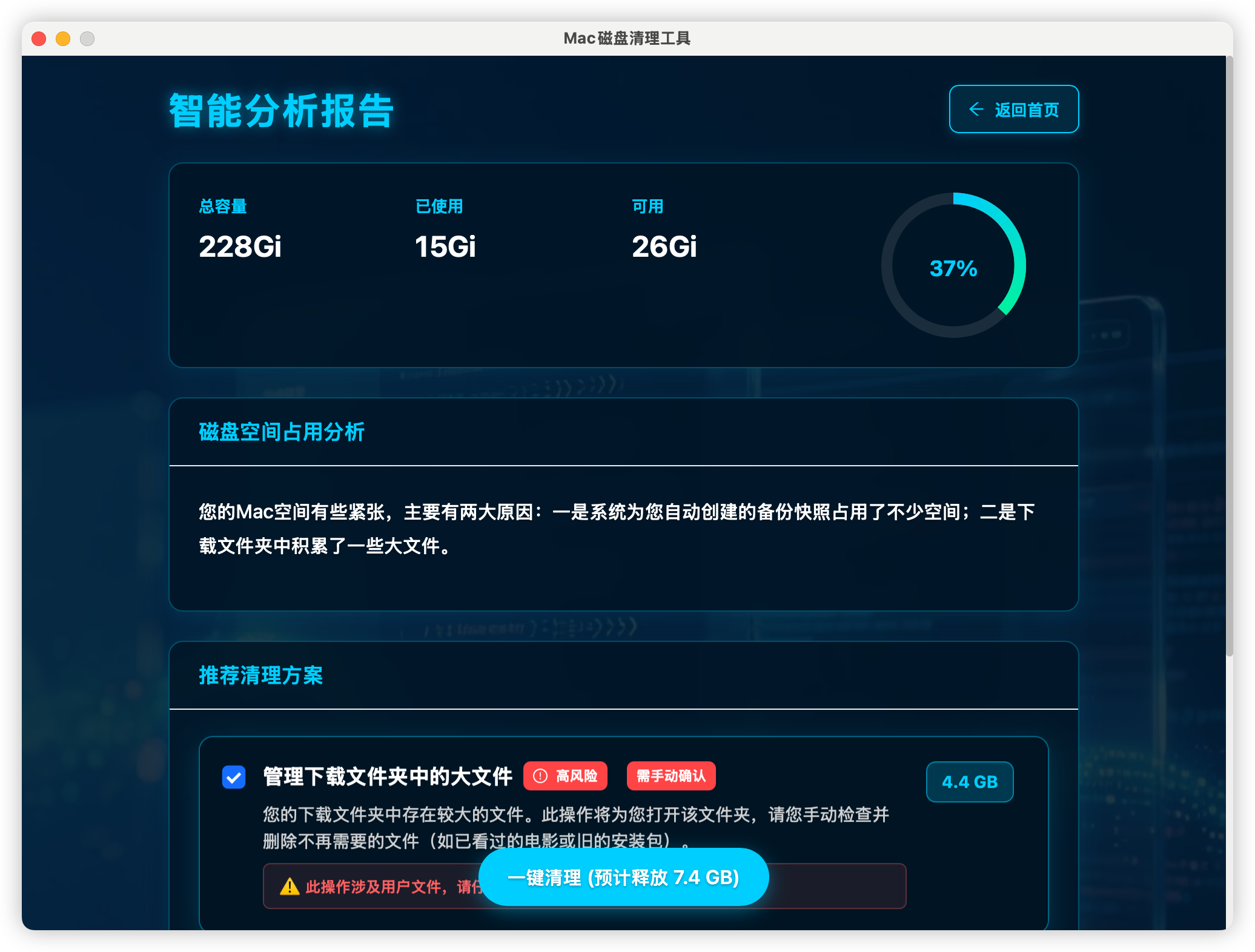
🤖 AI智能分析
- 智能磁盘分析: 基于AI的存储空间分析和优化建议
- 个性化清理方案: 根据使用习惯提供定制化清理策略
- 风险评估: 智能评估清理操作的安全性
📸 快照管理
- 智能快照分类: 自动区分系统更新快照和时间机器快照
- 安全清理: 使用
tmutil thinlocalsnapshots安全清理时间机器快照 - 空间预估: 准确估算快照占用的磁盘空间
🎯 精准清理
- 多类型文件清理: 缓存、日志、临时文件、下载文件等
- 白名单保护: 保护重要文件和应用不被误删
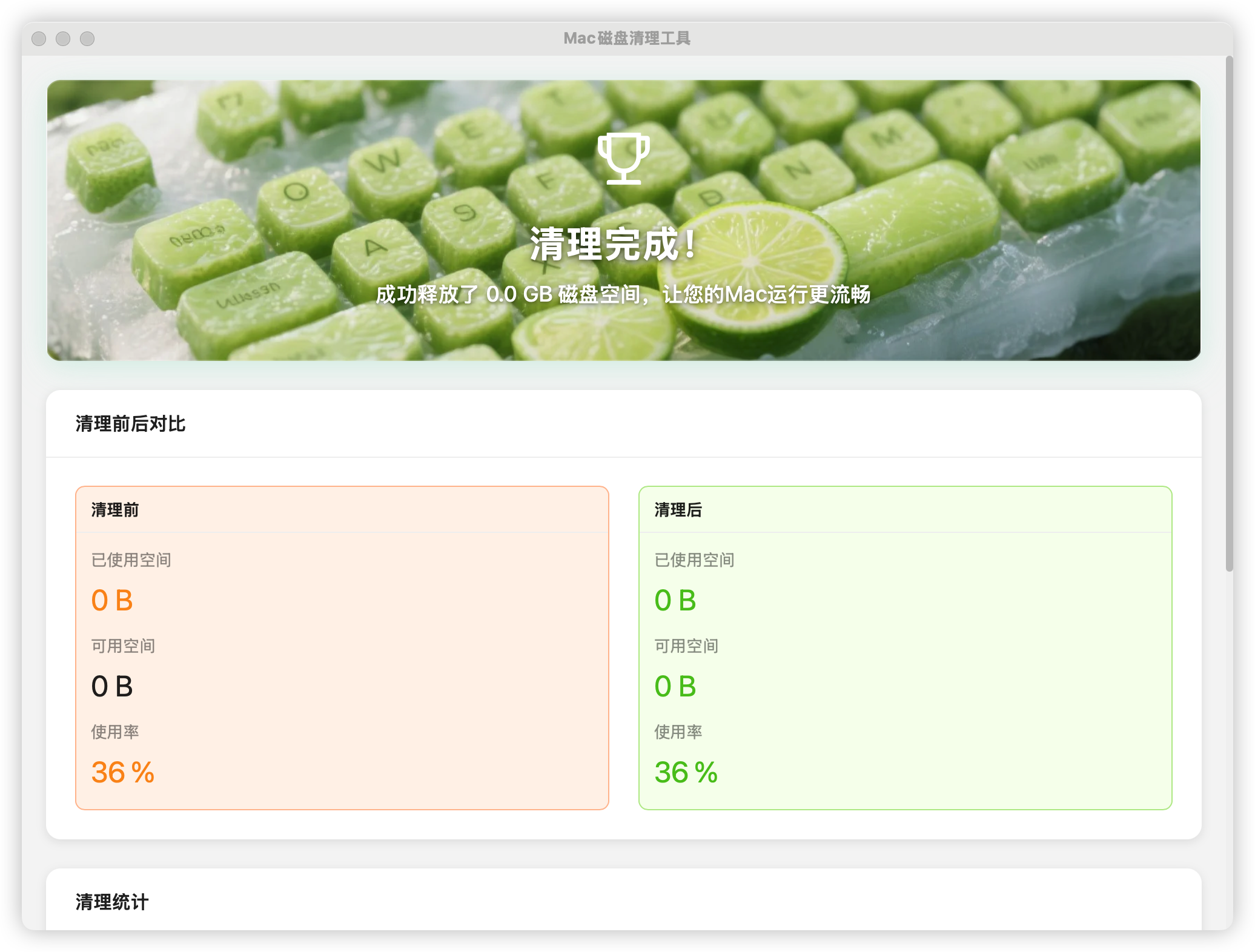
- 实时进度: 清理过程可视化,实时显示进度和结果
🎨 现代化界面
- 美观UI: 基于Ant Design的现代化界面设计
- 流畅体验: React + TypeScript构建的响应式用户界面
- 原生性能: Tauri框架提供的原生应用性能
🚀 快速开始
系统要求
- macOS 10.15 或更高版本
- 至少 100MB 可用磁盘空间
安装方式
方式一:下载预编译版本
- 前往 Releases 页面
- 下载最新版本的
.dmg文件 - 双击安装包并拖拽到应用程序文件夹
方式二:从源码构建
# 克隆仓库
git clone https://github.com/GitDzreal93/clean-your-mac.git
cd clean-your-mac

# 安装依赖
pnpm install

# 开发模式运行
pnpm run tauri dev

# 构建生产版本
pnpm run tauri build
🛠️ 技术栈
- 前端框架: React 19.1.0 + TypeScript
- UI组件库: Ant Design 5.27.0
- 桌面框架: Tauri 2.x
- 后端语言: Rust
- 状态管理: Zustand
- 图表库: ECharts
- 构建工具: Vite
📱 使用截图
主界面

AI分析报告
清理结果
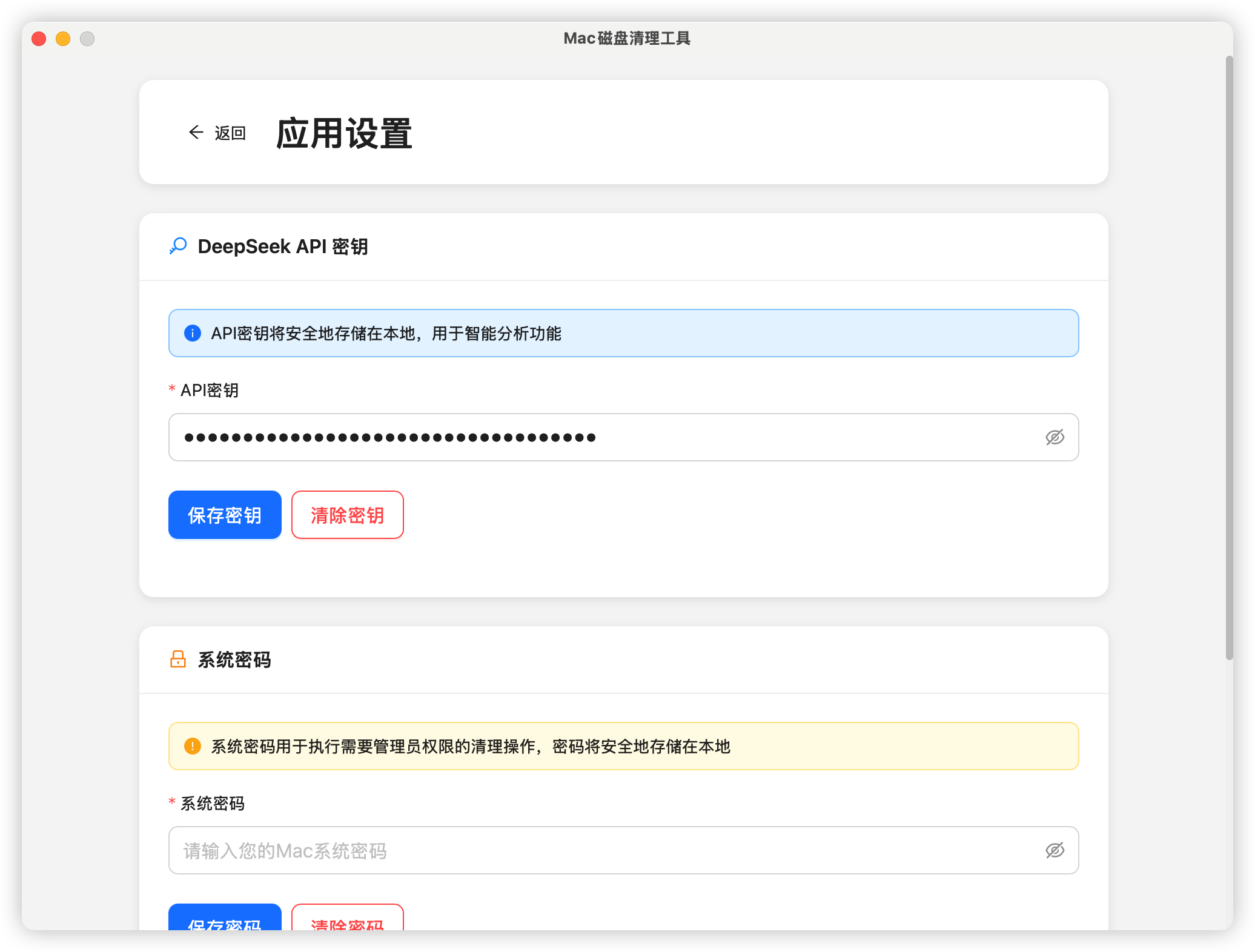
应用设置
🔧 开发指南
环境准备
# 安装 Rust
curl --proto '=https' --tlsv1.2 -sSf https://sh.rustup.rs | sh

# 安装 Node.js (推荐使用 nvm)
nvm install 18
nvm use 18

# 安装 pnpm
npm install -g pnpm

# 安装 Tauri CLI
cargo install tauri-cli
项目结构
clean-your-mac/
├── src/                    # React 前端源码
│   ├── components/         # React 组件
│   ├── services/          # 业务逻辑服务
│   ├── types/             # TypeScript 类型定义
│   └── assets/            # 静态资源
├── src-tauri/             # Tauri 后端源码
│   ├── src/               # Rust 源码
│   ├── icons/             # 应用图标
│   └── Cargo.toml         # Rust 依赖配置
├── public/                # 公共静态文件
└── dist/                  # 构建输出目录
开发命令
# 启动开发服务器
pnpm run tauri dev

# 构建前端
pnpm run build

# 构建应用
pnpm run tauri build

# 类型检查
pnpm run type-check
🤝 贡献指南
我们欢迎所有形式的贡献!请查看 CONTRIBUTING.md 了解详细信息。
贡献方式
- Fork 本仓库
- 创建特性分支 (
git checkout -b feature/AmazingFeature) - 提交更改 (
git commit -m 'Add some AmazingFeature') - 推送到分支 (
git push origin feature/AmazingFeature) - 创建 Pull Request
💖 支持
如果这个项目对你有帮助,请考虑支持一下!你的支持是我们持续改进的动力。


或者扫描二维码:

微信赞赏:

📄 许可证
本项目采用 MIT 许可证 - 查看 LICENSE 文件了解详情。
🙏 致谢
- Tauri - 跨平台桌面应用框架
- React - 用户界面库
- Ant Design - 企业级UI设计语言
- Rust - 系统编程语言
📞 联系我们
- 项目主页: https://github.com/GitDzreal93/clean-your-mac
- 问题反馈: Issues
- 功能建议: Discussions
如果这个项目对你有帮助,请给我们一个 ⭐️
English
🌟 Features
🤖 AI-Powered Analysis
- Intelligent Disk Analysis: AI-driven storage space analysis and optimization recommendations
- Personalized Cleanup Plans: Customized cleaning strategies based on usage patterns
- Risk Assessment: Smart evaluation of cleanup operation safety
📸 Snapshot Management
- Smart Snapshot Classification: Automatically distinguish between system update snapshots and Time Machine snapshots
- Safe Cleanup: Use
tmutil thinlocalsnapshotsfor secure Time Machine snapshot cleanup - Space Estimation: Accurate estimation of disk space occupied by snapshots
🎯 Precise Cleaning
- Multi-type File Cleanup: Cache, logs, temporary files, downloads, and more
- Whitelist Protection: Protect important files and applications from accidental deletion
- Real-time Progress: Visualized cleanup process with real-time progress and results
🎨 Modern Interface
- Beautiful UI: Modern interface design based on Ant Design
- Smooth Experience: Responsive user interface built with React + TypeScript
- Native Performance: Native application performance provided by Tauri framework
🚀 Quick Start
System Requirements
- macOS 10.15 or later
- At least 100MB available disk space
Installation Methods
Method 1: Download Pre-compiled Version
- Go to Releases page
- Download the latest
.dmgfile - Double-click the installer and drag to Applications folder
Method 2: Build from Source
# Clone repository
git clone https://github.com/GitDzreal93/clean-your-mac.git
cd clean-your-mac

# Install dependencies
pnpm install

# Run in development mode
pnpm run tauri dev

# Build for production
pnpm run tauri build
🛠️ Tech Stack
- Frontend Framework: React 19.1.0 + TypeScript
- UI Component Library: Ant Design 5.27.0
- Desktop Framework: Tauri 2.x
- Backend Language: Rust
- State Management: Zustand
- Chart Library: ECharts
- Build Tool: Vite
📱 Screenshots
Home Interface
AI Analysis Report
Cleanup Results
Application Settings
🔧 Development Guide
Environment Setup
# Install Rust
curl --proto '=https' --tlsv1.2 -sSf https://sh.rustup.rs | sh

# Install Node.js (recommended using nvm)
nvm install 18
nvm use 18

# Install pnpm
npm install -g pnpm

# Install Tauri CLI
cargo install tauri-cli
Project Structure
clean-your-mac/
├── src/                    # React frontend source code
│   ├── components/         # React components
│   ├── services/          # Business logic services
│   ├── types/             # TypeScript type definitions
│   └── assets/            # Static resources
├── src-tauri/             # Tauri backend source code
│   ├── src/               # Rust source code
│   ├── icons/             # Application icons
│   └── Cargo.toml         # Rust dependency configuration
├── public/                # Public static files
└── dist/                  # Build output directory
Development Commands
# Start development server
pnpm run tauri dev

# Build frontend
pnpm run build

# Build application
pnpm run tauri build

# Type checking
pnpm run type-check
🤝 Contributing
We welcome all forms of contributions! Please see CONTRIBUTING.md for details.
How to Contribute
- Fork this repository
- Create a feature branch (
git checkout -b feature/AmazingFeature) - Commit your changes (
git commit -m 'Add some AmazingFeature') - Push to the branch (
git push origin feature/AmazingFeature) - Create a Pull Request
☕ Support
If you find this project helpful, consider buying me a coffee! Your support helps keep this project alive and growing.
Or scan the QR code:
📄 License
This project is licensed under the MIT License - see the LICENSE file for details.
🙏 Acknowledgments
- Tauri - Cross-platform desktop application framework
- React - User interface library
- Ant Design - Enterprise-class UI design language
- Rust - Systems programming language
📞 Contact Us
- Project Homepage: https://github.com/GitDzreal93/clean-your-mac
- Bug Reports: Issues
- Feature Requests: Discussions
If this project helps you, please give us a ⭐️
Made with ❤️ for Mac users worldwide