
GaoSSR/Kiri
GaoSSR/Kiri has 444 GitHub stars and 4 forks. GitHot measured 0 stars in 24 hours. Last checked 2026-11-09 12:22 UTC. Last push 2026-08-14.
See through the fog of local development ports.
Measured star growth
- in 24h
- 0
- in 7 days
- Update delayed
- in 15 days
- Update delayed
- in 1 month
- Update delayed
Net star changes over overlapping periods, not daily totals. Missing measurements are left blank. Stars measure attention, not software quality.
README.md
OriginalEnglish | 简体中文 | 日本語


High-performance local development port management CLI, powered by Rust





Kiri Overview
Kiri is a high-performance CLI for managing local development ports, powered by Rust. It helps you quickly see which local services are running, which ports they use, and handle the process behind a port when needed.
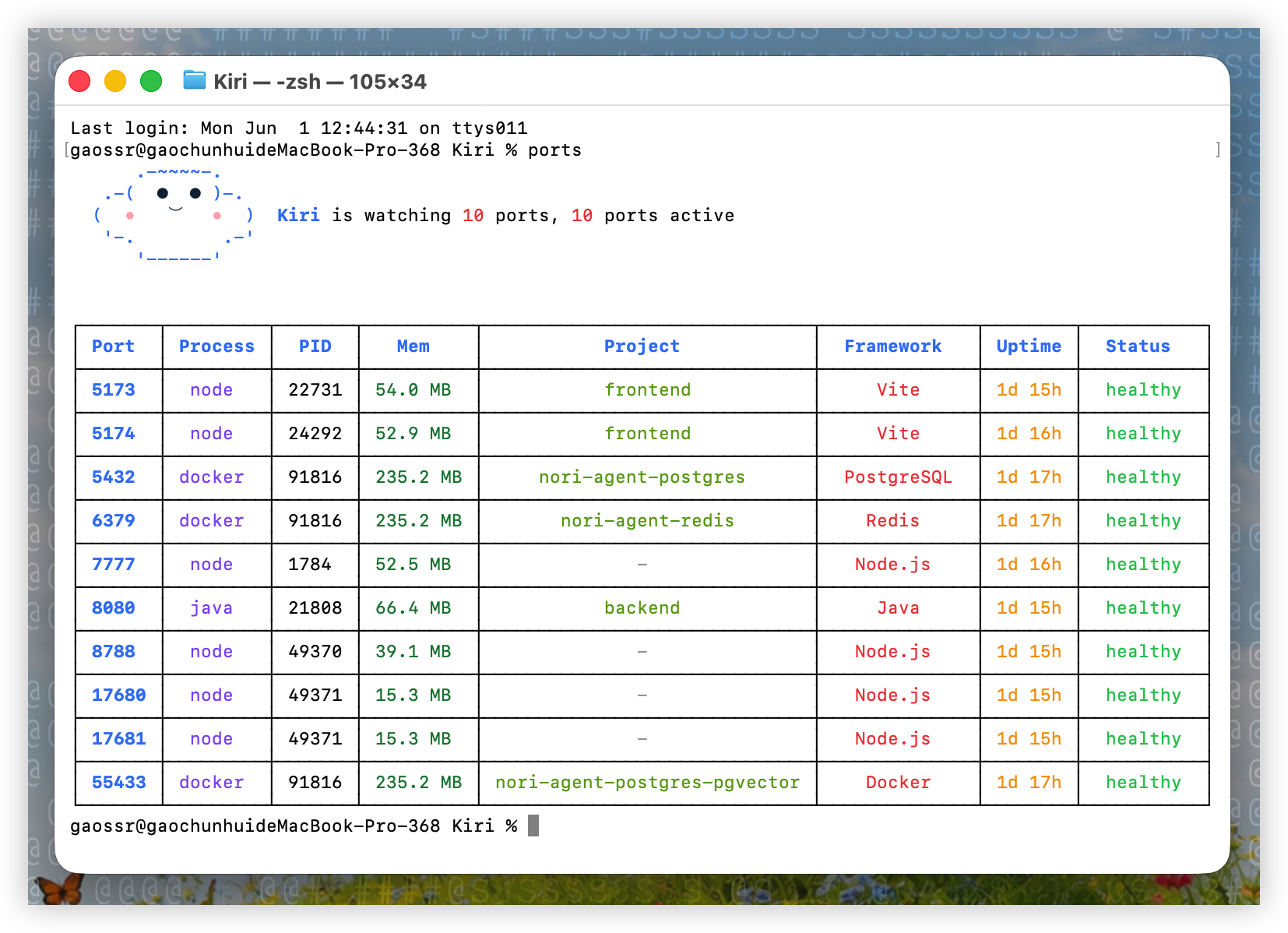
Run ports to see a focused local development service overview: port, process, PID, memory usage, project name, detected framework, uptime, and health status.
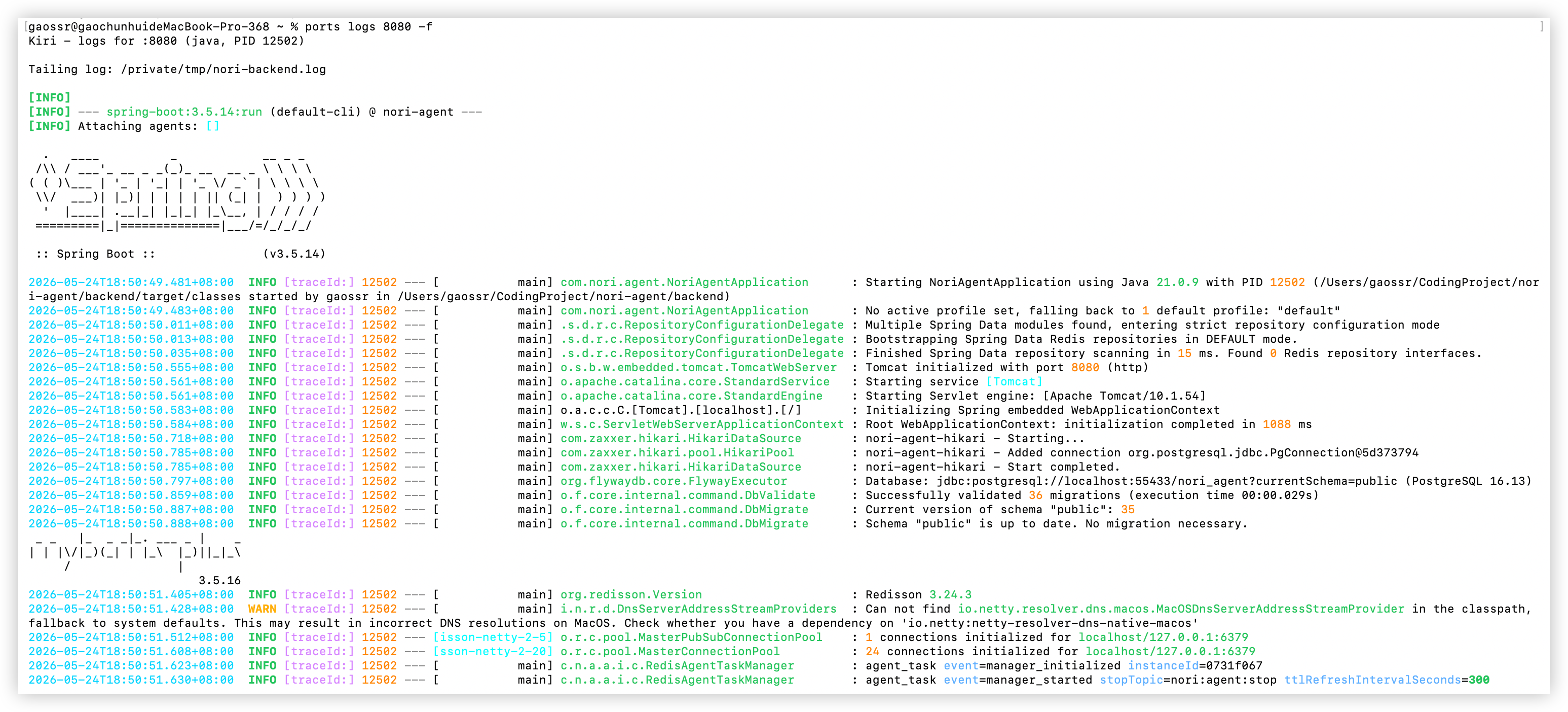
Run ports logs <port|pid> -f to follow the matched process logs. Kiri keeps dense framework output readable with ANSI colors for timestamps, log levels, process IDs, trace IDs, source classes, HTTP values, and structured fields.
Meet Kiri
The default ports terminal view opens with a cute Kiri ASCII logo before the port table:
      .-~~~~-.
   .-(  ●  ● )-.
  (  •   ⌣   •  )  Kiri is watching 5 ports, 5 ports active
   '-.        .-'
      '------'
Core Usage
- View local development services and their ports:
ports - View developer background processes:
ports psshows development-related processes that may not listen on a port, such as MCP Server processes started by Codex, Claude Code, or other AI coding tools. Use it when you want to see memory usage or find long-running tool processes outside the port table. - Quickly kill the process / PID behind a port:
ports kill <port> - Follow logs for the process listening on a port:
ports logs <port|pid> -f - View all ports:
ports --all
Install
Kiri ships prebuilt release artifacts for MacOS, Linux x64, and Windows x64. Install with npm, Homebrew, or the GitHub Release install scripts:
# npm
npm install -g @gaossr/kiri@latest

# Recommended on MacOS with Homebrew
brew install gaossr/tap/kiri

# MacOS / Linux install script
curl -fsSL https://raw.githubusercontent.com/GaoSSR/Kiri/main/scripts/install.sh | bash
Windows users can install with PowerShell:
irm https://raw.githubusercontent.com/GaoSSR/Kiri/main/scripts/install.ps1 | iex
On MacOS, Homebrew is the recommended install method. npm and the install scripts use prebuilt native binaries and do not compile Rust locally.
Commands
ports                       # view local development services and their ports
ports --all                 # show all listening ports
ports <port>                # show details for one port
ports ps                    # show developer background processes, including MCP Server processes that do not listen on a port
ports ps --all              # show all processes
ports logs <port|pid>          # show recent logs and exit
ports logs <port|pid> -f       # follow logs for the process listening on a port
ports logs 3000 --lines 10     # show last 10 lines and exit
ports logs 3000 -f --lines 10  # show last 10 lines and keep following
ports logs 3000 --err          # stderr only
ports clean                 # ask before cleaning orphaned/zombie dev processes
ports watch                 # stream port start/stop events
ports kill 3000             # quickly kill the process / PID behind a port
ports kill 3000-3010        # terminate listeners across a range
ports kill --force 3000     # use SIGKILL instead of SIGTERM
Status Labels
Kiri uses these status labels in the ports table:
healthy: the process is running and still has a normal parent process.orphaned: the process is still alive and may still be listening on a port, but the parent process that started it has already exited. This is an orphan process, not a zombie process.zombie: the process has already exited, but the operating system still has a leftover process record that has not been reaped by its parent.
In practice, orphaned means "this process is still running, but its original launcher is gone." That can happen after closing a terminal, IDE task, script runner, Codex session, or Claude Code session while a child server process keeps running.
Platform Support
| Platform | Status |
|---|---|
| MacOS arm64/x64 | Supported |
| Linux x64 | Supported |
| Windows x64 | Supported |
| Linux arm64 / Windows arm64 | Planned |
On MacOS, Kiri uses lsof, ps, tail, MacOS log commands, and optional Docker metadata. Linux uses ss, ps, /proc, and optional Docker metadata. Windows uses PowerShell/CIM and Get-NetTCPConnection; process working directories are best-effort from executable paths. Docker is optional; if Docker is unavailable or no containers are running, Kiri continues without Docker mappings.
ports intentionally renders the Kiri ASCII logo and ANSI terminal output by default. ports logs adds ANSI colors for common development log formats, including Java, Python, Go, Node.js, logfmt, and JSON logs. For services started through a terminal, a stable file-backed log such as .dev-logs/service.log lets ports logs <port|pid> -f follow output from another process.
The default ports table stays focused on developer ports and includes Mem, so day-to-day checks do not require the broader ports ps process view.
Development
For maintainers and contributors working from source:
cargo fmt
cargo test
cargo clippy --all-targets -- -D warnings
cargo build --release --bin ports
scripts/perf-smoke.sh
scripts/verify-release.sh v0.1.24
cargo run --bin ports
cargo run --bin ports -- --all
cargo run --bin ports -- ps
Project Resources
Acknowledgements
Kiri was inspired by port-whisperer, especially the idea of making local development ports easier to see, understand, and clean up.
Explore related projects
codecrafters-io/build-your-own-x
Master programming by recreating your favorite technologies from scratch.
561,382 starspublic-apis/public-apis
A collective list of free APIs
497,660 starsmorluto/rea
Reverse engineer anything with agents, from app behavior down to native binaries.
447,297 starsopenclaw/openclaw
The AI that really does things. Any OS. Any Platform. The lobster way. 🦞
394,257 stars