
GaProgMan/OwaspHeaders.Core
GaProgMan/OwaspHeaders.Core has 316 GitHub stars and 38 forks. GitHot measured 0 stars in 24 hours. Last checked 2026-11-19 02:21 UTC. Last push 2026-11-13.
Measured star growth
- in 24h
- 0
- in 7 days
- Collecting history
- in 15 days
- Collecting history
- in 1 month
- Collecting history
Net star changes over overlapping periods, not daily totals. Missing measurements are left blank. Stars measure attention, not software quality.
About
Inject OWASP recommended HTTP Headers for increased security in a single line
SecurityREADME.md
OriginalOwaspHeaders.Core
An ASP.NET Core middleware designed to increase web application security by adopting the OWASP Secure Headers project recommended HTTP headers and values.
| Build Status | Release Status | License used | OpenSSF |
|---|---|---|---|
 |
 |
 |
Please note: this middleware DOES NOT SUPPORT BLAZOR OR WEBASSEMBLY APPLICATIONS. This is because setting up secure HTTP headers in a WebAssembly context is a non-trivial task.
[!IMPORTANT] Version 11 is a major release with breaking changes. If you are upgrading from version 10, read Upgrading to version 11 first: it lists the code to change, what to expect on the first build, and how to opt out of the agent skill install.
[!WARNING] From version 11, building a project which references OwaspHeaders.Core writes files into your repository. It installs an agent skill for coding agents into
.agents/skills/owaspheaders-core/and.claude/skills/owaspheaders-core/, hidden from git by a.gitignore. It is skipped on CI, and<OwaspHeadersCoreAgentSkill>false</OwaspHeadersCoreAgentSkill>turns it off. See Agent Skill for what is written, why, and when it is not.
Tools Required to Build This Repo
- .NET SDKs vLatest
- 10.0
- 11.0
- an IDE (VS Code, Rider, or Visual Studio)
That's it. Code formatting is checked with dotnet format, which ships as part of the SDK, so there is no separate tool to install.
Security & Support
Please see the SECURITY file in the project's repo for the latest details.
Documentation
The latest documentation for OwaspHeaders.Core can be found at https://gaprogman.github.io/OwaspHeaders.Core/.
Attestations
As of PR 148, OwaspHeaders.Core uses the GitHub provided process for creating attestations per build. This document talks through how to verify those attestations using the gh CLI.
See the Attestations page of the documentation to read about how you can verify the attestations for builds from 9.5.0 onward.
Pull Requests

Pull requests are welcome, but please take a moment to read the Code of Conduct before submitting them or commenting on any work in this repo.
We have comprehensive documentation for contributing to this project which you are encouraged to reach. This documentation can be found at: https://gaprogman.github.io/OwaspHeaders.Core/Contributing/.
Getting Started
Assuming that you have an ASP .NET Core project, add the NuGet package:
dotnet add package OwaspHeaders.Core
Alter the program.cs file to include the following:
app.UseSecureHeadersMiddleware();
This will add a number of default HTTP headers to all responses from your server component.
To choose the headers yourself, pass a configure delegate instead:
app.UseSecureHeadersMiddleware(opt =>
{
    opt.UseRecommendedDefaults();
    opt.SetUrlsToIgnore(["/health"]);
});
The configuration is validated as your application starts, so a mistake stops the host from starting rather than surfacing on the first request.
The following is an example of the response headers from version 10.5.0 (taken on September 27th, 2026)
strict-transport-security: max-age=31536000;includeSubDomains
x-frame-options: deny
x-content-type-options: nosniff
content-security-policy: script-src 'self';object-src 'self';block-all-mixed-content;upgrade-insecure-requests;
x-permitted-cross-domain-policies: none
referrer-policy: no-referrer
cross-origin-resource-policy: same-origin
cache-control: no-cache, no-store, max-age=0
cross-origin-opener-policy: same-origin
cross-origin-embedder-policy: require-corp
x-xss-protection: 0
Please note: The above example contains only the headers added by the Middleware.
Secure Headers
The SecureHeadersMiddleware is used to inject the HTTP headers recommended by the OWASP Secure Headers project into all responses generated by the ASP.NET Core pipeline.
Listing and commenting on the default values that this middleware provides is out of scope for this readme—but can be found in the official documentation—. Please note that you will need to read through the above link to the Secure Headers Project in order to understand what these headers do, and the affect their presence will have on your applications when running in a web browser.
Configuration
This Middleware uses the builder pattern to set up the header information, which is a compile time dependency.
In your Program.cs file:
This will use the default configuration for the OwaspHeaders.Core middleware. The method (found in /src/Extensions/SecureHeadersMiddlewareExtensions.cs) looks like this:
Custom Configuration
In order to use a custom configuration, follow the same pattern (perhaps creating your own extension method to encapsulate it):
public static void CustomConfiguration(SecureHeadersBuilder opt)
{
    opt.UseHsts(1200, false);
    opt.UseDefaultContentSecurityPolicy();
    opt.UsePermittedCrossDomainPolicies(XPermittedCrossDomainOptionValue.masterOnly);
    opt.UseReferrerPolicy(ReferrerPolicyOptions.sameOrigin);
}
Then consume it in the following manner:
app.UseSecureHeadersMiddleware(CustomSecureHeaderExtensions.CustomConfiguration);
Naming the method rather than inlining the lambda means a test can assert the configuration is valid without starting your application:
SecureHeadersBuilder.BuildAndValidate(CustomSecureHeaderExtensions.CustomConfiguration);
Testing the Middleware
An example ASP .NET Core application - with the middleware installed - is provided as part of this repo (see the code in the OwaspHeaders.Core.Example directory). As such, you can run this example application to see the middleware in use via a provided OpenAPI endpoint - located at /swagger.
Or you could add the middleware to an existing application and run through the following Run the application, request one of the pages that it serves and view the headers for the page.
This can be done in Google Chrome, using the Dev tools and checking the network tab.
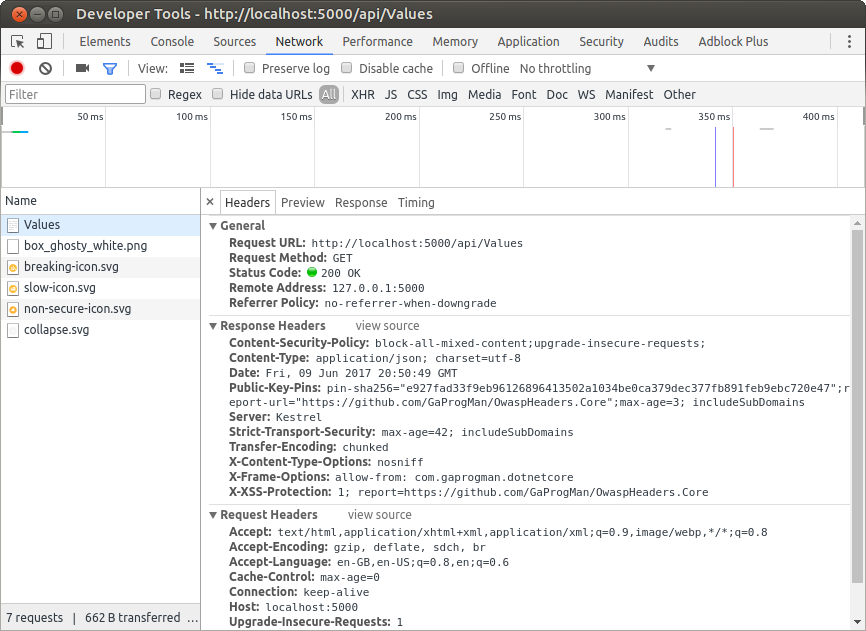
Shown above in the Response Headers section of the Values response.
Server Header: A Warning
The default configuration for this middleware removes the X-Powered-By header, as this can help malicious users to use targeted attacks for specific server infrastructure. However, since the Server header is added by the reverse proxy used when hosting an ASP .NET Core application, removing this header is out of scope for this middleware.
In order to remove this header, a web.config file is required, and the following should be added to it:
<?xml version="1.0" encoding="UTF-8"?>
<configuration>
    <system.webServer>
        <security>
            <requestFiltering removeServerHeader="true" />
        </security>
    </system.webServer>
</configuration>
The above XML is taken from this answer on ServerFault.
The web.config file will need to be copied to the server when the application is deployed.