
Fortiphyd/GRFICSv2
Fortiphyd/GRFICSv2 has 651 GitHub stars and 117 forks. GitHot measured 0 stars in 24 hours and +4 in 7 days. Last checked 2026-11-09 22:13 UTC. Last push 2025-10-29.
Version 2 of the Graphical Realism Framework for Industrial Control Simulation (GRFICS)
Measured star growth
- in 24h
- 0
- in 7 days
- +4
- in 15 days
- Update delayed
- in 1 month
- Update delayed
Net star changes over overlapping periods, not daily totals. Missing measurements are left blank. Stars measure attention, not software quality.
README.md
OriginalGRFICSv2
Version 2 of the Graphical Realism Framework for Industrial Control Simulation (GRFICS)
NOTE - Version 3 is NOW AVAILABLE at https://github.com/Fortiphyd/GRFICSv3 Version 2 will continue with only limited support
Overview
This version of GRFICS is organized as 5 VirtualBox VMs (a 3D simulation, a soft PLC, an HMI, a pfsense firewall, and a workstation) communicating with each other on host-only virtual networks. For a more detailed explanation of the entire framework and some background information on ICS networks, please refer to the workshop paper located at https://www.usenix.org/conference/ase18/presentation/formby
A video series walking through VM setup and example attacks is available on the Fortiphyd YouTube channel at https://www.youtube.com/playlist?list=PL2RSrzaDx0R670yPlYPqM51guk3bQjFG5
A commercial version of GRFICS with more scenarios, advanced features, and streamlined usability is being offered by Fortiphyd Logic. Find out more at https://www.fortiphyd.com/training
Simulation
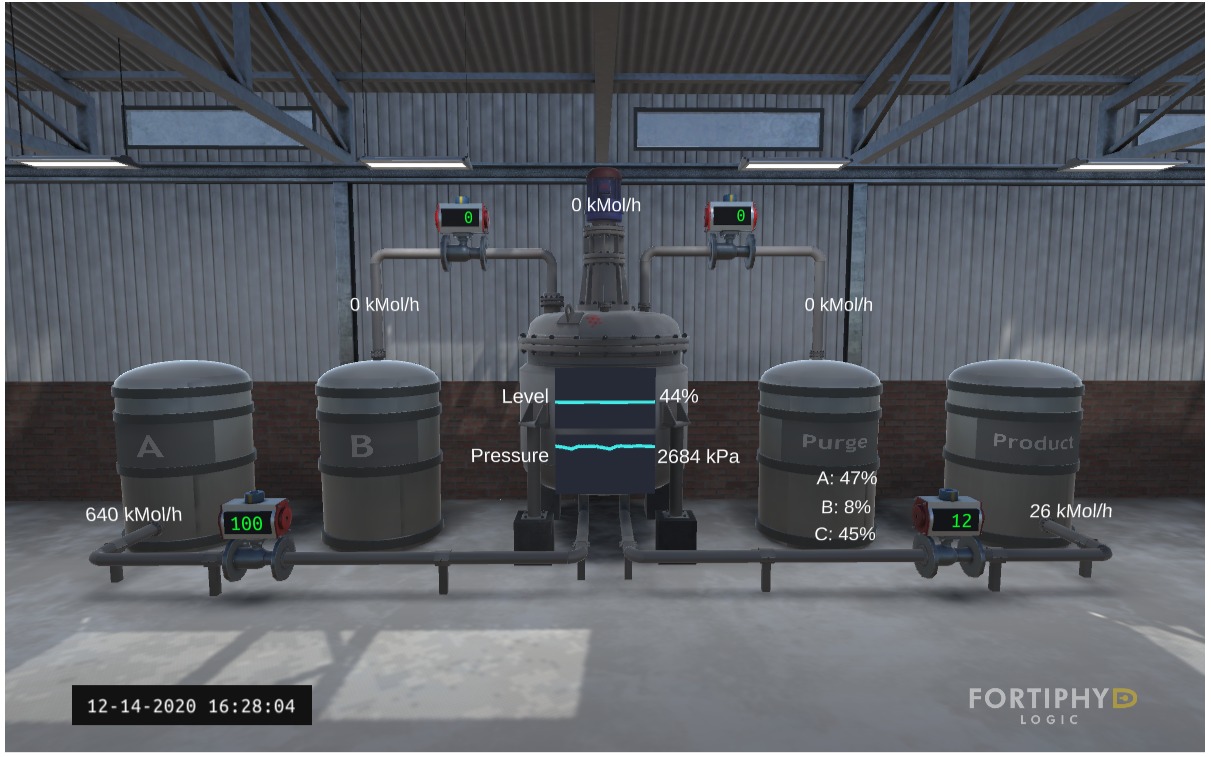
The simulation VM (named ChemicalPlant) runs a realistic simulation of a chemical process reaction that is controlled and monitored by simulated remote IO devices through a simple JSON API. These remote IO devices are then monitored and controlled by the PLC VM using the Modbus protocol. This VM is located in the ICS network subnet (192.168.95.0/24) with the IP addresses 192.168.95.10-192.168.95.15
Programmable Logic Controller
The PLC VM (named plc_2) is a modified version of OpenPLC (https://github.com/thiagoralves/OpenPLC_v2) that uses an older version of the libmodbus library with known buffer overflow vulnerabilities. This VM is located in the ICS network subnet (192.168.95.0/24) at 192.168.95.2
Human Machine Interface
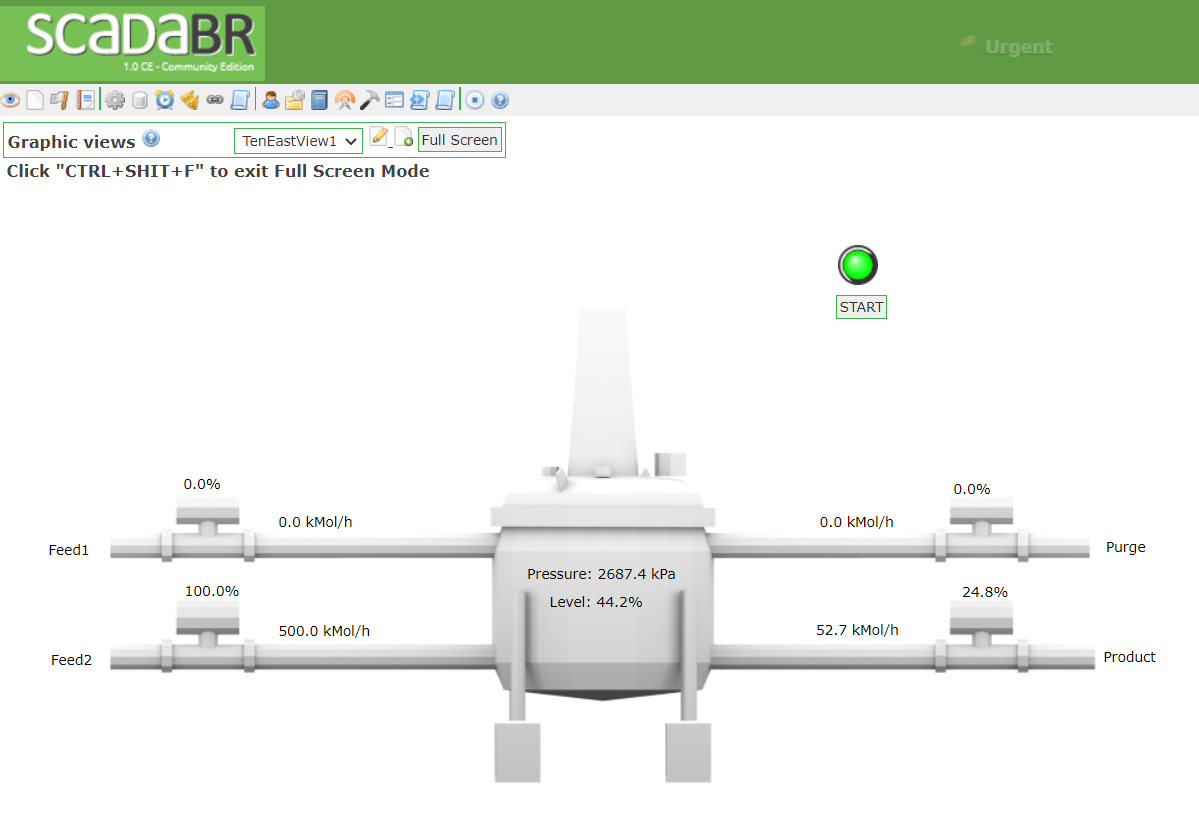
The HMI VM (named ScadaBR) primarily contains an operator HMI created using the free ScadaBR software. This HMI is used to monitor the process measurements being collected by the PLC and send commands to the PLC. This VM is located in the DMZ network subnet (192.168.90.0/24) at 192.168.90.5
PfSense Firewall/Router
The firewall VM (named pfSense) provides routing and firewall features between the DMZ and ICS network. The WAN interface is on the DMZ subnet (192.168.90.0/24) at 192.168.90.100 and the LAN interface is on the ICS subnet (192.168.95.0/24) at 192.168.95.1
Engineering Workstation
The workstation VM is an Ubuntu 16.04 machine with software used for programming the OpenPLC. The workstation is located in the ICS network (192.168.95.0/24) at 192.168.95.5.
Installing from scratch
Download and install the latest version of VirtualBox.
Create a host-only interface in VirtualBox.
Download an image for both the desktop and server versions of 64-bit Ubuntu 16.04.
See instructions for each VM in corresponding directories.
Pre-built VMs
Download VMs:
- Simulation VM - MD5=02af6c2502ecaab6c6d138deb560b27d
- HMI VM - MD5=20ef1ff9e36f80ea3e257806bec09274
- pfsense VM - MD5=521745220cd2f6e268eb188934d6b0ad
- PLC VM - MD5=0fbb1254fb166466496f2a48780ae774
- Workstation - MD5=68c21a9057d68c637c358b05f1f816e8
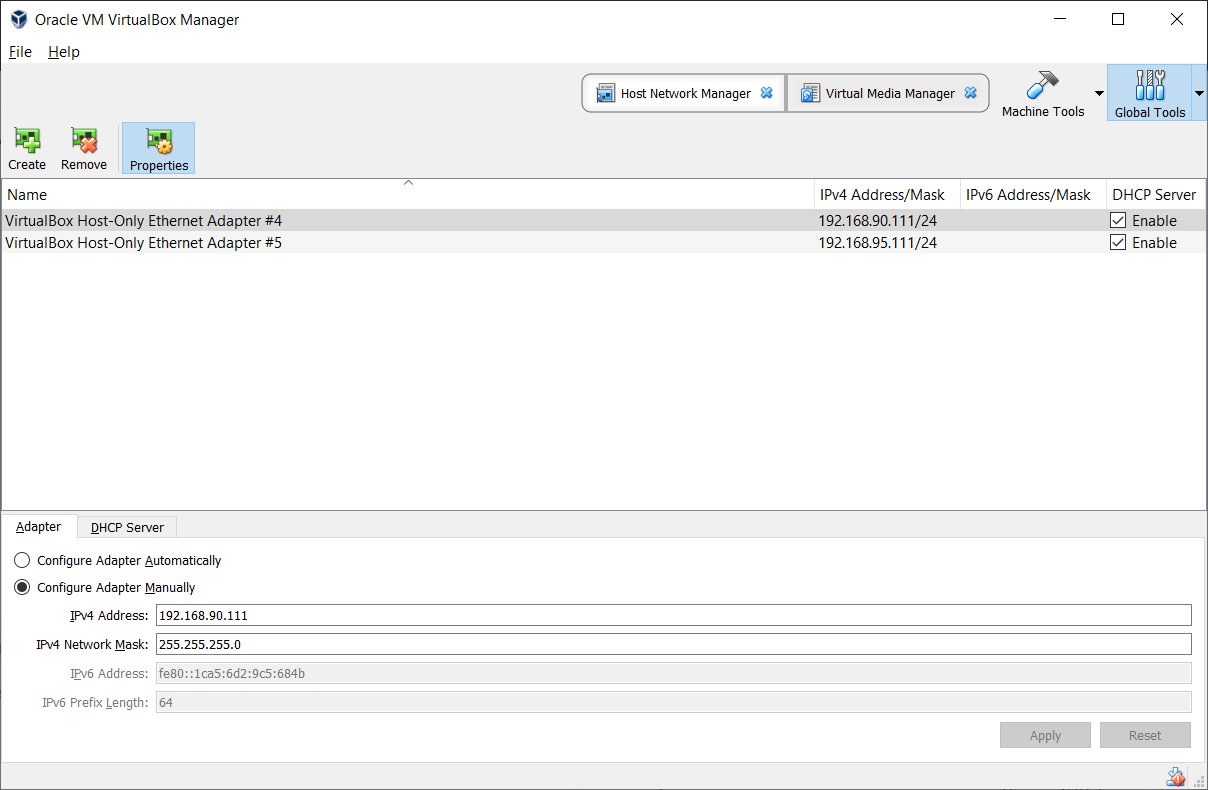
Add 2 host-only adapters in VirtualBox:
- VirtualBox Host-Only Ethernet Adapter: 192.168.90.111 and 255.255.255.0 netmask
- VirtualBox Host-Only Ethernet Adapter: 192.168.95.111 and 255.255.255.0 netmask
Your VirtualBox settings should look something like the below screenshot, although the names will likely differ.
Import each VM into VirtualBox using File->Import Appliance
Go into each VM's network settings, and attach each adapter to the correct network:
- plc_2 Adapter 1 => 192.168.95.0/24
- ScadaBR Adapter 1 => 192.168.90.0/24
- ChemPlant Adapter 2 => 192.168.95.0/24
- workstation Adapter 1 => 192.168.95.0/24
- pfSense Adapter 1 => 192.168.90.0/24
- pfSense Adapter 2 => 192.168.95.0/24
Start all the VMs. Attention, it is important to follow a boot order for the vm:
- First start the VMs in the 192.168.95.0/24 subnet including pfSense and wait for the completation of the boot procedure
- Then start the ScadaBR VM
If for some reason you start first ScadaBR and then the other VMs, the HMI could not be able to retrive data from the Chemical Plant. In this case you can log in the Chemical Plant VM and run run_all.sh in ~/GRIFICSv2/simulation_vm/simulation/remote_io/modbus.
VM credentials
- Simulation (Chemical Plant): simulation | Fortiphyd
- HMI (ScadaBR): scadabr | scadabr web console: admin | admin
- Pfsense: admin | pfsense
- PLC: user | password
- Workstation: workstation | password
If you downloaded a VM, the simulation scripts should start on boot. If not, log into the simulation VM and open 2 terminals. In one, cd into the
~/GRFICSv2/simulation_vm/simulationdirectory and run./simulation. In the second terminal, cd into the~/GRFICSv2/simulation_vm/simulation/remote_io/modbusdirectory and runsudo bash run_all.sh.If you downloaded a VM, the PLC should start on boot. If not, log into plc VM, cd into the OpenPLC_v2 directory, and run
sudo nodejs server.jsPoint your internet browser to the IP address of the simulation VM (default 192.168.95.10) to view the visualization.
Explore related projects
trimstray/the-book-of-secret-knowledge
A collection of inspiring lists, manuals, cheatsheets, blogs, hacks, one-liners, cli/web tools and more.
257,443 starsHack-with-Github/Awesome-Hacking
A collection of various awesome lists for hackers, pentesters and security researchers
125,103 starsswisskyrepo/PayloadsAllTheThings
A list of useful payloads and bypass for Web Application Security and Pentest/CTF
82,542 starscaddyserver/caddy
Fast and extensible multi-platform HTTP/1-2-3 web server with automatic HTTPS
78,935 stars