
ForeverToAI/AiPC has 46 GitHub stars and 1 forks. GitHot measured 0 stars in 24 hours and -3 in 7 days. Last checked 2026-11-09 13:53 UTC. Last push 2026-10-07.
Give the agent "this" and he gets a real PC.
What you can do
- Prompt injection: a web page, document or chat message tells the agent to delete/send/run something. Mitigations: untrusted markers, taint-guard confirmations, ask by default. Still — read the confirmation dialogs.
- Wrong window, wrong click: the agent acts on what it sees; a changed layout means a wrong button. focus_type refuses to type blind, but stay nearby for destructive tasks.
- Update without signature: aipc update downloads an exe checked only for the MZ header. Don't update over hostile networks.
- Secrets in context: the agent may paste a token it read into chat. audit.log, env_get and fs_read mask known patterns; everything else is your eyes on the screen.
Measured star growth
- in 24h
- 0
- in 7 days
- -3
- in 15 days
- Collecting history
- in 1 month
- Collecting history
Net star changes over overlapping periods, not daily totals. Missing measurements are left blank. Stars measure attention, not software quality.
README.md
Original
AiPC by SYSIK
This tool is for personal automation and testing on your own machine. Do not use it for unauthorized access.
Give the agent "this" — and it gets a real PC.
Screen, mouse, keyboard, your browser, files, terminal, SSH — via the model's native tools.





🌐 Site: aipc.sysik.mom · RU README: Russian version · Skills: SKILL.md · IDE matrix: docs/IDES.md
Video overview · direct link
Contents
- What it is
- Why AiPC
- Read this first: risks
- Quick start
- The
aipcmenu - 70 tools
- Token efficiency
- MCP connection
- Self-update
- Safety
- What can go wrong
- Troubleshooting
- Project structure
- Build from source
- License
What it is
AiPC is a local service + console utility that gives any AI agent full access to your computer over the open MCP (Model Context Protocol) standard.
[ Agent in any IDE ] --MCP/stdio--> [ AiPC-Core: one local service ]
                                            |
        +------------------+----------------+------------------+
        |                  |                |                  |
      Vision            Control          Browser           System/Net
   screenshots,      mouse+keyboard,  your Chrome via    files, terminal,
   UI tree,           apps,            CDP + history,     processes, SSH,
   windows            clipboard        JS eval           search, sysinfo
The agent stops being "text in a chat" and starts working like a human at the PC: it looks at the monitor, clicks, types, opens apps, googles in your browser, runs commands, uses SSH — and verifies every step with a new screenshot.
If a model says "I have no computer access", the built-in system prompt
(aipc/server.py:SYSTEM_PROMPT, also served as the aipc_instructions MCP prompt)
tells it to use the tools when they are available — or honestly say what's missing.
Why AiPC
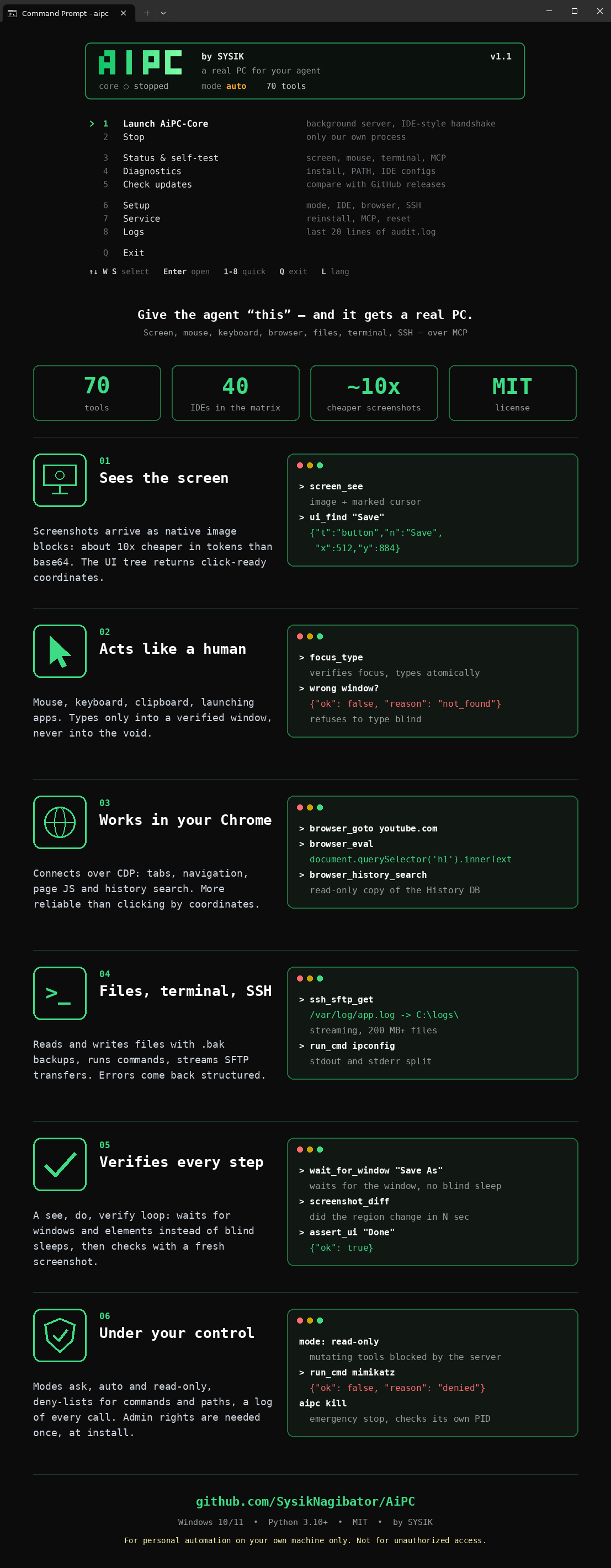
| Usual agent limits | With AiPC |
|---|---|
| Blind: no screen | screen_see — screenshot as a native image block, cursor marked |
| Clicks by guessing | ui_snapshot / ui_find — ready-made x/y coordinates (0–1000) |
| Typing into the void | focus_type — verified focus + atomic typing; refuses to type blind |
| Sleeps and hopes | wait_for_window / wait_for_ui_element / wait_for_change |
| "Did it work?" unknown | screenshot_diff, assert_ui, logs_tail, audit.log |
| No machine access | Files, terminal, processes, SSH/SFTP, browser, clipboard |
| Token burn on screenshots | Native image blocks (~65 chars + image vs 55K chars of base64) |
Read this first: risks
AiPC gives an AI model real control over your PC: it sees the screen, moves the mouse, types, runs terminal commands, reads files, uses SSH. That is the point — and the risk.
- Keep the default
askmode: the server shows you a Yes/No dialog for every dangerous action. The model cannot click "Yes" for you. - Never switch to
autofor tasks involving strangers' files, links or email attachments — prompt injection is real (seedocs/THREAT_MODEL.md). - Know the kill switch:
aipc panicor Ctrl+Alt+Shift+K freezes everything. - This tool is for your own machine (see the note at the top).
Quick start
Windows: download AiPC_Win_1.1.1.exe from Releases and double-click it.
| Step | What to do |
|---|---|
| 1 | On first run it sets everything up itself: asks for admin once (UAC) → copies itself to C:\Program Files\AiPC\ → adds the aipc command to PATH → opens the menu (MCP registration into IDEs is **explicit**: aipc install --ide cursor or menu → Settings → Connect IDE) |
| 2 | In your IDE refresh MCP servers (Refresh / restart) and give the agent a plain-language task |
macOS / Linux: binaries come from the same Releases page (AiPC_macOS_*, AiPC_Linux_*), or install from source:
npm i -g aipc-sysik   # easiest: downloads the binary for your OS
# or: pip install aipc-sysik
# or: pipx install aipc-sysik
# mirror (needs npm login): npm i -g @sysiknagibator/aipc-sysik
aipc mcp                 # MCP command for your IDE
aipc install --dry-run   # preview IDE changes before applying
The exe above is just the convenient bundle. On macOS grant Accessibility + Screen Recording when asked; on Linux prefer an X11 session (Wayland blocks synthetic input) — details in
docs/PLATFORM.md.
Example tasks:
look at my screen, what is this error?
open YouTube and find a review of ...
connect via SSH to 192.168.1.10 and fetch yesterday's log
Works with any tool-capable 2026 model: claude-opus-5-5, gpt-6-astra,
gpt-6-sol / luna, gemini-3.8-flash, claude-fable-5-1.
The aipc menu
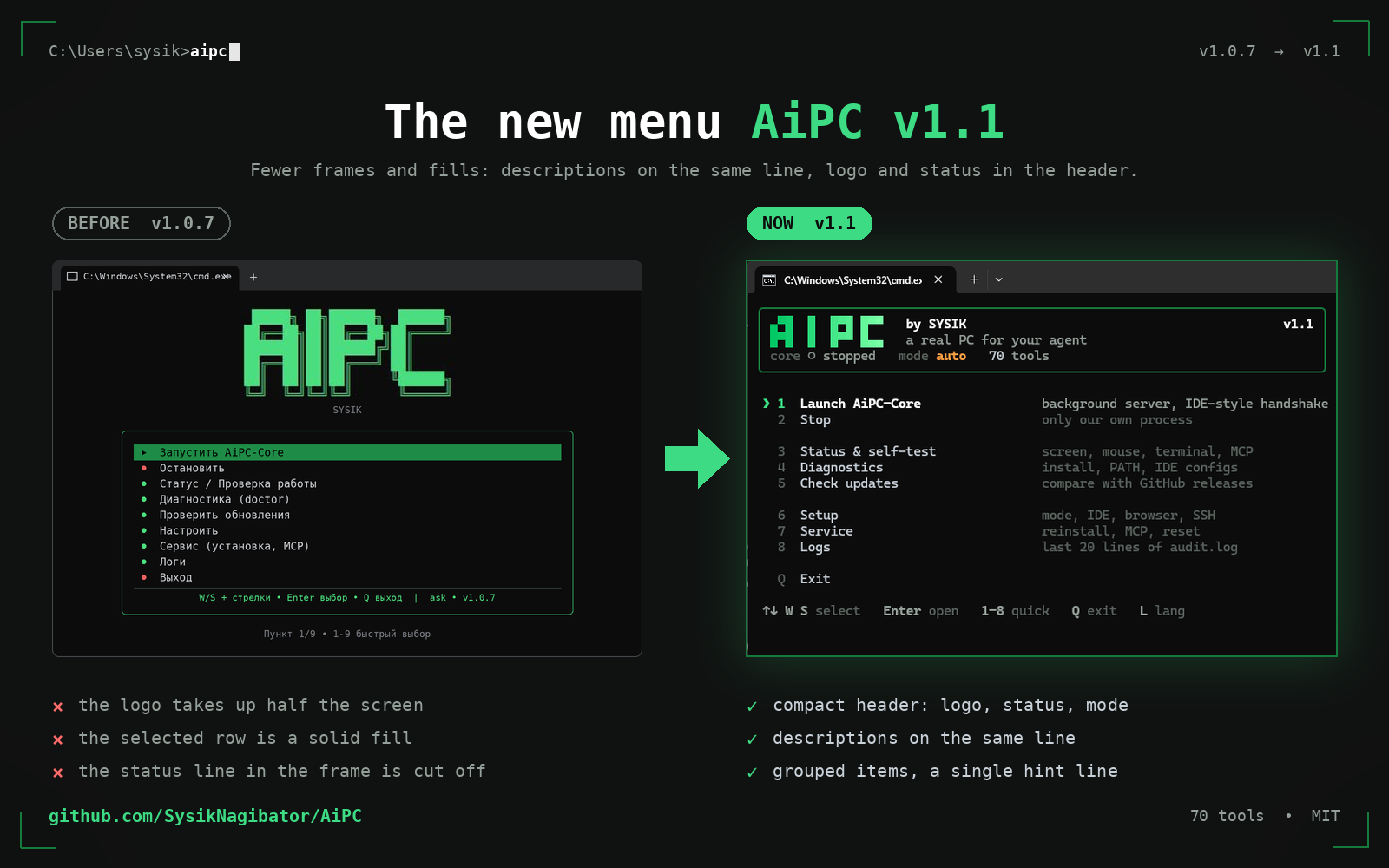
Open a regular cmd and type aipc. One rich.Live frame in an alternate
buffer, redrawn only on events — no flicker, no leftover lines. A rounded card
holds the logo, slogan and status (core ● running, mode, tools count);
below it a frameless numbered list with inline descriptions, groups split by
blank lines, the ❯ marker on the selection (danger items turn red when
selected, no fills anywhere). One dim footer line with the keys.
Controls: W/S, arrows ↑/↓, Home/End, Enter open, digits 1–8
quick select, Q exit, L toggles language (wraps around the edges).
Russian layout works by key position. Themes: green/mono/amber
(Setup → Theme), NO_COLOR and ASCII fallback respected. Narrow windows hide
descriptions automatically; a background check notifies about new releases.
| Item | What it does |
|---|---|
| Launch AiPC-Core | Background server, IDE-style handshake |
| Stop | Only our own process |
| Status & self-test | Screen, mouse, terminal, MCP |
| Diagnostics | Install, PATH, IDE configs |
| Check updates | Compare with GitHub releases |
| Setup | Mode ask/auto/read-only, IDE, browser (CDP flag), SSH hosts, language, theme |
| Service | Reinstall + PATH, reconfigure MCP, kill Core, where-am-I info |
| Logs | Last 20 lines of audit.log |
| Exit | — |
No menu at hand? Same actions as commands:
aipc update, aipc doctor, aipc kill, aipc keys (keyboard diagnostics),
aipc status, aipc selftest, aipc setup, aipc install, aipc mcp.
70 tools for the model
Vision (18): screen_see, screen_region, screen_burst, window_shot, pixel_color, ui_snapshot (active window by default:
0.69s / 17 nodes vs 1.7s / 200 desktop), ui_find, assert_ui, windows_list,
window_focus (verified), window_manage, window_find, get_active_window,
wait_for_window, wait_for_ui_element, wait_for_change, screenshot_diff, screen_info.
Mouse & keyboard (19): mouse_move/click/drag/double_click/right_click/middle_click, mouse_position
(drag with ctrl/shift/alt), scroll, type_text (auto-chunked, Cyrillic-safe),
press_key, key_down/up, clipboard_set/get (+images), sleep, open_app,
focus_type (verified focus + atomic type — the only correct way to type).
Browser (6): browser_tabs, browser_goto, browser_eval (JS via CDP —
more reliable than coordinate clicks), browser_active_tab, browser_close_tab,
browser_history_search (read-only copy of the History DB).
Files & system (13): fs_list/read/write/find/stat/mkdir/delete/move
(atomic writes + .bak, binary guard, pagination, deny-lists),
run_cmd (split stdout/stderr, Russian OEM decoding, deny-list),
process_list/find, wait_for_process, download_file (streamed, no size cap).
Network & machine (7): web_search_pc, ssh_exec, ssh_sftp_get/put
(200 MB+ friendly streaming), sys_info (battery/memory/CPU/disks),
net_check, env_get (refuses secret-like names).
Human & debug (4): notify_user (popup, non-blocking), ask_user (Yes/No,
blocks for a human decision), aipc_status, logs_tail.
Audio (1): audio_listen (loopback — system sound, or mic; 1-30 s, WAV,
native audio block or saved file).
Video (2): video_info (duration/size/fps/codec), video_frames
(1-12 frames as image blocks — watch a clip frame by frame).
Agent loop: see (screen_see) → do → re-see to verify.
Errors are structural: {"ok": false, "reason": "not_found|timeout|denied|..."}.
Every call runs exactly once, serialized; every call lands in ~/.aipc/audit.log
(2 MB rotation).
Token efficiency
- Screenshots travel as native MCP image blocks: ~65 chars of JSON + image
instead of ~55K chars of base64 text (~10x cheaper per screenshot).
raw=truereturns legacy base64 if a client can't render images. - UI nodes are compact:
{"t","n","x","y"}instead of long keys. ui_snapshotdefaults to the active window; role/name filters cut tokens further.- Prefer search over listing:
ui_find/window_find/fs_find/process_find. - All tool descriptions fit in one short line.
- Profiles (
aipc mcp --profile ...):minimal(12 tools: see→do→verify loop),browser(20 tools: + web),full(70, default). Measured tool-schema size: full ~12.9K chars, browser ~3.8K, minimal ~2.5K (−81% vs full).
MCP connection
AiPC registers itself on every menu launch (19 configs across 14 IDE families). Manual reference format:
{
  "mcpServers": {
    "aipc": {
      "command": "C:\\Program Files\\AiPC\\AiPC_Win_1.1.1.exe",
      "args": ["mcp"]
    }
  }
}
Full 40-IDE matrix (auto / preset / bridge): docs/IDES.md. Ready-made files: mcp_presets/. Skill-style install: SKILL.md.
Cloud IDEs without localhost access (Claude.ai, Manus, Devin, Bolt, v0, Lovable,
Replit…) can't reach 127.0.0.1 — see the "Bridge" section in docs/IDES.md.
Self-update
Menu → "Check updates" (or aipc update): compares with the latest GitHub release,
shows the changelog, and only with your explicit Yes downloads and reinstalls
itself (UAC). Version is always visible in the menu title; aipc doctor flags
a stale install in Program Files.
Safety
| Mode | File writes/deletes | Commands/SSH | Typing in password managers | Who decides |
|---|---|---|---|---|
ask (default) |
popup to YOU | popup to YOU | popup to YOU | human, every time |
auto |
allowed | allowed | allowed | model (except after untrusted input — taint-guard asks) |
read-only |
blocked server-side | blocked server-side | blocked server-side | nobody |
- Modes:
ask(default — the server pops a Yes/No dialog to YOU for every file-write/delete, command, SSH, download, browser-JS call; the model cannot bypass it; silence for 120 s = denied),auto(no dialogs),read-only(all mutating tools blocked server-side, not just by prompt). - Risk classes: every tool is tagged
read/interact/mutate/exec/network(policy.TOOL_RISK). read-only passes onlyread; ask confirmsmutate/exec/network; typing/clicking inside password-manager, crypto-wallet or banking windows also asks. The dialog offers time choices — once, 10 min, 1 hour (safety.allow_presets) — never forever. - Honest note: deny-lists only reduce risk, they are not a security
boundary (obfuscation always evolves). The real boundary is modes +
server-side confirmations. For strict setups use
run_cmd_policy: allowlist— only listed command prefixes run, everything else asks. - Admin rights needed once — copying into Program Files + writing PATH.
- Deny-lists for commands (mimikatz, ransomware patterns, encoded PowerShell,
quotes/
^/env-var/chain-obfuscation normalized) and paths (browser secrets, private keys, hives,System32) live in~/.aipc/config.yamland auto-upgrade (safety.version) without wiping your additions. Paths insiderun_cmd(type ...\Login Data) are checked too. - Typing goes only into a verified foreground window (
focus_type). - Secrets guard:
env_getrefuses*KEY/*TOKEN/*SECRET/*PASSWORD*names. - Emergency stop: menu → Stop, or
aipc kill(verifies the PID is ours first).
What can go wrong
- Prompt injection: a web page, document or chat message tells the agent
to delete/send/run something. Mitigations:
untrustedmarkers, taint-guard confirmations,askby default. Still — read the confirmation dialogs. - Wrong window, wrong click: the agent acts on what it sees; a changed
layout means a wrong button.
focus_typerefuses to type blind, but stay nearby for destructive tasks. - Update without signature:
aipc updatedownloads an exe checked only for the MZ header. Don't update over hostile networks. - Secrets in context: the agent may paste a token it read into chat.
audit.log,env_getandfs_readmask known patterns; everything else is your eyes on the screen.
Full version: docs/THREAT_MODEL.md.
Troubleshooting
| Symptom | Fix |
|---|---|
| Model says "no PC access" | Reconnect MCP (Refresh / restart IDE), remind: "you have aipc.* tools, start with screen_see" |
| Menu doesn't respond to keys | Run aipc keys, press W/S/arrows/Enter/Esc — paste the 5 lines to us |
aipc command unknown |
Open a new cmd (PATH applies to new shells); reinstall via dist\aipc.exe |
| Right wall of the menu drifts | Update: frames render only via fixed-width rich.Panel since 1.0.4.4 |
| Chrome tabs invisible | Menu → Setup → Browser (adds --remote-debugging-port=9222), restart Chrome |
| Old version in Program Files | aipc doctor tells you; run fresh dist\AiPC_Win_1.1.1.exe → UAC → updated |
| MCP not in IDE | Run aipc install --list-ides, then aipc install --ide cursor (or --all); preview with --dry-run |
| Remove AiPC | aipc uninstall (removes our MCP entries, PATH, Program Files copy; --yes for scripts) |
| GitHub page/API 404s or rate-limits | Wait a minute and retry; check your token scopes and proxy; if the outage persists, open an issue with the timestamp |
Project structure
AiPC/
  aipc/            # server.py (MCP) · vision/control/os_ops/browser/net/sysinfo
                   # notify · installer (self-install + 19 IDE configs)
                   # maintenance (update/doctor/kill) · menu · policy/audit
  mcp_presets/     # ready-made MCP configs (16 files)
  assets/          # logo (AiPC_Logo.svg/png) + app icons: AiPC.ico (Windows),
                   # AiPC.icns (macOS) — visible on light and dark themes;
                   # AiPC_promo*.mp4 — video overviews (EN/RU) for README
  tools/           # build_exe.bat · build_icon.py · sign.bat · version_info.txt
  tests/           # pytest: policy, installer merge, server (19 tests)
  docs/            # IDES.md (40 IDEs) · SIGNING.md (SmartScreen)
  SKILL.md         # one-file skill install · CHANGELOG.md · LICENSE (MIT)
Build from source
python -m pip install -r requirements.txt
python -m pytest tests -q
python -m aipc selftest
tools\build_exe.bat
Output: dist\AiPC_Win_1.1.1.exe (~36 MB, icon + publisher version-info) and dist\AiPC-Setup.exe.
Signing away the blue SmartScreen: see docs/SIGNING.md (needs
a code-signing certificate: Certum Open Source ~€25/yr is the cheapest start).
License
MIT. Author — SYSIK. See LICENSE.
Explore related projects
affaan-m/ECC
The agent harness performance optimization system. Skills, instincts, memory, security, and research-first development for Claude Code, Codex, Opencode, Cursor and beyond.
300,126 starsNousResearch/hermes-agent
The agent that grows with you
262,015 starsmultica-ai/andrej-karpathy-skills
A single CLAUDE.md file to improve Claude Code behavior, derived from Andrej Karpathy's observations on LLM coding pitfalls.
231,278 starsfirecrawl/firecrawl
Supercharge your AI agents with data from the web and beyond. Building the library for superintelligence. 🔥
199,847 stars