
Foraum-GmbH/kimai-clock
Foraum-GmbH/kimai-clock has 47 GitHub stars and 11 forks. GitHot measured 0 stars in 24 hours. Last checked 2026-11-15 04:09 UTC. Last push 2026-11-08.
What you can do
- Menu Bar Control: Start, pause, resume, and stop timesheets directly from the status item.
- In-Place Descriptions: Add or update timesheet notes on the fly without visiting the web interface.
- Tags: Pick Kimai tags for a timesheet before starting or while paused; they are kept across pauses. The picker only appears when your Kimai server has tags.
- Server Sync: Picks up timers started in the web UI or on your phone on open, on an interval, or on demand via the refresh button in Settings.
Measured star growth
- in 24h
- 0
- in 7 days
- Collecting history
- in 15 days
- Collecting history
- in 1 month
- Collecting history
Net star changes over overlapping periods, not daily totals. Missing measurements are left blank. Stars measure attention, not software quality.
About
KimaiClock is a lightweight macOS menu bar app that lets you track and manage Kimai 2 time entries directly from your desktop.
ProductivityREADME.md
OriginalKimaiClock
A native macOS menu bar app for Kimai 2 time tracking.






Overview
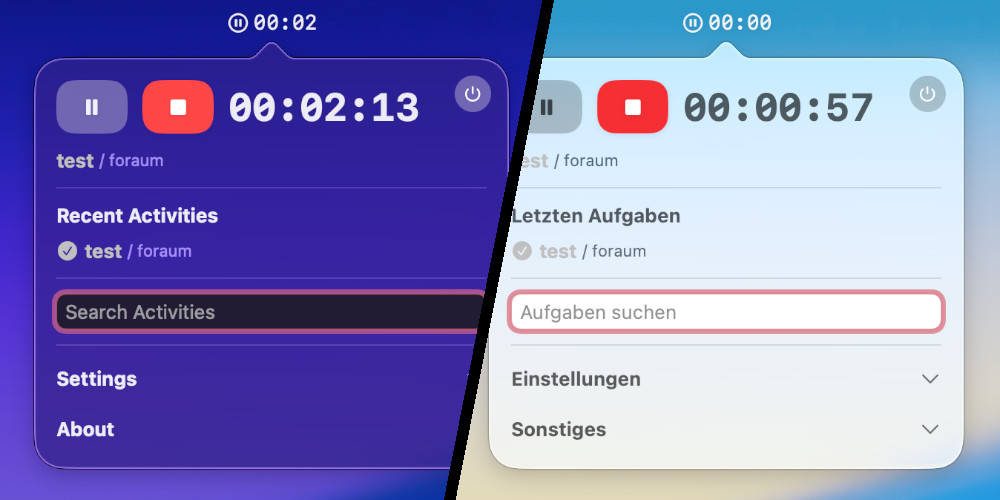
KimaiClock brings your Kimai time tracking into the macOS menu bar. Designed for speed and minimal disruption to your workflow, it allows you to start, pause, annotate, and switch timers without opening a browser window.
[!NOTE]
KimaiClock requires Kimai 2. It does not support legacy Kimai 1 installations.
Features
- Menu Bar Control: Start, pause, resume, and stop timesheets directly from the status item.
- In-Place Descriptions: Add or update timesheet notes on the fly without visiting the web interface.
- Tags: Pick Kimai tags for a timesheet before starting or while paused; they are kept across pauses. The picker only appears when your Kimai server has tags.
- Server Sync: Picks up timers started in the web UI or on your phone on open, on an interval, or on demand via the refresh button in Settings.
- Recent Activities: Reopen and resume recent tasks with a single click.
- Smart Idle Detection: Detects system inactivity, prompts upon return, and retroactively adjusts logged duration.
- App Launch Reminders: Prompts you to start tracking when selected developer tools (VS Code, PhpStorm, Xcode) launch.
- Automation Ready: First-class URL schemes for macOS Shortcuts, Raycast, Alfred, and shell scripts.
- Desktop Widget: Native widget extension showing active timers and elapsed duration.
- Native and Secure: Built with Swift 6 and SwiftUI, zero external dependencies, sandboxed, and Apple-notarized.
- Localization: English and German interface support.
Controls and Shortcuts
Menu Bar Status Item
- Left click: Open or close the popover.
- Left click and hold: Open the Kimai web dashboard in your default browser.
- Right click: Toggle play/pause for the active task (same as the play/pause button: pausing stops the timesheet on the server, resuming starts a new one).
Stop Button Context Menu
Right-clicking the stop button inside the popover reveals additional options:
| Action | Description |
|---|---|
| Stop with description | Prompts for a note, then stops and records the timesheet with that comment. |
| Discard and delete | Immediately cancels the timer and removes the timesheet from the server (only while the timer is running). |
Idle Detection
KimaiClock monitors system idle time while an activity is running. When you return after reaching your configured idle threshold, a dialog lets you resolve the gap:
- Continue without idle time: Keep the timer running and deduct the absence from the timesheet.
- Continue and keep idle time: Keep the timer running and count the absence (e.g. a phone call).
- Stop: Stop and record the timesheet at the exact moment you stepped away.
Tick Remember my choice to apply the same option automatically next time; Reset alerts in Settings brings the dialog back. You can configure or disable the idle threshold in Settings.
When your Mac goes to sleep, the running timesheet is stopped on the server at your last input before sleep (the display often turns off before the idle threshold is reached), so nothing keeps running while the Mac is off. The session itself stays paused in KimaiClock and the same dialog appears after wake: continuing starts a new timesheet, either now or (when keeping the idle time) right where the stopped one ended.
Installation
Homebrew (Recommended)
Install the cask via the official tap:
brew tap foraum-gmbh/foraum https://github.com/Foraum-GmbH/homebrew-foraum
brew install --cask foraum-gmbh/foraum/kimai-clock
To update or remove:
brew upgrade --cask kimai-clock
brew uninstall --cask kimai-clock
brew untap foraum-gmbh/foraum
Direct Download
- Download the latest
.dmgrelease from the Releases page. - Open the disk image and drag KimaiClock.app into your Applications folder.
- Launch KimaiClock, open Settings from the popover, and enter your Kimai server URL and API token.
URL Schemes and Automation
KimaiClock registers custom URL schemes to support system hotkeys and automated workflows:
| URL | Description |
|---|---|
kimai-clock://startLast |
Starts the most recently tracked activity. |
kimai-clock://startLast?description=... |
Starts the most recent activity with an optional timesheet description. |
kimai-clock://pause |
Pauses the currently running timer. |
kimai-clock://stop |
Stops and commits the active timesheet. |
Examples
Terminal
# Start the most recent activity with a note
open "kimai-clock://startLast?description=Reviewing%20pull%20requests"

# Pause the active timer
open "kimai-clock://pause"
macOS Shortcuts
- Open the Shortcuts app and create a new shortcut.
- Add the Open URLs action.
- Enter the URL (such as
kimai-clock://startLast). - Open the shortcut details panel and select Add Keyboard Shortcut (such as
Command + Shift + L).
These URLs can also be triggered from launchers such as Raycast, Alfred, or BetterTouchTool.
Widgets
KimaiClock includes a native widget extension for desktop and Notification Center placement, displaying your active activity and running duration at a glance.
Testing
Unit tests live in KimaiClockTests/ and run in CI on every push and pull request:
xcodebuild -project KimaiClock.xcodeproj -scheme KimaiClock -destination "platform=macOS" CODE_SIGNING_ALLOWED=NO test
Coverage as of the last update (105 tests):
| Area | Coverage |
|---|---|
Managers & models (KimaiClock/Manager) |
77% |
ApiManager (Kimai REST API) |
90% |
AppDelegate (idle, sleep, URL scheme handling) |
33% |
| App target overall, incl. SwiftUI views | 24% |
SwiftUI views are not unit tested. Behaviour that needs a real Mac, such as sleep, idle detection and the menu bar, is tested manually before each release.
Changelog
For a detailed list of changes, bug fixes, and new features in each release, see CHANGELOG.md.
Contributors


Contributions, issues, and feature requests are welcome. Feel free to check the issues page.
License
Distributed under the MIT License. See LICENSE for details.