
FoksWang/FWPlayer
FoksWang/FWPlayer has 376 GitHub stars and 15 forks. GitHot measured 0 in 7 days and 0 in 15 days. Last checked 2026-11-10 21:14 UTC. Last push 2021-03-07.
A video player SDK for iOS, it is based on AVPlayer. https://se.linkedin.com/in/foks-huiwang, https://www.fokswang.com/
What you can do
- Supports horizontal and vertical playback
- Supports auto-rotating screen playback
- Supports the full-screen and mini-player playback
- Supports mini-player position to drag freely
Measured star growth
- in 24h
- Update delayed
- in 7 days
- 0
- in 15 days
- 0
- in 1 month
- Collecting history
Net star changes over overlapping periods, not daily totals. Missing measurements are left blank. Stars measure attention, not software quality.
README.md
Original



FWPlayer
A video player SDK for iOS, it is based on AVPlayer.
Features
- Supports horizontal and vertical playback
- Supports auto-rotating screen playback
- Supports the full-screen and mini-player playback
- Supports mini-player position to drag freely
- Supports the network and local video playback
- Supports full-screen lock
- Supports playback while downloading (Media Cache)
- Supports vertical slide on the left side of the screen to adjust the brightness
- Supports the vertical slide on the right side of the screen to adjust the volume
- Supports gesture swipe fast-forward and rewind
- Supports drag slider fast-forward and rewind
- Supports direct jump to a point in the timeline to play
- Supports multiple video formats
- Supports UITableView playback
- Supports UICollectionView playback
- Supports UIScrollView playback
- Supports background playback
- Supports play sound in silent mode by default
- Supports speed rate playback (0.5x, 1.0x, 1.25x, 1.5x, 2.0x)
- Supports custom player view
- Supports advertising view
- Supports adding Http headers and other options to AVURLAsset
- Supports iPhone X and above
- Supports iOS 13 +
- FFmpeg is not supported because OpenGL ES was deprecated in iOS 12
Requirements
- iOS 10 +
- Xcode 11 +
Installation
You can install FWPlayer SDK in several ways:
CocoaPods
CocoaPods is an easy way to install FWPlayer.
- Add following pod to your
Podfile:
platform :ios, '10.0'

target 'Your App' do
    pod 'FWPlayer'
end
- Then, run the following command:
$ pod install
- Switch over to
Build Phasesand add aNew Run Script Phaseby clicking the+in the top left of the editor. Add the following command to solve the issue of App Store submission.
bash "${BUILT_PRODUCTS_DIR}/${FRAMEWORKS_FOLDER_PATH}/FWPlayerCore.framework/strip-frameworks.sh"
Carthage
Since FWPlayer SDK is distributed as a binary, you need to use custom binary rule in your Cartfile.
- Add following to your
Cartfile:
binary "https://raw.githubusercontent.com/FoksWang/FWPlayer/master/Carthage/FWPlayer.json" ~> 1.0.13
- Fetch framework by running:
$ carthage update --platform iOS
Manual Installation
- Add the FWPlayer framework to
Embedded Binariesfor your target:
FWPlayerCore.framework
- Make sure you link with the following
Linked Frameworks and Libraries:
FWPlayerCore.framework
Usage
Normal Style
Objective-C
FWAVPlayerManager *playerManager = [[FWAVPlayerManager alloc] init];
self.player = [FWPlayerController playerWithPlayerManager:playerManager containerView:self.containerView];
self.player.controlView = self.controlView;
Swift
private var player: FWPlayerController?

private lazy var containerView: UIImageView = {
	let imageView = UIImageView()
	imageView.setImageWithURLString(coverImageUrl, placeholder: UIImage(named: "placeholder"))
	return imageView
}()

private lazy var controlView: FWPlayerControlView =  {
	let view = FWPlayerControlView()
	view.fastViewAnimated = true
	view.autoHiddenTimeInterval = 5.0
	view.autoFadeTimeInterval = 0.5
	view.prepareShowLoading = true
	view.prepareShowControlView = true
	return view
}()

let playerManager = FWAVPlayerManager()
playerManager.isEnableMediaCache = false

// Setup player
self.player = FWPlayerController(playerManager: playerManager, containerView: self.containerView)
self.player?.controlView = self.controlView

// Setup continue playing in the background
self.player?.pauseWhenAppResignActive = true

self.player?.orientationWillChange = { [weak self] (player, isFullScreen) in
	self?.setNeedsStatusBarAppearanceUpdate()
}

// Finished playing
self.player?.playerDidToEnd = { [weak self] (asset) in
	guard let strongSelf = self else {
		return
	}
	strongSelf.player?.currentPlayerManager.replay!()
	strongSelf.player?.playTheNext()
	if strongSelf.player?.isLastAssetURL == false {
		strongSelf.controlView.showTitle("Video Title", coverURLString: strongSelf.kVideoCover, fullScreenMode: .landscape)
	} else {
		strongSelf.player?.stop()
	}
}

self.player?.assetURLs = self.assetURLs
To play the next or previous video, just set:
Objective-C
self.player.assetURLs = self.assetURLs;
Swift
self.player!.assetURLs = self.assetURLs
- To play the next video, please call method
playTheNext - To play the previous video, please call method
playThePrevious - To play the video from the asset list, please call method
playTheIndex:index
For example, play the next video:
Objective-C
if (!self.player.isLastAssetURL) {
    [self.player playTheNext];
    [self.controlView showTitle:@"Video title" coverURLString:kVideoCover fullScreenMode:FWFullScreenModeAutomatic];
} else {
    NSLog(@"No more videos");
}
Swift
if self.player!.isLastAssetURL == false {
    self.player!.playTheNext()
    self.controlView.showTitle("Video title", coverURLString: kVideoCover, fullScreenMode: .automatic)
} else {
    print("No more videos")
}
Quick demo for Normal Style
Step 1: In AppDelegate, make sure you have var window: UIWindow?
Swift
    var window: UIWindow?
    static var shared: AppDelegate {
        UIApplication.shared.delegate as! AppDelegate
    }
Step 2: In SceneDelegate, make sure you have var window: UIWindow?
Swift
    var window: UIWindow?

    func scene(_ scene: UIScene, willConnectTo session: UISceneSession, options connectionOptions: UIScene.ConnectionOptions) {
        // Use this method to optionally configure and attach the UIWindow `window` to the provided UIWindowScene `scene`.
        // If using a storyboard, the `window` property will automatically be initialized and attached to the scene.
        // This delegate does not imply the connecting scene or session are new (see `application:configurationForConnectingSceneSession` instead).

        guard let windowScene = (scene as? UIWindowScene) else { return }
        window = UIWindow(windowScene: windowScene)
        window?.rootViewController = ViewController()
        window?.makeKeyAndVisible()
        AppDelegate.shared.window = window
    }
Step 3: Use quick demo code ViewController
Swift
import UIKit
import FWPlayerCore

class ViewController: UIViewController {

    private let kVideoCover = "https://github.com/FoksWang/FWPlayer/blob/master/Example/FWPlayer/Images.xcassets/Common/cover_image_placeholder.imageset/cover_image_placeholder.jpg?raw=true"
    private var player: FWPlayerController?
    private lazy var containerView: UIImageView = {
        let imageView = UIImageView()
        let color = UIColor(red: 220.0/255.0, green: 220.0/255.0, blue: 220.0/255.0, alpha: 1)
        let placeholderImage = FWUtilities.image(with: color, size: CGSize(width: 1, height: 1))
        imageView.setImageWithURLString(kVideoCover, placeholder: placeholderImage)
        return imageView
    }()

    private lazy var controlView: FWPlayerControlView = {
        let view = FWPlayerControlView()
        view.fastViewAnimated = true
        view.autoHiddenTimeInterval = 5.0
        view.autoFadeTimeInterval = 0.5
        view.prepareShowLoading = true
        view.prepareShowControlView = true
        return view
    }()

    private lazy var playButton: UIButton = {
        var button = UIButton(type: .custom)
        button.setImage(FWUtilities.imageNamed("FWPlayer_all_play"), for: .normal)
        button.addTarget(self, action: #selector(playButtonClick), for: .touchUpInside)
        return button
    }()

    @objc private func playButtonClick() {
        print("playButtonClick")
        self.player!.playTheIndex(assetIndex)
        self.controlView.showTitle("Video title 1", coverURLString: kVideoCover, fullScreenMode: .automatic)
    }

    private lazy var nextButton: UIButton = {
        var button = UIButton(type: .system)
        button.setTitle("Next", for: .normal)
        button.addTarget(self, action: #selector(nextButtonClick), for: .touchUpInside)
        return button
    }()

    @objc private func nextButtonClick() {
        print("nextButtonClick")
        assetIndex += 1
        if assetIndex > assetURLs.count - 1 {
            assetIndex = assetURLs.count - 1
        }
        self.player!.playTheIndex(assetIndex)
        self.controlView.showTitle("Video title 2", coverURLString: kVideoCover, fullScreenMode: .automatic)
    }

    private var assetIndex = 0
    private lazy var assetURLs: Array<URL> = {
        var assetList = [
            URL(string: "https://svt1-b.akamaized.net/se/svt1/master.m3u8")!,
            URL(string: "https://svt1-b.akamaized.net/se/svt2/master.m3u8")!,
            URL(string: "https://www.radiantmediaplayer.com/media/bbb-360p.mp4")!,
            URL(string: "http://commondatastorage.googleapis.com/gtv-videos-bucket/sample/ElephantsDream.mp4")!,
            URL(string: "http://commondatastorage.googleapis.com/gtv-videos-bucket/sample/ForBiggerBlazes.mp4")!,
            URL(string: "http://commondatastorage.googleapis.com/gtv-videos-bucket/sample/Sintel.mp4")!,
            URL(string: "http://commondatastorage.googleapis.com/gtv-videos-bucket/sample/SubaruOutbackOnStreetAndDirt.mp4")!,
            URL(string: "http://commondatastorage.googleapis.com/gtv-videos-bucket/sample/TearsOfSteel.mp4")!,
            URL(string: "http://commondatastorage.googleapis.com/gtv-videos-bucket/sample/VolkswagenGTIReview.mp4")!,
            URL(string: "http://commondatastorage.googleapis.com/gtv-videos-bucket/sample/WeAreGoingOnBullrun.mp4")!,
            URL(string: "http://commondatastorage.googleapis.com/gtv-videos-bucket/sample/WhatCarCanYouGetForAGrand.mp4")!,
        ]
        return assetList
    }()

    override func viewDidLoad() {
        super.viewDidLoad()
        // Do any additional setup after loading the view.

        self.view.backgroundColor = .white
        self.view.addSubview(self.containerView)
        self.containerView.addSubview(self.playButton)
        self.view.addSubview(self.nextButton)

        let version = FWAVPlayerManager.getVersionNumber()
        let build = FWAVPlayerManager.getBuildNumber()
        print("version = \(String(describing: version)), build = \(String(describing: build))")

        let playerManager = FWAVPlayerManager()
        // Playback speed,0.5...2
        playerManager.rate = 1.0

        // Enable media cache for assets
        playerManager.isEnableMediaCache = false

        // Setup player
        self.player = FWPlayerController(playerManager: playerManager, containerView: self.containerView)
        self.player!.controlView = self.controlView
        // Setup continue playing in the background
        self.player!.pauseWhenAppResignActive = true

        self.player!.orientationWillChange = { [weak self] (player, isFullScreen) in
            guard let self = self else { return }
            self.setNeedsStatusBarAppearanceUpdate()
        }
//        playerManager.isMuted = true

        // Finished playing
        self.player!.playerDidToEnd = { [weak self] (asset) in
            guard let strongSelf = self else {
                return
            }
            strongSelf.player!.currentPlayerManager.replay!()
            strongSelf.player!.playTheNext()
            if strongSelf.player!.isLastAssetURL == false {
                strongSelf.controlView.showTitle("Video Title", coverURLString: strongSelf.kVideoCover, fullScreenMode: .landscape)
            } else {
                strongSelf.player!.stop()
            }
        }
        self.player!.assetURLs = self.assetURLs
    }

    override func viewWillAppear(_ animated: Bool) {
        super.viewWillAppear(animated)
        self.player?.isViewControllerDisappear = false
    }

    override func viewWillDisappear(_ animated: Bool) {
        super.viewWillDisappear(animated)
        self.player?.isViewControllerDisappear = true
    }

    override func viewWillLayoutSubviews() {
        super.viewWillLayoutSubviews()

        var w: CGFloat = UIScreen.main.bounds.size.width
        var h = w * 9 / 16
        var x: CGFloat = 0
        var y: CGFloat = (UIScreen.main.bounds.size.height - h) / CGFloat(2.0)
        self.containerView.frame = CGRect(x: x, y: y, width: w, height: h)

        w = 44
        h = w
        x = (self.containerView.frame.width - w) / 2
        y = (self.containerView.frame.height - h) / 2
        self.playButton.frame = CGRect(x: x, y: y, width: w, height: h)

        w = 100;
        h = 30;
        x = (self.view.frame.width - w ) / 2
        y = self.containerView.frame.maxY + 50
        self.nextButton.frame = CGRect(x: x, y: y, width: w, height: h)
    }

    override var preferredStatusBarStyle: UIStatusBarStyle {
        if self.player != nil && self.player!.isFullScreen {
            return .lightContent
        } else {
            return .default
        }
    }

    override var prefersStatusBarHidden: Bool {
        // Support only iOS 9 and later, so return false.
        return false
    }

    override var preferredStatusBarUpdateAnimation: UIStatusBarAnimation {
        return .slide
    }

    override var shouldAutorotate: Bool {
        return self.player?.shouldAutorotate ?? false
    }

    override var supportedInterfaceOrientations: UIInterfaceOrientationMask {
        if self.player != nil && self.player!.isFullScreen {
            return .landscape
        }
        return .portrait
    }
}
List Style
Objective-C
FWAVPlayerManager *playerManager = [[FWAVPlayerManager alloc] init];
self.player = [FWPlayerController playerWithScrollView:self.tableView playerManager:playerManager containerViewTag:tag];
self.player.controlView = self.controlView;
Swift
let playerManager = FWAVPlayerManager()
self.player = FWPlayerController(scrollView: tableView, playerManager: playerManager, containerViewTag: tag)
self.player!.controlView = self.controlView
- Your custom playerManager must conform to
FWPlayerMediaPlaybackprotocol. - Your custom controlView must conform to
FWPlayerMediaControlprotocol.
Must implement in the ViewController if video rotating
Objective-C
- (BOOL)shouldAutorotate {
    return player.shouldAutorotate;
}
Swift
override var shouldAutorotate: Bool {
  return self.player?.shouldAutorotate ?? false
}
If use playback while downloading (Media Cache)
The function playback while downloading (Media Cache) does NOT support m3u8, it is commonly used for MP4.
- Setup
isEnableMediaCache
Objective-C
playerManager.isEnableMediaCache = YES;
Swift
playerManager.isEnableMediaCache = true
- Setup
NSAppTransportSecurityin yourInfo.plist
<key>NSAppTransportSecurity</key>
<dict>
    <key>NSAllowsArbitraryLoads</key>
    <true/>
</dict>
Demonstration

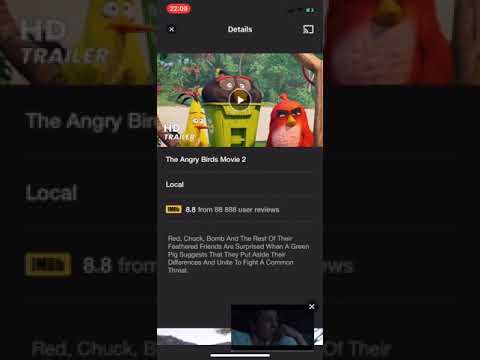
ScreenShots


Video
References
- https://github.com/Bilibili/ijkplayer
- https://github.com/changsanjiang/SJVideoPlayer
- https://github.com/renzifeng/ZFPlayer
- https://github.com/vitoziv/VIMediaCache
- https://github.com/ChangbaDevs/KTVHTTPCache
Author
(Foks)Hui Wang, [email protected]
License
FWPlayer is available under the MIT license. See the LICENSE file for more info.
Explore related projects
ytdl-org/youtube-dl
Command-line program to download videos from YouTube.com and other video sites
141,527 starsexcalidraw/excalidraw
Virtual whiteboard for sketching hand-drawn like diagrams
135,396 starsgodotengine/godot
Godot Engine – Multi-platform 2D and 3D game engine
119,942 starsmrdoob/three.js
JavaScript 3D Library.
117,983 stars