
Fangyuan025/Chaty has 58 GitHub stars and 9 forks. GitHot measured 0 stars in 24 hours and +1 in 7 days. Last checked 2026-11-15 21:13 UTC. Last push 2026-11-05.
Measured star growth
- in 24h
- 0
- in 7 days
- +1
- in 15 days
- Update delayed
- in 1 month
- Update delayed
Net star changes over overlapping periods, not daily totals. Missing measurements are left blank. Stars measure attention, not software quality.
About
The models on your disk, put to work. A private desktop app for open models — chat, a coding agent built for small models, text-to-image, text-to-music, answers from your own documents, and voice. GGUF on llama.cpp, MLX on Apple Silicon. macOS, Windows, Linux. No account, no cloud, no telemetry.
AIREADME.md
OriginalEnglish · 简体中文 · Português (BR)

Chaty
The models on your disk, put to work.
Chat, a coding agent, image and music studios, answers from your own documents, and a voice to talk to —
on open models running entirely on your own Mac or PC. No account, no cloud, no telemetry.


Download · Website · Docs · Changelog
macOS (Apple Silicon) · Windows 10/11 · Linux (AppImage) — GGUF on llama.cpp, MLX natively on Apple Silicon, text-to-image on stable-diffusion.cpp, text-to-music on audio.cpp
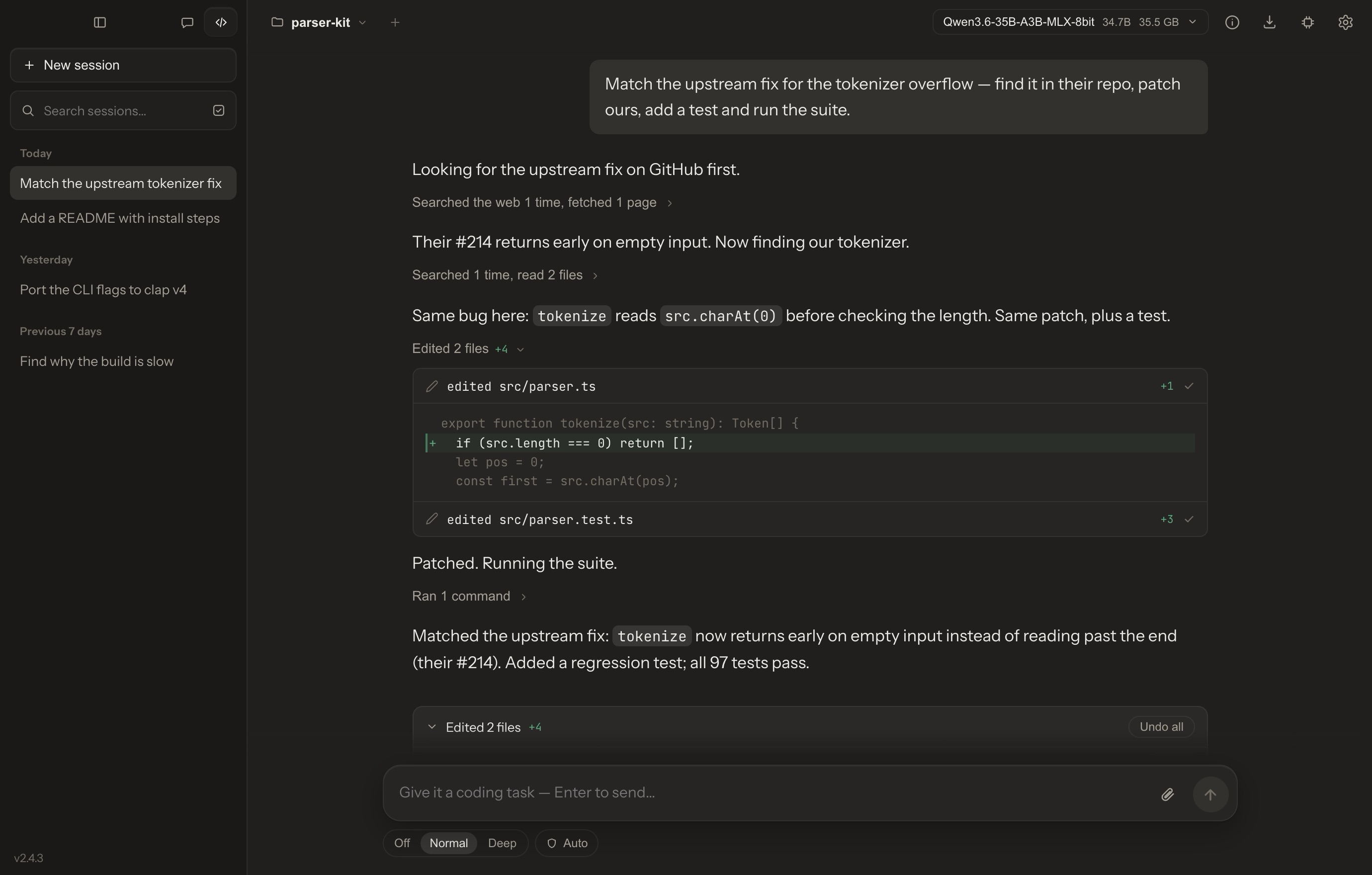
Code mode: the agent found the upstream fix, patched the parser, added a test and ran the suite — on a model running on the same laptop.
Why Chaty
- One app, six jobs. Chat, a coding agent, an image studio, a music studio, answers from your own documents, and a voice to talk to — on the same local models, in one window. No server to run, no port, no API key.
- Built for the model that fits on your laptop. Tool calls in the format each model was trained on, edits checked against the file while they're still being written, slips caught at the step they happen — so a small model finishes real work. How it's done →
- GGUF and MLX, both native. llama.cpp on Metal or Vulkan on every platform, MLX on Apple Silicon, and a model store that searches Hugging Face and tells you which files fit in your memory.
- Yours, completely. Models, chats, documents, pictures and music live in a folder on your disk. No account, no telemetry — delete the folder and it's gone.
Contents
Chat · Code · Image · Music · Documents and research · Voice · Built for small models · Models · Privacy · Install · Build · Architecture
Chat
A chat that shows its work. Reasoning streams into a panel you can fold away; on models with an effort ladder — Qwen3.8's low · medium · xhigh, Muse-Glimmer's four rungs, K2 Horizon's — you choose how hard it thinks, message by message.
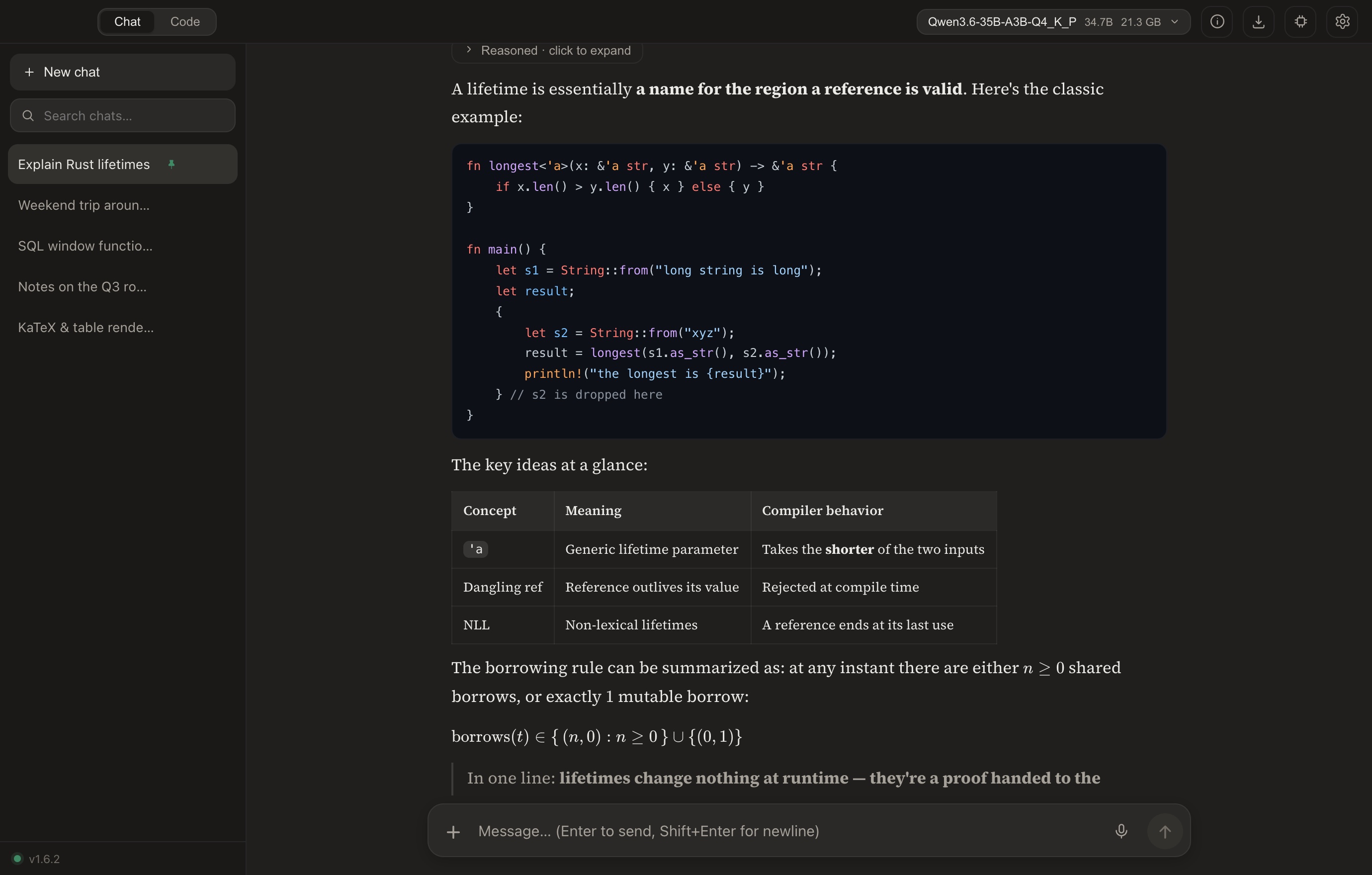
- Rendered as it streams — highlighted code, tables, KaTeX, Mermaid, and HTML you can run in place. Blocks render one by one, so a fast model doesn't make the window stutter.
- What's on, at a glance — a quiet line above the composer names what the next message will use (thinking, web search, the knowledge base), each one click from off.
- Pictures in — any vision model: a GGUF with its projector, or an MLX build.
- Canvas — ask for a page and watch it build in a live preview beside its source; later changes land as patches.
- Web search without a key, full-text search across your history, and export to Markdown or JSON.
- Your way — follows your system's light or dark; warm or cool dark, paper or cream light, four code themes, one text size for chat and code, keyboard shortcuts, English · 简体中文 · Português.
Code
A coding agent for the model you can actually run. Switch to Code, open a folder, describe the task. The agent reads, searches, edits and runs commands in your project and tells you what it is doing as it goes — its tool calls fold into a line each, opened to show every step and every edit as a real diff — and ends the turn with a card listing every file it changed, each one undoable.
- You stay in charge — a live task plan and five permission modes: by default routine work goes ahead and anything hard to take back — deleting, pushing, publishing — waits for you; or have it plan first, ask before every change, or let it all run. File access is confined to the workspace; on macOS its shell runs in the system sandbox.
- Commands that keep running — dev servers and watchers move to the background; a command that asks a question (
[y/N],Password:, a REPL, a scaffolder's menu) gets a terminal to answer in. - It remembers — project memory in plain Markdown; it can search its own past sessions, and you can @-mention one to bring it in.
- Tools you add — MCP servers (with a curated, live-tested list), skills written as Markdown, and a browser it can drive.
- Nothing done on red — a turn ends at a gate: whatever changed since the last passing run is verified first.
Measured. One local model for every row — Qwen3.5-35B-A3B (MoE, ~3 B active), mxfp8 on MLX, reasoning off, one machine:
| SWE-bench Verified, 45-task macOS-validated subset | Resolved |
|---|---|
| Chaty agent (v1.9, 16K context) | 15/45 (33 %) |
| qwen-code 0.20 — the model family's own CLI (needs 32K) | 12/45 (27 %) |
| pi 0.81 — minimal 4-tool agent | 10/45 (22 %) |
| opencode 1.18 | 7/45 (16 %) |
| bare bash agent — single-tool ablation | 6/45 (13 %) |
A subset on a macOS harness, so not comparable with leaderboard numbers; the method, configs and caveats are in docs/BENCHMARKS.md.
Image
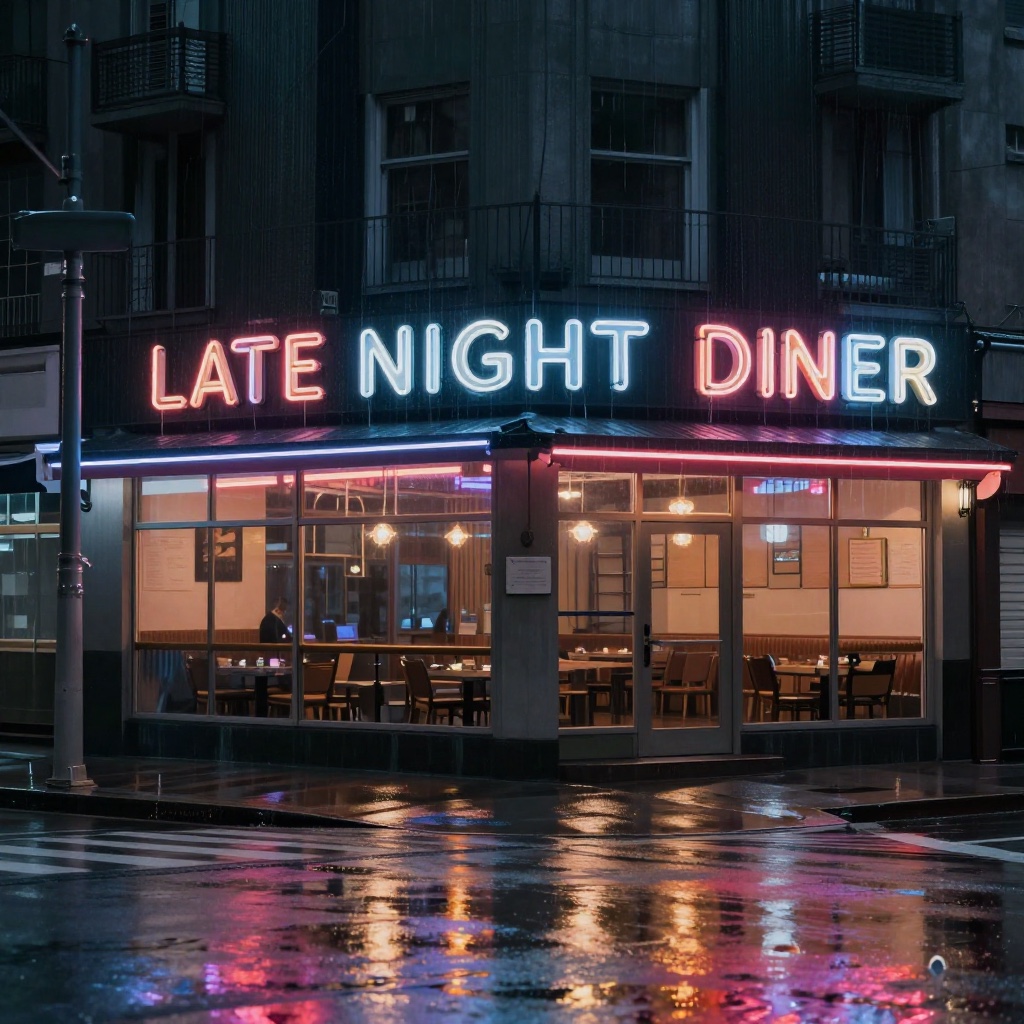
Load a text-to-image model and the whole app becomes an image studio: sessions that read like conversations, a live preview while it draws, and each model's recommended settings filled in.
 |
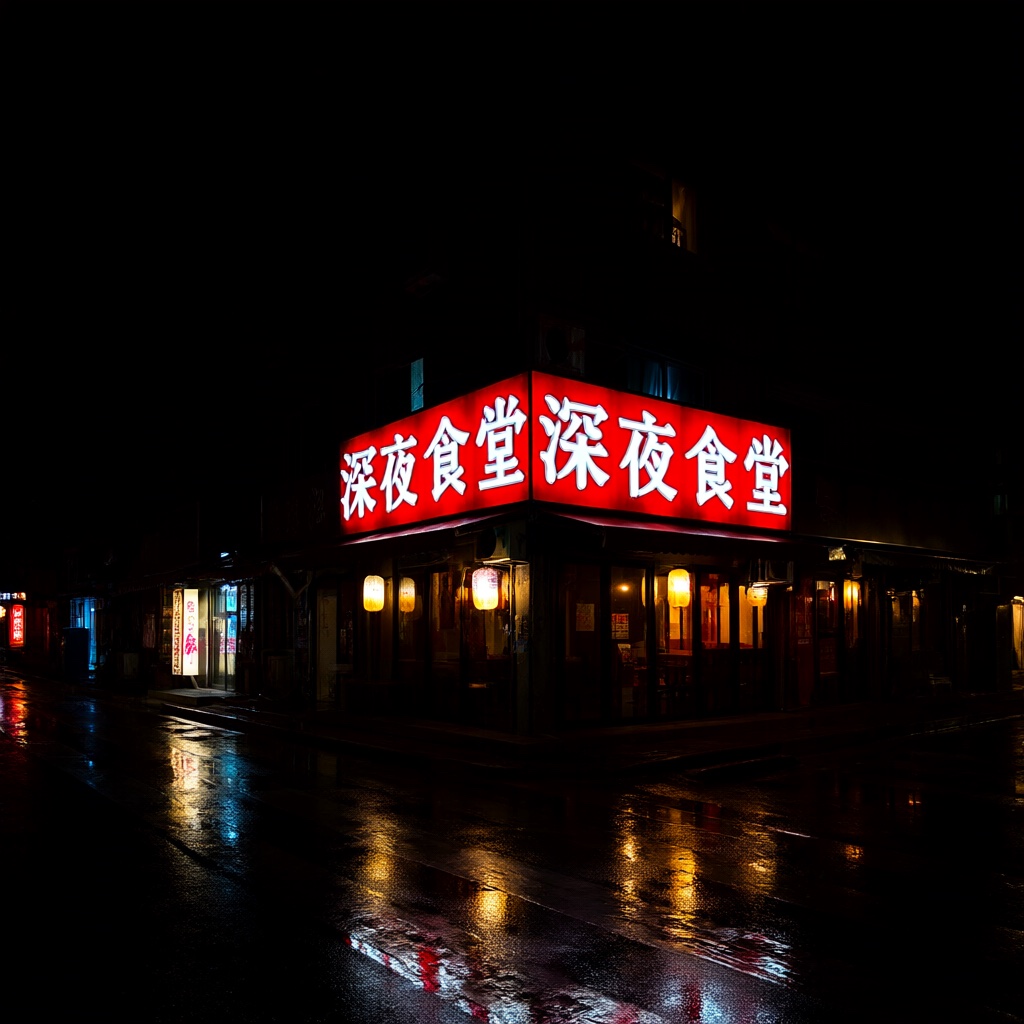 |
| “A neon sign that reads LATE NIGHT DINER on a rainy street corner…” — Z-Image Turbo, Q4_K_M, 1024², 8 steps, 2 min 51 s | “雨夜街角的霓虹灯招牌,写着「深夜食堂」…” — Qwen-Image 2.1, Q4_K_M, 1024², 20 steps, 16 min 10 s |
Straight out of Chaty, unedited, on an Apple M4 Pro with 48 GB.
- The families that matter — Z-Image and Z-Image Turbo, Qwen-Image 2.1, FLUX.2 [klein] 4B and 9B, FLUX.1 dev and schnell, Chroma, Stable Diffusion 1.x, 2.x, XL and 3.x.
- The other files, found — a text-to-image GGUF is only the denoiser; Chaty finds its VAE and text encoder beside it, or downloads the missing ones in one click.
- Keep going from a picture — start the next round from any image; models that edit take it as a reference and change only what you ask.
- Saved with its recipe — PNGs carry the prompt and settings inside, filed by date.
It runs on stable-diffusion.cpp in a helper process — Metal on a Mac, Vulkan on Windows and Linux — so a driver crash ends the helper, not the app. On a Mac, MLX image models (mflux's folders of Z-Image, Qwen-Image and FLUX.1) run on the MLX engine instead, faster still: Z-Image Turbo draws the same prompt in 1 min 45 s, Qwen-Image 2.1 in 9 min 0 s.
Music
Load a text-to-music model and the whole app becomes a music studio, the way an image model makes it an image studio: sessions that read like conversations, each family's recommended settings filled in, and a percentage that follows the piece through its stages — writing the score, composing, rendering, decoding.
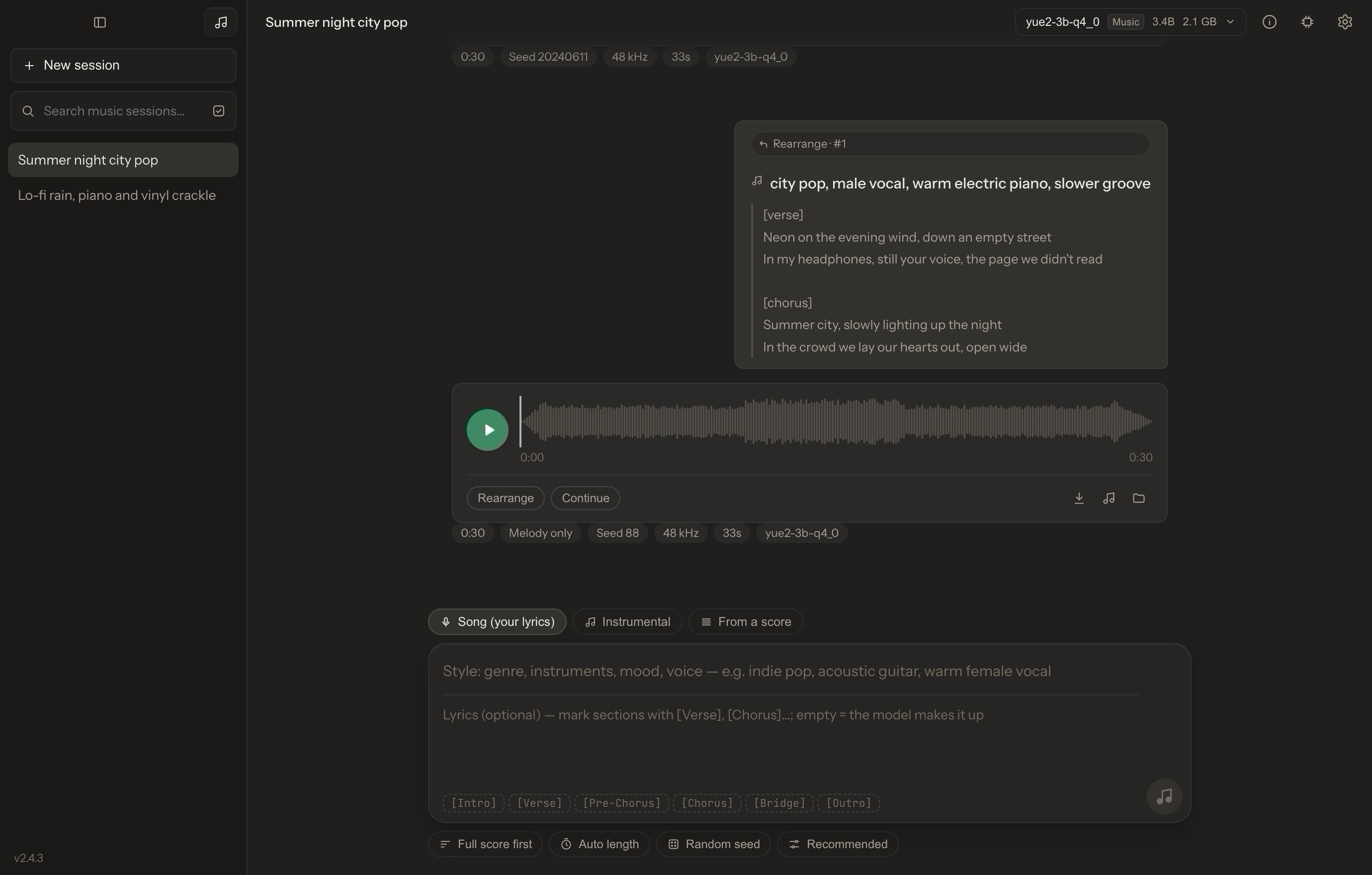
A YuE2 song rearranged on its own melody in a new style — the lyrics as your turn, the piece as a waveform to play, seek and select.
- The families audio.cpp runs — YuE2 (lyrics to a whole song, voice and band together), MiniMax Music 3, ACE-Step 1.5, HeartMuLa, Stable Audio 3 and MiDashengLM-Gen, as audio.cpp's GGUF packages. Chaty finds a package's other files beside the model — a VAE, configs, a tokenizer, the parts of a multi-file model — or downloads the missing ones in one click.
- Your lyrics, or none — write lyrics with section tags, leave them to the model, or ask for an instrumental; the style is a few words of description.
- Keep going from a piece — each family's own edits of an earlier round: YuE2 rearranges a piece on its own melody or continues it from any second, ACE-Step repaints a stretch or covers it in a new style, Stable Audio makes a variation or fills a stretch in again.
- Every setting, the recommended one first — the common ones on the composer, the rest in Settings, each with its way back to the recommendation.
It runs in a helper process of its own, chaty-audio — Metal on a Mac, Vulkan on Windows and Linux — and stopping a piece ends the helper, which hands back every byte of the model at once. On an M4 Pro, YuE2 writes and sings a 30-second verse and chorus in 33 s, ACE-Step 1.5 turbo makes 10 s in 13 s, and Stable Audio 3 Small makes 20 s in 1.2 s.
Documents and research
Drop in PDFs, Word files, slides, spreadsheets, Markdown or code. Chaty indexes them on your machine, retrieves by meaning and by keyword, and cites the passage behind each claim — or says plainly when your documents don't cover the question.
- Scans, read page by page by a vision model; charts inside documents can be described so they're searchable too.
- Deep Research — several rounds of web search and reasoning, written up as a report that cites only what it used; export to PDF or Markdown.
- A two-host podcast from a knowledge base, saved as WAV.
Voice
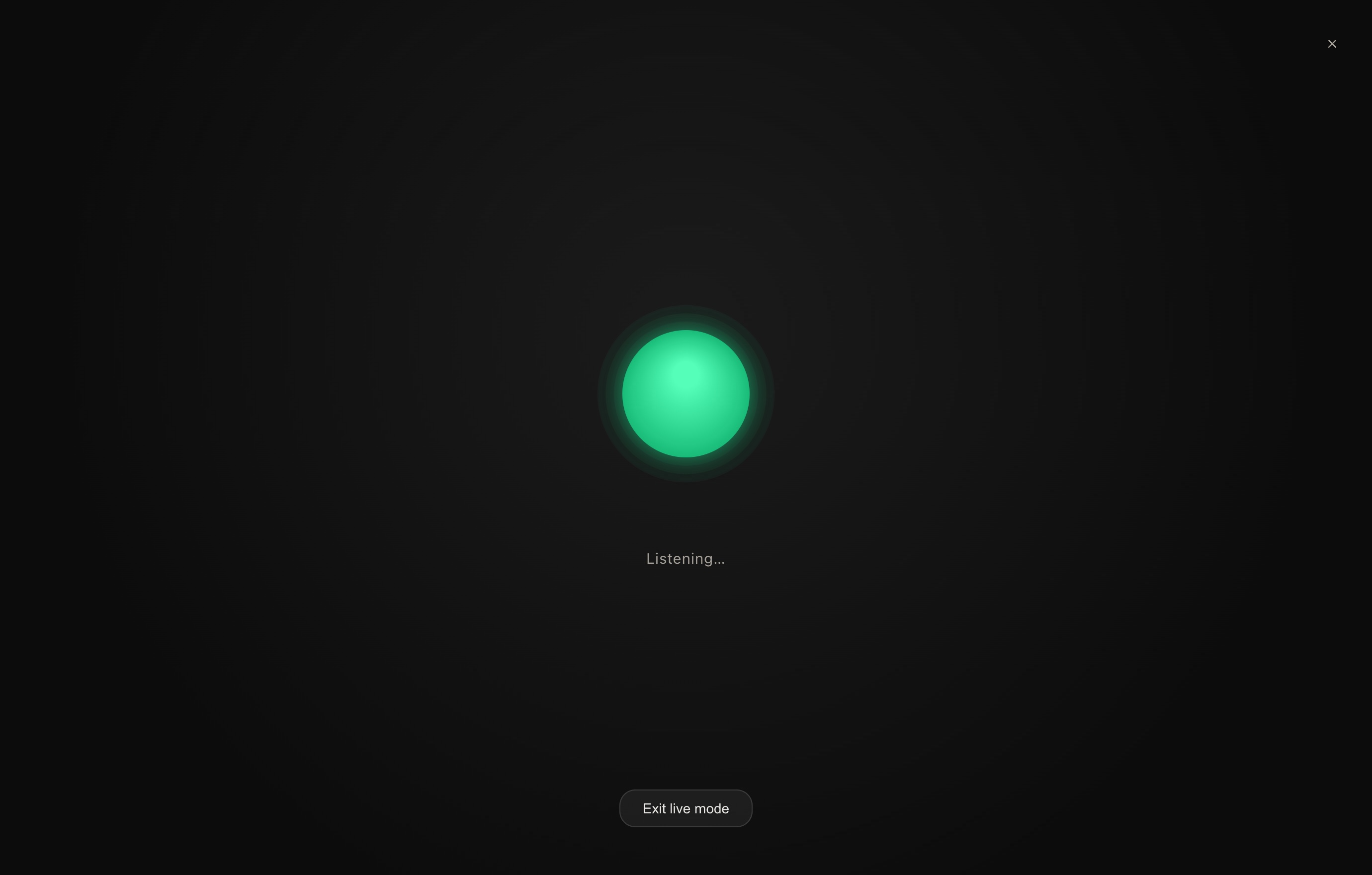
Live mode is a hands-free conversation: Whisper listens, the model answers, and a local voice reads the reply back sentence by sentence — in English or Chinese. Speech runs on the CPU, so it never competes with the model for GPU memory. Silence sends your turn; interrupt a reply and it's your turn at once, the model remembering what it said up to there. Any answer can be read aloud.
Built around what small models get wrong
A frontier model can hold a workflow together on its own. A model that fits on your laptop often can't: it repeats the call it just made, sends an empty argument, retypes the line it means to change slightly wrong, and calls the job done without running it. Chaty is engineered for that model.
| Its own dialect | Tool calls are taught and read in the format each model was trained on — XML, JSON, Gemma, LFM, K2, GLM, MiniCPM — taken from its chat template, not assumed. |
| Edits that land | An edit is checked against the file while it's still being written. A retyped line with the wrong spaces, escapes or line numbers still lands when exactly one place fits. |
| Slips caught at the step | Repeated calls, empty arguments and plans left unexecuted are noticed where they happen, with a correction that shows the model what it wrote. |
| Nothing done on red | Changes since the last passing run are verified before a turn may end. |
| A cache that carries over | Each turn's prompt is an append to the last, so the model's cache is reused instead of read again from the top. |
| One app | No server, no port, no API key, no config file. |
Models
Any GGUF runs on llama.cpp (Metal, or Vulkan on NVIDIA, AMD and Intel); on Apple Silicon, MLX folders run natively too. Search and download from Hugging Face inside the app — or point Chaty at a folder you already have. These families get their templates, reasoning controls and tool-call formats wired in:
| Family | What's wired in |
|---|---|
| Qwen 3 · 3.5 · 3.6 · 3.8 | Thinking on or off; Qwen3.8's effort ladder; vision where the model has it |
| Gemma 3 · 4 | Vision; Gemma 4's own tool-call format and reasoning |
| K2 Horizon · MoVA | Its effort ladder and <ifm|arg_key> tool calls, on both engines |
| GLM-4.5 · 4.6 · 4.7 | Its <tool_call>name<arg_key>… tool calls |
| Llama 3 · Muse-Glimmer | Vision, and Muse-Glimmer's four-rung effort ladder |
| LFM3 · LFM3-VL | Thinking on or off; vision on LFM3-VL |
| MiniCPM5 · LFM 2.5 | Each family's own tool-call format |
| Chaty · Qwen3.5-4B design | Our own fine-tune for single-file web pages — one click at first launch |
A community fine-tune whose chat template differs from llama.cpp's built-in guess is run with its own template, as transformers would run it. Text-to-image and text-to-music models load from the same place; their families are listed under Image and Music.
The engines don't wait for a Chaty release. Settings → Runtimes moves llama.cpp, stable-diffusion.cpp, audio.cpp and MLX to a build of their newest upstream — at a click, or by itself if you turn that on — so a new architecture can run as soon as its engine has it. Each one is checked and started once before it's used, and if it won't start, the bundled engine takes over.
Privacy
Models, conversations, documents, pictures and music live in a folder on your disk. There's no account and no server of ours to trust — delete the folder, and it's gone.
The network is used only for: web search and Deep Research when you turn them on; downloads you start (models, voices, embedding files); and one update check — a request to GitHub for the latest release, a few seconds after launch. Details in Privacy & data.
Install
Download from the latest release:
| Platform | File | Notes |
|---|---|---|
| macOS (Apple Silicon) | Chaty_*_aarch64.dmg |
Metal and MLX. See the first-launch note below |
| Windows 10 / 11 (x64) | Chaty_*_x64-setup.exe |
Vulkan. Per-user installer, no admin needed |
| Linux (x86-64) | Chaty_*_amd64.AppImage |
Vulkan. Beta — chmod +x, then run it |
macOS first launch. Chaty is signed but not notarized (there's no paid Apple Developer account behind it), so Gatekeeper warns on first open. Clear the download quarantine once, then open Chaty as usual:
xattr -dr com.apple.quarantine /Applications/Chaty.app
Or open it, dismiss the warning, and choose System Settings → Privacy & Security → Open Anyway.
Small quantized language models run in 8 GB of memory; text-to-image models want 16 GB or more. Chaty sizes GPU offload to your memory and refuses a model that can't fit rather than freezing the machine. New to it? Getting started.
Build
Full details in BUILD.md.
# macOS (Apple Silicon)
npm install
npm run tauri dev      # dev (Metal)
npm run tauri build    # → .app + .dmg
# Windows
npm install
.\dev.ps1                            # dev
npm run tauri build -- --no-bundle   # release exe → compile the Inno installer
# Linux — WebKitGTK and Vulkan SDK packages are listed in BUILD.md
npm install
npm run tauri dev
npm run tauri build -- --bundles appimage
The MLX, image and music engines are separate helpers — scripts/build-mlx-sidecar.sh, scripts/build-sd-sidecar.{sh,ps1} and scripts/build-audio-sidecar.{sh,ps1}. Releases come from CI: bump with scripts/bump-version.sh x.y.z, push a vx.y.z tag, and GitHub Actions builds all three platforms onto one release.
Architecture
| Layer | Stack |
|---|---|
| Shell | Tauri 2 — tray, global shortcut, single instance |
| Interface | React 19 · Vite · react-markdown · KaTeX · Mermaid |
| Language models | llama.cpp (Metal / Vulkan) in the chaty-llama helper, through llama-cpp-2 · MLX through mlx-swift-lm in the chaty-mlx helper on Apple Silicon · chat templates rendered with minijinja where a model's own differs |
| Image models | stable-diffusion.cpp in the chaty-sd helper · MLX image models (mflux saves) in the chaty-mlx helper on Apple Silicon |
| Music models | audio.cpp in the chaty-audio helper — YuE2, MiniMax Music 3, ACE-Step 1.5, HeartMuLa, Stable Audio 3, MiDashengLM-Gen |
| Voice | sherpa-rs (ONNX Runtime, CPU) — Whisper, Kokoro-82M, and a VITS Chinese voice |
| Knowledge base | bge-m3 embeddings + BM25 · hybrid RRF / MMR retrieval · SQLite vector store |
| Storage | SQLite — conversations, sessions, full-text search |
| Engine updates | Each engine's newest upstream built daily into the release's helpers · a signed (Ed25519) list · SHA-256 and a first start checked before use |
Contributing
Bug reports are welcome — attaching the error log (Settings → Data → Open error log) usually turns days of guessing into minutes. See Contributing and the developer guide for building, testing and the benchmarks.
If Chaty is useful to you, a star helps other people find it.
License
MIT — see LICENSE. Built on llama.cpp, MLX, stable-diffusion.cpp, audio.cpp, Tauri and sherpa-onnx.