
Fabian-Galvez/DensePack
Fabian-Galvez/DensePack has 38 GitHub stars and 6 forks. GitHot measured +6 in 7 days. Last checked 2026-11-10 00:28 UTC. Last push 2026-11-01.
Packs text files into small images that an AI model reads for about half the input tokens. Includes a Claude Code plugin, a right-click tool and an HTML app.
Measured star growth
- in 24h
- Update delayed
- in 7 days
- +6
- in 15 days
- Update delayed
- in 1 month
- Update delayed
Net star changes over overlapping periods, not daily totals. Missing measurements are left blank. Stars measure attention, not software quality.
README.md
Original

DensePack cuts the price of whole Claude Code sessions by 45.0% to 52.8% with Opus 5.5, and 58.9% to 70.8% with a Sonnet subagent.
DensePack packs text into images that the agent reads accurately, including Bash output and .doc and .docx files. All 20 of its runs on the 4 Opus benches cost less than the average session without it.
The DensePack plugin works in Claude Code and in Cowork. The plugin and the right-click tool render their images with FreeType and run on Windows, Linux and macOS. The benches ran on Windows and Linux, and the five-files-read bench also ran on macOS. The tests in `tests/` also pass on macOS 14 on an Intel Mac.
Savings
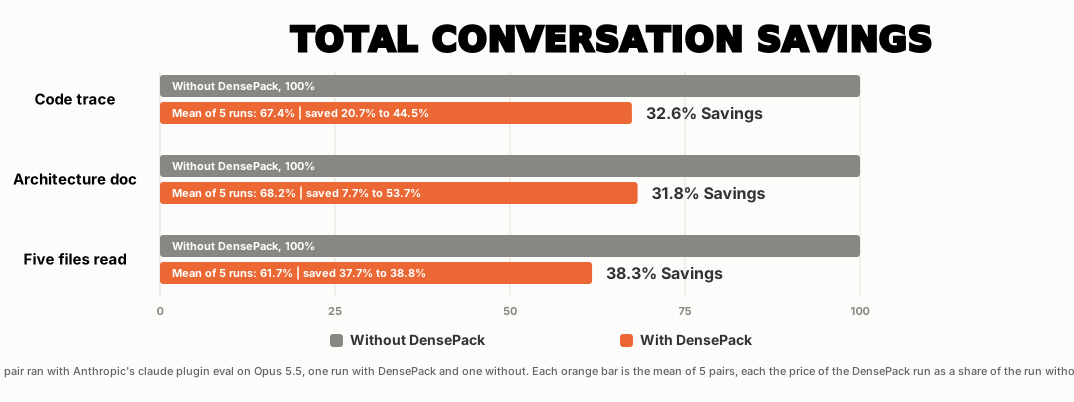
On Opus 5.5, each saving is against the price without DensePack. In the last column, the Opus lead gives the reading to one Sonnet 5.5 subagent. The DensePack prices are averages of 5 runs, and of 10 runs for the architecture doc and code trace with a subagent.
| Bench | Without DensePack | DensePack 2.0.3 | DensePack 2.0.3 with a Sonnet subagent |
|---|---|---|---|
| Five files read | $0.984 | $0.512, 47.9% | $0.287, 70.8% |
| Architecture doc | $0.740 | $0.349, 52.8% | $0.304, 58.9% |
| Read-in-full architecture | $1.810 | $0.865, 52.2% | $0.532, 70.6% |
| Code trace | $4.737 | $2.605, 45.0% | $1.510, 68.1% |
All prices are for the whole Claude Code session at Anthropic's API prices.
| Bench | What the agent does |
|---|---|
| Five files read | Reads 5 scripts of 5,586 lines and writes a 5-line summary |
| Architecture doc | Reads 14 scripts of about 8,700 lines and writes an architecture document |
| Read-in-full architecture | Reads the same 14 scripts whole and writes one table |
| Code trace | Follows a file read through about 24,000 lines of code |
Opus 5.5
| Bench | Without DensePack | DensePack 2.0.3 | Saving | Pro 5-hour limit used | Max 5x 5-hour limit used |
|---|---|---|---|---|---|
| Five files read | $0.98 | $0.51 | 47.9% | 2.0% | 0.5% |
| Architecture doc | $0.74 | $0.35 | 52.8% | 1.4% | 0.3% |
| Read-in-full architecture | $1.81 | $0.87 | 52.2% | 3.5% | 0.9% |
| Code trace | $4.74 | $2.60 | 45.0% | 10.4% | 2.6% |
Opus 5.5 main agent with a Sonnet 5.5 subagent
The Opus main agent gives the reading to one Sonnet 5.5 subagent. The savings are against Opus 5.5 without DensePack.
| Bench | Without DensePack | DensePack 2.0.3 | Saving | Pro 5-hour limit used | Max 5x 5-hour limit used |
|---|---|---|---|---|---|
| Five files read | $0.98 | $0.29 | 70.8% | 1.1% | 0.3% |
| Architecture doc | $0.74 | $0.30 | 58.9% | 1.2% | 0.3% |
| Read-in-full architecture | $1.81 | $0.53 | 70.5% | 2.1% | 0.6% |
| Code trace | $4.74 | $1.51 | 68.1% | 6.0% | 1.5% |
The last two columns show how much of the 5-hour limit one session with DensePack used. On 10 October 2026, $0.25 of API price used about 1% of the 5-hour limit on Pro, and $1 used about 1% on Max 5x.
DensePack adds a start note of about 2,300 tokens with its rules, about $0.018 at the start of an Opus 5.5 session. The prices above already include it. The session start note has the cost on each model.
The agent searched and ran commands in Bash. BENCHMARKS.md has each run. You can run the same benches on your own computer with the scripts in bench/, as Run these benches yourself shows.
Longer sessions save more, because Claude Code sends the whole conversation again with each request. Images cost about half the tokens of their text in each of those requests.
Install the plugin
DensePack works in Claude Code and in Cowork. INSTALL.md has the steps for both, on Windows, macOS and Linux.
In Claude Code, type these two commands:
/plugin marketplace add Fabian-Galvez/DensePack
/plugin install densepack@densepack-marketplace
In Cowork, add the marketplace Fabian-Galvez/DensePack on claude.ai, in Customize, then Plugins, and then check that DensePack is on in Cowork. Install in Cowork has the steps.
DensePack needs Python 3.10 or newer, and Bash. On macOS and Windows, DensePack downloads and installs Python when it is missing. On macOS, Claude Code needs the Xcode Command Line Tools to download the plugin with Git, so run xcode-select --install first.
DensePack saves by packing what the agent reads and the output of its commands into images. The files that the agent opens stay as they are, and DensePack keeps their images and a copy of the exact text in .claude/densepack-vault. Bash output packs whole, so DensePack runs Claude Code with Bash. On macOS, Linux and WSL, Claude Code already runs commands and searches in Bash.
On Windows, Bash comes with Git for Windows:
- Install Git for Windows before the plugin, because Claude Code downloads the plugin with Git. On the first run, DensePack downloads and installs Python when it is missing. INSTALL.md has the steps.
- With Git for Windows, DensePack adds these settings to
~/.claude/settings.json. They take effect in your next session.
{
  "env": {
    "EMBEDDED_SEARCH_TOOLS": "1",
    "CLAUDE_CODE_USE_POWERSHELL_TOOL": "0"
  }
}
EMBEDDED_SEARCH_TOOLSremoves the Grep and Glob tools, because their results always stay text and cannot be packed. The agent still searches withgrepandfindin Bash, and DensePack packs that output. The Claude Code docs do not list this setting.CLAUDE_CODE_USE_POWERSHELL_TOOLset to0turns off the PowerShell tool. Commands then run in Git Bash, where long output arrives as all its images in one result.- When DensePack cannot write
settings.json, its start message shows the lines to add yourself. DensePack never changes a value that you set yourself.
In Cowork, open DensePack in Customize, then Plugins, and select Check for updates. Use these steps to update DensePack in Claude Code.
- Run
claude plugin marketplace update densepack-marketplacein a terminal. - Run
claude plugin update densepack@densepack-marketplace. - Restart Claude Code.
If you packed folders with /mdpack, follow these 2 steps after the update.
To remove DensePack, follow Remove DensePack in INSTALL.md.
DensePack packs instruction files, such as CLAUDE.md, into images only when you run /bakpack, not on its own. The originals stay next to their files as <name>.bakpack.
Files that DensePack 2.0.1 or older packed on its own stay images until you run /bak-off, which puts their original text back. See How /bakpack works.
Claude Code needs densepack: before every command, such as /densepack:helppack. Cowork uses the names in this table.
| Command | What it does |
|---|---|
/densepack |
Starts DensePack and sets each setting to its default |
/dense-off |
Stops all DensePack hooks in this session only. New sessions start with DensePack on |
/maxpack |
Sends images to Sonnet and is the default |
/max-off |
Sends text to Sonnet |
/stylepack |
Turns the writing rules on, which is the default, and prints them so the agent reads them again mid-session |
/style-off |
Turns the writing rules off. The reminder line stops now, and new subagents get only the rules for finding and reading files. From the next session, the start note drops the writing rules. Packing, the project map and the rules for finding and reading files stay on |
/densetext |
Keeps more as text: Bash output under 15 lines and 2,000 characters, JSON output and files under 100 lines. Repeated output blocks fold to one copy, and more IDs go beside images as exact text. It sends more text, so it saves less. /densepack turns it off |
/densedoctor |
Checks Python, Pillow, FreeType and NumPy, draws one test image and prints the last lines of .claude/densepack-vault/why-text.log, which names why each Read or output stayed text |
/helppack |
Prints all commands |
/dense-remove |
Puts the original text back in each packed instruction file and deletes the DensePack files. Run it before the uninstall. Remove DensePack has the details |
/bakpack [folder] |
Experimental: the benches did not run it, so it has not been thoroughly tested. With no folder, it packs the instruction files of this project and its memory index MEMORY.md. With a folder, it packs the files of that folder, and /bakpack ~/.claude packs your personal CLAUDE.md. Each original stays as <name>.bakpack, and the next session gets the images. See The slash commands |
/bak-off [folder] |
Restores the original text and deletes the images. With no folder, it restores this project and its memory index. With ~/.claude, it restores your personal CLAUDE.md and every memory index |
Questions
Can Claude read text in an image?
Yes, Fable, Opus and Sonnet read text in images.
Why does an image of text cost fewer tokens than raw text?
Images cost 1 token for each square of 28 by 28 pixels, no matter how much text or color the square contains. Text costs 1 token for about 2.4 characters of Python and about 3 characters of English prose. DensePack letters are about 10 by 17 pixels, so the same text fits in an image at about half the tokens.
| File | Image size | Text tokens | Image tokens |
|---|---|---|---|
| Markdown prose, 115 lines | 728 x 952 px | 1,855 | 886 |
| Python script, 116 lines | 896 x 728 px | 1,859 | 834 |
How much do I save?
On the benches in Savings, DensePack 2.0.3 saved 45.0% to 52.8% of the whole session with Opus 5.5. With an Opus 5.5 main agent and a Sonnet 5.5 subagent, it saved 58.9% to 70.8%.
Longer sessions that read many files save more, because Claude Code sends each image again with each later request.
Can Claude misread the image?
Yes, some lines, such as random IDs. DensePack sends those lines as exact text beside the image. With DensePack 2.0.2, all 390 runs of Ponytail's 39 tasks passed Ponytail's own checks, as the 13 October results show. Opus 5.5 copied 167 of 168 hex hashes right from DensePack images. DensePack's safeguards cover the last one.
These safeguards limit the risk:
- Some Bash output lines also go as exact text, because Opus 5.5 copied them wrong from images. These include
git --statbars, 18-digit or longer numbers and random IDs with a capital I or small l. - The exact text of each image stays on your computer, beside the image, so the agent can search it for an exact string.
- Reads of 20 lines or fewer return text. Claude Code rejects an Edit that does not match the file, so a misread line changes nothing.
- DensePack checks each Edit before Claude Code does. When the old text is not in the file, DensePack blocks the Edit and shows the exact lines, so the agent can try again.
/max-offsends Sonnet agents text instead of images, like Haiku.
Will Claude shrink the image?
No, the images are 1,596 pixels or less on each side, so neither Claude Code (over 2,000 pixels) nor the API (over 2,576 pixels) shrinks them. The PNGs are also 250,000 bytes or less, below the 307,200 bytes at which Claude Code converts a PNG to a JPEG. The model reads the text at the size that DensePack drew it.
Size limits of the image contains every size limit and the tests of JPEG and color.
What are the limits?
Files and Bash output over 1,000,000 bytes stay text, and so do empty files. Files also stay text when the font has no glyph for more than 2% of their characters, such as Chinese, Japanese or Korean text. Haiku gets text, because it got only about 95% of the bench checks right from images.
The limits contains each limit, its reason and where to change it.
Is it safe?
Yes, DensePack sends no data to an outside service. It uses the internet only to download and install Python, Pillow, freetype-py and NumPy, Git for Windows on Windows and uv on macOS.
- Claude Code sends the images to Anthropic, the same as text.
/bakpackkeeps each instruction file, byte for byte, as<name>.bakpack. Run/dense-removeto put the original text back.
Is DensePack an exploit that AI companies will shut down?
No, DensePack sends normal images through the Read and Bash tools of Claude Code. Anthropic bills each image by its published formula: one input token for each block of 28 by 28 pixels.
- Images and text have the same price per token. One 28-by-28 block contains several letters, which is why the same text costs about half the tokens as an image.
- The images contain only the text of your files and command output. Instructions inside them are file content, the same as in a text Read, not orders from you.
- Sonnet, Opus and Fable do not run a harmful command because an image contains it.
- DensePack never approves a tool call. Claude Code still asks for your permission and stops destructive actions the same way.
- Models read images better with each release. Haiku 4.5 got about 10% right from images, and Haiku 5.5 about 95%, so DensePack gets better with no update.
What changes are made to my computer?
- On Windows with no Python 3.10 or newer, DensePack downloads and installs Python 3.13 with winget.
- On macOS with no Python 3.10 or newer, DensePack downloads uv and uses it to download and install Python 3.13 into its own data folder. It needs no password, and it changes no PATH and no shell file. The plugin uninstall deletes it.
- On Windows with no Git Bash, DensePack downloads and installs Git for Windows with winget, once on each computer.
- DensePack downloads and installs Pillow, freetype-py and NumPy into its own folder. Your own Python does not change.
- On Windows with Git for Windows, DensePack adds
"EMBEDDED_SEARCH_TOOLS": "1"and"CLAUDE_CODE_USE_POWERSHELL_TOOL": "0"to~/.claude/settings.json, so the agent uses Bash. See Install the plugin. - DensePack adds
"CLAUDE_CODE_THRIFTY_SONIC": "0"to~/.claude/settings.jsonon every system. This setting turns off an instruction to read files withcat. The Claude Code harness adds that instruction for some accounts and models in auto and bypassPermissions mode, and a Read costs a little less thancat.- The setting is not in the Claude Code docs, so any Claude Code update can rename or remove it.
- The settings apply to all your projects.
/dense-removedeletes the settings that DensePack added. If you uninstall DensePack without/dense-remove, the settings stay.
See HOW-IT-WORKS.md for each change.
Can I test it myself?
Yes, the bench scripts are in bench/, and the tasks are in plugin/evals/. Run these benches yourself contains the commands.
Three parts
- The plugin, the right-click tool and the HTML app pack text into images.
- The plugin and the right-click tool use the same renderer.
- The HTML app has its own renderer with its own color coding and code mode. It has no line numbers, space counts or tab boxes. It has no bench result.
| Part | What it does | Who it is for | Where to start |
|---|---|---|---|
| Plugin | The plugin packs the files that the agent reads, Bash output, Word files and instruction files such as CLAUDE.md. It also packs the briefs and reports of subagents. |
People who use Claude Code or Cowork | Install the plugin |
| Right-click tool | The right-click tool packs a file from your file manager or your shell on Windows, Linux and macOS. | People who use an AI chat | INSTALL.md and tools/Tool-README.md |
| HTML app | The HTML app runs in your browser. Type or paste text and download or copy the image. | People who want one image without an install | The HTML app and index.html |
tools/Tool-README.md lists what the right-click tool changes on your computer and how to remove it. It also contains the steps to install the tool without the hotkeys.
Rules and the project map
DensePack 2.0 adds rules that make the agent write less, and a map of your project that makes it read less.
- The rules are in plugin/rules/STYLE-RULES.md. DensePack's session start hook puts them in the agent's start note. They are not a skill, so the agent gets them in every session that gets images.
- Subagents get the same rules from DensePack's subagent start hook.
- The start note also names an image of your project map: each folder, its files and the names that each file defines. The agent reads that image in its first turn. When the map has under 400 characters, the note contains it as text, because the text costs less than the image and its Read.
- The session start note has the details and the cost, about 2,300 tokens. BENCHMARKS.md has the savings.
You can make the rules your own. Ask your agent to change STYLE-RULES.md in the DensePack plugin folder, or to delete it. Without that file, DensePack sends no rules and no project map.
The rules save output, both prose and code, because the agent writes shorter documents, replies and code. The images and the project map save input, because the agent reads fewer tokens.
We do not recommend deleting the file, because without it DensePack saves only through the images. Plugin updates put the original file back.
Save the most
DensePack saves the most in long sessions that read many whole files, such as an audit of a repository. Stay in one session and open files with the Read tool, so each later request rereads the cheaper images.
- Reads and Bash commands such as
catandgrepreturn each page of their output as an image, all in one result. - Grep and Glob results stay text. On Windows, the settings in Install the plugin make the agent search with Bash instead, as on macOS and Linux. The savings above are from runs with these settings.
- DensePack packs instruction files such as
CLAUDE.mdonly when you run/bakpack. Run it once in a project, and the next sessions there get the images. To get the text of a packed file back, run/bak-off.
Word files
Claude Code cannot Read Word files, so DensePack packs .doc and .docx files into images before the agent reads them. HOW-IT-WORKS.md has the rules and how to read and change Word files.
Thank you
The output savings and the better replies of DensePack 2.0 are in large part thanks to 3 projects. Its rules use what they found.
- Ponytail showed how rules make the agent write less code, and its benchmark measured DensePack 2.0.
- The i-have-adhd skill for Claude Code showed how to write short replies that put the answer first.
- Research on the shape of AI writing named the signs that the rules cut. The main papers are StoryScope by Russell, Pham, Iyyer and Wieting, and SlopShape by Jochen Madler.
DensePack renders each character with FreeType and the Inter font family. Thank you to the FreeType and Inter projects.
Files
| File | Contents |
|---|---|
| README.md | What DensePack is, what it saves and how to install the plugin |
| CHANGELOG.md | The changes in 2.0 and 1.3.4 |
| HOW-IT-WORKS.md | The swap, the packing, the image, the Edit check, Word files, the commands, the hooks and the scripts |
| INSTALL.md | The install and removal steps for Claude Code and Cowork on Windows, macOS and Linux, the right-click tool and the HTML app |
| BENCHMARKS.md | The benches, the prices and how Anthropic bills |
| PLUGIN-FOLDERS-FILES.md | The folders and working files that the plugin writes and the purpose of each one |
| tools/Tool-README.md | The right-click tool, its install, its use and the files it puts on your computer |
| PRIVACY-POLICY.md | The privacy policy. DensePack sends no data to an external service and uses the network only to download and install what it needs |
| THIRD-PARTY-NOTICES.md | The font and the libraries that this project uses, with their licenses |
| LICENSE | The MIT license |
| plugin/README.md | The short README in the plugin folder. It names what DensePack downloads and installs |
| plugin/LICENSE | The MIT license, copied into the plugin folder |
Explore related projects
affaan-m/ECC
The agent harness performance optimization system. Skills, instincts, memory, security, and research-first development for Claude Code, Codex, Opencode, Cursor and beyond.
300,980 starsNousResearch/hermes-agent
The agent that grows with you
262,572 starsmultica-ai/andrej-karpathy-skills
A single CLAUDE.md file to improve Claude Code behavior, derived from Andrej Karpathy's observations on LLM coding pitfalls.
232,018 starsfirecrawl/firecrawl
Supercharge your AI agents with data from the web and beyond. Building the library for superintelligence. 🔥
200,444 stars