
Eyevinn/strom
Eyevinn/strom has 78 GitHub stars and 20 forks. GitHot measured 0 stars in 24 hours and +2 in 7 days. Last checked 2026-11-16 00:10 UTC. Last push 2026-11-04.
What you can do
- Visual Pipeline Editor - Node-based graph editor in your browser
- Real-time Control - Start, stop, and monitor pipelines via REST API or WebSocket
- Element Discovery - Browse and configure any installed GStreamer element
- Reusable Blocks - Pre-built inputs, outputs, and processing blocks (mixers, encoders, media player, recorders including the experimental fragmented-MP4 Live Recorder, WebRTC, RTMP, AES67, SRT, NDI, DeckLink, TAMS, local capture and playback devices, …)
Measured star growth
- in 24h
- 0
- in 7 days
- +2
- in 15 days
- Collecting history
- in 1 month
- Collecting history
Net star changes over overlapping periods, not daily totals. Missing measurements are left blank. Stars measure attention, not software quality.
About
GStreamer media pipeline engine with a visual web GUI. The media engine behind Open Live.
Creative & MediaREADME.md
Original
Strom - GStreamer Flow Engine
Strom is a GStreamer media pipeline engine with a visual, web-based GUI. At its core it builds, runs, and manages real-time media pipelines; the node-based editor lets you design and control complex media flows without writing code.
Used by Open Live: Strom is a standalone GStreamer flow engine, but Open Live — an open-source live production platform with Open Live Studio as its web-based production interface — uses Strom as a media backend, driving it over its REST and WebSocket APIs. Try the hosted platform at openlive.apps.osaas.io, or see docs/OPEN_LIVE_SETUP.md for running your own Strom instance for Open Live.
Quick Demo: Open Source Cloud
Strom is the media engine behind Open Live. Try it in the hosted Open Live platform on Open Source Cloud.

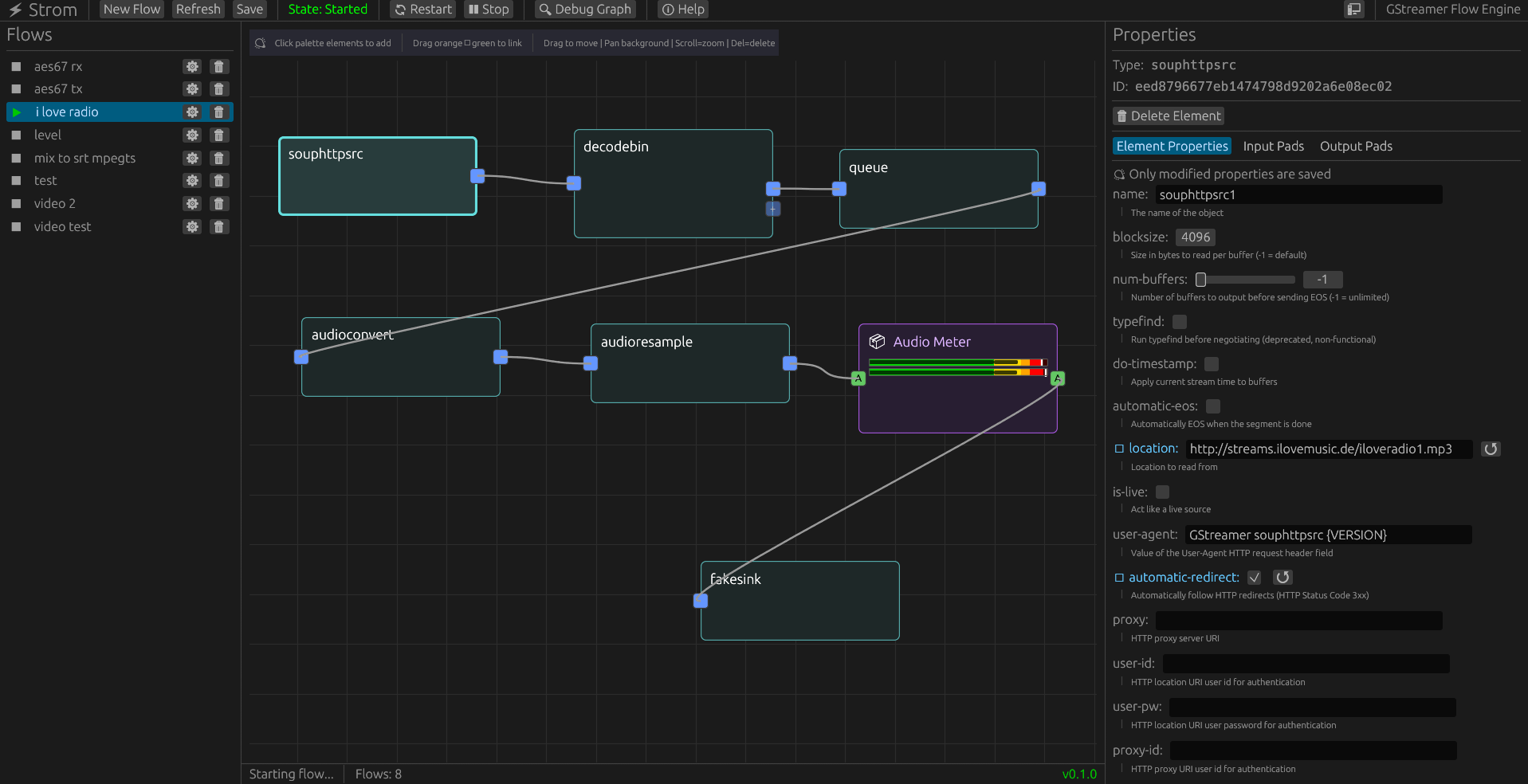 Visual pipeline editor showing a simple test flow
Features
- Visual Pipeline Editor - Node-based graph editor in your browser
- Real-time Control - Start, stop, and monitor pipelines via REST API or WebSocket
- Element Discovery - Browse and configure any installed GStreamer element
- Reusable Blocks - Pre-built inputs, outputs, and processing blocks (mixers, encoders, media player, recorders including the experimental fragmented-MP4 Live Recorder, WebRTC, RTMP, AES67, SRT, NDI, DeckLink, TAMS, local capture and playback devices, …)
- Vision Mixer - Broadcast-style PVW/PGM video switcher with web control UI, a GPU shader FX engine (GLSL looks, wipes, and master FX takes), and stinger transitions with a clip library
- Audio Mixer - Digital mixing console with channel processing, aux sends, groups, and metering
- WebRTC / RTMP / AES67 / SRT / NDI / DeckLink - Wide protocol and hardware I/O coverage
- Media Library - Upload files, or download them from a URL, and play them with the Media Player
- HTML Rendering - Render web pages as video and audio sources with the HTML Input block, and drive the page remotely, using CEF (via
strom-fullDocker image) - gst-launch Import/Export - Import existing
gst-launch-1.0commands or export flows - System Monitoring - Real-time CPU, memory, and GPU usage graphs
- Authentication - Optional session login or API keys
- MCP Integration - Control pipelines with AI assistants (Claude, etc.) over the backend's own
/api/mcpendpoint — no separate binary to install - Native or Web - Run as a desktop app or a web service
Browse the full set of built-in blocks and their properties in the app's element palette and inspector.
Quick Start
One-liner install (recommended)
curl -sSL https://raw.githubusercontent.com/Eyevinn/strom/main/install.sh | bash
The interactive installer detects your OS, downloads the latest release, and installs GStreamer dependencies. Then run strom and open http://localhost:8080.
Strom is tested against GStreamer 1.28 and supports 1.22 and newer. The installer warns when the installed GStreamer is older.
Docker
docker run -p 8080:8080 -v $(pwd)/data:/data eyevinntechnology/strom:latest
Use eyevinntechnology/strom-full:latest for the image with HTML rendering (CEF). Access the web UI at http://localhost:8080.
Other ways to install
- Pre-built binaries (Linux, macOS, Windows MSI) — see GitHub Releases.
- Docker / Docker Compose (production, GPU, reverse proxy) — see docs/DOCKER.md and docs/DOCKER_GPU_SETUP.md.
- Build from source — see docs/DEVELOPMENT.md.
- Deploy for Open Live — try the hosted platform at openlive.apps.osaas.io, or see docs/OPEN_LIVE_SETUP.md.
First steps
- Open
http://localhost:8080. - Drag elements from the palette onto the canvas and connect their pads.
- Configure properties in the inspector, then click Start.
For interactive API docs, visit http://localhost:8080/swagger-ui.
Documentation
- Documentation index — everything, organized by topic.
- FAQ — short answers to common questions.
Quick links: Open Live setup · Docker · GPU setup · Authentication · Vision Mixer · Audio Mixer · MCP · Development · Changelog
Architecture
┌─────────────────────────────────┐
│  Frontend (egui → WebAssembly)  │
│  - Visual flow editor           │
│  - Element palette              │
│  - Property inspector           │
└────────────┬────────────────────┘
             │ REST + WebSocket
┌────────────▼────────────────────┐
│  Backend (Rust + Axum)          │
│  - Flow manager                 │
│  - GStreamer integration        │
│  - Block registry (AES67, ...)  │
│  - Storage (JSON or PostgreSQL) │
└─────────────────────────────────┘
Workspace members:
strom-types- Shared domain models and API typesstrom- Server with GStreamer pipeline managementstrom-frontend- egui UI (compiles to WASM or native)
Configuration
Configure via CLI arguments, environment variables, or a config file (highest priority first):
--port 8080                      # or STROM_PORT=8080
--data-dir /path/to/data         # or STROM_DATA_DIR=...
--database-url postgresql://...   # or STROM_DATABASE_URL=... (production)
Copy .strom.toml.example to .strom.toml for all options. Key topics have dedicated guides: storage, authentication, media library, and HTTPS/TLS (built-in --tls-cert/--tls-key with hot-reload, or a reverse proxy). strom --help lists every CLI option; docs/DEVELOPMENT.md covers the common ones.
API & MCP
- REST + WebSocket API, with interactive OpenAPI docs at
/swagger-ui. WS /api/wsfor real-time state and pipeline events.- gst-launch import/export via
POST /api/gst-launch/parseand/export. - Model Context Protocol over HTTP at
/api/mcp— see docs/MCP.md.
Built by AI
Strom is written by Claude Code. The codebase is authored by AI, not hand-written by humans — that's intentional, and it's also why the code (not the docs) is the source of truth for how things work.
We welcome bug reports, feature requests and ideas. We would rather have a good issue than a pull request: say what is broken, how you would solve it, and how we would test it. Code is quick to generate and goes stale fast. Questions and ideas also fit in GitHub Discussions.
Contributing
See docs/CONTRIBUTING.md and docs/DEVELOPMENT.md. CI runs tests and builds binaries for Linux, Windows, macOS, and ARM64, and publishes Docker images on release.
License
MIT OR Apache-2.0
The name Strom (rhymes with "from") comes from "Ström" — Swedish for "stream".