
EvelynFan/FaceFormer
EvelynFan/FaceFormer has 919 GitHub stars and 148 forks. GitHot measured 0 stars in 24 hours and 0 in 7 days. Last checked 2026-11-09 04:43 UTC. Last push 2023-08-22.
[CVPR 2022] FaceFormer: Speech-Driven 3D Facial Animation with Transformers
Measured star growth
- in 24h
- 0
- in 7 days
- 0
- in 15 days
- Update delayed
- in 1 month
- Update delayed
Net star changes over overlapping periods, not daily totals. Missing measurements are left blank. Stars measure attention, not software quality.
README.md
OriginalFaceFormer
PyTorch implementation for the paper:
FaceFormer: Speech-Driven 3D Facial Animation with Transformers, CVPR 2022.
Yingruo Fan, Zhaojiang Lin, Jun Saito, Wenping Wang, Taku Komura
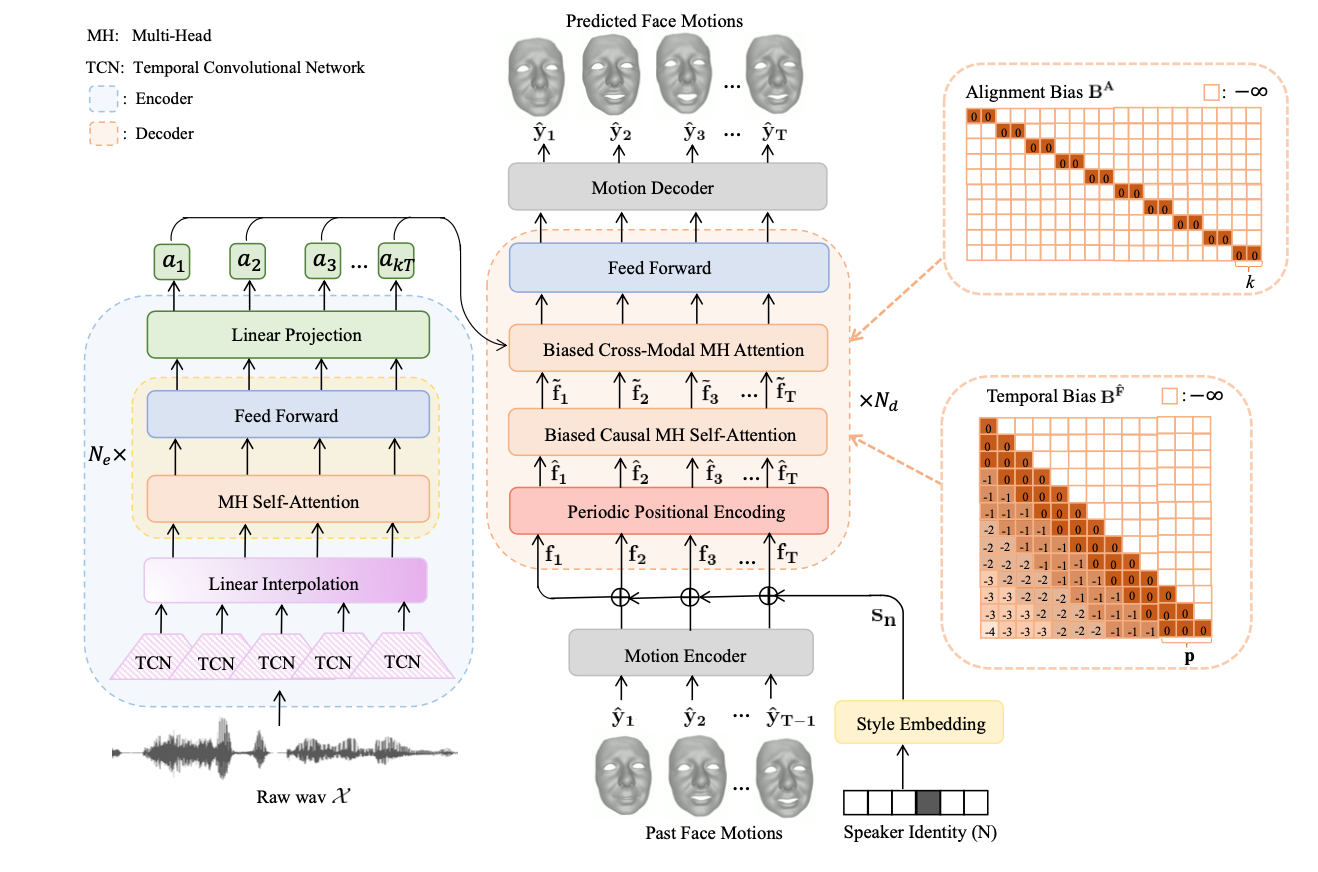
Given the raw audio input and a neutral 3D face mesh, our proposed end-to-end Transformer-based architecture, FaceFormer, can autoregressively synthesize a sequence of realistic 3D facial motions with accurate lip movements.
Environment
- Ubuntu 18.04.1
- Python 3.7
- Pytorch 1.9.0
Dependencies
- Check the required python packages in
requirements.txt. - ffmpeg
- MPI-IS/mesh
Data
VOCASET
Request the VOCASET data from https://voca.is.tue.mpg.de/. Place the downloaded files data_verts.npy, raw_audio_fixed.pkl, templates.pkl and subj_seq_to_idx.pkl in the folder VOCASET. Download "FLAME_sample.ply" from voca and put it in VOCASET/templates.
BIWI
Request the BIWI dataset from Biwi 3D Audiovisual Corpus of Affective Communication. The dataset contains the following subfolders:
- 'faces' contains the binary (.vl) files for the tracked facial geometries.
- 'rigid_scans' contains the templates stored as .obj files.
- 'audio' contains audio signals stored as .wav files.
Place the folders 'faces' and 'rigid_scans' in BIWI and place the wav files in BIWI/wav.
Demo
Download the pretrained models from biwi.pth and vocaset.pth. Put the pretrained models under BIWI and VOCASET folders, respectively. Given the audio signal,
to animate a mesh in BIWI topology, run:
python demo.py --model_name biwi --wav_path "demo/wav/test.wav" --dataset BIWI --vertice_dim 70110 --feature_dim 128 --period 25 --fps 25 --train_subjects "F2 F3 F4 M3 M4 M5" --test_subjects "F1 F5 F6 F7 F8 M1 M2 M6" --condition M3 --subject M1to animate a mesh in FLAME topology, run:
python demo.py --model_name vocaset --wav_path "demo/wav/test.wav" --dataset vocaset --vertice_dim 15069 --feature_dim 64 --period 30 --fps 30 --train_subjects "FaceTalk_170728_03272_TA FaceTalk_170904_00128_TA FaceTalk_170725_00137_TA FaceTalk_170915_00223_TA FaceTalk_170811_03274_TA FaceTalk_170913_03279_TA FaceTalk_170904_03276_TA FaceTalk_170912_03278_TA" --test_subjects "FaceTalk_170809_00138_TA FaceTalk_170731_00024_TA" --condition FaceTalk_170913_03279_TA --subject FaceTalk_170809_00138_TAThis script will automatically generate the rendered videos in the
demo/outputfolder. You can also put your own test audio file (.wav format) under thedemo/wavfolder and specify the argument--wav_path "demo/wav/test.wav"accordingly.
Training and Testing on VOCASET
Data Preparation
Read the vertices/audio data and convert them to .npy/.wav files stored in
vocaset/vertices_npyandvocaset/wav:cd VOCASET python process_voca_data.py
Training and Testing
To train the model on VOCASET and obtain the results on the testing set, run:
python main.py --dataset vocaset --vertice_dim 15069 --feature_dim 64 --period 30 --train_subjects "FaceTalk_170728_03272_TA FaceTalk_170904_00128_TA FaceTalk_170725_00137_TA FaceTalk_170915_00223_TA FaceTalk_170811_03274_TA FaceTalk_170913_03279_TA FaceTalk_170904_03276_TA FaceTalk_170912_03278_TA" --val_subjects "FaceTalk_170811_03275_TA FaceTalk_170908_03277_TA" --test_subjects "FaceTalk_170809_00138_TA FaceTalk_170731_00024_TA"The results and the trained models will be saved to
vocaset/resultandvocaset/save.
Visualization
To visualize the results, run:
python render.py --dataset vocaset --vertice_dim 15069 --fps 30You can find the outputs in the
vocaset/outputfolder.
Training and Testing on BIWI
Data Preparation
- (to do) Read the geometry data and convert them to .npy files stored in
BIWI/vertices_npy.
Training and Testing
To train the model on BIWI and obtain the results on testing set, run:
python main.py --dataset BIWI --vertice_dim 70110 --feature_dim 128 --period 25 --train_subjects "F2 F3 F4 M3 M4 M5" --val_subjects "F2 F3 F4 M3 M4 M5" --test_subjects "F1 F5 F6 F7 F8 M1 M2 M6"The results will be available in the
BIWI/resultfolder. The trained models will be saved in theBIWI/savefolder.
Visualization
To visualize the results, run:
python render.py --dataset BIWI --vertice_dim 70110 --fps 25The rendered videos will be available in the
BIWI/outputfolder.
Using Your Own Dataset
Data Preparation
Create the dataset directory
<dataset_dir>inFaceFormerdirectory.Place your vertices data (.npy format) and audio data (.wav format) in
<dataset_dir>/vertices_npyand<dataset_dir>/wavfolders, respectively.Save the templates of all subjects to a
templates.pklfile and put it in<dataset_dir>, as done for BIWI and vocaset. Export an arbitary template to .ply format and put it in<dataset_dir>/templates/.
Training and Testing
Create the train, val and test splits by specifying the arguments
--train_subjects,--val_subjectsand--test_subjectsinmain.py.Train a FaceFormer model on your own dataset by specifying the arguments
--datasetand--vertice_dim(number of vertices in your mesh * 3) inmain.py. You might need to adjust--feature_dimand--periodto your dataset. Runmain.py.The results and models will be saved to
<dataset_dir>/resultand<dataset_dir>/save.
Visualization
- Specify the arguments
--dataset,--vertice_dimand--fpsinrender.py. Runrender.pyto visualize the results. The rendered videos will be saved to<dataset_dir>/output.
Citation
If you find this code useful for your work, please consider citing:
@inproceedings{faceformer2022,
title={FaceFormer: Speech-Driven 3D Facial Animation with Transformers},
author={Fan, Yingruo and Lin, Zhaojiang and Saito, Jun and Wang, Wenping and Komura, Taku},
booktitle={Proceedings of the IEEE/CVF Conference on Computer Vision and Pattern Recognition (CVPR)},
year={2022}
}
Acknowledgement
We gratefully acknowledge ETHZ-CVL for providing the B3D(AC)2 database and MPI-IS for releasing the VOCASET dataset. The implementation of wav2vec2 is built upon huggingface-transformers, and the temporal bias is modified from ALiBi. We use MPI-IS/mesh for mesh processing and VOCA/rendering for rendering. We thank the authors for their excellent works. Any third-party packages are owned by their respective authors and must be used under their respective licenses.
Explore related projects
tensorflow/tensorflow
An Open Source Machine Learning Framework for Everyone
201,427 starshuggingface/transformers
🤗 Transformers: the model-definition framework for state-of-the-art machine learning models in text, vision, audio, and multimodal models, for both inference and training.
168,711 starsAUTOMATIC1111/stable-diffusion-webui
Stable Diffusion web UI
165,261 starsComfy-Org/ComfyUI
The most powerful and modular diffusion model GUI, api and backend with a graph/nodes interface. The fastest local inference engine in the world.
145,835 stars