
EthanChan050430/Saki-Panel
EthanChan050430/Saki-Panel has 184 GitHub stars and 2 forks. GitHot measured 0 stars in 24 hours. Last checked 2026-11-09 12:28 UTC. Last push 2026-11-02.
Next-gen AI-native server ops panel with an in-workspace SRE agent. Crash self-healing, safe rollbacks, Docker/game servers, and local Ollama support.
What you can do
- AI-assisted operations - Ask about status and logs, inspect or edit workspace files, manage instances, and run scoped commands. Supports Skills, MCP, and image or log attachments.
- Saki Watch - Record unexpected exits and error fingerprints, diagnose incidents, review patches, and roll back a change when verification fails under supported conditions.
- Instances and nodes - Connect remote Linux servers over SSH. Manage nine instance types across Daemon nodes, including Minecraft, Steam, Docker containers, and Compose stacks.
- Daily administration - Web terminal, file editing and transfers, visual Git diffs, SQLite / MySQL / PostgreSQL / Redis, scheduled tasks, and instance templates.
Measured star growth
- in 24h
- 0
- in 7 days
- Update delayed
- in 15 days
- Update delayed
- in 1 month
- Update delayed
Net star changes over overlapping periods, not daily totals. Missing measurements are left blank. Stars measure attention, not software quality.
README.md
Original
Saki Panel
An open-source server operations panel with AI in the workspace.
Manage Minecraft, Steam, Docker, and ordinary processes from one web console. Saki uses live logs, files, and node metrics to help investigate incidents and can act after authorization.
Website · Incident walkthrough (中文) · Quick start · Download a release · 简体中文


https://github.com/user-attachments/assets/99a8d410-c079-4368-86c9-f847413d4580

Screenshots
Version 5.0 puts Saki Assistant, live system metrics, and multiple workspaces on the overview page. The poster above uses an unmodified capture of the running app; click it to open the original screenshot. The examples use local demo services.
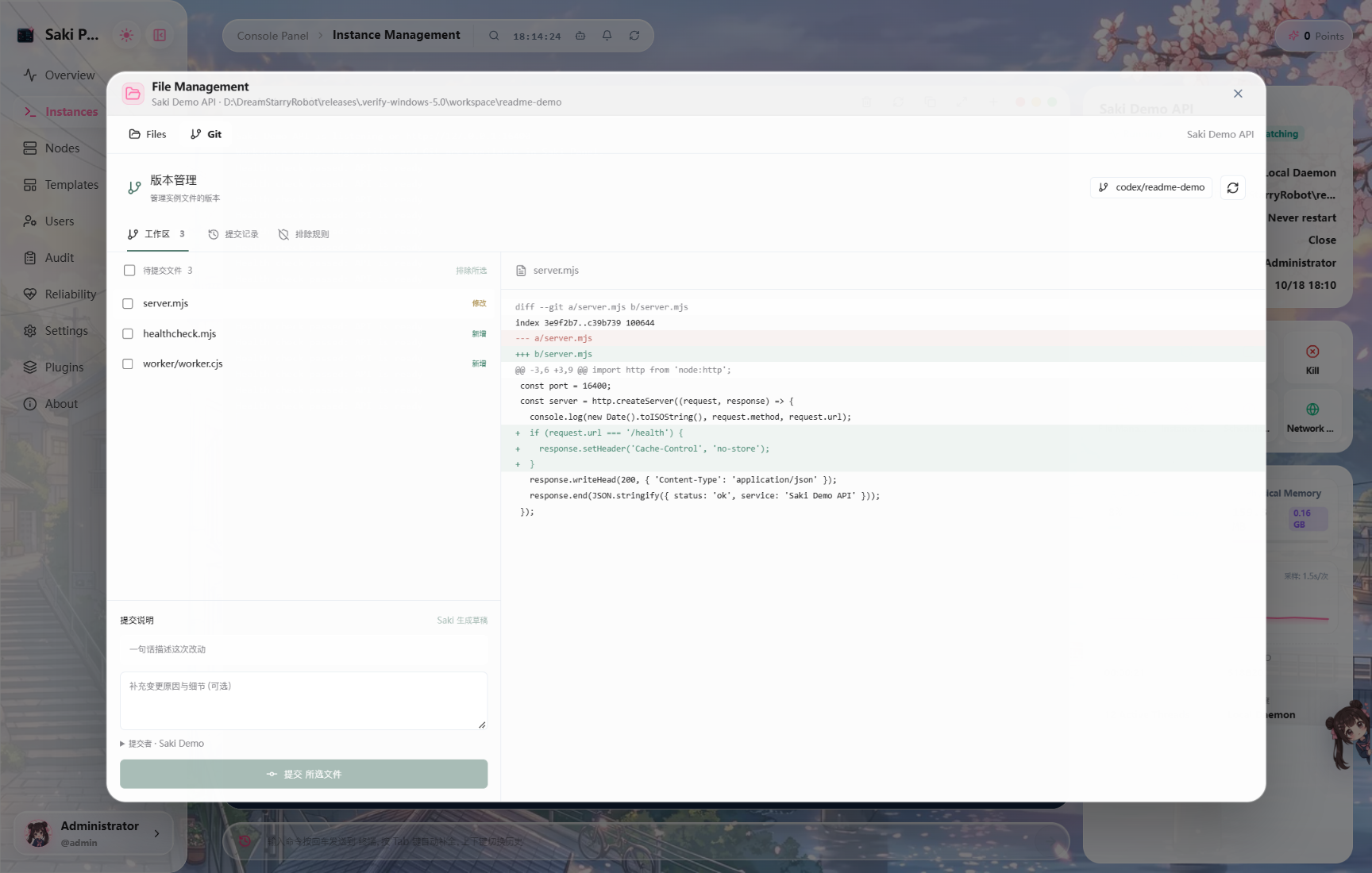
Review file changes, select what to commit, and browse history from the instance's Git workspace.
Saki Panel brings instances, nodes, terminals, files, databases, and access control into one workspace. When something fails, Saki can inspect the current instance's status and logs and propose actions without making you copy context between a panel, a terminal, and a separate chat.
What you can do
| Area | Capabilities |
|---|---|
| AI-assisted operations | Ask about status and logs, inspect or edit workspace files, manage instances, and run scoped commands. Supports Skills, MCP, and image or log attachments. |
| Saki Watch | Record unexpected exits and error fingerprints, diagnose incidents, review patches, and roll back a change when verification fails under supported conditions. |
| Instances and nodes | Connect remote Linux servers over SSH. Manage nine instance types across Daemon nodes, including Minecraft, Steam, Docker containers, and Compose stacks. |
| Daily administration | Web terminal, file editing and transfers, visual Git diffs, SQLite / MySQL / PostgreSQL / Redis, scheduled tasks, and instance templates. |
| Visibility and access | Cluster dashboard, reliability reports, audit history, and role-based access. Send incident notifications through webhooks, DingTalk, WeCom, or Telegram. |
| Extensions | Install themes, Saki skins, games, widgets, and locales. Import optional operations packs with templates and runbooks. |
Saki can use local Ollama or LM Studio models, or a cloud provider configured in Settings. Local inference keeps model requests on your chosen local endpoint; cloud models, online plugins, and operations packs use external services when selected.
Quick start
Run locally from source
Requires Node.js ≥ 22.13 and npm ≥ 9.
git clone https://github.com/EthanChan050430/Saki-Panel.git
cd Saki-Panel
npm install
npm run db:push
npm run dev
Open http://localhost:5478. The Panel API defaults to port 5479 and the local Daemon to 5480. The development login is admin / admin123456. Change the default password and secrets before making the services reachable from other devices.
Development start scripts are available at scripts/windows/start-dev.ps1, scripts/linux/start-dev.sh, and scripts/macos/start-dev.command. You can also choose a compatible package from Releases, when one is available for your system.
Use prebuilt Docker images
Download docker-compose.ghcr.yml into your deployment directory and create a .env file:
JWT_SECRET=replace-with-a-long-random-secret
ADMIN_PASSWORD=replace-with-a-strong-password
DAEMON_REGISTRATION_TOKEN=replace-with-a-separate-random-token
docker compose -f docker-compose.ghcr.yml pull
docker compose -f docker-compose.ghcr.yml up -d
The default web address is http://localhost:5478. For remote or public deployments, set WEB_ORIGIN, PANEL_PUBLIC_URL, and PANEL_CORS_ORIGINS to your actual origins, configure HTTPS for Web, Panel, and remote Daemons, and limit exposed ports. Node tokens authenticate requests; the default HTTP transport does not encrypt them. The Compose file mounts the Docker socket into the Daemon, so review the permissions granted to that node.
To build the images from source instead, use docker-compose.yml, supply the same secrets in .env, and run docker compose up -d --build. See .env.example for more options.
How Saki helps investigate
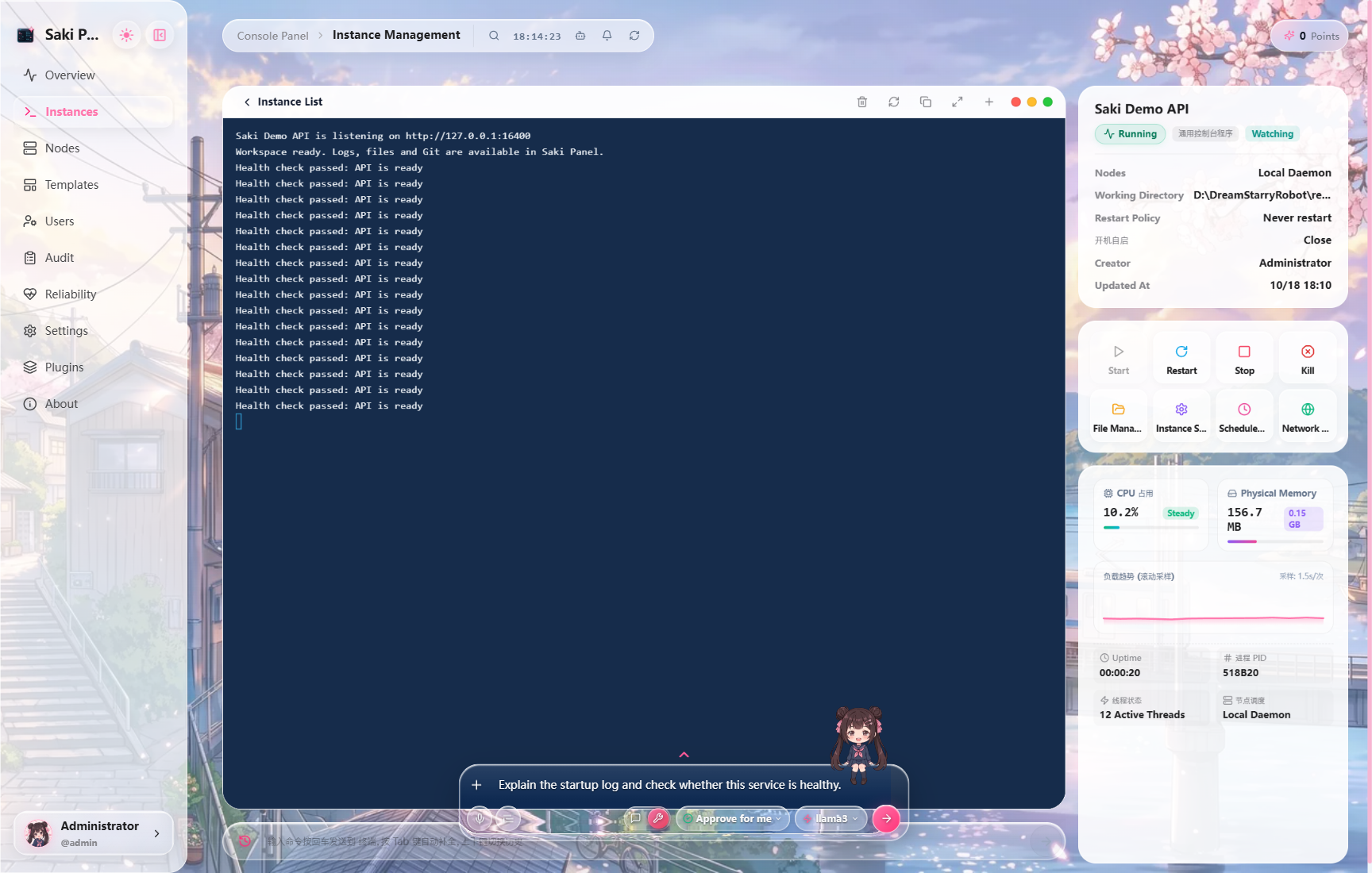
Saki combines the current instance's state, logs, files, and resource metrics with scoped tools for instance and file operations. Actions have risk levels; operations requiring approval are shown before execution, and the Daemon blocks certain dangerous commands. Results depend on the selected model, granted permissions, and node environment.
For example, ask it to inspect logs before a crash and identify a likely configuration error, or to restart a service and watch its new logs. You can attach screenshots and log files. Save recurring procedures as Skills or connect external tools through MCP.
How Saki Watch responds to incidents
- After an unexpected exit, the Daemon records exit details and an error fingerprint. By default, no model call happens yet.
- A user starts AI diagnosis from the incident notification. An administrator can optionally enable automatic diagnosis for an instance.
- Diagnosis reads logs and files. Proposed edits are shown as diffs and require human approval by default.
- An optional auto-approval policy applies only to small patches that meet risk, confidence, scope, and instance-state limits.
- After a patch, Watch restarts and verifies the instance. If verification finds the same failure or a configured health check fails, and a usable checkpoint and acting user exist, it attempts to roll back that change. Other outcomes are recorded for manual follow-up.
Watch also supports cooldowns, run limits, notification channels, and escalation reminders. Configure these in instance and system settings.
Reproducible incident walkthrough
The port configuration walkthrough (Chinese) includes a deliberately broken sample service, actual Ollama calls, the proposed patch, pre-approval and post-approval configuration, health checks, and original UI captures. The exercise exposed and fixed a Watch file-edit approval bypass before the successful rerun. Earlier connection failures and a wrong-port change that was rolled back are retained, with the tested source revision and limitations stated explicitly.
Panel and extensions
Instance types: generic_command, nodejs, python, java_jar, shell_script, docker_container, docker_compose, minecraft, and steam_game_server. The instance view provides lifecycle controls, logs, process probes, and optional proxy settings. Templates reuse launch commands and environment variables.
The file manager supports browsing, editing, transfers, and common archives. The database workspace supports SQLite, MySQL / MariaDB, PostgreSQL, and Redis. Scheduled tasks keep run history; users, roles, and audit logs help manage access and trace actions.
The Plugin Workshop supports themes, skins, games, widgets, and locales. The Templates page also offers optional Minecraft Paper and Docker Compose Service Guardian operations packs. Downloads verify hashes and sizes; importing templates or runbooks is a separate action, and downloading alone does not execute scripts or change instances. See the operations pack documentation.
Architecture and development
Web (React / Vite)  ──HTTP / WebSocket──  Panel (Fastify / Prisma)
                                               │
                                          HTTP / WebSocket
                                               │
                                      Daemon (one per node)
                                               │
                                        Service instances
apps/web is the web console, apps/panel provides the API, authentication, audit, and Saki, apps/daemon manages processes and files on each node, packages/shared holds shared contracts, and prisma contains the database schema.
npm run dev                 # Start Panel, Daemon, and Web
npm run build               # Build all workspaces
npm run check               # TypeScript checks
npm run test:watch          # Watch approval and diagnostic-context regressions
npm run db:push             # Sync the SQLite schema
See CONTRIBUTING.md to contribute and SECURITY.md to report a vulnerability.
License
Apache License 2.0. See LICENSE.
Explore related projects
awesome-selfhosted/awesome-selfhosted
A list of Free Software network services and web applications which can be hosted on your own servers
335,521 starsimmich-app/immich
High performance self-hosted photo and video management solution.
118,645 starsStirling-Tools/Stirling-PDF
#1 PDF Application on GitHub that lets you edit PDFs on any device anywhere
96,149 starslouislam/uptime-kuma
A fancy self-hosted monitoring tool
93,425 stars