
EXT-IT/motd
EXT-IT/motd has 46 GitHub stars and 0 forks. GitHot measured 0 stars in 24 hours, 0 in 7 days, and +1 in 15 days. Last checked 2026-11-10 01:13 UTC. Last push 2026-04-14.
Pre-login warning banner and dynamic post-login MOTD for Linux — standalone shell installer and SaltStack formula from one unified schema.
Measured star growth
- in 24h
- 0
- in 7 days
- 0
- in 15 days
- +1
- in 1 month
- Collecting history
Net star changes over overlapping periods, not daily totals. Missing measurements are left blank. Stars measure attention, not software quality.
README.md
Original🛡️ motd
A pre-login warning banner and a dynamic post-login MOTD for Linux — from one config, in one install.





pre-login warning · dynamic system-info dashboard · zero runtime deps · Salt + standalone from one schema
Version: v1.0.1 — see the CHANGELOG for release notes.
Every Linux fleet ends up with two hand-written shell snippets nobody wants to
touch: one that prints a legal warning before SSH auth, and one that prints
system facts after login. Both drift across hosts, both ship with an off-by-two
bug the next time someone edits them, and both land in /tmp/.foo_pubip the
moment the author needs a cache.
motd replaces both with a single, auditable tool that ships in two flavours:
- 🐚 a standalone shell installer (
install.sh) for bootstrap scripts, golden images, and one-off hosts, - 🧂 a SaltStack formula (
salt/) that plugs into any Salt 3006+ tree.
Both variants are driven by the same /etc/motd.conf schema, so a
Salt-managed host and a hand-installed VM render byte-identical output. The
Salt formula deploys the exact same bash script the standalone installer ships
— no Jinja-at-runtime, no template drift.
💬 Announcement: 📢 read the LinkedIn post · 🏢 Built by EXT IT GmbH · 📦 Repo github.com/EXT-IT/motd
📺 What you get
1. The pre-login banner (/etc/issue.net)
Shown by OpenSSH before authentication — a legally-enforceable warning
carrying a specific statute citation. The ASCII twin under /etc/issue is
written at the same time for the local console.
╔════════════════════════════════════════════════════════╗
║  WARNING: Authorized access only.                      ║
║  This system is property of Acme Corp.                 ║
║  Unauthorized access is strictly prohibited.           ║
║  All connections are monitored and logged.             ║
║  Contact: [email protected]                             ║
║  Violations prosecuted under §202a StGB.               ║
╚════════════════════════════════════════════════════════╝
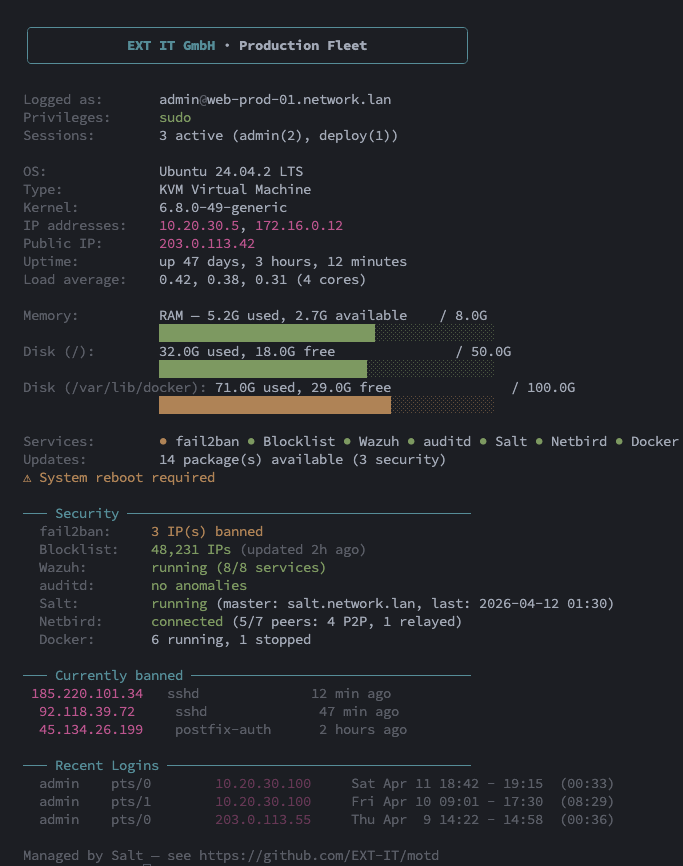
2. The dynamic MOTD (/etc/update-motd.d/10-system-info)
Shown after authentication — one-screen operational dashboard with everything an admin wants to see in the first two seconds of a session.
✨ Features
Banner side
- Dual-output: writes
/etc/issue(flat ASCII for the local console) and/etc/issue.net(Unicode box for SSH) in one pass — guaranteed to agree. - Auto-growing box:
BOX_WIDTH = max(min_width, longest_line + 4), capped at 120. Long tenant names can never silently overflow. - Three box styles:
double(╔═╗║╚═╝),single(┌─┐│└─┘),ascii(+=|). - EN + DE presets out of the box, with ASCII transliteration for
/etc/issueso boot consoles without a UTF-8 font still render cleanly. - Legal citation as a first-class field. Default
§202a StGB(GermanAusspähen von Daten), swap for your jurisdiction via one flag. - Automatic
sshd_config.d/drop-in withsshd -tvalidation before reload — a broken config is reverted, never shipped.
MOTD side
- Branded header box (rounded corners, auto-centered, auto-growing).
- Service health summary — fail2ban, Blocklist (ipset), Wazuh, auditd, Salt minion, Netbird, Docker, WireGuard, OpenVPN, Restic/Borg, plus 30+ infrastructure daemons detected automatically via one batched
systemctl is-active. - Security drilldown — fail2ban ban list with relative timestamps (bounded detail at 10 IPs), blocklist size + last update, Wazuh subsystem count, auditd anomaly count, Salt last-apply timestamp, Netbird peer count (P2P vs relayed), Docker running/stopped split.
- Disk + memory bars with green → yellow → red thresholds (70% / 90%).
- Updates count locale-neutral — works on
de_DE,fr_FR, any gettext-localisedupdate-notifieroutput. Security subset highlighted in yellow. - Recent logins scoped to the currently-logged-in user only (no fleet-wide session leak via
last -n 5). - Runtime toggles —
--no-motd-services,--no-motd-updates,--no-motd-loginsgate entire blocks without touching the script. - Verbose mode opt-in (kernel version + public IP) per CIS Ubuntu 24.04 L1 §1.7.x recon-surface reduction.
Cross-cutting
- Zero runtime dependencies — no Python, no curl-to-fetch-deps, no package install during provisioning.
- Hot-path audited — every external command in the MOTD is wrapped in
timeout 2. A hung daemon socket cannot block an SSH login. - Atomic writes + timestamped backups — never leaves
/etc/issue*,/etc/motd.conf, or the sshd drop-in in a half-written state. A.latest.baksymlink always points at the most recent backup. - Idempotent — re-running with the same config is a no-op on disk, and
sshdis only reloaded when something actually changed. - Atomic
sshdguard — every reload is preceded bysshd -t; a bad drop-in is reverted before the daemon sees it. - Input sanitation — control characters, ANSI escapes, overlong strings, and shell-metacharacters (
\`$") are rejected at install time. The public-IP cache is root-owned and character-whitelisted on read. - Dry-run (
--dry-run) shows all three phases (banner, MOTD, sshd) before touching disk. - Uninstaller restores from the most recent backup or cleanly removes files.
- Apache-2.0 licensed — use it, fork it, ship it in your product.
⚡ Performance
The MOTD script runs on the SSH login critical path (invoked by pam_motd
as root on every interactive session). It is audited to keep that hot path
short and bounded:
| Metric (warm cache) | Typical | Worst case (real-world load) |
|---|---|---|
| Hot-path median | ~500-600 ms | ~700 ms |
| Cold-cache first login | +50-100 ms | up to ~800 ms |
| Hard upper bound per call | 2 s | 2 s (per daemon probe) |
Measured on an Ubuntu 24.04.3 LXC with a realistic service surface: fail2ban
with active bans, docker with running containers, wazuh-agent connected,
~50 pending package updates, and update-notifier with an ESM preamble.
Figures are warm-cache median over 15 consecutive runs. Your numbers will
be lower on bare metal and on hosts with fewer active services, and
marginally higher on the first login after reboot (cold bash hash table,
cold dentry cache).
The budget is held by a small set of hard rules — if you modify the runtime script, keep them intact:
- No
salt-callanywhere. Booting the Salt Python interpreter costs ~300-800 ms per call on LXC. The "last Salt apply" indicator is read from themtimeof a marker file that the formula touches on everystate.apply(/var/cache/motd/salt-status). timeout 2around every daemon-socket call.fail2ban-client,docker ps,netbird status,wazuh-control status,wg show. A hung socket cannot block an SSH login — the worst case is the daemon being reported as?and a 2 s ceiling on detail.- No full-scan of log files.
fail2ban-client get <jail> banip --with-time(in-memory state, not log grep);/var/lib/update-notifier/updates-availablecache (notapt list --upgradable). The update-notifier parser is scan-based and locale-neutral, so Ubuntu's ESM preamble does not push it into the slowaptfallback. - Fork-free binary probes. Availability checks use
hash <name>at the top of the service-checks section.hashis a bash builtin that walks$PATHonce, stores the resolved binary in bash's internal hash table, and lets every later invocation skip the PATH walk entirely. - Terse enumeration variants.
ipset -t list(header only, never the full member dump);systemctl list-unit-filescached into a shell variable; one batchedsystemctl is-active "${units[@]}"for all dynamic-discovery candidates;docker ps -a --format '{{.State}}'once (never twice, never a fullps -adump). - Cached public-IP probe. 1 h TTL, root-owned cache at
/var/cache/motd/pubip, character-whitelisted on read (tr -dc '0-9a-fA-F:.'), skipped entirely on Proxmox hosts where there is typically no default route.
If you want to measure on your own host:
# Warm the script once, then time 15 runs
sudo bash /etc/update-motd.d/10-system-info > /dev/null
for i in $(seq 1 15); do
  /usr/bin/time -f '%e' sudo bash /etc/update-motd.d/10-system-info > /dev/null
done 2>&1 | sort -n
If a median run on your host costs more than ~800 ms, the most likely
causes are (a) an unresponsive daemon socket eating its 2 s timeout
(check with strace -f -e trace=execve), (b) landscape-common's
50-landscape-sysinfo still executable and duplicating system-info
gathering (the installer skips this symlink by design — see the
--dry-run output), or (c) a large fail2ban ban list above the
MAX_DETAIL=10 cap still being scanned (it shouldn't be — the summary
path is O(1) per jail, not O(bans)).
🔧 Requirements
| Component | Version / detail |
|---|---|
| OS (banner) | Debian/Ubuntu 20.04+, RHEL/Rocky/Alma/CentOS 8+, Fedora (any maintained release) |
| OS (MOTD) | Ubuntu 22.04 LTS or 24.04 LTS (uses the update-motd.d hook + update-notifier) |
| Shell | bash 4+ (macOS bash 3.2 works for the installer but not for the runtime MOTD) |
| OpenSSH | 8.2+ for the sshd_config.d/ drop-in path; older servers fall back to append |
| Salt | 3006 LTS (Onedir) or later — for the Salt variant only |
| Privileges | Root at install time. The MOTD runs as root via pam_motd, no setuid. |
🚀 Quickstart
Option A — standalone shell installer
git clone https://github.com/EXT-IT/motd.git
cd motd
sudo ./install.sh --company-name "Acme Corp" --contact "[email protected]"
Why no
curl | bashone-liner? The installer needs the runtime MOTD script (motd/10-system-info.sh) from the repo directory. A piped install cannot access sibling files, so a full clone (or tarball extraction) is required.
Preview everything without touching disk:
sudo ./install.sh --dry-run --company-name "Acme Corp"
Use a persistent config file (the installer reads /etc/motd.conf automatically when present):
sudo cp motd.conf.example /etc/motd.conf
sudo $EDITOR /etc/motd.conf
sudo ./install.sh
Install only one half:
sudo ./install.sh --banner-only --company-name "Acme Corp"   # just the banner
sudo ./install.sh --motd-only --motd-verbose                 # just the MOTD
Option B — SaltStack formula
Drop the state tree into your Salt file roots — no formula packaging, plain directories:
git clone https://github.com/EXT-IT/motd.git /tmp/motd
sudo cp -r /tmp/motd/salt /srv/salt/motd
sudo cp /tmp/motd/motd/10-system-info.sh /srv/salt/motd/10-system-info.sh
The second copy places the runtime MOTD script at salt://motd/10-system-info.sh
so the formula's file.managed state can reference it. (Alternatively, add the
repo as a GitFS remote — see salt/README.md.)
Create the pillar (start from salt/pillar.example.sls):
# /srv/pillar/motd.sls
login_banner:
  banner_enabled: true
  motd_enabled: true
  company_name: "Acme Corp"
  contact: "[email protected]"
  motd:
    subtitle: " · Production"
    verbose: false
    footer: "Managed by motd"
  sshd:
    banner_manage: true
The pillar top-level namespace is
login_banner:. New keys live under themotd:andsshd:sub-namespaces — seesalt/README.mdfor the full pillar reference.
Wire it into the top files:
# /srv/salt/top.sls
base:
  '*':
    - motd

# /srv/pillar/top.sls
base:
  '*':
    - motd
Apply:
salt '*' saltutil.refresh_pillar
salt '*' state.apply motd
Detailed Salt usage — targeting, compound matches, multi-tenant layouts — lives
in salt/README.md.
⚙️ Configuration reference
Both variants share the same schema. The Pillar key column is the YAML path
under login_banner:; the CLI flag column is what install.sh accepts.
The shell-var column matches what is written into /etc/motd.conf.
Scope flags
Scope flags are CLI-only in the shell installer. They are intentionally not
written to /etc/motd.conf and not read back from it — persisting them would
let a one-off --motd-only run silently disable the banner for every
subsequent install, long after the operator's original intent. For scripted
invocations the shell installer still accepts them via environment variables
(per-invocation, not per-host).
| Pillar key | CLI flag | Env var (shell) | Default | Description |
|---|---|---|---|---|
banner_enabled |
--no-banner |
BANNER_ENABLED |
true |
Install the pre-login banner. |
motd_enabled |
--no-motd |
MOTD_ENABLED |
true |
Install the post-login MOTD. |
sshd:banner_manage |
--no-sshd-banner |
SSHD_BANNER_MANAGE |
true |
Write the sshd_config.d/ drop-in. |
| (shell only) | --banner-only |
— | — | Alias for --no-motd; forces sshd banner on. |
| (shell only) | --motd-only |
— | — | Alias for --no-banner --no-sshd-banner. |
Banner keys
| Pillar key | CLI flag | Shell var | Default | Description |
|---|---|---|---|---|
company_name |
--company-name |
COMPANY_NAME |
Managed Server |
Shown in the "property of" line. Max 64 chars. Control chars / ANSI are rejected. |
contact |
--contact |
CONTACT |
(empty) | Optional contact line rendered above the statute. Omitted entirely when empty. |
language |
--language |
LANGUAGE |
en (en | de) |
Preset warning text. German ASCII variant transliterates ü→ue, ö→oe, ß→ss. |
style |
--style |
STYLE |
double |
double | single | ascii. Box drawing for /etc/issue.net only. |
min_width |
--min-width |
MIN_WIDTH |
56 |
Minimum inner box width. Auto-grows to longest_line + 4. Hard cap at 120. |
statute |
--statute |
STATUTE |
§202a StGB |
Unicode legal citation for /etc/issue.net. |
statute_ascii |
--statute-ascii |
STATUTE_ASCII |
section 202a StGB |
ASCII legal citation for /etc/issue (ASCII-safe boot console). |
issue_file |
--issue-file |
ISSUE_FILE |
/etc/issue |
Target path for the local-console banner. |
issue_net_file |
--issue-net-file |
ISSUE_NET_FILE |
/etc/issue.net |
Target path for the SSH banner. |
clear_motd |
--no-clear-motd |
CLEAR_MOTD |
true |
Blank out /etc/motd (the static file). Pass the flag to preserve existing content. |
sshd_reload |
--no-sshd-reload |
SSHD_RELOAD |
true |
Non-disconnecting systemctl reload sshd when the banner actually changed. |
warning_lines_override |
--warning-lines (repeatable) |
WARNING_LINES_OVERRIDE |
[] |
Replace the preset warning lines verbatim. The statute is still appended. CLI form is repeatable: --warning-lines "Line 1" --warning-lines "Line 2". Config-file form is single-quoted with literal \n separators: WARNING_LINES_OVERRIDE='Line 1\nLine 2' (the double-quoted form would be rejected because the parser refuses backslash inside "…"). Per-line cap 128 chars; single quote, shell metacharacters ($ \ " \`), control characters, and emoji are rejected at install time. |
MOTD keys
| Pillar key | CLI flag | Shell var | Default | Description |
|---|---|---|---|---|
motd:subtitle |
--motd-subtitle |
MOTD_SUBTITLE |
· Managed Server |
Subtitle after the company name in the MOTD header. Leading separator is intentional. |
motd:min_width |
--motd-min-width |
MOTD_MIN_WIDTH |
54 |
Minimum MOTD header box width. Auto-grows to fit company_name + subtitle + 4. |
motd:verbose |
--motd-verbose |
MOTD_VERBOSE |
false |
Show kernel version and public IP. Off by default (CIS L1 §1.7.x). |
motd:footer |
--motd-footer |
MOTD_FOOTER |
(empty) | Optional dim footer line. Typical: "Managed by motd". |
motd:show_services |
--no-motd-services |
MOTD_SHOW_SERVICES |
true |
Show the Services / Security blocks. |
motd:show_updates |
--no-motd-updates |
MOTD_SHOW_UPDATES |
true |
Show the Updates line and the "reboot required" warning. |
motd:show_recent_logins |
--no-motd-logins |
MOTD_SHOW_RECENT_LOGINS |
true |
Show the Recent Logins block (scoped to the current user). |
motd:security_priv_only |
--motd-security-priv-only |
MOTD_SECURITY_PRIV_ONLY |
false |
Only render the Security / Currently-banned blocks for users in sudo/wheel/admin. Shared-bastion / jump-host safety. |
motd:pubip_url |
(config file only) | MOTD_PUBIP_URL |
https://ifconfig.me |
Public-IP probe endpoint. Restricted to ^https?://[A-Za-z0-9./_:?=&%-]+$ (query strings allowed). |
motd:script_path |
--motd-script-path |
MOTD_SCRIPT_PATH |
/etc/update-motd.d/10-system-info |
Where the runtime MOTD script lands. |
motd:config_path |
--motd-config-path |
MOTD_CONFIG_PATH |
/etc/motd.conf |
Where the unified runtime config file lands. |
motd:cache_dir |
--motd-cache-dir |
MOTD_CACHE_DIR |
/var/cache/motd |
Root-owned cache dir for the public-IP cache + apply-time marker. Must NOT live under /tmp, /var/tmp, or /dev/shm. |
sshd:banner_dropin |
--sshd-dropin |
SSHD_BANNER_DROPIN |
/etc/ssh/sshd_config.d/99-motd-banner.conf |
Path to the sshd_config drop-in that wires Banner /etc/issue.net for new SSH logins. |
Common shell-only options
| CLI flag | Default | Description |
|---|---|---|
--backup-dir DIR |
/var/backups/motd |
Where timestamped backups land. Created mode 0700 on first write. |
--no-backup |
false (backups enabled) |
Disable backups (not recommended). |
--config PATH |
/etc/motd.conf if present |
Shell-style config file parsed (never sourced) by the installer. |
--dry-run, -n |
false |
Render to stdout; make no changes. |
--force, -f |
false |
Overwrite without prompting even if backups are disabled. |
--uninstall |
— | Invoke uninstall.sh from the same directory. |
--help, -h |
— | Grouped usage reference. |
--version |
— | Print version. |
Precedence (shell): CLI flags > environment variables > config file > built-in defaults.
sshd reload semantics
Differs between standalone and Salt — by design, both pathways converge on the same operational invariant.
The standalone installer uses a single global SSHD_RELOAD=true/false (CLI flag --no-sshd-reload). Salt uses two separate pillar keys: login_banner:sshd_reload (banner.sls) and login_banner:sshd:reload (motd.sls — the W4 split). Both pathways reach the invariant "deploy the drop-in, do not reload sshd now," which is what an operator needs during a change window: stage the new config but defer the reload to an approved maintenance slot.
The Salt split additionally allows banner-reload ≠ motd-reload granularity — useful only for the rare workflow where an operator wants to stage the MOTD drop-in while reloading sshd for the banner immediately (or vice versa). Standalone collapses both into one knob because install.sh runs the phases sequentially and a per-artefact split is harder to reason about on a single command line.
If you flip between the two deployment modes, the upgrade path is straightforward: a SSHD_RELOAD=false standalone config becomes login_banner:sshd_reload: false AND login_banner:sshd:reload: false on the Salt side. Setting only one of the two leaves the other reload enabled.
📚 Example configurations
Four ready-to-adapt shell configs live under examples/:
config-minimal.conf — the two-field starter
COMPANY_NAME="Acme Corp"
CONTACT="[email protected]"
Everything else defaults. Banner + MOTD + sshd drop-in all enabled.
config-corporate.conf — managed-infrastructure baseline
COMPANY_NAME="Acme Corporation"
CONTACT="[email protected]"
LANGUAGE="en"
STYLE="double"
MIN_WIDTH=64
STATUTE="§202a StGB"
STATUTE_ASCII="section 202a StGB"
CLEAR_MOTD=true

MOTD_SUBTITLE=" · Managed Server"
MOTD_MIN_WIDTH=58
MOTD_VERBOSE=false
MOTD_FOOTER=""
MOTD_SHOW_SERVICES=true
MOTD_SHOW_UPDATES=true
MOTD_SHOW_RECENT_LOGINS=true

SSHD_RELOAD=true
BACKUP=true
BACKUP_DIR="/var/backups/motd"
Both halves enabled (the default — scope flags are CLI-only), contact set, sshd drop-in active, verbose mode off, backups on.
config-paranoid.conf — heaviest statute, MOTD installed with every optional block disabled
COMPANY_NAME="Acme Restricted Systems"
CONTACT="[email protected]"
LANGUAGE="en"
STATUTE="§202a StGB · GDPR Art. 32 · BSI SYS.1.3.M6 · all access logged"
STATUTE_ASCII="section 202a StGB / GDPR Art. 32 / BSI SYS.1.3.M6 / all access logged"
# ... plus MOTD_SHOW_SERVICES=false, MOTD_SHOW_UPDATES=false,
# MOTD_SHOW_RECENT_LOGINS=false, MOTD_VERBOSE=false.
Install with the default scope (no extra scope flag):
sudo ./install.sh --config examples/config-paranoid.conf
The pre-login banner carries a long multi-clause statute citation (BSI, GDPR, German Criminal Code); the post-login MOTD is installed but rendered with every optional information block disabled — no services row, no updates line, no Recent Logins, no kernel / public IP. The post-auth screen shows only the company header box, system identity (FQDN, OS, IPs, uptime, load) and the resource bars. A lateral-movement attacker who gains one session learns the host identity and nothing about running defences.
If you want the stricter profile where the post-login MOTD is skipped
entirely (banner + sshd wiring only), add --banner-only to the
install command above. For shared bastion hosts, combine with
--motd-security-priv-only so non-sudo users see neither the Services
row nor the Security block even if you re-enable them later.
config-full.conf — every option demonstrated
See examples/config-full.conf — every single key
set to a non-default value with a one-line comment per key explaining why you
might want that choice.
🧹 Uninstall
Standalone
sudo ./uninstall.sh                 # restore the most recent backup of each file
sudo ./uninstall.sh --dry-run       # show what would happen
sudo ./uninstall.sh --purge         # also remove /etc/motd.conf and /var/cache/motd
sudo ./uninstall.sh --keep-cache    # default — preserve the public-IP cache
If no backup is available, the uninstaller prints a warning and leaves the
file alone — it will never delete /etc/issue and lock you out of the local
console. The sshd drop-in is always removed cleanly and sshd -t is run
before any reload.
FAQ — Hand-edits and re-install. Ownership of motd-created files is tracked via
.createdmarker files under/var/backups/motd/. A file the installer wrote from nothing (e.g./etc/motd.confon a host that never had one) has no "pristine" snapshot — the marker is the signal to the uninstaller tormthe file instead of restoring it. As a side effect, hand-edits to motd-managed files are not preserved on re-install — a subsequent run will overwrite your edits without a backup, because the presence of the marker means "we still own this file".To keep your changes after a re-install, delete the corresponding marker first:
sudo rm /var/backups/motd/<basename>.created. The next install run will then treat the file as an operator artefact, capture a pristine backup, and you can merge your edits from that backup.
SaltStack
Remove the state from your top file, or flip both pillar flags:
login_banner:
  banner_enabled: false
  motd_enabled: false
Applying the formula with both flags false raises at render time — you have to untop it rather than apply-empty.
🧪 Development & verification
Every commit touching states, templates, or shell must pass:
shellcheck -s bash install.sh uninstall.sh motd/10-system-info.sh— no warnings.bash -n install.sh uninstall.sh motd/10-system-info.sh— syntax.yamllint salt/*.sls(Jinja-tolerant config).- Jinja render of
salt/*.slsagainst a fake pillar withjinja2.Environment(trim_blocks=False, lstrip_blocks=False)— Salt's default — piped throughyaml.safe_load. - A dry-run of
install.shagainst the English default, the German preset, a long-name auto-grow case, a--motd-onlycase, a--banner-onlycase, and--motd-verbose --motd-footer "x". All must succeed without writing. - A runtime render of
motd/10-system-info.shviaCOMPANY_NAME="Test Co" MOTD_SUBTITLE=" · Lab" bash motd/10-system-info.sh— the header box must auto-grow and center.
See CHANGELOG.md for the release history.
🗂️ Repository layout
motd/                            # repo root on GitHub: github.com/EXT-IT/motd
├── install.sh                   # standalone installer (banner + MOTD + sshd)
├── uninstall.sh                 # standalone uninstaller with backup restore
├── motd.conf.example            # unified shell config (banner + MOTD + sshd)
├── motd/
│   └── 10-system-info.sh        # runtime MOTD script (no Jinja — shared with Salt)
├── examples/
│   ├── config-minimal.conf      # two-field starter
│   ├── config-corporate.conf    # managed-infrastructure baseline
│   ├── config-paranoid.conf     # banner only, heaviest statute
│   └── config-full.conf         # every option demonstrated
├── salt/
│   ├── init.sls                 # thin include wrapper
│   ├── banner.sls               # pre-login banner state
│   ├── motd.sls                 # MOTD + sshd state
│   ├── pillar.example.sls       # documented pillar
│   ├── README.md                # Salt-specific usage
│   └── examples/                # pillar examples mirroring examples/config-*.conf
│       ├── pillar-minimal.sls   # 1:1 with config-minimal.conf
│       ├── pillar-corporate.sls # 1:1 with config-corporate.conf
│       ├── pillar-paranoid.sls  # 1:1 with config-paranoid.conf
│       └── pillar-full.sls      # 1:1 with config-full.conf
├── LICENSE                      # Apache-2.0
├── CHANGELOG.md                 # Keep a Changelog format
├── .editorconfig
├── .gitignore
└── README.md                    # you are here
🤝 Contributing
Contributions are welcome. A good patch:
- follows Conventional Commits (
feat:,fix:,docs:,refactor:,test:,chore:,ci:,perf:,style:), - keeps the shell and Salt variants in output parity (add a test case if you change the rendering),
- passes
shellcheck,yamllint, and the render tests described in Development & verification, - updates
CHANGELOG.mdunder## [Unreleased], - includes a Why paragraph in the commit body for any security- or compliance-relevant change.
For larger changes, open an issue first so we can sanity-check the approach.
📜 License
Released under the Apache License 2.0. Copyright © 2026 EXT IT GmbH.
The Apache-2.0 license includes an explicit patent grant and clear contribution terms, which we consider the right default for an infrastructure / security tool published by a company. You are free to use, modify, and redistribute this code in commercial and non-commercial settings as long as you preserve the copyright and license notice.
🔗 Links
- 📦 Repository: github.com/EXT-IT/motd
- 🏢 Maintainer: EXT IT GmbH
- 📢 Announcement: LinkedIn post
- 🐞 Issues: github.com/EXT-IT/motd/issues
- 📝 Changelog: CHANGELOG.md
Repo description one-liner: Pre-login warning banner and dynamic post-login MOTD for Linux — standalone shell installer and SaltStack formula from one unified schema.
Built and maintained by EXT IT GmbH. PRs welcome.
Explore related projects
awesome-selfhosted/awesome-selfhosted
A list of Free Software network services and web applications which can be hosted on your own servers
335,563 starsimmich-app/immich
High performance self-hosted photo and video management solution.
118,645 starsStirling-Tools/Stirling-PDF
#1 PDF Application on GitHub that lets you edit PDFs on any device anywhere
96,149 starslouislam/uptime-kuma
A fancy self-hosted monitoring tool
93,425 stars