
Dockmesh/dockmesh
About
Self-hosted Docker fleet manager in a single binary: Compose stacks across hosts with agents, backups, reverse proxy, roles and SSO.
Self-hostedWhat you can do
- Stacks — deploy, update and roll back compose stacks; git sources with auto-deploy; templates; move a stack to another host
- Hosts — one view across all hosts; agents over mTLS with outbound connections only; drain a host; agent upgrades from the UI
- Updates — see which images have a newer version, update one or many, roll back to the previous image
- Backups — scheduled, age-encrypted backups of volumes, stacks and Dockmesh itself to local disk, SMB, SFTP, WebDAV or S3; read back and verified after every run; restore from the UI
Measured star growth
- in 24h
- +1
- in 7 days
- +2
- in 15 days
- Collecting history
- in 1 month
- Collecting history
Net star changes over overlapping periods, not daily totals. Missing measurements are left blank. Stars measure attention, not software quality.
README.md
Original

Dockmesh
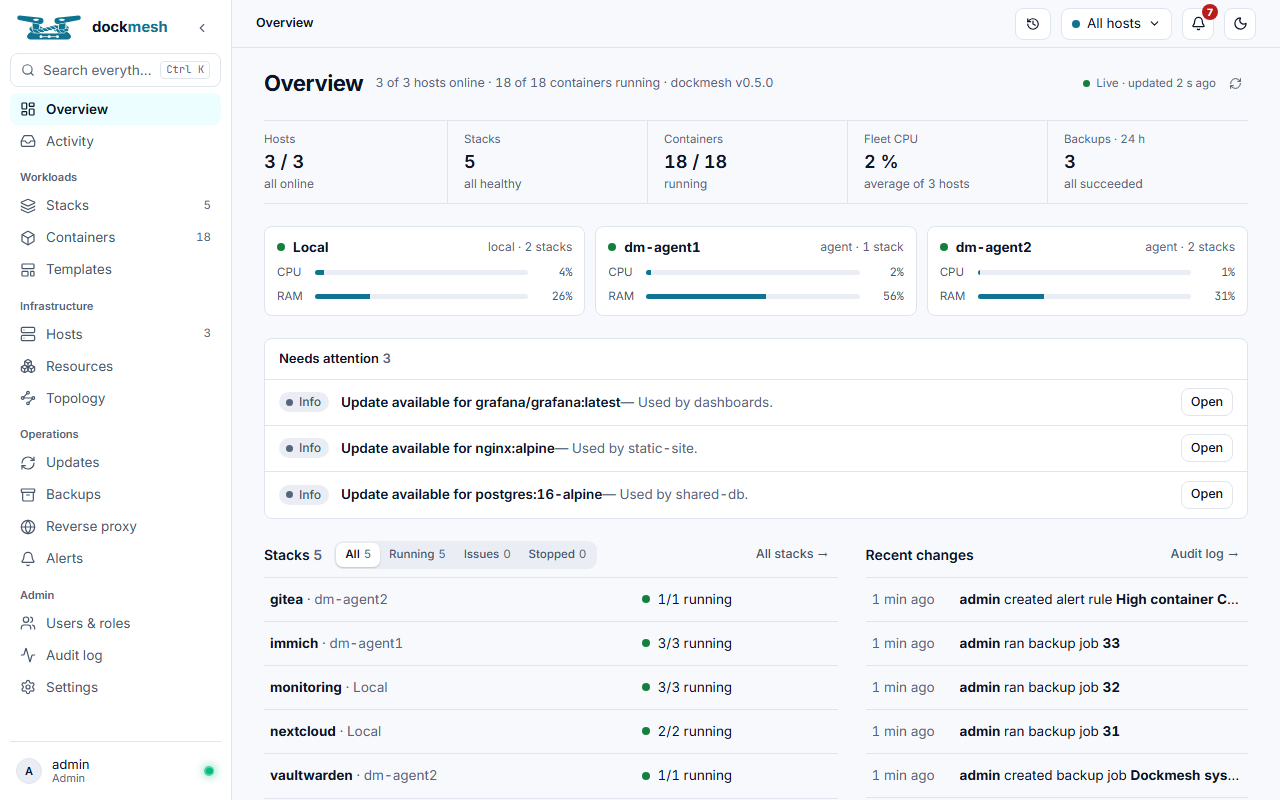
Manage Docker Compose stacks on all your hosts from one web UI.
One binary, outbound-only agents, free and open source.



What it is
Dockmesh is a web UI for Docker hosts that run Compose stacks. The server is a single Go binary with the UI
built in; every other host runs a small agent that connects out to the server, so remote hosts need no open port.
Stacks stay plain compose.yaml files on disk — you can still edit them, version them with git or run
docker compose by hand.
It is built for homelabs and small teams with a handful to a few dozen hosts. It does not manage Kubernetes.
Features
- Stacks — deploy, update and roll back compose stacks; git sources with auto-deploy; templates; move a stack to another host
- Hosts — one view across all hosts; agents over mTLS with outbound connections only; drain a host; agent upgrades from the UI
- Updates — see which images have a newer version, update one or many, roll back to the previous image
- Backups — scheduled, age-encrypted backups of volumes, stacks and Dockmesh itself to local disk, SMB, SFTP, WebDAV or S3; read back and verified after every run; restore from the UI
- Reverse proxy — optional Caddy with automatic HTTPS, per-site options, import of an existing Caddyfile
- Alerts — container CPU and memory, restart loops, stopped, unhealthy or OOM-killed containers, offline hosts, disk usage, failed or overdue backups and expiring certificates; sent to email, Discord, Slack, Teams, ntfy, Gotify, Pushover, PagerDuty or a generic webhook
- Access — roles per area with host, tag or stack scope; SSO with OIDC, SAML, LDAP and OAuth2; 2FA; hash-chained audit log
- Security scans — image vulnerability scans with Grype
Everything is in the open source release. There is no paid edition.
Install
On a Linux host with Docker Engine running:
curl -fsSL https://get.dockmesh.dev | sudo bash
The installer picks the amd64 or arm64 build, verifies its checksum, puts the binary in /usr/local/bin, creates a service user and a systemd unit and starts Dockmesh.
Open the link the installer prints (http://<host>:8080/setup#<code>) to create the admin account and finish the setup; sudo dockmesh setup new-code prints a new one.
Other hosts: in the UI go to Hosts → Add host and run the command it shows on that host (Linux with systemd).
Requirements, manual and from-source installs: installation guide. Tested distributions and Docker versions: supported systems.
Upgrade
Dockmesh shows a banner in the UI when a new release is out. To upgrade the server, run the installer again (see the upgrade guide); database changes are applied on start. Agents are upgraded from Hosts. Read the changelog before a minor release.
How it works
- Server: Go with the SvelteKit UI embedded, SQLite for state. Stacks live in
stacks/<name>/compose.yaml. - Agents: connect to the server over a WebSocket with mTLS client certificates; each one can be revoked.
- Proxy and scanner: Caddy runs in a separate
dockmesh-proxycontainer when you enable it; Grype is a separate binary.
Project status
Dockmesh is before 1.0. Every release candidate is installed and tested on lab VMs before it is tagged; minor releases get the full run (server and agents, upgrades, every backup target, SSO sign-in). See the changelog. Breaking changes are listed there with upgrade notes.
Community
- Questions and ideas: Discussions
- Bugs and feature requests: Issues (👍 an existing issue instead of opening a duplicate)
- Security problems: never in public issues, see SECURITY.md
- Contributing: CONTRIBUTING.md
A note on AI
Parts of the code are written with AI assistance. Every change is reviewed and tested before it ships.
License
AGPL-3.0-only. If you offer a modified Dockmesh as a network service, you have to publish your changes.
Explore related projects
Loading…