
DimiVlachos/bucky has 30 GitHub stars and 1 forks. GitHot measured +1 stars in 24 hours. Last checked 2026-11-15 05:14 UTC. Last push 2026-11-09.
Measured star growth
- in 24h
- +1
- in 7 days
- Collecting history
- in 15 days
- Collecting history
- in 1 month
- Collecting history
Net star changes over overlapping periods, not daily totals. Missing measurements are left blank. Stars measure attention, not software quality.
About
Full PC-layout soft keyboard for Android (Termux, SSH, coding)
Developer ToolsREADME.md
OriginalBucky Keys
A full PC-layout soft keyboard for Android, built for Termux, SSH clients and coding. Ctrl, Alt, Esc, Tab and the arrows send real key events, so terminals and editors treat it like a physical keyboard.
It is a from-scratch successor to Hacker's Keyboard, written in Kotlin on current Android APIs. It is not a fork.
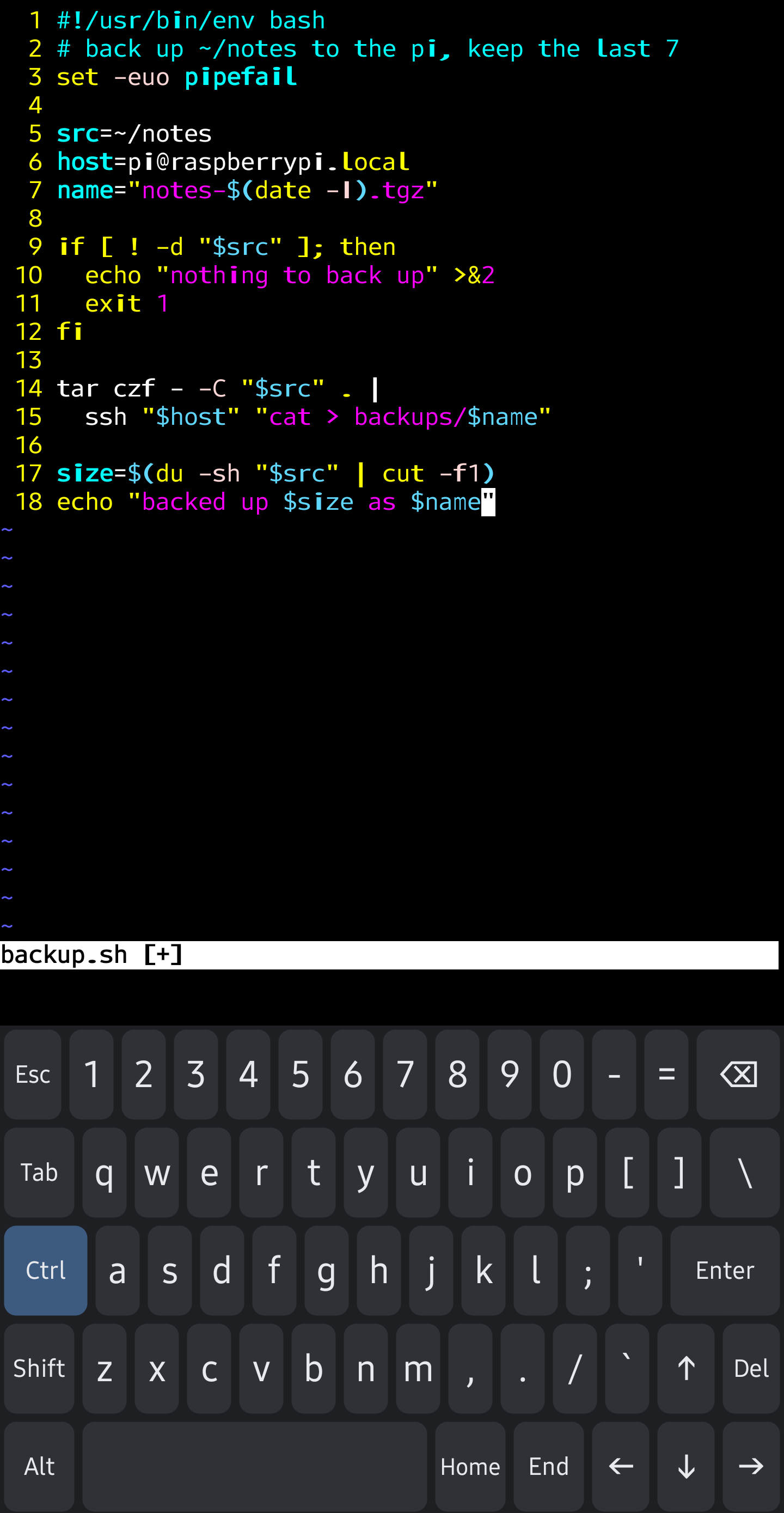
Status: alpha. Download the APK from the latest pre-release and tell us what breaks. The Play Store beta waitlist is at buckykeys.app (one email when testing opens).
What works today
- Full 5-row PC layout in Hacker's Keyboard positions:
`/~ top left, Esc bottom left, and the letters centred between your hands - A "Hacker's Keyboard (classic)" layout with HK's exact key positions, ❖ Meta, ○ and HK's Fn page (F1–F12, numpad, SysRq…), for HK veterans (Settings → Full layout style)
- Ctrl, Alt, Shift and Fn that send real
KeyEvents: tap once for the next key, twice to lock, or hold. Ctrl+C interrupts a command in Termux, Esc leaves vim's insert mode, and the arrows walk shell history - Esc, Tab, Home, End, Del and the arrow keys as real keys, with key repeat
- An Fn key, as in Hacker's Keyboard: the number row becomes F1–F12, the arrows PgUp, PgDn, Home and End, and Del becomes Ins
- Long-press alternates with hints on the keys: accented letters (é, ñ, ß, õ, š and more), typographic punctuation (… « » ’), and F1–F12 on the number row
- An optional F1–F12 row and an extra row you define yourself, using Termux extra-keys names
- US English, Greek, Estonian and Finnish layouts from JSON, with dead keys (Greek tonos, Estonian ˇ ~ ´
, Finnish ´¨ ^). On Estonian and Finnish, the AltGr symbols (@ $ { [ ] } \ |) are a long-press away. The classic Finnish layout matches Hacker's Keyboard's Finnish Swipe the space bar to switch language - Settings for key height (portrait and landscape), label size, key preview and vibration
- Per-app profiles: the full layout in Termux, ConnectBot, JuiceSSH and Termius; elsewhere a phone-style compact layout (with ?123 pages, a capital at the start of a sentence and double space for a full stop), the full layout, or a switch to your other keyboard. Long-press ⌨ for the full layout in any app (a tap does it when there's no other keyboard to switch to)
- About 13 ms from touch to drawing the key (median, debug build on a Galaxy S23 Ultra, before the screen's own frame); see the spike report
Planned
- More layouts: UK, Dvorak, Colemak, plus your own
- TalkBack support
- Themes, split layout for tablets
Principles
- No INTERNET permission. The keyboard cannot open network connections, so it cannot upload what you type.
- Open source under Apache-2.0.
- Every key, layout and modifier Hacker's Keyboard had stays free. Optional extras later (layout editor, themes, word prediction) are sold on Google Play to pay for the work. They are in this same repo, and the
fossbuild (GitHub Releases today, F-Droid planned) unlocks everything for free.
Building
Requirements: any JDK 17 or newer to start Gradle (it downloads the JDK 21 it runs on, and the JDK 17 toolchain, automatically) and the Android SDK (compile SDK 37, min SDK 26).
./gradlew assembleFossDebug     # F-Droid flavour, all features unlocked
./gradlew installFossDebug      # install on a connected device
Then enable "Bucky" in your phone's keyboard settings and choose it as the current keyboard. Opening the Bucky app walks you through both steps.
Checks run before every commit:
./gradlew spotlessApply
./gradlew detekt :detekt-rules:test testFossDebugUnitTest testDebugUnitTest :app:architectureTest lintFossDebug assembleFossDebug assemblePlayDebug
scripts/check-manifest-permissions.sh   # no INTERNET or QUERY_ALL_PACKAGES
Project layout
| Module | Holds |
|---|---|
app |
The input method service, play and foss flavours |
ime |
Layout model, key geometry, input engine and the keyboard view (no Compose, no billing) |
settings |
Compose settings and onboarding |
billing, billing-play, billing-foss |
Pro entitlement and its two implementations |
detekt-rules |
Custom static-analysis rules (build tooling only) |
site |
The buckykeys.app landing page |
Contributing
Ideas, layout requests and bug reports are welcome as issues. For code, see CONTRIBUTING.md. Commits need a DCO sign-off (git commit -s).
License
Apache-2.0. See NOTICE.