
Derrors/iphone-control
Derrors/iphone-control has 36 GitHub stars and 4 forks. GitHot measured +1 stars in 24 hours. Last checked 2026-11-10 01:27 UTC. Last push 2026-11-08.
Control a real USB-connected iPhone from Linux (no Mac, no paid developer account) and expose it to AI agents as MCP tools
What you can do
- See and touch the screen: screenshots with region zoom, tap, swipe, long-press, text input (including Chinese), hardware buttons
- Work with UI elements: read the element tree, tap by text (on a part not covered by floating bars or the keyboard), launch and close apps, open URLs, wait for text to appear
- Fewer round trips: any action can return the resulting screen once it has settled, flagging pages still loading and blocking alerts; iphone_batch runs up to 20 steps in one call
- Automatic fallback: when WebDriverAgent is down, screenshots, taps, swipes and keys switch to Apple's CoreDevice HID service (iOS 27+)
Measured star growth
- in 24h
- +1
- in 7 days
- Update delayed
- in 15 days
- Update delayed
- in 1 month
- Update delayed
Net star changes over overlapping periods, not daily totals. Missing measurements are left blank. Stars measure attention, not software quality.
README.md
Original
Let an AI agent operate a real iPhone or iPad plugged into a Linux machine or a Mac — one Rust binary, no Xcode, no paid developer account, no jailbreak.





🚀 Quick Start · 📖 Docs · 📦 Releases · 🐛 Issues · 🌐 简体中文
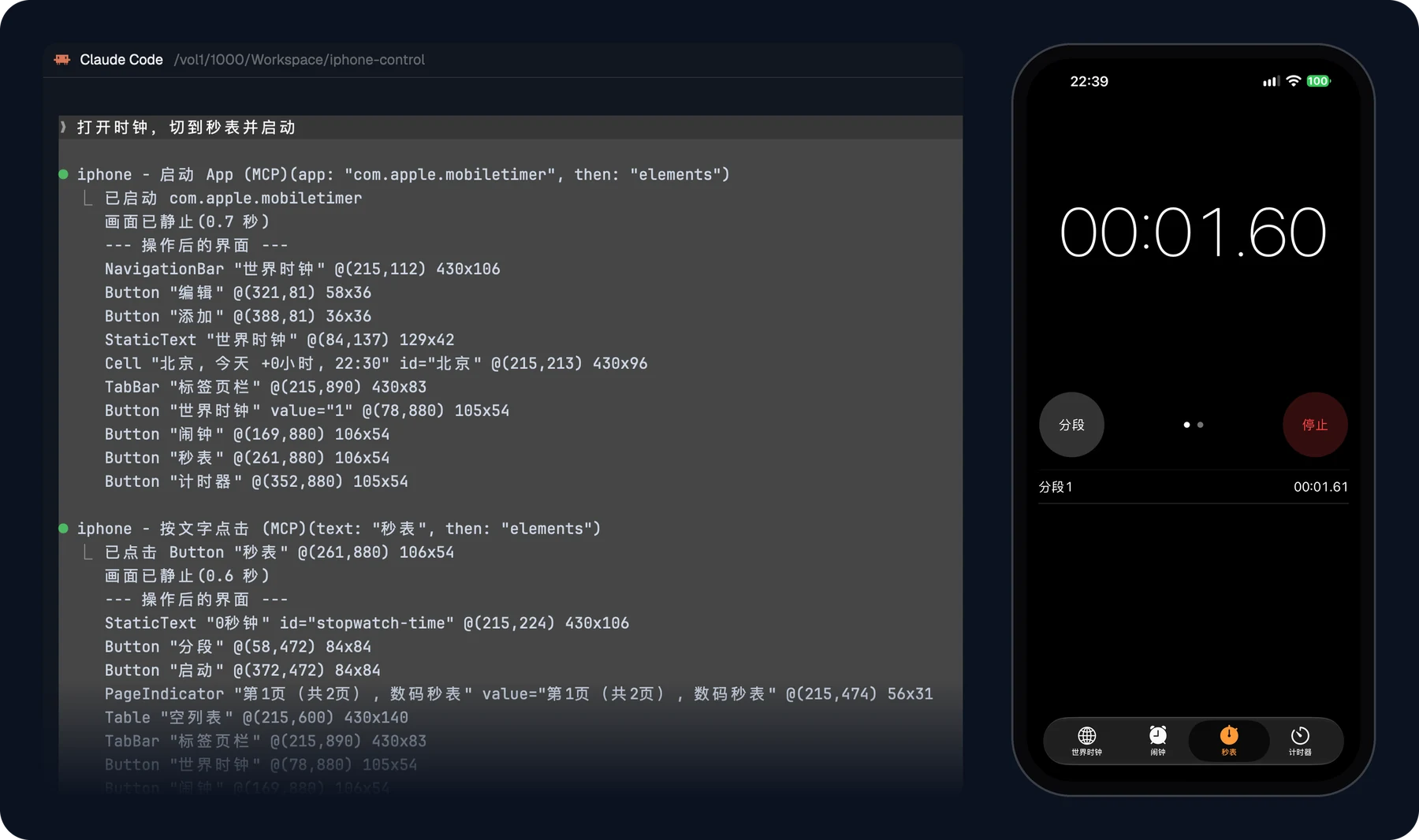
Asking Claude Code to “open Clock, switch to the stopwatch and start it”. Left: Claude Code’s tool calls (first part only). Right: the phone afterwards.
Overview
AI agents can drive browsers and desktops, but a real iPhone is harder: Apple's automation tools need a Mac and Xcode, and the open-source alternatives come as separate pieces that each need their own setup, signing and babysitting.
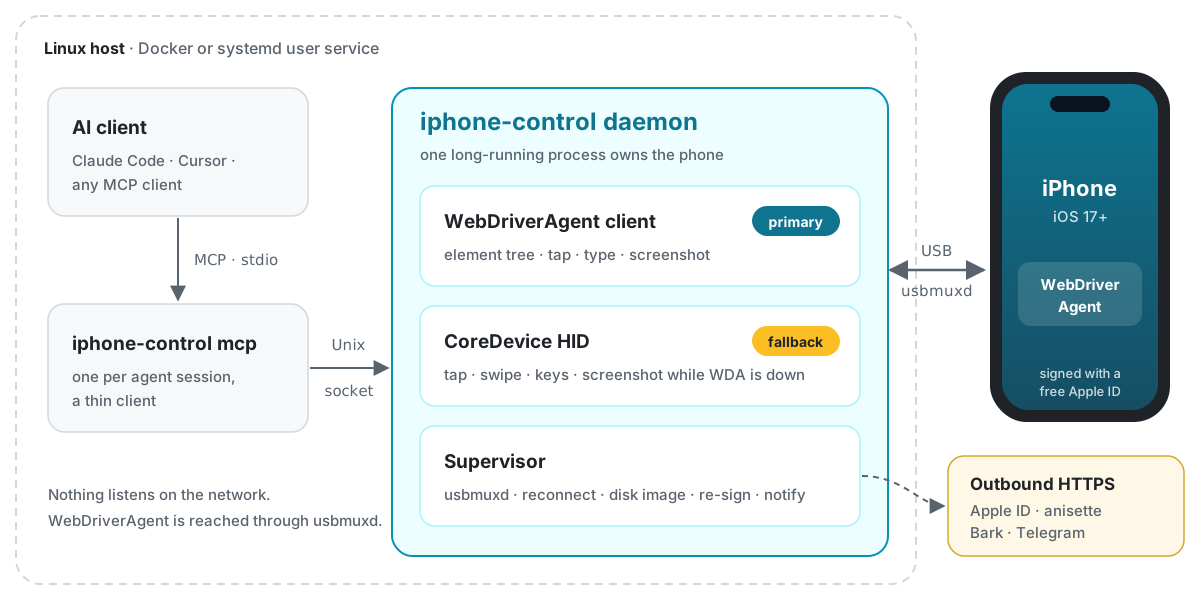
iphone-control does it all in one Rust binary on Linux or macOS, built on idevice, Impactor and WebDriverAgent. A long-running daemon owns the phone — tunnel, HID session, WebDriverAgent session — and exposes it to Claude Code or any MCP client. It succeeds iphone-control-toolkit and keeps its MCP tools compatible.
Features
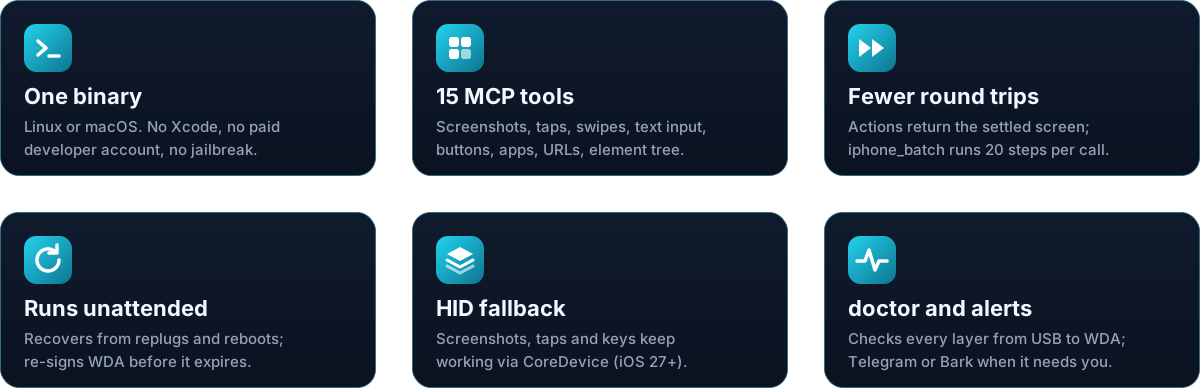
- See and touch the screen: screenshots with region zoom, tap, swipe, long-press, text input (including Chinese), hardware buttons
- Work with UI elements: read the element tree, tap by text (on a part not covered by floating bars or the keyboard), launch and close apps, open URLs, wait for text to appear
- Fewer round trips: any action can return the resulting screen once it has settled, flagging pages still loading and blocking alerts;
iphone_batchruns up to 20 steps in one call - Automatic fallback: when WebDriverAgent is down, screenshots, taps, swipes and keys switch to Apple's CoreDevice HID service (iOS 27+)
- Runs unattended: recovers from replugging, phone reboots and WebDriverAgent crashes; re-signs WebDriverAgent with a free Apple ID before the 7-day profile expires
- Alerts: Telegram or Bark notifications when re-signing fails, the Apple ID session expires, the phone goes offline, or a passcode is needed after a reboot
- Optional auto-unlock: every passcode digit is verified, and a wrong passcode disables auto-unlock after one attempt
- Diagnostics:
doctorchecks every layer from USB to WebDriverAgent and tells you how to fix each failure
Quick Start
You need an iPhone or iPad on iOS 17+ connected by a data cable, a free Apple ID (use a dedicated one), and a Linux host with Docker or an Apple Silicon Mac.
Linux (Docker)
git clone https://github.com/Derrors/iphone-control.git && cd iphone-control
cp .env.example .env                                  # optional: proxy, notifications
docker compose up -d --build                          # the first build takes a few minutes
docker exec -it iphone-control iphone-control setup   # guided setup; safe to re-run
claude mcp add iphone -s user -- docker exec -i iphone-control iphone-control mcp
macOS (Docker can't pass USB through on a Mac, so run the binary directly)
V=v0.1.4   # latest release
curl -fsSL https://github.com/Derrors/iphone-control/releases/download/$V/iphone-control-$V-macos-arm64.tar.gz | tar xz
mkdir -p ~/.local/bin && install -m 755 iphone-control-$V-macos-arm64/iphone-control ~/.local/bin/
echo 'export PATH="$HOME/.local/bin:$PATH"' >> ~/.zprofile && source ~/.zprofile
iphone-control daemon       # keep this terminal open
iphone-control setup        # in a second terminal
iphone-control mcp-config   # prints the `claude mcp add` command to run
setup walks you through pairing, Developer Mode, Apple ID sign-in and installing WebDriverAgent; do what it asks on the phone. Then open a new Claude Code session and ask, for example, “Open Clock, switch to the stopwatch and start it.”
More: step-by-step guide · prebuilt image · binary / source · macOS guide · other MCP clients.
MCP Tools
| Tool | Description |
|---|---|
iphone_status |
Connection, lock state, foreground app, screen size |
iphone_screenshot |
Screenshot scaled to points; pass x/y/width/height to zoom into a region |
iphone_list_elements |
Elements with text and their center coordinates; filter by text or type |
iphone_tap / iphone_tap_element |
Tap by coordinates or by element text |
iphone_swipe / iphone_long_press |
Swipe (returns once the list stops), long-press |
iphone_type_text |
Type into the focused field; reads it back and fixes dropped characters |
iphone_press_button |
home, volume_up, volume_down, lock |
iphone_list_apps / iphone_launch_app / iphone_terminate_app |
Manage apps by name or bundle ID |
iphone_open_url |
Open a URL or URL scheme |
iphone_wait_for |
Wait until some text appears instead of polling with screenshots |
iphone_batch |
Run up to 20 steps in one call, stopping at the first error |
iphone_list_devices |
Every iPhone/iPad on USB; marks the one being controlled |
iphone_select_device |
Switch to another device, or back to automatic choice |
Action tools accept then: "elements" | "screenshot" to return the screen after the action. Screenshot pixels are tap coordinates, so the agent can tap what it sees. Games, maps and video players draw their own UI and have no element tree — use screenshots and coordinates there. Full parameters: docs/tools.md.
Everyday Commands
Run them as docker exec -it iphone-control iphone-control <command>, or directly for a source install and on macOS.
| Command | What it does |
|---|---|
daemon |
The long-running daemon: the container's entry point; on a source install or macOS you start it yourself |
mcp |
The MCP server; your AI client starts it |
status |
Daemon state, time left on the signing profile, recent log |
doctor |
Layer-by-layer health check with a fix for each failure |
setup |
Guided setup; re-run any time |
login |
Sign in to the Apple ID again when the session expires |
sign |
Sign and install WebDriverAgent now |
resign [--force] |
Re-sign WebDriverAgent if it expires soon (or now) |
passcode set|clear |
Turn auto-unlock on or off for a device (passcodes are kept per device) |
unlock-reset |
Turn auto-unlock back on after it was disabled |
devices / select <UDID|name|auto> |
List connected devices / switch which one is controlled |
notify-test [event] |
Send test notifications |
mcp-config |
Print the command that registers the MCP server |
wda-bridge [--port] |
Expose WebDriverAgent on 127.0.0.1 for other tools; stop it when done |
All commands and options: CLI reference.
Upgrade with git pull && docker compose up -d --build (or docker compose pull && docker compose up -d --no-build for the prebuilt image); for the binary and macOS, see Source / binary and macOS. Read the upgrade notes in the changelog first. Settings live in .env — see configuration. All state lives in data/: pairing records, the Apple ID session and signing key, and the passcode if auto-unlock is on. Back it up; never commit or share it.
Documentation
| Guide | What is it · Limitations · Getting started · AI clients · Tools |
| Usage | Configuration · CLI · Several devices · Notifications · Auto-unlock |
| Deployment | Docker · Source / binary · macOS · Data and backups |
| Problems | FAQ · Troubleshooting · Issues |
| Security | SECURITY.md: what is stored, who can reach it, reporting vulnerabilities |
| Development | Contributing · Architecture · Decisions · Changelog |
| Licensing | THIRD_PARTY.md: vendored components, versions and licenses |
The architecture and design documents are in Chinese for now.
[!WARNING] This tool can fully control your phone. An agent may tap payment, delete or send buttons — keep tool-call confirmation on in your MCP client. Not affiliated with Apple; use it only with devices and accounts you own. Read SECURITY.md before enabling auto-unlock.
Contributing
Issues and pull requests are welcome — see the contributing guide.
License
MIT. Third-party components: THIRD_PARTY.md.
Explore related projects
affaan-m/ECC
The agent harness performance optimization system. Skills, instincts, memory, security, and research-first development for Claude Code, Codex, Opencode, Cursor and beyond.
300,728 starsNousResearch/hermes-agent
The agent that grows with you
262,415 starsmultica-ai/andrej-karpathy-skills
A single CLAUDE.md file to improve Claude Code behavior, derived from Andrej Karpathy's observations on LLM coding pitfalls.
231,832 starsfirecrawl/firecrawl
Supercharge your AI agents with data from the web and beyond. Building the library for superintelligence. 🔥
200,444 stars