
Deen-Media/dgx-monarch
Deen-Media/dgx-monarch has 56 GitHub stars and 6 forks. GitHot measured 0 stars in 24 hours, 0 in 7 days, and +4 in 15 days. Last checked 2026-11-15 06:53 UTC. Last push 2026-11-07.
What you can do
- Wait less for a render. Distribute one supported image or video job across the pair. The results below compare the same graph on one GPU and two.
- Work on two prompts at once. Fleet runs a separate render on each GPU, useful for trying prompts or processing independent jobs.
- Fit larger models. FSDP divides supported model weights between the GPUs. It is a capacity option and can be slower; text encoders, VAEs, and other driver work still need local memory.
- Avoid unnecessary model copies. Slab residency and low-RSS LoRA handling reduce duplicate weights in shared memory. Built-in checks compare these paths with stock residency before reuse.
Measured star growth
- in 24h
- 0
- in 7 days
- 0
- in 15 days
- +4
- in 1 month
- Collecting history
Net star changes over overlapping periods, not daily totals. Missing measurements are left blank. Stars measure attention, not software quality.
About
Distributed image and video generation in ComfyUI for two NVIDIA DGX Sparks.
Creative & MediaREADME.md
Original
Use both Sparks in ComfyUI


Generate images and video across two DGX Sparks from one ComfyUI window. Split a render between the GPUs, run separate prompts at once, or shard supported model weights to fit larger checkpoints.
DGX Monarch provides model loaders, samplers, memory controls, and 71 example workflows. Text encoding, VAE decode, saving, and the rest of your graph stay in ComfyUI.
Get started · Installation · Model support · Benchmarks
Why use it?
- Wait less for a render. Distribute one supported image or video job across the pair. The results below compare the same graph on one GPU and two.
- Work on two prompts at once. Fleet runs a separate render on each GPU, useful for trying prompts or processing independent jobs.
- Fit larger models. FSDP divides supported model weights between the GPUs. It is a capacity option and can be slower; text encoders, VAEs, and other driver work still need local memory.
- Avoid unnecessary model copies. Slab residency and low-RSS LoRA handling reduce duplicate weights in shared memory. Built-in checks compare these paths with stock residency before reuse.
- Start with a model workflow. Choose a template, select your files, and queue it. Automatic selection chooses a supported GPU layout for the model; the model guide explains the manual options.
- See what the pair is doing. The ComfyUI sidebar and
dgxm topshow memory use, render progress, connection state, and errors.
Studio
Studio is an optional browser workspace for the pair. Pick a bundled
workflow, write the prompt, queue renders on the driver and follow them on
one page, with Gallery, Queue, Grids, Fleet and Library views beside it.
Studio listens only on this computer. It signs your browser in with a link
that holds its access token; treat that link like a password. Install the
studio extra (INSTALL), tell
Studio once where ComfyUI listens, in cluster.toml
(CLUSTER):
[studio]
driver = "http://127.0.0.1:8188"
Use the address your ComfyUI listens on; Studio keeps its records for the first driver address it uses. Then start it on the computer that runs ComfyUI:
dgxm studio
dgxm studio reads your cluster.toml, starts Studio and opens it in your
browser, or prints the link when there is no display. dgxm studio up keeps
it running as a user service, and dgxm studio tunnel <host> prints the SSH
line that reaches it from a laptop.
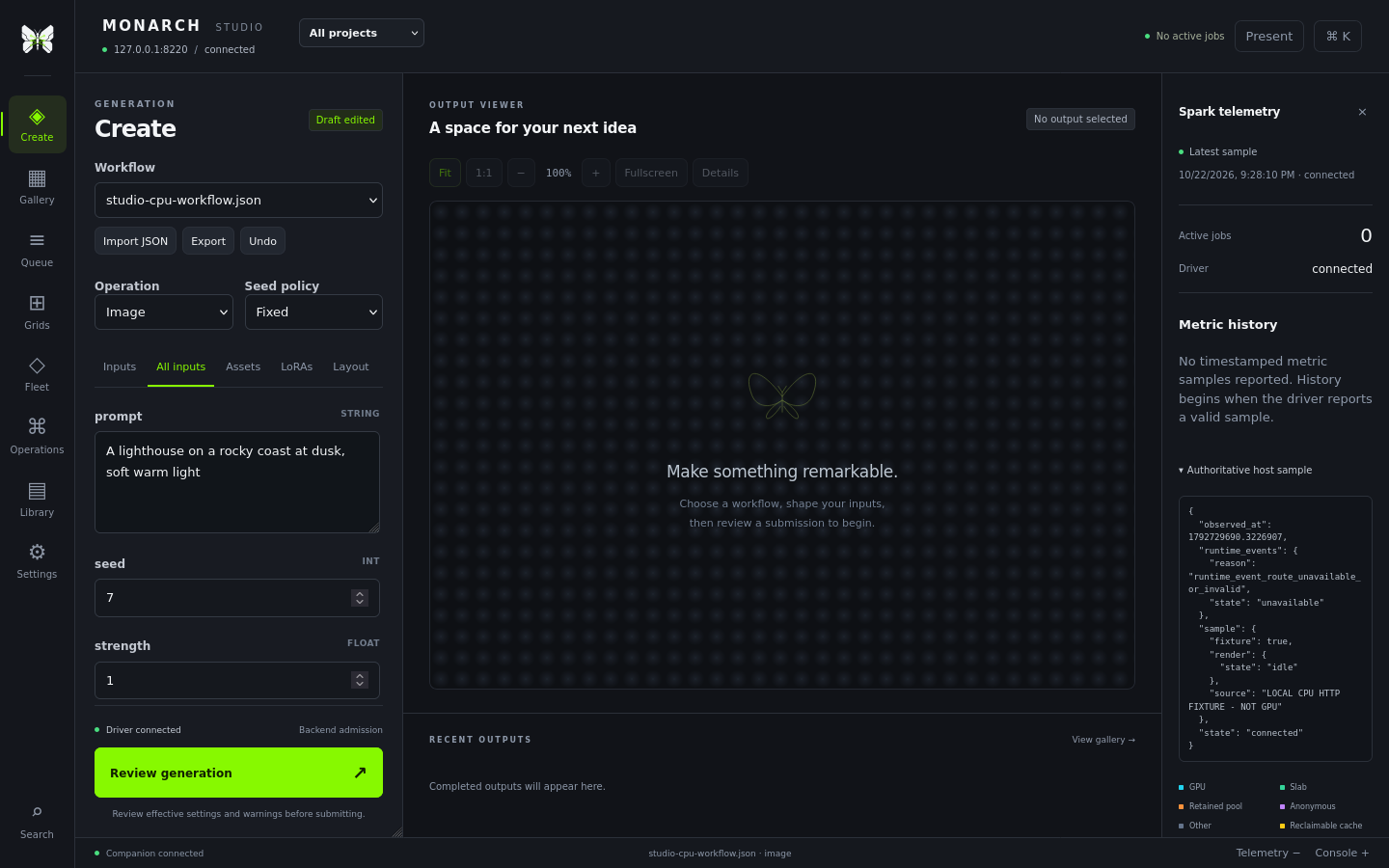
Shown with the CPU test fixture, so no model ran. Studio is a draft; the Studio guide covers setup, remote access and what is not finished yet.
Featured workflows
 Krea2 RAW and Turbo Image generation, with LoRA support and several ways to split work across the pair. |
 MiniMax H3 Video with audio, plus image-guide and reference-video workflows. |
 Ideogram4 Image generation with support for its two-model workflow. |
 Qwen Image 2.1 Image generation and editing with up to ten references, including alpha-masked images. |
The pack also includes Kroma BF16, INT8 and 2x upscale workflows,
Flux, FLUX.3 Klein, MOSS-Image and its Kromoss fine-tune, Chroma, LTX, Hunyuan, Wan, and other families. Kroma uses the Krea2 runtime;
its resident BF16, local INT8 and BF16 2x refinement graphs matched their
listed stock references. Manual
uly2+fsdp also matched these three workflows at batch 1; batch-2 dp2+fsdp
remains CHECK for stock fidelity. Model support lists the
tested configurations and limits for each. Support for one workflow does not
mean every precision, LoRA, or parallel mode has been tested.
Measured results
Recorded renders on two DGX Sparks connected over ConnectX-7 200G:
| Workflow | One GPU | Two GPUs | Speedup |
|---|---|---|---|
| Krea2 RAW BF16, 1536×1536, 8 steps, CFG++ sampler, Ulysses | 74.1 s | 48.1 s | 1.54× |
| Ideogram4 FP8, dual-model, 1024×1024, 20 steps, Ulysses | 36.0 s | 26.0 s | 1.38× |
| MiniMax H3 INT8 ConvRot, 1280×720, 241 frames, 20 steps, Ulysses | 42m 03s | 23m 07s | 1.82× |
Krea2 and Ideogram4 timings are warm renders of matching graphs. Their separate one-step output checks matched one GPU; those checks do not prove equality at every step of a full render. Automatic selection now takes cfg2 for the Krea2 graph: on 2026-10-14 cfg2 was bit-identical to one GPU and ran the sampler 1.23× faster than Ulysses (36.3 s against 44.8 s; one GPU 72.9 s). Those are sampler times from Campaign K, with the first Spark capped at 2100 MHz, so compare them with each other, not with the table. H3 uses exact attention: the one-GPU timing is stock ComfyUI, while one Monarch worker took 42m 20s and matched the pair's output. Results depend on the settings and hardware; benchmark details describe each comparison.
Qwen Image 2.1: 12 model formats matched native ComfyUI output in one-step tests. Separate full 25-step generation and editing tests also matched, including ten-reference editing. A comparable speed measurement has not been recorded. Qwen test results.
Full benchmarks include slower configurations. Validation explains output comparisons and remaining gaps. Campaign results provide the detailed measurements.
Watch the pair
Run dgxm top to see memory use, render progress, GPU activity, and connection status in your terminal. The ComfyUI sidebar shows the same cluster while you work on a graph.
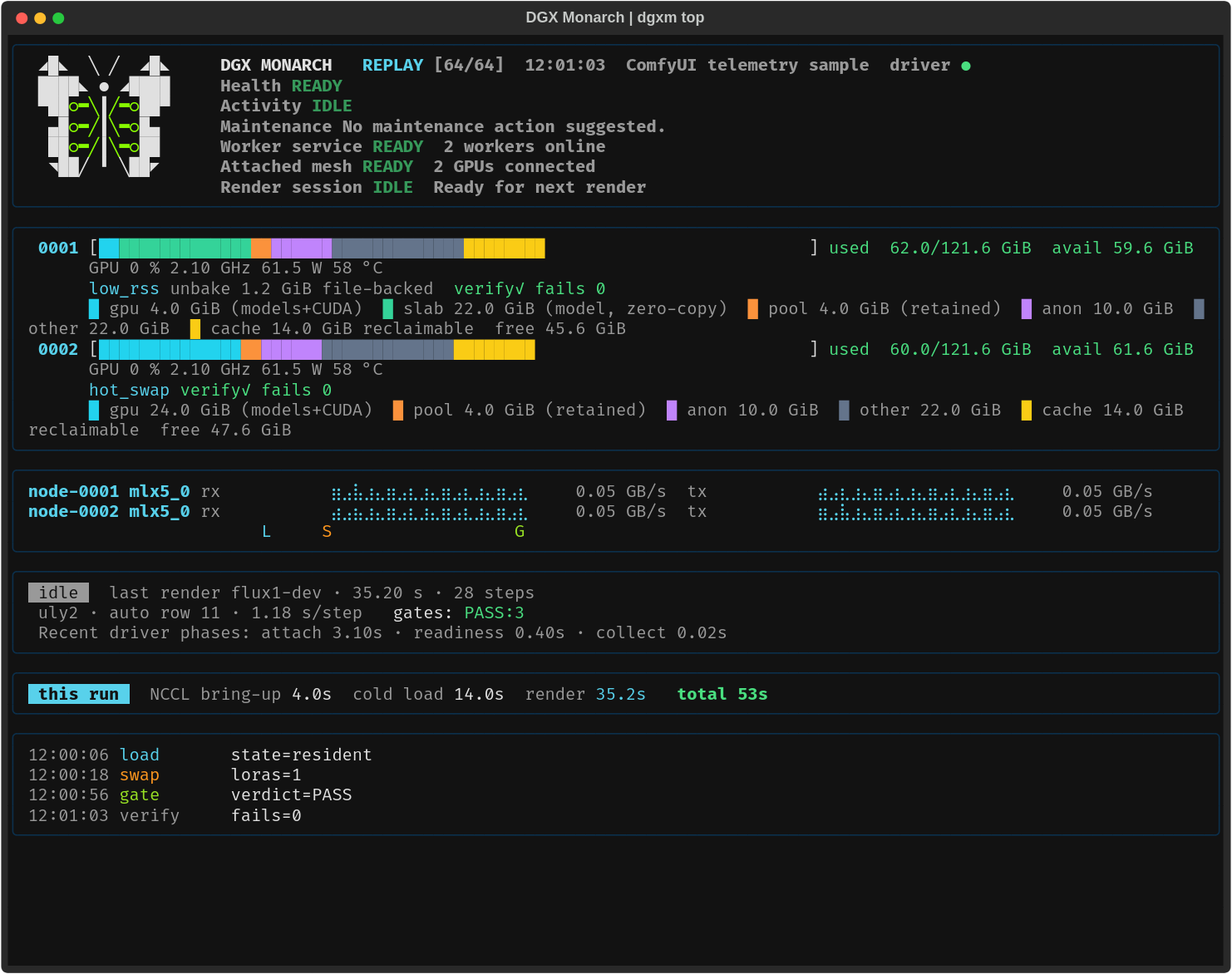
Dashboard shown with sample data. See the TUI guide for setup, keyboard controls, and recording.
Set up with a coding agent
Use an agent with a shell on the driver Spark, approved SSH access to the other Spark, and access to the selected ComfyUI and model directories. It needs network access for source and dependency downloads. A browser-only agent cannot complete the hardware steps without a connection to those machines. You may need to approve maintenance or complete sudo, SSH trust, repository access, or model-license steps yourself. Grant read or write access only where needed, using the narrowest existing parent directories for files it will create. Keep its sandbox enabled. Never paste private keys or tokens into chat.
Copy this prompt into your agent:
Help me install DGX Monarch from https://github.com/Deen-Media/dgx-monarch on my two DGX Sparks. Use the checkout I provide, or clone the repository if needed. Explicitly read skills/dgx-monarch/SKILL.md and follow it and its linked docs; do not assume skills are discovered automatically.

Discover the existing setup and prerequisites first. Ask together for missing inputs and the specific read or write directory access you need. Then present one concise installation and recovery plan, explicitly listing package, service and any security changes for approval. Reuse that approval for the listed work; ask again only if the scope changes. Preserve existing environments, models, credentials and unrelated work. Never print credentials. Reuse my existing installation where suitable; ask where new permanent files should live. Ask whether I want the dgxm TUI and an easy launch script, and where to save the script. Do not install into temporary or chat-output folders. This is a normal installation, not a clean-machine acceptance test.

Use a supported model and workflow I already have or choose. Chroma is optional; recommend it only if I have no preference. Follow the selected model's documented files and distributed settings. Complete a real distributed render, save its output, and show that both Sparks participated. Check that rerunning setup preserves the installation. Finish with how to start it, which machine and browser URL to use, whether ComfyUI is running, and where the installation, workflow and outputs live. Then report the commit, versions, reused components, manual steps, results and limitations. Do not claim success from imports or Doctor alone.
The maintained setup procedure is skills/dgx-monarch/SKILL.md. Review the agent's plan before it changes your machines. See the fresh-agent installation results for the tested setup and its limits.
Get started
You need an existing ComfyUI installation. For the tested two-Spark setup, both hosts need matching software and model files, plus an isolated, source-restricted fabric connection. Read the fabric requirements before setup: the attach API has no peer authentication, and restricting the Worker port alone is insufficient.
- Follow INSTALL using the Python that starts ComfyUI. Keep its CUDA torch build and install this checkout under
custom_nodes. - Configure the pair with guided setup, then check
dgxm doctoranddgxm status. - Keep ComfyUI in a foreground terminal. Open Workflow → Browse Templates → dgx-monarch and choose a supported workflow for your model. QUICKSTART explains the choice and includes an optional Chroma recipe.
- Queue the graph. See QUICKSTART for the node layout and first-run checks.
Worker services stay running when ComfyUI closes. Use dgxm down when you intend to stop them.
One Spark also works: Init mode=auto without cluster.toml stays local. The memory tools, templates, sidebar, and diagnostics remain available.
Before the first render
With the default auto_gate=first_use, a new combination using slab and low-RSS or FSDP may run reference renders before producing your result. Allow 2-4 minutes on the tested hardware. A successful check is reused for the same combination; an upgrade requires new checks before those results can be reused.
If the comparison fails, supported resident paths use stock residency with the memory optimizations disabled. FSDP has no stock fallback and refuses. Some large FSDP checkpoints cannot fit the gate's reload; the model guide and troubleshooting explain the available choices.
Native latent RDMA is off by default. Selected-rail return checks have limited recorded coverage; positive-step qualification is limited to the recorded at-threshold case. Latents return through actor messages; this does not disable NCCL rendering across the pair. comfy_managed residency is opt-in and has additional memory and LoRA restrictions. Smaller jobs may gain little from using two GPUs.
Updating
Read the changelog before you update. Before the first update from 1.2.0, follow Upgrading from 1.2.0; from 1.1.0, follow Upgrading from 1.1.0 as well.
Stop ComfyUI. Both update modes refuse while a driver answers.
Check where each host's Workers run. A path under
releases/means a release slot:readlink -f ~/.local/share/dgx-monarch/srcGuided multi-node setup puts remote Workers in release slots, and a verified update puts every Worker in one.
Update in the matching mode:
- One Spark, or Workers that run from plain source directories:
dgxm update. - Any Worker in a release slot:
dgxm update --verify --target <ref>, with a release tag or commit as<ref>. Plain update cannot change a slot; TROUBLESHOOTING #118 repairs an install where it ran anyway.
- One Spark, or Workers that run from plain source directories:
Start ComfyUI again. Under the default
auto_gate=first_use, each model, residency and LoRA combination runs its first-use Gate once more on its first render, as Before the first render describes.
dgxm update moves only dgx-monarch and its torchmonarch pin; update ComfyUI
your own way. INSTALL covers every flag, recovery
and rollback.
Documentation
Studio draft describes the optional browser companion and its current acceptance gaps. Existing CLI, TUI and ComfyUI workflows remain the supported interfaces while Studio's complete specification is under development.
Documentation index · Model guide · Troubleshooting · FAQ · Contributing
DGX Monarch uses PyTorch Monarch for actors and xDiT / xfuser for parallel attention, inside ComfyUI. These dependencies are installed separately; this repository does not vendor their code.
License: Apache-2.0.