
D33ptar00p/emulator-ui
D33ptar00p/emulator-ui has 19 GitHub stars and 5 forks. GitHot measured +1 stars in 24 hours. Last checked 2026-11-15 16:57 UTC. Last push 2026-11-12.
What you can do
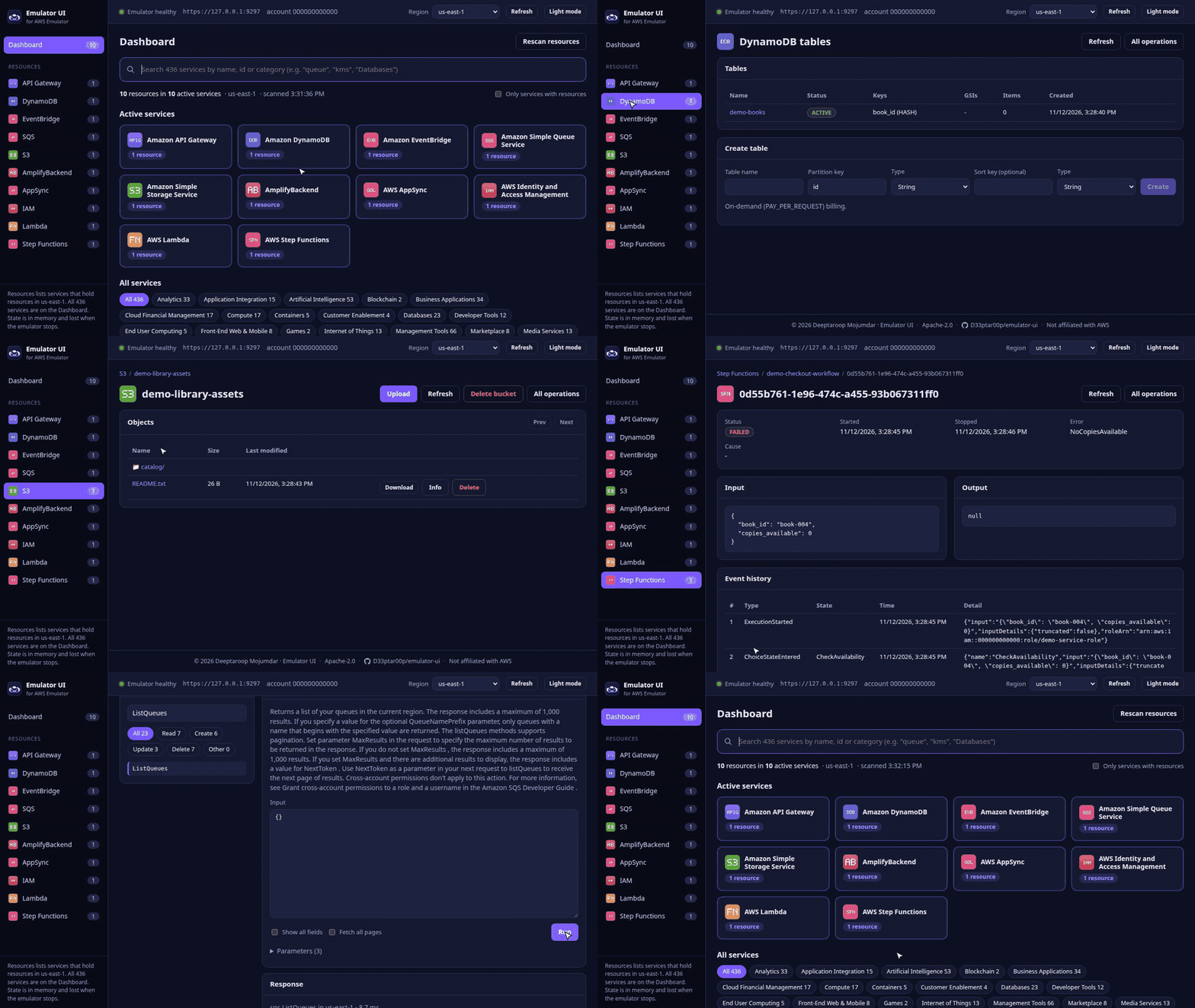
- Dashboard: search all 436 services. Services holding resources are listed first, the rest are grouped by category. The sidebar lists only active services, with counts.
- Any service: browse its resources as tables, or run any API operation from a JSON editor pre-filled from the API model.
- DynamoDB items, S3 browser, Lambda invoke;
- API Gateway requests;
Measured star growth
- in 24h
- +1
- in 7 days
- Update delayed
- in 15 days
- Update delayed
- in 1 month
- Update delayed
Net star changes over overlapping periods, not daily totals. Missing measurements are left blank. Stars measure attention, not software quality.
About
A web console for AWS Emulator: browse and drive every emulated service locally
Web & AppsREADME.md
Original


Emulator UI
A web console for AWS Emulator.
Browse and interact with the resources in a locally running AWS Emulator, for all 436 services it supports.







Quick start ◆ Emulator requirements ◆ Features ◆ Development ◆ Contact
Quick start
Requires Docker and a running AWS Emulator (see Emulator requirements).
git clone https://github.com/D33ptar00p/emulator-ui.git && cd emulator-ui
make up-image   # pull the prebuilt image (amd64/arm64) + start -> http://127.0.0.1:8080
make up         # or build the image from source
make down       # stop the console
The console runs in its own container and never starts or stops emulators. Start them in any order; the console picks up emulator restarts, new regions and new keys on its own.
Emulator requirements
| Container | named aws-emulator-<port> (default port 9297), on the Docker network aws-emulator, listening on 0.0.0.0:<port> inside the container |
| Files | the emulator's emulator_credentials, config and ca.pem in ~/.aws/emulator/<port>/ on the host |
| Host port | published on 127.0.0.1:<port> (used by make dev and make test) |
| Regions (optional) | ~/.aws/emulator/regions with region=port lines for regions that have their own emulator |
Example, with an image built from the official Dockerfile
and tagged aws-emulator:
docker network create aws-emulator 2>/dev/null || true
mkdir -p ~/.aws/emulator
docker run -d --rm --name aws-emulator-9297 --network aws-emulator \
  --user "$(id -u):$(id -g)" -p 127.0.0.1:9297:9297 \
  -e HOME="$HOME" -v "$HOME/.aws/emulator:$HOME/.aws/emulator" \
  aws-emulator -p 9297 --telemetry off
Features
Dashboard: search all 436 services. Services holding resources are listed first, the rest are grouped by category. The sidebar lists only active services, with counts.
Any service: browse its resources as tables, or run any API operation from a JSON editor pre-filled from the API model.
Dedicated pages:
- DynamoDB items, S3 browser, Lambda invoke;
- API Gateway requests;
- Step Functions executions, EventBridge events, SQS messages;
- AppSync and IAM.
Region switcher: shared regions use the default emulator; isolated regions (listed in
~/.aws/emulator/regions) get their own.Safe by default:
- localhost only;
- CSRF and DNS-rebinding guards;
- never calls a non-local endpoint;
- destructive actions ask for confirmation.
See SECURITY.md.
Resource counts exclude the items a fresh emulator already has (recorded in src/emulator_ui/inventory_baseline.json).
Troubleshooting
| Symptom | Fix |
|---|---|
| "Emulator unreachable" / "Emulator is off." | Start an emulator that meets the requirements. |
| No resources | Emulators keep state in memory, so a new run is empty. Create resources, then click Rescan resources. |
| Resource missing in another region | Check the region switcher; regions can be isolated. |
| "Not implemented by the emulator yet (501)" | The emulator doesn't support that operation yet. |
Development
make dev           # API on :8081 with reload + Vite on http://127.0.0.1:5173
make test          # backend tests (live tests need a running emulator)
make ui-test       # frontend typecheck + tests
make lint          # ruff + shellcheck
make catalog       # regenerate the service catalog and icons (offline)
make inventory-baseline   # re-record a fresh emulator's built-in items
Backend: FastAPI in src/emulator_ui/. Frontend: React + TypeScript (Vite) in ui/. Inside the container, the
console reaches each emulator over the aws-emulator network through a loopback relay, so TLS is verified end to end
against the emulator's own certificate. API docs: http://127.0.0.1:8080/api/docs.
Contact
- Bugs and questions: GitHub Issues
- Contributing: see CONTRIBUTING.md
- Security: see SECURITY.md; don't open public issues
- Other: Deeptaroop Mojumdar, [email protected]
License
Apache License 2.0. Copyright 2026 Deeptaroop Mojumdar. See NOTICE.