
CureJe/sedentary-reminder
CureJe/sedentary-reminder has 100 GitHub stars and 1 forks. GitHot measured 0 stars in 24 hours and +2 in 7 days. Last checked 2026-11-17 03:07 UTC. Last push 2026-09-22.
What you can do
- Adjustable 1–240 minute reminder interval
- Adjustable 5–120 second reminder duration
- Five large characters with unique entrance animations
- Character artwork sized to occupy roughly one-third of the screen
Measured star growth
- in 24h
- 0
- in 7 days
- +2
- in 15 days
- Collecting history
- in 1 month
- Collecting history
Net star changes over overlapping periods, not daily totals. Missing measurements are left blank. Stars measure attention, not software quality.
About
Stand Up Buddy is a lightweight desktop app for Windows and macOS that reminds you to take regular breaks. Animated characters appear with unique motions and sounds, encouraging you to stretch, move, and reduce discomfort from prolonged sitting.
ProductivityREADME.md
OriginalStand Up Buddy


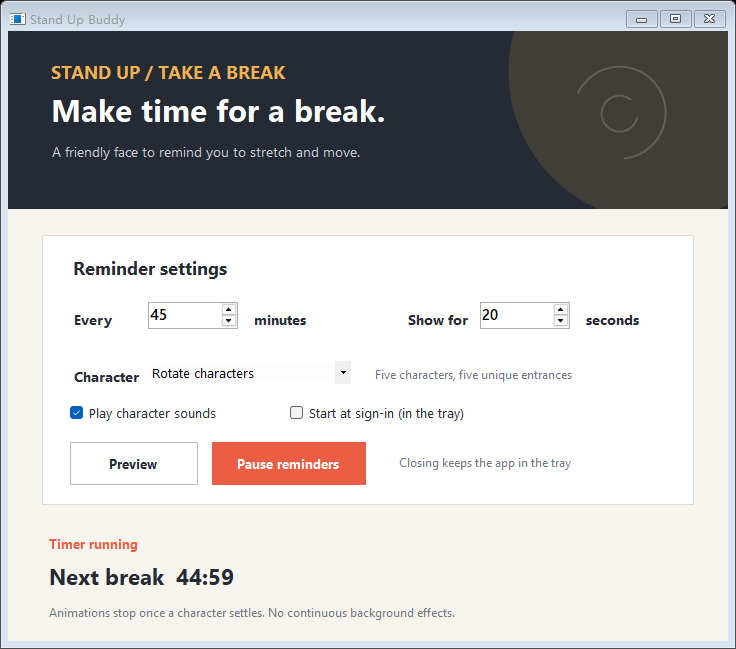
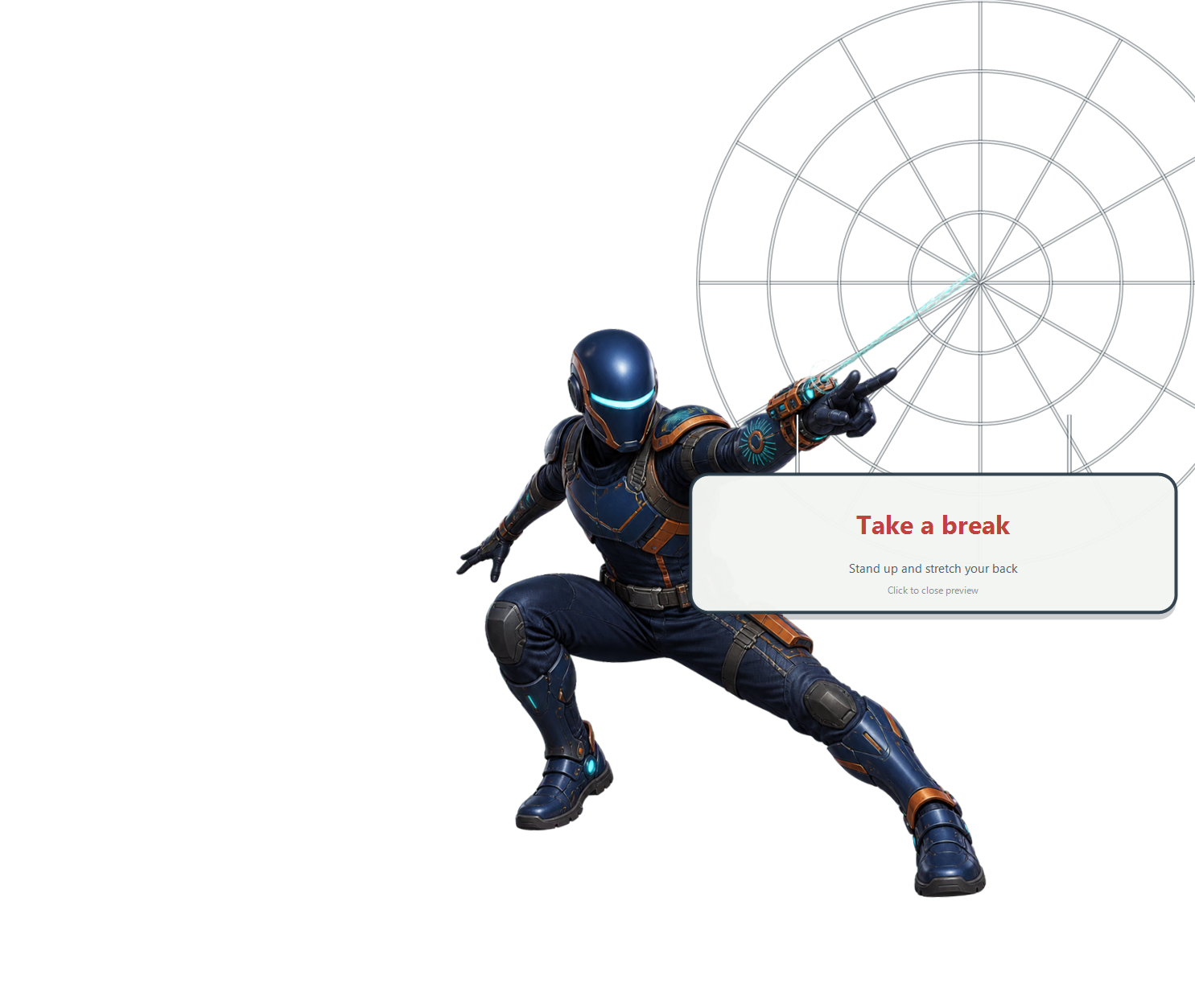
Stand Up Buddy is a lightweight desktop break reminder for Windows and macOS. Instead of showing a stiff notification box, it brings large animated characters onto the screen, each with a distinct entrance, message, and short nonverbal sound.
Download for Windows · Report a problem · Contribute · Changelog
Why this project exists
Long vibe-coding sessions with Codex can make it surprisingly easy to lose track of time and stay seated for hours, often leaving your lower back feeling stiff or sore. This project is built for people who spend long stretches at a computer. Its goal is simple: offer a friendly, hard-to-miss reminder to stand up, stretch, and move around for a moment.
Platforms
| Platform | Implementation | Current status |
|---|---|---|
| Windows 10/11 | Native C# and WinForms | Source included; portable v1.3.1 executable included |
| macOS 13+ | Native Swift, AppKit, and Core Animation | Universal build and native arm64/Intel AppKit CI; physical-device acceptance pending |
The project intentionally avoids Electron, WebView, and always-running high-frame-rate loops. While idle, it performs only lightweight timer checks. Animation work stops after a character settles on screen.
Features
- Adjustable 1–240 minute reminder interval
- Adjustable 5–120 second reminder duration
- Five large characters with unique entrance animations
- Character artwork sized to occupy roughly one-third of the screen
- One short character sound per appearance, with no speech or text-to-speech
- Sequential character rotation or manual character selection
- Five-minute snooze
- Windows system tray and macOS menu bar operation
- Optional launch at sign-in
- Offline operation with no analytics or telemetry
- Reduced-motion behavior on macOS
The five characters are an orange cat, a corgi, a red panda, a mech guardian, and the original open-source character Web Ranger. Web Ranger was created specifically for this project and does not use Marvel characters, movie costumes, logos, or third-party superhero assets.
Windows
Run the portable build
Download the Windows ZIP from Releases, extract it, and run StandUpBuddy.exe. The archive includes license and sound attribution notices. The app uses the .NET Framework included with Windows 10 and Windows 11 and does not require an installer. The executable is also available in bin/StandUpBuddy.exe.
The executable is not commercially code-signed, so Windows may show a first-run security prompt. Verify it against SHA256SUMS.txt before opening it.
For a release download, compare Get-FileHash .\StandUpBuddy-v1.3.1-windows.zip -Algorithm SHA256 with the release's SHA256SUMS.txt. The repository checksum above covers the executable in bin/, not the release ZIP.
Build from source
.\build.cmd
.\run.cmd
The output is written to bin\StandUpBuddy.exe.
Upgrading from the original release
Quit the previous version before running StandUpBuddy.exe. Your reminder interval, sound preference, and character selection are retained. Legacy character names are recognized by one-way fingerprints and displayed in English; newly saved settings use English values.
If you enabled launch at sign-in in the previous version, turn that option off and back on in the new app. This removes the old startup entry and registers the new executable path. You can then remove the previous executable and update any shortcuts.
English UI checks
Run powershell.exe -NoProfile -ExecutionPolicy Bypass -File tests/check-english.ps1 from a Git checkout on Windows. It rebuilds the app, checks old character-setting compatibility, inspects settings-window bounds, renders all five reminder scenes, and checks Escape dismissal. Generated images are written to the ignored tests/output/ directory.
These checks do not replace testing startup at sign-in, sound playback, or the complete reminder cycle on a real desktop.
macOS
The macOS version must be compiled on a Mac because AppKit, the macOS SDK, code signing, and notarization are not available on Windows.
cd macos
chmod +x build-macos.sh
./build-macos.sh
The default script creates a universal Apple Silicon and Intel build at macos/dist/StandUpBuddy.app. See the macOS build and validation guide for signing, Gatekeeper, and real-device testing requirements.
Contributors without a Mac can use the macOS runtime workflow. It runs the application controllers on separate Apple Silicon and Intel macOS 15 hosts, waits through real reminder and snooze intervals, and saves a report and six view renders per architecture. This does not establish physical-device or macOS 13/14 compatibility; see the test boundaries.
Controls
- Left-click the reminder, or press
Return,Space, orEsc, to dismiss it. - Right-click the reminder, or press
S, to snooze for five minutes. - Sound can be disabled in settings.
Project layout
assets/      Shared character, icon, and sound assets
bin/         Portable Windows build
macos/       Native Swift/AppKit implementation
tests/       Windows animation harness
tools/       Asset preparation helper
*.cs         Native Windows implementation
Asset and sound credits
- Cat recording: freemaster2, CC0 1.0
- Dog recording: Kriplozoik at English Wikipedia, CC BY-SA 3.0; edited and redistributed under the same license
- Red panda recording: Mizunoryu, public domain
- Mech and Web Ranger effects: original synthesized sounds created for this project
- Web Ranger artwork: original AI-assisted character artwork created for this open-source release
Full source links and modification notes are available in assets/audio/README.md. No movie audio or spoken dialogue is included.
Contributing and feedback
See CONTRIBUTING.md for setup, validation, and pull request guidance. The roadmap lists concrete validation gaps and improvements. Reports from real Windows and Mac users are welcome; include the app version, OS version, display setup, and steps to reproduce. Never include passwords, access tokens, or private documents.
The app sends no analytics or telemetry. Release download counts measure downloads, not unique or active users. Adoption claims should be backed by public reports or explicit permission from the people involved.
To help with real-device validation, follow the desktop test guide and submit a Desktop test report from the issue picker. See the code of conduct, security policy, and release process for project maintenance practices.
License
The source code and original project assets are available under the MIT License. Third-party recordings retain their original licenses: the dog recording and its edited derivative are CC BY-SA 3.0, while the cat recording is CC0 and the red panda recording is in the public domain. See the audio credits for details.
Health note
This app provides general break reminders. It is not medical software and does not diagnose, prevent, or treat any condition. Persistent back, neck, or joint pain should be discussed with a qualified healthcare professional.