
Commit-Plus/commit-plus
Commit-Plus/commit-plus has 155 GitHub stars and 10 forks. GitHot measured 0 stars in 24 hours. Last checked 2026-11-10 00:24 UTC. Last push 2026-11-02.
The Git client macOS deserves. Commit+ is a fast, native Git client built with Swift and SwiftUI
Measured star growth
- in 24h
- 0
- in 7 days
- Update delayed
- in 15 days
- Update delayed
- in 1 month
- Update delayed
Net star changes over overlapping periods, not daily totals. Missing measurements are left blank. Stars measure attention, not software quality.
README.md
Original

Commit+
A fast, native Git client for macOS.
Free and open source.


Website • X • Download • Documentation
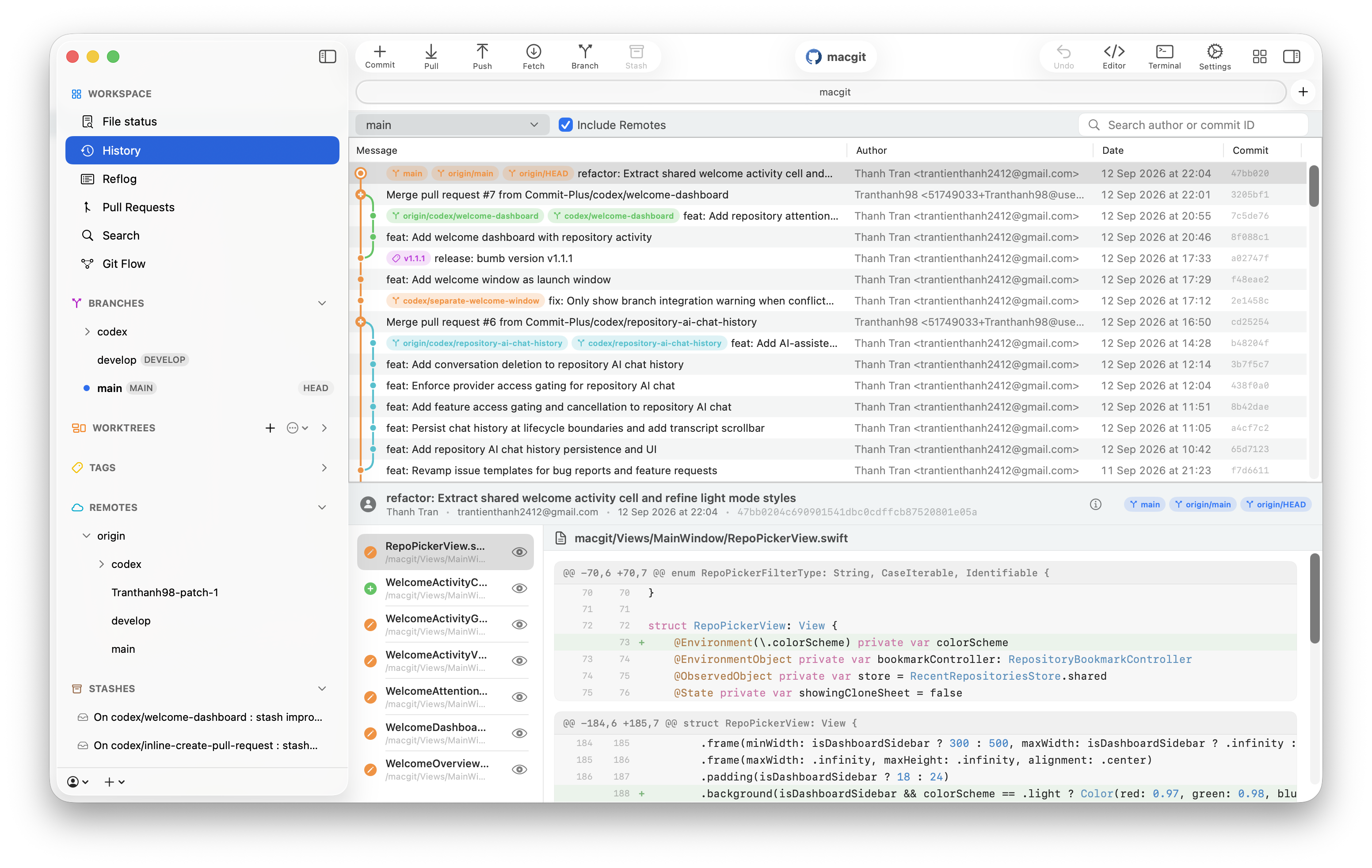
Commit+ is a native macOS Git client built with Swift and SwiftUI — designed to be fast, lightweight, and deeply integrated with the platform. Optional account features add settings sync, provider integrations, and AI-assisted workflows.
Installation
Install with Homebrew:
brew tap commit-plus/tap
brew trust --tap commit-plus/tap
brew install --cask commit-plus
brew trust is required by recent Homebrew versions for third-party taps; skip it on older versions that do not have the command.
Or download the signed and notarized .dmg from the latest release. Commit+ updates itself in the app either way.
Features
Revision Browser & Visual Comparisons
- Browse any revision: Explore its complete file and folder tree without checking it out, with text, image, and Git LFS previews.
- Compare files and folders: Compare a path in your working tree or a revision against any commit, branch, or tag.
- Compare branches: Inspect changed files, unique commits, merge bases, and ahead/behind counts using merge-base or tip-to-tip comparisons.
Selective Apply & Revert
Bring back only the changes you need from any commit — or reverse them — by file, hunk, or selected lines. Commit+ previews the patch, detects stale state, and provides visual conflict resolution when changes do not apply cleanly.
Git LFS
Set up Git LFS, manage tracking rules, find and convert large files, inspect local object availability, and download missing content with progress and cancellation. Commit+ can use System Git LFS or manage its own private runtime, including LFS-aware clone and revision previews.
Drag & Drop Workflows
Stage and unstage files, apply stashes, reorder or squash commits, cherry-pick or revert across branches, merge or rebase branches, and publish or pull branches with direct manipulation.
Safe, Complete Git Management
- Everyday Git: Commit, fetch, pull, push, branch, merge, rebase, stash, cherry-pick, revert, reset, tags, and reflog.
- Interactive rebase: Right-click a History commit to reorder or rewrite a linear commit range. Eligible commits on the current branch offer Reword Message, Edit, Squash into Parent, Fixup into Parent, and Drop, including published commits. Squash and fixup also support a merge commit as the immediate parent. Continue, skip, or abort a paused rebase from File Status. Rewriting published history may require a force push. Other ranges containing merge commits are not supported.
- Undo & redo: Recover from staging, commits, stashes, discards, branch operations, and supported remote actions.
- Conflict resolution: Review inline conflicts, choose resolutions, stage the result, or continue/skip/abort interrupted operations.
- Worktrees & submodules: Create and manage worktrees, plus add, initialize, update, synchronize, edit, and remove submodules from the sidebar.
- Pull requests: Create pull requests for GitHub, GitLab, and Bitbucket repositories, with in-app review for GitHub and GitLab.
Git Flow
Set up and run feature, bugfix, release, and hotfix flows without an external git-flow installation. Start topics in the current repository or a new worktree, finish with merge or rebase strategies, and recover interrupted flows.
AI-Assisted Git
Generate editable Conventional Commit messages with Apple Intelligence or your own OpenAI, Gemini, Claude, DeepSeek, or OpenRouter key. Repository AI can inspect repository context and route supported actions through Commit+'s existing safety and confirmation flows.
Search & Terminal Integration
Quick Search finds commits, files, branches, and tags from one place. The optional commit CLI opens a repository in Commit+ from Terminal:
commit                  # Open the current folder's repository
commit .                # Same behavior
commit "/path/to/repo"   # Open a specific repository
commit --help
Install it from Settings → General → Command Line. The command opens the repository; it does not create a Git commit. Subfolders and linked worktrees are supported.
System Requirements
- macOS: 26.2+
- Xcode: 26.2+ (to build from source)
- Git: Installed on the system (Homebrew or Xcode Command Line Tools)
Contributing
We welcome contributions! Please see CONTRIBUTING.md for setup instructions, coding conventions, and pull request guidelines, and follow our Code of Conduct.
For security issues, please refer to SECURITY.md.
License
This project is licensed under the GNU Affero General Public License v3.0 (AGPLv3).
For GitHub Enterprise Server and GitLab Self-Managed setup, see Self-hosted Git providers.
Explore related projects
codecrafters-io/build-your-own-x
Master programming by recreating your favorite technologies from scratch.
561,570 starspublic-apis/public-apis
A collective list of free APIs
497,890 starsmorluto/rea
Reverse engineer anything with agents, from app behavior down to native binaries.
449,491 starsopenclaw/openclaw
The AI that really does things. Any OS. Any Platform. The lobster way. 🦞
394,300 stars