
CodeverDotDev/codever
CodeverDotDev/codever has 386 GitHub stars and 57 forks. GitHot measured 0 stars in 24 hours, 0 in 7 days, and 0 in 15 days. Last checked 2026-11-09 14:43 UTC. Last push 2026-10-27.
Bookmarks & Notes Manager for Developers — with Markdown and Code Snippets support
Measured star growth
- in 24h
- 0
- in 7 days
- 0
- in 15 days
- 0
- in 1 month
- Collecting history
Net star changes over overlapping periods, not daily totals. Missing measurements are left blank. Stars measure attention, not software quality.
README.md
Original
⚡🔖️ Bookmarks and snippets manager for developers & co 🔖⚡️
:point_right: Use our HowTo pages to get you going and start saving time and nerves when managing your bookmarks and code snippets. The following helpers and extensions will assist you along the way:
Extensions
 |
 |
 |
 |
 |
|---|---|---|---|---|
| Bookmarklet | Chromium Extension | Firefox Addon | IntelliJ Plugin | VSCode Extension |
Chrome extension usage example - save snippet
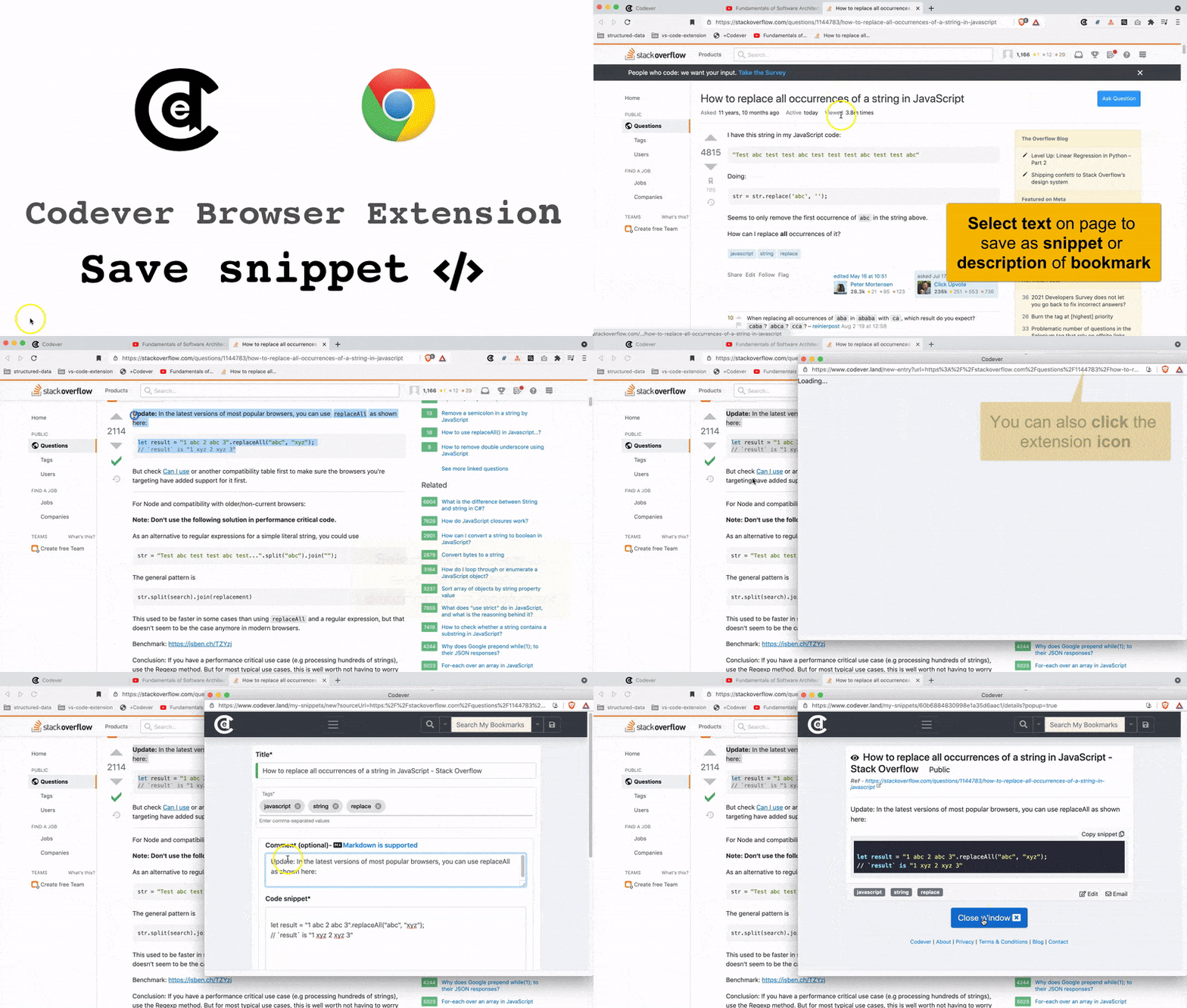
The other extensions function more or less after the same principle
The browser extension source is maintained in this monorepo alongside the Codever web application and API.
Public bookmarks
Worthy public bookmarks are published regularly on Github at CodeverDotDev/bookmarks.
Setup (development or self hosting)
These instructions will get you a copy of the project up and running on your local machine for development and testing purposes.
The project is developed with the MEAN stack and Keycloak for authentication and authorization:
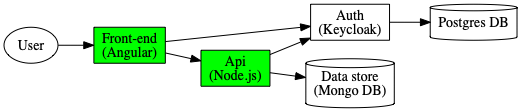
The project contains two core apps and the browser extension source:
- codever-ui which makes up the User Interface. This uses with Angular and Angular CLI.
- codever-api which is the API supporting the UI. It uses ExpressJS with MongoDB and Keycloak. See the OpenAPI specification
- codever-browser-extension which contains the source for the Chrome and Firefox extension. It is independently loaded, tested, packaged, and published from this directory.
Prerequisites
What you need to run this app:
nodeandnpm(we recommend using NVM)- Ensure you're running Node at least (
v16.x.x+) and NPM (8.x.x+)
- Ensure you're running Node at least (
- nodemon -
npm install -g nodemon - Docker - we recommend using Docker Desktop
Docker and Docker-compose are currently used only for local development
Installing (development setup)
Start MongoDB and Keycloak server
:warning: When you run docker compose for the first time uncomment the following -Dkeycloak.migration.action=import line :
#command: -Dkeycloak.migration.action=import -Dkeycloak.migration.provider=dir -Dkeycloak.migration.dir=/tmp/keycloak/export-import -Dkeycloak.migration.strategy=IGNORE_EXISTING
in the docker-compose file, so that the initial Keycloak setup (realm and users) is loaded.
:warning: For further startups of docker-compose you should comment back this line, as it starts faster
docker-compose up
Use
-dto run it in the background
Install and run (frontend & backend)
⚠️ One-time setup: the API requires an
env.jsonconfig file (git-ignored) — create it from the provided example before the first start, otherwise the backend fails withCannot find module '../../env.json':cp apps/codever-api/env.json.example apps/codever-api/env.json
You want to have the backend API running first with the following commands:
# install
nvm use   #only if you are using nvm
npm install

# run
npm run frontend #to run the frontend
npm run backend #to run the backend

#alternatively run in parallel
npm start
or in one line nvm use; npm install; npm start
This starts
- the API with nodemon at http://localhost:3000/api and will watch for code changes in backend and automatically redeploy.
- the frontend available at http://localhost:4200. Login the user/password
mock/mockconfigured for you in the initial Keycloak setup. Some bookmarks are initially loaded with your account, so you can start playing with them.
You can create your own test user, or any other extra users by following the screenshots in Add a Keycloak user to create it.
To be able to automatically add youtube videos published date and duration to the title you need to create a nodemon.json file based on the backend/nodemon.json.example and add your own youtube api key
Keycloak
Keycloak Admin console reachable at http://localhost:8080/auth with the user/password admin/Pa55w0rd
(see docker compose file)
Testing
E2E (integration) tests with Cypress
Keycloak and mongodb have to be started as specified above (
docker-compose upcommand)
Run the integration test by issuing the following command.
cd apps/codever-ui
npm run cy:run
To open Cypress you can run the following task
npm run cy:open
API (backend)
Integration tests
Keycloak and mongodb have to be started as specified above (
docker-compose upcommand)
Run the integration test by issuing the following command.
cd apps/codever-api
npm run integration-tests
A report will be generated.
Database migrations
One-off MongoDB migration scripts (including the full-text search index definitions and
their search weights) live in
apps/codever-api/resources/db-migration/mongodb.
See that README for how to run
the scripts both locally and in production, with examples for applying, verifying,
and rolling back changes.
Debugging
UI (Frontend)
Dev Tools in Chromium browsers
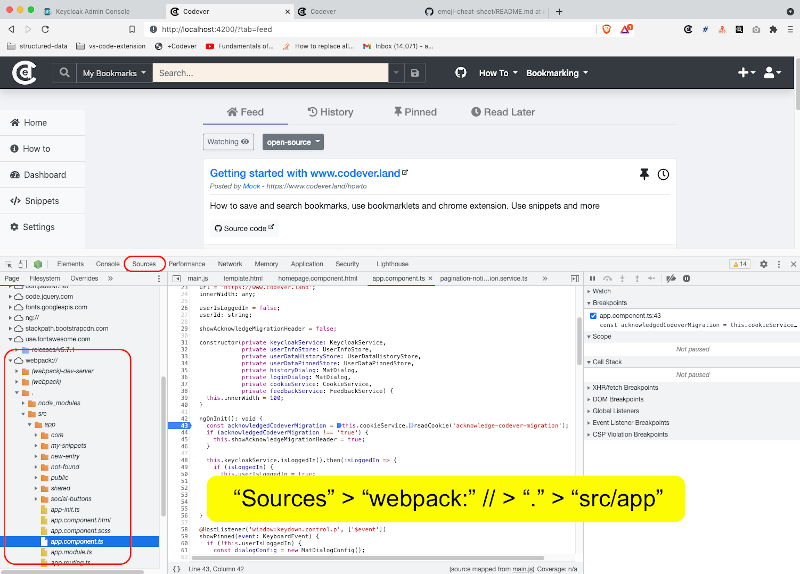
You can use the Dev Tools in Chromium based browsers (e.g. Chrome, Brave). Navigate to Sources and the file you want to set your break points, like in the following example:
IntelliJ
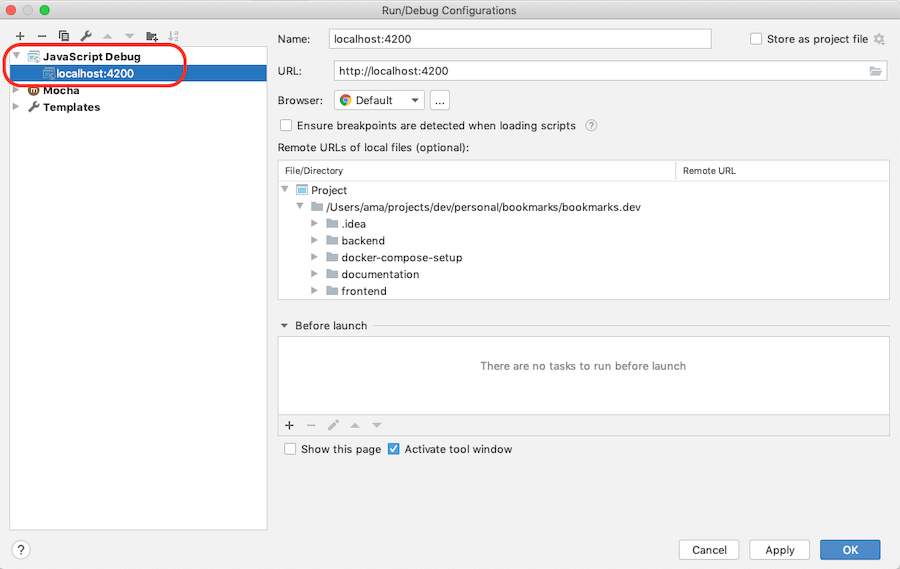
In IntelliJ you add Javascript Debug configuration as shown below:
Backend
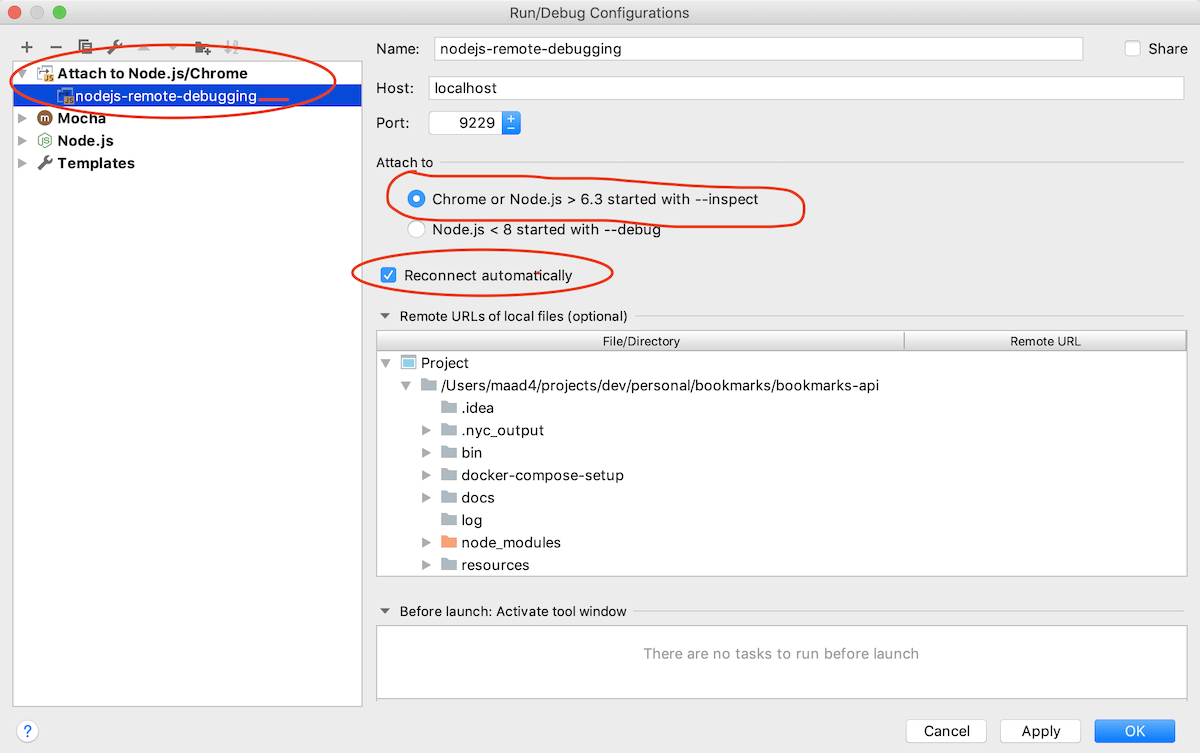
IntelliJ / Webstorm (Node.js plugin is required)
The npm run debug starts nodemon with the --inspect parameter so you can attach to this process,
by using the following configuration:
Visual Studio Code
See Node.js debugging in VS Code with Nodemon
Blog
Blog posts related to Codever features and implementation details can be found on Codepedia.org and Dev.to
Contributing
Please read CONTRIBUTING.md for details on our code of conduct, and the process for submitting pull requests to us.
Versioning
We use SemVer for versioning. For the versions available, see the tags on this repository.
Changelog
The changelog is available in CHANGELOG.md
To update the changelog execute the following commands:
nvm use
standard-changelog
License
This project is licensed under the MIT License - see the LICENSE file for details.
All media materials used in the project fall under the copyright law
Explore related projects
n8n-io/n8n
Fair-code workflow automation platform with native AI capabilities. Combine visual building with custom code, self-host or cloud, 400+ integrations.
209,918 starslanggenius/dify
Build Agentic workflows, RAG pipelines, with rich AI model and tool support on one collaborative workspace. Deploy on cloud, VPC, or self-hosted, so teams move from prototype to production without rebuilding the stack.
160,680 starsmicrosoft/PowerToys
Microsoft PowerToys is a collection of utilities that supercharge productivity and customization on Windows
140,755 starsstablyai/orca
Orca is the place for working with a fleet of agents (e.g. Grok Bot, Claude Code). Run any coding agent with your own subscription. Available on desktop, mobile and remote runtime.
120,197 stars