
ChunelFeng/CGraph
ChunelFeng/CGraph has 2,317 GitHub stars and 391 forks. GitHot measured +1 stars in 24 hours, -1 in 7 days, and +3 in 15 days. Last checked 2026-11-07 20:58 UTC. Last push 2026-10-24.
【A common used C++ & Python DAG framework】 一个通用的、无三方依赖的、跨平台的、收录于awesome-cpp的、基于流图的并行计算框架。欢迎star & fork & 交流
Measured star growth
- in 24h
- +1
- in 7 days
- -1
- in 15 days
- +3
- in 1 month
- Collecting history
Net star changes over overlapping periods, not daily totals. Missing measurements are left blank. Stars measure attention, not software quality.
README_en.md
Original


Chinese Readme | English Readme | deepwiki
CGraph Readme

CGraph is a cross-platform Directed Acyclic Graph framework based on pure C++ without any 3rd-party dependencies.
You, with it, can build your own operators simply, and describe any running schedules as you need, such as dependence, parallelling, aggregation, conditional and so on. Python APIs are also supported to build your pipeline.
Tutorials and contact information are shown as follows. Please get in touch with us for free if you need more about this repository.
1. Introduction
The Chinese name of CGraph is "Se丶Tu". It is a cross-platform graph flow execution framework without any third-party dependencies. Through the underlying scheduling of GPipeline, it provides eDAG scheduling features including sequential execution of dependent elements, concurrent execution of independent elements, pause, resume, and timeout settings.
Users only need to inherit from the GNode class, implement the run() method in the subclass, and set dependencies as needed to execute tasks as a graph or as a pipeline. Users can also configure different GGroups containing multiple nodes to control conditional judgment, loop, and concurrent execution logic by themselves.
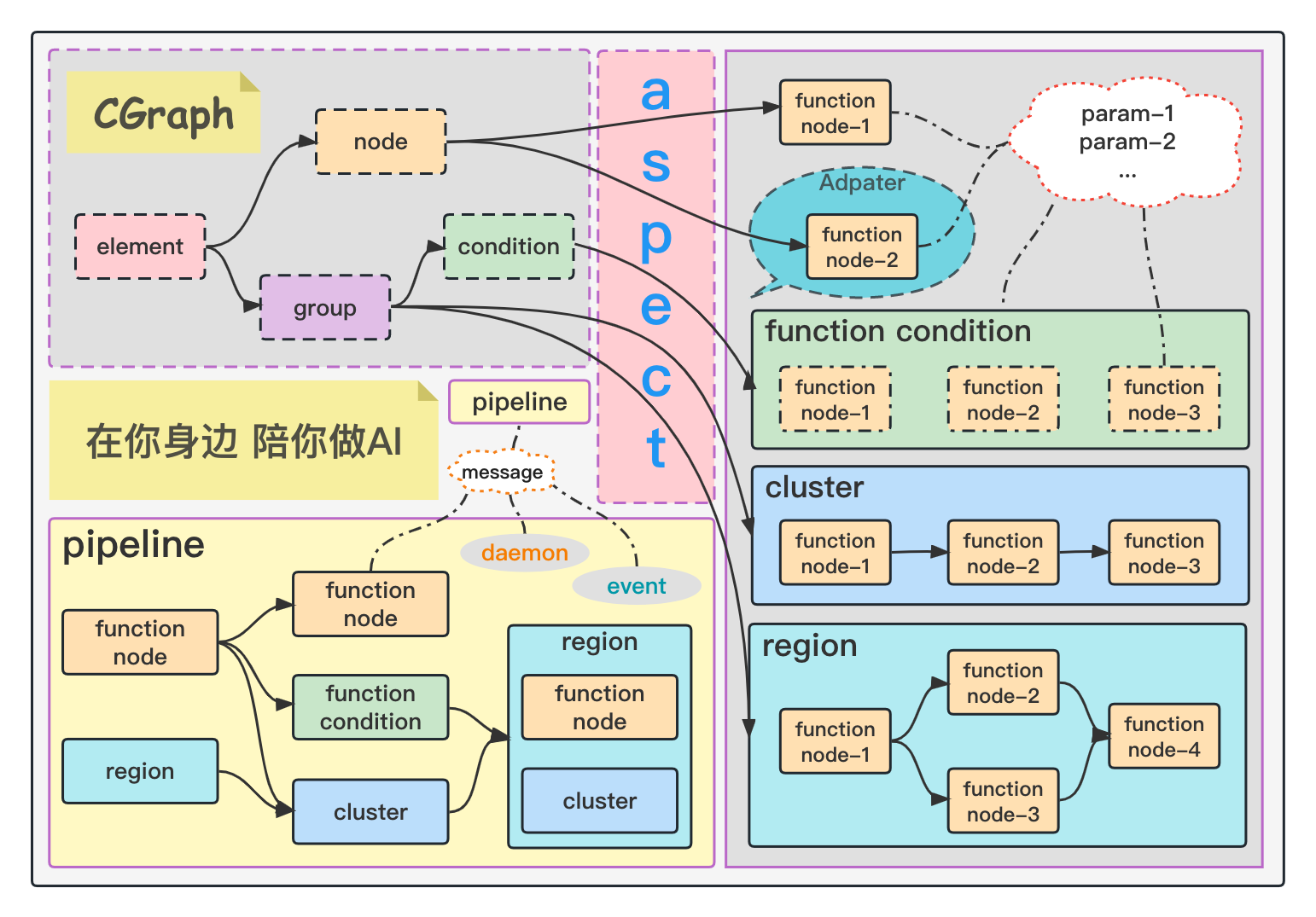
This project is written with only the C++11 standard library and has no third-party dependencies. It is compatible with MacOS, Linux, Windows, and Android. It supports local compilation and secondary development, and also provides a Python version: pycgraph. For compilation and installation, please refer to CGraph Compile Guide
For detailed feature introductions and usage, please refer to the articles on Chunel's Blog. Related videos are continuously updated on Bilibili. Welcome to watch and discuss:
- Bilibili Video: CGraph Getting Started
- Bilibili Video: CGraph Features
- A complete introduction to all terms and feature modules in the CGraph project
- Detailed explanations of each feature's usage scenarios, usage methods, and solved problems with real coding processes
- Suitable for users who want to fully understand CGraph features and get started quickly
- Suitable for users interested in multithreaded programming
- Bilibili Video: CGraph Applications
- Bilibili Video: CGraph Sharing
2. Getting Started Demo
C++ Version
#include "CGraph.h"

using namespace CGraph;

class MyNode1 : public GNode {
public:
    CStatus run() override {
        printf("[%s], sleep for 1 second ...\n", this->getName().c_str());
        CGRAPH_SLEEP_SECOND(1)
        return CStatus();
    }
};

class MyNode2 : public GNode {
public:
    CStatus run() override {
        printf("[%s], sleep for 2 second ...\n", this->getName().c_str());
        CGRAPH_SLEEP_SECOND(2)
        return CStatus();
    }
};


int main() {
    /* Create a pipeline for configuring and executing graph flow information */
    GPipelinePtr pipeline = GPipelineFactory::create();
    GElementPtr a, b, c, d = nullptr;

    /* Register dependencies between nodes */
    pipeline->registerGElement<MyNode1>(&a, {}, "nodeA");
    pipeline->registerGElement<MyNode2>(&b, {a}, "nodeB");
    pipeline->registerGElement<MyNode1>(&c, {a}, "nodeC");
    pipeline->registerGElement<MyNode2>(&d, {b, c}, "nodeD");

    /* Execute the graph flow framework */
    pipeline->process();

    /* Clear all resources in the pipeline */
    GPipelineFactory::remove(pipeline);

    return 0;
}
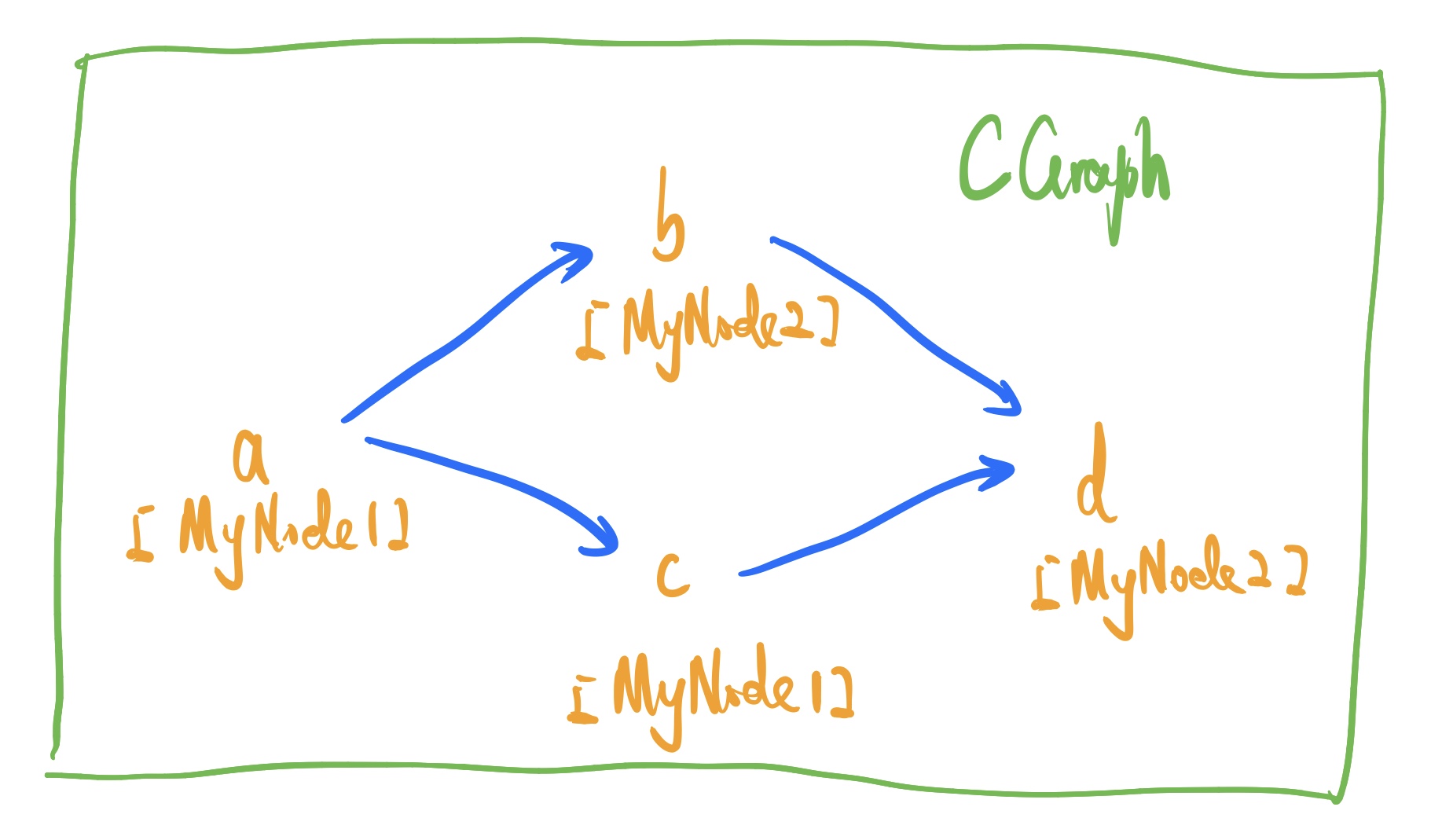
As shown above, when the graph structure is executed, node a runs first. After node a finishes, nodes b and c run in parallel. After both b and c finish, node d runs.
Python Version
import time
from datetime import datetime

from pycgraph import GNode, GPipeline

class MyNode1(GNode):
    def run(self):
        print("[{0}] {1}, enter MyNode1 run function. Sleep for 1 second ... ".format(datetime.now(), self.getName()))
        time.sleep(1)
        return 0

class MyNode2(GNode):
    def run(self):
        print("[{0}] {1}, enter MyNode2 run function. Sleep for 2 second ... ".format(datetime.now(), self.getName()))
        time.sleep(2)
        return 0


if __name__ == '__main__':
    pipeline = GPipeline()
    a, b, c, d = MyNode1(), MyNode2(), MyNode1(), MyNode2()

    pipeline.registerGElement(a, set(), "nodeA")
    pipeline.registerGElement(b, {a}, "nodeB")
    pipeline.registerGElement(c, {a}, "nodeC")
    pipeline.registerGElement(d, {b, c}, "nodeD")

    pipeline.process()
Other Versions
- CsCGraph : A CSharp native, CGraph-API-liked DAG project
- JaCGraph : A Java native, CGraph-API-liked DAG project
- GoCGraph : A Go native, CGraph-API-liked DAG project
- CGraph-lite : A one-header-only, CGraph-API-liked DAG project, lite version by C++
Explore related projects
n8n-io/n8n
Fair-code workflow automation platform with native AI capabilities. Combine visual building with custom code, self-host or cloud, 400+ integrations.
209,772 starslanggenius/dify
Build Agentic workflows, RAG pipelines, with rich AI model and tool support on one collaborative workspace. Deploy on cloud, VPC, or self-hosted, so teams move from prototype to production without rebuilding the stack.
160,627 starsmicrosoft/PowerToys
Microsoft PowerToys is a collection of utilities that supercharge productivity and customization on Windows
140,669 starsstablyai/orca
Orca is the place for working with a fleet of agents (e.g. Grok Bot, Claude Code). Run any coding agent with your own subscription. Available on desktop, mobile and remote runtime.
118,563 stars