
ChiFungHillmanChan/setpiece
ChiFungHillmanChan/setpiece has 49 GitHub stars and 3 forks. GitHot measured 0 stars in 24 hours. Last checked 2026-11-15 05:50 UTC. Last push 2026-10-13.
What you can do
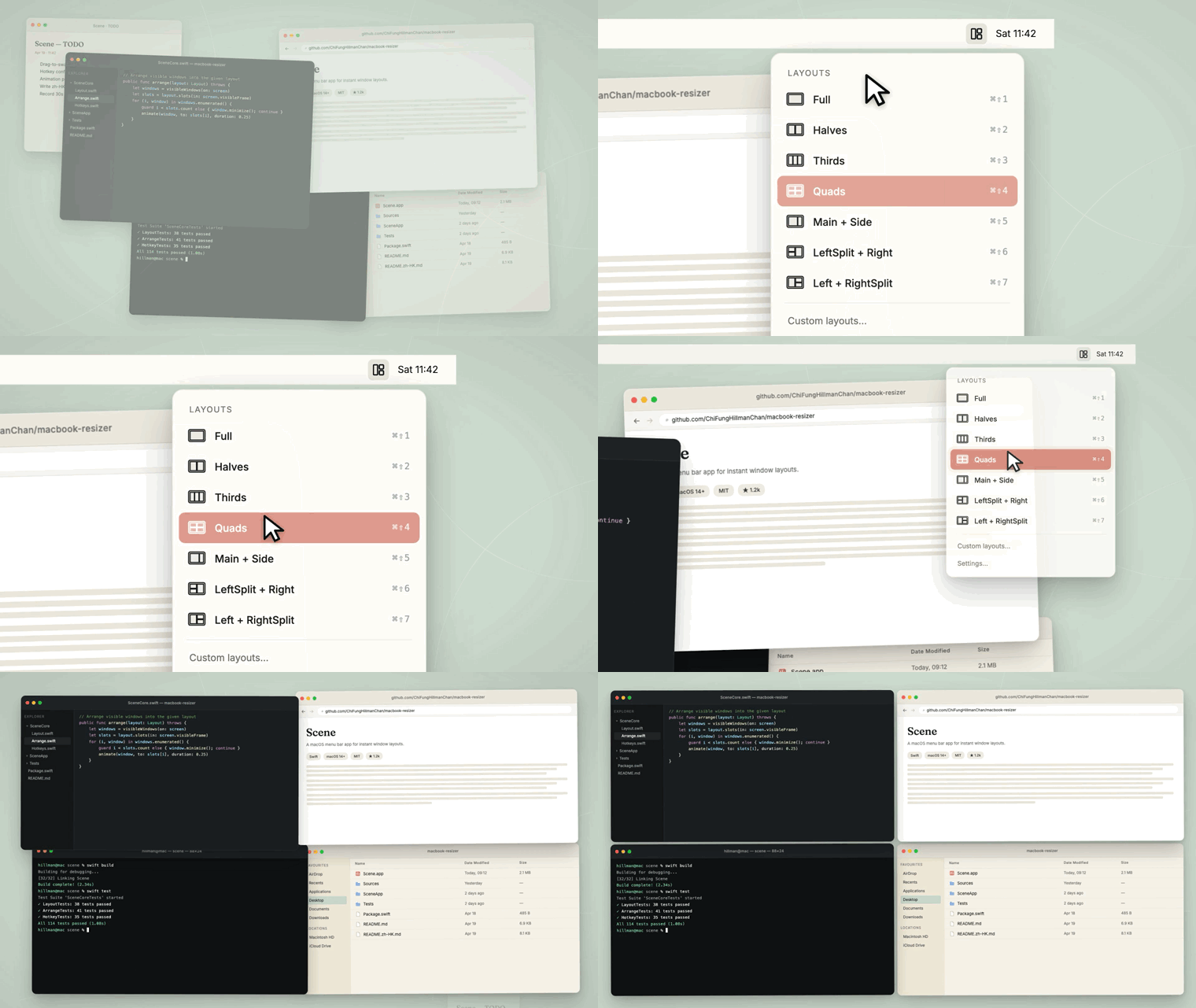
- 10 built-in layout presets — Full, Halves, Thirds, Quads, Main + Side (70/30), LeftSplit + Right, Left + RightSplit, plus vertical variants: Main + Side (Vertical), Halves (Vertical), Thirds (Vertical)
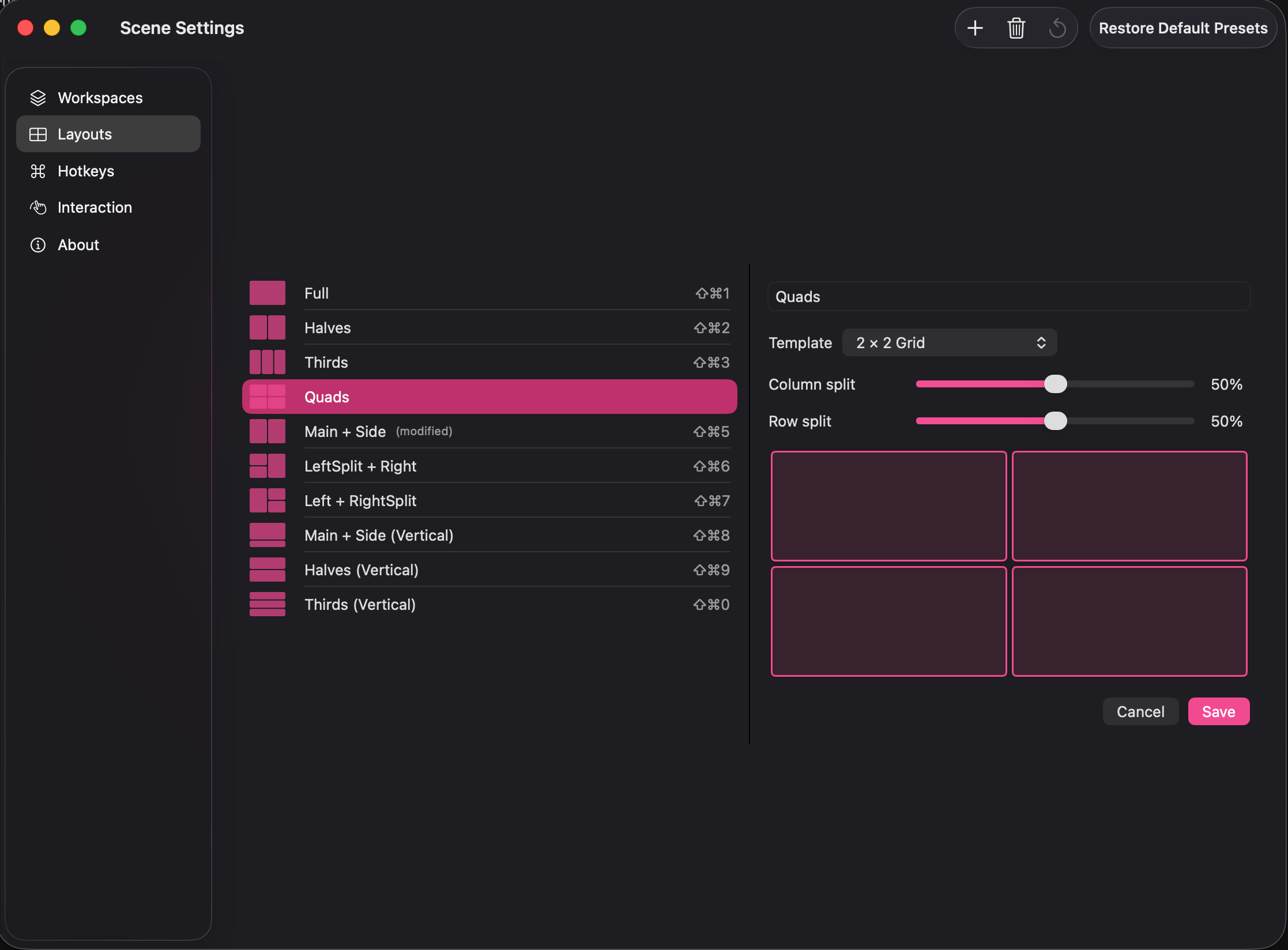
- Build your own layouts — 11 grid templates (columns / rows / 2×2 / 3×2 / 4 L-shape variants) with proportion sliders
- Per-layout custom hotkeys with conflict detection (block-save: one chord per layout or workspace)
- Smooth window animation with adjustable duration (100–500 ms) and easing (Linear / Ease Out / Spring)
Measured star growth
- in 24h
- 0
- in 7 days
- Collecting history
- in 15 days
- Collecting history
- in 1 month
- Collecting history
Net star changes over overlapping periods, not daily totals. Missing measurements are left blank. Stars measure attention, not software quality.
About
Setpiece — free open-source macOS menu bar window manager. One-click Workspaces (apps + layout + Focus mode), tiling layouts, global hotkeys, and auto-triggers on monitor / time / calendar. Native Swift, zero dependencies, notarized. A Rectangle & Magnet alternative. Formerly Scene.
ProductivityREADME.md
OriginalSetpiece
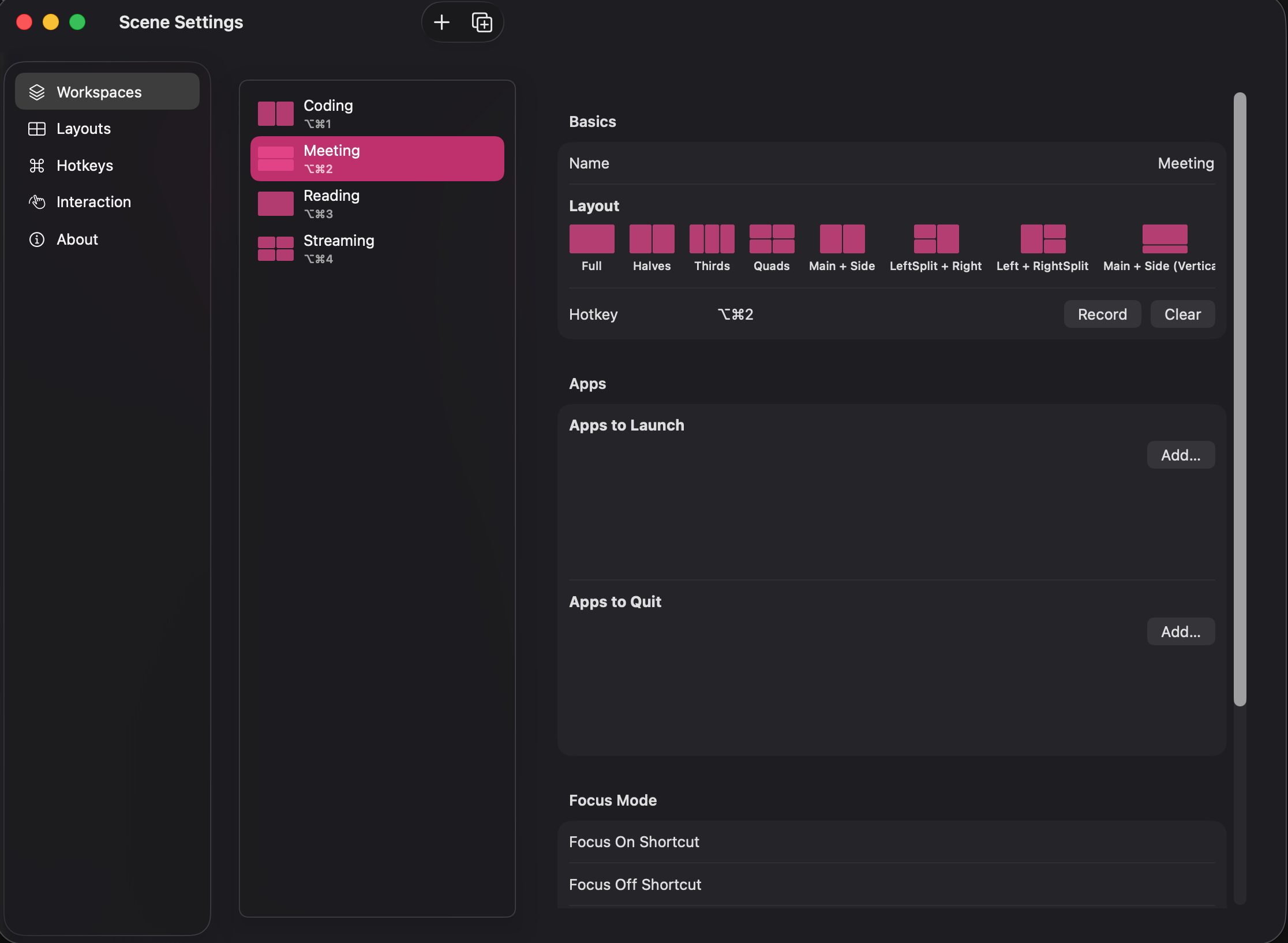
One click. Your windows snap, your apps launch, your Focus mode kicks in. Like Rectangle for snap layouts — but with Workspaces that bundle apps + layout + Focus mode together, and auto-triggers that fire when you connect a monitor, hit a scheduled time, or join a calendar event.
A free, open-source macOS menu bar window manager. Native Swift, zero dependencies, notarized by Apple. Requires macOS 14 (Sonoma) or later. Universal binary — runs native on both Apple Silicon and Intel.





繁體中文版本:README.zh-HK.md
Setpiece was called Scene until v0.8.0. If you already have it installed, nothing about your install changes — same Accessibility grant, same layouts and workspaces, and
scene://URLs keep working alongside the newsetpiece://. Old links to this repository redirect here permanently.
Why Setpiece?
Setpiece's differentiators in a crowded category:
| Setpiece | Rectangle | Magnet | Loop | Moom | |
|---|---|---|---|---|---|
| Price | Free | Free | $7.99 | Free | $10 |
| Open source | Yes | Yes | No | Yes | No |
| Snap-to-edge layouts | ✓ | ✓ | ✓ | ✓ | ✓ |
| Custom layout builder | ✓ tree-split | — | — | — | ✓ |
| Workspaces (apps + layout + Focus, one click) | ✓ | — | — | — | partial |
| Auto-triggers (monitor / time / calendar) | ✓ | — | — | — | — |
| Drag-to-swap windows | ✓ | — | — | — | — |
| 繁體中文 (HK / TW) | ✓ | — | — | — | — |
If you only need snap-to-edge tiling, Rectangle is great. If you want one click that switches your entire context — apps, layout, Focus mode, with optional auto-triggers — that's Setpiece.
Install
Homebrew (recommended):
brew trust chifunghillmanchan/tap       # Homebrew 7+ requires this for third-party taps
brew install --cask chifunghillmanchan/tap/setpiece
Homebrew 7 refuses to load casks from a tap you have not trusted, and it raises rather than
prompting — if you skip the first line you get Refusing to load cask … from untrusted tap.
Homebrew 6 and earlier need only the second line. The old …/tap/scene token still resolves,
so an existing install keeps upgrading without any action.
Quarantine is stripped automatically — no "cannot be verified" prompt. On first launch, grant Accessibility in System Settings → Privacy & Security → Accessibility.
Or download the DMG directly: Scene-0.8.2.dmg (Universal: Apple Silicon + Intel, macOS 14+, notarized by Apple — no Gatekeeper prompt)
All versions: Releases page · DMG users, see docs/INSTALL.md for the one-time Gatekeeper + Accessibility-permission steps.
Demo
Workspaces — bundle a layout, the apps it needs and a Focus mode into one click:
Layout editor — drag the seams to design any tile shape:
▶ Watch the full 30-second demo (MP4, 13 MB)
What's new in v0.8.2
Drag-to-swap works across two monitors. On a Mac with an external display, rearranging windows went wrong in three ways:
- A window you dragged to the other display was still in its old slot as far as Setpiece knew, so the next swap on its old display pulled it back across.
- Letting go with the pointer on the other display, while most of the window was still on the first, had Setpiece and macOS move the window at the same time. It ended up straddling both screens at the wrong size.
- Applying a layout on one display switched drag-to-swap off on the other.
Each display now keeps its own layout. A window you drop on another display stays where you put it and is never pulled back, and both displays keep swapping.
WhatsApp takes its slot again. WhatsApp's main window calls itself a dialog, and since v0.7.6 Setpiece skips dialogs, so WhatsApp floated over the windows around it. Setpiece now tiles any "dialog" with working minimise, zoom or full-screen buttons. Real dialogs, save sheets and floating palettes are still left alone.
No more gap under your MacBook's screen. "Reserve Dock space on every display" is now off by default, and this update turns it off for you. A display keeps room for the Dock only while the Dock is on it, so with the Dock on an external monitor, MacBook layouts reach the bottom edge. Re-applying a layout after the Dock moves still keeps every window in its slot. If you would rather the Dock never cover a window when it moves over, turn the setting back on in Settings → Interaction → Dock space.
To get it: click Update available in the menu bar.
For the full version history, see CHANGELOG.md.
What's new in v0.8.1
Settings opens again on macOS 27. On v0.8.0, opening Settings froze the window — nothing in it could be clicked — and a few seconds later macOS reported that Setpiece quit unexpectedly. It happened every time, because Settings always opens on the Workspaces tab.
The cause was layout, not your data. The Workspaces tab was a split view nested inside the Settings window's own split view, and on macOS 27 the two kept resizing each other: every layout pass changed the inner one's minimum size, which forced another pass, until AppKit gave up and threw. The Workspaces tab is now built the same way as the Layouts tab, which never had the problem. It looks and works the same.
To get it: click Update available in the menu bar. The updater lives in the menu bar panel, not in Settings, so it works even while Settings is crashing.
For the full version history, see CHANGELOG.md.
What's new in v0.8.0
Scene is now Setpiece. That is the whole release — no layout, hotkey, workspace or update behaviour changed.
Nothing about your install changes either, and that was the constraint the rename was built around. The bundle identifier is still com.hillman.SceneApp, so macOS keeps your Accessibility grant exactly as it is; you will not be asked to re-authorize. Your layouts, workspaces, hotkeys and settings stay where they are in ~/Library/Application Support/Scene. The app on disk is still Scene.app, because every updater already in the field looks for that filename inside the DMG. And scene:// URLs keep working, permanently, alongside the new setpiece:// — any Shortcut, Raycast script or bookmark you built against the old scheme is safe.
What changes is the name you see: the menu bar, the Settings window, the Accessibility row in System Settings.
Why now. The old name collided with SwiftUI's own Scene type, which meant a Swift project called Scene was effectively invisible in search next to Apple's documentation. Renaming was going to get more expensive with every release, and only six people had taken v0.7.6 when this was cut — so this was the cheapest moment it will ever be, and nearly everyone upgrading will see exactly one name change rather than two.
One thing under the hood. The in-app updater no longer hard-codes the bundle filename; it takes whichever .app the mounted DMG carries. That is what would let the bundle itself be renamed a release from now, instead of breaking updates for everyone.
For the full version history, see CHANGELOG.md.
What's new in v0.7.6
Dialogs and floating panels no longer eat a slot. Setpiece tiled every on-screen window an app owned, which included its preferences dialogs, save sheets, inspectors and floating palettes. Opening one re-shuffled the whole layout and pushed a real window into the minimize pile — a Get Info panel was enough to scramble a three-way split. Setpiece now reads each window's accessibility subrole and skips the ones that are not user-arrangeable. The test is a deny-list, not an allow-list: plenty of apps leave the subrole unset or report something bespoke, and refusing to tile those would silently break an entire app rather than one stray panel, so anything unrecognized is still tiled.
Windows reach the bottom edge again. v0.7.4 stopped the Dock dragging layouts around by reserving the Dock's thickness on every display, since macOS reserves it only on whichever display the Dock currently sits on and the Dock follows your pointer. The cost was a dead strip along the bottom of every display the Dock is not on. Settings → Interaction → Dock space now lets you turn that reserve off, so windows sit flush on the bottom — at the price of the re-apply stability it buys. It stays on by default, and single-display Macs are unaffected either way.
A newer settings file can no longer stop Setpiece from launching. Running a newer Setpiece upgrades settings.json; going back to an older one made it refuse the file and hard-fail at startup, with no way to tell why. Setpiece now reads a file from the future leniently — taking the settings it understands, defaulting the rest — and leaves the file alone so returning to the newer build finds it intact.
Setpiece asks for a GitHub star, once. After twenty layouts that actually landed, a single row appears in the menu bar panel. Answer it either way and it never comes back.
For the full version history, see CHANGELOG.md.
What's new in v0.7.5
The Settings toolbar buttons are back on macOS 26 (Tahoe). On the Layouts tab, +, + Custom, delete, reset-to-default and Restore Default Presets were all missing; on Workspaces, New, Duplicate and Delete were missing. You could still edit the layouts you already had, but you couldn't create, duplicate or delete anything from Settings. The cause was the whole-window translucency added in v0.7.2: the frosted backdrop was an AppKit container that the SwiftUI view was nested inside, and a hosting controller only hands its toolbar to the window when it is the window's content — nested one level deeper, it hands over nothing. The backdrop is now a SwiftUI background layer, so the glass look is exactly the same and the buttons are back. macOS 14 and 15 were never affected. Thanks to @nphxexp-create for the report (#4).
For the full version history, see CHANGELOG.md.
What's new in v0.7.4
The Dock no longer drags your layout around — on a multi-display Mac the Dock follows your pointer, and macOS reserves space for it only on whichever display it currently sits on. Setpiece tiled into that reserved space, so moving the Dock to your other monitor and re-firing a layout resized and shifted every window by the Dock's height. Setpiece now reserves the Dock's thickness on every display, making a layout's target rects depend only on your display arrangement — re-apply is stationary no matter where the Dock has wandered. The trade-off: the display the Dock is not on reserves that strip too. With Dock auto-hide there's no cost at all, and single-display Macs are completely unaffected. Windows parked over the Dock are now included in layouts as well, instead of being invisible to Setpiece.
The menu bar panel ticks the layout you applied — a checkmark sits at the far right of the active layout's row, and its name goes bold, so you can tell at a glance which layout is live without counting windows. Hotkey chords stay aligned whether or not a row is ticked.
Updating from an old build goes straight to the newest release — Setpiece asked GitHub for releases/latest, which sounds like "newest version" but is actually "most recent release sorted by the date of the commit its tag points at". Cut a hotfix from an older commit and that endpoint returns the release it supersedes, so a user far behind could be offered an older build, install it, and be handed the next one on relaunch — climbing versions one at a time. Setpiece now reads the full release list and picks the highest version itself, skipping drafts and prereleases. Tests: 371 → 394.
For the full version history, see CHANGELOG.md.
Features
- 10 built-in layout presets — Full, Halves, Thirds, Quads, Main + Side (70/30), LeftSplit + Right, Left + RightSplit, plus vertical variants: Main + Side (Vertical), Halves (Vertical), Thirds (Vertical)
- Build your own layouts — 11 grid templates (columns / rows / 2×2 / 3×2 / 4 L-shape variants) with proportion sliders
- Per-layout custom hotkeys with conflict detection (block-save: one chord per layout or workspace)
- Smooth window animation with adjustable duration (100–500 ms) and easing (Linear / Ease Out / Spring)
- Settings window — Workspaces / Layouts / Hotkeys / Interaction / About (open via menu bar icon → Settings… or ⌘,)
- One click, all windows — frontmost window goes to slot 1, the rest follow z-order
- Sticky re-apply — windows already sitting in a slot stay put when you re-fire the same layout; only unplaced windows move
- Overflow handling — windows beyond slot count get minimized
- Electron-aware — retries ±5 px corrections for Cursor, VS Code, Slack, etc.
- Multi-display — only rearranges windows on the screen under the mouse
- Dock/menu-bar-aware — uses
visibleFrameso windows never slide under the menu bar or Dock - Animation perf safety — falls back to instant placement when 7+ windows are visible
- Zero external dependencies — pure Foundation, AppKit, SwiftUI, Carbon
Layouts
| ID | Name | Slots |
|---|---|---|
| 1 | Full | 1 (100%) |
| 2 | Halves | 2 (50/50) |
| 3 | Thirds | 3 equal columns |
| 4 | Quads | 2×2 grid |
| 5 | Main + Side | 70% / 30% |
| 6 | LeftSplit + Right | left column split top/bottom, right column full |
| 7 | Left + RightSplit | left column full, right column split top/bottom |
| 8 | Main + Side (Vertical) | top row 70%, bottom row 30% |
| 9 | Halves (Vertical) | 2 equal rows |
| 10 | Thirds (Vertical) | 3 equal rows |
Build from source
Prerequisites
- macOS 14+
- Xcode 16+ (for building the app — free from the Mac App Store)
- Swift 5.9+ (bundled with Xcode)
Build via Xcode
git clone <repo-url>
cd setpiece
open SceneApp/SceneApp.xcodeproj
In Xcode, select the SceneApp scheme and press ⌘R. The app runs as a menu bar extra (no Dock icon).
Build a distributable DMG
./scripts/build-dmg.sh 0.8.2 # produces dist/Scene-0.8.2.dmg (universal, notarized)
This builds a universal (arm64 + x86_64) binary, Developer ID-signs it, submits it to Apple for notarization, and packages it into a DMG with an Applications drop shortcut. Both Apple Silicon and Intel Macs install from the same DMG. Set SKIP_NOTARY=1 for a local ad-hoc build that skips the Apple notary submission (useful while iterating on DMG layout).
Run the core library tests
The layout logic lives in SceneCore, a Swift package that works without Xcode:
swift test
467 unit tests cover layout math, window-to-slot mapping, animation state machine, JSON persistence, hotkey conflicts, drag-to-swap logic, seam reflow, custom-layout tree round-trip, diagnostics writer + sanitizer, semver comparison for the update nudge, and edge cases.
Usage
- On first launch, Setpiece asks for Accessibility permission. Grant it in System Settings → Privacy & Security → Accessibility.
- Click the Setpiece icon in the menu bar (
rectangle.3.group) to see the 10 layout presets and 4 workspace presets. - Click any layout preset, or press ⌘⌃1 – ⌘⌃0 (where ⌘⌃0 = the 10th). Workspaces fire on ⌘⌥1 – ⌘⌥4.
- Quit via the menu's Quit Setpiece item.
Hotkey reference
| Shortcut | Layout |
|---|---|
| ⌘⌃1 | Full |
| ⌘⌃2 | Halves |
| ⌘⌃3 | Thirds |
| ⌘⌃4 | Quads |
| ⌘⌃5 | Main + Side |
| ⌘⌃6 | LeftSplit + Right |
| ⌘⌃7 | Left + RightSplit |
| ⌘⌃8 | Main + Side (Vertical) |
| ⌘⌃9 | Halves (Vertical) |
| ⌘⌃0 | Thirds (Vertical) |
Workspace hotkeys (defaults):
| Shortcut | Workspace |
|---|---|
| ⌘⌥1 | Coding |
| ⌘⌥2 | Meeting |
| ⌘⌥3 | Reading |
| ⌘⌥4 | Streaming |
All layout and workspace hotkeys are re-bindable in Settings → Hotkeys; chord conflicts across layouts and workspaces are blocked at save time.
Automation (v0.7+)
Setpiece exposes two automation surfaces that any tool can drive:
URL scheme
open "scene://workspace/Coding"               # activate workspace by name
open "scene://workspace/Friday%20review?force=1"   # bypass Free Mode
open "scene://layout/Halves"                  # apply layout
open "scene://free-mode/toggle"               # toggle Free Mode
Works from Terminal, Raycast script commands, Alfred file actions, Stream Deck "Open URL" buttons, Keyboard Maestro, and any other URL-aware tool.
Shortcuts.app + Siri (macOS 14.1+)
Setpiece registers 5 AppIntents that appear in Shortcuts.app under the "Setpiece" section:
- Activate Workspace — fire a workspace by picker selection
- Apply Layout — apply a layout to the active screen
- List Workspaces — return names as a string array (chain into other actions)
- Toggle Free Mode
- Set Free Mode (Bool param)
The actions iCloud-sync to Shortcuts on iPhone, iPad, and Apple Watch. Voice command works via Siri:
- "Hey Siri, activate Setpiece workspace Coding"
- "Hey Siri, apply Setpiece layout Halves"
- "Hey Siri, toggle Setpiece Free Mode"
AppIntents require macOS 14.1+. URL scheme works on all Scene-supported macOS versions (14.0+).
Edge-case behavior
| Scenario | Behavior |
|---|---|
| More windows than slots | First N placed by z-order; remainder minimized |
| Fewer windows than slots | Windows placed; extra slots left empty |
| No visible windows | macOS notification (or menu bar icon blink if notifications are denied) |
| Permission revoked mid-session | Menu bar icon greys out; hotkeys unregister within 2 s |
| Electron apps | Single ±5 px retry if the window undershoots/overshoots the target |
| System Settings | macOS enforces a minimum window size — position is respected, size may not be |
Architecture
setpiece/
├── Package.swift
├── Sources/SceneCore/          # pure logic, unit-testable without Xcode
│   ├── AX/                     # Accessibility API wrappers, WindowSubrole
│   ├── Animation/              # Clock, FrameInterpolator, AnimationRunner
│   ├── Automation/             # URLRouter (scene:// + setpiece://), AutomationCommand
│   ├── Diagnostics/            # privacy-first diagnostic writer + sanitizer
│   ├── Display/                # screen picker, TilingFrame
│   ├── Interaction/            # HotkeyManager, DragSwapController, SeamResizeController,
│   │                           #   WindowAnimationSink, WindowMoveObserving
│   ├── Layout/                 # Slot, Layout, LayoutEngine, Plan, Geometry, LayoutNode,
│   │                           #   LayoutTemplate, CustomLayout, PresetSeeds, LayoutStore
│   ├── Settings/               # AnimationConfig, HotkeyBinding, DragSwapConfig,
│   │                           #   SettingsStore, StarPromptState, Cancellable
│   └── Workspace/              # Workspace, WorkspaceTrigger, WorkspaceSeeds,
│                               #   WorkspaceStore, FocusModeReference
├── Tests/SceneCoreTests/       # 467 XCTest cases
├── SceneApp/                   # Xcode project — menu bar shell + settings window
│   └── SceneApp/
│       ├── Animation/                 # WindowAnimator (CVDisplayLink + AX bridge)
│       ├── Automation/                # AutomationDispatcher + Intents/ (AppIntents)
│       ├── Diagnostics/               # DiagnosticController
│       ├── FirstLaunch/               # welcome window
│       ├── Interaction/               # AXMoveObserverGroup, AXWindowLookup,
│       │                              #   DragSwapAnimationSink
│       ├── Resources/                 # Localizable.xcstrings, InfoPlist.xcstrings
│       ├── Settings/                  # SettingsWindowController + 5 tabs
│       │                              #   (Workspaces / Layouts / Hotkeys / Interaction / About)
│       │                              #   + LayoutEditorView + LayoutPickerView + LayoutThumbnail
│       │                              #   + WorkspaceEditorView + WorkspaceTriggerEditor
│       │                              #   + AppPickerView + HotkeyCaptureView
│       ├── Stores/                    # LayoutStoreViewModel, SettingsStoreViewModel,
│       │                              #   WorkspaceStoreViewModel, StarPromptTracker
│       ├── Workspace/                 # AppLauncher, FocusController, WorkspaceActivator
│       │   └── Triggers/              #   MonitorTriggerWatcher, TimeTriggerScheduler,
│       │                              #   CalendarTriggerWatcher, TriggerSupervisor
│       ├── SceneAppApp.swift          # @main + MenuBarExtra
│       ├── AppDelegate.swift
│       ├── Coordinator.swift          # orchestration layer
│       ├── MenuBarContentView.swift
│       ├── OnboardingView.swift
│       ├── OnboardingWindowController.swift
│       ├── UpdateChecker.swift        # picks the highest version, not GitHub's "latest"
│       ├── UpdateInstaller.swift      # verify Team ID, then swap the bundle in place
│       └── NotificationHelper.swift
├── .github/
│   ├── ISSUE_TEMPLATE/                # bug + feature forms, security contact links
│   ├── PULL_REQUEST_TEMPLATE.md
│   └── workflows/                     # CI: swift test + SceneApp build on every PR
├── CONTRIBUTING.md                    # + CONTRIBUTING.zh-HK.md
├── SECURITY.md                        # private advisory route, highest-concern areas
├── CODE_OF_CONDUCT.md                 # + CODE_OF_CONDUCT.zh-HK.md
└── docs/
    ├── INSTALL.md                     # end-user install walkthrough
    ├── TESTING.md                     # manual smoke-test checklist
    └── media/                         # demo GIF, video + screenshots
The split is deliberate: SceneCore is framework-neutral and owns all the hard logic (AX calls, layout math, hotkey plumbing, animation state machine, JSON persistence, drag-swap, seam reflow, diagnostics). 467 unit tests run via swift test without Xcode. SceneApp is a thin SwiftUI/AppKit shell — only UI, app lifecycle, and the AppKit/AX bridges (WindowAnimator, AXMoveObserverGroup, AXWindowLookup, DragSwapAnimationSink) that can't live in a framework-neutral library. Only the final .app build needs Xcode.
Persistence
Setpiece writes three JSON files atomically into:
~/Library/Application Support/Scene/
├── layouts.json      # 10 seeds + your custom layouts + each layout's hotkey
├── settings.json     # animation enabled/duration/easing + drag-swap config
└── workspaces.json   # 4 workspace seeds + your custom workspaces + active workspace ID
Delete this folder to reset to factory state.
Roadmap
Already shipped, so not on this list: per-display layouts (v0.6 — a Workspace can assign a different layout to each screen) and the free-form canvas layout editor (v0.5.7 — drag the seams to build any tile shape).
- Pattern learning — observe manual window arrangements and suggest presets ("you usually split 70/30 in the afternoon — save?").
- AI / natural-language input — type "cursor left, chrome right" → LLM → layout JSON.
- Per-app rules — e.g., "always put Slack in slot 4".
- Launch-at-Login UI.
- More trigger types — CoreLocation, Wi-Fi network, audio device, Bluetooth.
- Mac App Store submission (currently Developer ID + notarized only).
License
MIT — see LICENSE.