
Cherry-Yiran/OneTouch
Cherry-Yiran/OneTouch has 32 GitHub stars and 3 forks. GitHot measured 0 in 7 days and 0 in 15 days. Last checked 2026-11-11 04:33 UTC. Last push 2026-10-07.
一个开关,处理 Mac 上每天重复的小事。原生 macOS 菜单栏工具,整合专注、显示、清理、设备与系统控制。
Measured star growth
- in 24h
- Update delayed
- in 7 days
- 0
- in 15 days
- 0
- in 1 month
- Collecting history
Net star changes over overlapping periods, not daily totals. Missing measurements are left blank. Stars measure attention, not software quality.
README_EN.md
Original
OneTouch
One switch for the small Mac tasks you repeat every day.
简体中文 · English
OneTouch is a lightweight, native macOS menu bar utility for focus, display, cleanup, device, and everyday system controls.
Download · Release notes · Report an issue




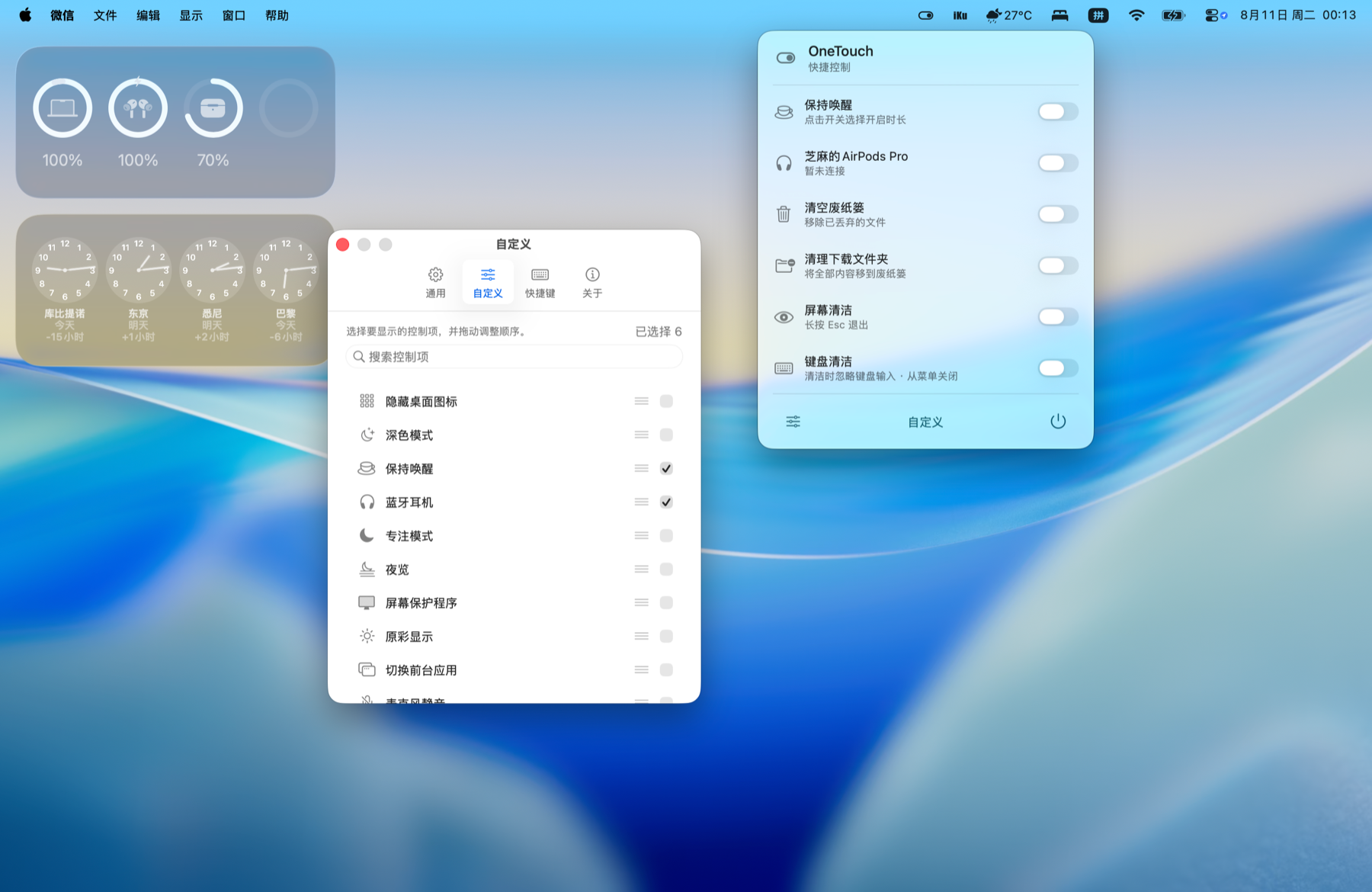
OneTouch uses native AppKit panels, controls, typography, colours, and system materials, with automatic light and dark appearance support.
Why OneTouch
macOS settings are rarely difficult to find, but repeatedly opening Settings, switching a state, and handling permissions interrupts your work. OneTouch keeps those actions in the menu bar so one switch gets the job done.
- One place: frequently used controls live together in the menu bar.
- One interaction: both persistent settings and one-time actions use a consistent switch interaction.
- Your order: choose any number of controls, search them, and drag to reorder. The panel stays compact and scrolls after eight items.
- Native macOS experience: panels, switches, menus, preferences, and dynamic materials use AppKit.
- Local by default: system actions run on your Mac; OneTouch does not upload activity data.
Features
Focus and display
- Dark Mode, Focus, and Keep Awake with native duration choices
- Night Shift, True Tone, Low Power Mode, and High Power Mode
- Screen resolution, display sleep, screen saver, and Stage Manager
Desktop and productivity
- Hide desktop icons, widgets, the Dock, or show hidden Finder files
- Control Music and Spotify playback
- Global shortcuts, launch at login, and lock screen
- Quit other Dock apps normally while keeping your current app, OneTouch, and Finder open
- Start or stop the Feishu aily background service without reopening Terminal after a reboot
Cleanup and devices
- Screen cleaning and keyboard cleaning
- Clear Downloads, Xcode derived data, Trash, and clipboard
- Connect Bluetooth headphones and view their battery level
- Eject external disks or mounted DMGs, with a protection list for important disks
- Mute the microphone
OneTouch currently includes 31 controls. Hardware-dependent or unavailable controls are clearly shown as unavailable.
Install
- Open the latest release and download
OneTouch_*_aarch64.dmg. - Open the DMG and drag OneTouch into Applications.
- Follow the first-launch guide to grant Accessibility permission.
- Click the switch icon in the menu bar.
The current release supports Apple Silicon Macs running macOS 13 or later.
Public builds use a stable OneTouch signing certificate and a separate Tauri updater signature. Because the app is not notarised through Apple Developer ID, macOS may ask you to allow the first launch in System Settings → Privacy & Security. After installation, use About → Check for Updates to install later releases.
How controls behave
- Regular controls switch immediately.
- One-time actions stay on while running and turn off when complete.
- Keep Awake, Dark Mode, and Focus show a native duration menu when switched on.
- Keyboard Cleaning ignores regular, modifier, function, and media keys until you turn it off with the mouse.
- Clear Downloads moves every item in Downloads to the system Trash; it does not permanently delete files.
- Quit Other Apps sends the standard macOS quit request and never force-quits apps.
- Feishu aily requires
~/.aily-cli/bin/aily-cliand shows as unavailable when it is missing. A cold start can take tens of seconds, and macOSlaunchdstarts the service independently; quitting OneTouch leaves it running, and this does not add a login startup registration. - Use Preferences → Customise to select and reorder controls.
- Use Preferences → Shortcuts to record optional global shortcuts.
Privacy and permissions
OneTouch guides you through the core Accessibility permission on first launch so later controls are not interrupted. Feature-specific Automation, Bluetooth, or Focus permissions are requested only when needed.
- All system actions run locally.
- OneTouch does not upload control history or personal data.
- It does not force-quit other apps.
- Protected disks are never ejected automatically.
- Update packages are verified with a Tauri signature.
Development
Stack: React, Vite, Tauri 2, Rust, Objective-C / AppKit, Core Graphics, and IOBluetooth.
Development requires macOS 13+, Node.js, pnpm, Rust stable, and Apple Command Line Tools.
pnpm install
pnpm native:dev
Run tests:
pnpm test:ui
cargo test --manifest-path src-tauri/Cargo.toml
Build the app:
TAURI_SIGNING_PRIVATE_KEY="$(< /path/to/onetouch.key)" \
TAURI_SIGNING_PRIVATE_KEY_PASSWORD="your-key-password" \
pnpm native:build
Build artifacts are written to src-tauri/target/release/bundle/. Pushing a v* tag creates a draft GitHub Release. GitHub Actions signs the app with the configured macOS certificate and signs updater artifacts with the Tauri private key before publishing them.
Design and implementation
OneTouch uses Apple public AppKit components and semantic system parameters. It does not manually imitate macOS glass, colours, blur levels, button states, or menu behaviour.
Contributing
Issues and pull requests are welcome. When reporting a problem, please include your macOS version, OneTouch version, steps to reproduce, and a screenshot when possible.
Explore related projects
n8n-io/n8n
Fair-code workflow automation platform with native AI capabilities. Combine visual building with custom code, self-host or cloud, 400+ integrations.
210,058 starslanggenius/dify
Build Agentic workflows, RAG pipelines, with rich AI model and tool support on one collaborative workspace. Deploy on cloud, VPC, or self-hosted, so teams move from prototype to production without rebuilding the stack.
160,773 starsmicrosoft/PowerToys
Microsoft PowerToys is a collection of utilities that supercharge productivity and customization on Windows
140,833 starsstablyai/orca
Orca is the place for working with a fleet of agents (e.g. Grok Bot, Claude Code). Run any coding agent with your own subscription. Available on desktop, mobile and remote runtime.
121,666 stars