
Chaoses-Ib/ObsidianShell
Chaoses-Ib/ObsidianShell has 146 GitHub stars and 9 forks. GitHot measured +1 stars in 24 hours and +2 in 7 days. Last checked 2026-11-09 09:23 UTC. Last push 2024-07-27.
Associate Markdown files with Obsidian
What you can do
- Everything + IbEverythingExt
- Open standalone Markdown files in Obsidian, i.e., use Obsidian as a Markdown editor.
- Enable the global vault pattern, which means that you can share one config with your notes at different locations.
- Open Markdown files in Obsidian through command line
Measured star growth
- in 24h
- +1
- in 7 days
- +2
- in 15 days
- Collecting history
- in 1 month
- Collecting history
Net star changes over overlapping periods, not daily totals. Missing measurements are left blank. Stars measure attention, not software quality.
README.md
OriginalObsidianShell
Features
Associate Markdown files with Obsidian
In addition to making it easy to open notes, associating files helps integrate Obsidian into your workflows. For example, you can use a launcher to quickly open notes.
For Chinese users:
配合支持拼音搜索的启动器,还可以间接实现通过拼音搜索笔记文件,比如:VaultRecent/Recent mode
- Open standalone Markdown files in Obsidian, i.e., use Obsidian as a Markdown editor.
- Enable the global vault pattern, which means that you can share one config with your notes at different locations.
Open Markdown files in Obsidian through command line
Installation
Config file location: %LOCALAPPDATA%\Chaoses Ib\ObsidianShell\Settings.json
Set as the default program for Markdown files
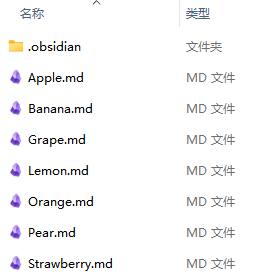
- Right-click on a .md file
- Select
Open with→Choose another app→ObsidianShell.CLI - Check
Always use this app to open .md files - Click
OK
CLI
A command line interface program for opening Markdown files in Obsidian.
It supports three opening modes:
VaultFallback (default)
If the Markdown file you want to open is in a vault, open the vault, otherwise open the file using the fallback Markdown editor.
Markdown editors:
Notepad (default)
-
The use of
codeis not recommended since it is actually an batch file and will cause some startup delays. Use%LOCALAPPDATA%\Programs\Microsoft VS Code\Code.exeinstead.OpenFileInWorkspace can be used to open the file in workspace. The settings should be:
Editor path:
wscriptArguments:
"...\OpenFileInWorkspace.vbs" {0}...\OpenFileInWorkspace.vbsshould be the absolute path toOpenFileInWorkspace.vbs.
Typora (≥ 1.1)
VaultRecent
If the Markdown file you want to open is in a vault, open the vault, otherwise link the file's parent directory to the Recent vault and then open the file.[^standalone]
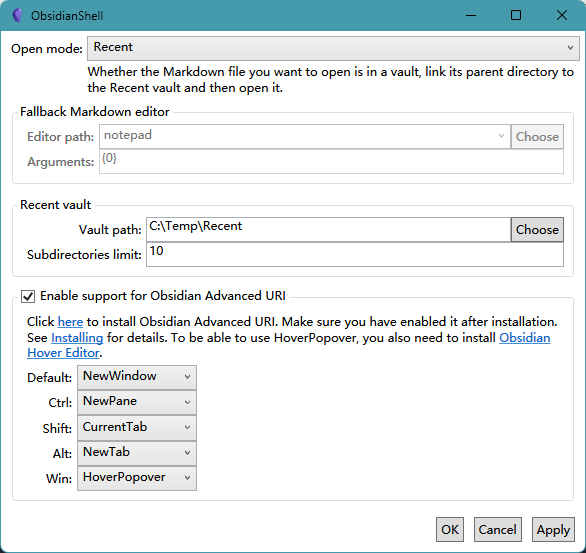
Recent
Whether the Markdown file you want to open is in a vault, link its parent directory to the Recent vault and then open it.
Notice: The vault where the Markdown file in (and the Recent vault) must be in the vault list of Obsidian before opening the file, i.e., you must have opened that vault before, otherwise Obsidian will report an error when opening the vault.
ContextMenu
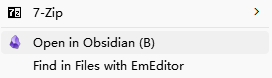
This menu is used to open the corresponding directory in Obsidian, complementing the defect that the CLI cannot be associated with directories.
[^standalone]: Open and edit standalone Markdown files - Feature requests - Obsidian Forum
Explore related projects
n8n-io/n8n
Fair-code workflow automation platform with native AI capabilities. Combine visual building with custom code, self-host or cloud, 400+ integrations.
209,927 starslanggenius/dify
Build Agentic workflows, RAG pipelines, with rich AI model and tool support on one collaborative workspace. Deploy on cloud, VPC, or self-hosted, so teams move from prototype to production without rebuilding the stack.
160,773 starsmicrosoft/PowerToys
Microsoft PowerToys is a collection of utilities that supercharge productivity and customization on Windows
140,755 starsstablyai/orca
Orca is the place for working with a fleet of agents (e.g. Grok Bot, Claude Code). Run any coding agent with your own subscription. Available on desktop, mobile and remote runtime.
120,306 stars