Changroro/llmux
Changroro/llmux has 26 GitHub stars and 3 forks. GitHot measured 0 stars in 24 hours. Last checked 2026-11-14 09:15 UTC. Last push 2026-09-30.
What you can do
- One dashboard for both engines — Every vLLM and llama.cpp profile side-by-side in a single Textual TUI, with a live tok/s column per running model.
- Build a profile once, spin it up and down — Keep every model you're experimenting with as a named profile in one profiles.yaml. No re-writing config each time — pick one, hit Enter, and it launches the right engine; stop it and start another just as fast.
- Pin any engine image per profile — Run a versioned vLLM release, nightly, the rolling llama.cpp CUDA image, or an image you built from source — pinned per profile via image_tag. llmux refuses the ambiguous :latest; versioned vLLM images are also verified inside the running container.
- VRAM-aware vLLM recipe import — Pull a model's official vllm-project/recipes config, then review its precision variants (bf16 / fp8 / awq) against your actual GPU's VRAM before it's written — so a recipe verified on an 80 GB card doesn't silently overshoot a 16 GB one.
Measured star growth
- in 24h
- 0
- in 7 days
- Collecting history
- in 15 days
- Collecting history
- in 1 month
- Collecting history
Net star changes over overlapping periods, not daily totals. Missing measurements are left blank. Stars measure attention, not software quality.
About
Run and manage both vLLM and llama.cpp model servers from one terminal UI + CLI — shared Docker Compose profiles, live tok/s, and cross-backend port/GPU conflict checks. NVIDIA + Linux.
Developer ToolsREADME.md
Original
llmux
Run and manage vLLM and llama.cpp servers from one terminal — TUI or CLI.







English | 한국어
vLLM for HF Transformers. llama.cpp for GGUF.
Two different toolchains, two different configs, two different terminals.
llmux unifies both under a single Textual dashboard backed by Docker Compose.
Pick a profile, press Enter — whichever engine it belongs to just runs.
Linux · NVIDIA GPU · Docker. No macOS, AMD/ROCm, or CPU-only yet.
Demos
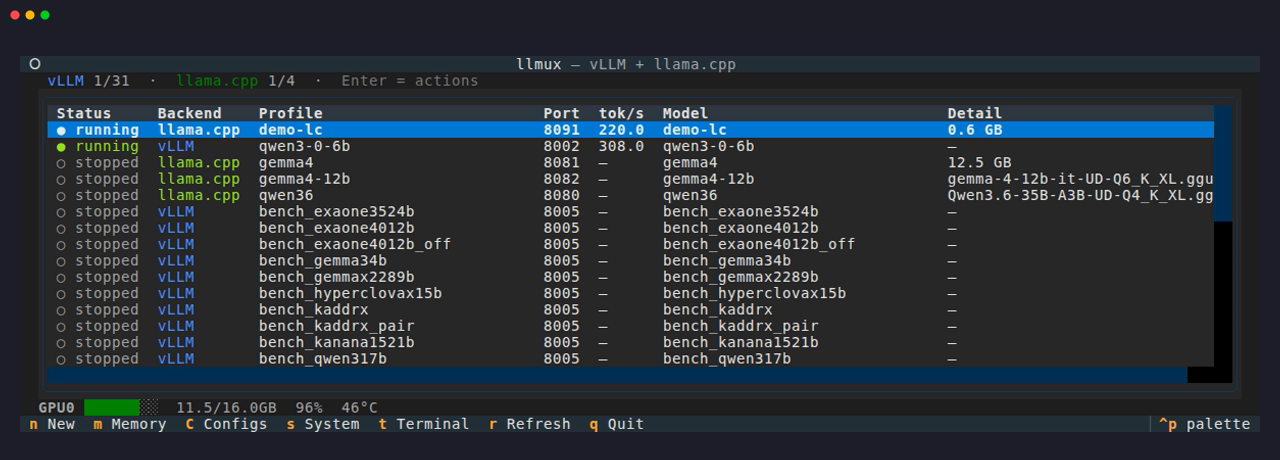
Both engines on one GPU, live tok/s per model — a vLLM model and a llama.cpp model running side by side, each with its own throughput, all in one dashboard
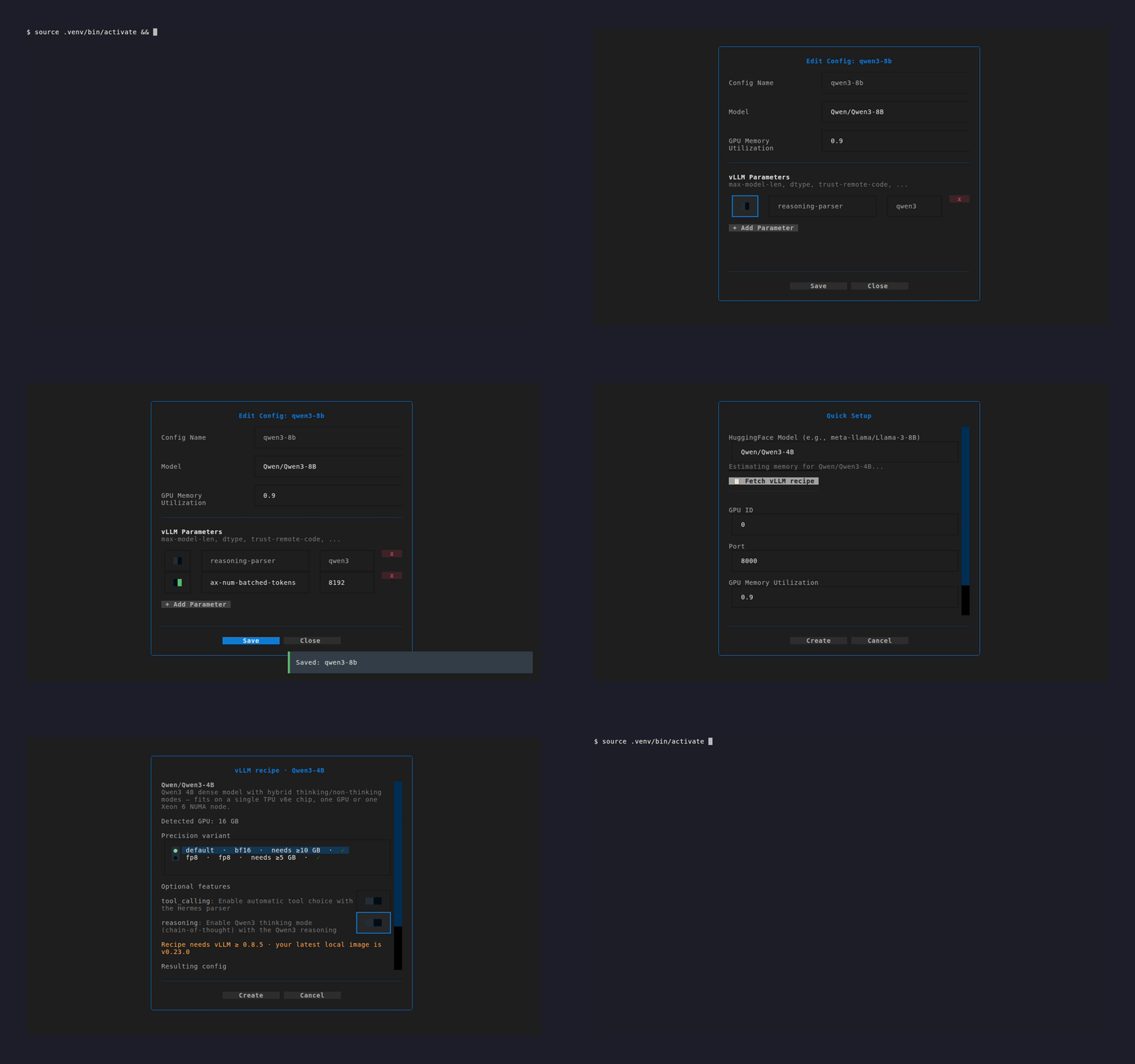
One dashboard for vLLM + llama.cpp — toggle a config flag on/off, add one with autocomplete, then import a model from its official vLLM recipe — reviewed against your GPU's VRAM
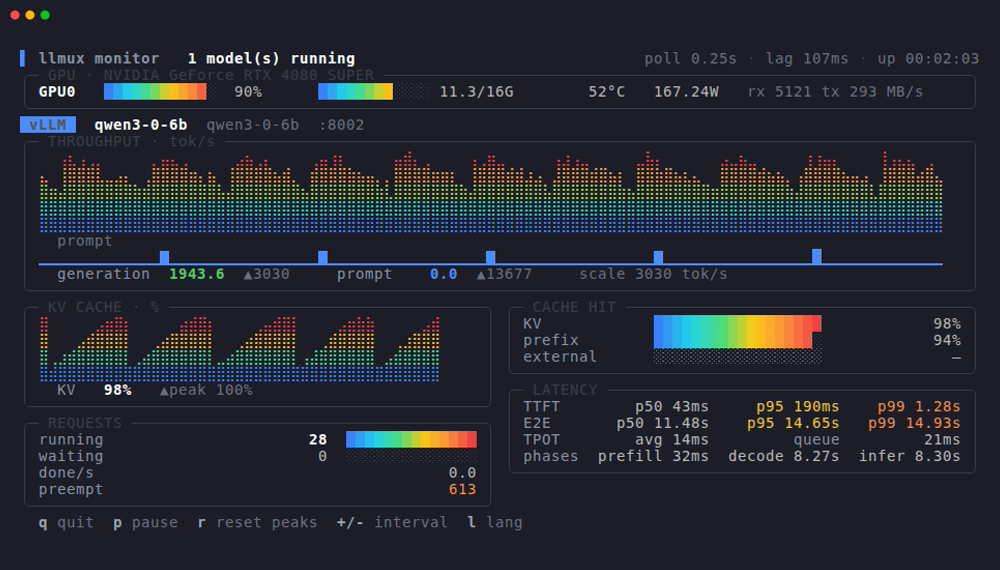
Live monitor — press v (or run llmux top) for GPUs plus a panel per running model: throughput and KV-cache graphs, cache hit rate, and latency percentiles read off the engine's Prometheus histograms
Headless CLI — recipe import, parameter on/off, status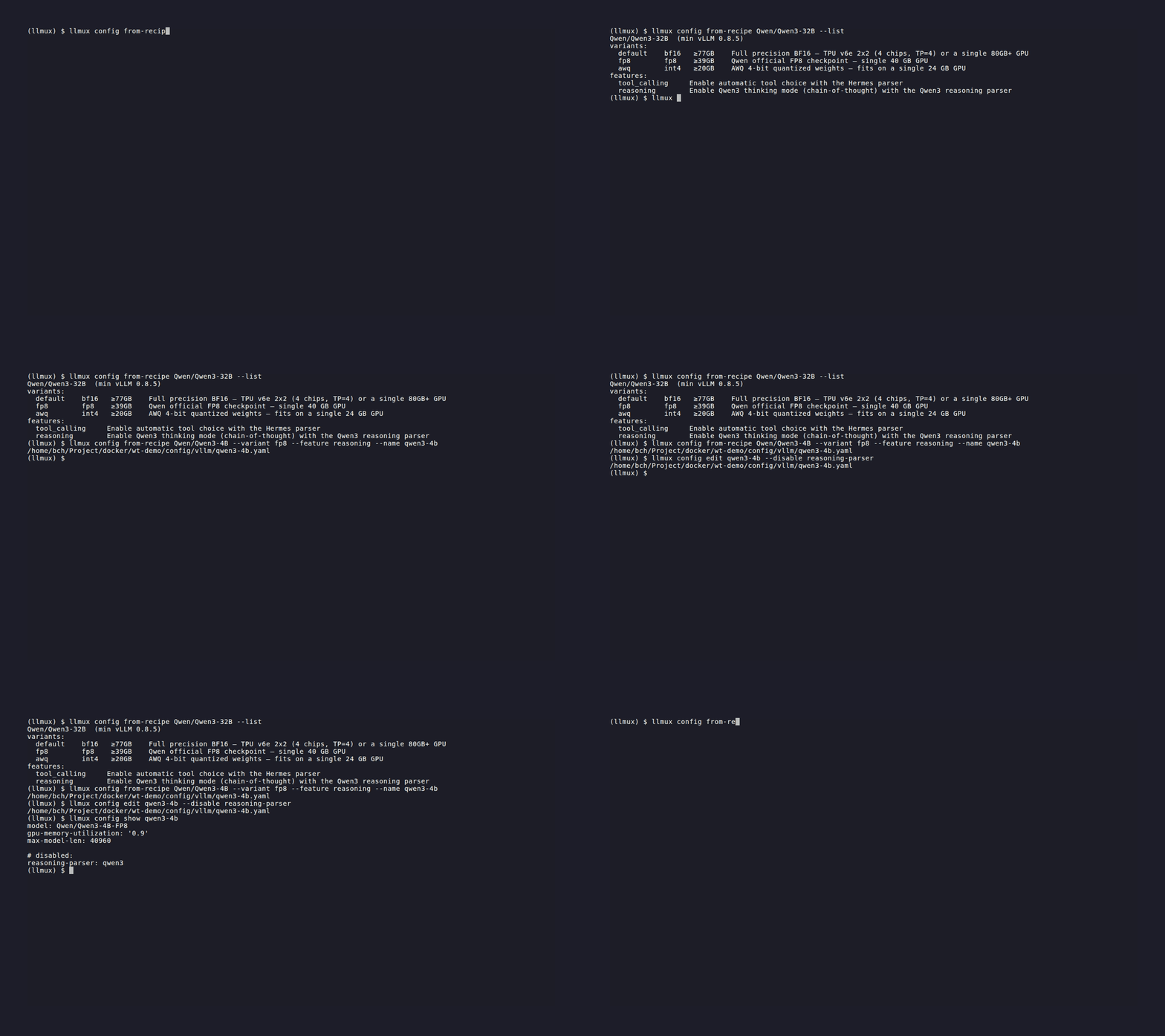
|
GPU memory estimator — per-GPU fit bar across models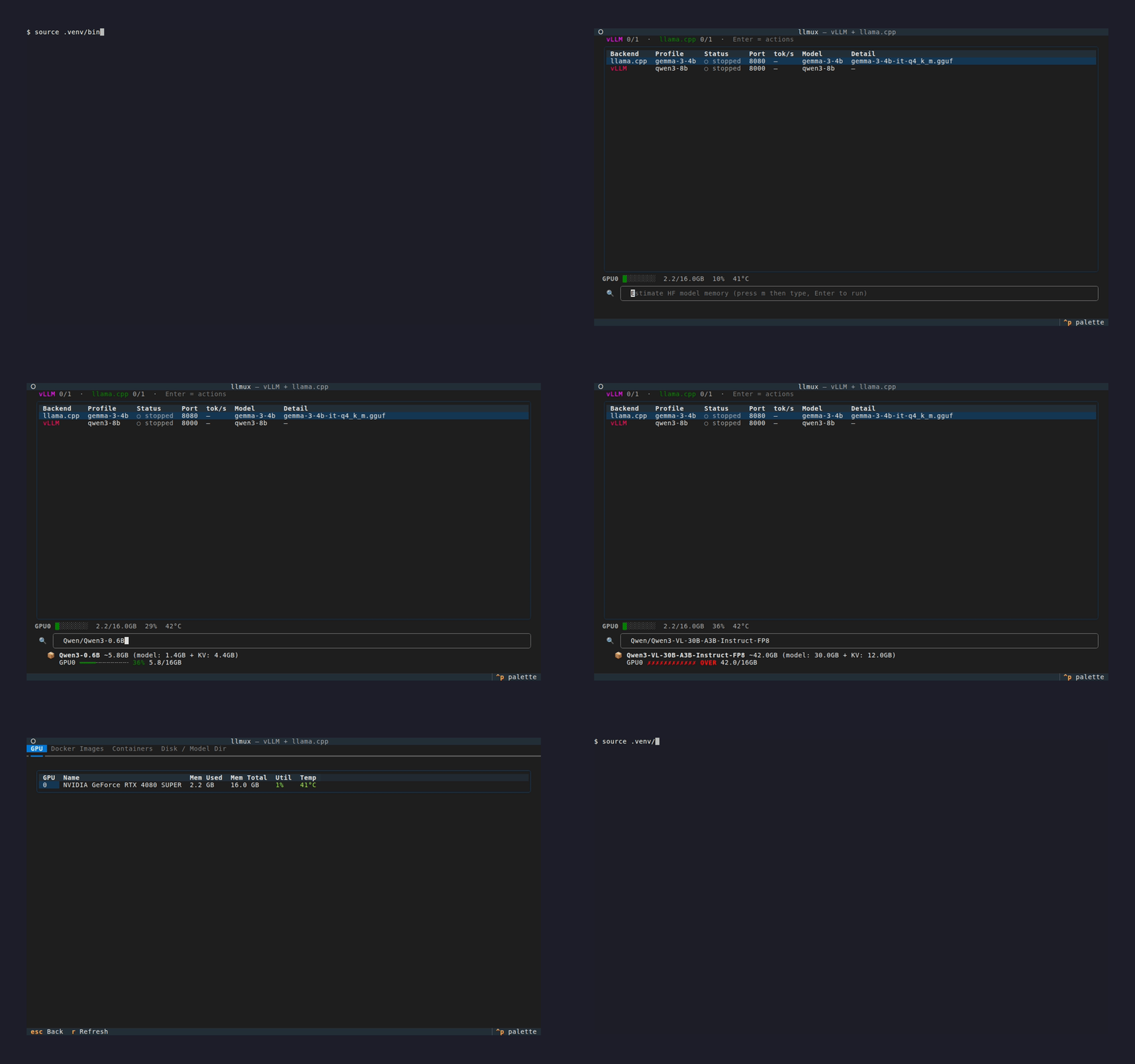
|
Features
- One dashboard for both engines — Every vLLM and llama.cpp profile side-by-side in a single Textual TUI, with a live tok/s column per running model.
- Build a profile once, spin it up and down — Keep every model you're experimenting with as a named profile in one
profiles.yaml. No re-writing config each time — pick one, hit Enter, and it launches the right engine; stop it and start another just as fast. - Pin any engine image per profile — Run a versioned vLLM release,
nightly, the rolling llama.cpp CUDA image, or an image you built from source — pinned per profile viaimage_tag. llmux refuses the ambiguous:latest; versioned vLLM images are also verified inside the running container. - VRAM-aware vLLM recipe import — Pull a model's official vllm-project/recipes config, then review its precision variants (bf16 / fp8 / awq) against your actual GPU's VRAM before it's written — so a recipe verified on an 80 GB card doesn't silently overshoot a 16 GB one.
- Memory estimator — Point it at an HF model and get a per-GPU fit bar (
hf-mem) before you download or launch anything. - Every engine flag, 1:1 —
config/<backend>/<name>.yamlmaps directly to engine flags — sampling, context length, KV-cache precision, MoE CPU offload. Toggle any flag on/off without deleting it, and your hand-written comments survive edits. - Flag autocomplete from your running server — The config editor reads
vllm serve/llama-serverflags inside the selected running container, including one-off image overrides. For stopped profiles it inspects the next startup image and caches by image ID. Failed discovery disables autocomplete instead of suggesting unverified flags. - LoRA and speculative / MTP setups — LoRA modules are profile fields, mounted and served on the base model; speculative decoding params are ordinary config params on a profile pinned to whatever image that setup needs.
- Benchmarks —
llmux benchruns a warmup + median pass so you can compare quant A against quant B on the same hardware. - btop-style live monitor — Press
vin the TUI, or runllmux topwith no TUI at all. Every GPU is always shown (util·mem·temp·power·PCIe as heat bars), plus a panel per running model: braille throughput and KV graphs, cache-hit, requests, and TTFT/E2E percentiles (p50/p95/p99) with prefill/decode phases. Metrics an engine doesn't expose read—rather than a made-up number. - Dev builds from source — Build a
vllm-dev:/llamacpp-dev:image from any fork/branch (GPU arch auto-detected) and pin a profile to it viaimage_tag. - Everything scriptable — Every TUI action is also a headless
llmuxsubcommand. Structured output is available only on commands that document--json. Lifecycle and mutation commands keep their documented text or stream output and exit codes.
Quick Start
Install with one command — it clones llmux, installs dependencies (and uv
itself if missing), and puts the llmux command on your PATH:
curl -fsSL https://raw.githubusercontent.com/Changroro/llmux/main/install.sh | sh
Then just launch it — the first run walks you through a short setup wizard
(HF cache directory, model directory, optional token) and writes .env.common
for you:
llmux
The checkout stays a live git repo, so git pull in ~/.llmux applies updates
with no reinstall — and llmux checks GitHub for a newer release on every
interactive run and offers to pull it for you. llmux update asks on demand
(--check to only report, --yes to skip the prompt); U does the same in
the TUI. Install elsewhere by passing LLMUX_DIR to the script:
curl -fsSL ... | LLMUX_DIR=/path sh.
Manual install
git clone https://github.com/Changroro/llmux.git && cd llmux
uv tool install --editable .   # editable — code edits are picked up live
uv tool update-shell           # one-time: adds ~/.local/bin to PATH
Prefer not to install globally?
uv run llmuxworks from inside the repo. From elsewhere, setLLMUX_ROOT=/path/to/llmux.
Language: the TUI is bilingual (English / Korean). It follows your system locale by default; force one with
LLMUX_LANG=enorLLMUX_LANG=ko.
See the Installation guide and Quick Start for the full walkthrough.
Headless CLI
Every TUI feature is also a non-interactive subcommand — llmux with no arguments
launches the TUI, any subcommand bypasses it:
llmux up <profile>                 # start a container
llmux prepare <profile>            # download the model + render setup, don't start
llmux prepare <profile> -w 2       # throttle to 2 connections (leave the line alone)
llmux update --check               # is a newer llmux release out?
llmux logs <profile>               # follow logs
llmux ps --json --running          # machine-readable status, both backends
llmux stats --once --json          # live tok/s from every running container
llmux bench <profile> --runs 3     # warmup + median tok/s benchmark
llmux profile quick-setup Qwen/Qwen3-8B --gpu-id 0,1
llmux config edit <name> --disable trust-remote-code   # toggle a flag off, keep it
llmux config from-recipe Qwen/Qwen3-32B --variant fp8   # official vLLM recipe
llmux config from-recipe my/Qwen3-32B-AWQ --recipe-from Qwen/Qwen3-32B --merge
llmux profile rename old-name new-name                  # container must be stopped
llmux image build-dev --backend llamacpp --branch master
--json is supported by every list/show/check command. Full command/flag list in the
CLI Reference.
Documentation
Full docs live at Changroro.github.io/llmux:
| Section | What's there |
|---|---|
| Getting Started | Installation, first-model walkthrough (TUI + CLI) |
| Guide | Profiles, model configs, container lifecycle, TUI shortcuts, dev builds |
| Backends | vLLM and llama.cpp deep-dives + a feature comparison matrix |
| Reference | Every CLI command/flag, .env.common variables, internal architecture |
| Troubleshooting | Common start/download/GPU issues — symptom → cause → fix |
Why llmux?
| Manual, two toolchains | llmux | |
|---|---|---|
| Switch engines | Different CLI, compose, and TUI per engine | One Textual dashboard for both |
| Profile format | .env per profile, scattered across two repos |
Single profiles.yaml, YAML-native, renders to .env at launch |
| Port / GPU clash | Find out when the container crashes | Pre-start conflict gate across both backends |
| Image versioning | docker pull latest and hope |
Refuses :latest; resolves to semver + verifies in-container version |
| Dev builds | Clone, build, wire compose by hand | llmux image build-dev from any branch; pin per profile |
| Memory sizing | Guess and hope it fits | hf-mem integration with per-GPU fit bars |
| GGUF setup | hf download → edit compose → mount |
llama.cpp downloads on first start, cached on the host |
What llmux is not. It doesn't proxy or route inference requests — each profile serves on its own port, and llmux is the layer that starts, stops, builds, and benchmarks them. If you want request-level model swapping behind a single endpoint, that's what llama-swap does. It's also not a chat UI — point Open WebUI or any OpenAI-compatible client at the servers it launches.
Requirements
- Linux with NVIDIA GPU(s) + a recent driver
- Docker Engine + the NVIDIA Container Toolkit (for GPU passthrough)
- Python 3.10+, and uv for the TUI environment
Confirm GPU passthrough works before the first run:
docker run --rm --gpus all ubuntu nvidia-smi
macOS, AMD/ROCm, and CPU-only aren't supported yet — llmux drives CUDA images through NVIDIA GPU passthrough, which needs an NVIDIA GPU on Linux.
Roadmap
- Recipe-based config recommender — Shipped in v2.4.0 as
llmux config from-recipe - Profile clone across backends —
llmux profile cloneduplicates within a backend today; cloning a vLLM profile as its llama.cpp GGUF equivalent is still open - Batch operations — Start/stop multiple profiles across both backends at once
- Export/Import bundles — Share full profile + config sets between machines
- AMD / ROCm — Mostly a base-image + device-mount swap; more feasible than macOS
- macOS (native Metal) — Under consideration, and llama.cpp only: Docker can't pass an Apple GPU into a Linux container, so this would mean running llama.cpp as a native process instead of a container (vLLM stays CUDA-only)
- Web UI — Optional browser-based dashboard for remote access
Built on
llmux is a control layer — the hard parts are upstream. It runs the official, unmodified images and stands on:
- vLLM and llama.cpp — the inference engines it drives
- vllm-project/recipes — source of the imported vLLM configs
- hf-mem — the model memory estimator
- Textual and Typer — the TUI and CLI
MIT License
Explore related projects
codecrafters-io/build-your-own-x
Master programming by recreating your favorite technologies from scratch.
562,434 starspublic-apis/public-apis
A collective list of free APIs
498,889 starsmorluto/rea
Reverse engineer anything with agents, from app behavior down to native binaries.
458,555 starsopenclaw/openclaw
The AI that really does things. Any OS. Any Platform. The lobster way. 🦞
394,422 stars