
CasaVargas/DebridDownloader
CasaVargas/DebridDownloader has 106 GitHub stars and 8 forks. GitHot measured 0 stars in 24 hours. Last checked 2026-11-16 19:45 UTC. Last push 2026-11-15.
What you can do
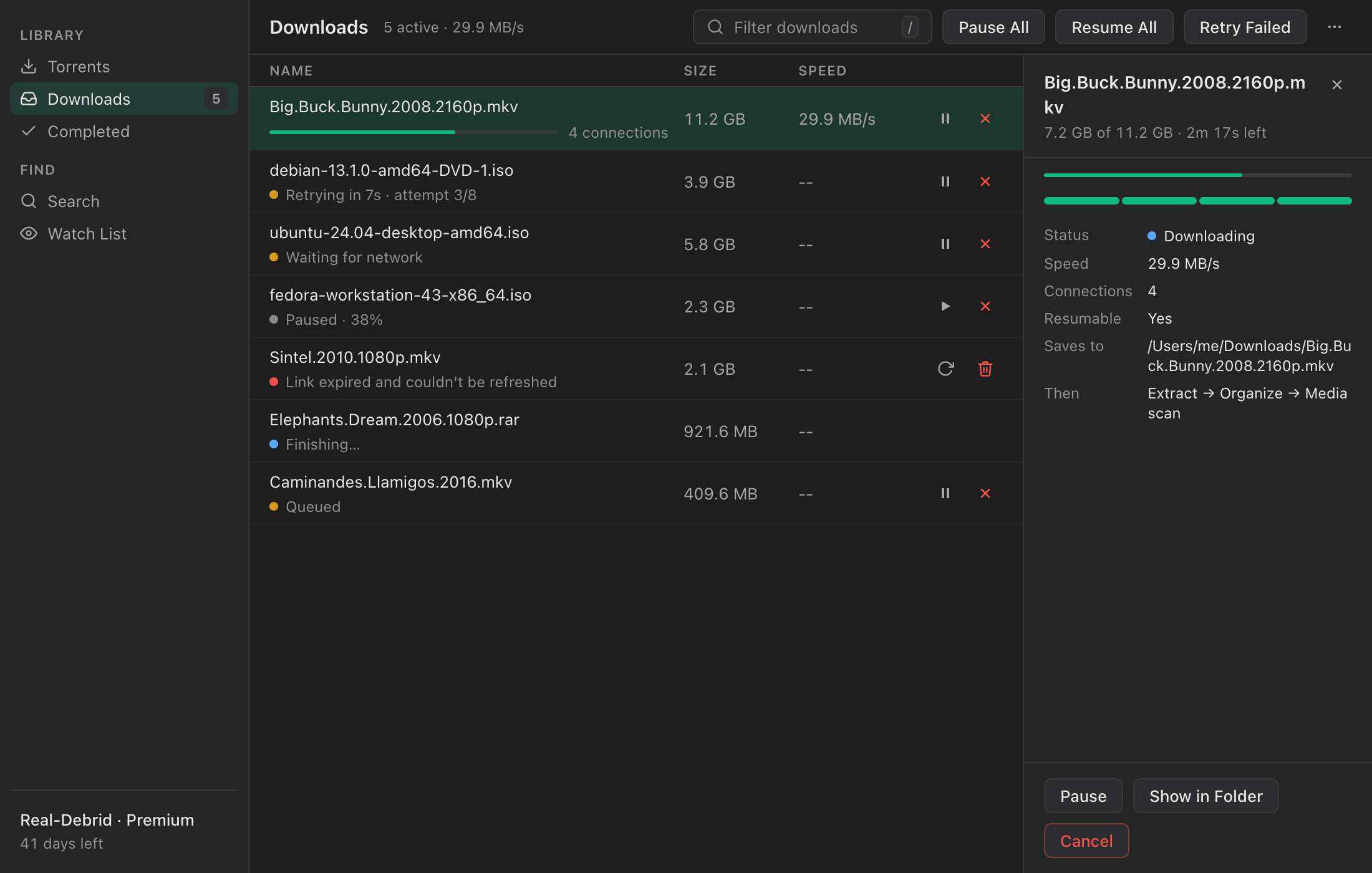
- Multiple connections per file (4 by default, up to 16)
- Resumes after dropped connections, app restarts, and crashes
- Expired debrid links refresh automatically
- Pause, resume, and retry, for one download or all of them
Measured star growth
- in 24h
- 0
- in 7 days
- Collecting history
- in 15 days
- Collecting history
- in 1 month
- Collecting history
Net star changes over overlapping periods, not daily totals. Missing measurements are left blank. Stars measure attention, not software quality.
About
Free, open-source desktop client for Real-Debrid, TorBox, and Premiumize. Resumable multi-connection downloads, light and dark mode. macOS, Windows, Linux.
Web & AppsREADME.md
OriginalDebridDownloader
A free, open-source desktop downloader for Real-Debrid, TorBox, Premiumize, and AllDebrid. Resumable multi-connection downloads, a native interface in light or dark, and your tokens stay in your OS keychain.



Download · Website · Release notes
Features
Downloads that don't start over
- Multiple connections per file (4 by default, up to 16)
- Resumes after dropped connections, app restarts, and crashes
- Expired debrid links refresh automatically
- Pause, resume, and retry, for one download or all of them
- One app-wide speed limit and concurrent-download limit
- Waits for the network to come back instead of failing
A native interface
- Light, dark, or follow your system, with six accent colors
- The same clean layout on macOS, Windows, and Linux
- Keyboard shortcuts for everything common, with ⌘ on macOS and Ctrl elsewhere
- Closing the window keeps downloads running in the tray
Everything around the download
- Add magnets or
.torrentfiles, pick files, and set it as your default magnet handler - Search your own trackers: Torznab, Prowlarr, Jackett, TPB-style JSON APIs, and TorBox's built-in search, with a check for what's already cached
- A watch list that finds new releases and adds or notifies automatically
- Download a ZIP's or RAR's contents straight into folders, with no extract step afterwards: the archive is read remotely with byte-range requests and each file is pulled out on its own (choose which files, too)
- Auto-extract archives and sort movies and shows into library folders (with TMDB lookups)
- Plex, Jellyfin, and Emby rescans when downloads finish
- rclone remotes as download destinations
- Plain-language error messages from your provider
- A headless server edition with the same interface in a browser, as a Docker image for a NAS or home server
- Tokens stored in macOS Keychain, Windows Credential Manager, or Secret Service
- Signed and notarized macOS builds, signed Windows installers, and in-app updates
Download
| Platform | Build |
|---|---|
| macOS (Apple Silicon, macOS 11+) | .dmg |
| Windows 10+ (x64 and ARM64) | .exe installer |
| Linux (x64 and ARM64) | .deb, .AppImage, .rpm |
| Docker and Unraid (amd64 and arm64) | ghcr.io/casavargas/debriddownloader, see Docker |
Get them from the website or the latest release. You'll need a Real-Debrid, TorBox, Premiumize, or AllDebrid account.
Getting started
- Install and open DebridDownloader.
- Connect your provider:
- Real-Debrid: sign in with OAuth, or paste a token from real-debrid.com/apitoken
- TorBox: paste your API key from torbox.app
- Premiumize: paste your API key from premiumize.me/account
- AllDebrid: paste an API key from alldebrid.com/apikeys
- Add a torrent with ⌘/Ctrl N, then download it once your provider has it ready.
- Optional: add tracker sources in Settings → Search to search from inside the app.
Keyboard shortcuts
⌘ on macOS, Ctrl on Windows and Linux.
| Shortcut | Action |
|---|---|
| ⌘ K | Search |
| ⌘ N | Add a torrent |
| ⌘ , | Settings |
| ⌘ R | Refresh |
| ⌘ I | Show or hide the details panel |
| 1–4 | Torrents, Downloads, Completed, Watch List |
| / | Filter the current list |
| ↑ ↓ / Enter | Select / run the default action |
| Space | Pause or resume the selected download |
| Delete | Remove or cancel the selection |
| Esc | Close the panel or dialog |
Legal
DebridDownloader is a download manager for paid debrid services. It:
- talks to the official Real-Debrid, TorBox, Premiumize, and AllDebrid APIs;
- ships with no tracker sources, so users add their own;
- does not host, index, or distribute any content;
- works like other download managers such as JDownloader or aria2.
It's a neutral tool. Users are responsible for how they use it and which sources they configure. The developers don't endorse or encourage piracy.
Docker (headless server)
The same download engine runs without a window as debriddownloader-headless, serving the browser UI and the HTTP API on one port. It ships as a slim image (no GTK or webkit) for amd64 and arm64 at ghcr.io/casavargas/debriddownloader, published with each release. The server inside runs as a non-root user (PUID/PGID, 1000:1000 by default).
docker run -d --name debriddownloader \
  -p 8777:8777 \
  -v debriddownloader-config:/config \
  -v /path/to/downloads:/downloads \
  -e DEBRIDDOWNLOADER_SECRET_SERVER_AUTH_TOKEN=pick-a-long-random-token \
  --restart unless-stopped \
  ghcr.io/casavargas/debriddownloader:latest
Then:
- Open
http://<host>:8777/and paste the token. - Sign in to your debrid provider in the web UI. Its token is saved in
/config. - Add a magnet or a
.torrentfile. Downloads land in the folder you mounted at/downloads.
The same thing with Docker Compose:
services:
  debriddownloader:
    image: ghcr.io/casavargas/debriddownloader:latest
    container_name: debriddownloader
    ports:
      - "8777:8777"
    volumes:
      - debriddownloader-config:/config
      - /path/to/downloads:/downloads
    environment:
      DEBRIDDOWNLOADER_SECRET_SERVER_AUTH_TOKEN: pick-a-long-random-token
      PUID: "1000"
      PGID: "1000"
    restart: unless-stopped

volumes:
  debriddownloader-config:
To update, pull the new image and recreate the container (docker compose pull && docker compose up -d); settings and unfinished downloads are kept in /config. Tags are latest and each version number, such as 1.8.0.
Unraid: the Community Applications template is docker/unraid/debriddownloader.xml, published through debriddownloader-unraid. It sets PUID/PGID to 99/100 and asks for the token.
To build the image yourself: docker build -t debriddownloader . from a checkout. GET /health answers 200 without a token, for health checks.
| Volume | What's in it |
|---|---|
/config |
The data dir: settings.json, downloads.json (download state, resumes after a restart) and secrets.json (your provider token and the server token, mode 0600). |
/downloads |
The default download folder. On first start, with no settings.json yet, it's written into the settings; change it later in Settings → Downloads (a path inside the container). |
| Env var | Default in the image | What it does |
|---|---|---|
DEBRIDDOWNLOADER_SECRET_SERVER_AUTH_TOKEN |
none | The token for the UI and API. If unset, one is generated on first start and saved in /config/secrets.json under server.auth_token. When set, the env var wins over the file. |
PUID / PGID |
1000 / 1000 |
The user and group the server runs as and files are written as. Unraid uses 99 / 100. |
DEBRIDDOWNLOADER_BIND |
0.0.0.0 |
Listen address inside the container. |
DEBRIDDOWNLOADER_PORT |
8777 |
Listen port; change the -p mapping to match. |
The container starts as root, makes the top level of /config and /downloads owned by PUID:PGID, then runs the server as that user. Set PUID and PGID to the owner of your downloads folder. With --user $(id -u):$(id -g) it skips that step, so both mounts must already be writable by that user. Put the port behind a reverse proxy with TLS (or a VPN such as Tailscale) before exposing it beyond your LAN.
Development
Prerequisites: Node.js 22+ and Rust stable.
- macOS:
xcode-select --install - Linux:
sudo apt install libwebkit2gtk-4.1-dev libappindicator3-dev librsvg2-dev patchelf - Windows: WebView2 (preinstalled on Windows 10/11)
git clone https://github.com/CasaVargas/DebridDownloader.git
cd DebridDownloader
npm install
npm run tauri dev        # app with hot reload
| Task | Command |
|---|---|
| Frontend tests (Vitest) | npm test |
| Rust tests (download engine) | cargo test --manifest-path src-tauri/Cargo.toml |
| Type check | npx tsc --noEmit |
| Production build | npm run tauri build |
| Docker image smoke and persistence check | docker build -t debriddownloader . && bash scripts/docker-smoke.sh debriddownloader |
Installers land in src-tauri/target/release/bundle/. CI runs the tests on every pull request.
Architecture
A Tauri v2 app: a React 19 + TypeScript + Tailwind v4 frontend in src/ talks to a Rust backend in src-tauri/ over Tauri IPC.
| Path | What it is |
|---|---|
src-tauri/src/engine/ |
The download engine. One actor owns every job; transfers write {file}.part with segmented Range requests and crash-safe checkpoints, persisted to downloads.json. No Tauri dependencies. |
src-tauri/src/engine_host.rs |
Connects the engine to Tauri: events, provider link refresh, rclone. |
src-tauri/src/providers/ |
Real-Debrid, TorBox, Premiumize, and AllDebrid clients behind one DebridProvider trait. |
src-tauri/src/commands/ |
IPC command handlers. |
src-tauri/src/scrapers/ |
Tracker search. |
src/styles/tokens.css |
Every color, size, and spacing value in one place. |
src/components/ui/ |
Shared, accessible UI components. |
src/pages/ |
One file per screen; Settings is split into src/pages/settings/. |
Design docs live in specs/. AGENTS.md has the conventions for contributors.
License
GPL-3.0. See LICENSE.
More from Casa Vargas
- Beltr: AI karaoke for Windows, macOS, and Linux
- OneScribe: an on-device document scanner for iOS
- casavargas.app: all projects