
CHA1007/RoCoPilot
CHA1007/RoCoPilot has 26 GitHub stars and 3 forks. GitHot measured 0 stars in 24 hours. Last checked 2026-11-14 18:33 UTC. Last push 2026-09-24.
Measured star growth
- in 24h
- 0
- in 7 days
- Collecting history
- in 15 days
- Collecting history
- in 1 month
- Collecting history
Net star changes over overlapping periods, not daily totals. Missing measurements are left blank. Stars measure attention, not software quality.
About
《洛克王国:世界》自动丢球捕捉工具箱:纯视觉识别精灵 + 自动瞄准投球(WPF-UI / YOLO11 / Interception)
Developer ToolsREADME_EN.md
Original简体中文 | English

RocoPilot
A Windows automation toolbox for the Roco Kingdom: World PC client
Multiple automation features powered by computer vision







Features
- Auto Throw — Recognizes wild spirits in the open world, auto-centers the camera, aims and throws balls to keep catching
- Auto Battle — Recognizes battle scenes and casts skills automatically to finish rounds
- Fast Travel — Recognizes the teleport button on the world map with auto or custom key-press triggering; after picking a map element such as the Magic Source or Alchemy Cauldron, completes the teleport automatically
- Route Replay — Compose and loop an execution chain of Teleport / Delay / Script Replay steps; teleport locates anchors by geometrically aligning the in-game map against the built-in Magic Source catalog, and a failed leg reruns from the nearest upstream teleport, enabling automated map runs and more
- Egg Query — Ships with full spirit egg group data; look up a spirit's egg groups, or find all spirits that can breed together in a group
- Central Dispatch — Detects the current game scene and switches tools automatically, no manual intervention
- Dynamic Island OSD — A floating status window above the game screen showing live state and key readings
- Auto Pause on Focus Loss — Suspends everything when the game window loses focus, resumes when it regains focus
Computer vision + simulated mouse & keyboard only
Showcase
Launch screen:
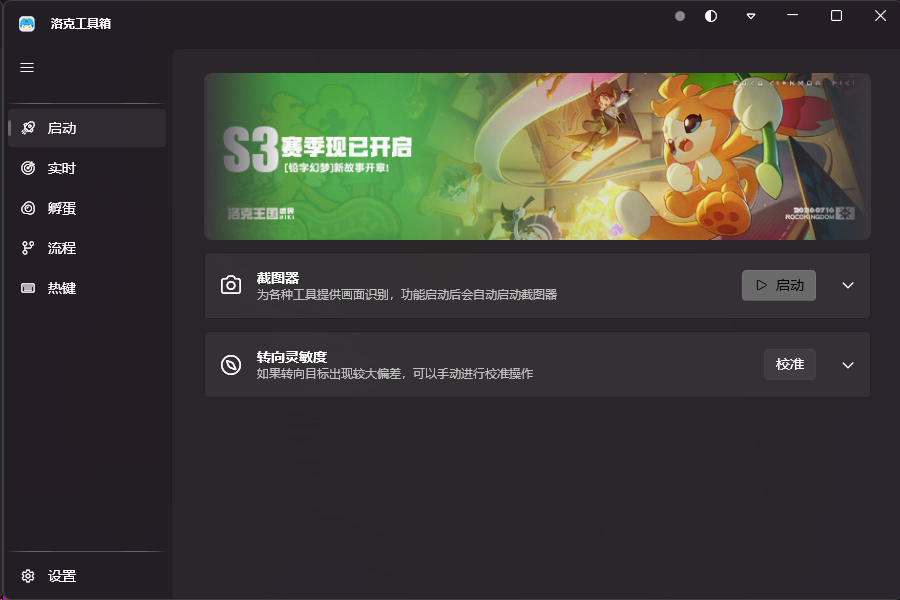
Dynamic Island OSD — floating status window:

Getting the Software
A beta is available now, download it from the Releases page:
RocoPilot-<version>-Setup.exe— a single-file installer; download it and double-click to install
A stable release will be published later, downloadable from the Releases page with in-app delta upgrades
Requirements
- Windows 10 / 11
Quick Start
- Launch the Roco Kingdom: World PC client
- On first use, install the Interception kernel driver (tick it in the installer, or install it from the Launch page of RocoPilot) and reboot for it to take effect
- Run RocoPilot and toggle the tools you want on the Realtime page; the capturer starts automatically and the central dispatcher switches tools by game scene
- To automate map runs, compose a route of Teleport / Delay / Script Replay steps on the Route page and run it
- Switching away from the game pauses everything; switching back resumes automatically
Data Sources
- The egg group and artwork data used by the Egg Query feature comes from the Roco Kingdom Mobile WIKI (egg group calculator / egg group lookup page), licensed under CC BY-NC-SA 4.0 (Attribution-NonCommercial-ShareAlike) and used for learning and research only. See assets/data/README.md for licensing details of the data files themselves.
- The Magic Source anchor catalog (name + world coordinates) embedded for Route Replay is compiled from WIKI map data, used for learning and research only.
Disclaimer
This project is licensed under GPL-3.0
This project is intended for learning and research only. Using this tool may violate the game's terms of service; any risk or consequence arising from its use is borne solely by the user
Questions and suggestions are welcome via Issues