
BuRnEd4AiM/HA-Floorplanner
BuRnEd4AiM/HA-Floorplanner has 38 GitHub stars and 5 forks. GitHot measured 0 stars in 24 hours, +4 in 7 days, and +11 in 15 days. Last checked 2026-11-21 19:26 UTC. Last push 2026-11-17.
What you can do
- 🏗️ Build it - Draw walls, rooms, stairs, doors and windows in a 2D blueprint that is linked live with the 3D view
- 🤖 Or describe it - Paste a JSON description (written by hand, by an AI, or from GeoJSON) and get the whole house, plot and garden included. Also available as a REST API
- 💡 Control it - Every device is a Home Assistant entity: lights, scenes, effects, Nanoleaf layouts, TV backlight, windows, heat and humidity
- 🌅 See it at a glance - Labels over the rooms and room tiles, power as a picture, the sky of the time of day with the weather and the moon, real floors
Measured star growth
- in 24h
- 0
- in 7 days
- +4
- in 15 days
- +11
- in 1 month
- Collecting history
Net star changes over overlapping periods, not daily totals. Missing measurements are left blank. Stars measure attention, not software quality.
About
Your home in 3D for Home Assistant: draw it or let an AI build it from a description, then control lights, windows, heating and scenes right where they are. With dashboard pages for energy, climate, cameras and more. Add-on, Docker and dashboard card – try the demo in your browser.
Creative & MediaREADME.md
Original🏠 3D Floorplan for Home Assistant
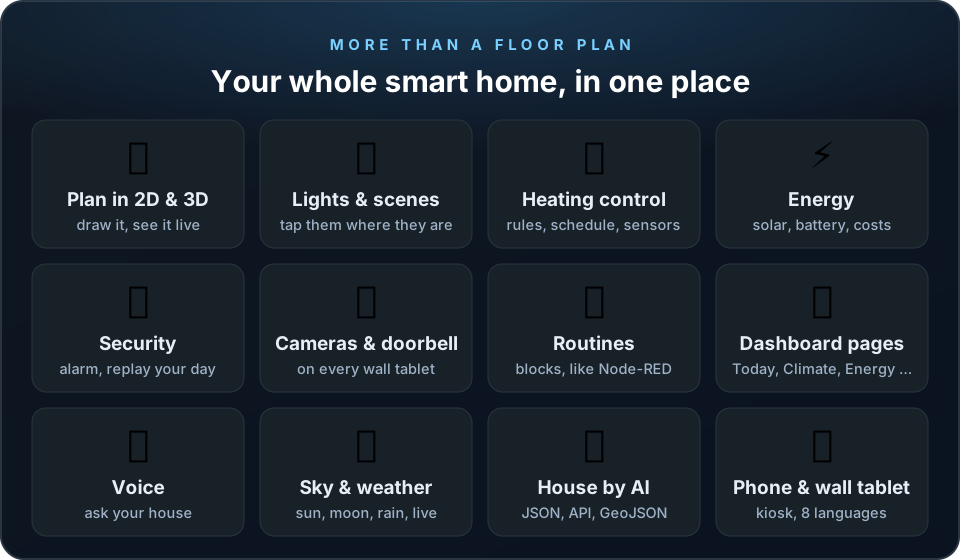
More than a floor plan: your whole smart home in one place, in 3D.
Draw your home (or let an AI build it), then run lights, heating, energy, security, cameras and your own routines right where things are, with ready-made dashboard pages, on the phone, the PC and the wall tablet.









Like it? 3D Floorplan is free and made with love in many evenings. A small donation via PayPal buys me a cup of tea and prevents brain overflow. Thank you! 💛


Try the demo: one click and it runs right in your browser, always the newest version, no install and no Home Assistant needed. Or download it as one HTML file with an example house, lights and sensors and double-click it.

Video guide: every feature shown in a short video (German or English interface), searchable down to the single step. Recorded automatically in the demo after every update.

Trailer: the best of the add-on in two minutes, with its own music, landscape (16:9) and upright (9:16, for Reels and Shorts), German and English. To share: the link or the download button on the page. Under it: ten short clips (16–20 s, one feature each) for TikTok, Reels and Shorts, with the text and hashtags to copy.
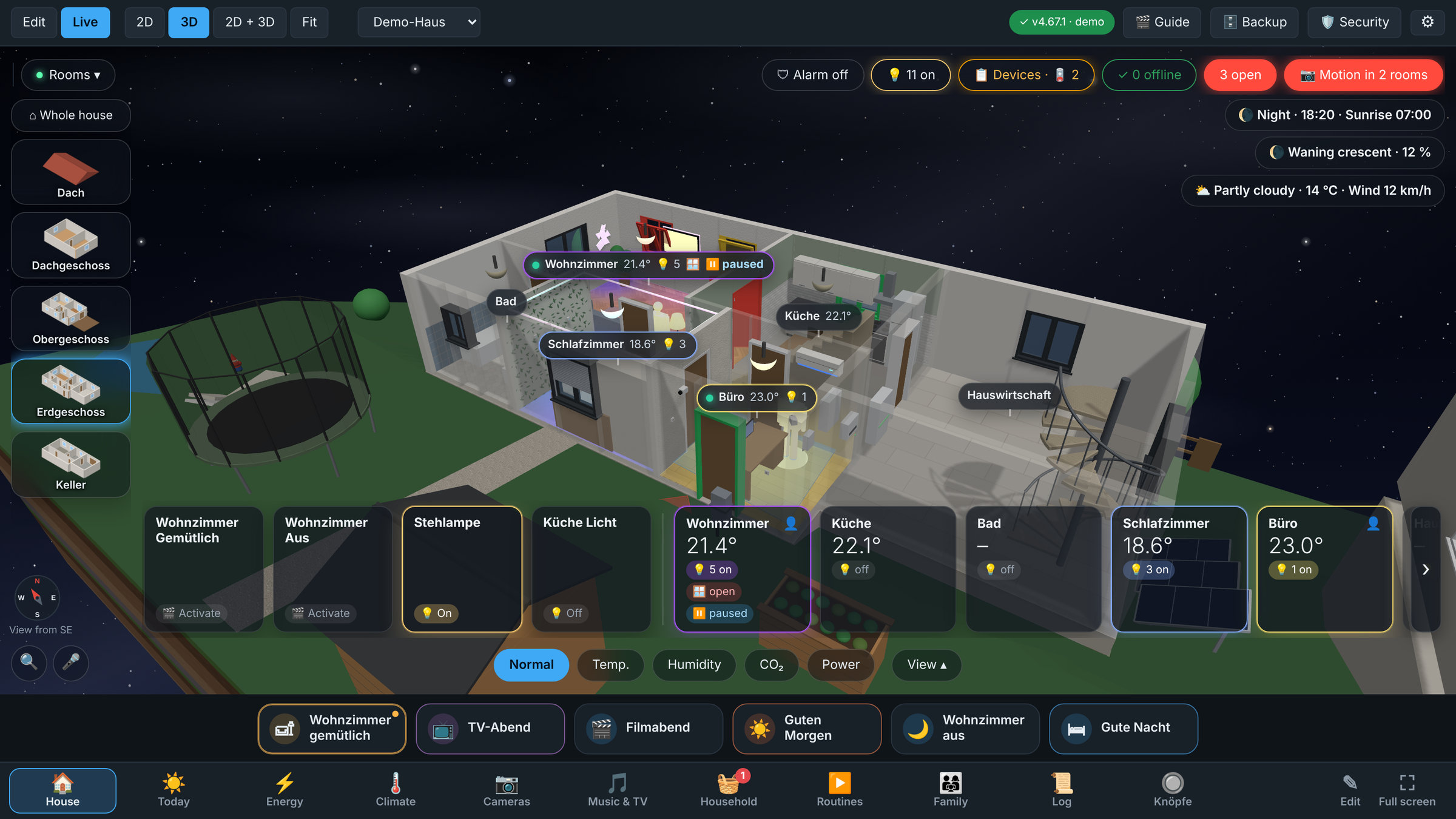
Your own floor plan in 3D on its plot, live with your real lights, sensors, windows and scenes, under the sky of the time of day.
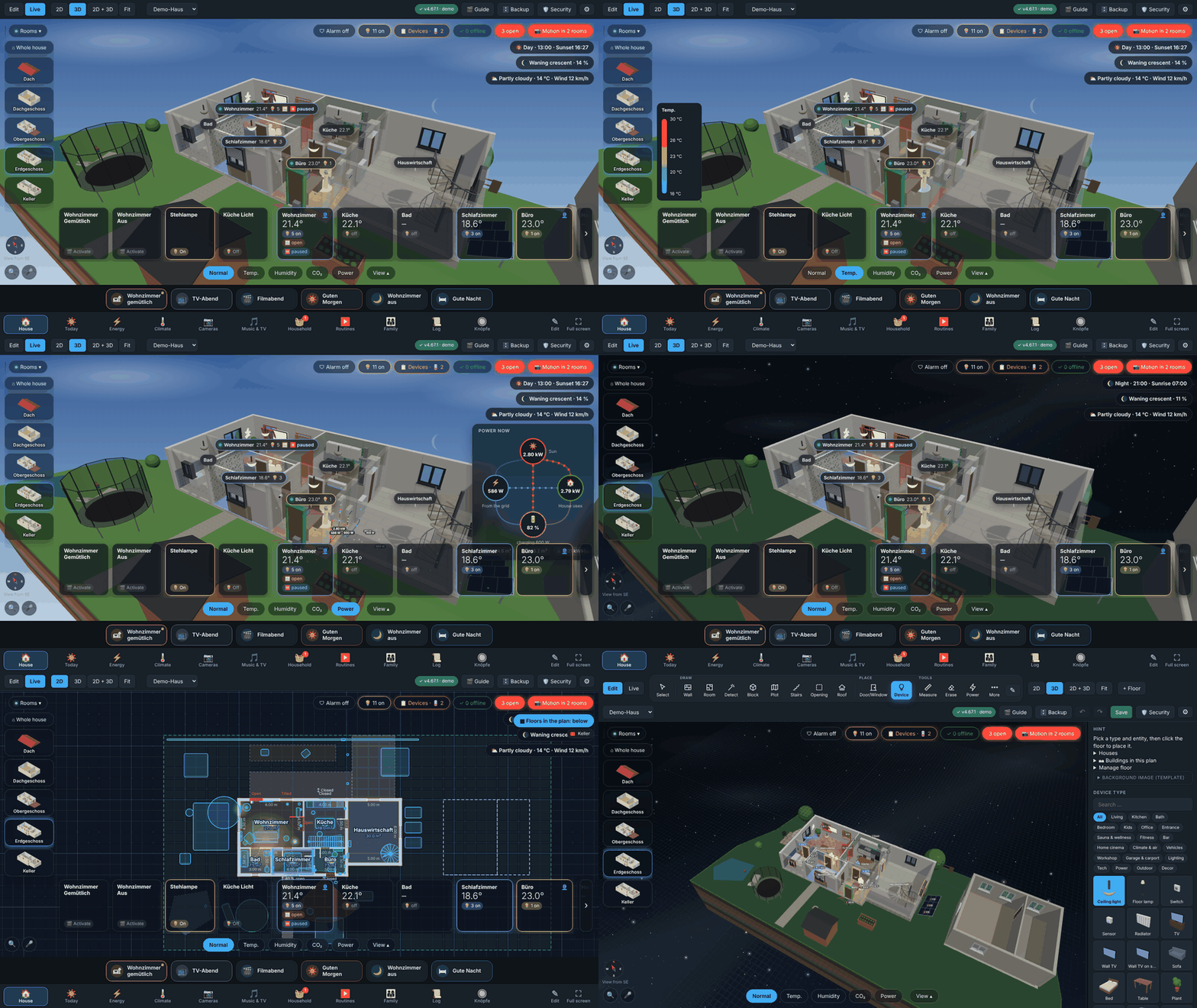
Quick tour (sped up): room control, heat colours, power, whole house, night sky, 2D / split view, device library. All from the demo file.
Features · Import by JSON / AI · Installation · Quick start · Phones & tablets · Documentation · Roadmap · 💛 Donate
✨ Why this add-on?
Most floor plan cards make you place icons on a picture. 3D Floorplan lets you build your home: walls, rooms, doors, windows, stairs and furniture, then see it as a real 3D model in which every device is bound to a Home Assistant entity. Tap a lamp where it stands, switch a whole room, start a scene, see which window is open, all in one place, on your phone, your desktop or a wall tablet.
And the plan is only the start. Behind it there is a whole smart home app that many people only find by chance: ready-made pages for every day (Today, Energy, Climate, Cameras, Music & TV, Household, Routines, Family), heating rules and schedules with room sensors for the thermostats, energy with sun, battery and costs, security with warnings, a doorbell on every tablet and a recorded day you can play back in 3D, own routines from blocks that become real Home Assistant automations, a voice search that answers in the plan, and a kiosk mode for wall tablets. All of it is listed under Features, and every feature has a short video.
It is made with a lot of love for my own smart home, and it is used every day. I hope it makes yours a little nicer, too. 💙
🤖 About this project (honest note)
This is an AI-assisted project: the code is written together with an AI (Claude by Anthropic). The idea, the design, every feature request, the decisions and the testing in my own smart home come from me, and a lot of time and care went into it: hundreds of iterations, screenshots, bug reports and fixes, tested on real wall tablets. The AI is my pair programmer, not an autopilot.
What that means for you: the code is automatically tested (backend and browser tests run on every change), everything is open source under the GNU GPL v3 (see License), and you are welcome to read, question and improve it. If you find a bug, please open an issue, I take it seriously and will fix it.
⚡ Highlights
| 🏗️ Build it | Draw walls, rooms, stairs, doors and windows in a 2D blueprint that is linked live with the 3D view |
| 🤖 Or describe it | Paste a JSON description (written by hand, by an AI, or from GeoJSON) and get the whole house, plot and garden included. Also available as a REST API |
| 💡 Control it | Every device is a Home Assistant entity: lights, scenes, effects, Nanoleaf layouts, TV backlight, windows, heat and humidity |
| 🌅 See it at a glance | Labels over the rooms and room tiles, power as a picture, the sky of the time of day with the weather and the moon, real floors |
| 🗂️ Your only dashboard | Pages at the bottom for every day: ☀ Today, ⚡ Energy, 🌡 Climate, 📷 Cameras, 🎵 Music & TV, 🧺 Household, ▶ Routines, 👨👩👧 Family, arranged like a Home Assistant dashboard |
| 🔥 Heating that thinks | Heating rules (window open → off, nobody home, night, schedule, boost, holidays), a room sensor per thermostat like Better Thermostat |
| ⚡ Energy at a glance | Power as a picture (sun, grid, battery and house with flowing dots, cables in the house), today, the week, month or year with costs, several houses compared |
| 🛡️ Safe at home | Warnings for smoke, gas, water and the alarm (also as a WhatsApp) and for windows open in the rain, the doorbell with its camera on every tablet, a recorded day played back in 3D |
| 🧩 Own routines | When … then … from blocks like Node-RED, saved as real Home Assistant automations; scenes, I'm leaving and Good night checks |
| 🎤 Ask your house | "Which windows are open?" and the view goes there; "Lights in the living room off" switches them |
| 📱 Everywhere | Phone, desktop and wall tablets (kiosk mode, per-user rooms), 8 languages, offline and private |
🤖 Describe it instead of drawing it
Tell the add-on what your property looks like and it builds the house: walls from your rooms, doors and windows snapped to the right wall, floors, roof, plot boundary and garden. It always creates a new house, so nothing is overwritten, and a check step shows errors with the exact JSON path before anything is created.
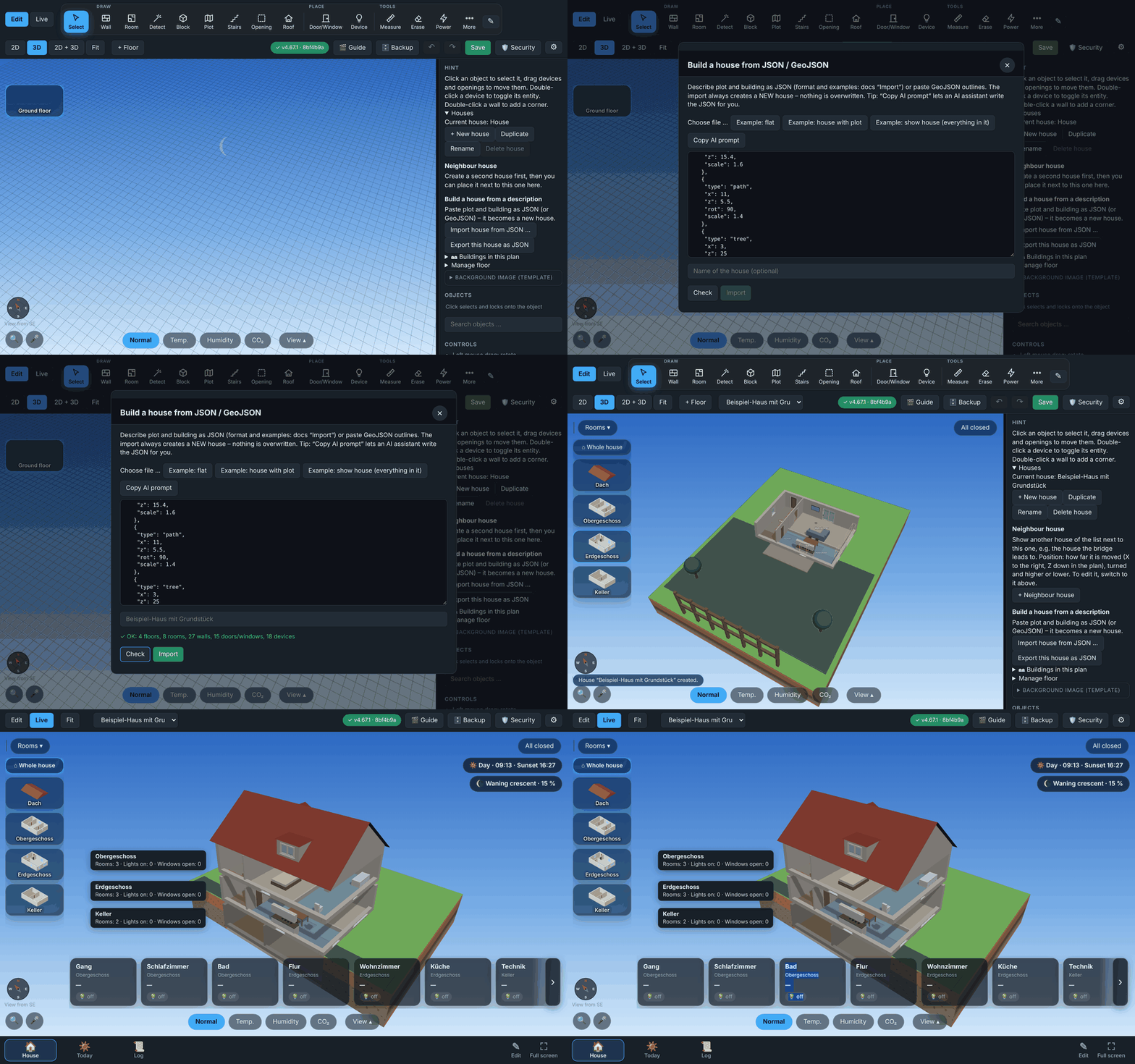
From JSON to a 3D house with plot and garden (sped up)
|
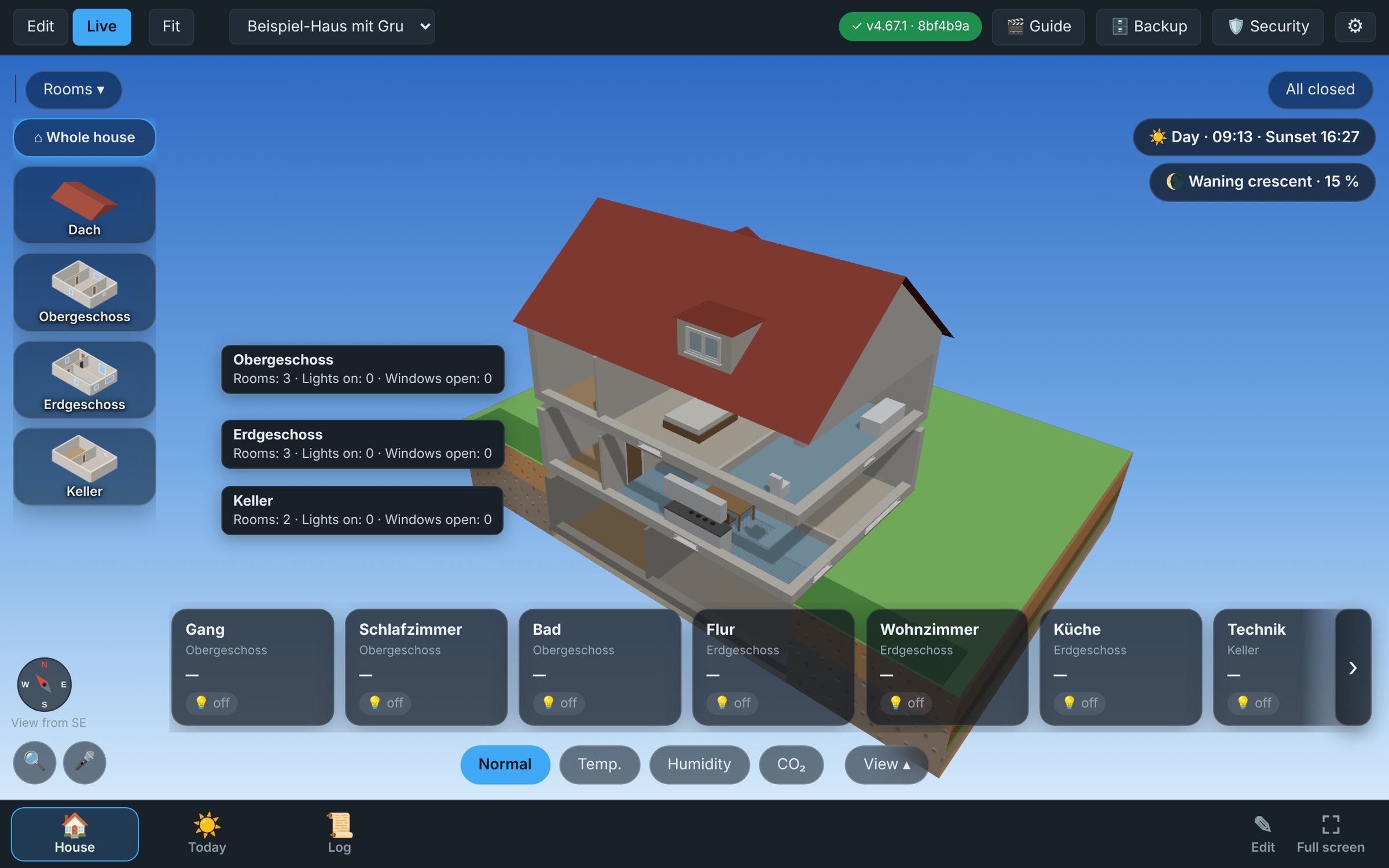 Result of docs/examples/house.json: 4 floors, plot, garden |
Three ways in: the import dialog (examples, check, file upload, a Copy AI prompt button that gives ChatGPT / Claude / Gemini everything they need), the API, or GeoJSON outlines from a cadastre / OpenStreetMap.
curl -X POST "$BASE/api/import?dryRun=1" -H "Content-Type: application/json" -d @house.json   # check only
curl -X POST "$BASE/api/import?name=Cabin" -H "Content-Type: application/json" -d @house.json  # create
curl "$BASE/api/export/property?house=main" -o my-house.json                                    # export any house in the same format
Want to see every option at once? docs/examples/showcase.json is a show house with everything in it (every device type, door and window, all five kinds of stairs, dormers, solar roof, roof terrace, garden house, power cables), also in the dialog as Example: show house.
Format reference, screenshots, prompt tips and examples: English · Deutsch
🎯 Features
🗂️ Pages for every day
In the live view a tab bar at the bottom turns the add-on into the only dashboard you need (on a wall tablet too). Which pages a user or tablet sees, and which one it starts with, is set per user.
| Page | What is on it |
|---|---|
| ☀ Today | Time and date, the weather of the next days, a week calendar of several calendars with + Event, the pinboard, waste collection, who is home and 🚆 your train (is it on time? delays, platform, also tomorrow's) |
| ⚡ Energy | Today by the hour, a week, month or year: used, from the sun, from the grid, what the house made itself and what it cost; the battery, the biggest users, several houses compared |
| 🌡 Climate | A card per room with its thermostat as a circle like in Home Assistant, humidity and air (air out), open windows while it heats, 📋 heating rules and 📅 the schedule |
| 📷 Cameras | Every camera by room, motion first |
| 🎵 Music & TV | Every player with what plays, its picture and its buttons |
| 🧺 Household | Washing machine, dryer, dishwasher (with 🔔 tell me when it is done), the shopping list, the car (charge, range, charge with the sun only) and the garden (rain, soil, water 10 min) |
| ▶ Routines | Scenes and scripts with one tap, I'm leaving and Good night checks, own routines, the automations and scenes of Home Assistant |
| 👨👩👧 Family | Who is home (Home Assistant, Wi-Fi and router), the pinboard |
Admins arrange every page like a Home Assistant dashboard: drag cards, hide them, sections, twelve kinds of own cards (button, switch, value, history, light, thermostat, cover, camera, calendar …) and own pages.
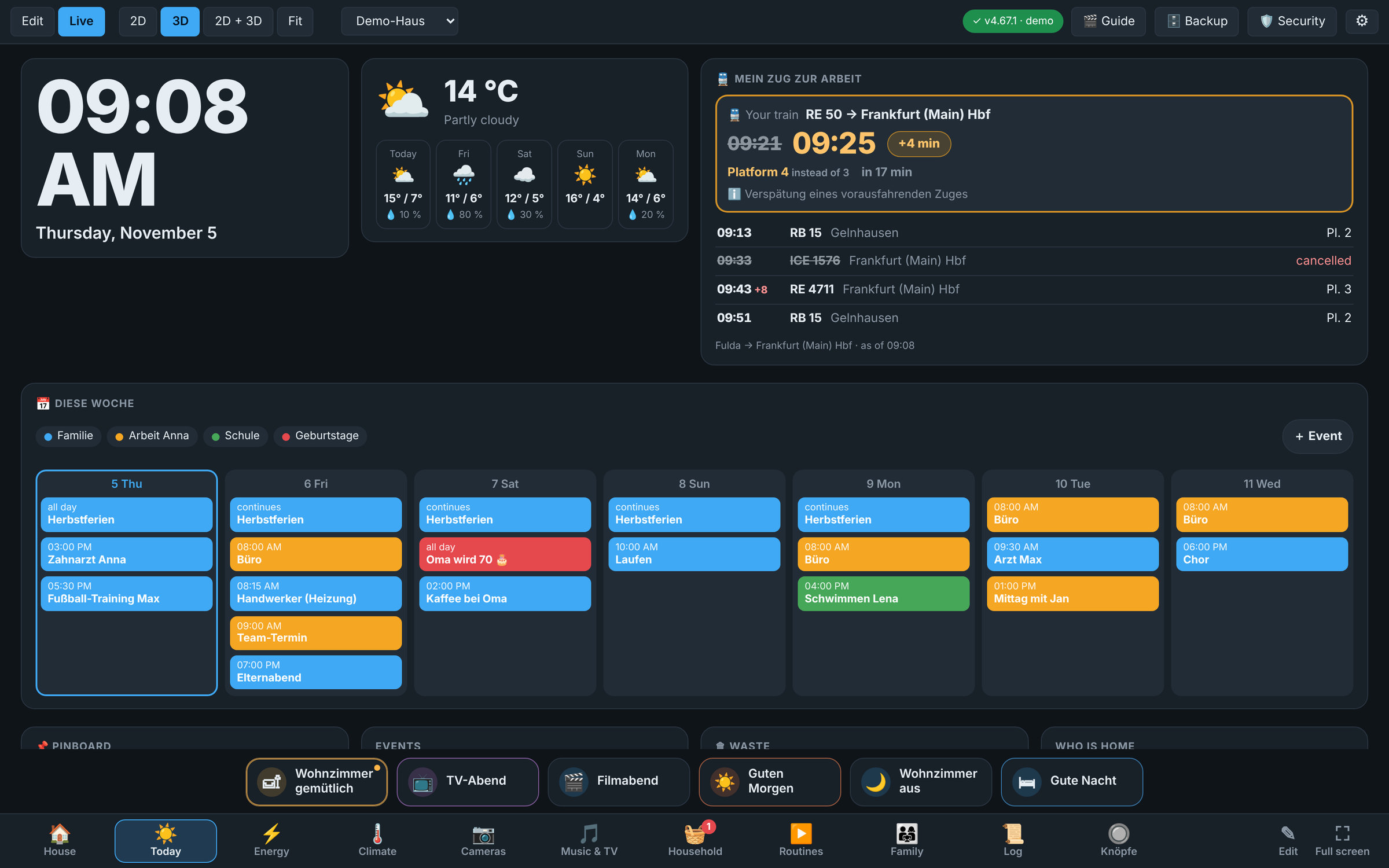 ☀ Today: the day at a glance, with your train |
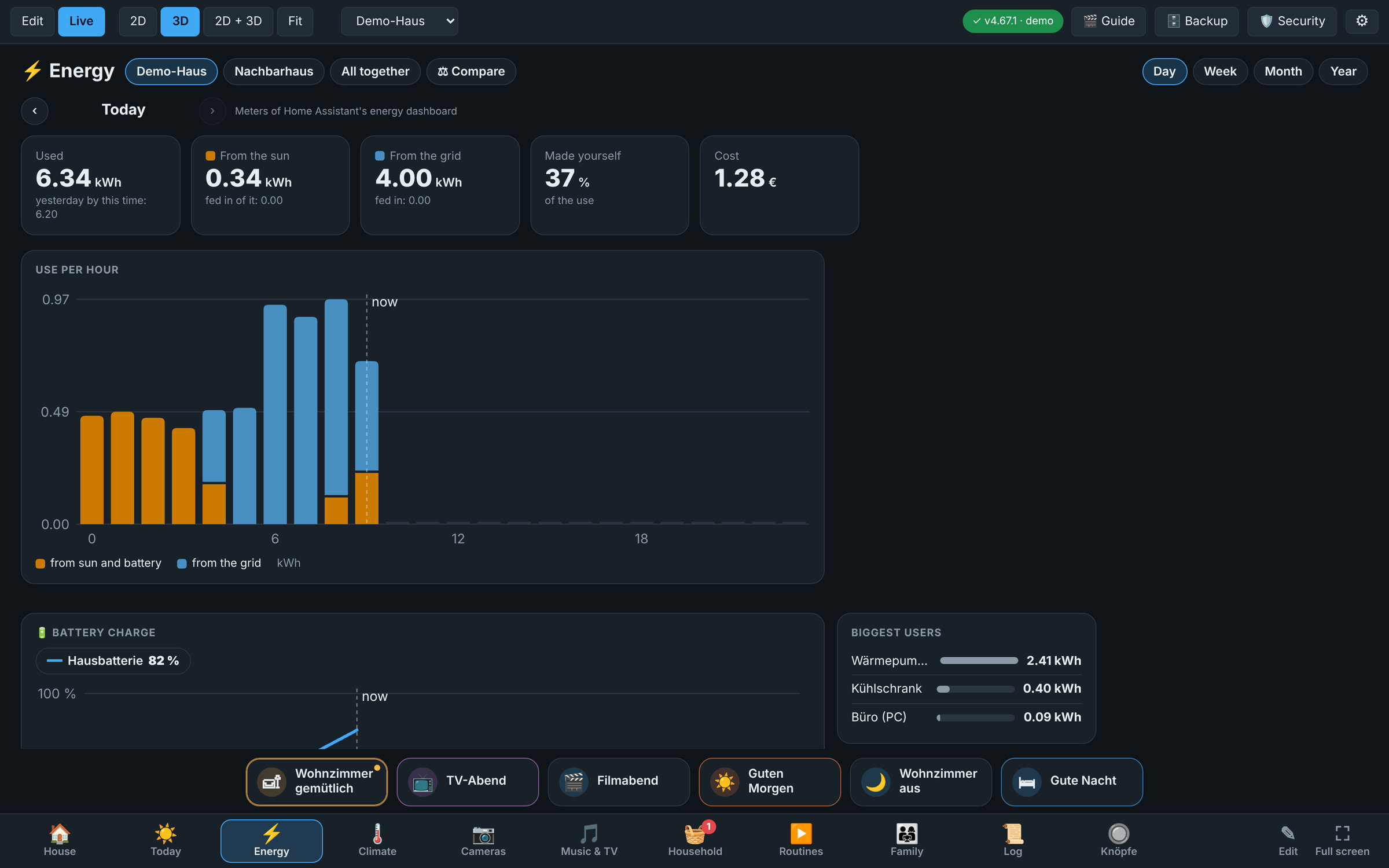 ⚡ Energy: the day, week, month or year |
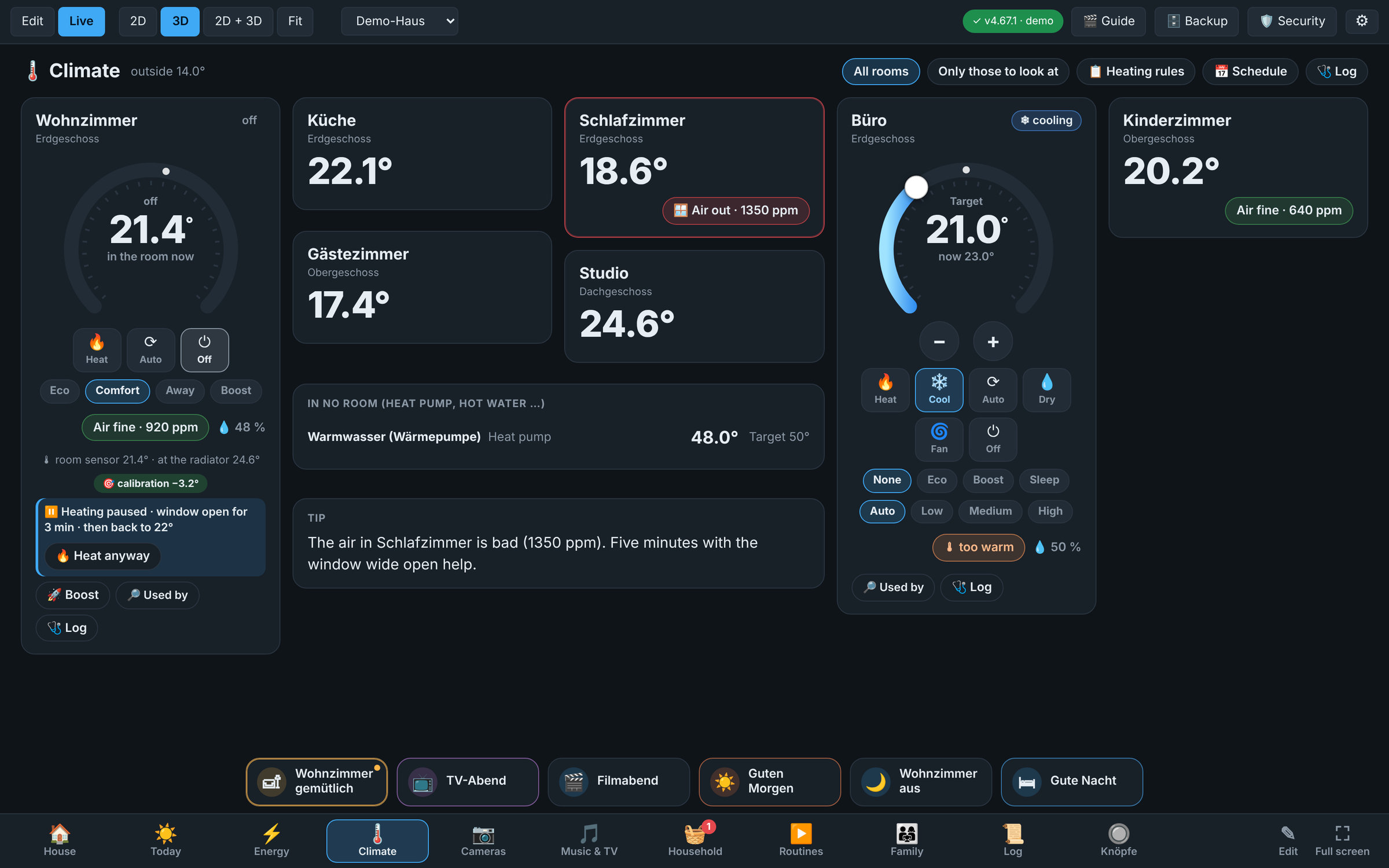 🌡 Climate: every room, the thermostat as a circle |
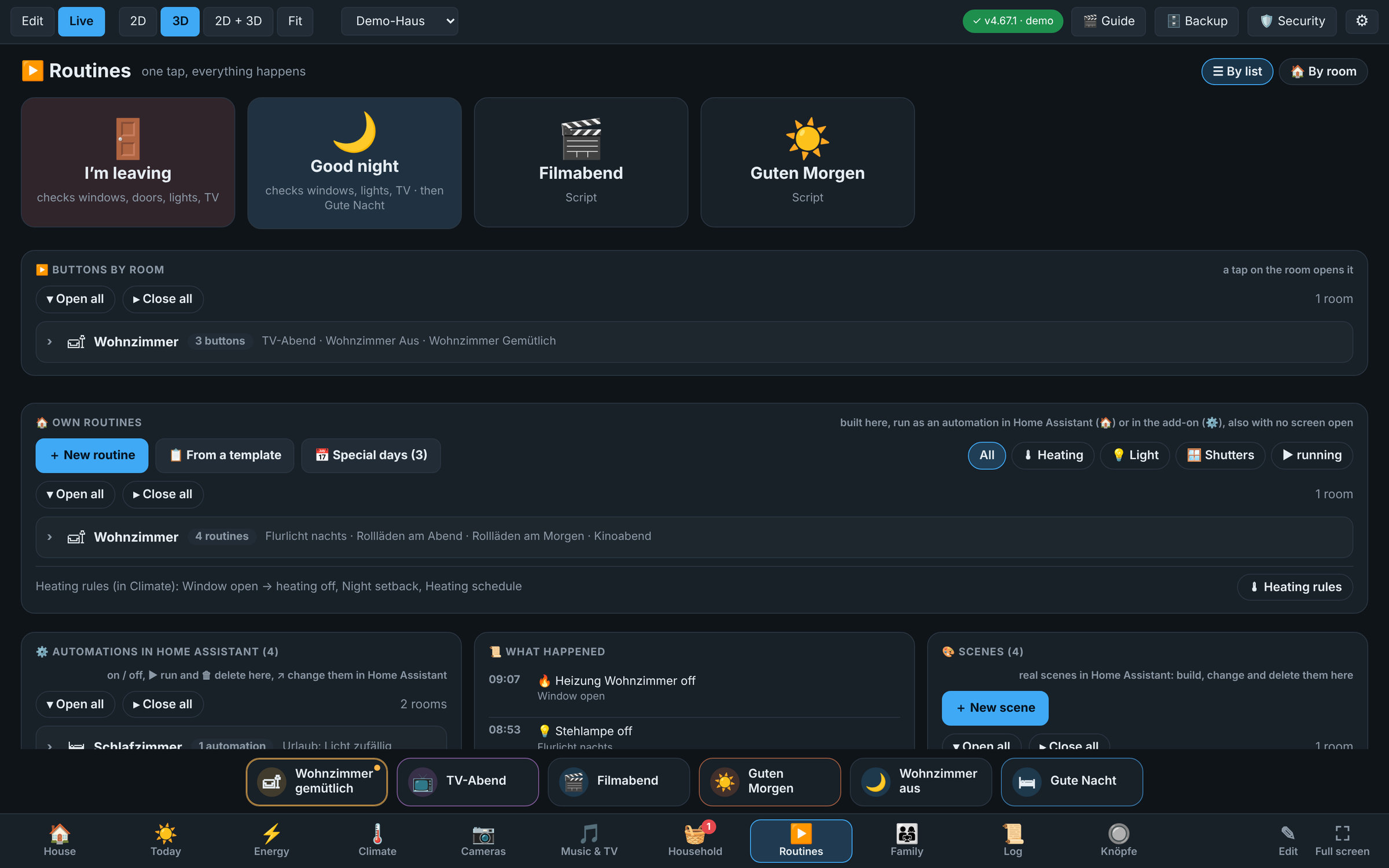 ▶ Routines: one tap, and your own routines |
🔥 Heating and routines
- Heating rules, ready to switch on (🌡 Climate → 📋): window open → heating off (and back as before when it is shut), nobody at home → cooler, night setback, summer pause by the weather, 🚀 boost, holidays (also with the holiday alarm). They run in the add-on itself, also with no screen open
- 📅 Schedule per room: night, eco and comfort as coloured blocks of the week, preheating; a thermostat turned by hand goes back to the plan after a while (you set how long)
- 🌡 Room sensors for the thermostats, like Better Thermostat: a thermostat on the radiator measures the warm air right at the radiator and stops too early. Give it a temperature sensor in the room and the add-on regulates by that sensor: it sets the thermostat's calibration / external sensor when the device has one (most Zigbee2MQTT, ZHA and Matter thermostats, Sonoff TRVZB, Aqara, Bosch, Danfoss Ally), or else moves its target until the room is as warm as you want (Homematic IP, tado …). Everywhere the add-on shows the room sensor's temperature
- 🔎 Used by: which automations, scripts and rules use a thermostat (or any device), whether they run right now, and a warning when two of them fight
- Own routines "When … then …" built from blocks like Node-RED (a device changes, time, sun, somebody comes home, a button on the page … → switch, dim, covers, heating, wait, a message to your phone). They become real automations of Home Assistant; Try it now runs one at once
- 🎨 Scenes for lights, LED strips, switches and covers as real scenes of Home Assistant: take the lights as they are now, ⇉ apply to all, white tone in Kelvin; scenes and automations made in Home Assistant can be changed and deleted here too, with ↶ restore (the old version is kept first)
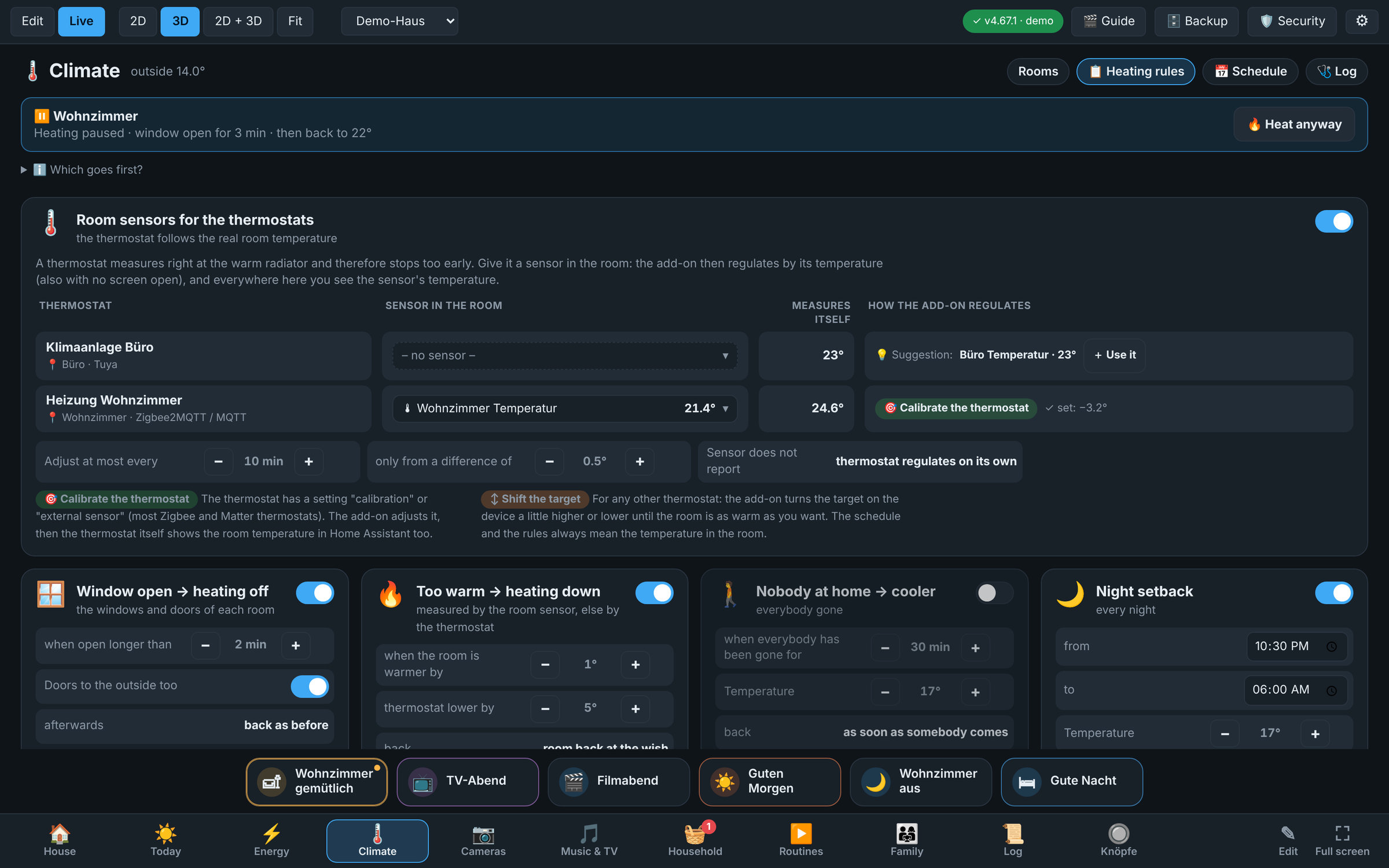 📋 Heating rules with the room sensors of the thermostats |
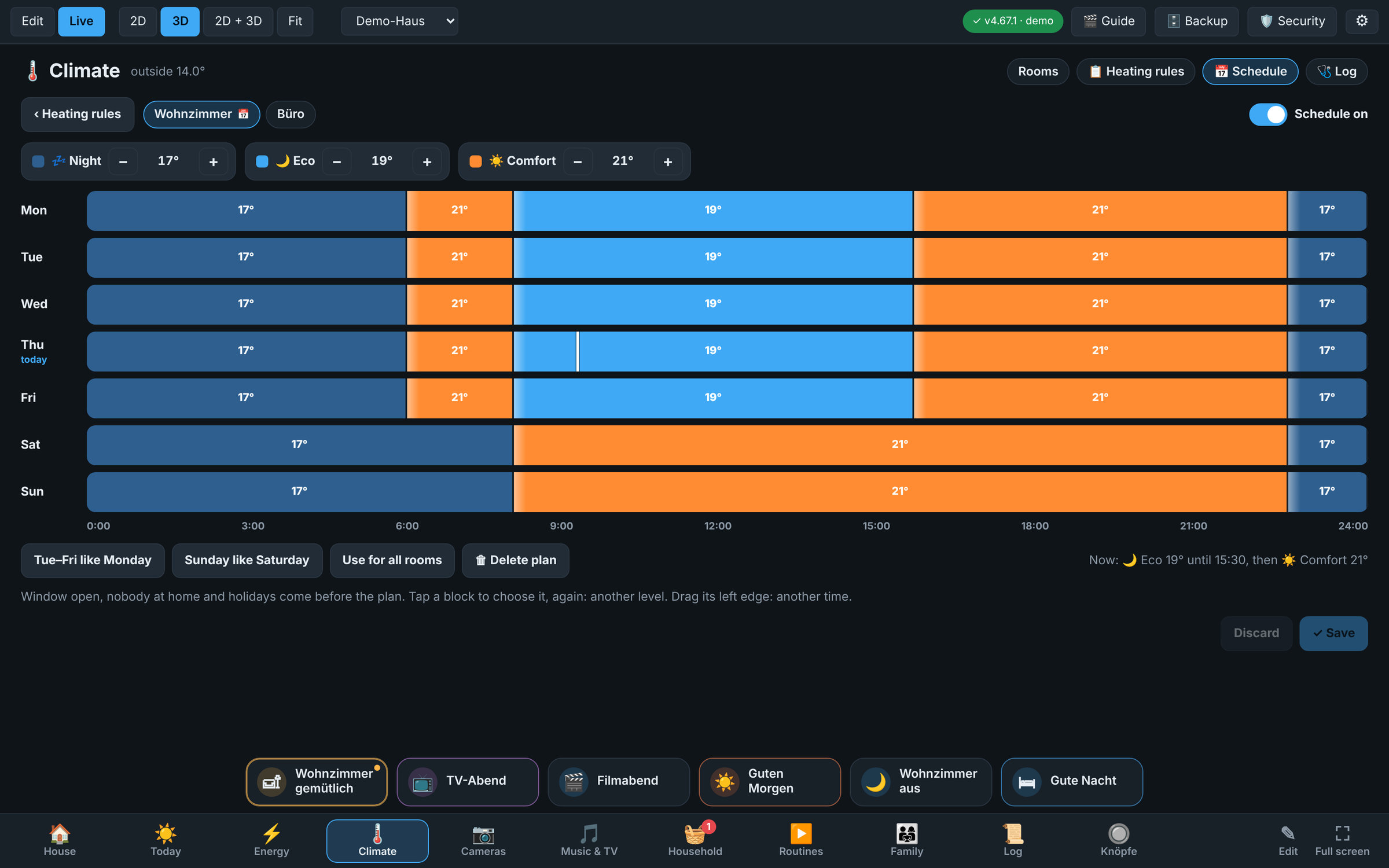 📅 Schedule: tap a block for another level, drag its edge |
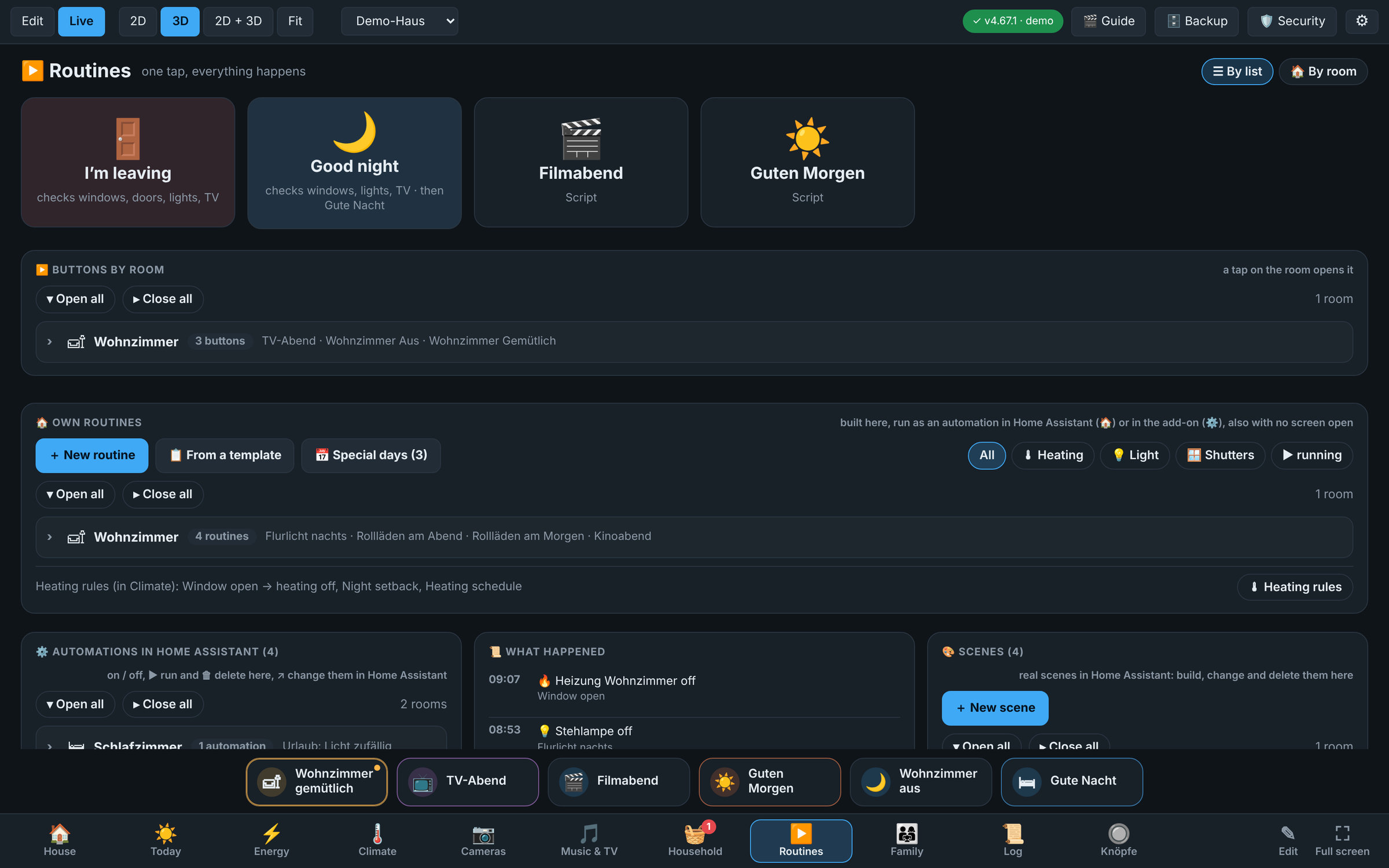 Routine editor: blocks, a chain, in words below; saved as a real automation of Home Assistant |
🏗️ Build your home
| Walls, rooms and floors | Draw on a snapping grid in a 2D blueprint editor that is linked live with the 3D view (split view). Several floors, basement and roof, placeholder blocks for floors you do not draw |
| Trace your plan | Load a scan or photo of your floor plan as a template, calibrate its scale and trace over it |
| Stairs | Straight, L-shaped, U-shaped and spiral stairs with real floor openings |
| Doors and windows | 14 presets: front door, glass door, double door, sliding door, single / double / triple window, balcony door, fixed glazing ... they cut real openings into the wall and open when the contact sensor reports open; every window (also in a dormer) can get a roller shutter or a curtain (to the left, to the right or parting in the middle) with its own cover entity, shown in 3D and controllable in live mode; up to 8 panes, each hinged at the bottom, top, left or right |
| Garden and surroundings | Trees, bushes, lawn, terrace, pool, paths, fences and cars around the house, in natural colours; 26 garden things: bench, table and chairs, parasol, grills, fire bowl, raised bed, garden lamps, trampoline, swing, greenhouse, garden shed, garden gnome ... |
| Plot and ground | Draw your plot (Grundstück) in the 2D plan, or set how far the lawn reaches around the house; measure it (size, perimeter, every side), type in its width and depth or lay a rectangle round the house in one tap. Draw areas on it: a yard of cobblestones, a drive, a wooden deck, gravel, beds, a pond ... with their pattern in 3D. The house stands in solid ground, a basement is shown as a section with soil layers |
| Whole-house view | See all floors, basement and roof stacked as one building |
| Plateau and raised rooms | A second house on a raised plateau in the plot (retaining wall of stone, concrete, clinker or gabions, or a bank of lawn) with outdoor steps up to the front door; a room's floor higher or lower than its storey, with steps at the doors |
| Terrain on a slope | Spot heights in the plot (or a slope in one step: one storey down to the street): the lawn, earth, paths and garden things follow the ground, the basement stands free where it lies lower, parts without a basement get a plinth, terraces stay level; contour lines in the 2D plan |
| Balconies | Tick a room in front of a door as Balcony / roof terrace: a railing of metal, glass or wood, supports down to the ground if you like. Reaching out beyond the floor below (or over a slope) it hangs free on a thin plate of its own; over a garage it is a roof terrace (#646) |
| Cabinets made to measure | A cabinet editor: columns, rails, shelves, drawers, doors, handles and finishes, also under a sloping roof (fit under the slope reads the roof above it) |
| Clear object list | Everything grouped by room (the room, its doors / windows and furniture), with a search field; the side panel can be dragged wider |
| Detect rooms | Draw the walls, press Räume erkennen: every closed loop of walls becomes a room |
| Cameras | The field of view as a cone on the floor, red with movement; a tap shows the camera live, a second tap opens Home Assistant's live view |
| Room panel | Lights (with all off), covers, heating, media, switches, cameras, sensors, scenes by kind, with slide switches; a bottom sheet on phones |
| More devices in the live card | Music and TV (play / pause, next, volume, mute, source), robot vacuum (clean, pause, back to the dock, suction), fan (speed, swing, presets), thermostats and air conditioners (target, modes, presets, fan modes), alarm panel (arm / disarm with its code, can be locked per user), buttons and choice lists; each device only gets the buttons it can do |
| Message on alarm (WhatsApp) | When the alarm panel goes off or a smoke, gas, CO or water sensor reports, a WhatsApp (free through CallMeBot) or a message through any notify service of Home Assistant, with the place in the plan; also with no screen open |
| Several houses | One floor plan per house (yours, your parents', a holiday home ...), a house selector and ?house= links for kiosks |
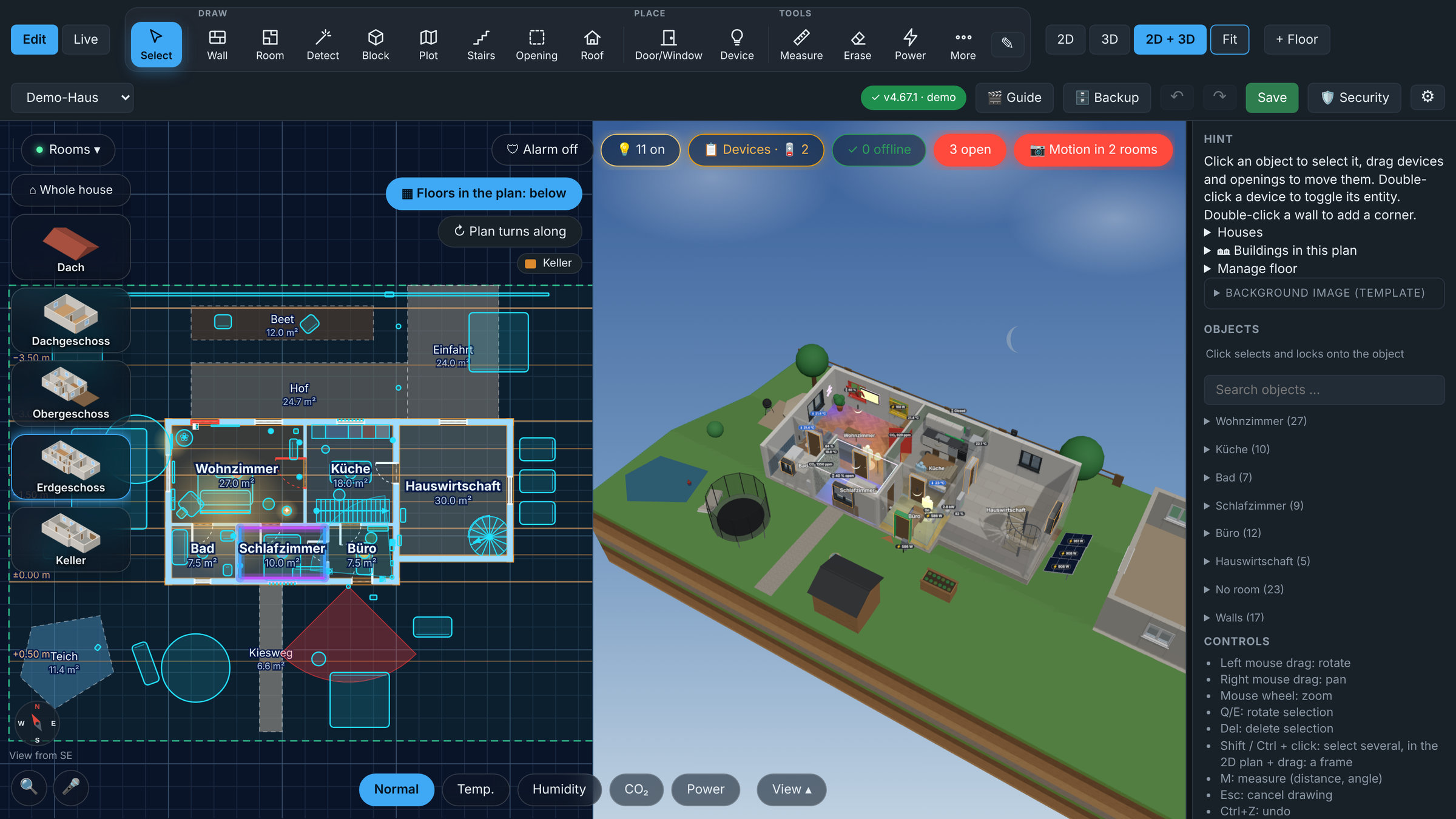 2D + 3D split view: draw in the blueprint, see it in 3D instantly |
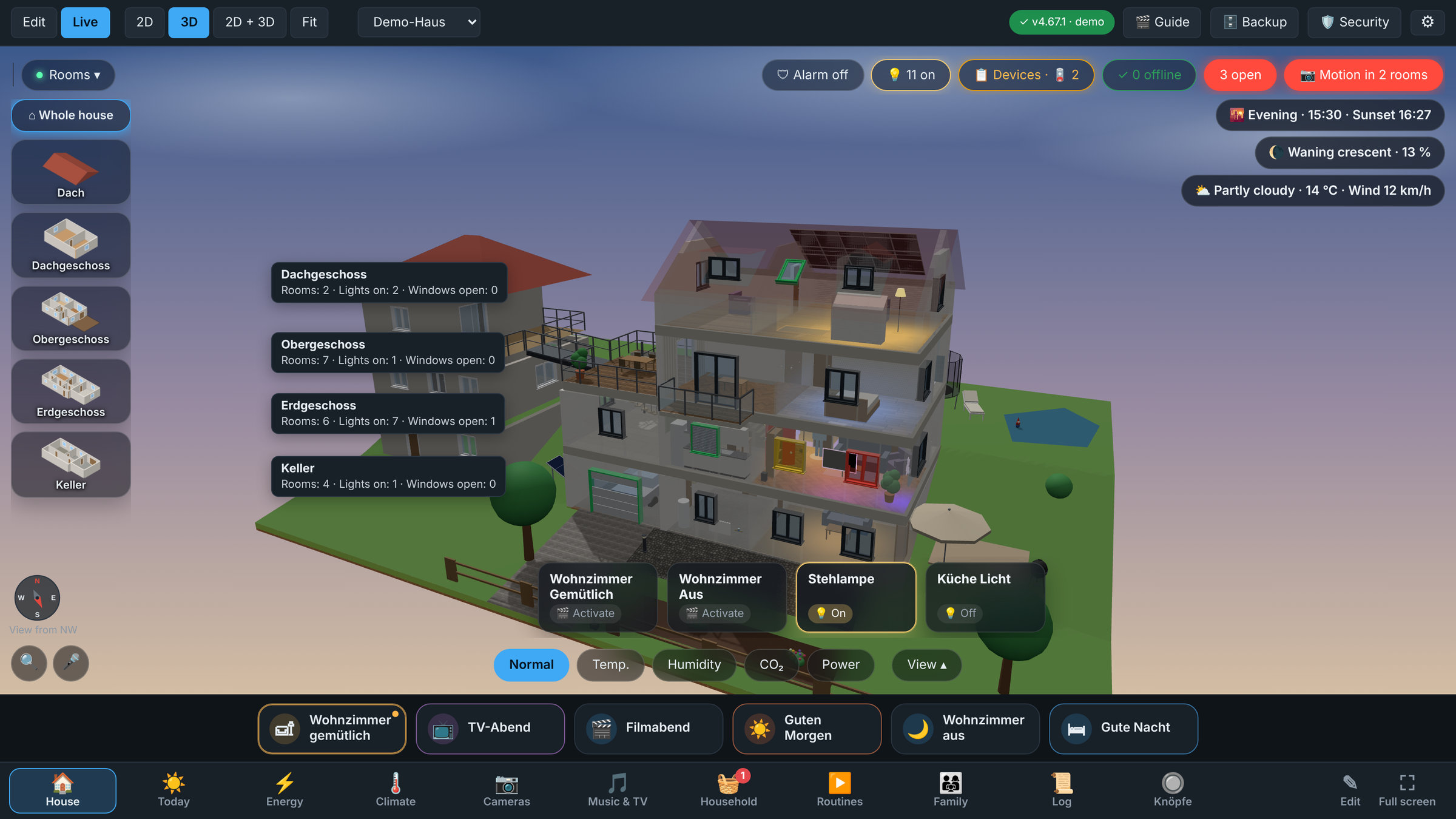 Whole-house view: all floors stacked, the house on its plot, here on a slope with the garage down at the street |
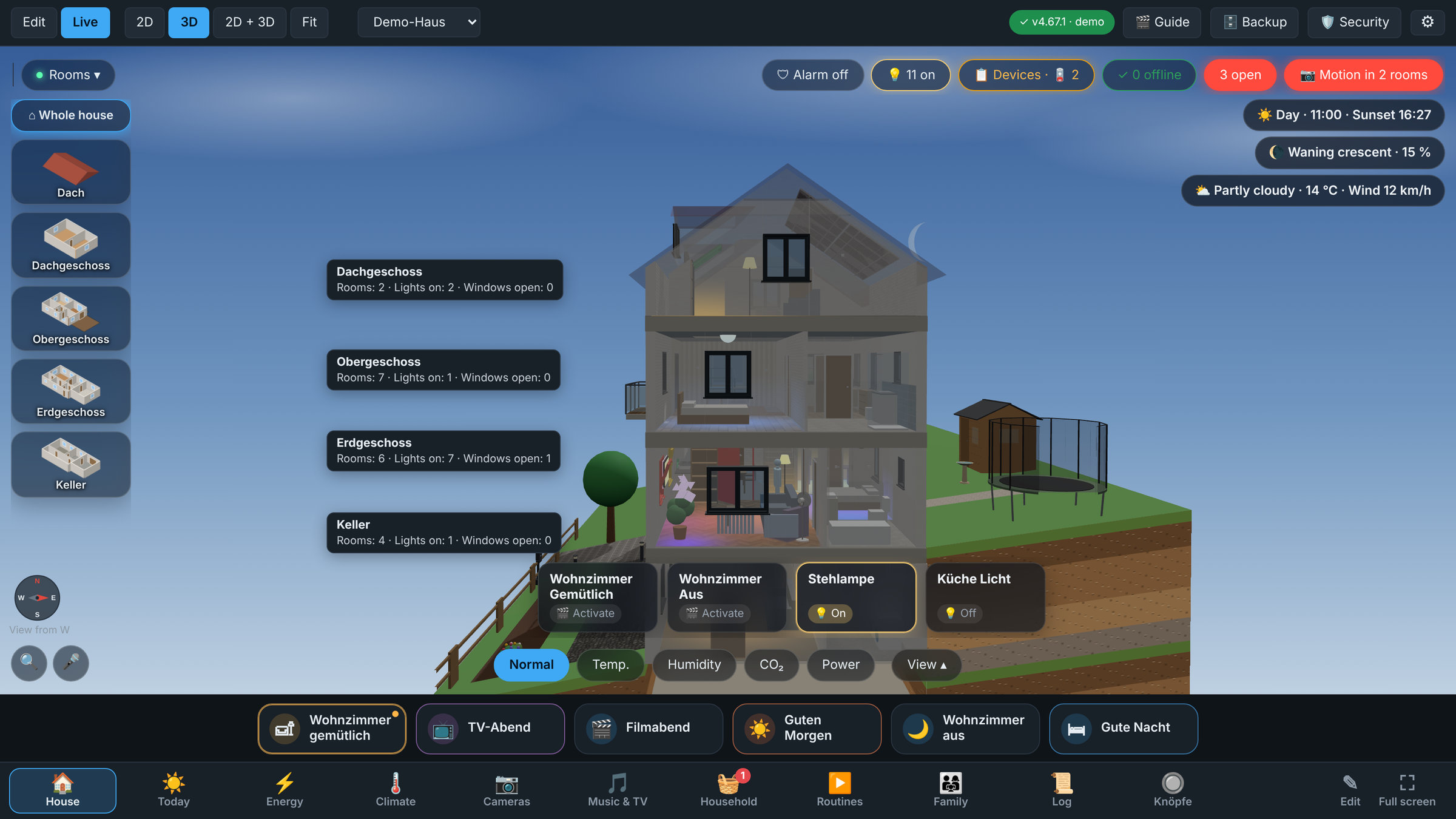 Basement in the ground: cut open like a section drawing, also on a slope |
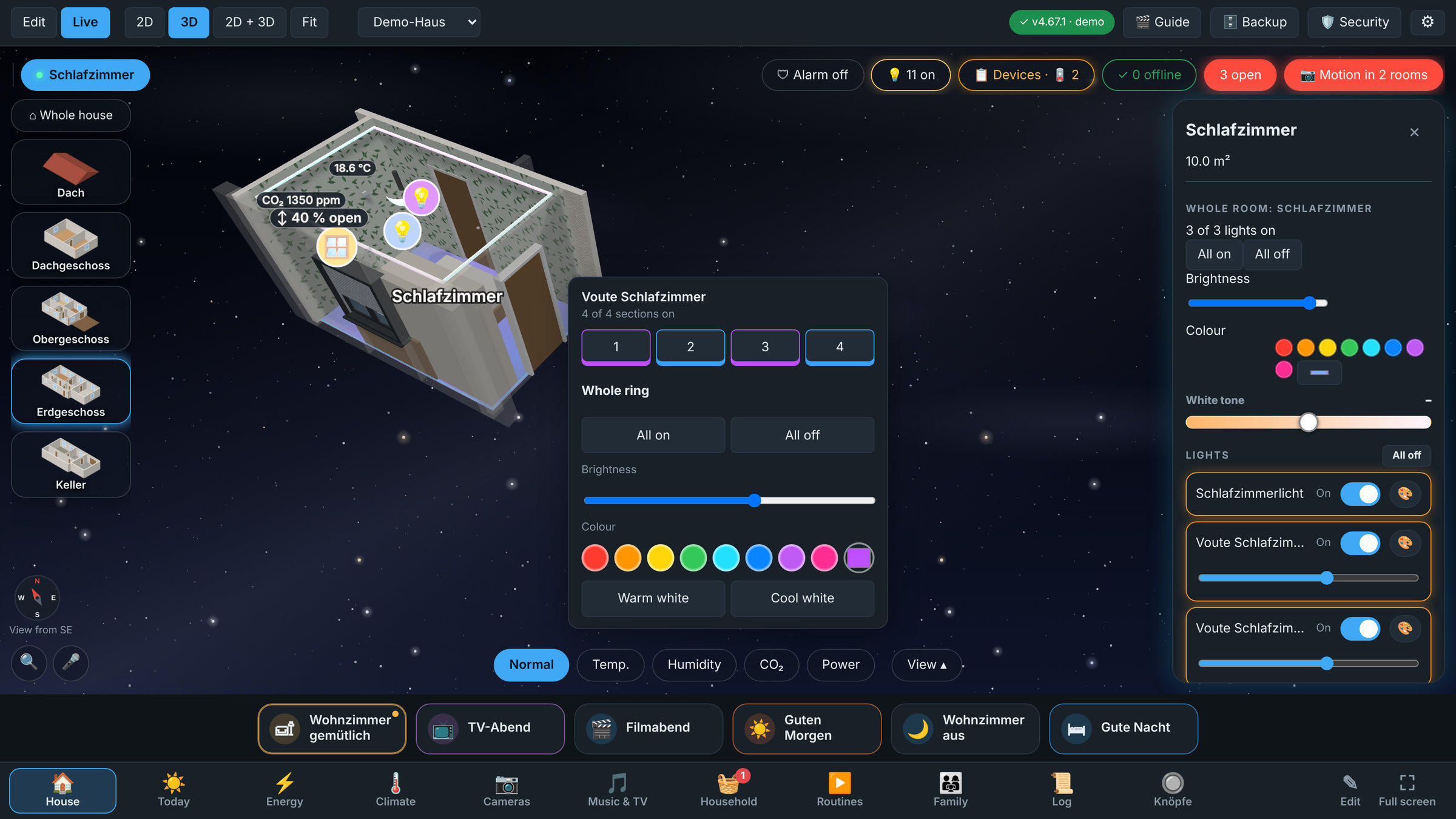 LED ring: indirect light around the room, one light per section |
📥 Import a house from JSON, AI or GeoJSON
Describe plot, rooms, windows and devices as JSON (write it by hand, let an AI generate it, or convert GeoJSON outlines) and get a new house: walls are derived from the rooms, openings snap to walls, floors, roof, plot boundary and garden are built. Check first, import after a clean check, errors name the exact JSON path.
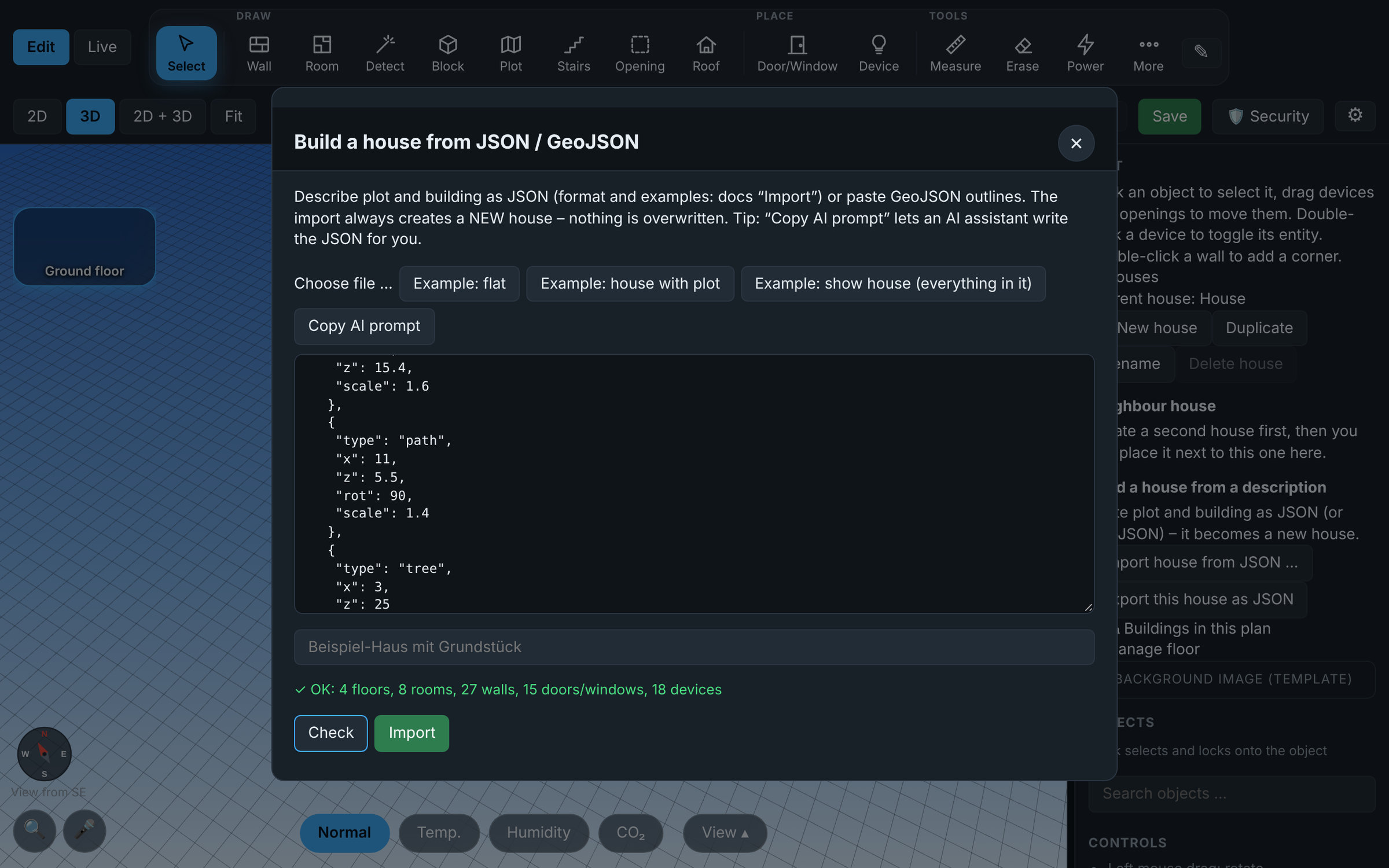 Import dialog: examples, check, AI prompt |
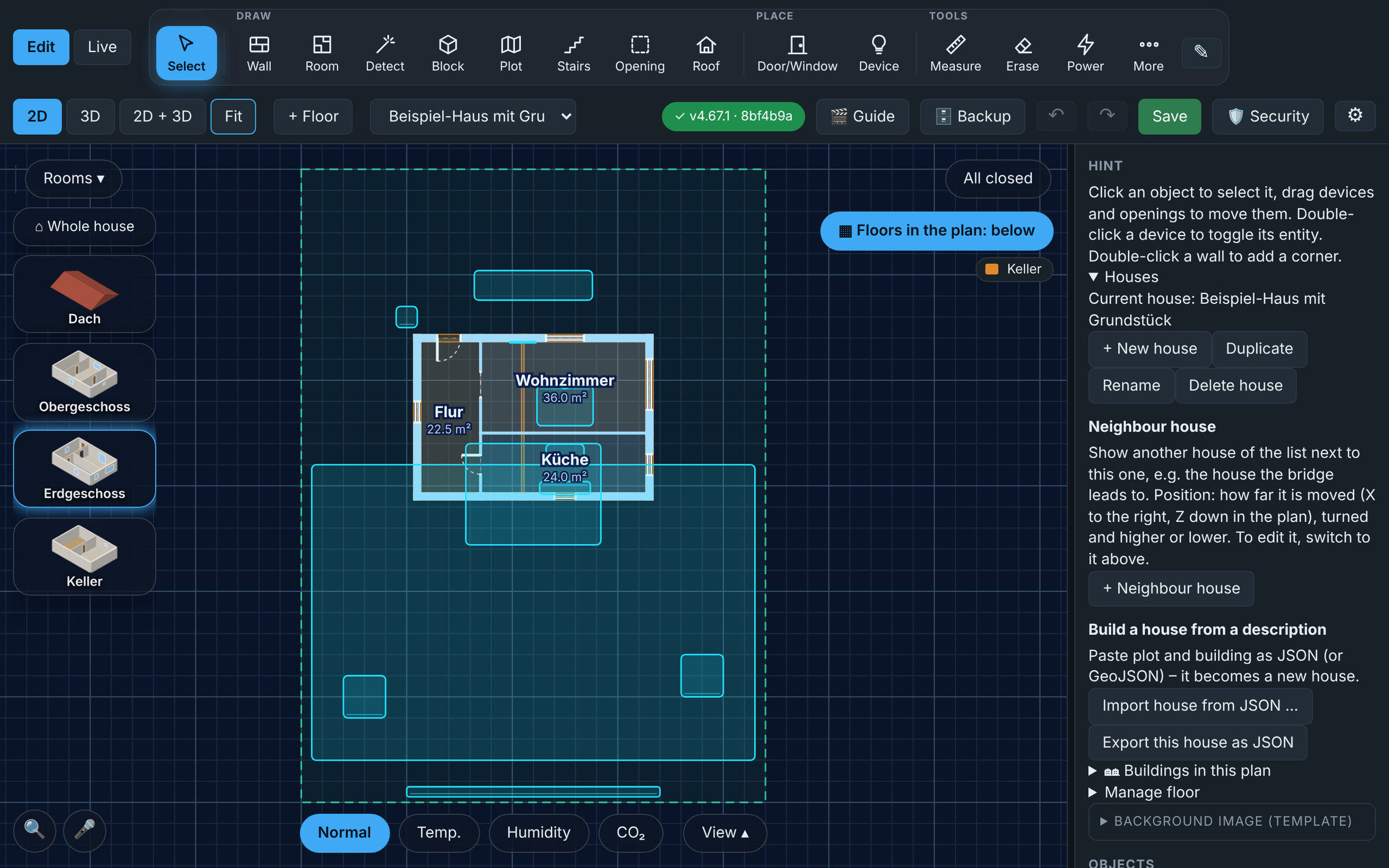 Result: plot boundary in the plan |
API: POST /api/import · GET /api/export/property · GET /api/import/schema. Full guide: English · Deutsch
🧰 Make it yours
- Customisable toolbar: ✎ lets you show, hide and re-order the tools; rarely used ones fold into a More ▾ menu
- Dormers and roof size: add dormers (gabled, flat, or a long shed dormer that raises part of one roof side) from the toolbar, and set the roof size by hand if the automatic one does not fit; steps in the eaves for a house that is narrower at the front (drag them in the 2D plan)
- Roof windows: plain windows lying in the slope of the roof, without a dormer (usual sizes like 78 × 118 cm); a real window with its contact, red and opened outwards when it is open
- Gable walls, shed roofs and canopies: the wall under each gable goes on up to the roof, with its own overhang at the gables; a shed roof (one slope, its high side chosen) for the house or an annex, and + Canopy for a sloped canopy in front of the house just under the eave
- Double-click a wall to add a corner exactly there
- Measure (tool Messen, key
M, in the 2D plan and in 2D + 3D): click two points for their distance (corners and wall faces snap), or click two walls and type their exact distance (face to face or centre to centre) or the angle between them: the wall moves, the walls joined to it and the rooms follow - Placed devices stay selected so you can fine-tune them right away (switchable in the settings)
- First start: an empty house shows a welcome card: draw walls, try the example house or import your own
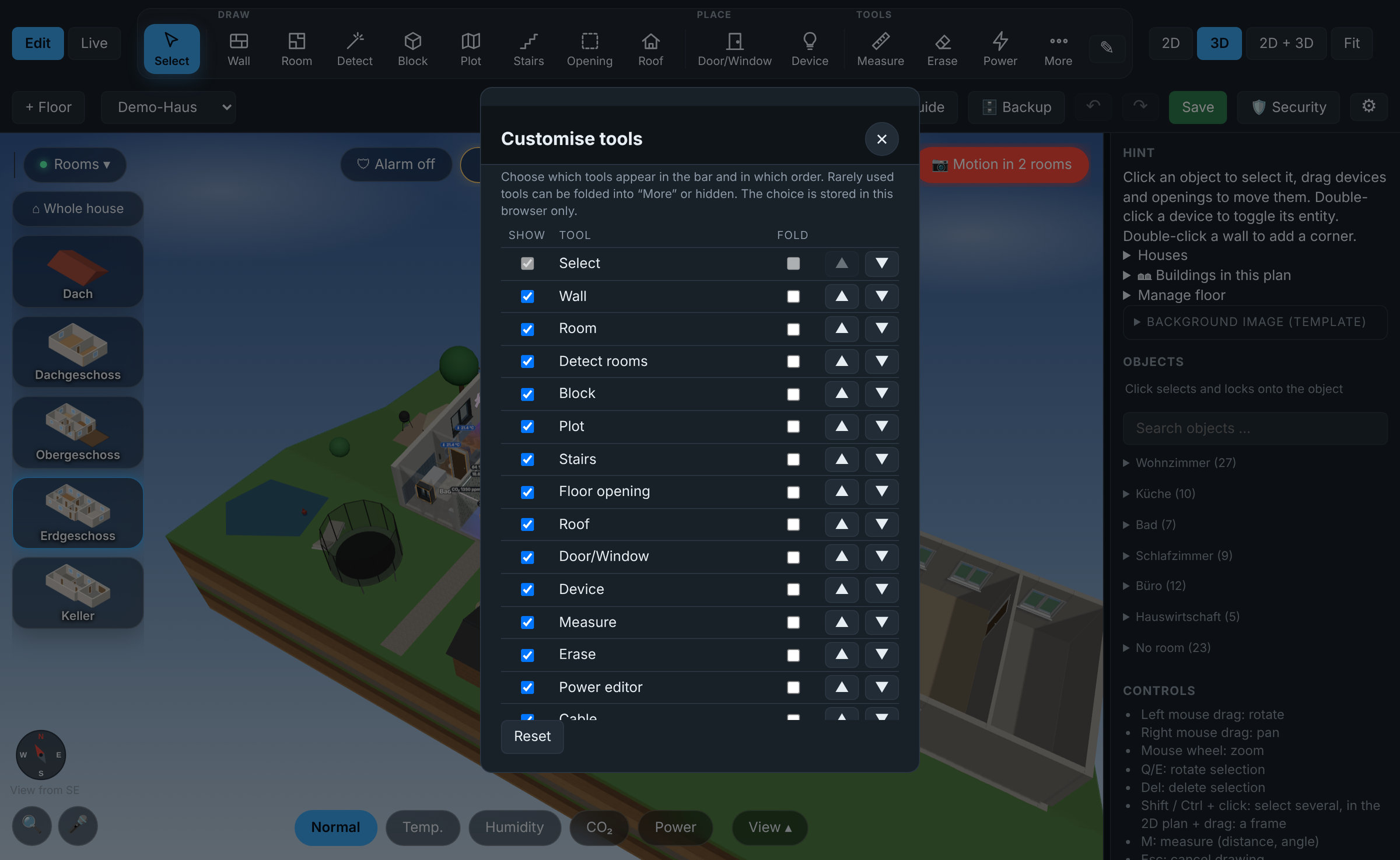 Toolbar: show, hide and order the tools |
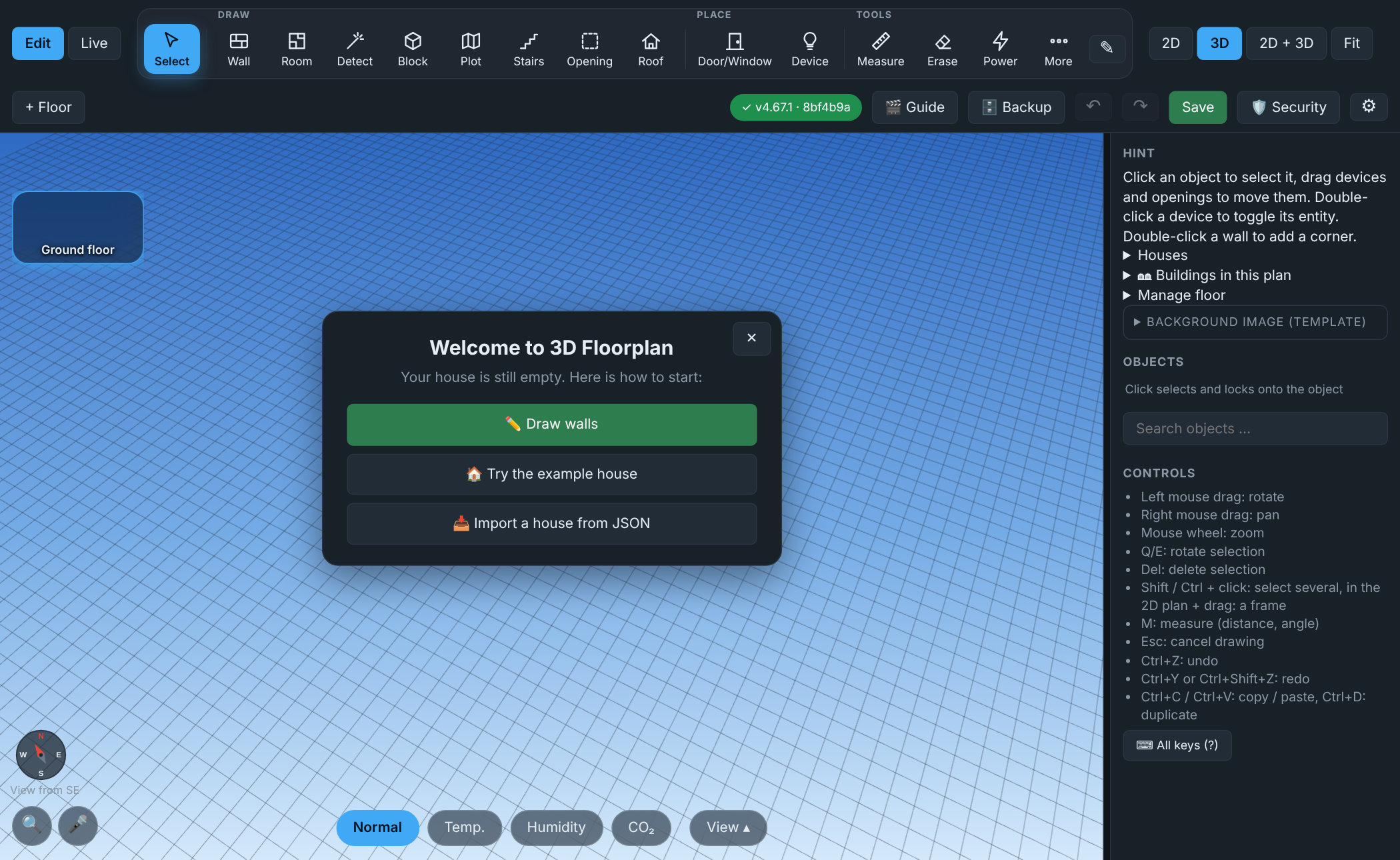 First start: three ways to begin |
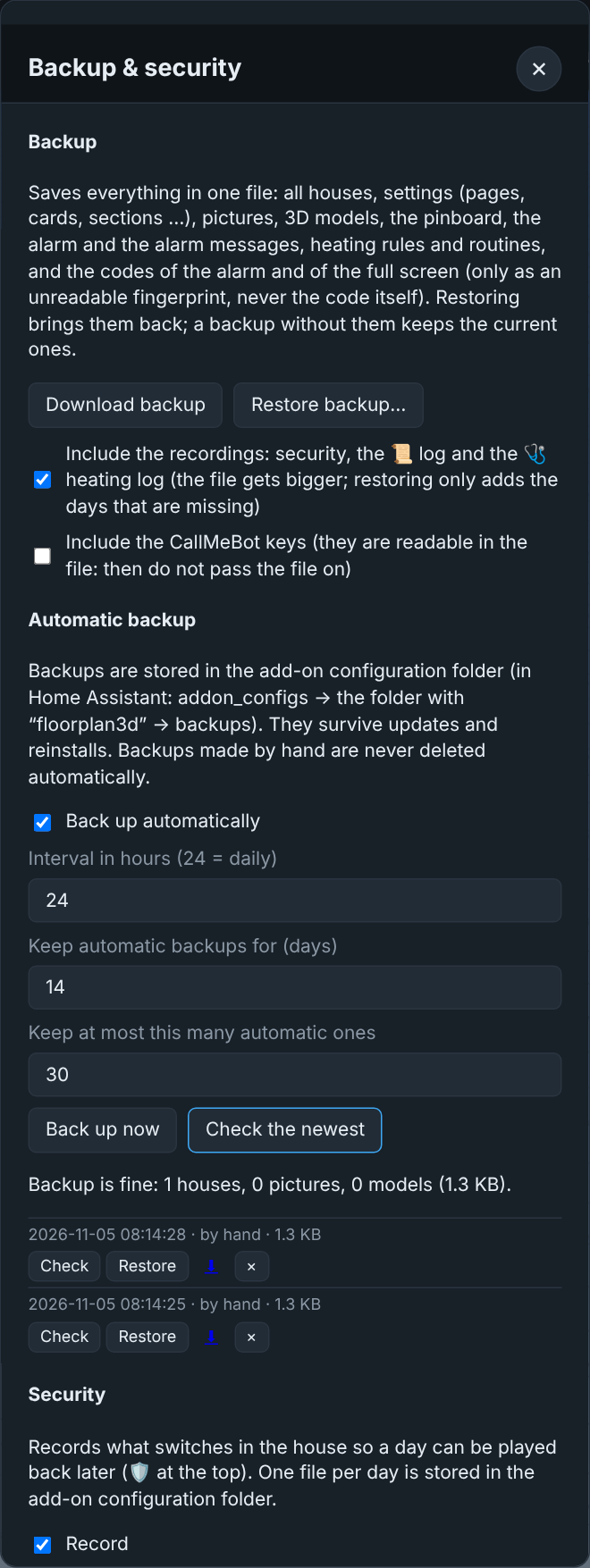 Automatic backups with check and restore |
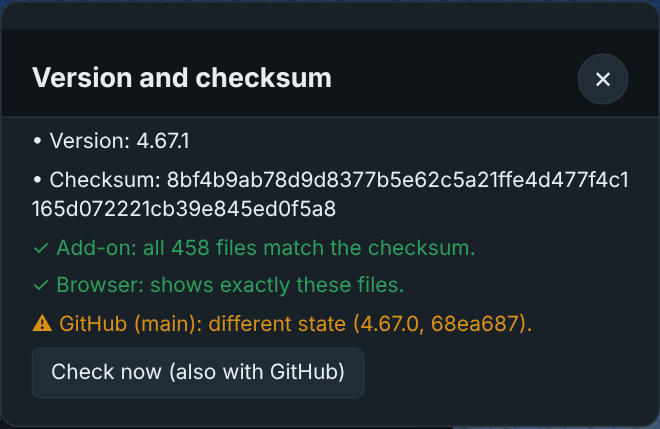 Version and checksum: proves which files really run |
🪑 Furnish it
- Furniture library with previews, search and categories (Living, Kitchen, Bath, Bedroom, Office, Lighting, Tech, Outdoor, Decor). The search understands everyday names ("Fernseher", "Couch" ...), and the pieces placed last stand on top
- 270+ built-in pieces: sofas, beds, kitchens, bathroom, lamps, TVs (also wall-mounted, and on a swivel arm you can swing, pull out and tilt), radiators, air conditioners and fans, cameras, robot vacuum and more, among them over 50 in the style of the well-known Scandinavian flat-pack classics (cube shelves, white bookcases, swing armchair, chests of drawers, wardrobes, kids' room, hall, paper lamps), most of them in several finishes (white, black-brown, oak …), and about 60 for sauna & wellness, fitness, the bar, the home cinema and the PC corner (sauna cabins, treadmill, power rack, bar counter with LED, also with a glass rack, a ceiling panel or pendant lamps hanging over it, pool table, screen and projector, gaming PC with RGB …); mirrors with LED light, also with several LED zones each linked to its own light; and about 55 for the garage, the workshop and the carport (small car, saloon, estate, SUV, sports car, pick-up, van, camper van, motorhomes, caravan, trailer, motorbike, scooter, bikes, cargo bike, ride-on and robot mower, workbench with pegboard, tool chest, car lift, compressor, table saw, welder, tyre rack, carports, bins …), the cars in car paint with head and tail lights that follow their entity
- Your own 3D models: upload any
.glbfile - Pictures on walls: upload a PNG / JPG / WebP and hang it, it clicks flat onto the nearest wall
- Exact sizes: enter width, height and depth in metres, or drag the handles in the 2D plan. Tilt, roll and mirror pieces freely
- Wall stop: furniture cannot be pushed through walls, it slides along them instead (can be switched off)
- Lock: a checkbox before every item keeps it from being moved by accident
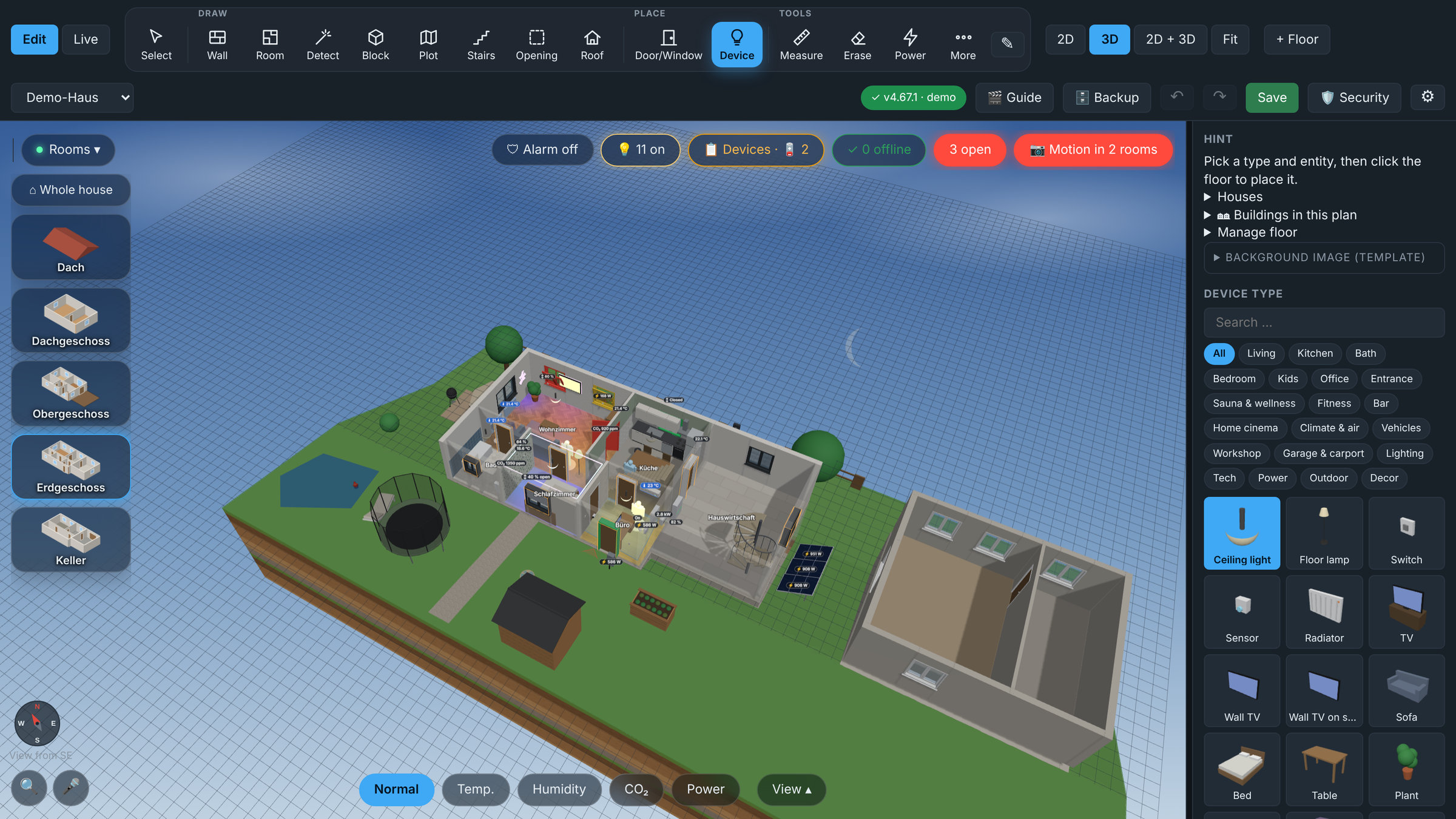 Furniture library with previews, search and categories |
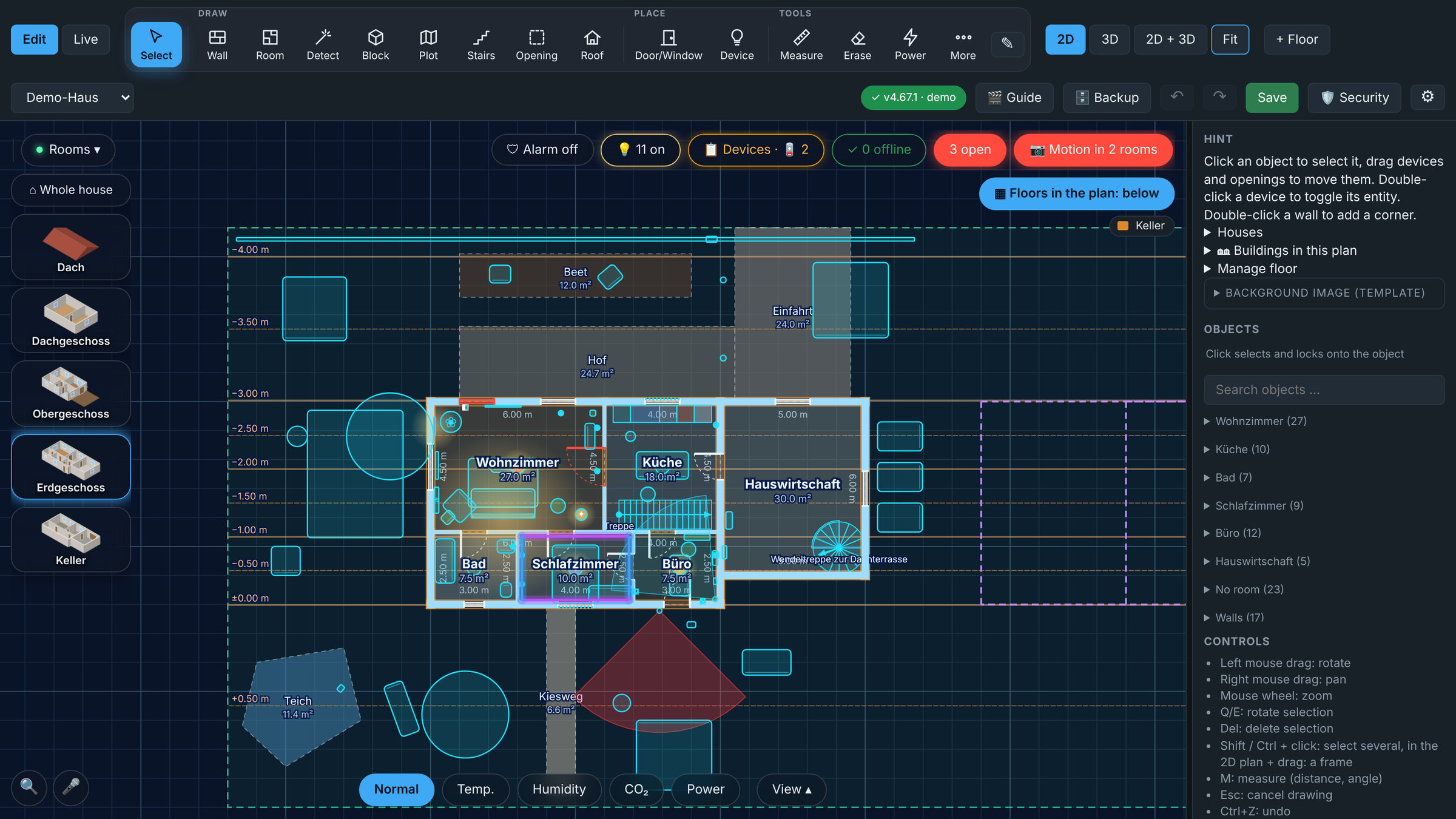 2D blueprint editor with snapping, dimensions and live state colours |
💡 Control it
- Every device is a Home Assistant entity: tap a lamp to switch it, dim it, pick a colour or warm / cool white
- Whole room at once: all lights on / off, brightness and colour for the entire room, plus the room's scenes, in one panel
- Scenes where the light is: the popup of a light lists every scene that contains it (e.g. Gaming)
- Effects: effect lists of Nanoleaf, WLED, Hue and others; Nanoleaf layout editor (snap grid: click triangles, hexagons, squares and bars together, saved as one object with one entity) plus single panel shapes
- Realistic light: lights glow in their real colour, with type-dependent light pools (a strip does not light the room like a ceiling lamp), dimmable
- House in its ground: lawn around the house in the shape of your plot; a basement sits in the earth and is shown as a section with soil layers, cut open on the side you look from
- Instant live state: a wall switch, an automation or a sensor shows up within a fraction of a second (the add-on listens to Home Assistant's event stream instead of polling)
- LED ring: indirect light all around a room under the ceiling, split into as many sections as you like (several per wall, set by metres or by dragging in the 2D plan), each with its own light entity
- Home Assistant details: ⓘ opens HA's own dialog with history, logbook and settings for any placed entity
- Auto placement: one click puts all entities of a room's HA area where they belong (lights under the ceiling, switch by the door, contacts on doors/windows)
- Open windows and doors: windows tilt open in 3D, each pane of a double or triple window can have its own sensor, an n open pill shows the overall state
- Presence: people (
person,device_tracker) and presence / motion sensors appear as a glowing figure while they are home; room pills show a dot when somebody is in the room - Heat and humidity views: rooms are coloured by temperature or humidity
- Power as a picture: press Power (Strom) and the card Power now shows sun, grid, battery and house with flowing dots, plus the water, gas and heat meters; cables with flowing dots run between the power devices in the house. In the power editor the tab ⚡ Rechnung: which sensor is grid, solar, battery, house and room, signs, and the calculation live with a check that it adds up
- Home Assistant areas: entities are grouped by your areas and assigned automatically
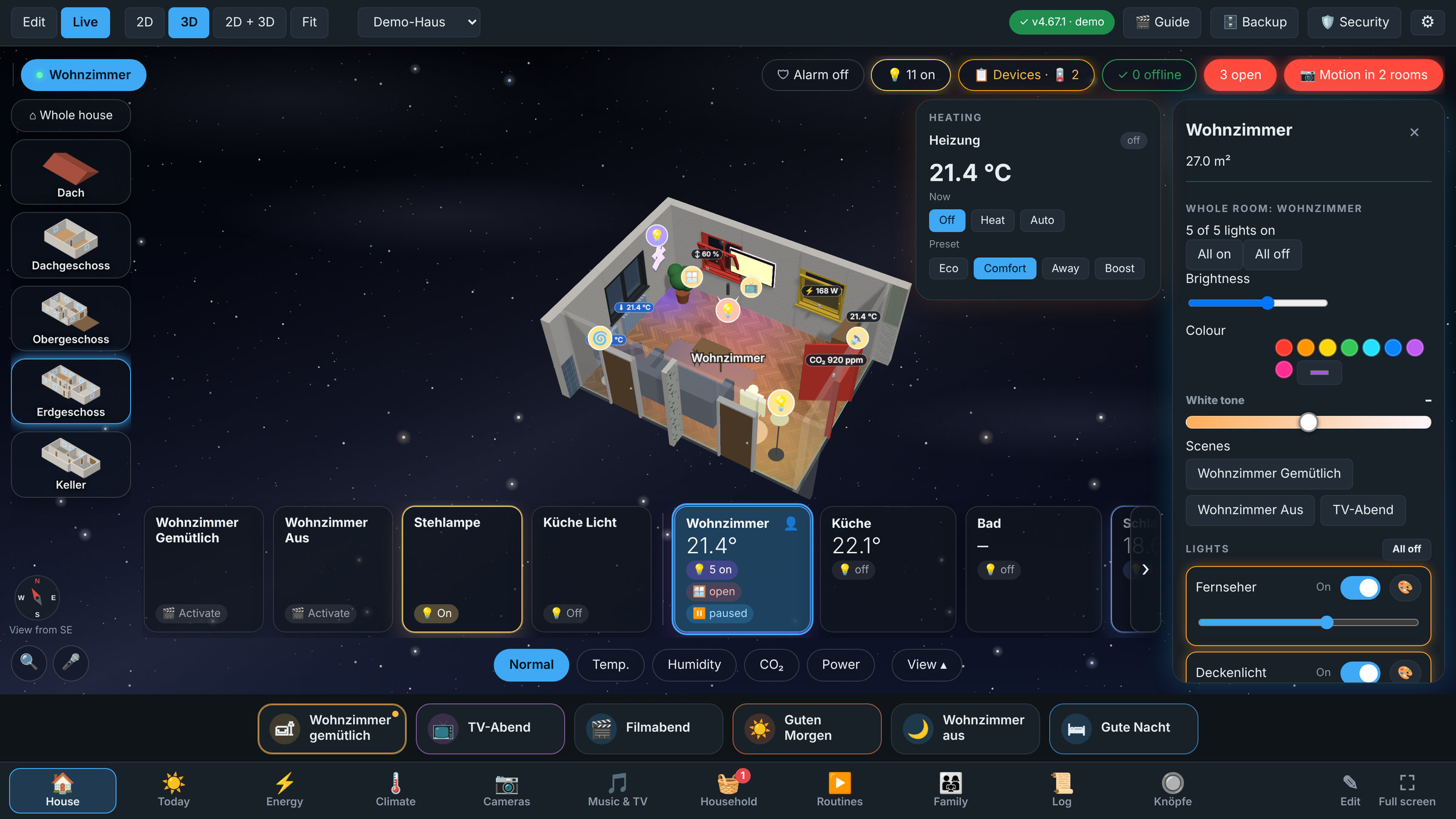 Whole-room control: lights, colour, brightness, heating and scenes |
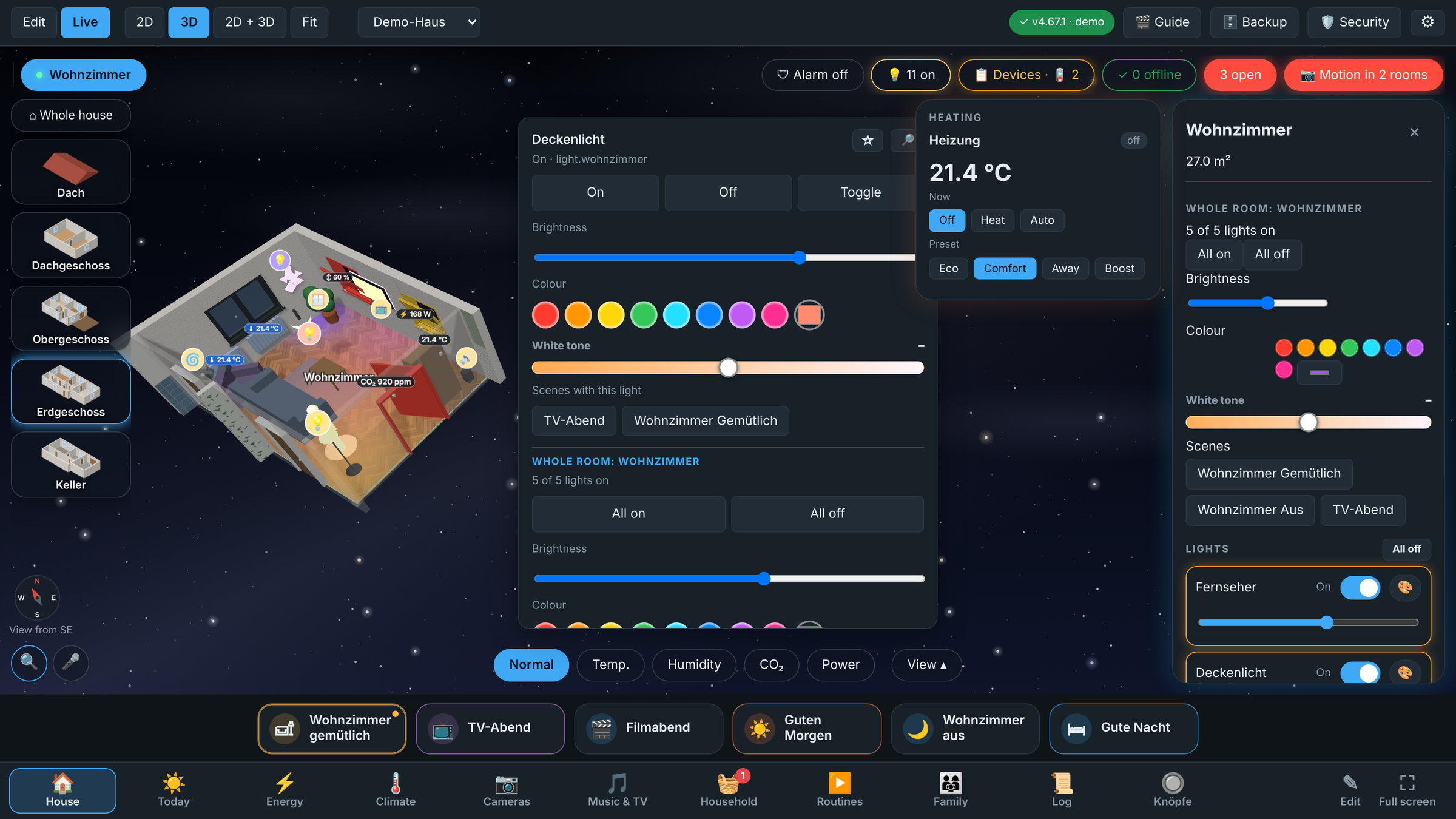 Light popup: tap a lamp right where it stands |
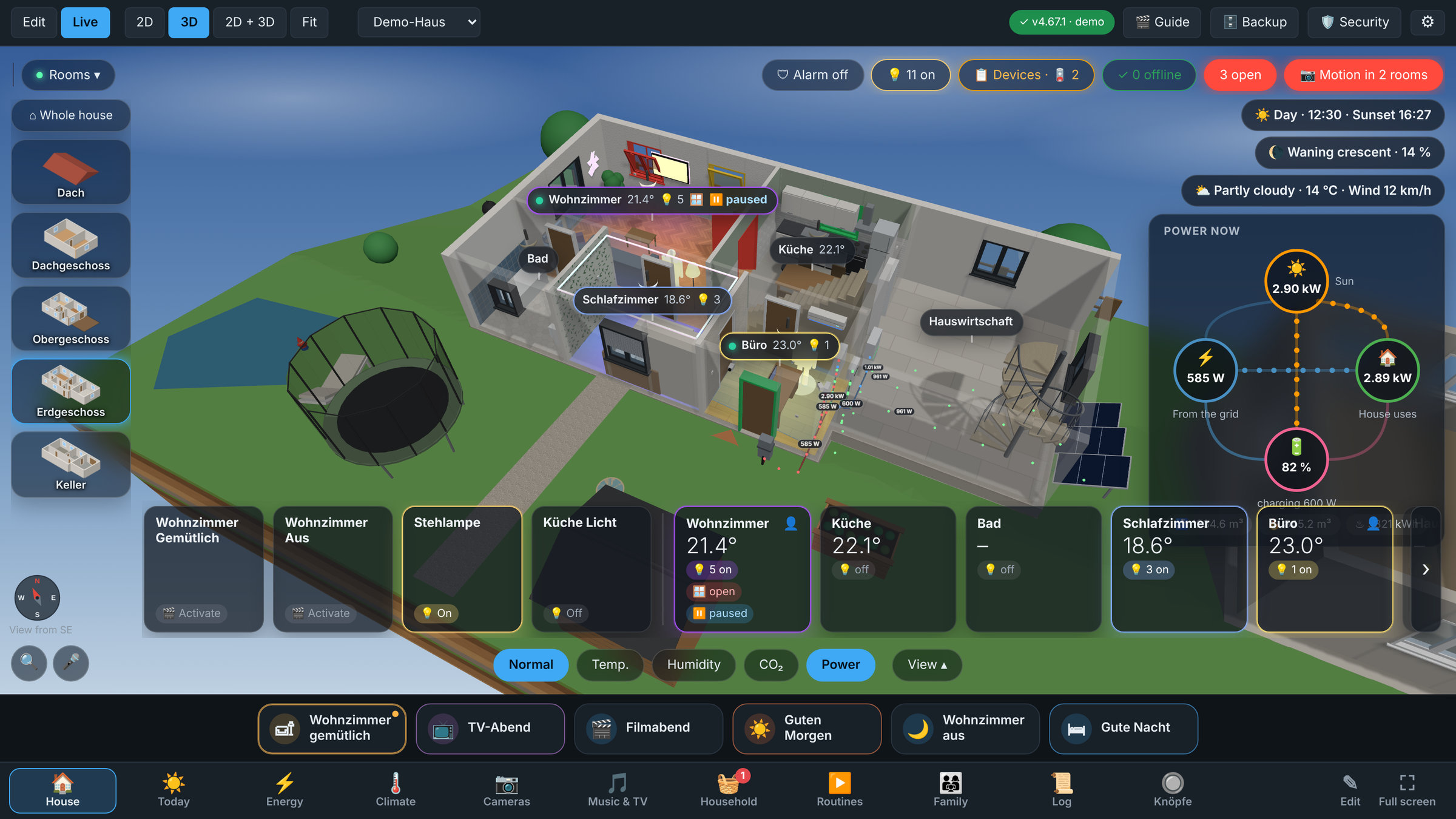 Power as a picture: sun, grid, battery and house at a glance |
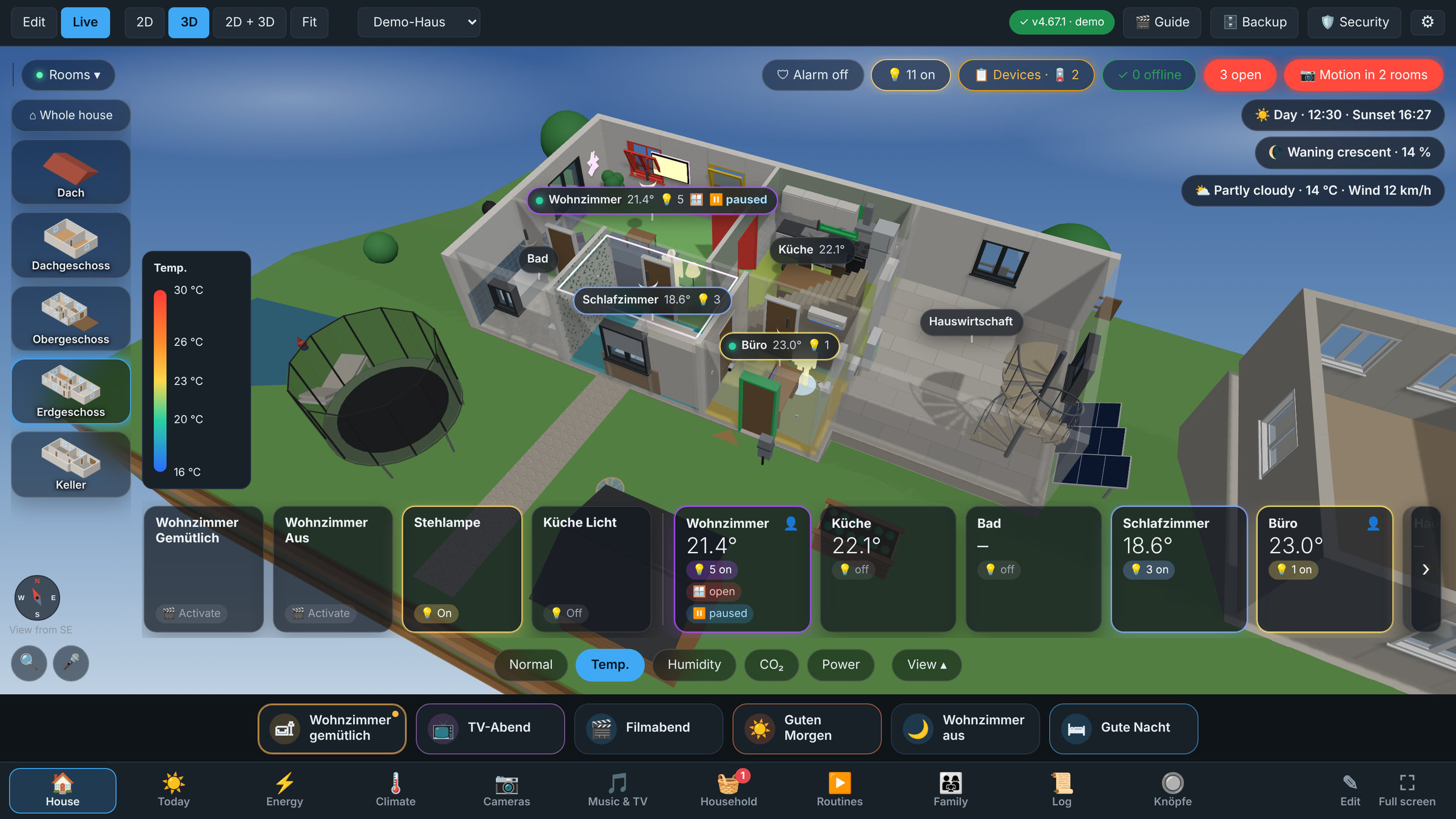 Heat view: every room in the colour of its temperature |
🔒 Safe, private and dependable
- Permissions: only chosen users edit, everyone else gets a read-only live view, enforced in the backend
- Offline and private: three.js is bundled, no CDN, no cloud, no account; it opens through Ingress in the Home Assistant sidebar
- Import by JSON / AI / GeoJSON: describe plot, rooms, windows and devices and get a new house; includes examples, schema, API and an AI prompt (guide)
- 8 languages: Deutsch, English, Français, Español, Italiano, Nederlands, Polski, 简体中文 (⚙ → Language, or Auto). Adding another one is a single file, see CONTRIBUTING
- Security (Sicherheit): every switch in the house is recorded (one file per day, the last 7 days kept). Pick a day and play it back in the 3D view with a time line: play, pause, jump from event to event, see when which light went on, which door opened. Read-only, on phone, tablet and PC
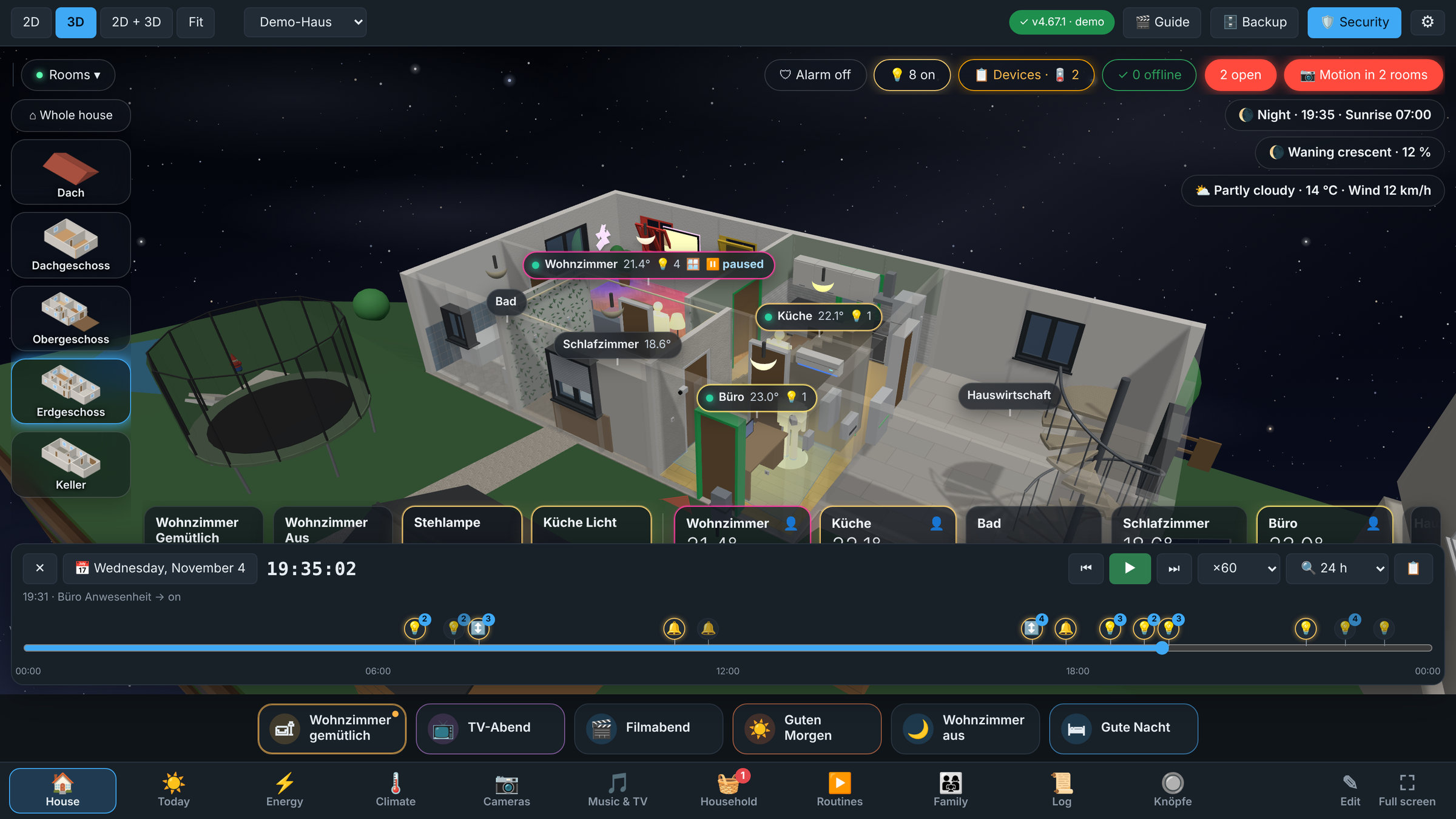
Security: yesterday evening played back, every event as an icon on the time line
- Backup and restore: one file with all houses, settings, pictures and models. A safety copy is made before every restore
- Automatic backups: optional, daily or at your own interval, stored in the add-on's config folder (
addon_configs), with retention by days and count, a Check the newest test and one-click restore - Undo:
Ctrl+Zfor everything you draw, and a short Deleted · ↶ Undo note after every deletion (handy on a tablet); ? shows every key on one card - Your data stays yours: layouts live in the add-on's
/datafolder and survive updates
📱 Phones and wall tablets
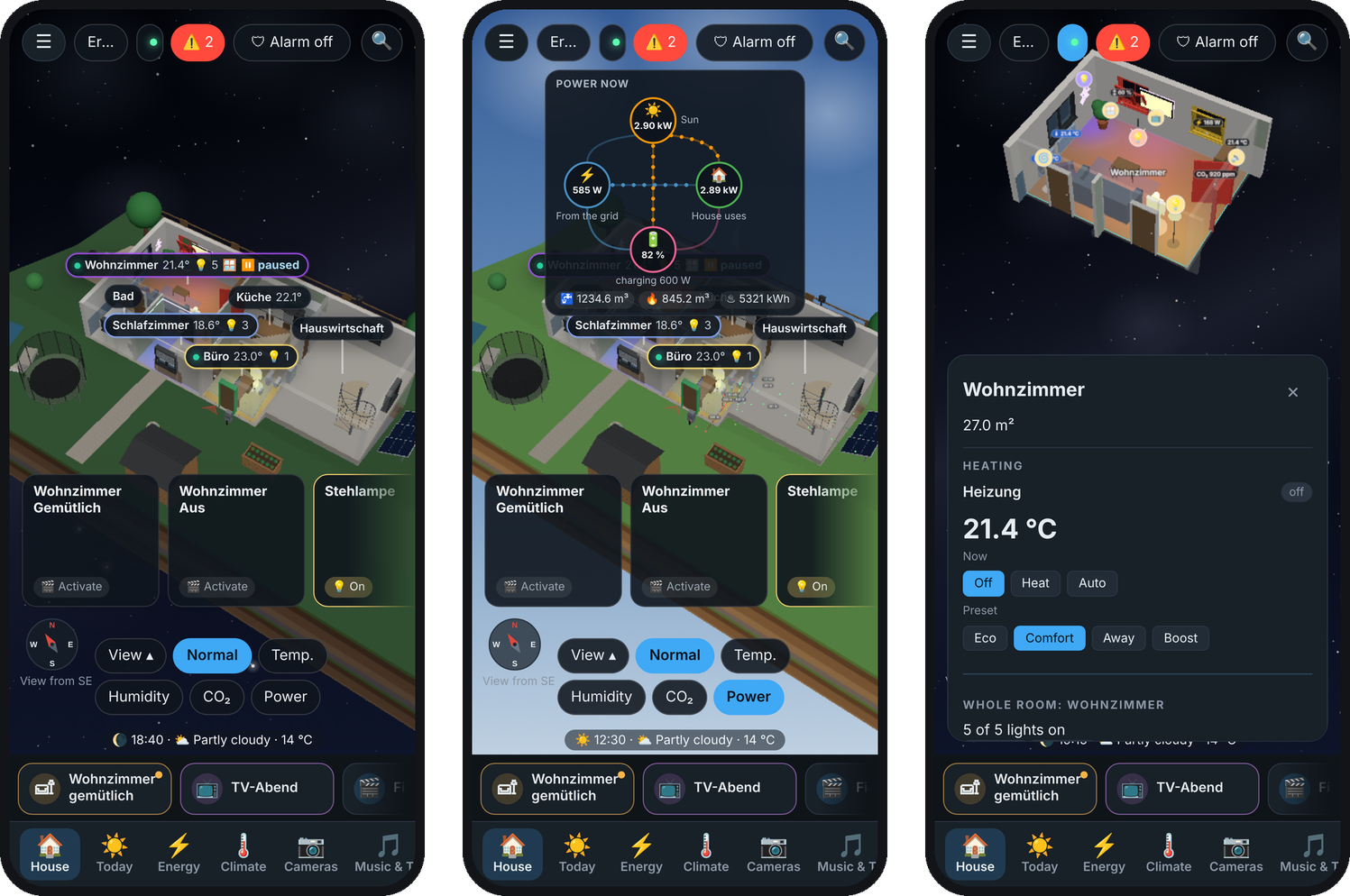
On the phone: room labels and tiles, Power as a small card, a tapped room opens as a sheet from below, time and weather in the last line
- Phones: the same live view, made for one hand: floors and rooms in one drop-down, room labels over the rooms and room tiles you swipe sideways, the room panel as a sheet from below, Power as a small card under the top bar, and the time and the weather in a short line at the very bottom. Editing works on a phone too (☰ → Bearbeiten): the tools in a strip you swipe, the settings of what you tapped below, draw walls with the finger
- One Home Assistant user per tablet: it starts in its own room and sees only the views you allow
- Low-power mode for Fire tablets and other weak devices (automatic in kiosk mode and on touch screens): lower resolution, throttled animation, no shadows, blur or glow. ⚙ Performance on this device switches it per tablet
- Warnings for smoke, gas, CO, water, alarm and windows open in the rain (red banner, the room flashes), a "Where is …?" search, and a kiosk mode: back to the start view when idle, screen-saver turn, night dimming
- Voice search 🎤: ask "Which windows are open?" or "How does the living room look?" and the view goes there with a ring on every window, light … of the answer; own code words for rooms ("the parents' living room"), the browser's recognition or Home Assistant Assist (Whisper), lockable per user
- Switching by voice 🗣: "Lights in the living room off", "Blinds in the kitchen down": an order switches, the whole house asks first
- Car 🚗 and garden 🌱: the car's charge, its range and "charge with the sun only" (evcc); the garden's rain, its soil and "💧 water 10 min" that switches off again by itself
- Tell me when it is done 🔔: a tap on the running washing machine, dryer or dishwasher, and a message comes to your phone (WhatsApp, Telegram or the Home Assistant app) when it has finished
- Doorbell 🔔: when somebody rings, every wall tablet shows the camera at the door with Open the door (it asks once more) and plays a gong; bells and their cameras are found by themselves
- Renamed in Home Assistant, renamed in the plan: change an entity id or a device name in Home Assistant or Zigbee2MQTT and every linked device in every house follows by itself, also in an open view
- Device overview (📋): every linked device by room with its state, its battery level (from the battery sensor of the same Home Assistant device) and whether it is offline; filter by what is still on or open, battery or offline. Low batteries turn the button orange and a tap shows which ones
- Lights off by group: 💡 n on at the top lists the whole house and your groups of rooms (e.g. Kids, Upstairs), each with an Off that asks once before it switches, so nothing goes off by accident
- Favourites: the scenes and devices you use most as one-tap buttons in front of the room tiles (☆ on a device's card, or ⚙ → Quick access)
- Devices offline at a glance: a pill over the plan shows how many placed devices are unavailable, unknown, missing in Home Assistant or not linked, with a list that jumps to each one
- Floor and room buttons scroll sideways with ‹ › arrows when they do not fit the screen
- Open a specific house with
?house=Parents
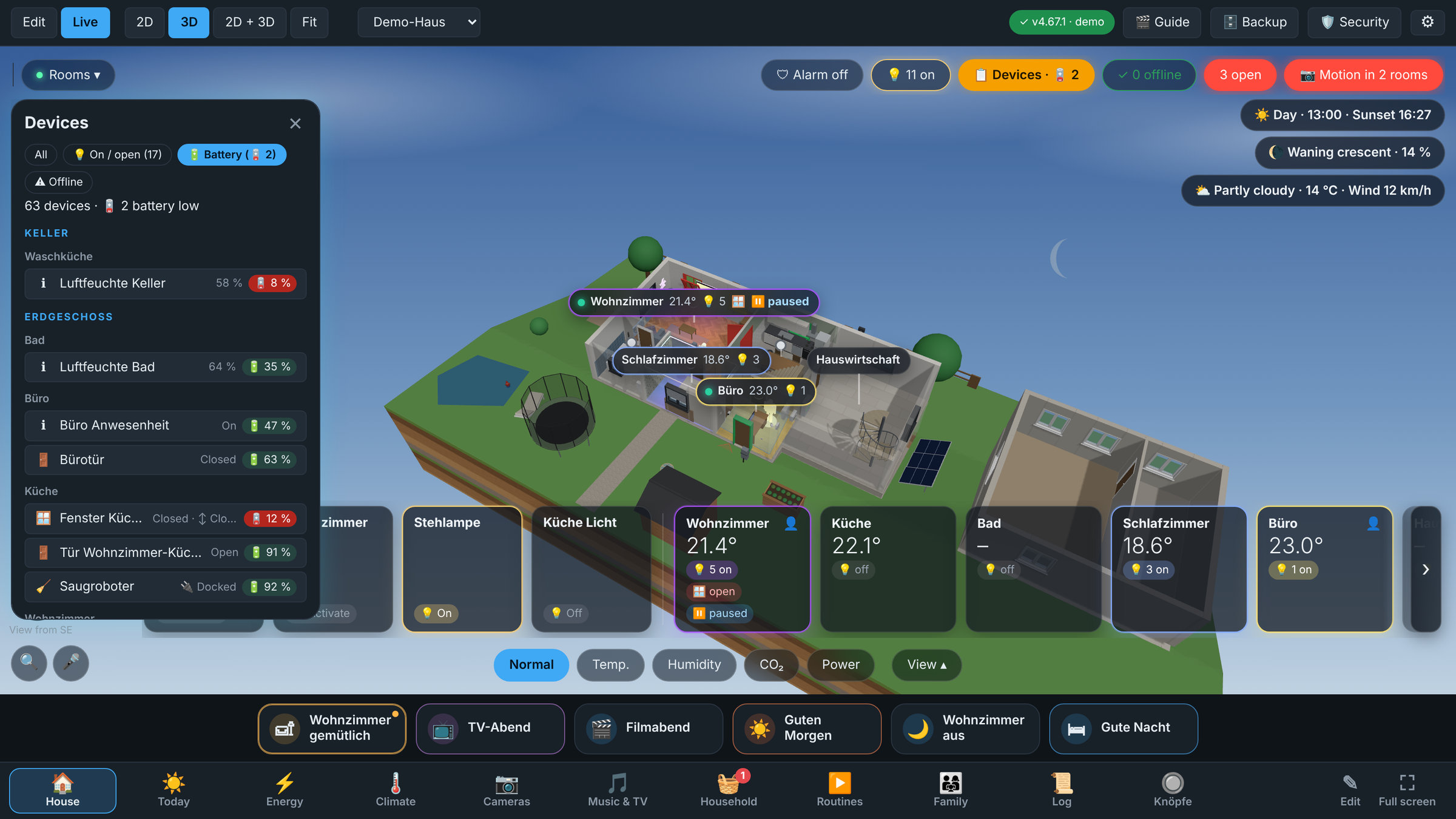
Device overview (📋): every device by room, with battery and offline filters
🎨 Look
- Sky by the time of day: morning, midday, dusk and night, the sun where Home Assistant's
sun.sunhas it, at night stars and a faint Milky Way; a chip shows the time and the next sunset or sunrise - 🌙 The moon as it is now (full, waxing, waning …) where it stands in your sky, with its phase in a chip
- Weather in the sky: clouds, rain and snow from your weather entity, and a rain warning per window when one is open while it rains
- Labels over the rooms: name, temperature, lights on and open windows, a green dot when somebody is there; a tap opens the room. Or the devices instead (View → In the picture)
- Room tiles at the bottom: every room with its temperature, lights and open windows, swipe sideways when there are many
- Real floors per room: parquet, herringbone, chevron, wide planks, tiles, hexagons, cement tiles, terrazzo, marble, stone, paving, carpet ... (about 30), each with its own colour, joint colour, size and angle
- Walls with a finish per room: paint, woodchip, plaster, wallpapers, tiles (also only up to a height, e.g. 1.20 m in the bathroom), brick, stone, wood; an accent wall on its own; the facade outside (plaster, brick, wood, slate ...)
- Window frames white or anthracite; floor cards and buttons in a glass look
- Dark theme by default (light theme and a hologram look as a gimmick are one click away), metric or imperial units, and 8 languages (Deutsch, English, Français, Español, Italiano, Nederlands, Polski, 简体中文)
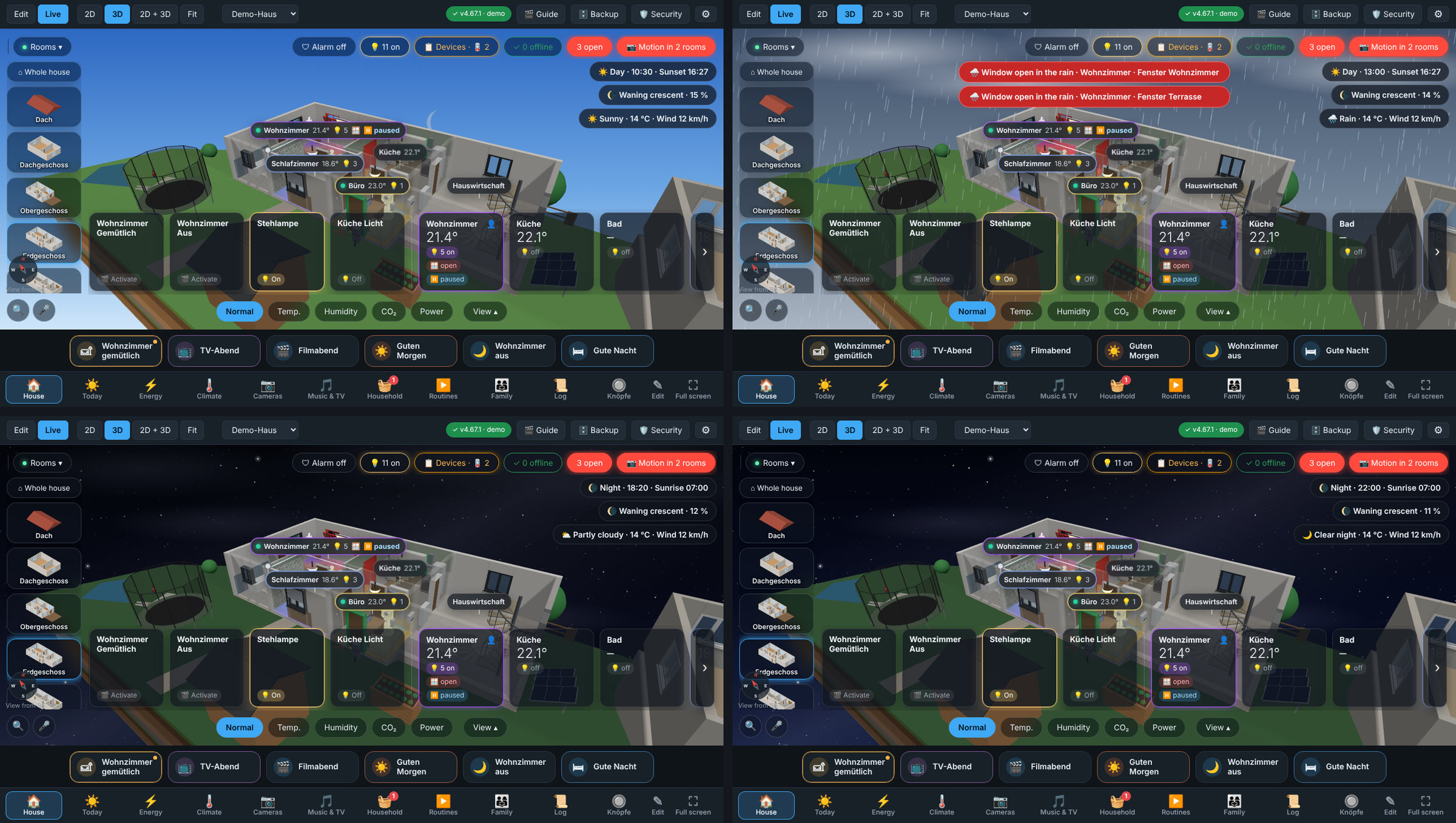 Sky and weather: sunny morning, rain (with the rain warning), dusk, starry night |
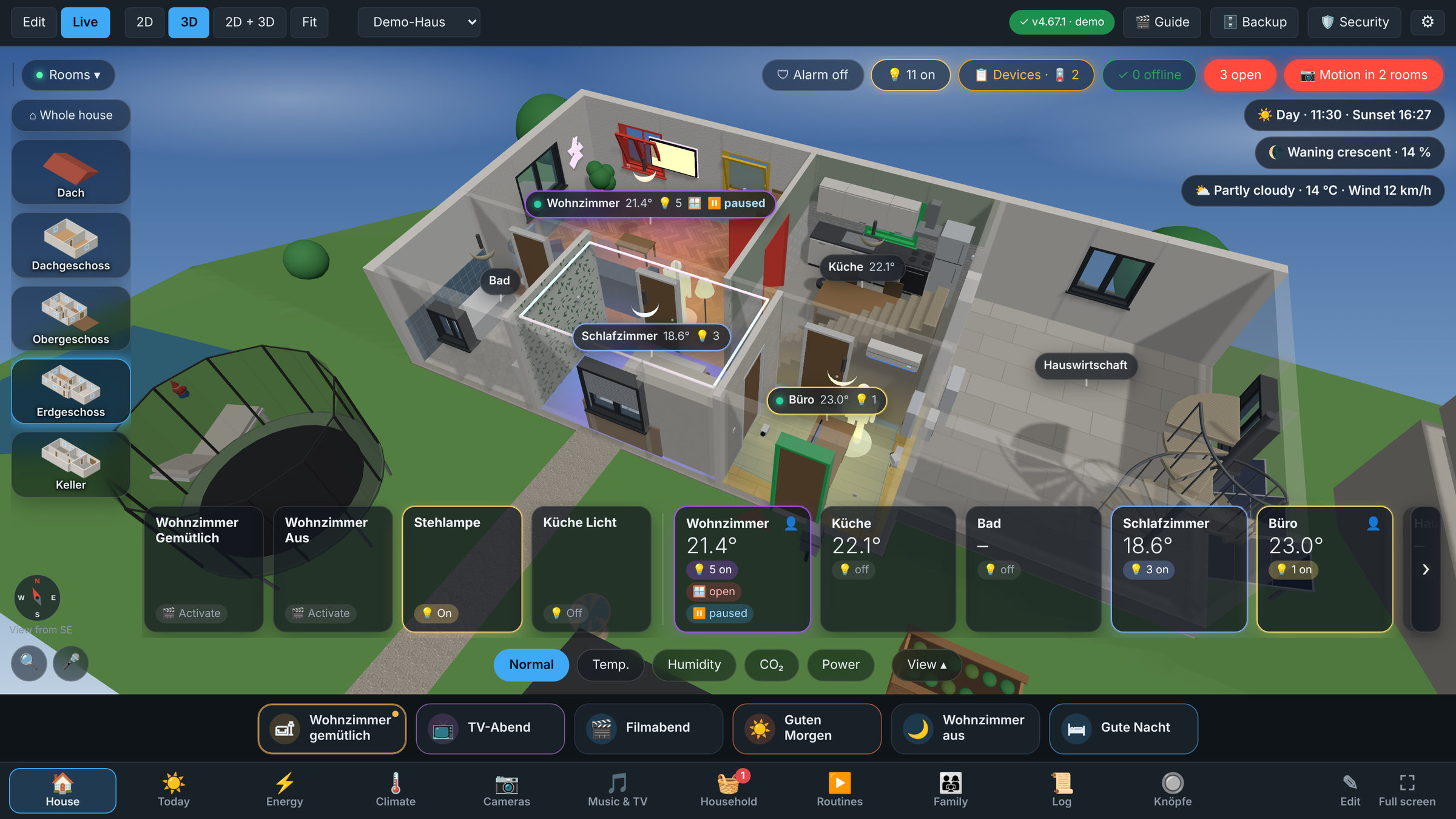 Real floors per room and anthracite window frames |
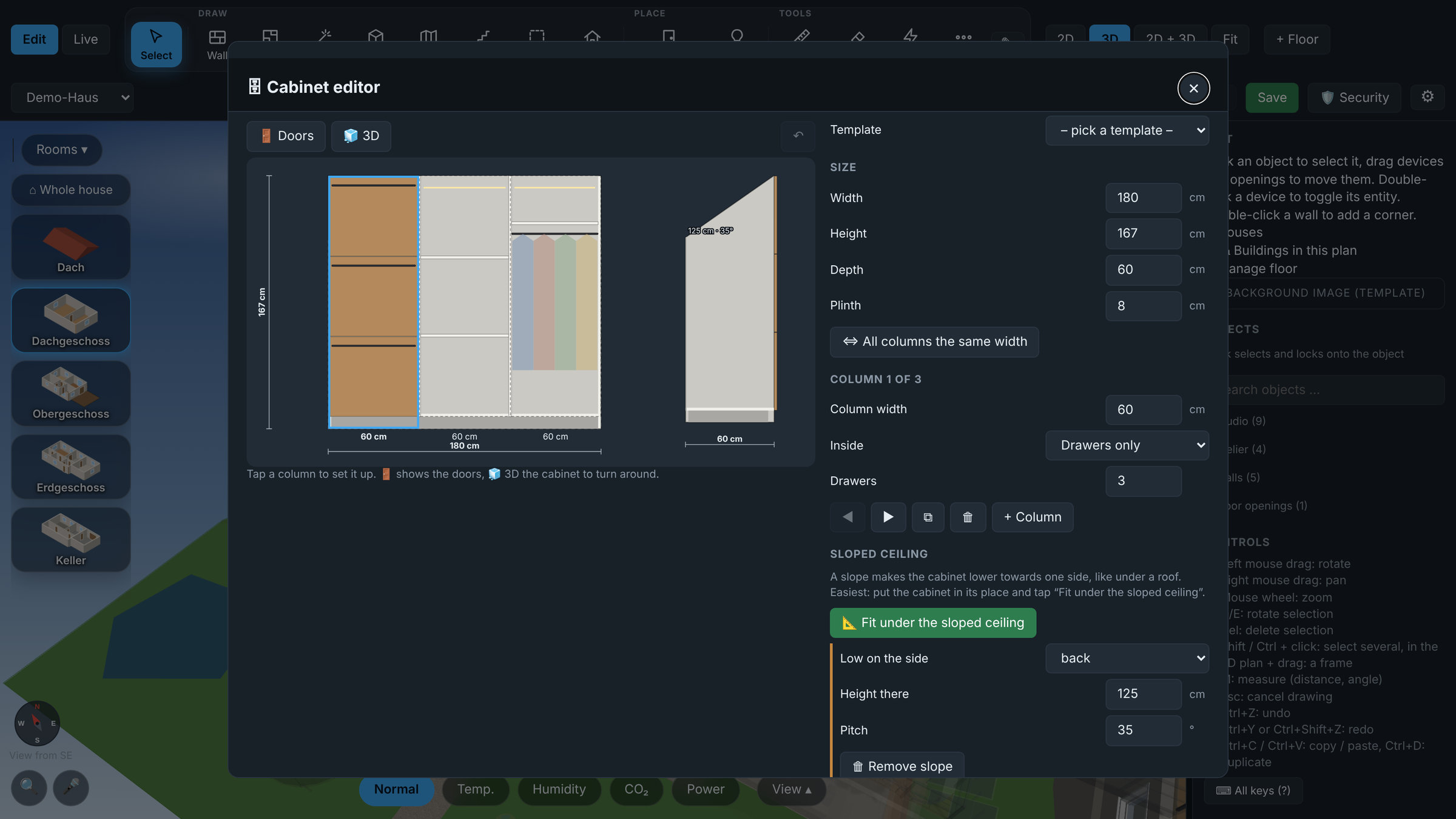 Cabinet editor: made to measure, also under the slope of the roof |
📦 Installation
- In Home Assistant open Settings → Apps → App store → ⋮ → Repositories.
- Add
https://github.com/BuRnEd4AiM/HA-Floorplanner(or press the button at the top). - Reload the store, open 3D Floorplan, Install, Start and enable Show in sidebar.
Requires Home Assistant OS or Supervised (anything with the Add-on / App store). Details on permissions and tablet setup are in the documentation.
Home Assistant Container (Docker, no add-on store): run 3D Floorplan as a second container next to Home Assistant; you log in with your Home Assistant user. The steps are in container/README.md.
Installed and happy? A small donation via PayPal helps me keep building. 💛
🧩 Dashboard card
Show the live 3D view on any dashboard with the card custom:floorplan3d-card. A tap on a device controls it, as in the add-on; editing stays in the add-on. The add-on must be installed and running.
Install with HACS: HACS → ⋮ → Custom repositories → https://github.com/BuRnEd4AiM/HA-Floorplanner, type Dashboard → open 3D Floorplan Card → Download, then reload the browser. HACS adds the card as a dashboard resource by itself.
Install by hand: copy dist/floorplan3d-card.js to /config/www/, then Settings → Dashboards → ⋮ → Resources → Add: /local/floorplan3d-card.js, JavaScript module.
Then edit a dashboard → Add card → 3D Floorplan. Every option can be set in the visual editor (floors and rooms are offered from your plan), or in YAML:
type: custom:floorplan3d-card
floor: Erdgeschoss      # a floor name, a number (0 = ground floor, 1 = above, -1 = basement) or "house"
height: 450px           # or fill: true for the whole screen
theme: auto             # follows the dark / light mode of Home Assistant
heatmap: temp           # start with the temperature colours (temp, humid, co2)
| Option | Values | Default |
|---|---|---|
title |
text above the view | none |
house / floor / room |
house name; floor name, number or house; a room name (opens that room like a room tablet) |
as in the add-on |
view |
with a room: room = only that room in 3D, the card never leaves it; panel = only the room's controls (its room panel), without 3D |
3d |
height / fill |
a height (400, 450px, 60vh); fill: true fills the screen. In a sections dashboard the card takes the size of its cell |
400px |
theme |
auto, dark, light, holo |
as in the add-on |
quality |
low (fast), high (beautiful) |
automatic |
walls |
auto (sink towards the camera), see_through, low, full |
as in the add-on |
labels |
important, all, none |
as in the add-on |
heatmap |
temp, humid, co2 |
off |
alerts |
true / false (warnings) |
as in the add-on |
idle_return |
minutes without a touch, then back to the card's floor (0 = never) | as in the add-on |
night |
off, sun, time (dim at night) |
as in the add-on |
room_panel |
false: a tap on a room (and the room tablet start) only zooms in, without the room panel over the house |
true |
show_nav / show_bar |
false: no bar at the top (floors, rooms) / at the bottom (view, room colours, search) |
true |
tabs |
true: the tab bar of the add-on at the very bottom (🏠 house, 📷 cameras …, per user as set in the add-on; add-on 4.3.0) |
false |
kiosk |
true: a wall tablet, Home Assistant's sidebar and the top bar of the dashboard are hidden, never for administrators; ?kiosk=off in the address leaves it for a moment (to try out: Home Assistant changes its inner parts now and then, otherwise use Kiosk Mode from HACS) |
false |
addon |
the add-on's slug, only if the card does not find it by itself (the message not found lists the names it tried; the slug is in the address of the add-on's page under Settings → Apps) | found by itself |
If a dashboard says Custom element doesn't exist: floorplan3d-card, the browser has not loaded the card: open http://<your Home Assistant>:8123/hacsfiles/HA-Floorplanner/floorplan3d-card.js. A 404 means HACS has not downloaded it: HACS → 3D Floorplan Card → ⋮ → Redownload (3.75.0 had this problem, 3.75.1 fixes it), then reload the browser with Ctrl+F5.
The add-on as the only dashboard of a wall tablet (#479): a dashboard with one view of type Panel and only this card, fill: true, tabs: true, kiosk: true, as the default dashboard of the tablet's own user (without admin rights). The tablet then shows the house with the tab bar at the bottom and nothing of Home Assistant around it; which tabs it gets and which one it starts with is set in the add-on (⚙ → Users & tablets). The add-on's ⚙ → Wall tablet → Set up a tablet has the steps and the card's text to copy.
A room and its controls side by side (#356): two cards with the same room, one with view: room (the room in 3D, it stays in the room) and one with view: panel (only the room panel: lights, heating, shutters, doors and windows). The card with view: panel draws no 3D picture, so it costs almost nothing.
type: custom:floorplan3d-card
room: Wohnzimmer
view: panel             # or room
The look of a card applies to that card only and never changes the add-on's settings. Every card is a full 3D view: one or two per dashboard are fine, on weak tablets prefer quality: low.
🚀 Quick start
| Action | How |
|---|---|
| Draw walls / rooms | Tool Wall W / Room R: click point by point, double-click or Esc finishes |
| Add doors and windows | Tool Door/Window O, pick a preset, click a wall |
| Place furniture | Tool Device D, pick a piece from the library, click the floor |
| Link an entity | Select a device, search the entity in the side panel |
| Resize | Drag the two square handles in the 2D plan, or type the size in metres |
| Move / rotate | Drag it, Q / E rotate in 15° steps |
| Measure, set two walls apart | Tool Messen M: click two points, or two walls and type their distance or angle in the side panel |
| Lock an item | Tick the box before its name in the object list |
| Live mode | Tap a device to control it, tap a room for the whole room |
| History of a device | ⓘ Details in its popup opens Home Assistant's own dialog |
| Place a whole HA area | Select the room, then ✨ Place all in its entity list |
| Undo | Ctrl+Z |
| Import a house | Houses → Import house from JSON, or POST /api/import |
| Backup | 🗄️ Backup in the top bar (also automatic backups and the security recording) |
🧪 Try it without Home Assistant
⬇ Download the demo (always the newest build; a GitHub workflow rebuilds it whenever the app changes) and open the file with a double-click: one HTML file, no server, no Home Assistant. Or open the demo directly in the browser (GitHub Pages, same build, nothing to download).
It contains an example house with a basement in the ground, several floors, a roof, a plot with garden, furniture, doors and windows with contact sensors, simulated lights (colour, brightness, effects, scenes), a Nanoleaf layout, a TV backlight, an invisible LED strip that still lights the room, an LED ring with two lights around the bedroom ceiling, temperature / humidity sensors, batteries, the holiday alarm (code 1234), two recorded days to play back in Security and the live mode. Everything works as in the add-on, except that changes are not saved and what needs the add-on itself: building a house from JSON, restoring a backup, uploading pictures and models, sending messages (the demo says so).
To build it yourself: cd demo && npm install && npm run build.
📚 Documentation
🎞 Trailer: the best of the add-on in 90 seconds, to show and share (made by
tools/make_trailer.py), and under it short clips for TikTok, Reels and Shorts (tools/make_clips.py).🎬 Video guide: every feature as a short video, searchable (also in the add-on: 🎬 Anleitung at the top, for editors; 📥 Für ohne Internet speichern keeps a small copy in the add-on).
User guide: permissions, tablets and views, areas, whole-room control, Nanoleaf, 2D editor, houses, backup
Import a house by JSON / AI / GeoJSON (Deutsch; with screenshots, format reference, API, prompt tips; examples in docs/examples)
Architecture: how the add-on is built
Changelog · Timeline: how the project grew, version by version · Roadmap · Security policy
🩺 Troubleshooting / FAQ
The panel is empty or shows old behaviour after an update. Look at the pill in the top bar (version + short checksum):
| Pill | Meaning | What to do |
|---|---|---|
| 🟢 green | Add-on files and browser files match the manifest | All fine. If something is still wrong, it is a real bug: please open an issue and mention the checksum |
| 🟠 orange | The browser shows older files than the add-on has | Open the pill, press Reload (clear cache) |
| 🔴 red | Files of the add-on differ from the manifest | Reinstall / update the add-on |
Where is my data? Layouts and settings are in the add-on's /data folder and survive updates. Backups (if enabled) are in the add-on config folder: File editor → addon_configs → folder with floorplan3d → backups, or via Samba / SSH at /addon_configs/.
How do I update? Settings → Apps → 3D Floorplan → Update. In the edit mode the pill checks GitHub every 5 minutes and turns blue with ⬆ New version available when there is a newer one (switch it off in ⚙ if you like).
Does it send data anywhere? No. Three.js is bundled; the only outside request is the check for a new version: it downloads the public checksum list (manifest.json) from GitHub, nothing about you or your house is sent. You can switch it off in ⚙.
🛠️ Development
pip install -r requirements-dev.txt
pytest -q                                                   # backend tests
DATA_DIR=./data python floorplan3d/rootfs/app/server.py     # http://localhost:8099 (standalone mode)
The browser end-to-end tests are described in tests/e2e/README.md. Every push to main that raises the version in floorplan3d/config.yaml creates a GitHub release automatically.
💛 Support the project
3D Floorplan is free and open source, and it will stay that way. It is built in my free time, many evenings and weekends. If it makes your home a little nicer and you would like to say thank you, you can buy me a cup of tea via PayPal:
Every donation, big or small, really means a lot to me. A ⭐ on GitHub, a bug report or an idea helps just as much. Thank you! 💛
🤝 Contributing
Bug reports, ideas and pull requests are welcome, see CONTRIBUTING.md and the issue templates. Please follow the Code of Conduct. If you like the project, a ⭐ on GitHub makes my day.
📄 License
GNU GPL v3 or later © 2026 BuRnEd4AiM and contributors.
In plain words: use it for free, read it, change it and share it. If you share a changed version or build its code into your own project, that must be GPL and open source too, and must keep the copyright notices.
Versions up to and including 4.61.0 were released under the MIT License and stay so; the GPL applies to every later version. The old MIT notice and the bundled libraries (three.js MIT, polygon-clipping MIT, hls.js Apache-2.0, 3D models by Kenney CC0) are listed in NOTICE.md.
Explore related projects
Loading…