
Bobby-Gray/open-tabletop-gm
Bobby-Gray/open-tabletop-gm has 71 GitHub stars and 13 forks. GitHot measured +1 stars in 24 hours and +2 in 7 days. Last checked 2026-11-18 12:15 UTC. Last push 2026-11-08.
What you can do
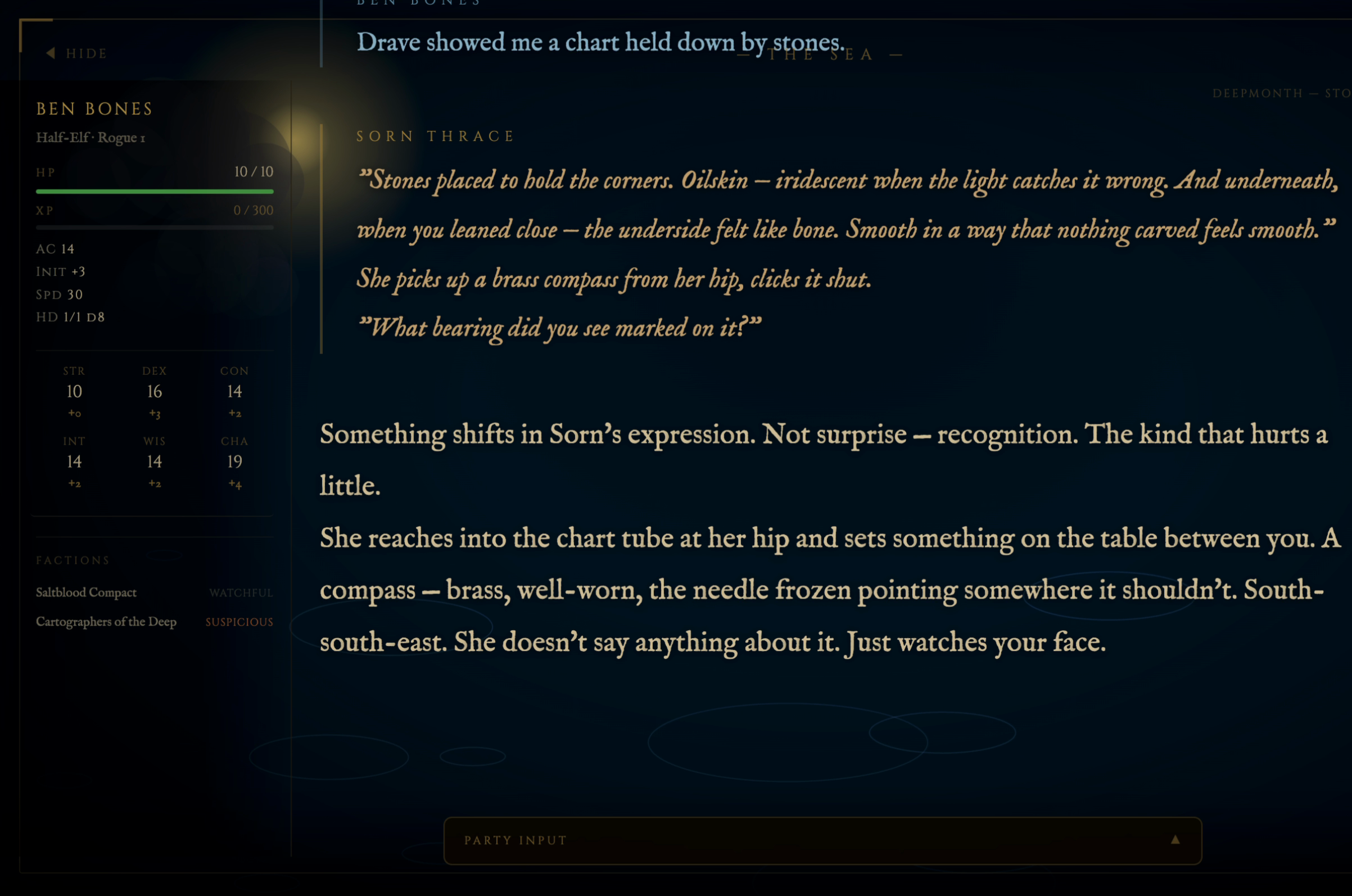
- Typewriter narration with animated scene-reactive backgrounds
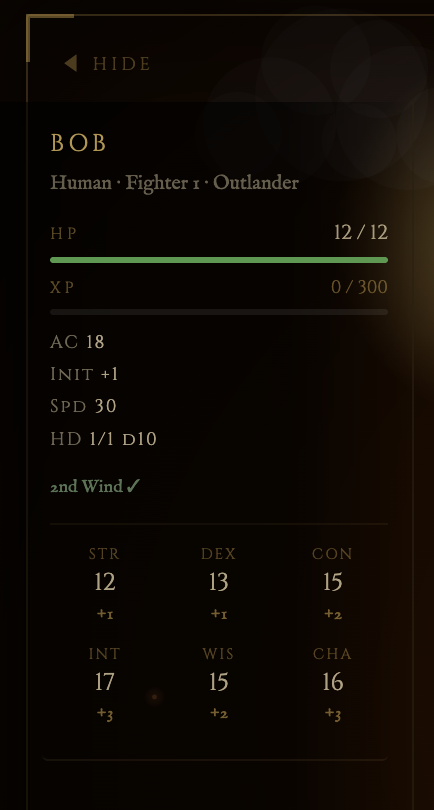
- Live party stat sidebar — HP bars, spell slots, conditions, turn order
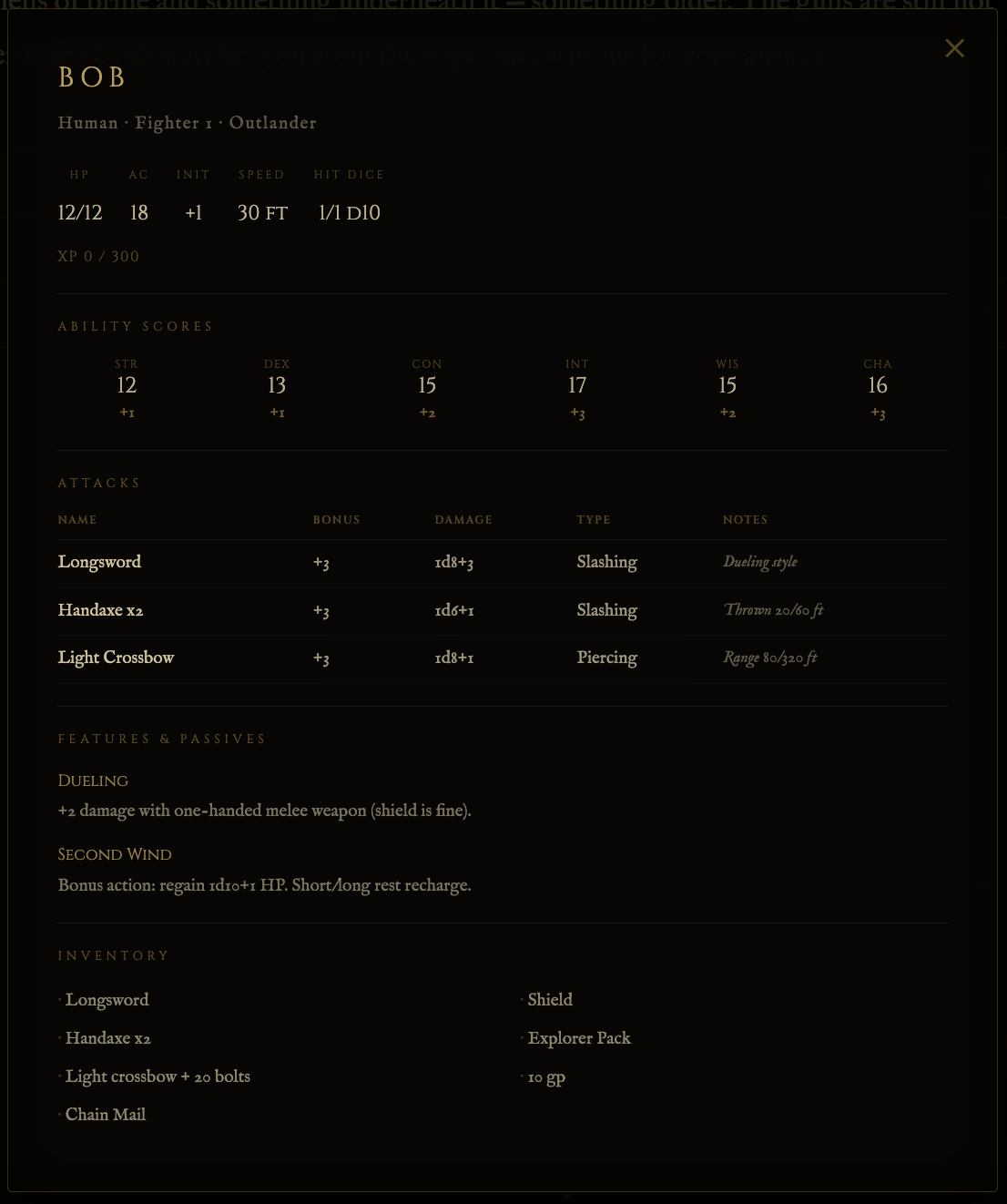
- Clickable character sheet modal — attacks, features, inventory
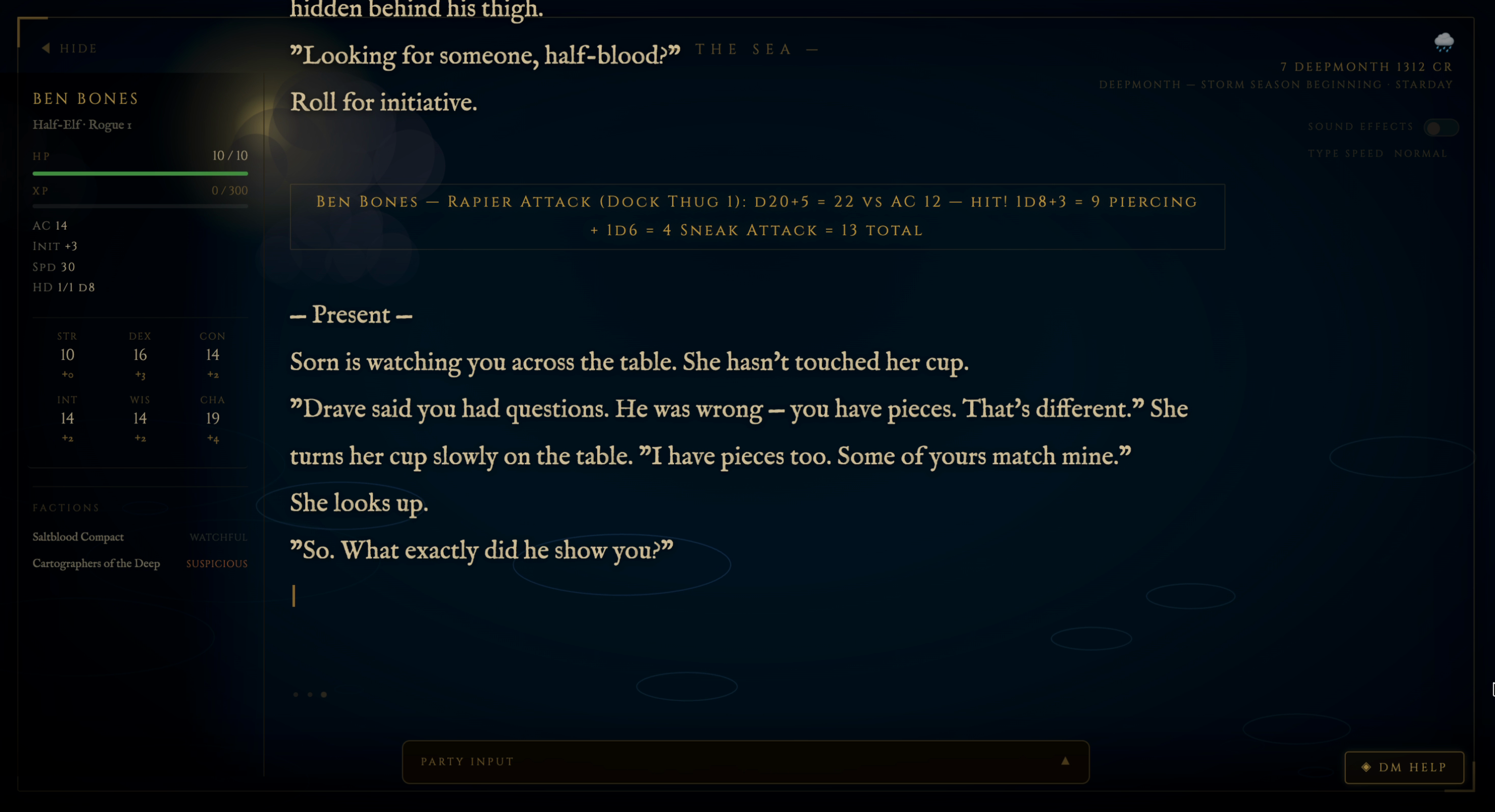
- Inline dice math with auto-detected roll types and visual icons
Measured star growth
- in 24h
- +1
- in 7 days
- +2
- in 15 days
- Collecting history
- in 1 month
- Collecting history
Net star changes over overlapping periods, not daily totals. Missing measurements are left blank. Stars measure attention, not software quality.
About
LLM-agnostic tabletop RPG Game Master framework. Runs on OpenCode, LM Studio, or any LLM service. D&D 5e included as reference system — add any TTRPG via a system module.
AIREADME.md
Originalopen-tabletop-gm
An LLM-agnostic Game Master framework for persistent tabletop RPG campaigns. Built to run on any model available through OpenCode, locally hosted models via LM Studio, or any other LLM service.
D&D 5e is included as the reference system. Any other tabletop RPG can be added by writing a system module — see SYSTEM-PORTING.md.
Using Claude? This framework was extracted from
claude-dnd-skill, a Claude Code-specific version with deeper integration. If you're running Claude Code, that repo will give you a more optimised experience.
What it is
A GM framework that offloads everything mechanical to Python so the LLM can focus on narration and judgment:
 Persistent campaigns — state, world, NPCs, and character sheets survive across sessions in plain Markdown files
 Python toolchain — dice, combat initiative, HP tracking, timed effects, conditions, calendar, campaign search; all run locally with zero LLM involvement
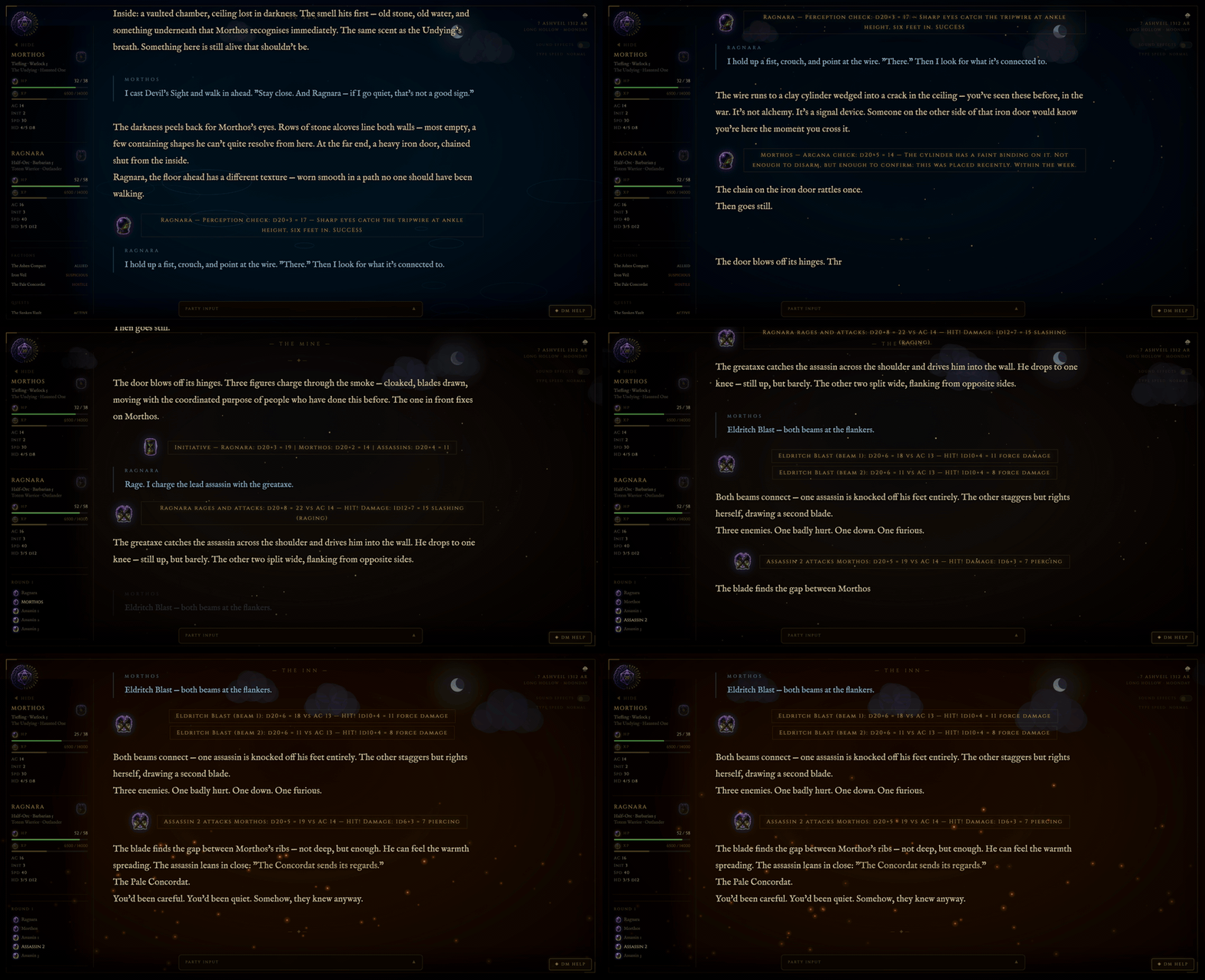
 Cinematic display companion — optional Flask web app that renders your session as a live display on any browser or TV, with a real-time stat sidebar, effect pills, and player input panel
 Four game systems in the box — D&D 5e, a PF2e-compatible module, Basic Roleplaying and a cyberpunk module compatible with Cities Without Number, each with its own rules layer and its own character sidebar; swap in any other TTRPG by writing a system module
 Campaign relationship graph — typed-edge graph alongside the markdown campaign files, with verbatim source-anchors on every edge;
scene-contextquery auto-pulled at/gm loadto surface who-knows-whom in the current scene without re-reading full NPC files; designed to hold long-session continuity when context compaction strips files out of scope. Manual + query-only in this fork (no LLM dependency); seeCHANGELOG.mdfor the why
System plugin architecture
The framework is split into two layers:
SKILL.md                    ← GM core: pacing, NPCs, improvisation, world craft
                               Never changes. Works for any game.

systems/<your-system>/
  system.md                 ← Your game's rules: dice, stats, health, resources
                               Loaded alongside SKILL.md at session start.
  ui.json                   ← Optional. Which stats the display sidebar shows.
                               Without one, the D&D layout is used as-is.
SKILL.md contains everything about being a good GM. system.md contains everything about your specific game. The GM model reads both at session start — it brings the craft, your system module brings the rules.
D&D 5e is the reference implementation. It demonstrates what a complete system module looks like: dice conventions, ability scores, spell slots, conditions, death saves, SRD lookup, and character scripts. Three more ship alongside it — a PF2e-compatible module, Basic Roleplaying and a module compatible with Cities Without Number — and between them they show what actually varies: PF2e sheets store attribute modifiers with no scores to derive from, BRP has no levels, so it has no XP bar and tracks Power Points and Sanity instead, and Cities Without Number tracks System Strain beside HP and brings its own city scenes in place of the fantasy backgrounds. None of that needed a line of display code; each system declares its own ui.json.
Building a new system module takes one file to start — a filled-in systems/TEMPLATE.md for your game. You can start with just dice resolution and health, play a session, then iterate. Full porting guide: SYSTEM-PORTING.md.
Supported games (out of the box)
| System | Module | Notes |
|---|---|---|
| D&D 5e | systems/dnd5e/ |
Full support — scripts, SRD dataset, character tools |
| PF2e-compatible (ORC) | systems/pf2e/ |
Three-action economy, four degrees of success, hero points, focus spells. Rules module + display manifest; combat.py rolls Perception initiative and resolves Strikes to four degrees |
| Basic Roleplaying (BRP) | systems/brp/ |
d100 roll-under, Power Points, optional Sanity. Rules module + display manifest; combat.py orders the fight by DEX rank |
| Compatible with Cities Without Number | systems/cwn/ |
Cyberpunk: 2d6 skill checks, d20 saves and attacks, Trauma Die, System Strain, cyberware, hacking and drones. Rules module + display manifest with its own city scenes; combat.py rolls 1d8 + DEX initiative and resolves the Trauma Die and Shock |
All four are rules modules the GM model reads, each with a display manifest so the character sidebar shows that system's own statistics — PF2e sheets store attribute modifiers with no scores to derive from, BRP has no XP bar because it has no levels, and a Cities Without Number character carries System Strain and, for a hacker, Access. A manifest can also bring its own background scenes: a Cities Without Number campaign plays on streets, rooftops and in the net instead of the inn and the crypt. None of them needs a line of display code.
combat.py and dice.py read the campaign's **System Module:** and apply
that system's rules — initiative stat and tie order, what a critical hit is,
and whether a natural 20 means anything on the roll in hand. A system they do
not know is refused rather than given D&D arithmetic; adding one is a row in a
table (see scripts/combat.md).
The PF2e and BRP modules carry ORC-licensed rules content with attribution in
their NOTICE files. The Pathfinder wordmark is Paizo's and is not licensed
by the ORC License, so that module is named and labelled "PF2e-compatible
(ORC)" — see systems/pf2e/NOTICE before renaming it.
The Cities Without Number module is written from the Cities Without Number SRD
by Kevin Crawford (Sine Nomine Publishing), which is dedicated to the public
domain under CC0 1.0. It is compatible with Cities Without Number; it is not an
official product and is not affiliated with, endorsed by or licensed by Sine
Nomine Publishing. The game's default setting is not in the SRD and is not
included, and neither is the SRD's optional magic chapter — see
systems/cwn/NOTICE.
Adding your own: Copy systems/TEMPLATE.md to systems/<your-system>/system.md and fill it in, then optionally add a ui.json for the sidebar (systems/UI-MANIFEST.md). See SYSTEM-PORTING.md for a compatibility breakdown of popular systems (Vampire: The Masquerade, Cyberpunk RED, Warhammer 40k, Call of Cthulhu).
Setup
1. Install OpenCode
opencode.ai — supports Anthropic, OpenAI, Google, Ollama, LM Studio, and any OpenAI-compatible endpoint.
2. Clone this repo
git clone https://github.com/Bobby-Gray/open-tabletop-gm
cd open-tabletop-gm
3. Install Python dependencies (display companion only)
The core scripts have no dependencies. The optional display companion requires:
cd display
pip3 install -r requirements.txt
4. Configure OpenCode
Point OpenCode at this skill by adding the following to your OpenCode config (~/.config/opencode/opencode.json):
{
  "instructions": [
    "/path/to/open-tabletop-gm/no_think.md",
    "/path/to/open-tabletop-gm/paths.md",
    "/path/to/open-tabletop-gm/SKILL-commands.md",
    "/path/to/open-tabletop-gm/SKILL-branches.md"
  ]
}
SKILL.md (the GM persona) is not loaded at startup — it is read from disk the first time a session is loaded, keeping the standing system prompt lean (~2,300 tokens). See docs/LLM-GUIDE.md for why this matters on smaller models.
For a local model via LM Studio, add your provider config:
{
  "provider": {
    "lmstudio": {
      "npm": "@ai-sdk/openai-compatible",
      "name": "LM Studio (local)",
      "options": {
        "baseURL": "http://localhost:1234/v1"
      },
      "models": {
        "your-model-id": {
          "name": "Your Model Name"
        }
      }
    }
  }
}
5. Start a campaign
/gm new <campaign-name>
The skill walks you through world creation, tone selection, and character setup. Everything is saved to plain Markdown files you can read and edit directly.
Versioning & updates
Releases are tracked in CHANGELOG.md and the current version is in VERSION. The skill follows semantic versioning — MAJOR.MINOR.PATCH. Breaking changes that require campaign-data migration bump MAJOR; new opt-in features bump MINOR; bug fixes bump PATCH.
To check for updates:
/gm update --check    # shows local vs. remote version + commit diff, no pull
/gm update            # pulls if you're behind (fast-forward only; refuses on dirty tree)
The --check output includes both sides' version strings so you can see at a glance whether you've fallen behind. After pulling, restart your GM session so new skill files load.
This project tracks behind claude-dnd-skill on Claude-specific features and runs ahead on LLM-agnostic concerns. Where the upstream version uses Haiku-backed extraction or Claude API tool calls, this fork either ports a deterministic equivalent or defers until one exists.
Other ways to play
Two sibling projects share this framework's design DNA, in case neither this nor the Claude-specific version fit how you want to set up:
- claude-dnd-skill — Claude Code-specific version with deeper tool-call integration. The right home if you're running Claude.
- neuralinitiative.ai — hosted browser version. Sign in with Google, top up a balance, play. Same model-picker philosophy, refined web GUI, no install. Costs more per session than running your own keys, in exchange for zero setup.
All three share the same maintainer and design DNA — pick the one that matches how you want to set up.
Quick Start
Improvised campaign — GM generates world and narrative arc:
/gm new my-campaign          # generates world, factions, NPCs, optional story arc
/gm character new            # create a character
/gm load my-campaign         # start a session
Structured campaign — import a pre-written module:
/gm import module.pdf my-campaign   # extract structure and build campaign files
/gm load my-campaign                # start a session — GM enforces the arc beats
Once loaded, type naturally — no /gm prefix needed. The GM interprets all input as in-game action.
Commands
| Command | What it does |
|---|---|
/gm new <name> [system] |
Create a new campaign with world generation |
/gm load <name> |
Load an existing campaign and resume |
/gm save |
Write session events to log, update state |
/gm end |
Save and close session |
/gm abandon |
Exit without saving — discards all unsaved changes from this session |
/gm list |
List all campaigns |
/gm import <filepath> [name] |
Import a pre-written campaign from PDF, markdown, DOCX, or plain text |
/gm character new |
Create a new character (uses system module for rules) |
/gm character sheet [name] |
Display character sheet |
/gm character import <name> |
Import a character from another campaign |
/gm characters |
List all characters in the global roster |
/gm level up [name] |
Level up a character (D&D / level-based systems) |
/gm npc [name] |
Generate or portray an NPC |
/gm roll <notation> |
Roll dice: d20, 2d6+3, d20 adv |
/gm combat start |
Start combat with initiative |
/gm rest short|long |
Short or long rest |
/gm recap |
In-character session recap |
/gm world |
Display world notes |
/gm quests |
Display active quests and open threads |
/gm tutor on|off |
Toggle learning mode hints |
/gm arc [status|advance|revise|view] |
Manage the campaign narrative arc |
/gm display on [--lan] |
Start the cinematic display companion (optionally in LAN mode) |
/gm display off |
Stop the display companion |
/gm path [<new>|reset] |
View or relocate campaign storage via GM_CAMPAIGN_ROOT |
/gm update [--check] |
Pull the latest skill changes from origin/main (refuses on dirty tree, fast-forward only) |
/gm graph init |
Initialize the campaign relationship graph — gm_graph.py init creates the empty graph, then the GM proposes seed nodes + edges and asks for approval |
/gm graph scene-context --place <id> [--present id1,id2] |
Focused subgraph for the current scene; primary in-session query |
/gm graph add-edge --from <id> --to <id> --type T --since N |
Record a relationship shift mid-session |
/gm graph close-edge --id <id> --at-session N |
Mark an edge as ended (alliance broke, NPC moved away, etc.) |
Narrative arc system
Both campaign modes use the same six-beat three-act structure tracked in state.md. Arc type determines how it's populated.
Improvised (type: dynamic)
Generated at /gm new from the world's threat, factions, and setting. Beats are defined by what_changes — the narrative consequence that must land — not by a specific scene or event. The GM stays flexible on how each beat arrives while committing to that it must.
| Act | Beat | What it marks |
|---|---|---|
| 1 | Inciting Incident | The threat becomes personal |
| 1 | Complication | The problem is bigger than it first appeared |
| 2 | Midpoint Shift | What the party thought they were doing changes |
| 2 | All Is Lost | A genuine setback — something fails or collapses |
| 3 | Final Confrontation | The decisive moment the campaign turns on |
| 3 | Resolution | What's different about the world and characters after |
Arc beats are tracked at /gm end and marked complete via /gm arc advance. When a player choice redirects the story, /gm arc revise updates outstanding beats to fit the new direction. When all six beats resolve, a new arc can be generated from the consequences of the first — same world, new story question.
Structured (type: structured)
Populated by /gm import from the source material. Acts contain chapter-level key beats, telegraph scenes that set up each beat naturally, and branching notes. The GM telegraphs before delivering any required beat and steers with world pressure rather than hard walls when players drift.
Both arc types are fully compatible with all system modules and the display companion.
Display companion
An optional Flask web app that renders your session as a cinematic full-screen display — stat sidebar, live effect tracking, player input panel, animated backgrounds.
bash display/start-display.sh          # localhost, HTTP (default)
bash display/start-display.sh --lan    # LAN mode (phones, tablets, TV), HTTP
bash display/start-display.sh --lan --tls  # LAN mode, HTTPS (public/untrusted networks)
open http://localhost:5001
Runs entirely independently of the LLM. If the display isn't running, all scripts fail silently — nothing breaks.
Screenshots below show the D&D 5e system module (included). The display companion works identically with any system module.
| Stat sidebar | Character sheet |
|---|---|
 |
 |
Features at a glance
- Typewriter narration with animated scene-reactive backgrounds
- Live party stat sidebar — HP bars, spell slots, conditions, turn order
- Clickable character sheet modal — attacks, features, inventory
 Inline dice math with auto-detected roll types and visual icons
 LAN party support — every device in the room sees the same display; TLS optional
- Dynamic sky canvas — live sun arc, moon, stars, and weather-reactive clouds
Viewing options
| Option | How |
|---|---|
| TV — Cast tab | Chrome → three-dot menu → Cast → Cast tab; select your Chromecast or smart TV |
| TV — Screen mirror | macOS: Control Centre → Screen Mirroring → Apple TV / AirPlay receiver |
| iPad / tablet | Start with --lan, open http://<your-ip>:5001 in Safari or Chrome; works in landscape |
| Second monitor | Open http://localhost:5001 in a browser window and drag it to the second display |
TLS / HTTPS (optional)
HTTP is the default. Use --tls only on public or untrusted networks. When passed:
- A self-signed cert is auto-generated if
cert.pemis not present - A plain HTTP server starts on
:8080to servecert.pemfor download - Per-platform install instructions are printed to the terminal (iOS, Android, Mac)
For iOS: open http://<your-ip>:8080/cert.pem in Safari → tap Allow → Settings → General → VPN & Device Management → install profile → Certificate Trust Settings → enable full trust.
Player input from the companion UI
Players open the companion on their phone browser. The Party Input panel lets each player:
- Stage an action — type it and hit Stage. It appears in the panel visible to everyone.
- Mark Ready — confirms the action is final.
- Skip — passes the turn without typing.
When a submission is picked up, three pulsing dots confirm the GM received it. If the player's device has not been seen before, the GM's screen shows a one-time approval card — approved devices are remembered across restarts.
Staged input text is cached in the browser — if the page reloads before the GM picks it up, the text is restored automatically.
Scene detection
The server scans narration text for keywords and crossfades the background gradient to match the current environment. Scenes change automatically as the story moves.
| Scene | Trigger keywords | Particles |
|---|---|---|
| Tavern | inn, hearth, ale, tallow, barkeep | embers |
| Dungeon | corridor, torch, portcullis, dank | dust |
| Ocean / Docks | dock, harbour, wave, tide, ship | ripples |
| Forest | tree, canopy, moss, thicket, grove | leaves |
| Crypt | tomb, undead, skeleton, burial | smoke |
| Arcane | ritual, rune, sigil, incantation | sparks |
| Mountain | glacier, frost, blizzard, ridge | snow |
| Cave | stalactite, grotto, echo, drip | mist |
| Night | midnight, moon, constellation | stars |
| City / Town | market, cobble, district, crowd | rain |
| + 7 more | mine, castle, ruins, desert, fire, temple, swamp | — |
These are the built-in fantasy scenes. A system can declare its own set in its ui.json, and its campaigns then use only those: the Cities Without Number module ships nine — street, rooftop, club, corporate tower, clinic, market, apartment block, safehouse and the net — and a fantasy campaign never sees them.
Scene transitions crossfade over ~2.5 seconds. Detection runs over a 20-chunk rolling window, and a challenger has to beat the scene already on screen by 2 points to take the room, with the incumbent carrying a bonus of 1 so it can hold its ground once its own keywords scroll out of the window. Before that margin existed a single keyword was enough to change the background, and two plausible scenes would trade it back and forth on a one-point edge. Keywords are matched as whole words, so ward no longer fires inside "deputy warden".
Dynamic sky canvas
A canvas layer above the scene background renders a live sky driven by world_time data:
- Time of day — sun arcs from dawn through midday to dusk; crescent moon and stars at night; orange horizon at twilight
- Weather — calm: light clouds; overcast: heavy dark clouds; rainy: dense cover, muted palette; stormy: near-black sky
- Clouds — five objects each built from overlapping circles; drift slowly and wrap
Push world time after session load and after any rest or time advance:
python3 display/push_stats.py --world-time \
  '{"date":"Day 7","day_name":"Starday","time":"morning","season":"Winter","weather":"overcast"}'
Valid time values: dawn, morning, midday, afternoon, evening, dusk, night
Valid weather values: calm, clear, overcast, rainy, stormy
Narration audio
Every narrator and NPC block has a speaker button. With a Gemini key configured
it plays Gemini Flash TTS, cached on disk so a replay costs nothing; with no key
it speaks through the browser's own voice, picked by the language the block is
written in. See docs/SKILL-tts.md.
Sound effects
Narration text is scanned server-side for 11 SFX categories. Matches trigger a synthesized WAV played via Web Audio API on any device with the tab open — no server audio output.
impact · sword · arrow · shout · thud · magic · coins · door · low_hum · fire · breath
SFX synthesis requires numpy. If numpy is not installed the feature degrades silently. Toggle via the Sound Effects switch in the top-right of the display.
Character sheet modal
Click or tap any character card in the sidebar to open a full character sheet — attacks, features, and inventory. Works on desktop and on phones/tablets connected via LAN.
Include a sheet field when pushing stats to populate the modal:
python3 display/push_stats.py --replace-players --json '{
  "players": [{
    "name": "Aldric",
    "hp": {"current": 14, "max": 18},
    "sheet": {
      "attacks": [{"name": "Longsword", "bonus": "+5", "damage": "1d8+3", "type": "Slashing"}],
      "features": [{"name": "Second Wind", "text": "Bonus action: regain HP. Short rest recharge."}],
      "inventory": ["Longsword", "Chain Mail", "Shield", "15 gp"]
    }
  }]
}'
Close with Esc, clicking outside the panel, or the ✕ button.
Session replay buffer
The server buffers the last 60 narration chunks to disk (text_log.json). Reconnecting browsers — Chromecast drops, tab refreshes — replay the full session history automatically. No narration is lost on reconnect.
GM Help button
A ◈ GM Help button sits in the bottom-right corner of the display. Click it and within a few seconds a contextual hint is generated from the current scene state and pushed to the display — no CLI command needed. Hint blocks are collapsed by default; click to expand. Warnings use an amber border to flag irreversible choices.
See display/README.md for full documentation.
File layout
open-tabletop-gm/
  SKILL.md              ← GM persona and craft (read at session load, not startup)
  SKILL-commands.md     ← command signature reference (always in context)
  SKILL-branches.md     ← branch router: maps each command to its procedure (always in context)
  no_think.md           ← suppresses chain-of-thought preamble on local models
  paths.md              ← absolute path constants for this installation
  SYSTEM-PORTING.md     ← guide for adding new game systems
  systems/
    dnd5e/              ← D&D 5e reference implementation
      system.md         ← D&D 5e rules context
      ability-scores.py
      character.py
      lookup.py
      data/             ← bundled SRD dataset
    TEMPLATE.md         ← scaffold for building a new system module
  scripts/              ← universal scripts (dice, combat, tracker, calendar, search)
    startup.md          ← display push syntax (loaded only when display is ON at session start)
    combat.md           ← combat script syntax (loaded only at /gm combat start)
    general.md          ← dice, calendar, search syntax (loaded on demand)
    character.md        ← character creation script syntax (loaded on demand)
  display/              ← cinematic display companion (Flask)
  templates/            ← blank campaign file templates
  probe/                ← model probe tool for testing instruction-following
    probe.py            ← runs 5 test cases against any OpenAI-compatible endpoint
    run-openrouter.sh   ← sequential runner for OpenRouter free/paid models
Campaign data lives outside the repo:
~/.local/share/open-tabletop-gm/campaigns/<name>/
  state.md / world.md / npcs.md / session-log.md / characters/
Performance on local / smaller models
The Python toolchain offloads everything mechanical — dice, HP math, initiative, timed effects, conditions — so the LLM only handles narration and judgment calls. This means smaller models remain functional even when creative output is limited.
The main constraint for local models is agentic tool-call depth. open-tabletop-gm is not a chatbot — it executes sequences of tool calls (bash, file reads) before responding. Models below ~70B parameters degrade after 4–5 sequential tool calls, drifting from their instructions toward the most recently read content. The routing architecture in SKILL-branches.md reduces the standing system prompt to ~2,300 tokens (down from ~18,000) to mitigate this, but it does not eliminate it at 24B and below.
Practical hardware guidance:
- MacBook Air / 24GB unified memory: Local inference below 70B is unreliable for session load. Use OpenRouter instead — 10 models tested, all scored cleanly, cost is ~$0.01–0.05/session on paid endpoints.
- 64GB+ machine (M3 Max, M4 Max, or equivalent): Local inference becomes viable at 70B. Qwen3-70B is the recommended starting point.
- Multi-GPU workstation: All local models viable.
See docs/LLM-GUIDE.md for full probe results, token usage data, and hardware recommendations.
See SYSTEM-PORTING.md — What to expect from smaller/local models for details.
Looking for the Claude-optimised version?
If you're running Claude Code, claude-dnd-skill is the dedicated version with model routing, deeper tool integration, and features built specifically for Claude's capabilities.
Contributing
System modules for new games are the most valuable contribution. If you've built and tested a module for a system not listed here, a PR adding systems/<your-system>/ is welcome. Include at minimum a filled-in system.md and a note in the PR about what you tested and how well it worked.
See CONTRIBUTING.md for the full guide and the contribution licensing handshake.
License
AGPL-3.0-or-later. Copyright (c) 2026 Neural Initiative LLC.
Self-hosting and modification are explicitly welcome — fork, run, change as you like. The AGPL specifically protects against re-hosting this as a closed-source SaaS without sharing modifications back. For most users this distinction never matters.