
Bakumon/StatusLayoutManager
Bakumon/StatusLayoutManager has 752 GitHub stars and 108 forks. GitHot measured 0 stars in 24 hours and 0 in 7 days. Last checked 2026-11-24 03:19 UTC. Last push 2021-07-26.
Measured star growth
- in 24h
- 0
- in 7 days
- 0
- in 15 days
- Collecting history
- in 1 month
- Collecting history
Net star changes over overlapping periods, not daily totals. Missing measurements are left blank. Stars measure attention, not software quality.
About
🐱 Switch between layouts for different data states, including loading, empty, and error states. Customize the state layouts.
Developer ToolsREADME_EN.md
OriginalStatusLayoutManager


StatusLayoutManager is being sponsored by the following tool; please help to support us by taking a look and signing up to a free trial

中文版 | English Version
Switch between different data state layouts, including loading medium and empty data and error status.
Feature
- Does not increase the number of layout layers
- Provide a configurable default state layout
- Layout lazy loading
- Retry button unified callback
- Support custom state layout
Demo
Download demo

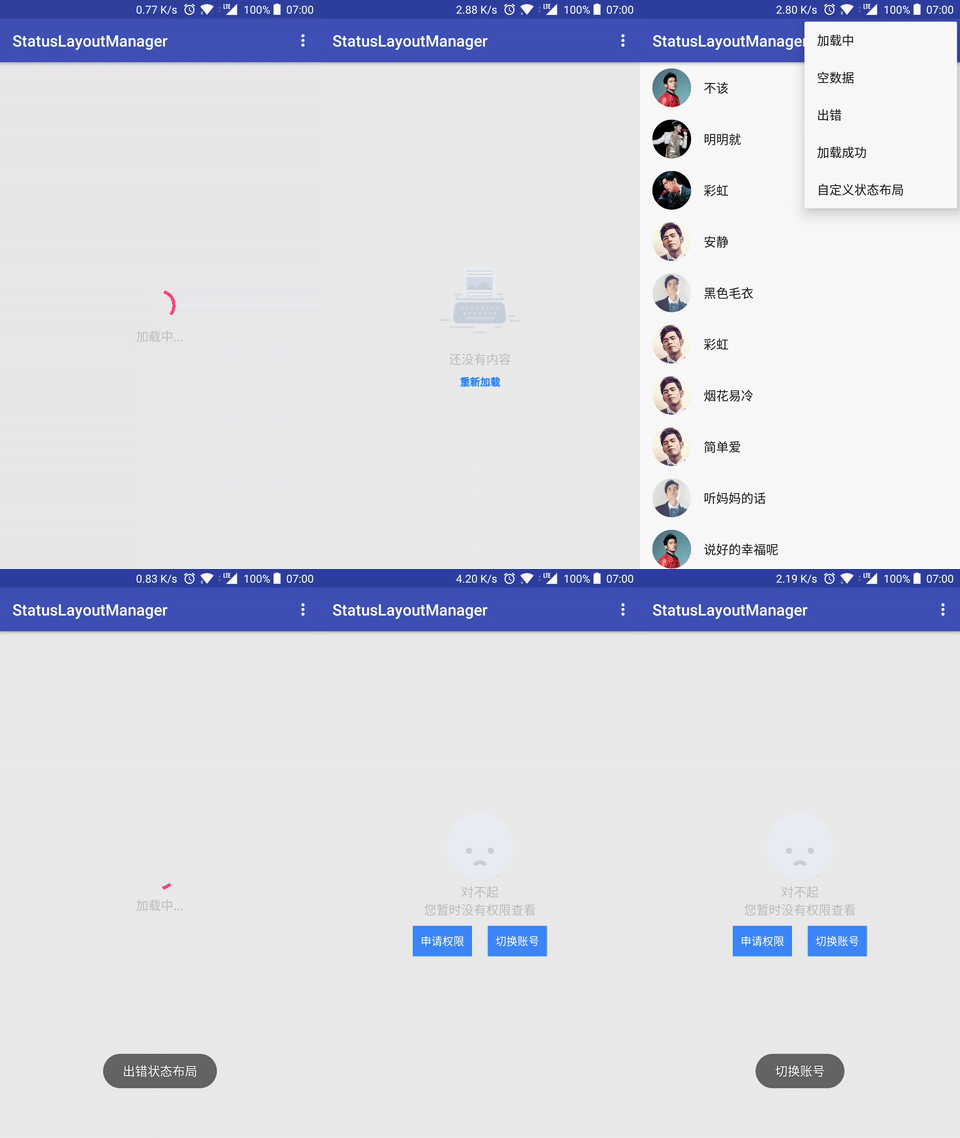
Download
- project
build.gradle:
allprojects {
    repositories {
	    ...
	    maven { url 'https://jitpack.io' }
    }
}
- app
build.gradle:
dependencies {
    implementation 'com.github.Bakumon:StatusLayoutManager:1.0.4'
}
Usage & Examples
Getting started
Create a StatusLayoutManager object with StatusLayoutManager#Builder:
statusLayoutManager = new StatusLayoutManager.Builder(recyclerView)
    .build();
Display the corresponding status layout at the right time:
// Loading
statusLayoutManager.showLoadingLayout();
// Empty data
statusLayoutManager.showEmptyLayout();
// Error
statusLayoutManager.showErrorLayout();
// success
statusLayoutManager.showSuccessLayout();
The above can satisfy most scenarios.
Configuring the default layout
The following APIs provide a way to modify the default layout.
statusLayoutManager = new StatusLayoutManager.Builder(recyclerView)

    // Set the prompt text for the layout in the default load
    .setDefaultLoadingText("loading...")

    // Set the prompt text for the default empty data layout
    .setDefaultEmptyText("Empty")
    // Set the image of the default empty data layout
    .setDefaultEmptyImg(R.mipmap.ic_launcher)
    // Set the text of the default empty data layout retry button
    .setDefaultEmptyRetryText("retry")
    // Set the text color of the default empty data layout retry button
    .setDefaultEmptyRetryTextColor(getResources().getColor(R.color.colorAccent))
    // Set the default empty data layout retry button to display
    .setDefaultEmptyRetryVisible(false)

    // Set the prompt text for the default error layout
    .setDefaultErrorText(R.string.app_name)
    // Set the image of the default error layout
    .setDefaultErrorImg(R.mipmap.ic_launcher)
    // Set the text of the default error layout retry button
    .setDefaultErrorRetryText("Reload")
    // Set the text color of the default error layout retry button
    .setDefaultErrorRetryTextColor(getResources().getColor(R.color.colorPrimaryDark))
    // Set default error layout retry button to display
    .setDefaultErrorRetryVisible(true)

    // Set the default layout background, including loading medium and empty data and error layout
    .setDefaultLayoutsBackgroundColor(Color.WHITE)
    .build();
Custom default layout
statusLayoutManager = new StatusLayoutManager.Builder(recyclerView)
    // Set the layout in load
    .setLoadingLayout(inflate(R.layout.layout_loading))
    // Set empty data layout
    .setEmptyLayout(inflate(R.layout.layout_empty))
    // Set the error layout
    .setErrorLayout(inflate(R.layout.layout_error))

    // Set the layout in load
    .setLoadingLayout(R.layout.layout_loading)
    // Set empty data layout
    .setEmptyLayout(R.layout.layout_empty)
    // Set the error layout
    .setErrorLayout(R.layout.layout_error)

    // Set empty data layout retry button ID
    .setEmptyRetryID(R.id.tv_empty)
    // Set error layout retry button ID
    .setErrorRetryID(R.id.tv_error)
    .build();
Show custom state layout
statusLayoutManager#showCustomLayout()There are several overloading methods. The following takes the most parameters as an example:
/**
 * Show custom state layout
 *
 * @param customLayoutID Custom layout ID
 * @param clickViewID        Retry button ID
 * @return Custom state layout
 */
statusLayoutManager.showCustomLayout(R.layout.layout_custome, R.id.tv_customer, R.id.tv_customer1);
The clickViewID parameter indicates the id of the View to which you want to add a click event.
onClick listener
statusLayoutManager = new StatusLayoutManager.Builder(recyclerView)

    // Set retry event listener
    .setOnStatusLayoutClickListener(new OnStatusLayoutClickListener() {
            @Override
            public void onEmptyChildClick(View view) {

            }

            @Override
            public void onErrorChildClick(View view) {

            }

            @Override
            public void onCustomerChildClick(View view) {

            }
        }
    })
    .build();
You can also use the default implementation class of OnStatusLayoutClickListener , like this:
statusLayoutManager = new StatusLayoutManager.Builder(recyclerView)
    // Set retry event listener
    .setOnStatusChildClickListener(new DefaultOnStatusChildClickListener() {
        @Override
        public void onEmptyChildClick(View view) {

        }

        @Override
        public void onErrorChildClick(View view) {

        }
    })
    .build();
Known issue
1. StatusLayoutManager#Builder(View view):parameter requirements
If you use android.support.v4.widget.SwipeRefreshLayout, it is recommended to pass the SwipeRefreshLayout object directly as the view to be replaced to the Builder constructor instead of its child view.
License
Sponsor

Explore related projects
Loading…