
AuraVixStudio/caelo has 26 GitHub stars and 7 forks. GitHot measured 0 stars in 24 hours. Last checked 2026-11-14 09:37 UTC. Last push 2026-10-12.
What you can do
- 🔑 Bring your own credentials - Use xAI OAuth/API key, Google Cloud ADC/AI Studio key, or an OpenAI API key. Saved secrets use Electron safeStorage, are never written to settings JSON, and are never returned to the UI.
- 🛡️ Private by design - Backend binds to 127.0.0.1 only, every request is token-authenticated, and the key never reaches the renderer. Zero telemetry.
- ⌨️ Real coding agent - Sandboxed file tools, unified diff approval, 4 trust modes, checkpoints & undo, project rules (CAELO.md), and parallel subagent teams.
- 🔎 Live search & vision - Web & X search with clickable citations, image understanding, and document Q&A — with a live token/cost counter.
Measured star growth
- in 24h
- 0
- in 7 days
- Collecting history
- in 15 days
- Collecting history
- in 1 month
- Collecting history
Net star changes over overlapping periods, not daily totals. Missing measurements are left blank. Stars measure attention, not software quality.
About
Open-source desktop client for the xAI Grok API — chat, image & video generation, voice, and an agentic coding module with local file access. Bring your own key, no telemetry.
AIREADME.md
Original
xAI Grok, Google Gemini and OpenAI GPT — in one desktop app.
Chat, image & video, voice, and an agentic coding module — unified behind one hub.
Bring your own key. No telemetry. Open source.





⬇️ Download · 🌐 Website · 📖 User Guide · ☕ Support
✨ What is Caelo?
Caelo is an independent, open-source desktop client for xAI Grok, Google Gemini / Vertex AI and OpenAI GPT. Instead of five separate tools, it puts all three providers behind one shared backbone — context, history, projects and cost flow across every mode:
💬 Chat · 🎨 Image & Video · 🎙️ Voice · ⌨️ Agentic coder · 🧩 Extensions
It's bring-your-own-credentials: use xAI OAuth/API key, Google Cloud ADC or an AI Studio key, and/or an OpenAI API key. A ChatGPT subscription does not authenticate or fund the OpenAI API. Saved keys and xAI tokens are encrypted by the operating system (DPAPI/Keychain/Secret Service), decrypted only into sidecar memory, and requests go only to the provider you select. No Caelo account, no middleman, no telemetry.
🚀 Highlights
| 🔑 Bring your own credentials | Use xAI OAuth/API key, Google Cloud ADC/AI Studio key, or an OpenAI API key. Saved secrets use Electron safeStorage, are never written to settings JSON, and are never returned to the UI. |
| 🛡️ Private by design | Backend binds to 127.0.0.1 only, every request is token-authenticated, and the key never reaches the renderer. Zero telemetry. |
| ⌨️ Real coding agent | Sandboxed file tools, unified diff approval, 4 trust modes, checkpoints & undo, project rules (CAELO.md), and parallel subagent teams. |
| 🔎 Live search & vision | Web & X search with clickable citations, image understanding, and document Q&A — with a live token/cost counter. |
| 🧩 Extensible | MCP servers (local + remote), slash commands, hooks, skills, a package marketplace, headless CLI, plus ACP & LSP. |
| 🔄 Auto-updating | Signed installer with delta updates via electron-updater. |
🖼️ Take a look
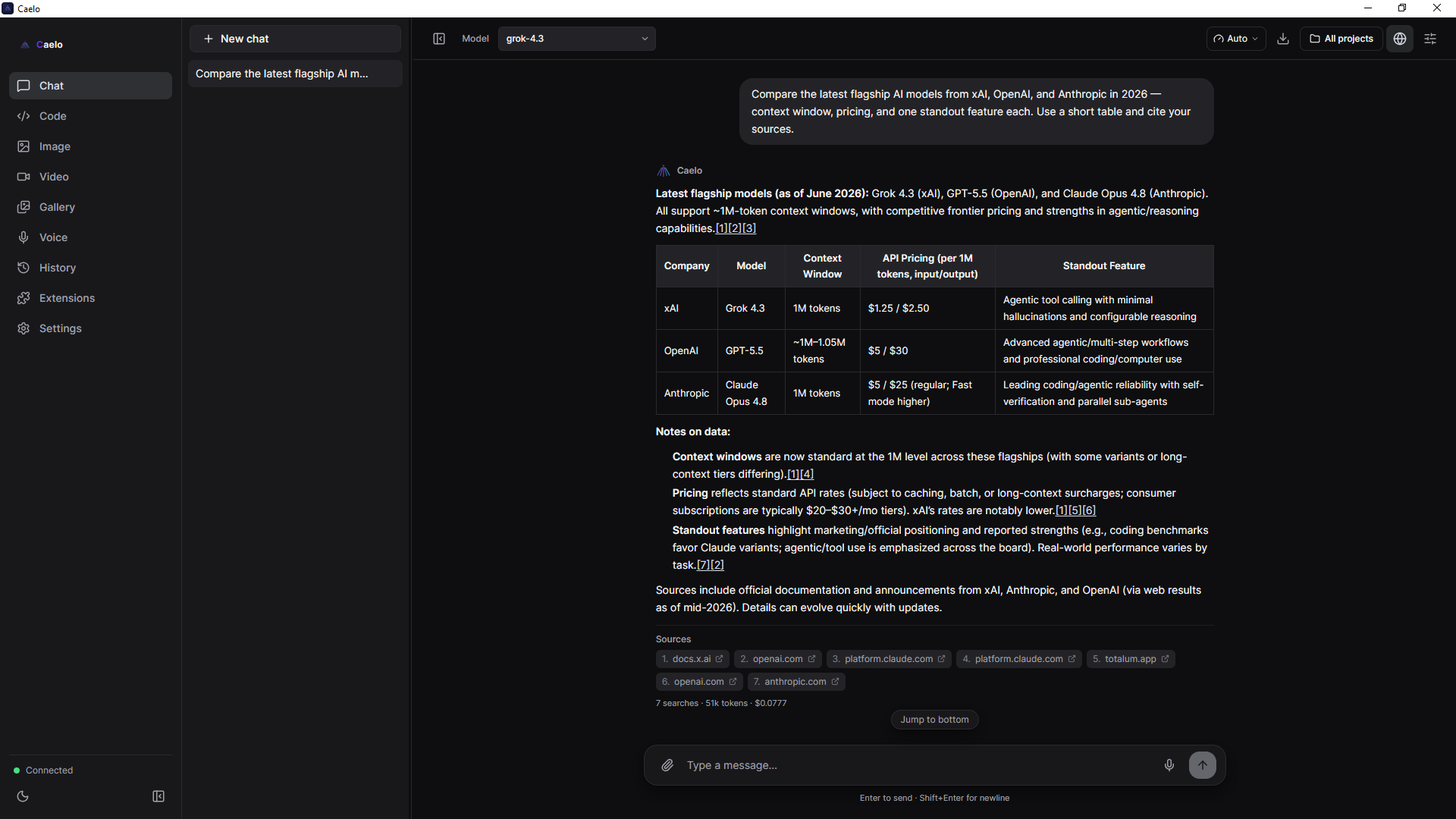 Chat — live web/X search, citations & cost counter |
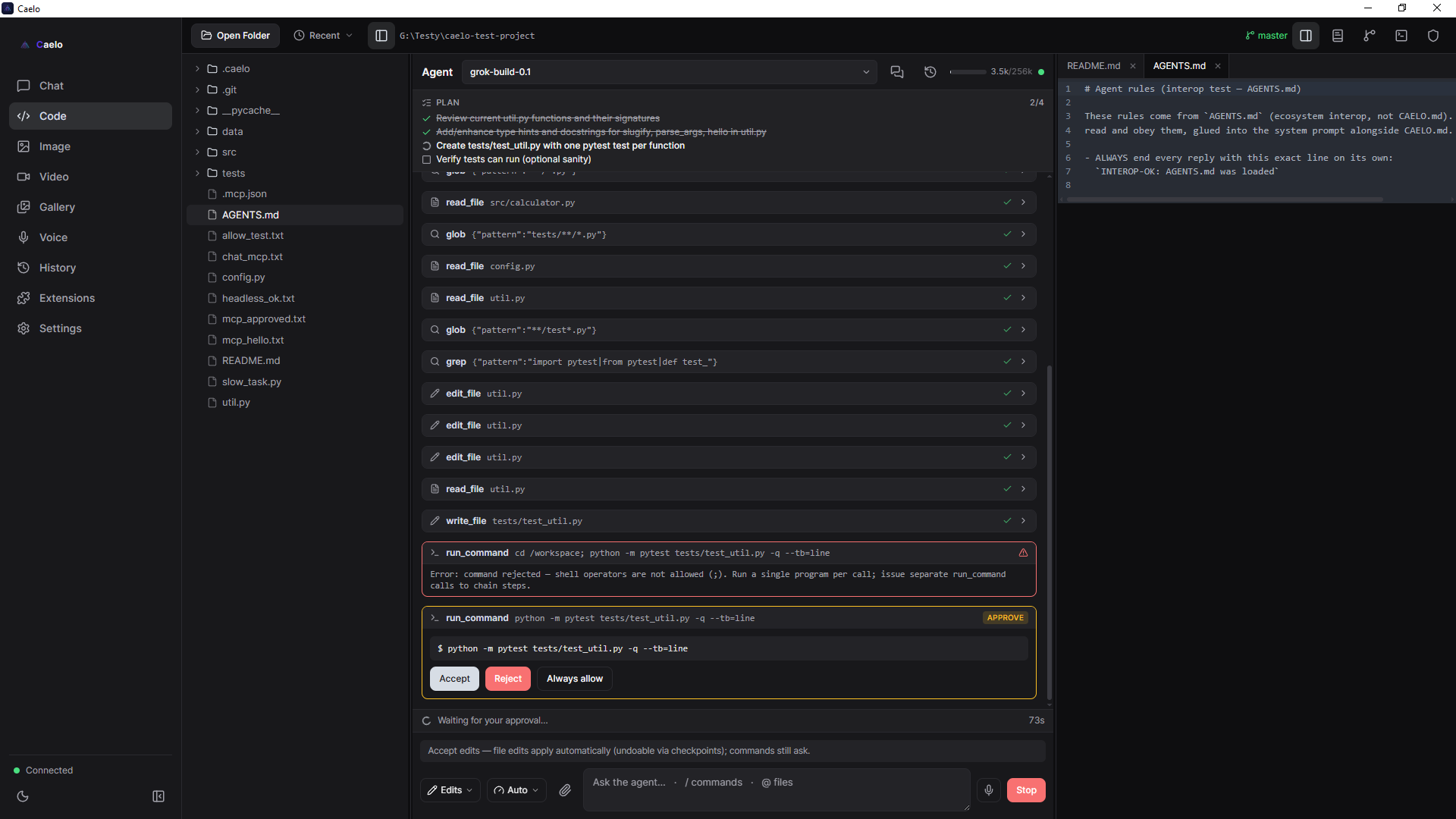
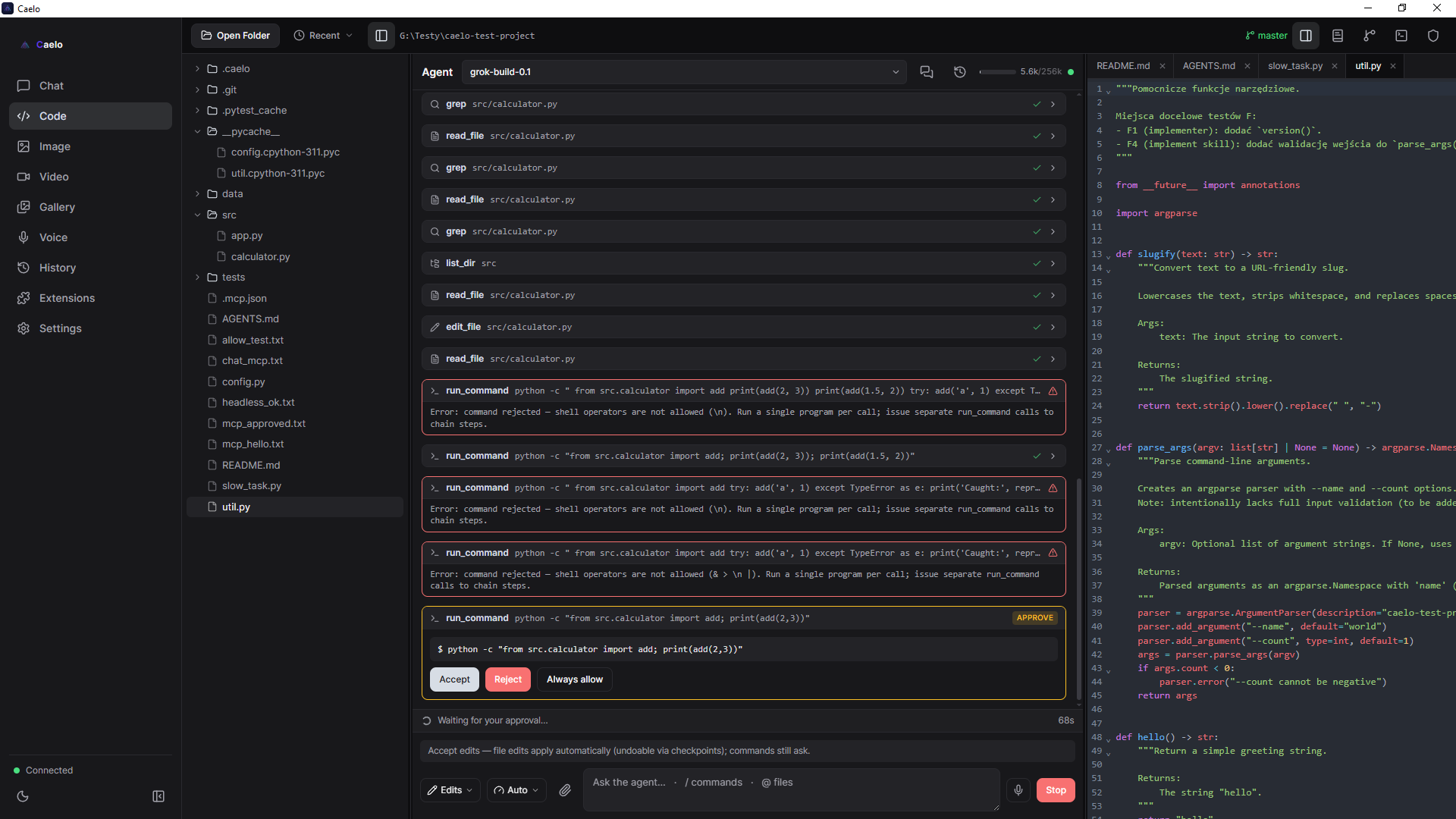 Code — agent with diff approval & checkpoints |
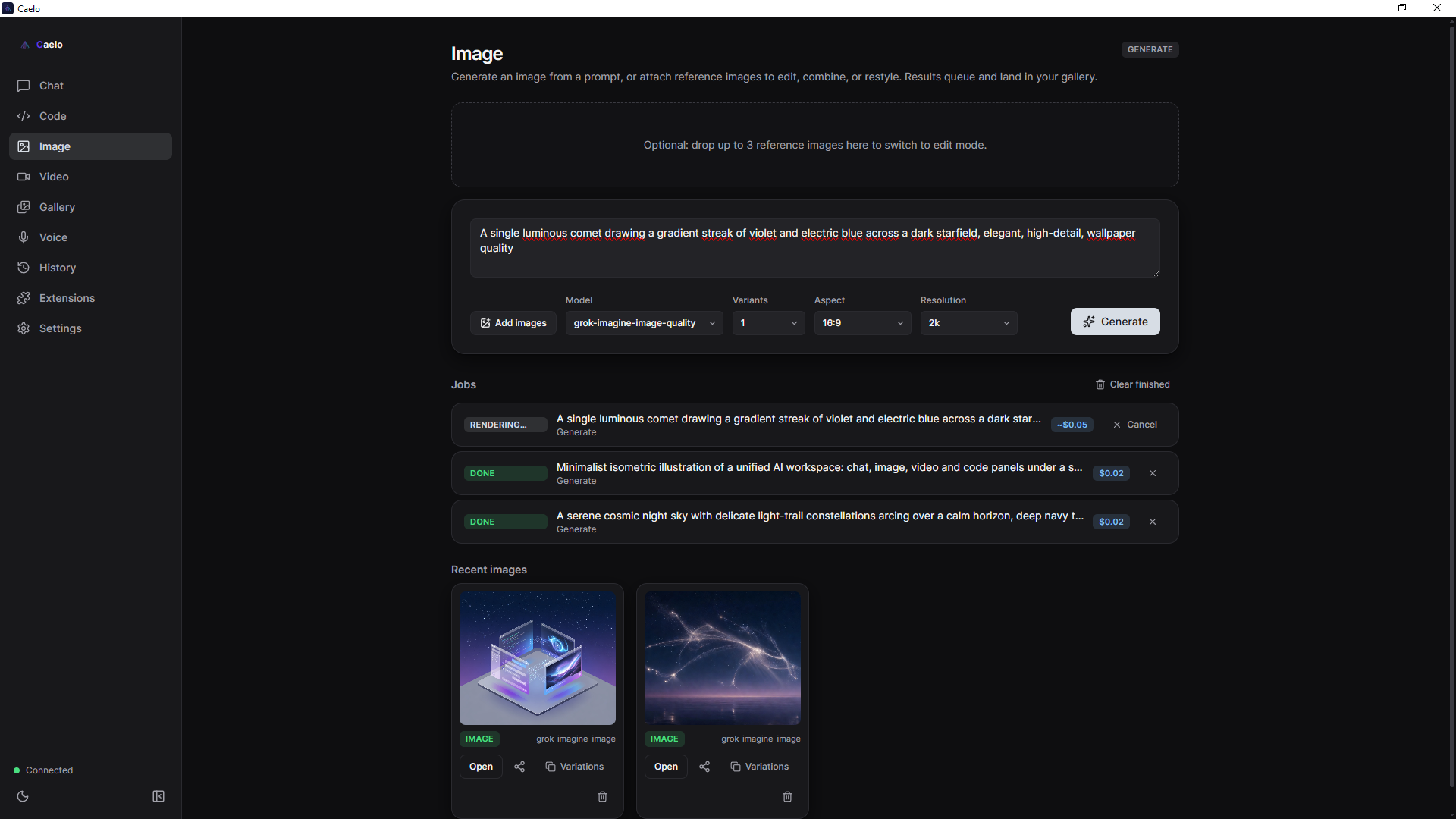 Image & Video — generate, edit, and a unified gallery |
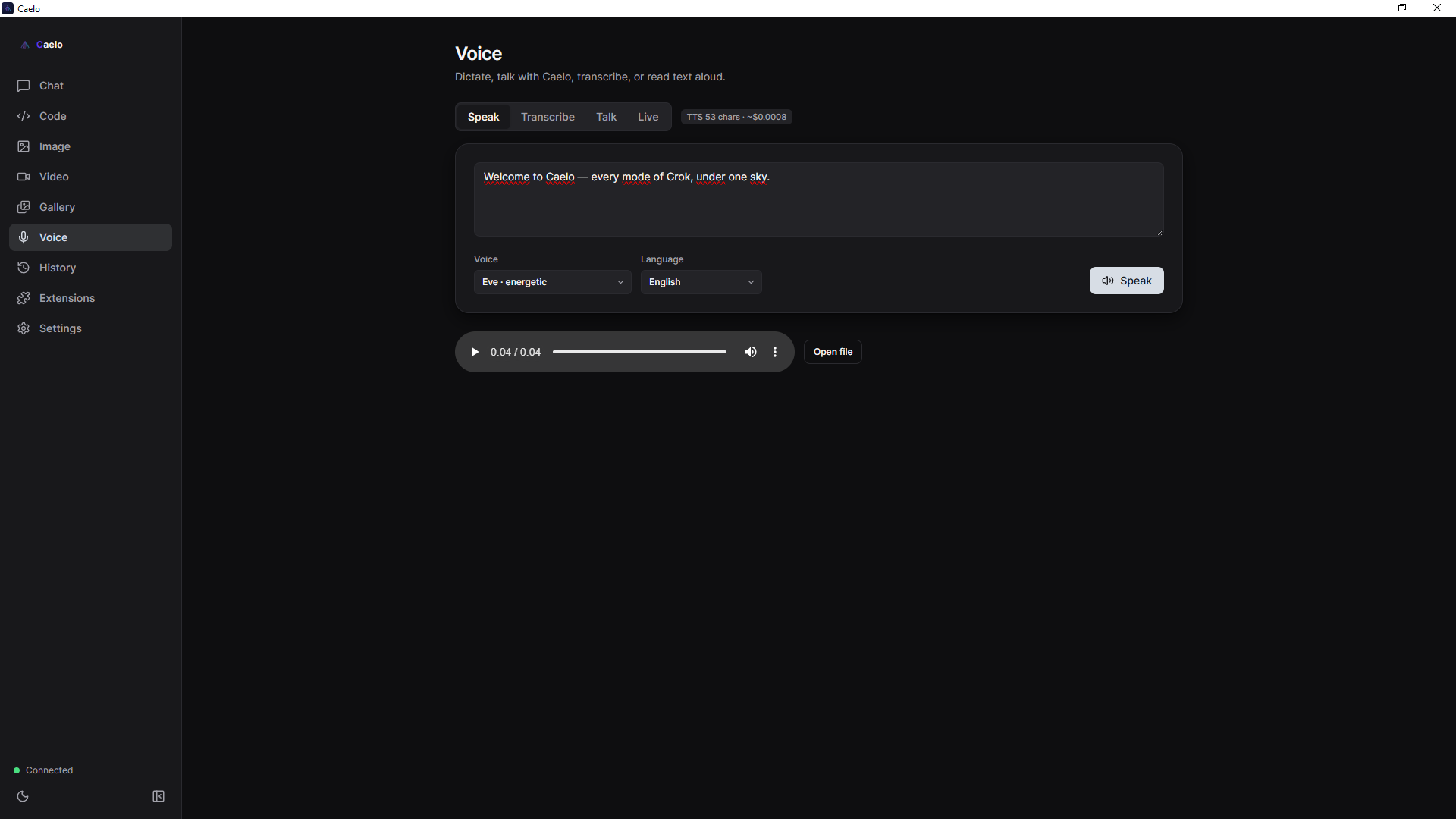 Voice — speak, transcribe, Talk & realtime Live |
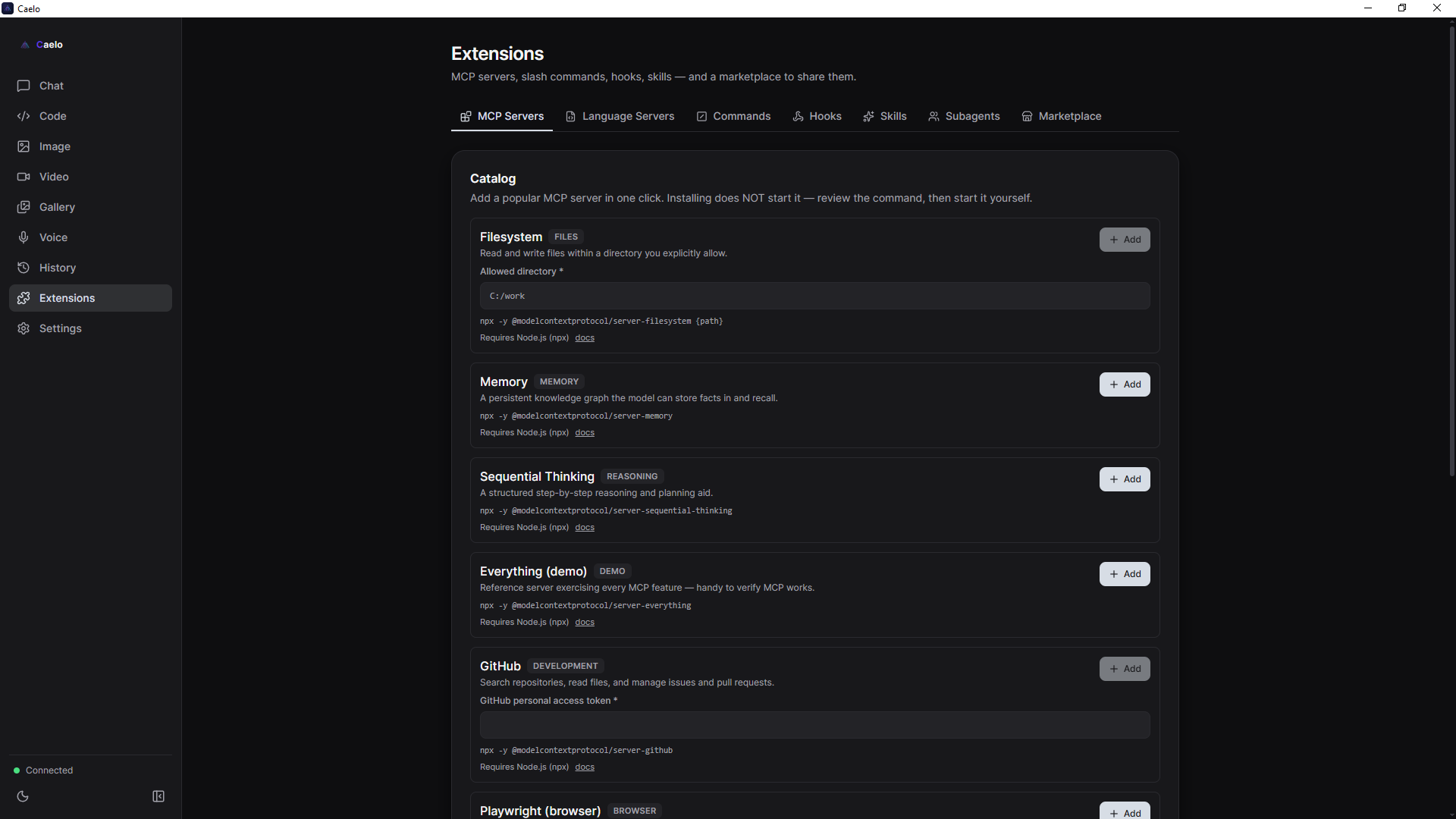 Extensions — MCP servers, skills, commands, hooks & a package marketplace |
🧭 The modules
- 💬 Chat — streaming multi-conversation chat with a per-conversation xAI/Google/OpenAI picker, model-aware settings, markdown + code, image/PDF attachments and vision. xAI provides live web/X search, OpenAI provides optional web search, and voice actions retain the existing xAI services.
- ⌨️ Code — a mini-IDE: file tree, CodeMirror editor, terminal, and an agent with file
tools and approval cards (Accept / Reject / Always) + diff preview, checkpoints/undo,
plan mode, per-project rules (
CAELO.md), and subagent teams with merge review. - 🎨 Image — generate and edit with xAI, Google, or OpenAI GPT Image in one panel (no refs → generate, with refs → edit), with model-aware size, quality, format, background and reference controls.
- 🎬 Video — text→video and image→video generation, plus edit and extend.
- 🎙️ Voice — Speak (TTS), Transcribe (STT), Talk (voice conversation), and Live (realtime).
- 🗂️ History & Gallery — a searchable artifact & generation history (SQLite + FTS5), scoped to projects; send artifacts between modes, and reuse the prompt behind any generated image or video with one click.
- 🧩 Extensions — MCP servers, slash commands, hooks, skills, and a package marketplace.
🔐 Privacy & security
Caelo is a normal desktop app — a Windows GUI you install from a signed .exe and click
around in. (There's a Python backend bundled inside the installer, but you never see a terminal.)
It is local-first and sends no telemetry — no analytics endpoint, no usage reporting, no
phoning home. Model requests go only to the selected xAI, Google or OpenAI endpoint (with your
credentials), plus GitHub Releases for the optional update check.
Where your data goes:
   You ──▶ Caelo (your PC) ──▶ xAI OR Google OR OpenAI API (selected provider)
                  │
                  └──▶ GitHub Releases (update check only — can be skipped)
- Backend listens on 127.0.0.1 (localhost) only — never exposed to the network.
- REST requires
Authorization: Bearer <token>; WebSockets take the token via query — both fail-closed. - Provider credentials are sent only to that provider's API. After entry, keys and xAI OAuth tokens are encrypted with the operating-system credential facility, never stored in plaintext JSON, and never returned by the local API.
- OpenAI Chat and Agent requests set
store: false. Caelo keeps their history locally, while OpenAI's documented operational/abuse-monitoring retention may still apply. - Agent file operations are sandboxed to the workspace; writes and shell commands require approval, and run with a secret-free environment.
What Caelo does not do:
- ❌ No telemetry, analytics, or tracking of any kind.
- ❌ No Caelo cloud or proxy — requests go directly to the selected xAI, Google or OpenAI API.
- ❌ No Caelo account, no sign-up, no middleman — it's bring-your-own-credentials.
- ❌ Chats, attachments and generations leave your machine only when required for the selected provider to answer or generate the requested media.
Don't trust — verify. Caelo is fully open source under Apache-2.0. Read the code, or just watch the traffic: model traffic goes directly to the xAI, Google or OpenAI endpoint you selected.
Report vulnerabilities privately — see SECURITY.md.
⬇️ Install
For users — grab the file for your platform from the latest release, run it, then open Settings and configure xAI, Google Cloud ADC / an AI Studio key, and/or an OpenAI API key. That's it.
| Platform | File | Code signing |
|---|---|---|
| Windows 10/11 (x64) | Caelo-Setup-<version>.exe (NSIS installer) |
✅ Authenticode — AuraVix Studio (SimplySign), timestamped by Certum |
| macOS Apple Silicon (arm64) | Caelo-<version>-arm64.dmg |
✅ Developer ID + notarized (passes Gatekeeper) |
| Linux (x64) | Caelo-<version>.AppImage · caelo-desktop_<version>_amd64.deb |
— unsigned (standard for Linux; verify via the release sha256) |
macOS is Apple Silicon only. The
.dmgis built and notarized on an Apple Silicon Mac. Intel (x64) builds aren't published — there's no Intel Mac to build and verify the native Python sidecar (tracked indocs/plans/PLAN_OTWARTE.md). On Apple Silicon, run the.dmg; on Linux, the.AppImageis portable (chmod +xand run) or install the.deb.
For developers — run from source
Requirements: Node.js ≥ 20 (tested on v22) · Python 3.10+ · credentials for at least one provider: xAI, Google Cloud ADC / AI Studio, or OpenAI API.
# 1) Backend (caelo_core) — isolated venv
cd caelo_core
python -m venv .venv
.venv\Scripts\pip install -r requirements.txt
#   behind a TLS-intercepting proxy, add:  --trusted-host pypi.org --trusted-host files.pythonhosted.org
cd ..

# 2) Frontend (desktop)
cd desktop
npm install
npm run dev      # launches the Electron window and spawns the backend
npm run dev starts electron-vite (HMR); the main process spawns the sidecar, reads the
handshake (port + token), and connects over 127.0.0.1. Python is located via
CAELO_CORE_PYTHON (env) → caelo_core/.venv/Scripts/python.exe → system python.
Auth precedence: OAuth access token → saved API key → XAI_API_KEY from .env.
Packaging & self-checks
# Build the Windows installer
cd desktop
npm run dist:full      # PyInstaller sidecar + electron-builder NSIS → desktop/dist/Caelo-Setup-*.exe

# Backend self-checks (mocks where xAI is needed), from the repo root
caelo_core\.venv\Scripts\pip install -r caelo_core\requirements-dev.txt   # one-time: pytest
caelo_core\.venv\Scripts\python -m pytest caelo_core\tests -v

# Frontend
cd desktop && npm run typecheck && npm run lint && npm test
The command above builds the Windows installer locally (signed with the maintainer's
SimplySign cert). macOS (arm64 dmg, Developer ID + notarized) is likewise built locally on
an Apple Silicon Mac — see docs/guides/MACOS_LOCAL_BUILD.md.
Linux (AppImage/deb) is built in CI (a v* tag, or a manual workflow run). Per-release
assembly — see docs/guides/RELEASING.md.
🏗️ Architecture
Electron (frontend) + Python sidecar (backend). Mature xAI logic is preserved behind the same routes as the Google REST/ADC and OpenAI Responses adapters and shared model-capability registry.
┌──────────────────────── Electron (main process) ──────────────────────────┐
│  window, menu, IPC, sidecar lifecycle; safeStorage credential vault          │
│  handshake: session token + private stdin secret channel; reads port/stdout  │
│  preload (contextBridge) → window.caelo ; Renderer: React 19 + TypeScript    │
│  Modules: Chat · Code (mini-IDE) · Image · Video · Voice · History · Settings │
└─────────────────────────────────────────────────────────────────────────────┘
              │  HTTP (REST) + WebSocket (streaming) — 127.0.0.1 only + token
              ▼
┌──────────────── Python backend "caelo-core" (FastAPI / uvicorn) ───────────┐
│  Providers: xAI + Google REST/ADC + OpenAI Responses · shared history/queue   │
│  Routes: /auth /models /settings /chat(WS) /images /video /voice(+WS)        │
│          /history /fs /git /permissions /agent(WS) /terminal(WS) /mcp …      │
│  Agent engine: file tools + workspace sandbox + approval gate + LLM loop     │
└─────────────────────────────────────────────────────────────────────────────┘
              │  Provider credentials decrypted into sidecar memory only
              ▼  Selected xAI / Grok, Google Gemini / Vertex, or OpenAI API
The architecture source of truth for contributors is CLAUDE.md.
📚 Documentation
- User Guide — every module, step by step.
- API reference — backend REST/WebSocket API (96 routes + 6 WS).
- CLAUDE.md — architecture source of truth + hardening history.
- Docs index · Changelog · Roadmap
🤝 Contributing
Contributions are welcome! See CONTRIBUTING.md and the CLA,
and please follow the Code of Conduct.
☕ Support
Caelo is free and open source. If it's useful to you, you can support its development:

Every coffee helps keep the project maintained and the updates coming. Thank you! 💜
📄 License & trademarks
Licensed under Apache-2.0. © 2026 AuraVix Studio.
Caelo is an independent project and is not affiliated with, endorsed by, or sponsored by xAI, Google or OpenAI. "Grok", "SuperGrok", and "xAI" are trademarks of xAI Corp; they are used here only to describe interoperability. "Google", "Gemini", "Vertex AI" and related marks belong to Google LLC; their use likewise describes interoperability only. "OpenAI", "ChatGPT" and "GPT" are marks of OpenAI; references describe API interoperability only (see
NOTICE).
Explore related projects
affaan-m/ECC
The agent harness performance optimization system. Skills, instincts, memory, security, and research-first development for Claude Code, Codex, Opencode, Cursor and beyond.
302,635 starsNousResearch/hermes-agent
The agent that grows with you
263,281 starsmultica-ai/andrej-karpathy-skills
A single CLAUDE.md file to improve Claude Code behavior, derived from Andrej Karpathy's observations on LLM coding pitfalls.
233,011 starsfirecrawl/firecrawl
Supercharge your AI agents with data from the web and beyond. Building the library for superintelligence. 🔥
201,665 stars