
Arienax/gxworks-agent
Arienax/gxworks-agent has 33 GitHub stars and 5 forks. GitHot measured +1 stars in 24 hours. Last checked 2026-11-16 19:56 UTC. Last push 2026-11-08.
Measured star growth
- in 24h
- +1
- in 7 days
- Update delayed
- in 15 days
- Update delayed
- in 1 month
- Update delayed
Net star changes over overlapping periods, not daily totals. Missing measurements are left blank. Stars measure attention, not software quality.
About
三菱 PLC 编程与工程助手。 MCP server and AI workbench for Mitsubishi PLC programming with GX Works2. Generate Ladder and Structured Text, edit native FBD, and review versioned projects with CPU-aware RAG and diagnostics.
AIREADME.md
Original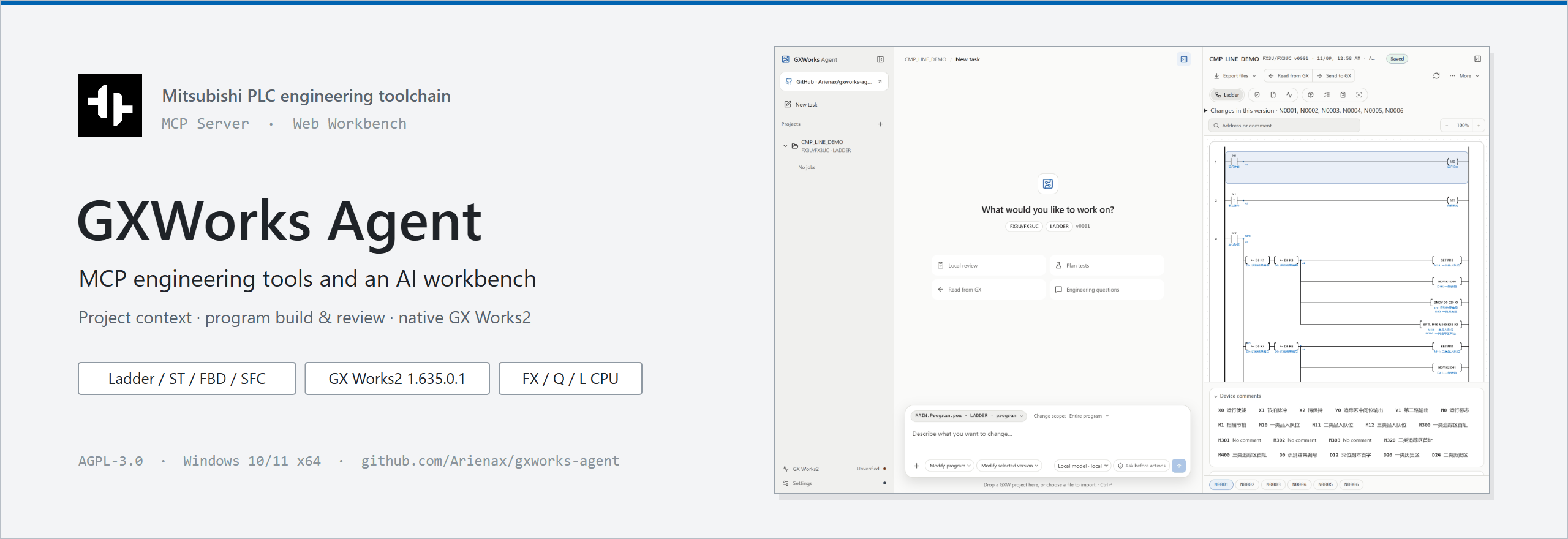
Originally created by Arienax · github.com/Arienax/gxworks-agent
© 2026 Arienax · Apache-2.0
MCP engineering tools and an AI workbench for Mitsubishi PLC workflows.
Read project context · Build and review programs · Drive native GX Works2 engineering and diagnostics




Downloads · MCP & Web · Issues
Quick start · Offline GXW editing · Ladder · ST · FBD · Engineering RAG · Native sessions · Web workbench · Diagnostics
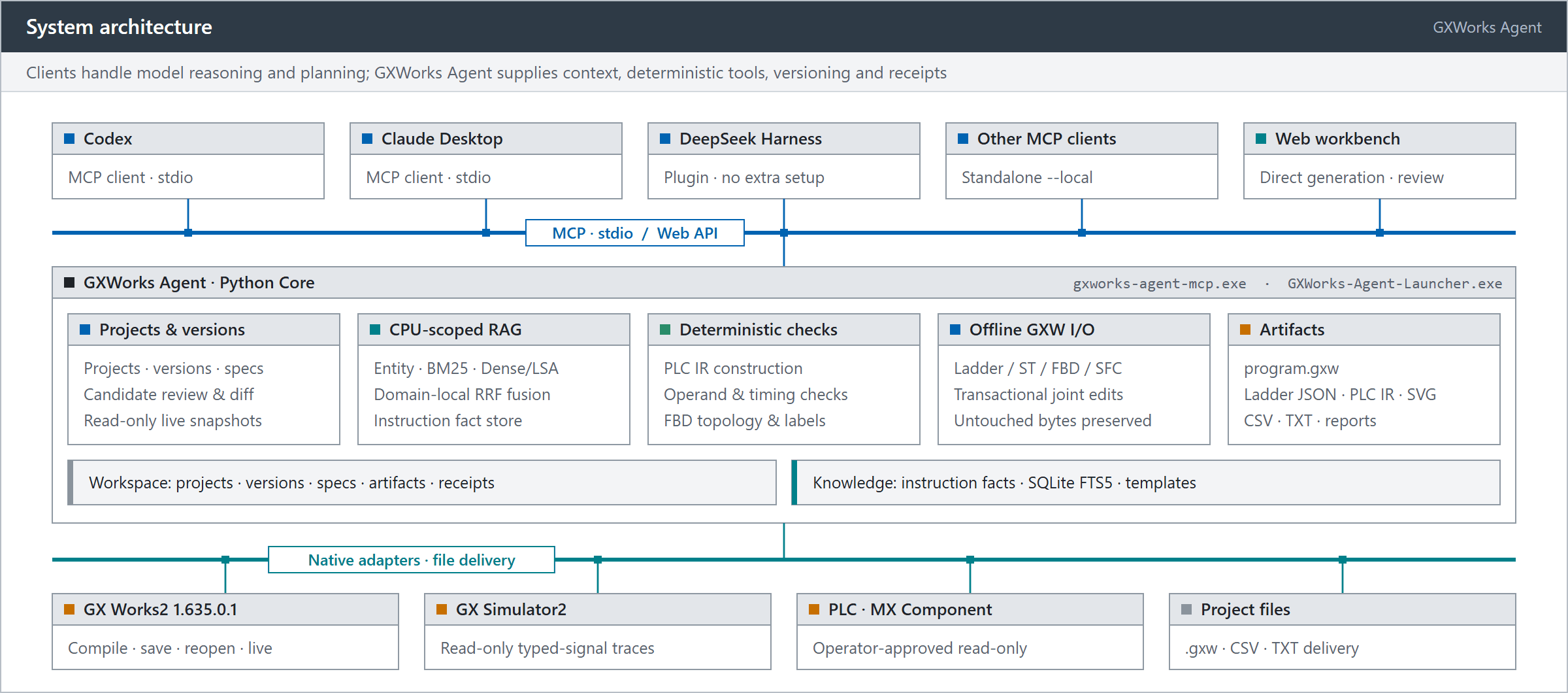
GXWorks Agent brings together project context, CPU-scoped instruction facts, deterministic static checks, and native GX Works2 operations into a unified engineering toolchain. It supports Ladder, Structured Text (ST), and Function Block Diagram (FBD) workflows, along with controlled SFC editing and inspection. Headless creation uses the selected CPU’s native project configuration.
On GX Works2 1.635.0.1, all 226 default legal language combinations across 57 programmable CPU menu entries (42 Q, 5 L, 10 FX; 69 concrete members) have completed creation without a base GXW, substantial content authoring, existing-source editing, native compilation, complete public checks, saving, and cold reopening. Ladder/SFC default to simple projects; ST/FBD use structured projects. FX1 is absent from the native structured menu; this creation restriction does not block reading existing sources. All four languages prefer GXW delivery and compile automatically when an installation is found. Complex FBD programs assemble actual ST function blocks. These results cover the stated software version and project operations, not physical execution on every member or support for every instruction and construct.
Connect any MCP client—such as Codex, Claude Desktop, or the DeepSeek Harness plugin—to use the engineering tools with your own model for planning, generation, live native editing, and verification, while saving versioned engineering artifacts. The standalone MCP server runs independently; the optional Web workbench adds browser-based Direct generation, graphical diff review, simulation testing, and operator-approved GX Works2 delivery.
Read and edit existing GXW files offline
Supported .gxw files can be inspected, edited, and saved without installing or starting GX Works2.
- Web: Drop a
.gxwinto the main conversation or choose Import GXW. No Agent project needs to exist first. Inspection selects the only ordinary Program automatically; choose a target when several programs are present, or explicitly select an existing FB or FUNCTION. - MCP: Use
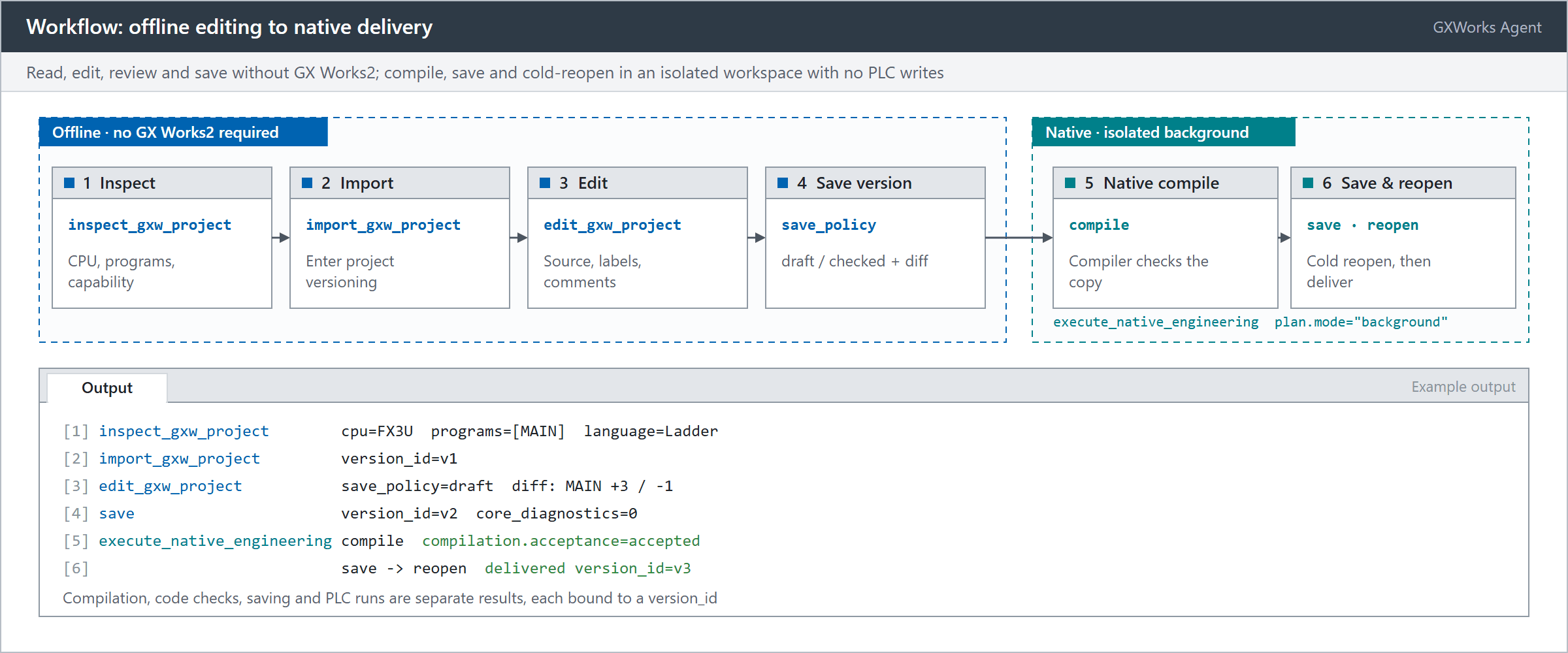
inspect_gxw_projectto inspect the file's CPU, sources, and format capabilities, thenimport_gxw_projectto enter the shared project/version workflow. - Describe the change, review its preview and differences, and save a new version. Download
program.gxwand re-import it to continue from the saved file; the original input file is preserved.
Imported Ladder sources automatically display contacts, coils, and branches, including conditions after outputs and the original MPS/MRD/MPP order. The source instruction list remains available.
The four languages share an offline transaction. Ladder supports source-bound instruction, float, string, and P/I label edits and moves while preserving MPS/MRD/MPP order and unchanged record bytes. ST edits existing Program, FB, and FUNCTION bodies and declarations, including existing interfaces, parameter order, and return types, with caller checks. FBD edits objects, connections, networks, variables, and instances of existing FB definitions. Existing SFC charts support step, transition, action, branch, merge, jump, and child-program edits with internal registrations maintained. Declaration rows may be added, removed, or reordered; actual QCD comments retain their complete text.
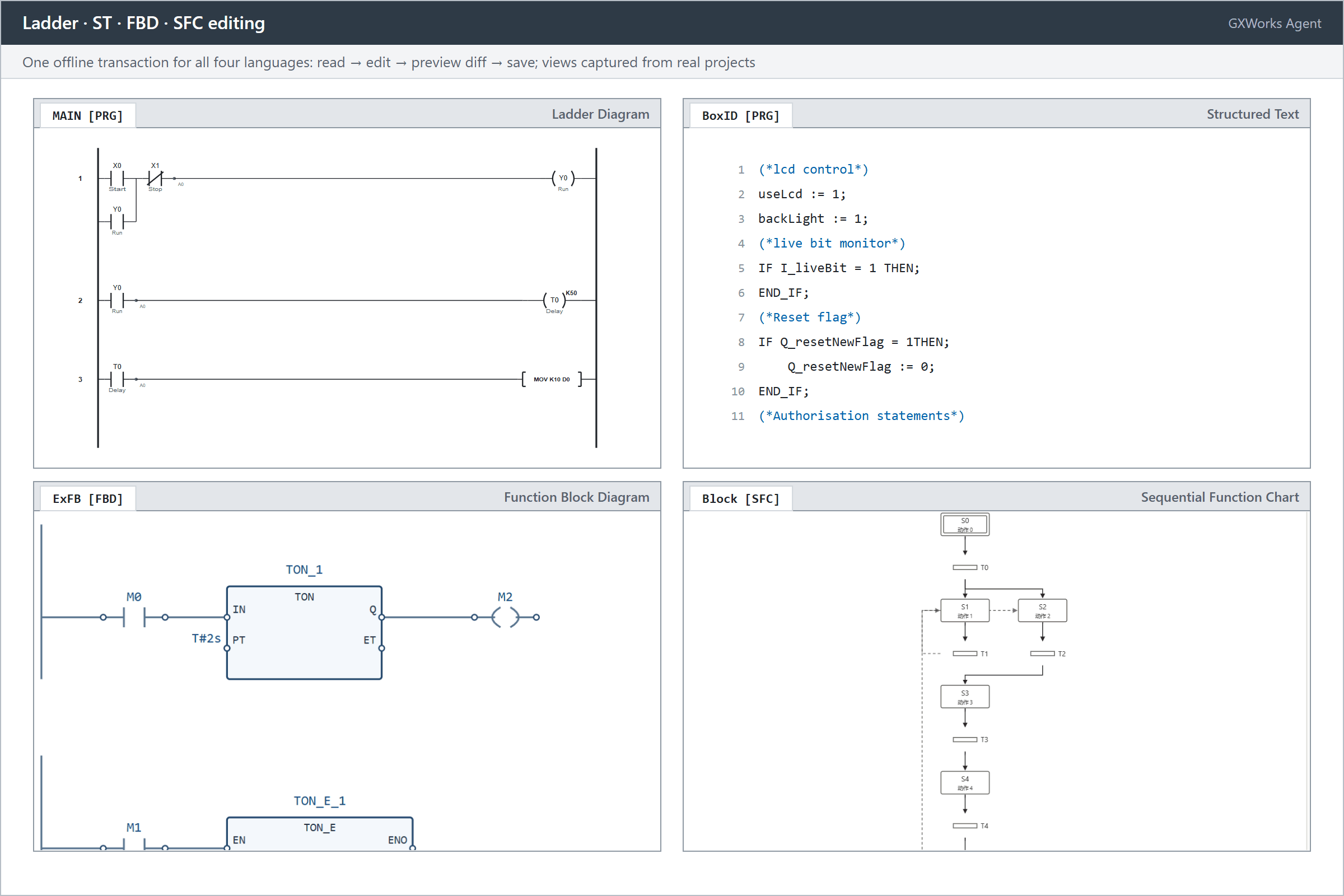
After import, use Program to edit to select another source in the same file. MCP read_gxw_source returns its editing model; edit_gxw_project submits several source, declaration, and comment edits against one current version_id, with differences shown per source. The new entry defaults to save_policy="draft", saving an editable intermediate version with source diagnostics once file structure and storage references pass checks; checked rejects newly introduced recognized errors.
The FX/Q/L model catalogue participates in file capability checks, returning support scoped to CPU, format, object, and operation. Unknown records retain their original bytes while parsed objects remain editable; edits with unresolved dependencies report the specific object and reason. This workflow focuses on offline edits to existing source objects, declarations, and comments.
Modifying source or declarations marks earlier compilation results stale. Saving a candidate automatically compiles, saves, and cold-reopens it when GX Works2 is available; existing versions can also be checked explicitly.
validate_project(native=true) compiles and checks an isolated copy. compilation.acceptance=accepted means the compiler accepted that copy. It does not write compiled artifacts back: save.completed and save.exported remain false, so the downloaded project may still appear pending compilation in GX Works2. The public compile_project tool also performs only local Core compilation. To persist native compiled artifacts, compile and save in GX Works2, or use the separate workspace API NativeWorkspaceSourceSave.compile_project and inspect its save and cold reopen results. Compilation, code checking, saving, and PLC execution have separate outcomes.
Ladder: from engineering context to deliverable artifacts
In this FX3U conveyor example, the agent retrieves CPU-specific facts and manual evidence for WSFL, INC, and T200, constructs a Ladder candidate, and commits it through MCP. Python Core validates structure and operands, merges shared conditions, and checks maintainability. Each saved version produces Ladder JSON, PLC IR, SVG diagrams, traceable ST derived from IR, and GX Works2 import CSVs for MAIN and device comments. For targeted fixes on an existing version, read_network and patch_program apply scoped network patches.
ST: Structured Text generation and native project editing
ST workflows cover both standalone text generation and native .gxw project maintenance:
- Generation and review in Web: Analyze requirements, confirm the specification, and generate bodies and declarations using the selected CPU's instruction context and ST call signatures. Assemble and deliver GXW first; fall back to
program.txtplus a GX Works2 global-labelglobal_labels.csv, with a reason only when a project cannot be created. Initial values or declaration properties that CSV cannot represent are listed in the TXT for configuration after import. Preview candidates and inspect text diffs across versions. Ladder versions can also export traceable ST from their PLC IR. - GXW ST project editing:
read_st_projectreads existing Program, FB, and FUNCTION bodies, declarations, and ownership;create_st_candidateedits their bodies and declarations offline. Creating an ordinary ST Program retains the explicit resource, task, and native-operation workflow. Persistent native sessions separately support coordinated FBD editing and compilation.
The local ST checker quickly validates supported syntax and semantics and highlights constructs that need attention, working alongside GX Works2 native compilation for full compiler verification.
FBD: project creation and full GXW editing
As an example, MCP adds fault latching, reset, and a 500 ms enable delay to the first axis of Mitsubishi Electric's MotionControl JEC example. The edit preserves existing FB implementations and Axis IN_OUT wiring, inserts SR/TON logic, and routes the motion permit into the existing power-control block.
Beyond wiring edits on imported files, the FBD module supports end-to-end project authoring:
- Create or import a project: GX Works2 1.635.0.1 with the v4 workspace adapter resolves the selected CPU’s native series and subseries to create an FBD project without a base GXW. CPU-specific project and language restrictions still apply. The 57 CPU-specific FBD resources supply catalogs and compatibility inputs. Import an existing
.gxwto continue editing its own sources. - Parameter-level and geometry-level editing: Submit high-level
callsandargumentsagainst the schema returned byget_fbd_catalog—letting Core expand ports,IN_OUTpairs, and routing automatically—or explicitly add, modify, and remove nodes, terminals, orthogonal wires, and multiple networks. - Modular assembly: For complex machines, ST function blocks encapsulate sequences, timing/counting, alarms and interlocks. The FBD main diagram assembles reusable instances through named ports and signals in clear functional networks. Create missing ST implementations before assembly. The first
create_st_fbon an unsaved FBD project creates its own CPU-bound project in the background; subsequent definitions and main-diagram edits use that saved version. - Definitions, user libraries, and task registration: Read and author project structures, ST/FBD Function Blocks, and global/local declaration tables; import user library definitions from a donor
.gxw(read_fbd_libraries/import_library) while keeping caller programs intact; create FBs and Programs where supported by the source project; register Programs to an existing task, new task, or new resource; and configure compiler device-allocation ranges. - Artifacts and validation: GXW delivery includes
program.gxw,fbd.json,fbd.svg, and a write report. When GX Works2 is available, saving automatically compiles, saves, and cold-reopens the project. If project creation is unavailable, delivery keeps the structured candidate and states the fallback reason. Each verification result is bound to its version.
For saved Ladder, ST, FBD, and SFC GXW versions, execute_native_engineering with plan.mode="background" and the ordered commands compile, save, reopen compiles and saves in an isolated native workspace, verifies the reopened output, and delivers a new version of the same language. It does not open a visible editing session or write to a PLC. See the background workflow.
Persistent native engineering sessions
With execute_native_engineering(mode="live"), an MCP client can drive multi-step edits inside one continuously open GX Works2 process across tool calls, without saving and reopening the project between every action:
- Multi-step live authoring: Sequentially edit global and local label tables, create or update ordinary ST Programs and ST FBs, insert FBD call instances, and rebind terminals, move nodes, or reroute wires using the active document's live node and terminal identities.
- In-session compilation and scoped address lookup: Compile the current source (
compile) and query compiler-assigned addresses for global declarations, local Program variables, andInstance.Memberpaths via native cross-reference (show_assignments). Any subsequent source edit automatically marks earlier compilation and address resultsstale. - Paced execution and safe reconciliation: Configure step dwell time (
dwell_ms), single-step execution (step_mode), pause (pause_native_engineering_session), and resume. The session tracks active edits (revision), verified disk saves (saved_revision), and committed application versions (version_revision) separately. Interrupted or timed-out steps retain anunconfirmedreceipt and reconcile against actual UI state viarebindbefore continuing.
Native engineering sessions require an interactive Windows desktop, GX Works2 1.635.0.1, and operator-configured execution consent.
Web workbench: Direct generation, visual review, and export
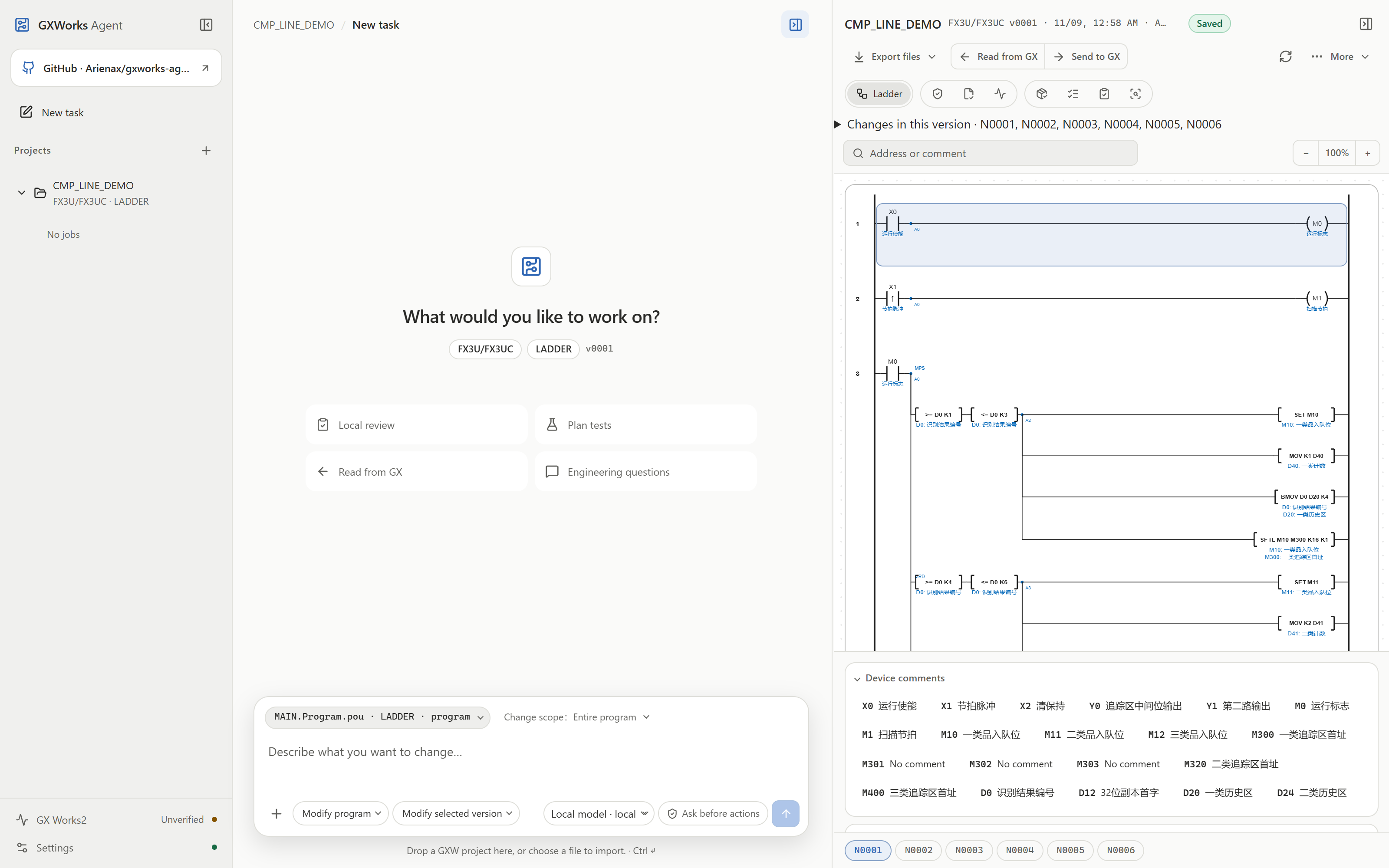
Configure a model API in the workbench to use the built-in Direct generation workflow—analyzing requirements, confirming specifications, and generating programs—then inspect Ladder networks, FBD/SFC graphs, device usage, version diffs, and downloadable artifacts. Direct shares the same engineering context and RAG pipeline as MCP while reducing external agent orchestration overhead; workbench Q&A can still invoke read-only tools as needed.
When process facts are missing, each clarification question appears as an individual input field that preserves entered text across panel switches and reloads until submitted together. Generation uses strict structured output where supported by the endpoint and normalizes unambiguous format differences locally before Core validation.
When sending Ladder to GX, enter the full path of the currently open GXW in the confirmation dialog if the window title shortens the path or shows only a file name. The MCP equivalent is import_current_program_to_gxworks2(project_path=...). For shortened titles, import is refused unless the current GX Works2 process holds the specified file. This does not open or switch projects. The parameter may be omitted when the title already contains the full path.
Default engineering delivery
New and edited Ladder, ST, FBD and SFC candidates prefer program.gxw. Existing projects use their offline writers; new projects require a verified headless path for the exact CPU and language. Complete project templates and IDE New dialogs are not used. GX Works2 1.635.0.1 with the v4 workspace adapter resolves CPU creation parameters through the installed native component. ST/FBD use structured projects with labels; Ladder/SFC use simple projects, subject to the selected CPU’s language restrictions. Creation, compilation, save and cold-reopen results are reported separately. Before creating projects from source, run ./tools/build_workspace_adapter.ps1 in PowerShell to build the v4 adapter; packaged builds include the matching component. When GX Works2 is found, saving automatically runs isolated native compilation, save and cold-reopen checks. A failed native check retains the diagnostic GXW candidate and does not activate it over the current version.
If GXW creation is unavailable, delivery explicitly falls back to Ladder program/comment CSVs, ST source, or FBD/SFC structured candidates and available previews. The result reports the actual format and reason. A successfully generated offline GXW remains deliverable without GX Works2, with native compilation marked as not run. Installation discovery uses GXWORKS2_EXE, running instances, Windows registration and common folders on local drives, including installations outside C:.
CPU-scoped engineering RAG: architecture and compact facts
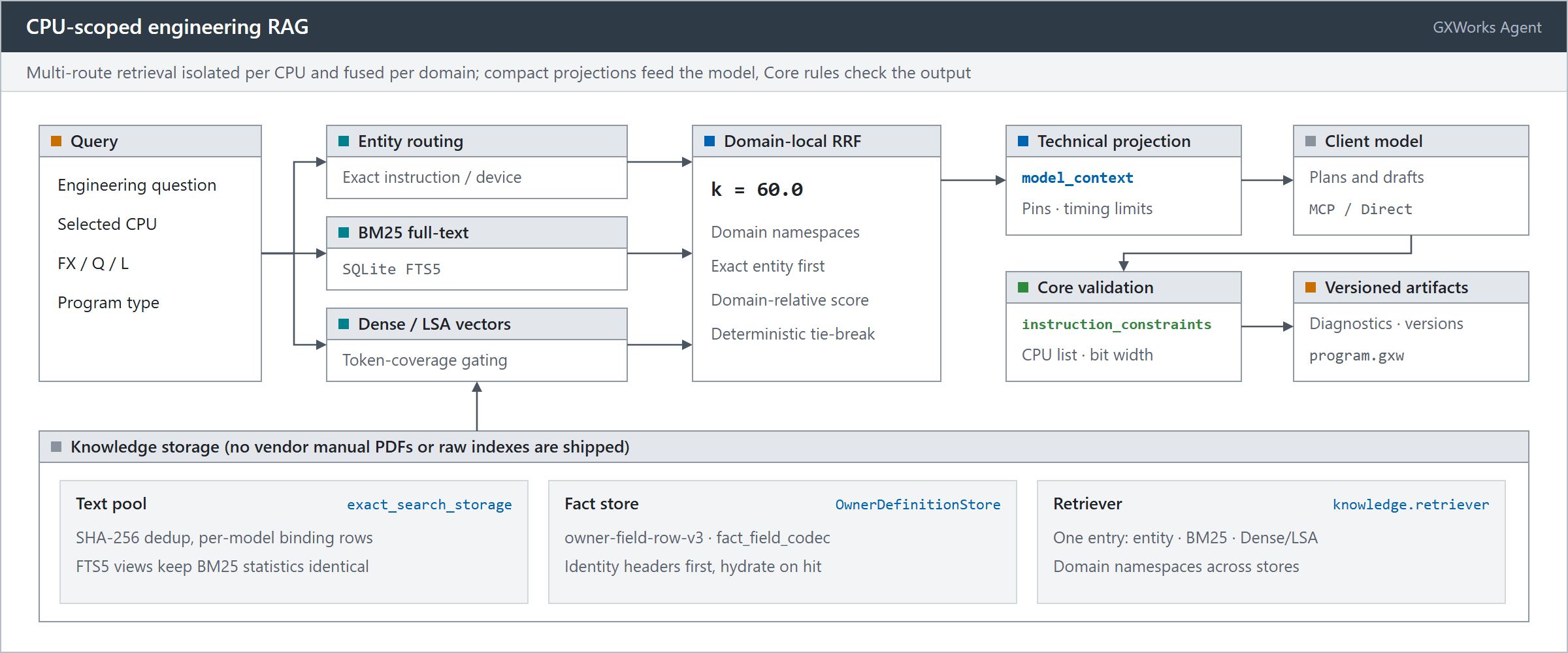
Generic document-chunking RAG frameworks are tailored for open-ended text Q&A and struggle with industrial control requirements such as zero-external-service deployments, strict isolation across CPU models, and compiler-grade deterministic verification. GXWorks Agent implements an engineered, compact RAG architecture based on reviewed technical facts and project-authored engineering records (release packages exclude vendor manual PDFs and raw manual-text indexes):
- Knowledge text pooling with BM25 statistical invariance: To handle recurring descriptions across multi-model technical specifications and engineering records,
exact_search_storageconsolidates long text into a SHA-256 deduplicated pool while retaining distinct chunk rows and attributes in the binding layer, exposed to SQLite FTS5 via a compatibility view. This design achieves multi-fold physical compression while ensuring BM25 scores and term frequencies remain mathematically identical to uncompressed baselines; a+rowidconstraint prevents redundant FTS virtual table MATCH loops across CPU pre-filter subqueries. - Graph-level fact pooling and on-demand hydration: The transport layer adopts the
owner-field-row-v3layout withfact_field_codec, interning repetitive structured fields (scope, conditions, dependencies, parameter specifications) into integer references. At runtime,OwnerDefinitionStoremounts an authenticated read-only SQLite database viainstruction_definitions.manifest.json, reading only lightweight identity headers at startup for CPU admission preflight and hydrating full fact graphs (hydrate_owner) strictly on demand. - Domain-Local Rank Fusion (RRF): Retrieval is coordinated through
knowledge.retriever, combining exact entity routing, BM25 full-text search, dense/LSA vector similarity, and lexical coverage gating. When querying across distinct databases (e.g., the instruction fact store and general engineering records), domain-local RRF (smoothing constant $k=60.0$) and qualified identifiers prevent cross-corpus score distortion; top-level arbitration prioritizes exact entity hits, normalized domain scores, query coverage, and deterministic record IDs. - Technical projection and deterministic Core validation: Retrieval hits are never treated as direct execution permission. For LLM generation,
model_contextextracts compact technical constraints (pin specifications, step widths, prerequisite conditions) to manage prompt budget. Generated logic must subsequently pass deterministic CPU whitelist, operand bit-width, and timing checks enforced byinstruction_constraintsand the Core validation engine.
What the toolchain provides
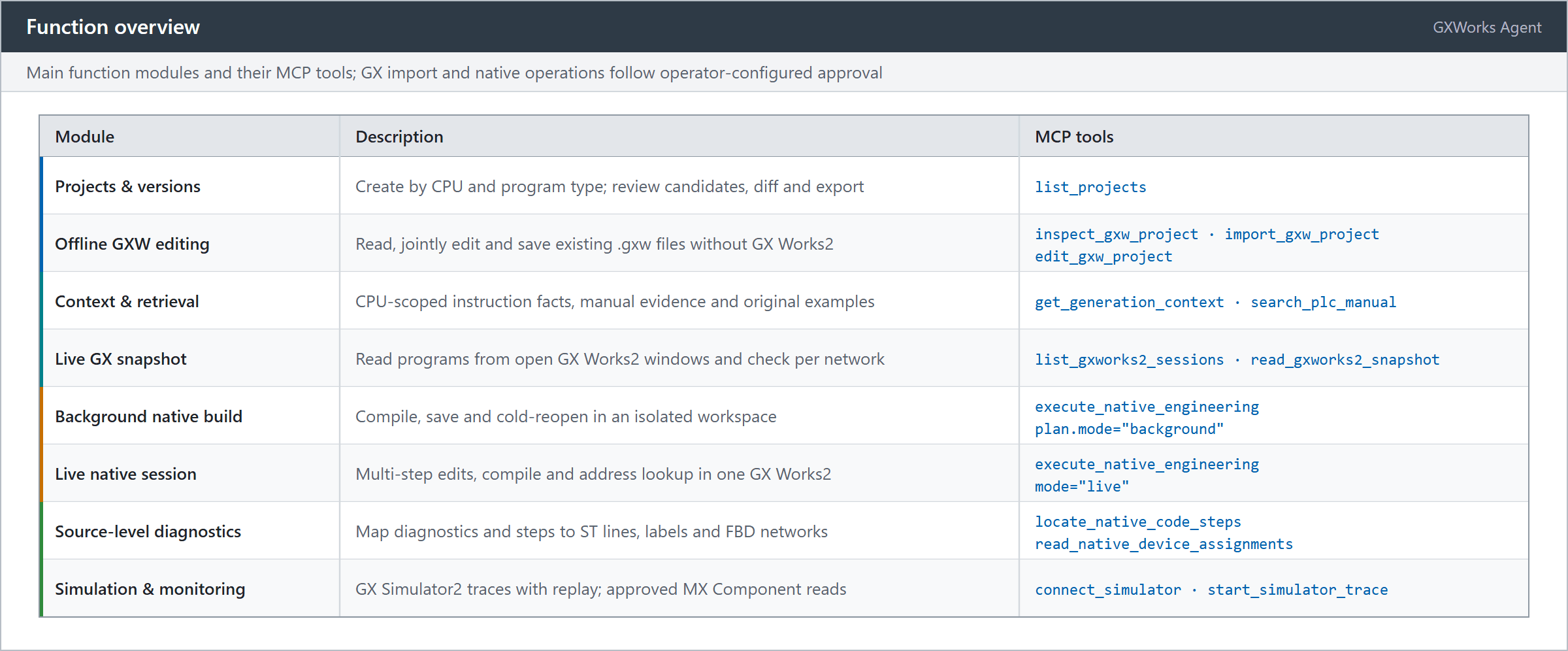
- Project-bound context and live session discovery: Create or select versioned projects by CPU and language, or call
list_gxworks2_sessionsandread_gxworks2_snapshotwithout an Agent project to inspect a read-only snapshot of a program currently open in GX Works2. When GX Works2 is not running,inspect_gxworks2_csv_filestakes an exported program CSV and comment CSV with an explicit CPU and returns the same kind of read-onlysource_ref. - CPU-scoped engineering RAG: Retrieval combines entity matching, full-text search, and dense/LSA vector retrieval with rank fusion (see architecture and compact facts for details). Structured facts supply exact operand, step-width, and modifier rules for known instructions, while residual retrieval adds technical evidence and project-authored examples without duplicating context.
- Deterministic Core validation and versioned artifacts: Python Core owns PLC domain semantics—building IR, checking operands and timing, verifying FBD topology and declarations, and generating version-bound artifacts alongside native compilation, simulation, and device monitoring.
- Controlled GX Works2 delivery: Under operator-configured approval policies, import the current Ladder version's
MAINand device comments into GX Works2, or execute native FBD/ST saves, compilations, and live session steps with version-bound operation receipts.
Your client or harness owns the model and planning loop; GXWorks Agent provides the engineering context, deterministic tools, version persistence, and operation receipts.
Project management, diagnostics, and simulation
| Capability | What you can do |
|---|---|
| Projects and versions | Create or select projects by CPU and program type (Ladder / ST / FBD / SFC), manage requirements and confirmed specifications, review candidates, compare versions, and export versioned artifacts. |
| Live GX read-only snapshots | Discover running GX Works2 windows and take a temporary read-only snapshot (source_ref) without creating an Agent project, then read networks and run static analysis. |
| Native compilation and source-level diagnostics | Compile and check a saved .gxw in an isolated workspace, query assigned addresses for declarations and FB instance members (read_native_device_assignments), compare saved code channels against fresh compilation (compare_native_compiled_code), and map diagnostics or code steps (locate_native_code_steps) to ST lines, declarations, FBD networks/nodes, or call instances—retaining unresolved when a location is ambiguous. |
| Existing SFC project editing | Read source relationships offline; edit steps, transitions, actions, branches, merges, jumps, and child programs; jointly add or remove internal objects, declarations, and registrations; preview differences and save versions. |
| Ladder simulation and live timeline viewer | Run version-bound simulation test plans with device stimuli and assertions; or use connect_simulator and start_simulator_trace to sample typed signals read-only from a connected GX Simulator2 target and inspect waveforms in the bundled Web timeline viewer (simulator.html). |
| Read-only PLC monitoring | With operator approval, read selected devices read-only through a configured MX Component logical station and review values and read history; permissions are bound to the project version, address range, and expiry and can be revoked at any time. |
Quick start
On Windows 10/11 x64, download the package you need from the releases page and extract the entire ZIP. Both executable packages run standalone and require neither Python nor Node.js.
| Package | Best for | Entry point |
|---|---|---|
GXWorks-Agent-MCP-windows-x64.zip |
Connecting an MCP client (Codex, Claude Desktop, DeepSeek Harness) and using its model | gxworks-agent-mcp.exe --local |
GXWorks-Agent-Full-windows-x64.zip |
Running the Web workbench and MCP with shared runtime resources | start-web.cmd / gxworks-agent-mcp.exe --local |
The lean MCP package omits the Web server, model SDK, offline PDF ingestion dependencies, while keeping the engineering tools, RAG retrieval, engineering templates, native helpers, and the simulator timeline viewer. Full includes both entrypoints: its MCP server runs independently with --local, or connects to a running Web workbench with --service to share projects and review flows.
Standalone MCP
Register a stdio server in your MCP client using the full path to gxworks-agent-mcp.exe as the command and --local as its argument. Refresh the connection, call list_projects to select an existing project or create one with your actual CPU and program type, use offline GXW import for a saved file, or call list_gxworks2_sessions to inspect an already-open GX Works2 window.
Try a prompt like:
“Create an FX3U Ladder project and read the generation context and relevant instruction evidence first. Count each press of X0, turn on Y0 after 3 counts, and reset with X1. Save the candidate version and show its artifacts and any remaining diagnostics.”
External clients use their own models without starting Web. GX import and native operations follow configured execution consent; add the Web workbench whenever you want shared visual review.
DeepSeek Harness plugin: dsh-gxworks packages this server as a DeepSeek Harness plugin. Install it with one command and the bundled MCP backend and gxworks-mcp-router skill are ready, so there is no separate MCP client to register or configure.
Bundled MCP router skill: Both the source repository and the release packages include an Agent Skill under skills/gxworks-mcp-router/ (SKILL.md and references/) covering MCP tool selection, key parameters, and call sequences for common PLC tasks—such as read-only snapshots versus versioned edits, offline .gxw changes versus live GX Works2 sessions, local artifact generation versus headless native compilation checks, and receipt handling across local, service, and context modes. Once MCP is connected, copy the gxworks-mcp-router/ directory into your client's skills folder to enable it.
Web workbench
Run start-web.cmd in the extracted Full directory and choose an engineering workspace folder. Create a project for a new program, or import an existing GXW. Configure a model service under Settings → Model → Model API for AI generation and changes; browsing existing projects, inspecting files and graphs, and exporting artifacts require no model calls. When updating, extract the new release into a fresh directory—your separate workspace and personal settings remain intact.
Run from source
Install Python 3.13 and Node.js 22.14 or newer, then run:
git clone https://github.com/Arienax/gxworks-agent.git
cd gxworks-agent
.\build-web.bat --no-pause
.\start-web.cmd
For MCP-only source use, create .venv-mcp, install requirements/mcp.txt, and launch gxworks-agent-mcp.cmd --local. Node.js is not required for MCP-only source runs.
Engineering templates and knowledge resources
Release packages include the FX3U baseline project, node and token-grammar templates, and 57 CPU-specific blank FBD projects under gxw/templates/ (src/gxw/templates/ in source); keep these files intact when copying or moving the application directory.
Executable packages bundle the reviewed runtime fact corpus and project-authored examples for RAG, excluding vendor manual PDFs and raw manual-text indexes. Runtime knowledge data is distributed separately from the source repository; when running from source, you can copy a release package's knowledge/ into resources/knowledge/ and its resources/instructions/mitsubishi/ into the matching source directory.
Offline GXW file operations require no Mitsubishi installation. Native saving, native compilation/code checking, delivery to GX Works2, and native simulation require the corresponding Mitsubishi software installed locally; read-only PLC monitoring requires MX Component and a configured logical station. These Mitsubishi applications are not included.
The Windows native adapter loads GX Works2 components in an x86 process; the Python host can be 64 bit. A pywinauto application bitness warning alone does not establish an operation failure. Diagnose the actual foreground automation error. If screenshot capture is unavailable, the original error is retained and the capture problem is reported separately.
Before operating machinery
Before commissioning, review all generated logic against the target CPU, field wiring, motion limits, and operating modes. Back up the target GX project before import; after sending updates to the GX Works2 project, compile, inspect, and download the program through your normal GX Works2 commissioning workflow.
Implement emergency stops, safety interlocks, and overtravel protection in an independent hardware safety system. Sanitize diagnostic records before sharing, and keep API credentials and local session URLs private.
Guides and license
Release changes · Contributing · Issues
Project-authored Core, Web, MCP, and native-adapter source code is licensed under the Apache License 2.0; see the license scope and third-party notices for details. Contributors retain their copyright, and previously distributed releases retain their original licenses. NOTICE records the original project, author and repository for copyrighted project material.