
AqibJavedZeepalm/stackyard
AqibJavedZeepalm/stackyard has 91 GitHub stars and 6 forks. GitHot measured 0 stars in 24 hours, +2 in 7 days, and +11 in 15 days. Last checked 2026-11-15 16:40 UTC. Last push 2026-11-03.
What you can do
- Set up in a minute. On first launch Stackyard finds the folders where your projects live, shows how many projects each holds, and lets you add more.
- One window for every tech. A sidebar entry appears only for techs found on your machine.
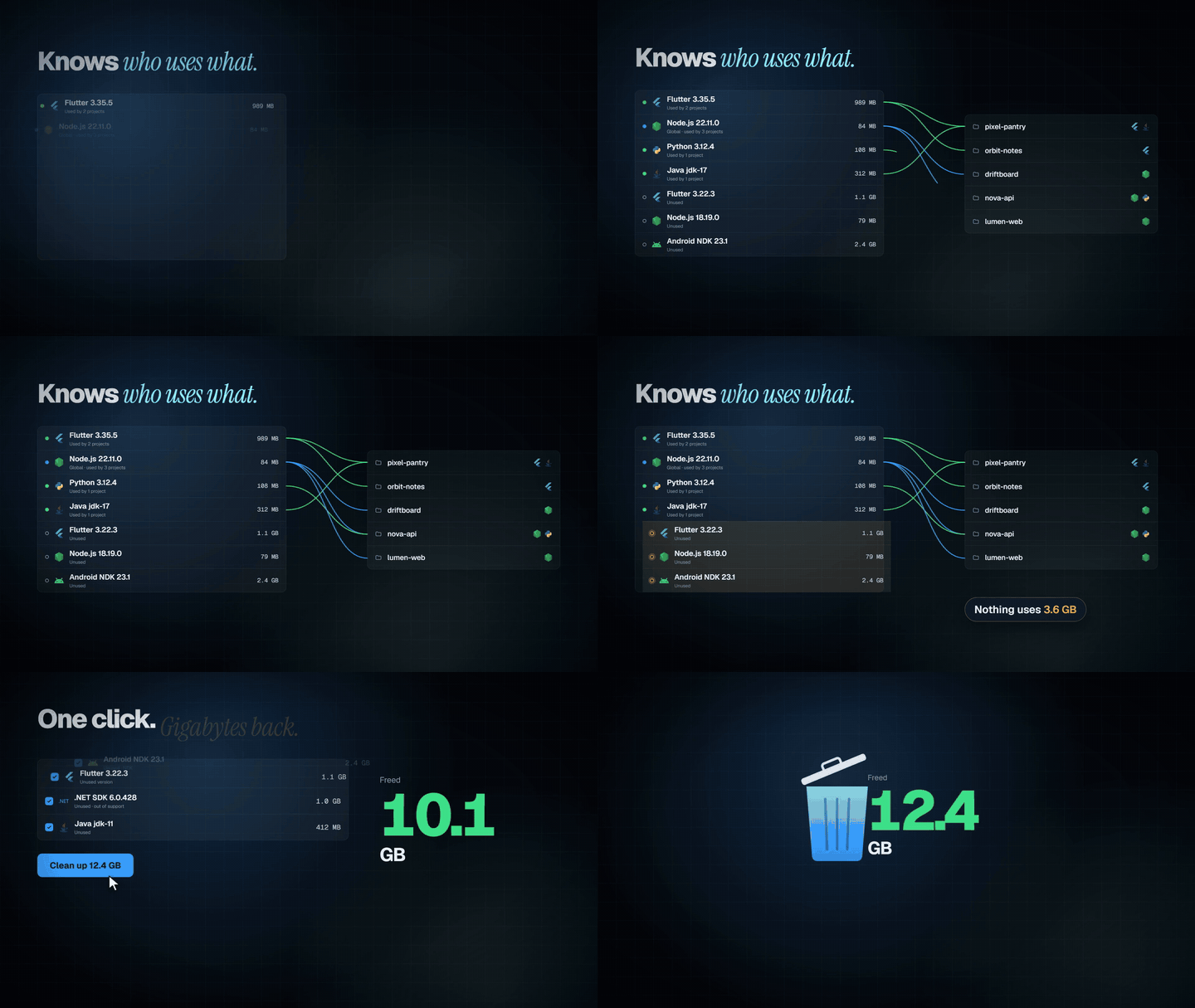
- Knows who uses what. It reads .fvmrc, .nvmrc, package.json, gradle-wrapper.properties, build.gradle, local.properties, .python-version, global.json and more across your project folders.
- Problems come with a fix button. Missing versions a project needs, two setups fighting over a folder, a broken JAVA_HOME: each is explained in plain words, with a button that fixes it. You never type a command.
Measured star growth
- in 24h
- 0
- in 7 days
- +2
- in 15 days
- +11
- in 1 month
- Update delayed
Net star changes over overlapping periods, not daily totals. Missing measurements are left blank. Stars measure attention, not software quality.
About
Free, open-source app for Windows and macOS that finds every SDK and toolchain on your machine (Flutter, Node.js, Android SDK, Xcode simulators, Java, Python, .NET, Gradle), shows which projects use each version, fixes broken setups in one click and frees disk space.
Developer ToolsREADME.md
Original
Stackyard
See every SDK and toolchain on your machine, which projects use each version, and what's safe to remove.
Free and open source, for Windows and macOS.





Works with Flutter (FVM) · Node.js (nvm, fnm, Volta) · Android SDK and emulators · Xcode simulators and runtimes · Gradle · Java · Python · .NET · Rust (rustup)
and spots React, React Native, Expo, Next.js, Vue, Angular, Svelte and more in your projects.
Why
Version managers like FVM, nvm, pyenv and SDKMAN are great at installing versions. None of them tells you that you have six Flutter SDKs, three Android NDKs and a 13 GB emulator you haven't started in a year. Stackyard does.
It shows every SDK, toolchain and framework version on your computer, which projects use each one, and what's safe to remove. Then it fixes what's wrong with one click, and nothing is deleted without you seeing it first.
Features
- Set up in a minute. On first launch Stackyard finds the folders where your projects live, shows how many projects each holds, and lets you add more.
- One window for every tech. A sidebar entry appears only for techs found on your machine.
- Get tools. A marketplace of SDKs and CLIs (Flutter, Android command-line tools, Node.js, Python, Java, .NET, Go, Rust, Deno, Bun, Gradle, and the Angular, Expo, NestJS, Firebase, Vercel, Ionic, Nx, TypeScript, pnpm and Yarn CLIs). Every version is listed from the publisher's own release feed. Downloads come straight from the publisher and are checked against their published hash. Before installing, you choose the folder and which environment variables to set (
PATH,JAVA_HOME,GOROOT…): your user variables or everyone's on Windows, a marked block in~/.zprofileon macOS. Installed versions can be made the default or removed later, which cleans up their variables too. - Knows who uses what. It reads
.fvmrc,.nvmrc,package.json,gradle-wrapper.properties,build.gradle,local.properties,.python-version,global.jsonand more across your project folders. - Problems come with a fix button. Missing versions a project needs, two setups fighting over a folder, a broken
JAVA_HOME: each is explained in plain words, with a button that fixes it. You never type a command. - Environment doctor. Finds
JAVA_HOME/ANDROID_HOMEpointing at folders that are gone, dead and duplicate PATH entries (it saves a backup first), and a Java that's too new or too old for a Flutter app's Gradle and Android Gradle Plugin. - Project cleanup. Shows the
node_modules,build,.dart_tool,.gradle,Podsand other rebuildable folders in your projects, with a one-click clean for projects you haven't touched in months. - Emulator manager. Start, cold boot, wipe data, delete snapshots or delete each Android emulator, with its size and when it last ran.
- Simulators (macOS). Every iOS, watchOS, tvOS and visionOS simulator with its size and last start: start, shut down, erase or delete it. The Xcode page shows each simulator runtime (often 8 GB each), which simulators use it, and Xcode's rebuildable caches.
- Progress you can see. Every install, removal and fix runs in Activity with its live output and a real progress bar. Cancel stops it cleanly, without leaving half a download behind.
- Safe removal. Things go to the Recycle Bin / Trash by default, or you can choose to delete permanently. Installed programs are removed with their own uninstaller. Links are removed as links; what they point to is never touched. You see every step before it runs, and a spinner wherever work is happening.
- Runs in the background. Closing the window keeps Stackyard in the system tray (Windows) or menu bar (macOS). It checks your setup daily or weekly and notifies you only when there's something new. It can start at sign-in.
- Move your setup. Export your toolchain versions to a file and import it on another computer to install what's missing.
- Never edits your projects. It doesn't change a project's pinned versions, because that can break builds.
- Native feel. Windows 11 Fluent design with Mica and your accent color; on macOS, the glass sidebar and motion of a Mac app. A Glass slider sets how much of your desktop shows through.
Screenshots
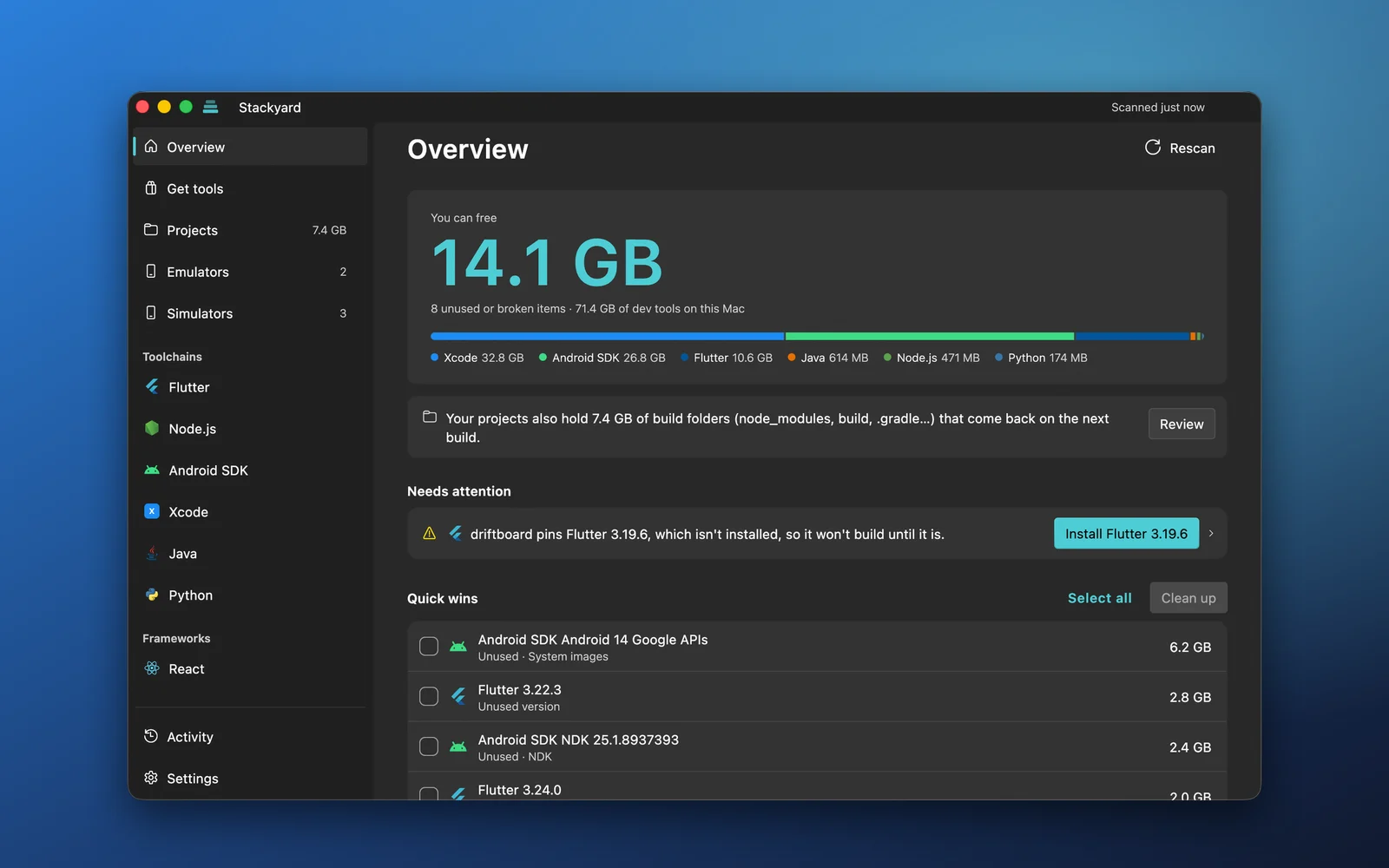
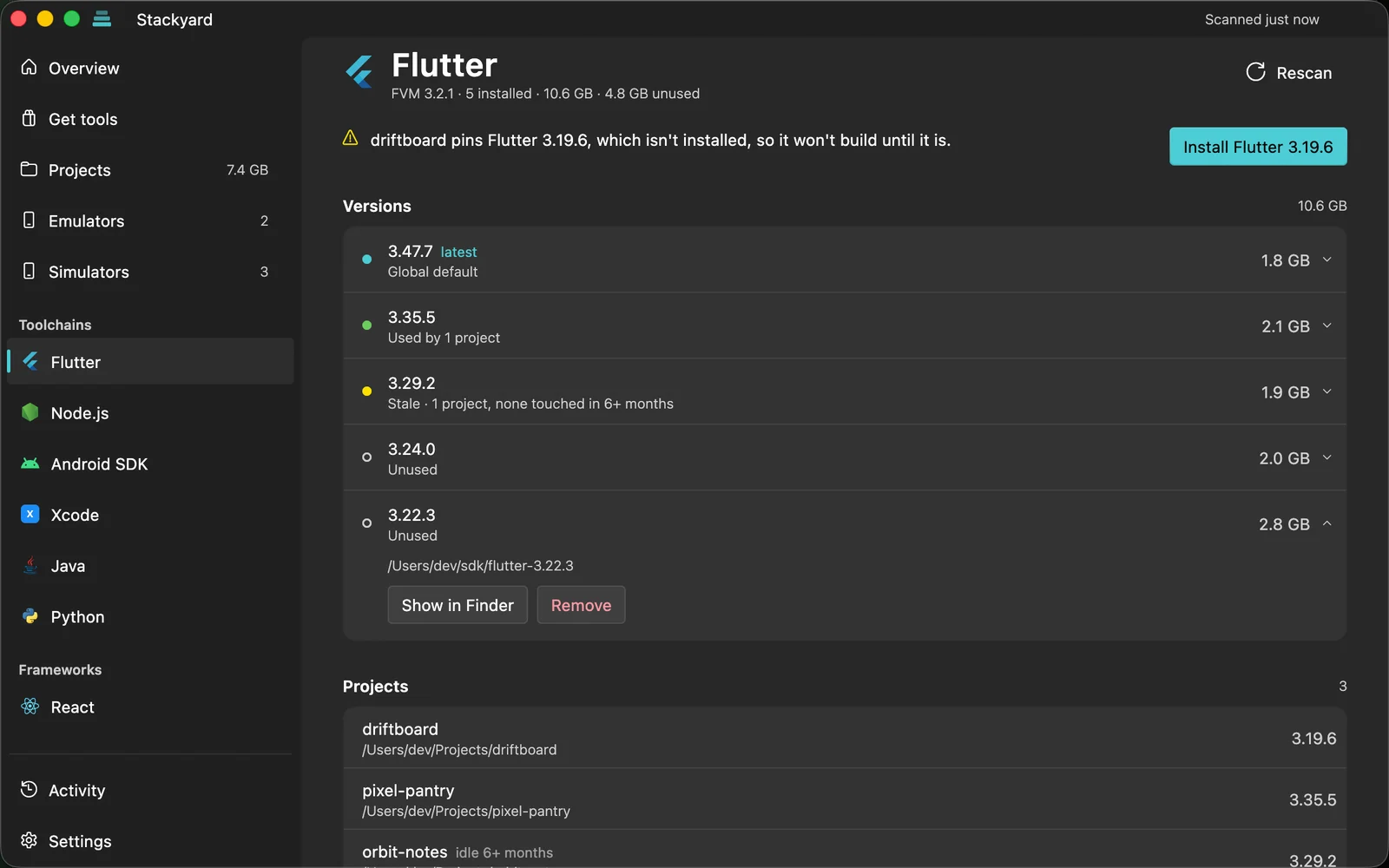 Every version, its size and the projects that use it |
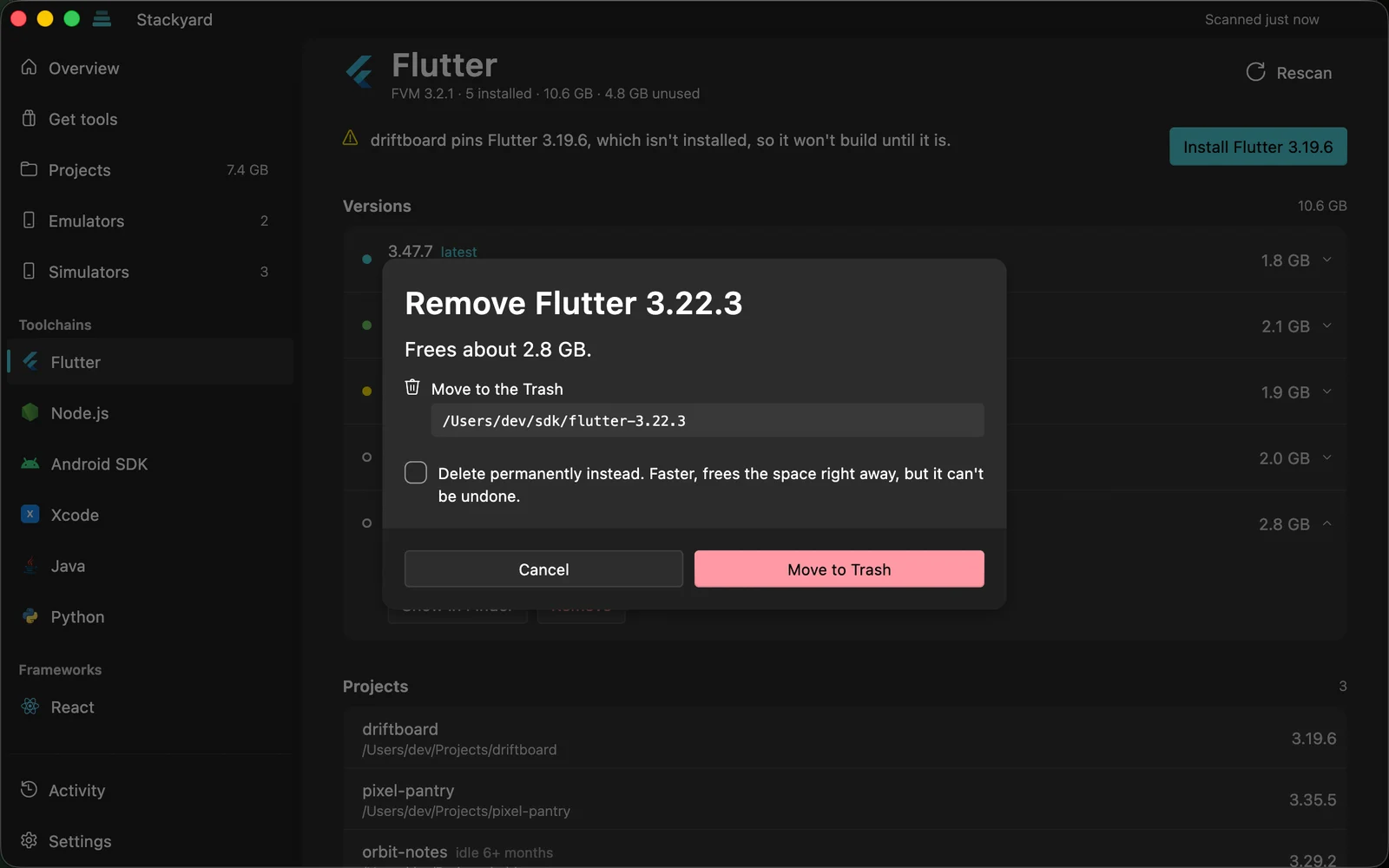 You see exactly what happens before anything runs |
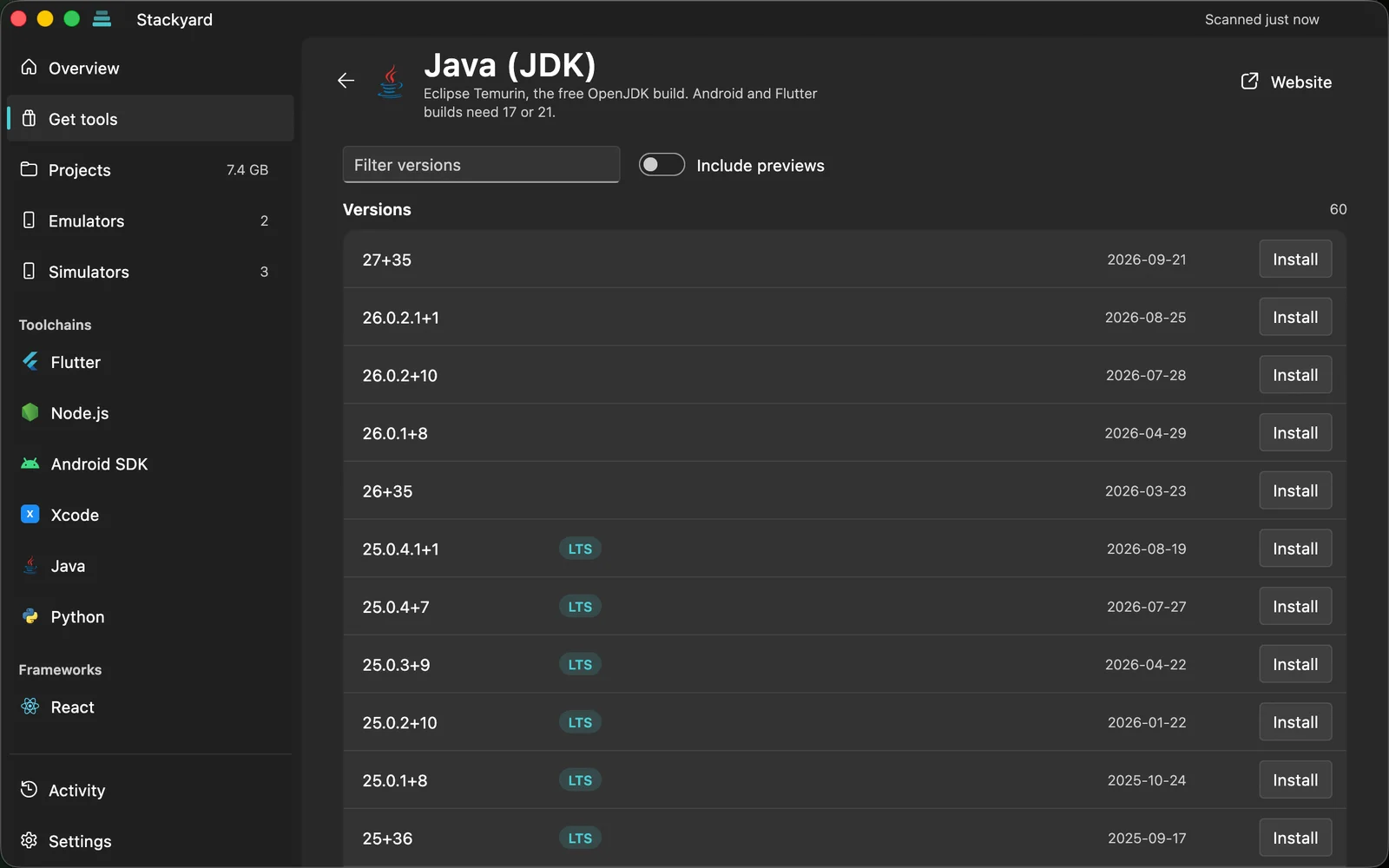 Install SDKs and CLIs straight from the publisher |
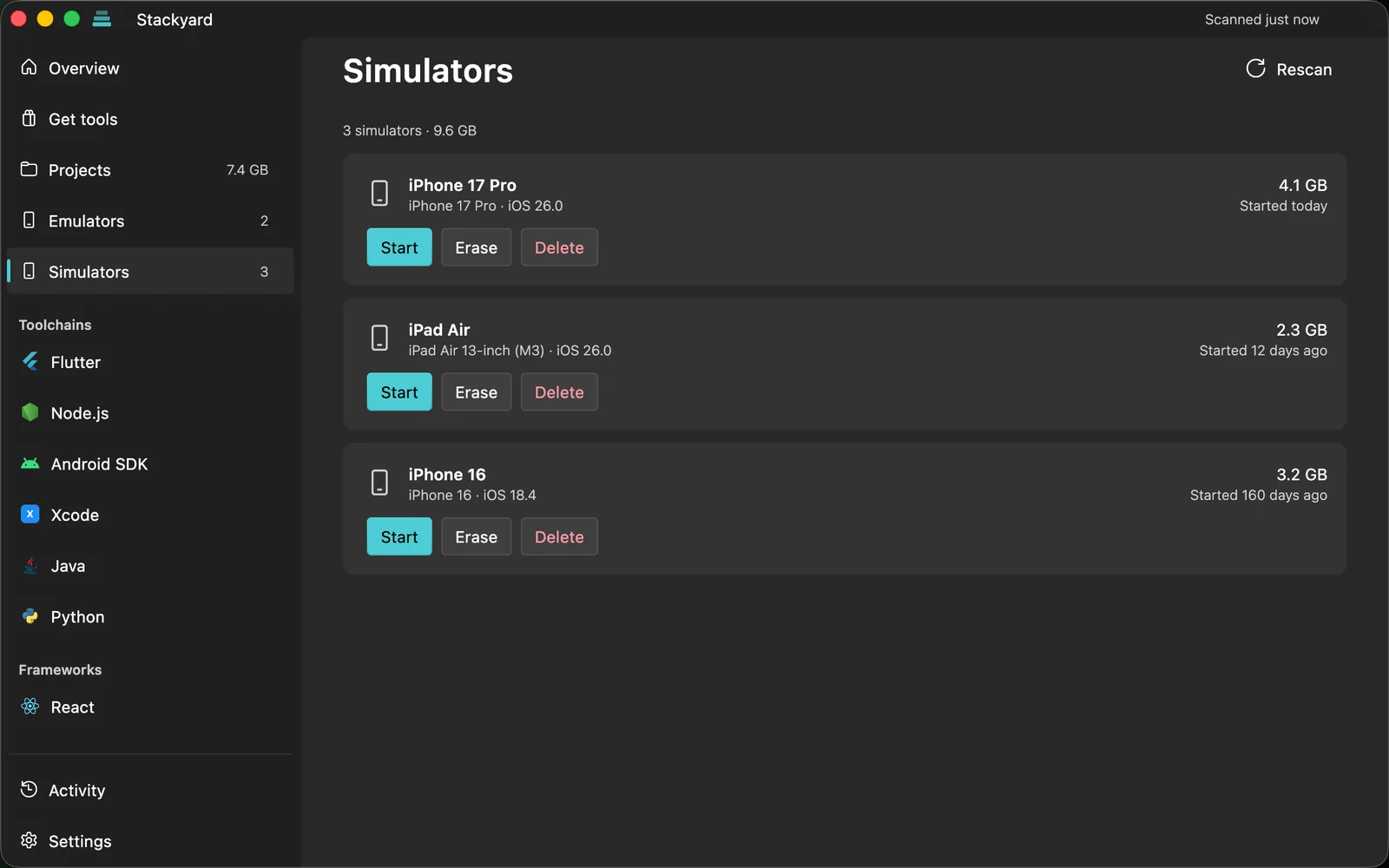 Simulators and emulators with their size and last start |
Screenshots are from macOS with demo data; the animation at the top is from the Stackyard film. On Windows the same pages use Windows 11's Fluent design and Mica.
What it detects
| Tech | Where it looks | How it knows a project uses it |
|---|---|---|
| Flutter | FVM (fvm api list), standalone SDK on PATH |
.fvmrc, .fvm/fvm_config.json; unpinned projects use the global version |
| Node.js | nvm (nvm-windows on Windows), fnm, Volta, Node.js installer, Homebrew | .nvmrc, .node-version, package.json volta / engines |
| Android SDK | Platforms, build tools, NDKs, system images, emulators, duplicate SDK folders | compileSdk, ndkVersion (including Flutter's defaults per SDK version), local.properties sdk.dir, emulator config.ini |
| Xcode (macOS) | Simulators and runtimes (xcrun simctl), DerivedData, device support files |
Which simulators use each runtime |
| Gradle | ~/.gradle/wrapper/dists, caches |
gradle-wrapper.properties |
| Java | Program Files vendors, /Library/Java/JavaVirtualMachines, Homebrew, ~/.jdks, SDKMAN, Android Studio JBR |
.java-version |
| Python | py launcher, pyenv / pyenv-win, uv, python.org, Homebrew and Microsoft Store installs |
.python-version, requires-python |
| .NET SDK | dotnet --list-sdks |
global.json version, rollForward and allowPrerelease, resolved the way dotnet picks an SDK; no global.json uses the newest |
| Rust | rustup toolchains in RUSTUP_HOME (~/.rustup, %USERPROFILE%\.rustup on Windows) |
rustup override folders, rust-toolchain / rust-toolchain.toml, in rustup's order; no toolchain file uses the default toolchain |
| React, React Native, Expo, Next.js, Vue, Nuxt, Angular, NestJS, Ionic, Svelte, Astro, Electron, Vite, TypeScript | Each project's node_modules |
package.json |
Installs use each tech's own manager (FVM, nvm / fnm / Volta, sdkmanager). Tools without one are installed with winget on Windows and Homebrew on macOS.
Download
Get the latest version from Releases:
- Windows 10 / 11:
Stackyard-Setup-<version>.exe. It installs for your user only, with no administrator prompt. The installer isn't code-signed yet, so SmartScreen may warn the first time: choose More info → Run anyway. - macOS 12 or later:
Stackyard-<version>.dmg. Open it and drag Stackyard to Applications.
How releases are built and signed: docs/RELEASING.md.
More Mac apps from me
Small menu bar apps for things I kept fixing by hand while building Stackyard.
 Notchet Clipboard history that drops out of the MacBook notch with Option Command V. Text, images, links and files. 7 days free, then $4.99 once |
 DisplayShift Plug in a monitor and choose which windows move over. Puts them back after sleep and tiles apps. 7 days free, then $6.99 once |
 Scrollwise Natural scrolling on the trackpad and Magic Mouse, classic on a wheel mouse, at the same time. Free, optional Pro $2.99 |
Run it
Needs Flutter 3.47 or later. The project pins its Flutter version in .fvmrc, so FVM is the easiest way to get the right one.
- Windows: Visual Studio 2022 with the "Desktop development with C++" workload.
- macOS: Xcode (open it once to accept the license), plus CocoaPods if Flutter asks for it (
brew install cocoapods). The app runs outside the App Sandbox (seemacos/Runner/*.entitlements), like other developer tools: it reads SDK folders across your home folder and runs tools such asfvm,brewandsdkmanager.
macOS
brew tap leoafarias/fvm && brew install fvm
git clone https://github.com/AqibJavedZeepalm/stackyard.git
cd stackyard
fvm install
fvm flutter config --enable-macos-desktop
fvm flutter run -d macos
Windows
dart pub global activate fvm   # or: choco install fvm
git clone https://github.com/AqibJavedZeepalm/stackyard.git
cd stackyard
fvm install
fvm flutter run -d windows
If the project sits in a very long path on Windows, MSBuild fails with FTK1011. tool/dev.ps1 mirrors the project to a short path and runs Flutter there:
powershell -File tool/dev.ps1 run -d windows
Install a release build for the current user (Start menu entry, desktop shortcut, uninstall from Settings → Apps):
powershell -File tool/dev.ps1 build windows --release
powershell -ExecutionPolicy Bypass -File tool/install.ps1
Tests
CI runs analyze, the tests and a debug build on macOS and Windows for every push and pull request. The rest touch your real machine, so they run locally only:
fvm flutter test
fvm flutter test test/scan_smoke_test.dart --dart-define=SMOKE=true          # scans your real machine
fvm flutter test test/market_live_test.dart --dart-define=LIVE=true          # installs every tool into a temp folder, runs it, deletes it
fvm flutter test test/simulators_live_test.dart --dart-define=LIVE=true      # macOS: a throwaway simulator
fvm flutter test integration_test/real_machine_test.dart -d macos            # the real app: every page (-d windows on Windows)
integration_test/actions_test.dart installs and removes real Flutter and Node versions through the UI; pick versions you don't have with --dart-define=FLUTTER_TEST_VERSION=… --dart-define=NODE_TEST_VERSION=…. On macOS, keep the test window in front: macOS stops drawing hidden windows and the test waits.
Adding a tech
Each tech is one class in lib/core/techs/ that extends TechAdapter:
detect()finds installed versions and returns aTechSnapshot, ornullif the tech isn't on the machine (then no sidebar entry appears).- In
detect(), link eachInstalledItemto the projects that use it withitem.usedBy.add(project.toUsage()). Report problems withsnap.problem(text, [NoteFix(...)])so each one comes with its fix. - Optionally implement
planInstall,planSetGlobal,planRemove,planInstallFromStackandavailableVersions. Actions return aPlannedChange(commands, file edits, Recycle Bin moves) that the user reviews before anything runs. - Register it in
lib/core/registry.dart.
If a tech only lives inside projects, like a JS framework, add a FrameworkTech line to the registry.
Layout
lib/
  core/            scanning and tech knowledge (no UI)
    techs/         one adapter per tech
    doctor.dart    environment checks and their fixes
    project_junk.dart, stack_file.dart, installers.dart, installed_apps.dart, autostart.dart
  state/           app state, settings, job queue, background (tray, checks), notifications
  ui/              Fluent UI: shell, pages, dialogs, onboarding, motion, report a problem
Code signing policy
Windows releases aren't code-signed yet. Stackyard has applied for free open-source signing from SignPath Foundation; once approved, Windows releases will be signed through SignPath.io under this policy. macOS releases are signed with the maintainer's Apple Developer ID and notarized by Apple.
- Committers and reviewers: members of this repository
- Approvers: the repository owner, Aqib Javed
The Windows installer is built from this repository's source by GitHub Actions (release.yml), which will also sign it once signing is approved. The macOS DMG is built from the same tagged commit with tool/release-mac.sh, signed, and notarized by Apple, so macOS checks it before it opens.
Privacy
Everything runs locally. Stackyard only goes online to check for new versions (Flutter releases, nodejs.org, the npm registry…) and to download the tools you choose to install. No accounts, no telemetry. "Report a problem" opens a GitHub issue in your browser with your app and OS versions filled in; nothing is sent until you submit it there.
Contributing
Bug reports, fixes and support for new techs are all welcome. Read CONTRIBUTING.md first: it has the rules that keep Stackyard safe to run on people's machines, how to set up the project, and what a pull request needs.
Support
Stackyard is free and stays free. If it saved you some disk space or an afternoon of fighting JAVA_HOME, you can buy me a coffee. It keeps the project going, and it's never required for anything: every feature is in the free app.

License
MIT. Made by Aqib Javed.