
Apra-Labs/apra-fleet
Apra-Labs/apra-fleet has 107 GitHub stars and 18 forks. GitHot measured 0 stars in 24 hours. Last checked 2026-11-16 19:45 UTC. Last push 2026-11-14.
Measured star growth
- in 24h
- 0
- in 7 days
- Collecting history
- in 15 days
- Collecting history
- in 1 month
- Collecting history
Net star changes over overlapping periods, not daily totals. Missing measurements are left blank. Stars measure attention, not software quality.
About
AI agents that write code, review each other's work, and coordinate across your machines
ProductivityREADME.md
Original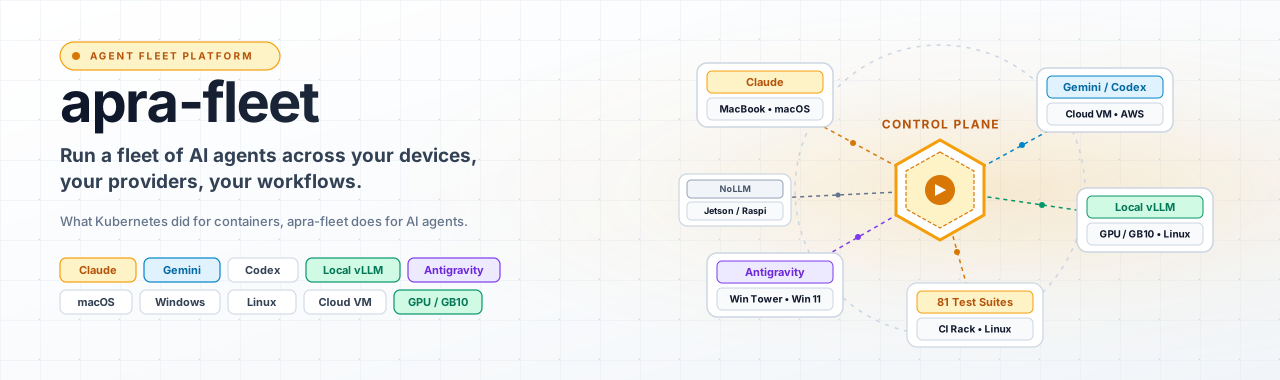
apra-fleet
Run a fleet of AI agents across your devices, your providers, your workflows.
What Kubernetes did for containers, apra-fleet does for AI agents: scheduling, credentials, isolation, and observability for an agentic workforce -- on any machine, anywhere, using every LLM provider at once.


Quick Start - Live Demo - How It Works - fleet-sprint Getting Started Guide - Website
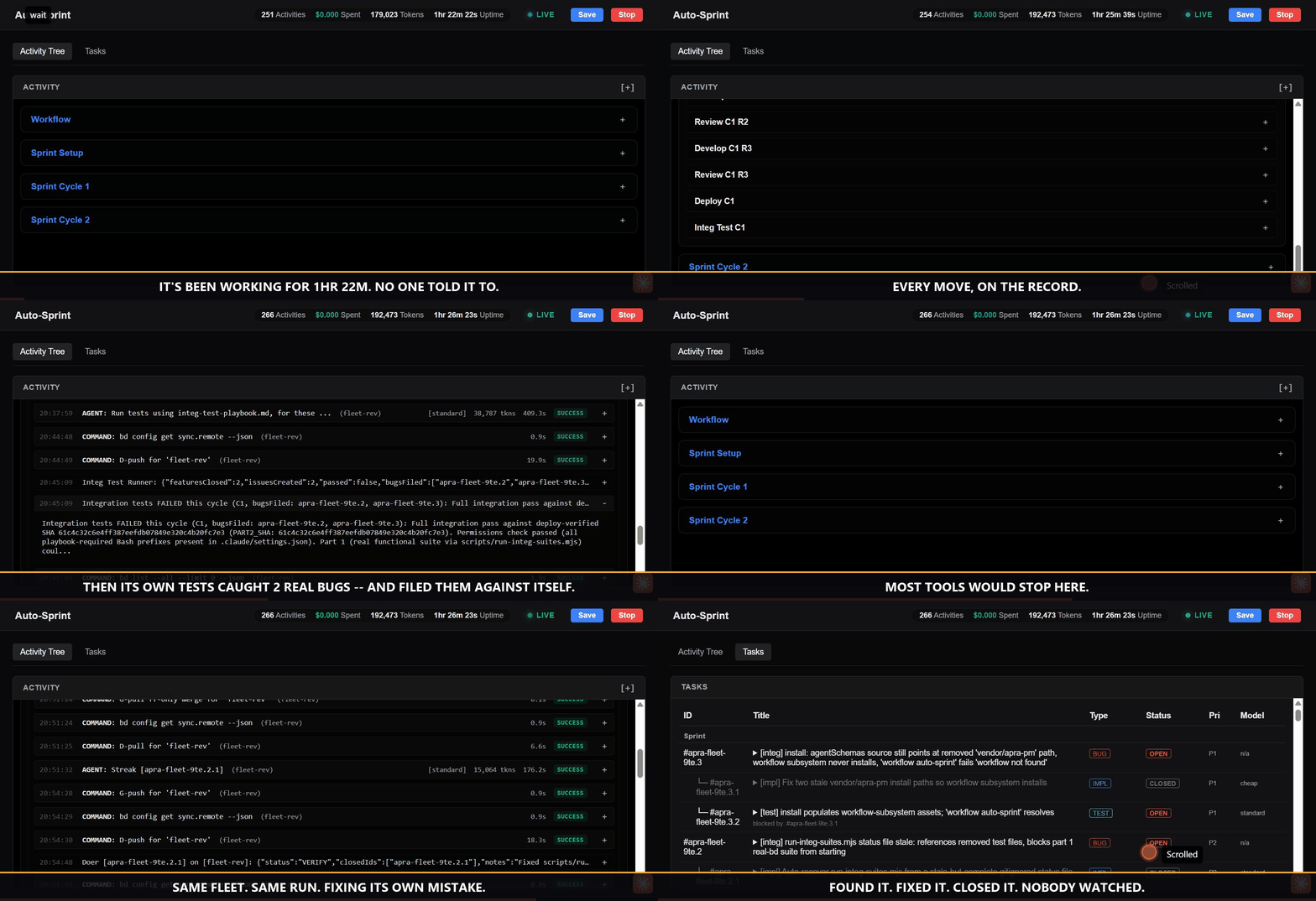
This repository is built by the product you are looking at. An autonomous apra-fleet workflow plans, codes, reviews, tests, and ships this codebase in multi-hour sprints -- filing bugs against itself and fixing them. The recording above is a real run, not a mockup.
Why a fleet?
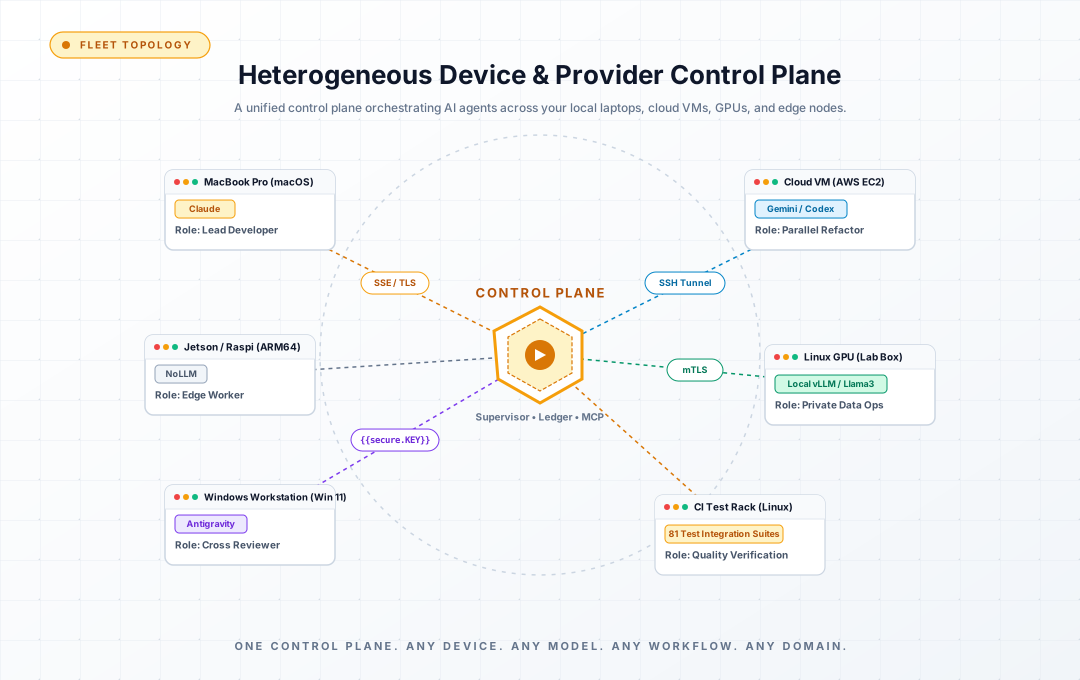
Running one AI agent is a demo. Running fifty -- across a MacBook in the office, a GPU box in the lab, three cloud VMs, and your CI -- is an operations problem nobody else has solved:
- Which machine runs which agent? Real devices, not throwaway sandboxes: registered, credentialed, health-checked members you already own.
- Which model does which job? Claude for review, a cheap tier for mechanical edits, a local vLLM model for private data -- all in one fleet, routed by cost tier, switchable per task.
- Who watches the agents? Durable workflows with supervisors, watchdogs, reservations, and live dashboards. Agents that die get detected. Work that stalls gets resumed. Nothing runs silently.
- Who holds the keys? Secrets entered out-of-band, never visible to any model. Per-provider permission composition. Network egress policy per credential.
One control plane. Any device. Any model. Any workflow. Any domain.
What you get
| Pillar | Concretely |
|---|---|
| Any device | Register any Windows / macOS / Linux machine (local or over SSH) as a fleet member in one command. Cloud members auto-start on demand. Windows members are fully supported for dispatch, command execution, and background long-running tasks (launched detached via WMI). |
| Any model | Claude, Codex, Copilot, Antigravity, local models (any OpenAI-compatible endpoint via OpenCode) -- mixed freely. Tier-based routing (cheap / standard / premium) keeps cost governance built in. Cross-provider review is a quality mechanism: a different model, with different blind spots, checks every change. |
| Any workflow | Workflows are durable programs, not prompt chains: multi-hour, resumable, observable, with member reservations and atomic state. Write your own; ship it to the fleet. |
| Any domain | Not just software development. The pattern fits wherever work decomposes into agent-sized pieces that need orchestration and an audit trail: nightly retail replenishment (reconcile inventory deltas, draft purchase orders for sign-off), logistics exception handling (triage a delayed shipment, re-book, notify), healthcare intake (summarize referrals, check completeness, route), back-office runs (invoice matching, compliance evidence collection). Software engineering is the vertical running today -- your domain is a workflow away. |
Watch a fleet work
Our flagship workflow, fleet-sprint, develops software autonomously: plan -> develop -> review -> deploy -> integration-test -> harvest, in cycles, until the goal is met or the evidence says stop.
It is not a toy. It builds apra-fleet itself:
- Multi-cycle sprints running for hours, unattended
- 2,300+ unit tests and an 81-file integration suite against real backends
- Files bugs against itself, decomposes them, fixes them, and blocks its own release until quality gates pass
- Every dispatch, verdict, and dollar visible live on the dashboard
- Every sprint's raw child stdout/stderr is captured to a per-sprint log and linked from the dashboard, so a run's output is traceable even if it crashes before reporting anything back
- Asks a human when it must: a doer or reviewer that needs an operator
decision files a decision bead, the run pauses (not stalls), you are
notified once by message and email, and your answer on the dashboard or
via
bd human respondresumes it (details)
A fleet that has run in production:
pm-1      Opus (premium)      orchestrator
doer-1    Sonnet (standard)   feature work
doer-2    Antigravity         large-context tasks
reviewer  Opus (premium)      final review
The engine does not know what a "sprint" is; it knows how to run your workflow reliably across your fleet (see Any domain above).
Quick start (5 minutes)
1. Install -- one command via npm (Node.js 22.16+), or grab the standalone installer binary for your platform from Releases and double-click it (installation is the default action):
npm install -g @apralabs/apra-fleet
apra-fleet install           # installs for Claude Code (default)
apra-fleet install --llm agy # or --llm opencode / codex / copilot
apra-fleet start             # npm install registers no OS service: start the server (again after reboot)
The standalone installer instead registers and starts a user-level service
(no start needed) and does not add anything to PATH: the binary is
~/.apra-fleet/bin/apra-fleet (Windows PowerShell:
& "$HOME\.apra-fleet\bin\apra-fleet.exe" status). See
docs/install.md.
The default install includes fleet-se (fleet-sprint, supervisor, bd), which requires a system Node.js 22.16+ and npm on PATH; the installer fails up front if they are missing. Use apra-fleet install --workflows none to install the core only.
For Claude Code, install also adds the fleet-status mod -- a Claude Code
plugin that shows every member's state in the status line and opens a
/fleet-status pane where you can also remove a member and list, add,
replace or delete secrets (a secret's value is typed in another terminal or
the server's one-time form, never in Claude Code). It is installed through the claude CLI from a local
marketplace in ~/.apra-fleet/claude-plugins/ and replaces the old statusLine
script. If the claude CLI is missing or too old to install plugins, install
says why and keeps the statusLine script instead. A statusLine of your own is
never overwritten. See docs/install.md.
2. Connect your agent. Load the fleet server in Claude Code with
/mcp (or restart your provider CLI). Your agent now has a fleet. To check
from a shell, claude mcp list should show a line like
apra-fleet: http://localhost:7523/mcp (HTTP) - ... Connected (7523 is the default port).
3. Register members -- in plain language. apra-fleet is driven conversationally through any MCP-capable agent:
"Register a local member called
doer. Register another calledreviewer. Pair them."
"Register 192.168.1.10 as
build-server. Username akhil, work folder/home/akhil/projects/myapp."
Remote passwords are collected out-of-band -- typed into a separate terminal, never the chat -- used once to set up SSH keys, then forgotten.
4. Run your first workflow:
apra-fleet workflow hello-world
Then point the fleet at real work:
apra-fleet workflow fleet-sprint \
  --issue my-project-epic --members doer \
  --branch fleet-sprint/first-run --base main
Open the dashboard, watch your fleet PLAN->BUILD->REVIEW->TEST->SHIP in a loop till closure
New to fleet-sprint? Read the fleet-sprint Getting Started Guide (Markdown if you're reading this on GitHub) -- a plain-English walkthrough of what it does, what you need to prepare (beads backlog,
deploy.md, test playbooks, member registration), how to launch and monitor a sprint, and what's automated versus what's still your call.
Running fleet-sprint after npm install: the apra-fleet workflow fleet-sprint ... command above is the same one command for everyone --
whether you installed via npm install -g @apralabs/apra-fleet, the
standalone binary, or a git-clone dev checkout. There is no separate
fleet-sprint command to install or remember. (Standalone installer: the
binary is not on PATH, so use ~/.apra-fleet/bin/apra-fleet or add
~/.apra-fleet/bin to PATH -- see step 1.) See
the full flag reference
for every option.
How it works
Layered Architecture
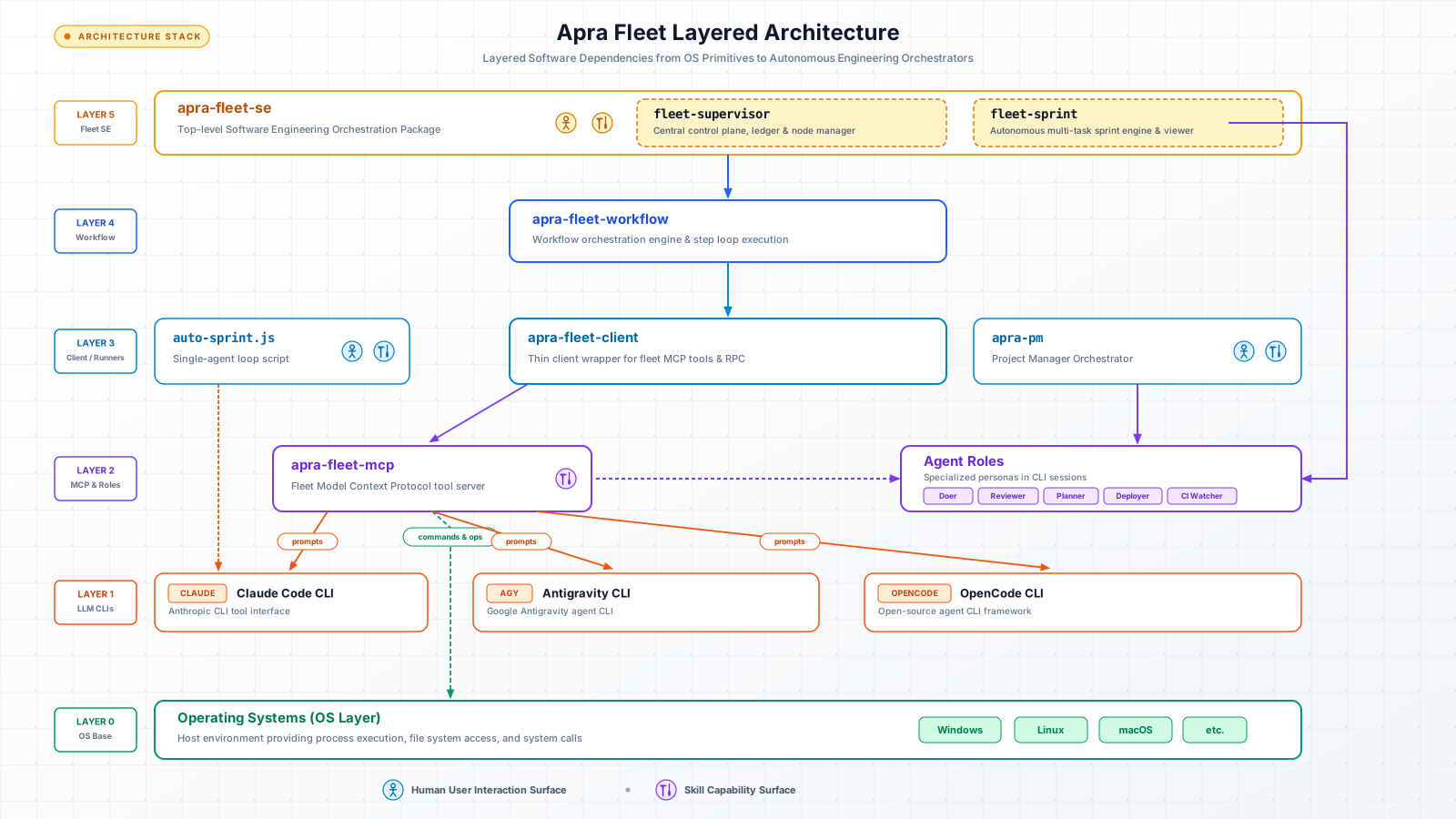
Component Docs: fleet-sprint | auto-sprint.js | apra-fleet-client | apra-pm | apra-fleet-mcp | Agent Roles | Sprint reliability gates
Fleet Dispatch Topology
flowchart LR
    CP["Control Plane<br/>(Server, Engine, Supervisor)"] -->|Dispatch & Sync| M1["MacBook<br/>(Claude)"] & M2["Linux GPU<br/>(vLLM)"] & M3["Cloud VM<br/>(AGY)"] & M4["Windows<br/>(OpenCode)"]
- Fleet server: the control plane. Registers members, dispatches commands and prompts, moves files, brokers credentials. Speaks MCP, so any MCP-capable agent can drive a fleet.
execute_promptsupports session forking (fork) on fork-capable providers -- branch a new, independent session from an existing one's context (e.g. a primed session reused across per-task dispatches) without continuing to write into the source session. See docs/mcp-tools.md for the parameter contract. - Members: real machines running provider CLIs. Composes provider-native permissions before every dispatch; unattended modes are scoped, never blanket.
- Workflow engine: runs workflow programs with phases, retries, turn budgets, resumable sessions, per-activity persistent state, and a cooperative pause/resume gate any workflow can hook into.
- Supervisor: always-on layer -- launch, pause/resume, & stop sprints over HTTP, member reservation ledger, crash watchdog (including a live "paused" state and base-branch-drift indicator), run history, and a supervisor-owned LLM-less backlog member that every launch is pinned to. The dashboard and backlog read a cached, tip-checked beads view and show when it was last refreshed ("Beads as of"); launch always forces a fresh beads check and answers 503, without reserving members or starting a sprint, when beads cannot be verified.
Knowledge Layer
Every agent session starts by calling kb_session_prime. The KB checks which
files have changed since last read and returns exactly those. Unchanged files
are served from cached summaries -- no re-read, no wasted tokens.
Cold session:  kb_session_prime returns stale_files=[a.ts, b.ts, c.ts]
               Agent reads all three, calls kb_capture for each.
Warm session:  kb_session_prime returns stale_files=[], session_warm=true
               Agent works from KB summaries. Zero file reads.
MCP tools that ship with the KB:
| Tool | What it does |
|---|---|
kb_session_prime |
Prime a session: stale files, fresh summaries, GitNexus call list |
kb_capture |
Store a learning, context-cache, runbook, or knowledge entry |
kb_query |
Two-level FTS retrieval (L1: title+summary, L2: full content) |
kb_list |
Audit-list entries by confidence/type/module/symbol (read-only, no use_count bump) |
kb_context |
Batch file freshness check (single git call for N files) |
kb_invalidate |
Mark files stale immediately (also called by the git hook), or discard own entries by ids |
kb_promote |
Advance confidence: UNVERIFIED -> INFERRED -> CONFIRMED (FULL session, or the sprint's kb_maintainer member session only) |
kb_demote |
Withdraw trust: lower a CONFIRMED entry back to INFERRED (the one reversible rung; never a ladder in its own direction) |
kb_harvest |
Extract learnings from a session transcript (auto-fires after execute_prompt) |
kb_export |
Additively merge live CONFIRMED entries whose cited files still match their recorded hashes into .fleet/kb-canonical.json -- the git-shareable team bible (FULL session only) |
kb_bible_commit |
Merge confirmed entry ids into the bible (format v3, per-entry file hashes), remove superseded or invalidated entries, and commit locally with base-branch provenance (used by the sprint kb_maintainer); on an http KB project it is a no-op that returns bible_skipped: true |
kb_setup |
Install git hook, write provider config, store remote token encrypted (FULL session only) |
kb_query accepts own_scope: true so a MEMBER session can read its own CONFIRMED rows from the per-repo database instead of the bible view. The fleet-sprint reviewer uses this to offer demotion candidates; the loop is on by default and --kb-demotion-loop off disables it. See docs/kb-member-view-and-maintainer.md.
code_* tools resolve the calling session's own folder, refuse with typed
E-CODE-INDEX-NOT-READY / E-CODE-INTEL-DISABLED errors when the index is not
usable, and report indexedCommit on every result; code_reindex and
code_status drive and inspect the index (see
docs/code-index-readiness.md). Registering a
remote member also installs a member-mode apra-fleet on it and wires a
per-folder MCP entry, recorded as fleetMcp (see
docs/member-fleet-mcp-wiring.md).
session_stats reports each member's kb_* / code_* call counts, which
fleet-sprint shows per dispatch in its Knowledge & Code Intel viewer tab.
kb_setup --remote <url> --token <key> takes effect immediately: the next
KB tool call resolves its project provider from this config, so a stock build
points at a remote KB server by configuration alone, with no code change and
no separate "server mode" build. A config with no remote, or any config the
reader cannot parse, always falls back to the local SQLite provider -- see
Client-side provider selection
for the exact selection rule and its fallback-construction invariant.
--token {{secret.NAME}} stores a reference to a refreshable fleet secret instead of a token, so an
expiring server token can be rotated with apra-fleet secret --set NAME --persist -y and no restart (see
Named credentials).
--request_timeout_ms <ms> (1000-120000, default 5000) sets the socket idle
timeout for each request to the remote KB server. It is not a per-request
deadline: a call can wait up to about twice the value when it first reads
the server capabilities. See
docs/knowledge-layer.md.
The provider config is install-wide, not per repo. There is one
knowledge/config.json per fleet install, so pointing it at a remote KB
points EVERY repo that install serves -- every member, every project -- at
that server. kb_setup only places the git post-commit hook (in the calling
session's own repo, including linked worktrees and custom core.hooksPath);
it does not scope the config. On a shared fleet server, treat
kb_setup --remote as a change for all of its users.
KB tool profiles. apra-fleet kb profile developer (or kb_setup with
tool_profile) trims the kb_* tools an interactive (non-member) session
lists to kb_session_prime, kb_query, kb_context, kb_capture and
kb_feedback; custom <a,b> lists exactly the named kb_* tools and full
(the default) lists them all. The profile is install-wide, applies to FULL
sessions only (member sessions and sprint roles are unaffected), and takes
effect when a session reconnects. It is a usability control, not a security
boundary. developer hides kb_setup and the tools the PM skills kb-review,
kb-reconcile and knowledge-agent need, so get back with
apra-fleet kb profile full (and reconnect) before running those. See
KB tool profiles.
Every KB tool call is scoped to the calling session's own repo -- a fleet
server handling many members across many repos never lets one repo's
learnings land in another repo's KB. No kb_* tool takes a scope argument:
a member session uses its registered work folder and any other session uses
the fleet server's working folder, and a folder that is not a git repository
with an origin remote is refused with a typed error that names the fix:
E-SELF-NO-WORKFOLDER (create the folder or re-register the member),
E-SELF-NOT-A-REPO (git init or clone there) or E-SELF-NO-REMOTE
(git remote add origin <url>; for a remote member, record its origin with
update_member git_repos). Member sessions get a reduced, explicit tool list:
the code_* tools, a few self-reporting tools and the kb_* tools except
kb_setup and kb_export (never served to a member) and kb_promote /
kb_resolve_contradiction (served only to the sprint engine's kb_maintainer
session, which applies the reviewer's promotions). The apra-fleet call verb
lets a process call tools as a member. KB reads default to CONFIRMED,
undisputed entries. See
Per-repo KB isolation for
the resolution, anchor and cache-keying rules, and
Member-session tool calls
for the member tool model.
The backend is swappable: start with local SQLite, add a central HTTP server for a team, or plug in Postgres later -- all via a one-line config change.
See docs/knowledge-layer.md for the full guide.
Explore with agents. Operate with programs.
There are two ways to orchestrate agents, and apra-fleet is built on the observation that you need both -- at different stages of a workflow's life:
- Exploration mode. While a workflow is still being discovered, let an LLM orchestrate: flexible, adaptive, and token-hungry -- every step is a decision, and every decision costs thinking.
- Operation mode. Once you know what must happen, the control flow
becomes a deterministic workflow program. Shell, git, and file steps run
through
execute_command-- zero tokens. The model is invoked only at the corners that genuinely require judgment (execute_prompt): review this diff, plan this backlog, decide this exception.
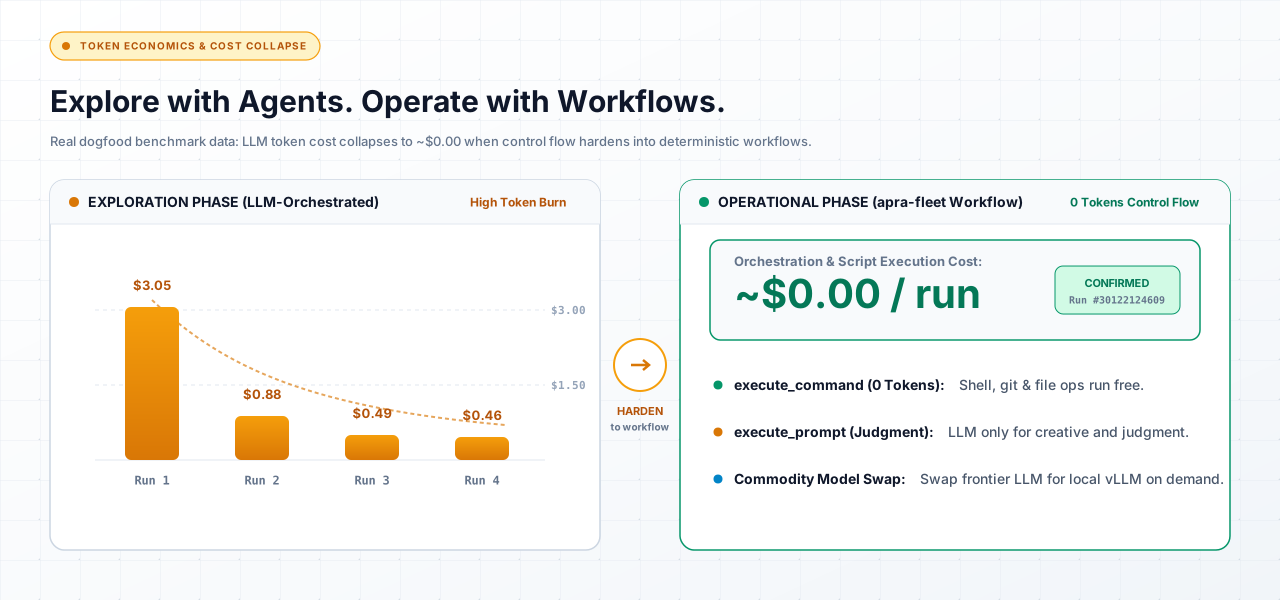
That is not a projection -- it is this repository's own e2e setup+teardown step, before and after we hardened it. Development tokens are not operating tokens: pay once to discover the workflow, then run it free.
| LLM-orchestrated (explore) | Workflow-orchestrated (operate) | |
|---|---|---|
| Control flow | the model decides each step (tokens) | deterministic program (free) |
| Shell / git / file steps | narrated through the model | execute_command, zero tokens |
| Where the model runs | everywhere | judgment nodes only (execute_prompt) |
| Cost curve | scales with every step | scales with thinking only |
| Failure mode | drift and silent retries | typed errors, resumable state |
The collapse is two-dimensional. As a workflow hardens, control flow moves from model to program -- and the judgment nodes that remain move from frontier models to cheaper ones, because a well-specified task no longer needs discovery-grade reasoning. Develop a workflow with Claude; operationalize it on OpenCode against a local or OpenRouter model. Same fleet, same workflow -- swap the members. Tier routing makes it a registration change, not a rewrite.
Only a fleet makes that trade possible. Single-provider tools cannot leave their vendor; in-process frameworks cannot move orchestration out of the token path. Because apra-fleet's unit of execution is the member -- a machine plus a provider, swappable at registration -- the same hardened workflow runs on frontier models the day you design it and on commodity models every day after.
fleet-sprint is this principle, lived: it began as LLM-orchestrated exploration; each discovered pattern was hardened into the deterministic engine; today the engine drives hour-long autonomous runs in which models are consulted only as planner, doer, reviewer, tester, and harvester.
Compare to alternatives
| Tool | Overlap | Where apra-fleet differs |
|---|---|---|
| Single-agent coding assistants | AI writes code | A fleet adds agents that review, test, and deploy each other's work -- across vendors. |
| CI self-hosted runners | Runs work on other machines | Conversational and stateful, not pipeline-triggered; agents carry context between phases. |
| SkyPilot / dstack | Multi-machine compute | Coordinates agents and their context, credentials, and permissions -- not just jobs. |
| Google A2A | Agent-to-agent messaging | An opinionated orchestration and operations layer, not just a transport. |
| Agent frameworks (LangGraph, CrewAI, ...) | Multi-agent logic | Those compose agents inside one process; apra-fleet operates agents across real machines, providers, and days-long workflows. |
When NOT to use it: a one-off single-file change needs no fleet.
Security model, in one paragraph
Secrets are entered out-of-band into a credential store and referenced as
{{secret.NAME}} -- resolved server-side at execution, never visible to
any LLM or log; see docs/secret-variables.md.
Credentials scope to members, expire on TTL, and can carry
a network egress policy (allow / deny / confirm). Every member runs with
composed, provider-native permission files -- allow-listed tools, not
god-mode. VCS access is provisioned and revocable per member, across GitHub,
Bitbucket, and Azure DevOps -- host differences (URL shape, PR REST dialect,
auth pattern, error vocabulary) are hidden behind a per-provider descriptor
rather than leaking into shared code; see
docs/design-azure-devops-vcs-auth.md for the Azure DevOps provider's
credential-assembly and PAT-lifetime details. A credential-requiring VCS
command can be handed to the server for execution (vcs_credential_exec)
rather than the orchestrator learning the plaintext token itself: the
server substitutes the credential into the command, runs it on the member,
and redacts the token from every field of the result -- the plaintext never
transits an orchestrator-readable output. Permission
composition verifies its own delivery: a grant is read back off the target
member and structurally compared against what was intended before it is
reported as applied, so a failed or partial write is surfaced as an
explicit failure rather than a false success. Dropped or unmappable permission
tokens are surfaced explicitly in composition warnings, and shell pipeline
stages are decomposed into constituent command grants to provide precise
permission suggestions across providers.
Email Configuration
The fleet send_email tool sends email via SendGrid or SMTP. Secrets
are stored in the fleet credential store. Non-secret config (provider, host,
port, from address) is passed by the workflow in each call.
Storing secrets (one-time setup)
Store email secrets via the CLI:
# SendGrid API key
apra-fleet secret --set sendgrid_api_key --persist

# SMTP password
apra-fleet secret --set smtp_password --persist
Or via the MCP tool (the path an LLM agent uses):
{ "name": "sendgrid_api_key", "prompt": "Enter your SendGrid API key", "persist": true }
Secrets are encrypted in the fleet credential store. They never appear in workflow code, config files, or environment variables.
Sending email from a workflow
The workflow passes non-secret config inline and calls send_email. Load
your config however you prefer (JSON file, hardcoded, etc.):
import { parseToolJson } from '@apralabs/apra-fleet-client';
import { connectFleet } from '@apralabs/apra-fleet-client/server-resolution';

const { fleetApi, transport } = await connectFleet({ env: process.env });

// fleetApi wrappers return the raw MCP tool result ({ content: [...] });
// parseToolJson extracts the JSON payload.
const result = parseToolJson(await fleetApi.sendEmail({
  provider: 'smtp',
  host: 'smtp.example.com',
  port: 587,
  user: '[email protected]',
  from: '[email protected]',
  to: '[email protected]',
  subject: 'Sprint Report',
  body: 'All tasks completed.'
}));
console.log(`Sent: ${result.messageId}`);

// Release the server session when done (stop() alone leaves it open).
await transport.close();
The SMTP password resolves from the credential store automatically. It never
appears in the workflow. See examples/workflows/email-notify/ for a
complete runnable example and docs/email-workflow-guide.md for the full
walkthrough.
send_email Tool Reference
| Parameter | Type | Required | Description |
|---|---|---|---|
provider |
"sendgrid" or "smtp" |
no (default: "sendgrid") |
Email provider |
from |
string | yes | Sender email address |
host |
string | SMTP only | SMTP server hostname |
port |
number | no (default: 587, or 465 when secure is true) |
SMTP server port |
user |
string | SMTP only | SMTP username |
secure |
boolean | no (default: false) | Implicit TLS (port 465). When false, STARTTLS is required. |
to |
string or string[] | yes | Recipient email address(es) |
subject |
string | yes | Email subject line |
body |
string | yes | Plain-text email body |
html |
string | no | HTML email body |
cc |
string[] | no | CC recipient addresses |
bcc |
string[] | no | BCC recipient addresses |
attachments |
attachment[] | no | File attachments (base64-encoded) |
Each attachment: filename (string), content (string, base64), contentType (string, optional).
Secrets are resolved from the credential store by name:
- SendGrid:
sendgrid_api_key - SMTP:
smtp_password
Returns: { ok: true, messageId } on success, { ok: false, error } on failure.
The packages
| Package | What it is |
|---|---|
apra-fleet |
The fleet platform: server, CLI, member management, credentials, workflows runtime |
packages/apra-fleet-se |
The software-engineering vertical: fleet-sprint engine, agent contracts, integration suites |
packages/apra-fleet-workflow |
Workflow authoring runtime: state, viewer, checkpointing |
packages/fleet-api-contract |
Typed API contract shared by server and clients |
Status and roadmap
apra-fleet is under active development -- by its own fleet. Current focus: hardening autonomous sprint execution (the toughest workflow we know of), supervisor-orchestrated multi-sprint operation, and the workflow SDK for third-party verticals.
Documentation
| Topic | Link |
|---|---|
| fleet-sprint Getting Started Guide (start here, plain English) | Website - Markdown |
| fleet-sprint set-aside rules (BLOCKED beads, deploy Permissions failure, immediate stall) | docs/fleet-sprint-set-aside.md |
| Codebase wiki (architecture, internals, AI Q&A) | DeepWiki |
Install, uninstall, the --llm flag |
docs/install.md |
| Choosing a provider (roles, gotchas, mixing providers, OpenCode/local models) | docs/provider-guide.md |
| Antigravity (agy) provider (project binding, permission mapping, model resolution, Windows parity) | docs/agy-provider.md |
| Transport, service mode, and supported interfaces | docs/transport-and-service-mode.md |
| Cost model (tiering, shell-over-prompts, measured token spend) | docs/cost-model.md |
The PM skill (doer-reviewer sprints, /pm commands) |
docs/pm-skill-overview.md |
| FAQ | docs/FAQ.md |
| Troubleshooting | docs/troubleshooting.md |
| Supervisor/viewer request guard | docs/supervisor-request-guard.md |
Keeping Fleet updated (apra-fleet update) |
docs/features/update.md |
Live member activity (apra-fleet watch, logging.previewChars) |
docs/features/watch.md |
| Secret variables and passwords | docs/secret-variables.md - docs/features/oob-auth.md |
| Member category and tags | docs/features/member-tags.md |
| Enabling SSH on a remote machine (if it does not have it yet) | docs/ssh-setup.md |
| Git authentication | docs/design-git-auth.md |
| GitHub App setup (exact permissions per git_access level) | docs/github-app-setup.md |
| Cloud compute | docs/cloud-compute.md |
| Architecture | docs/architecture.md |
| Dispatch and orchestration reliability design (Windows completion-on-exit, stall detector, test-runner wall-clock bound) | docs/dispatch-reliability-hardening.md - docs/stall-detector-resilience.md |
| Windows shell selection (probe order, gitbash/pwsh7/powershell5, shell vs os) | docs/windows-shell-selection.md |
| Cross-shell command construction for member-bound commands | docs/cross-shell-command-construction.md |
| Knowledge Layer (setup, usage, provider swap) | docs/knowledge-layer.md |
| Code intelligence provider abstraction | docs/code-intelligence-providers.md |
| Hub-spoke cloud migration plan (historical; see tier-3 ownership ADR) | docs/hub-spoke-master-plan.md |
Tier-3 ownership decision (fleet-dashboard vs src/hub-service/) |
docs/adr-tier3-ownership.md |
| Shared hub/dashboard API contract package | packages/fleet-api-contract/README.md |
Workflow engine internals (agent()/parallel()/pipeline(), journal, budget, pause/resume) |
packages/apra-fleet-workflow/docs/apra-fleet-workflow-architecture.md |
| Cooperative workflow pause/resume (engine, viewer, supervisor, fleet-sprint) | docs/features/workflow-pause-resume.md |
Sprint run summary (GET /state?summary=1, published once per state, pulled by supervisor rows) |
docs/sprint-run-summary.md |
Supervisor dashboard live-refresh (/state + /events SSE, tab-activation refresh, in-memory scope expansion) |
docs/features/supervisor-dashboard-live-refresh.md |
| Writing and running workflow scripts | packages/apra-fleet-workflow/docs/workflow-guide.md |
Authoring a SEA-embedded apra-fleet workflow (manifest, entry contract, launcher env vars) |
docs/authoring-workflows.md |
| Workflow launcher fleet-server resolution order (HTTP singleton vs. stdio) | docs/adr-workflow-server-resolution.md |
| Running fleet-sprint (full flag reference; identical for npm-install, standalone binary, and git-clone dev checkout) | packages/apra-fleet-se/fleet-sprint/docs/README.md |
| fleet-sprint overview (autonomous plan-develop-review-publish loop) | packages/apra-fleet-se/docs/overview.md |
| fleet-sprint CLI reference | packages/apra-fleet-se/docs/cli-reference.md |
| fleet-sprint internals (cycle loop, stall detection, budget, topology) | packages/apra-fleet-se/docs/architecture.md |
| fleet-sprint agent role contracts | packages/apra-fleet-se/docs/role-contracts.md |
| fleet-supervisor skill (start/stop/restart/auto-start-on-boot, sprint launch via HTTP API) | packages/apra-fleet-se/fleet-sprint/skills/fleet-supervisor/SKILL.md |
| Scoped in-cycle replan findings threading, and the wrapper-injection role KB contract | docs/scoped-replan-and-planner-kb-contract.md |
MCP client SDK overview (transports, ApraFleet API) |
packages/apra-fleet-client/docs/overview.md |
| MCP client SDK API reference | packages/apra-fleet-client/docs/api-reference.md |
| MCP client SDK getting started | packages/apra-fleet-client/docs/getting-started.md |
Memory contract v1 inventory findings and invariants (kb_*/code_* tool surface) |
docs/memory-contract-v1-inventory-notes.md |
| Memory contract v1 schema generation design (zod -> JSON Schema 2020-12) | docs/memory-contract-v1-generator-design.md |
| Memory contract v1 round-trip validation, drift guard, and T1/T2/T3/T7 handoff design | docs/memory-contract-v1-roundtrip-and-handoff.md |
Community
- Questions and ideas: GitHub Discussions
- Releases: GitHub Releases
- Issues: GitHub Issues
- What is planned next: ROADMAP.md
If Apra Fleet helped you ship faster with better quality, please star the repo -- it helps others find it.
Development
Build from source (also the path for Intel Macs):
git clone https://github.com/Apra-Labs/apra-fleet && cd apra-fleet
npm install && npm run build && npm test
npm test runs the full local suite: the root vitest suite, the
apra-fleet-se workspace suite, and the apra-pm suite (which is not an npm
workspace and is otherwise only reachable via an explicit --prefix
invocation) -- so a green local run and a green CI run see the same tests.
See CONTRIBUTING.md to contribute.
License
Apache 2.0 -- see LICENSE.
Stop babysitting agents. Start operating fleets.