
Anning01/novelvids
Anning01/novelvids has 364 GitHub stars and 110 forks. GitHot measured +2 stars in 24 hours. Last checked 2026-11-09 18:03 UTC. Last push 2026-11-08.
从故事创作、角色资产管理、分镜设计,到 AI 图片与视频生成,打造完整的开源 AI 漫剧与短剧创作工作台。支持创作助手、无限画布、本地部署与多模型接入。
Measured star growth
- in 24h
- +2
- in 7 days
- Update delayed
- in 15 days
- Update delayed
- in 1 month
- Update delayed
Net star changes over overlapping periods, not daily totals. Missing measurements are left blank. Stars measure attention, not software quality.
README.en.md
Original

NovelVids · 猫影短剧
An AI creation platform for illustrated stories and short dramas · hosted service and open-source self-hosting.
Bring stories, character assets, storyboards, AI images, video generation and episode assembly
into one project you can edit, track and keep refining.



English | 简体中文
Join the community · Video tutorial · Example videos · Create online · Get started · Documentation · Contribute · Support the project
Join the community
Join the NovelVids · 猫影短剧 WeChat group to discuss AI animation, short dramas, model workflows and open-source deployment.

Scan with WeChat · Updated November 8, 2026; valid before November 15.
Group QR codes expire after 7 days. If this one has expired, check the latest version of the repository home page.
Create online
Open the NovelVids commercial service →
Sign in with Qiling through WeChat. Start with an image or video idea, add reference material, or develop a story into a short drama. The hosted service provides model selection, team collaboration, usage records and top-ups. Generation fees follow the displayed estimates and actual usage.
For open-source self-hosting and development, see Quick start below and the development guide.
Video tutorial
Watch the tutorial on Bilibili →
Watch the tutorial to learn how to use NovelVids. For finished creations, see the example videos below.
Example videos
Commercial remake example

Watch the commercial remake on YouTube
Illustrated drama example

Watch the illustrated drama on YouTube · Visual style: 3D xianxia; storyboard strategy: narrated storytelling. Generated automatically from story to finished video, without manually editing prompts or AI-generated prompts. Results depend on the material, models and creative revisions.
Keep the creative process in one project
| Start with | What you can do |
|---|---|
| A visual idea | Choose an image or video model on the home page, reference images, video or audio, review the estimate and create a clip |
| A story or manuscript | Import TXT, Markdown, DOCX or PDF, review chapter boundaries and story analysis, then work chapter by chapter |
| Characters, locations and props | Manage reference images, aliases and variants; reuse the same assets and voice bindings |
| A storyboard | Edit shot descriptions, complete prompts, reference media and generation parameters; inspect each result |
| An infinite canvas | Connect assets, videos and enhanced results; switch between storyboard and workflow views |
| A revision in mind | Ask the assistant to change selected objects, inspect diffs and recorded changes, and undo supported edits |
| Generated footage | Track tasks and versions, connect shots, assemble episodes and optionally enhance resolution |
You can also use Remake studio to analyze reference videos you are authorized to use and turn their shots into an editable project.
Why a workspace?
- Reusable settings. Characters, variants, locations and voices stay linked to shots across chapters.
- Editable steps. Keep prompts and generation versions. Revise one shot before deciding whether to generate it again.
- Shared capabilities for buttons and chat. The assistant orchestrates creation; image and video models generate the media. Tasks and usage remain recorded.
- Customizable creative rules. One Chinese skill pack guides story analysis, assets, images and storyboards, with Chinese or English output selected by system language.
- Choose how to use it. Create with the hosted service, or manage your own models, storage and deployment with the open-source edition.
Current interface
Home: select a model, reference material and start with an image or video clip.

| Storyboards and creation assistant | Infinite canvas workflow |
|---|---|
 |
 |
| Project assets | Works library |
|---|---|
 |
 |
Screenshots use public example projects in the current Chinese interface. English is also supported. View the complete gallery.
Quick start
- Open the NovelVids commercial service, read the agreements and sign in with Qiling through WeChat.
- Choose an image or video model, enter a visual idea, add references and review the estimate. For a series, import a story through Short dramas and continue into assets and storyboards.
- Review generated versions, revise shots, organize resources and manage finished episodes in the works library. Projects and costs belong to the currently selected team.
Open-source self-hosting
The open-source edition lets you manage models, data and deployment. It runs anonymously by default; password login and team setup are covered in the team deployment guide.
Expand Docker self-hosting and first-run configuration
You need Docker with Docker Compose and access to model services. Self-hosting is not offline inference: AI features call the APIs you configure, and providers may charge for them.
git clone https://github.com/Anning01/novelvids.git
cd novelvids
docker compose up -d --build
Open http://localhost:8080 when startup completes.
Before creating your first project:
- Under Settings → Model settings, enable a text model, select Creation assistant, and enable Multi-turn tool calling. Enable the assistant in General settings.
- Configure the image/video models you want and their prices. A text model alone is enough to start planning stories, assets and storyboards.
- Start with a short story or one chapter. Review extraction and storyboard results before generating media. Explicit generation requests can incur model charges; editing a prompt does not automatically generate images or videos.
The current Docker backend image does not include FFmpeg. Before video probing, composition, remake analysis or enhancement, install it in the backend container:
docker compose exec -u root backend sh -c 'apt-get update && apt-get install -y --no-install-recommends ffmpeg && rm -rf /var/lib/apt/lists/*'
docker compose exec backend ffprobe -version
Repeat this preparation after rebuilding the backend image. See model setup and first run for configuration and troubleshooting.
- Local persistence:
./dataholds the database and private exports;./mediaholds images, video and audio. Back up both before updating. - No login by default: intended for personal local use. Before public exposure, configure authentication and HTTPS using the team deployment guide (Chinese).
- Local development: Python 3.12+, Node.js 22.12+, uv and FFmpeg. See the development guide.
Creative workflow
flowchart LR
    A[Story / manuscript] --> B[Analysis and chapters]
    B --> C[Characters · locations · props]
    C --> D[Editable storyboard]
    D --> E[Image and video generation]
    E --> F[Review and revise]
    F --> D
    F --> G[Episode / video enhancement]
Use the storyboard to inspect each shot and the canvas to organize references and workflow. Accepted media tasks continue to be collected after you close the page. Uncertain submissions require review rather than an automatic repeat of a paid request.
Documentation
| What you want to do | Guide |
|---|---|
| Learn the workflow, assistant, voices and workspace | Creation guide |
| Configure models, prices and assistant budgets | Model setup and first run |
| Produce English dialogue and reuse uploaded MP3/WAV voices | English production |
| Improve image/storyboard prompts or add visual styles | One skill pack |
| Enhance a clip or an episode | Video enhancement |
| Configure PostgreSQL, OSS, persistent media and backfills | Database and storage |
| Enable authentication, teams and deployment protections | Team deployment (Chinese) |
| Develop, understand the structure and run tests | Development · Contributing |
| Check specific behavior | Media library · Project metrics · Project name migration (Chinese) |
Development and community
The frontend uses Vue 3, TypeScript and Vue Flow; the backend uses FastAPI, Tortoise ORM and Pydantic AI. Creative guidance lives in prompts/skills/, separate from model adapters and task execution.
Bring a real creative problem: report a bug, discuss an idea, or contribute. For generation problems, include a shareable minimal example, model configuration type and reproduction steps. Keep keys and private media out of reports.
Directions for discussion include asset consistency, reproducible workflows, deployment and recovery, model/skill extensibility and production quality checks. The roadmap distinguishes current capabilities from proposed work; it is not a release commitment.
If NovelVids helps you, consider a Star, report your experience, or share work and production notes you are authorized to publish.
Support the project
If NovelVids helps you, consider supporting my work through WeChat Pay or Alipay. Your support helps me keep developing and maintaining the project. Thank you!
| WeChat Pay | Alipay |
|---|---|
 |
 |
License
Project code and documentation use the MIT License. Commercial use, modification and redistribution are permitted with the copyright and license notice retained. The software is provided as is, without warranty.
Third-party dependencies, fonts, media and model services retain their own terms. Demonstration content is not a grant of rights to underlying stories, music or voices. See third-party notices.
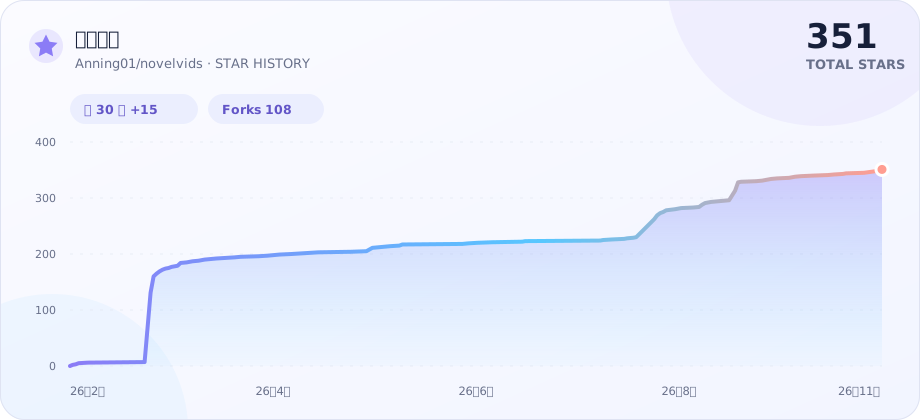
Star history
Explore related projects
awesome-selfhosted/awesome-selfhosted
A list of Free Software network services and web applications which can be hosted on your own servers
335,757 starsimmich-app/immich
High performance self-hosted photo and video management solution.
118,645 starsStirling-Tools/Stirling-PDF
#1 PDF Application on GitHub that lets you edit PDFs on any device anywhere
96,149 starslouislam/uptime-kuma
A fancy self-hosted monitoring tool
93,425 stars