
Animan-AI/DuckBuddy
Animan-AI/DuckBuddy has 92 GitHub stars and 6 forks. GitHot measured 0 stars in 24 hours and +3 in 7 days. Last checked 2026-11-16 03:32 UTC. Last push 2026-10-30.
Measured star growth
- in 24h
- 0
- in 7 days
- +3
- in 15 days
- Collecting history
- in 1 month
- Collecting history
Net star changes over overlapping periods, not daily totals. Missing measurements are left blank. Stars measure attention, not software quality.
About
Your real-life buddy duck: an open-source embodied AI robot duck that walks, hears, sees, and has a life of its own. 让 DuckBuddy 成为你真正的生活伙伴鸭:开源具身智能小鸭机器人,运动、语音、视觉与生命层全部跑在机器人自己身上。Feetech servos + Orange Pi Zero 3W, built on Pollen Robotics' Microduck (unofficial).
Developer ToolsREADME-EN.md
OriginalDuckBuddy
An open-source embodied AI robot duck — it walks, hears, sees, and has a life of its own.
🦆 Make DuckBuddy your real-life buddy duck. 让 DuckBuddy 成为你真正的生活伙伴鸭。




中文 | English
https://github.com/user-attachments/assets/7dd5c290-7b48-4f87-a991-7aab6c25632f
A string of spoken instructions, done one move after another (recorded on the robot, 2026-10-17; it has sound — unmute the player).
📱 No video in the GitHub app? Open the GIF
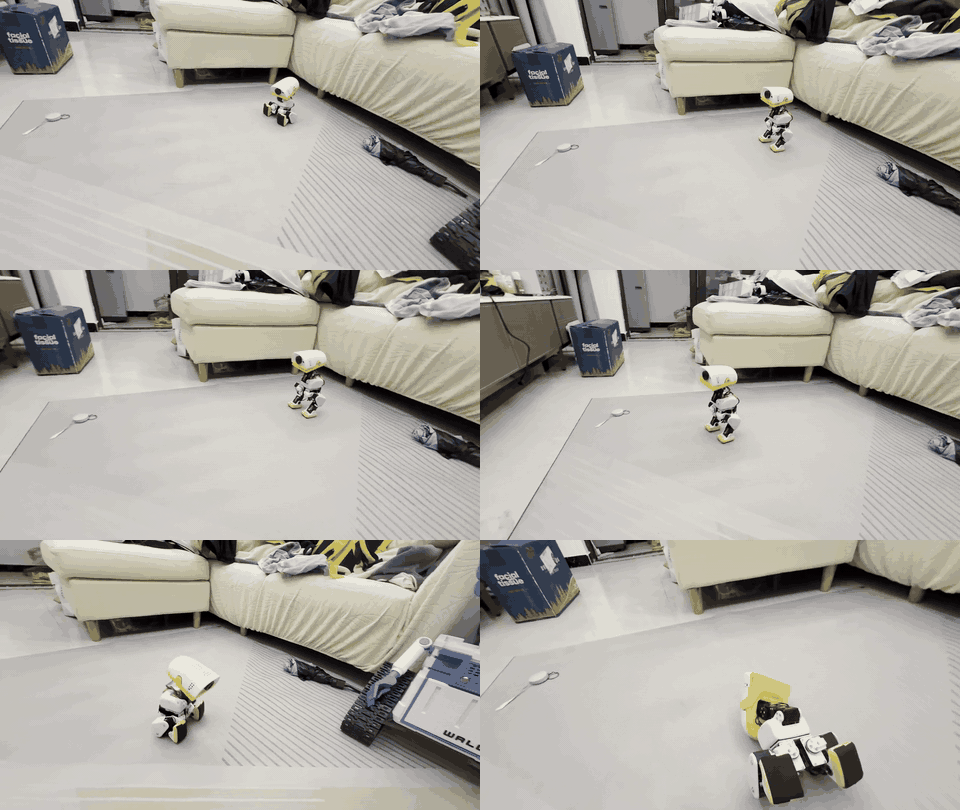
3× speed, no sound. The full video: download demo.mp4 (5.7 MB), or open this page in a browser.
This is not just another robot duck. DuckBuddy brings motion, perception, voice and a life layer together in one open system that you can build and improve — and all of it runs on the robot itself, without a phone or the cloud.
DuckBuddy is built on Pollen Robotics' Microduck. It is an independent community project, not affiliated with or endorsed by Pollen Robotics; "Microduck" is their name for their robot. See NOTICE.
What makes DuckBuddy special?
- 🦆 Motion — Reinforcement-learning policies retrained for our Feetech HL-2915 servos: walking, getting up after a fall, sitting down and standing up, a forward roll (trained in sim). A 50 Hz loop that guards against falls, heat, a flat battery and a lost link
- 👂 Hearing — Offline speech recognition (SenseVoice) with denoising and voice detection; two microphones in the head tell which side a voice came from, so it turns to look when you call it
- 👀 Vision — Notices faces and things that move and turns to look, naturally (being tested on the robot); joins Wi-Fi from a QR code; "what is this?" answered by a multimodal model when online
- 🧭 Autonomy — A mission layer: say a string of moves ("two steps forward, turn around, sit down") and it plans and does them in turn; walking a spoken route is being tested on the robot
- 💗 A life layer — Drives and moods; it tires, rests and keeps its servos cool (a hot head moves less); it answers in duck-speak rather than a text-to-speech voice; its name and character live in one persona file — swap it and you have a different duck
Architecture
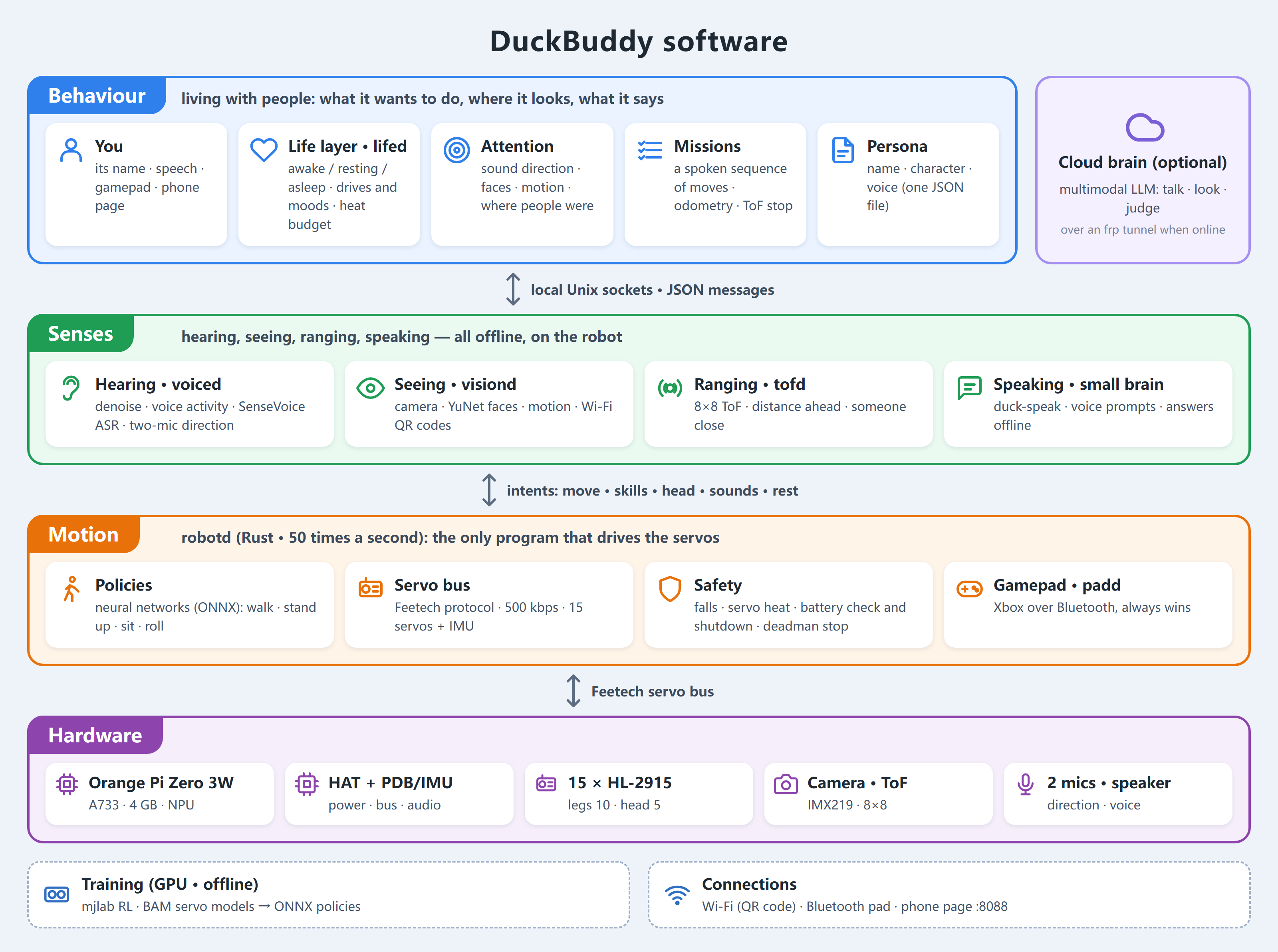
One picture of how it fits together: perception (hearing, vision, distance) reports events to the
life layer, lifed, which decides where to look, what to do and what to say, and hands its intents to
robotd, the only process that drives the servos. The gamepad outranks lifed. Online, lifed asks a
brain server (a multimodal LLM) through an frp tunnel; offline, its own small brain answers. Every
service runs on its own on the Orange Pi and they talk JSON over local Unix sockets.
For developers: the editable Mermaid diagram
flowchart TB
  subgraph ROBOT["On the robot · Orange Pi (Linux)"]
    subgraph SENSE["Senses"]
      VOICED["voiced · Python<br/>denoise · VAD · SenseVoice offline ASR<br/>sound direction from two mics"]
      VISIOND["visiond · Python + duckcam<br/>faces (YuNet) · motion · Wi-Fi QR · photos"]
      TOFD["tofd · Rust<br/>8×8 ranging"]
    end
    LIFED["lifed · Python · the life layer<br/>states · drives and moods · attention<br/>missions · offline small brain · head · voice prompts"]
    PERSONA[("persona JSON<br/>name · character · voice")]
    DUCKWEB["duckweb · Python<br/>phone page :8088"]
    PADD["padd · Rust<br/>Xbox pad"]
    ROBOTD["robotd · Rust · 50 Hz<br/>ONNX policies: walk · stand up · sit · roll<br/>safety: falls · heat · battery · deadman"]
  end
  HW["15 servos · IMU · speaker"]
  BRAIN["duckbrain · GPU server (optional)<br/>multimodal LLM: talk · look · judge"]
  TRAIN["Training · GPU<br/>mjlab · BAM actuator identification"]

  VOICED -- "calls / speech (with direction)" --> LIFED
  VISIOND -- "faces · motion · QR codes" --> LIFED
  TOFD -- "distance ahead" --> LIFED
  TOFD -- "someone close" --> VISIOND
  LIFED -- "watch · scan · snap" --> VISIOND
  PERSONA -.-> VOICED
  PERSONA -.-> LIFED
  DUCKWEB <-- "state · volume · missions" --> LIFED
  LIFED -- "JSON-RPC: move · skills · head · sounds · rest" --> ROBOTD
  ROBOTD -- "pose · temperatures · battery · odometry" --> LIFED
  PADD -- "JSON-RPC: driving" --> ROBOTD
  ROBOTD -- "Feetech bus · 500 kbps" --> HW
  LIFED <-. "frp tunnel: talk · look" .-> BRAIN
  PERSONA -.-> BRAIN
  TRAIN -. "ONNX policies" .-> ROBOTD
Hardware & Software
Hardware at a glance
| Microduck | DuckBuddy | |
|---|---|---|
| Main board | Radxa Zero 3W (RK3566, 1 GB) | Orange Pi Zero 3W (Allwinner A733: 2×A76 + 6×A55, 4 GB, 3 TOPS NPU) |
| Servos | 15 × Dynamixel XL330 (2S) | 15 × Feetech HL-2915 (3S); HD-1910 (2S) on the way |
| Carrier boards | Pollen's hat | our HAT (audio codec, two microphones, speaker amp, ToF, 5 V supply, servo bus) and PDB/IMU (power distribution + an IMU on the servo bus) |
| Sensors | IMU | IMU, two microphones, IMX219 camera, 8×8 ToF ranging |
| Policies | Pollen's | retrained for the HL-2915, in training/ |
| Behaviour | a gamepad or the app | a life layer on the robot, in tools/lifed |
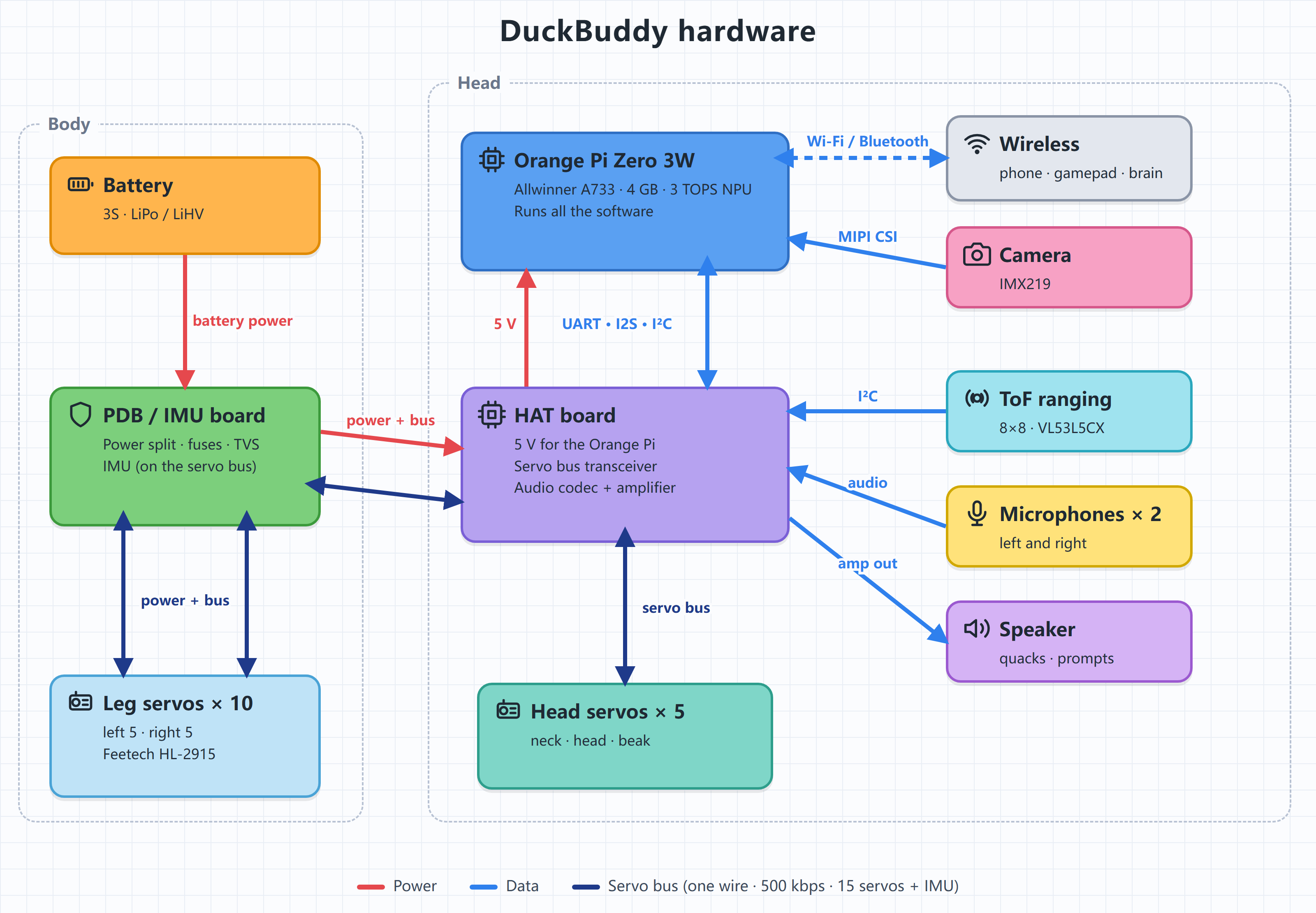
The battery plugs into the PDB/IMU board in the body, which splits it three ways — left leg, right leg, head — each branch carrying power and the servo bus. The HAT sits on the Orange Pi in the head: it brings the battery down to 5 V for the Orange Pi, puts its UART on the servo bus, and does the sound (two microphones in, a speaker out). The 15 servos and the IMU share one bus.
For developers: the editable Mermaid diagram
flowchart LR
  BAT["Battery 3S<br/>LiPo / LiHV"] --> PROT
  subgraph PDB["PDB/IMU board · body"]
    PROT["TVS + branch fuses"]
    IMU["IMU<br/>STM32G031 + LSM6DSV16X<br/>on the bus · ID 200"]
  end
  PROT -- "J4 · power + bus" --> LLEG["Left leg<br/>5 × HL-2915"]
  PROT -- "J6 · power + bus" --> RLEG["Right leg<br/>5 × HL-2915"]
  PROT --- IMU
  PROT == "J5 ⇄ J2 · power + bus" ==> PWR
  subgraph HEAD["Head"]
    subgraph HAT["HAT board"]
      PWR["Reverse protection · soft start<br/>5 V buck LMR51450"]
      XCV["Half-duplex bus transceiver"]
      CODEC["Audio codec<br/>TLV320AIC3104"]
      AMP["Amplifier<br/>TPA2005D1"]
    end
    OPI["Orange Pi Zero 3W<br/>Allwinner A733 · 4 GB · 3 TOPS NPU"]
    HSERVO["Head 5 × HL-2915<br/>neck · head · beak"]
    MIC["Microphones × 2<br/>left / right"]
    SPK["Speaker"]
    TOF["ToF 8×8<br/>VL53L5CX"]
    CAM["Camera<br/>IMX219"]
  end
  PWR -- "5 V" --> OPI
  OPI -- "UART7 · 500 kbps" --> XCV
  XCV -- "servo bus" --> HSERVO
  XCV -. "bus data · via J2/J5" .-> PROT
  OPI -- "I2S" --> CODEC
  OPI -- "I²C" --> CODEC
  OPI -- "I²C" --> TOF
  CAM -- "MIPI CSI" --> OPI
  MIC --> CODEC
  CODEC --> AMP --> SPK
  OPI -. "Wi-Fi / Bluetooth" .-> EXT["Phone page · Xbox pad<br/>brain server (optional)"]
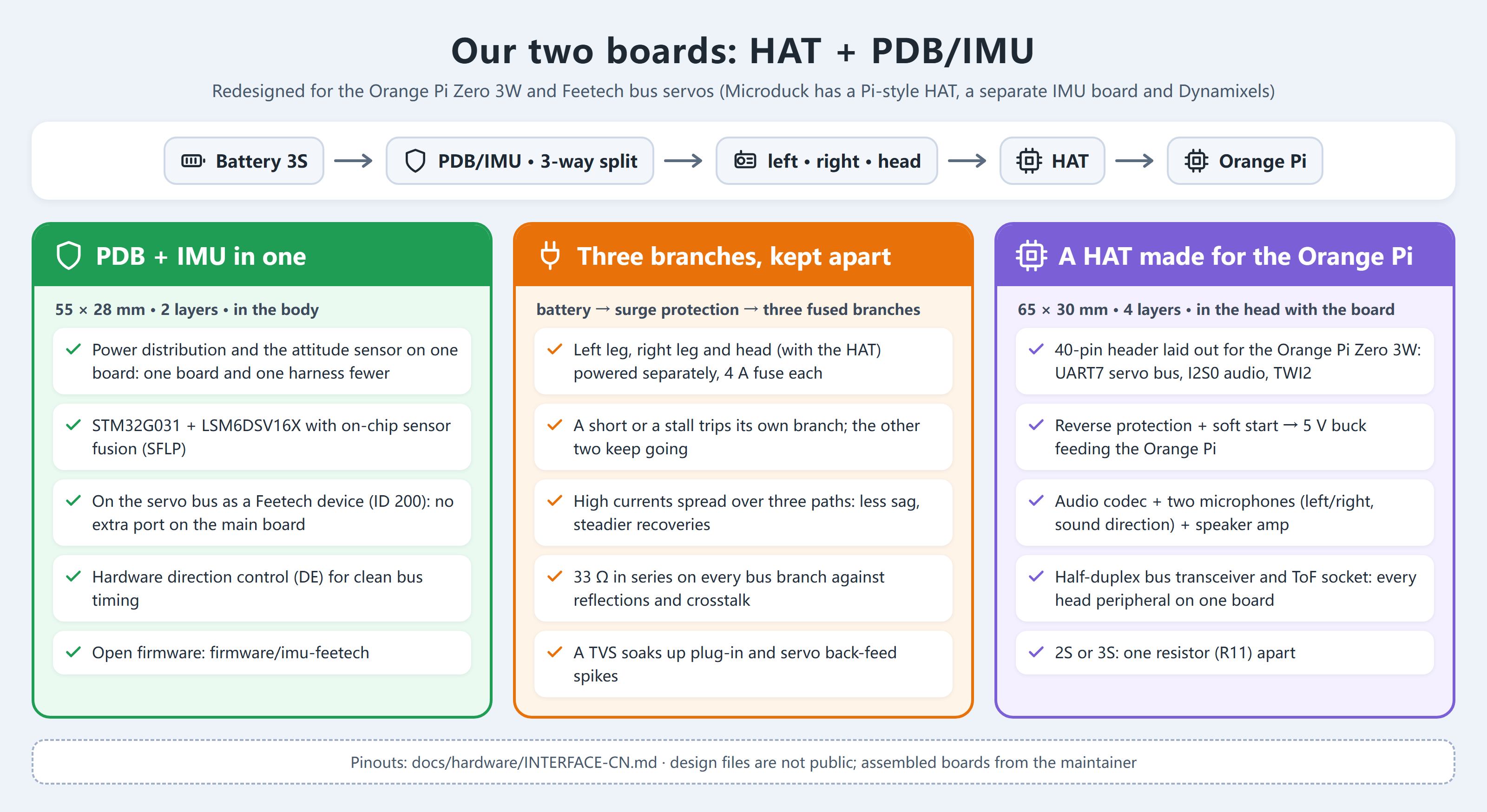
Our two boards, the HAT and the PDB/IMU:
Software stack
| Service | Language | What it does |
|---|---|---|
robotd |
Rust | the 50 Hz control loop running ONNX policies; Feetech HLS bus driver, battery identification (2S/3S, LiPo/LiHV), heat and fall guards |
lifed |
Python | the life layer: state machine, drives and moods, attention, missions, an offline small brain, head motion |
voiced |
Python | denoising, voice detection, offline recognition (SenseVoice), sound direction from two microphones |
visiond |
Python | the camera: faces (YuNet), motion, Wi-Fi by QR code, snapshots |
tofd |
Rust | 8×8 ToF ranging: distance ahead, someone close |
padd |
Rust | Xbox gamepad over Bluetooth; outranks lifed |
duckweb |
Python | a phone page: state, battery, conversation, volume |
duckbrain |
Python | optional, on a GPU server: any OpenAI-compatible multimodal LLM, for conversation and looking |
persona |
JSON | who the duck is — name, character, how it talks — apart from the code |
Verified platforms
| Combination | Status |
|---|---|
| Orange Pi Zero 3W 4 GB + 15 × HL-2915 + 3S battery (LiPo 1500 mAh / LiHV 2800 mAh) | ✅ in daily use |
| Orange Pi Zero 3W + 15 × HD-1910 + 2S battery | 🚧 boards being assembled; servo driver and policies to do |
| Original Microduck (Radxa Zero 3W + Dynamixel XL330) | ⚪ the Dynamixel bus driver is unchanged; not tested by us |
Progress
| When | Done |
|---|---|
| 2026-08 | Started from Microduck |
| 2026-09 | Designed the HAT (R3E) and PDB/IMU (R2f) boards; fabricated and assembled |
| early 2026-10 | Feetech HL-2915 bus driver, IMU firmware; actuator identification (BAM); walk, stand-up and sit/stand retrained |
| 10-13 | Xbox gamepad over Bluetooth |
| 10-14 | The life layer: drives, moods, rest, servo heat budget |
| 10-15 – 16 | Voice: offline recognition, duck-speak replies, online brain |
| 10-17 | Wi-Fi by QR code, voice prompts, volume, "what is this?", missions (a spoken sequence of moves), odometry calibration |
| 10-18 | Sound direction from two microphones, attention with vision (faces, motion), battery identification, persona apart from framework, open source |
| Area | What | Status |
|---|---|---|
| Skills | Forward roll, picking a cloth up from the floor (trained in sim, robot test next) | 🚧 in progress |
| Attention | Vision-guided gaze, on the robot | 🚧 in progress |
| Missions | Walking a spoken route on the robot | 🚧 in progress |
| 2S version | HD-1910 servos on 2S | 🚧 in progress |
| NPU | Object detection for the attention | 📋 planned |
| On-device VLM | MiniCPM-V 4.7 1B, seeing offline | 📋 planned |
| Localisation | AprilTag landmarks → visual odometry → a room map | 📋 planned |
| Voice | Wake word, noisy rooms, two-mic beamforming | 📋 planned |
| Docs | English translations, a full build guide | 📋 planned |
Build Your Own DuckBuddy
| Step | Where | Status |
|---|---|---|
| 1. Get the parts | the parts list below | ✅ list · 🚧 shop links coming |
| 2. Print | hardware/print: Bambu Studio project DuckBuddy.3mf, 6 plates, PETG + TPU, settings included |
✅ |
| 3. Carrier boards | interfaces (pinouts, power, bus): docs/hardware/INTERFACE-CN.md. The PCB design files are not public; assembled boards are available from the maintainer, or design your own to the interface | ✅ interface |
| 4. Flash the IMU | firmware/imu-feetech: ST-Link on the PDB's J2, one probe-rs command |
✅ |
| 5. Set up the Orange Pi | services in deploy/opi-dev, robot configs in deploy/robots | 🚧 one-step installer coming |
| 6. Policies | trained policies ship in the repo; to train your own see training | ✅ |
| 7. Give it a character | tools/persona: write your own persona JSON after the example duck | ✅ |
| 8. Assembly guide, FAQ | a short FAQ below; an illustrated assembly guide is coming | 🚧 |
Parts list
| Part | Qty | Notes |
|---|---|---|
| Feetech HL-2915 servo | 15 | the 3S version; 2 × 5 in the legs, 5 in the head (neck, head, beak). Microduck's printed parts fit as is, M2×6 self-tapping screws |
| Orange Pi Zero 3W | 1 | the 4 GB version recommended |
| HAT | 1 | in the head, stacked on the Orange Pi |
| PDB/IMU board | 1 | in the body |
| IMX219 camera module | 1 | MIPI CSI, in the face |
| 8×8 ToF module (VL53L5CX) | 1 | in the face |
| Small speaker | 1 | on the HAT's amplifier |
| 3S battery | 1 | LiPo 1500 mAh or LiHV 2800 mAh; robotd identifies it |
| PETG and TPU filament | TPU for the soft parts (soles, beak) | |
| Xbox gamepad | 1 | optional, Bluetooth |
FAQ
- 2S or 3S? The HL-2915 runs on 3S. The HD-1910 runs on 2S, and the HAT needs one resistor changed (R11); nothing else. robotd identifies the pack at start-up and refuses to power the servos if it does not match the configuration.
- The servos have power but don't move? Feetech HLS servos stay still while their target current and running speed registers are 0. robotd writes them at start-up; set them in your own test scripts.
- It stops answering the stick after a while? Most likely the head servos' heat guard. The head has little cooling, and the life layer budgets its movement and rest by temperature.
- Does the original Microduck run this software? In software terms yes — the Dynamixel bus driver is unchanged — but we have not tested it on the original hardware.
Join the Community
Issues and pull requests are welcome; see CONTRIBUTING.md for building and testing. Places we'd love help with:
- the HD-1910 servo driver;
- NPU object detection for the attention;
- AprilTag localisation for the mission layer;
- the build guide and English translations of the docs.
Repository layout
| Path | What |
|---|---|
robotd, duck-control, kinematics, padd, robotctl, … |
the Rust workspace (from Microduck, extended) |
tools/ |
the Python services: lifed, voiced, visiond, duckweb, duckbrain, persona, robot test scripts |
firmware/imu-feetech |
the IMU board's firmware (STM32G031 + LSM6DSV16X, speaks the Feetech protocol) |
training/ |
HL-2915 tasks, actuator identification (BAM), evaluation scripts, trained policies |
hardware/ |
the print project (hardware/print), the robot model used for training (hardware/rev-a/mjcf) |
docs/ |
the hardware interface (docs/hardware), and Microduck's own design notes and guides |
Come and chat — building, tuning, training, or just showing off your duck. The WeChat group:
WeChat group codes expire after a week and are refreshed here; if this one has lapsed, open an issue.
License: software Apache-2.0 (as Microduck), documentation CC-BY-4.0; some components carry their own licences — see NOTICE.