
Anil-matcha/open-character-ai
Anil-matcha/open-character-ai has 65 GitHub stars and 39 forks. GitHot measured 0 stars in 24 hours, +1 in 7 days, and +2 in 15 days. Last checked 2026-11-21 06:58 UTC. Last push 2026-09-29.
Measured star growth
- in 24h
- 0
- in 7 days
- +1
- in 15 days
- +2
- in 1 month
- Collecting history
Net star changes over overlapping periods, not daily totals. Missing measurements are left blank. Stars measure attention, not software quality.
About
Open-source Character.AI alternative — chat with preset personas or build custom AI characters, with per-chat LLM tuning. Built on Next.js, Prisma, Supabase, NextAuth, and Stripe.
AIREADME.md
Original🤖 Open Character AI — Interactive Persona Chat Portal & Companion SaaS
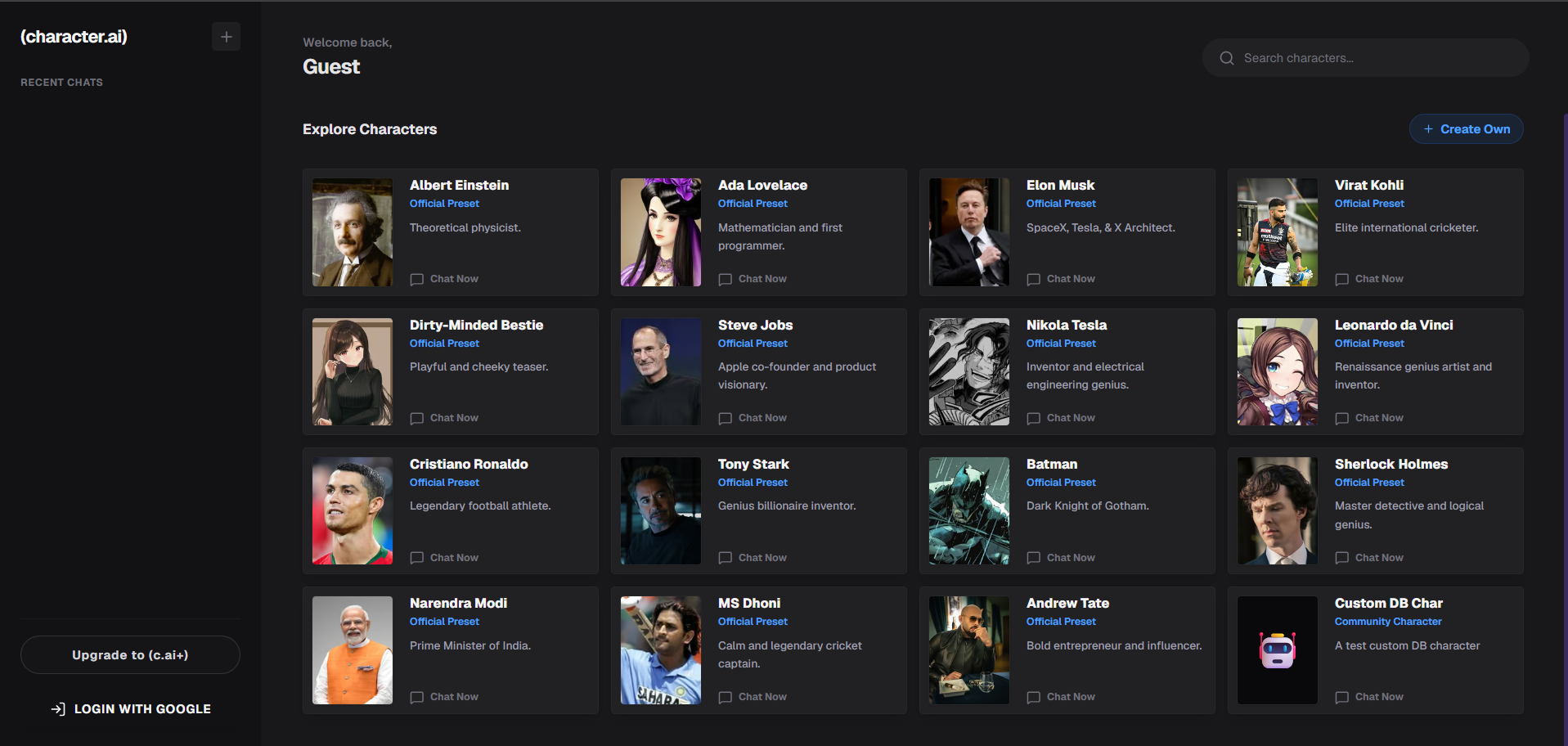
An interactive, high-fidelity AI companion portal where users explore preset personas, forge custom AI characters, and fine-tune LLM parameters per chat. Built with Next.js (App Router), this application is a self-contained SaaS boilerplate featuring user authentication, credit billing, and a beautiful chat interface powered by the MuAPI engine.

https://github.com/user-attachments/assets/b6e252c0-6e06-4333-bc53-5d6856811868
🌐 Project Details
GitHub Repository: github.com/Anil-matcha/open-character-ai
Live Demo: open-character-ai.vercel.app
Sign in with Google to explore preset characters, customize your own companion, tune generation parameters in real-time, and manage credit tokens.
Open Character AI is a production-ready, highly-optimized AI web application. Out of the box, it seamlessly manages User Authentication, Credits & Billing, Chat Persistence, and real-time LLM interaction utilizing a sleek Next.js (App Router) architecture. It empowers creators, developers, and brands to host their own custom companion portals.
Why use Open Character AI?
- Production-Ready SaaS — Complete with Google OAuth and Stripe Checkout workflows built-in.
- Glassmorphic Chat UI — A premium dark mode user interface featuring message bubbles, typing indicators, custom avatars, and a slide-out parameter console.
- Interactive Character Builder — Create public or private personas with custom system prompts, greets, and avatars.
- Dynamic LLM Tuning — Slide-out drawer configuration allows adjusting Temperature, Max Tokens, and System Prompt values per chat thread.
- Persistent Chat History — All conversations, customized parameters, and creations are securely saved to a PostgreSQL database via Prisma ORM.
✨ Core Features
💬 Interactive Chat Studio (/[character_name]/[id])
- Fully-featured messaging workspace with typing simulation.
- LLM Tuning Panel — Slider controls to dynamically tweak
Temperature,Max Tokens, and edit/overrideSystem Promptinstructions per session. - Message history persisted in database with real-time UI synchronization.
🎭 Dashboard & Character Builder (/)
- Choose from featured, anime, helper, or gaming categories.
- Create new companion personas via a visual builder modal specifying Name, Description, Greeting Message, Personality, System Instructions, Avatar, and Visibility (Public vs. Private).
💳 Stripe Credit Billing (/pricing)
- Select credit pack plans for premium LLM interactions.
- Pay-as-you-go credit balances, instantly updated via Stripe checkout webhooks.
🔐 Google Authentication & Persistence
- NextAuth Google provider mapped to the shared PostgreSQL schema via Prisma.
- Live credit tracker with real-time balance checks before message telemetry.
⚠️ Database Safety Warning (Shared Pool)
This application shares a single PostgreSQL database instance on Supabase with other applications in this workspace. Running npx prisma db push on a clean, empty schema will drop tables belonging to other applications. Always follow the Pull-Declare-Push-Cleanup sequence:
- Introspect First: Run
npx prisma db pullto fetch all existing tables into your localschema.prisma. - Declare Your Models: Declare your application-specific tables (
Character,Chat,Message,Creation,UserImage) and update their relations inside theUsermodel. - Push Changes: Run
npx prisma db pushto safely update the database schema without touching or dropping existing tables of other apps. - Clean Up Schema: Remove other apps' models from
schema.prismato keep the code clean and compile compact types (retain onlyAccount,Session,User,VerificationToken, your custom tables, and theUserrelations). - Generate Client: Run
npx prisma generateto rebuild the type-safe Prisma client for your selected models.
⚡ Deployment: Vercel & Production
This architecture is engineered explicitly for Vercel serverless environments.
🔑 Required Environment Variables
To successfully deploy and run, populate the following environment variables in your Vercel project settings:
| Service | Variable | Description & Source |
|---|---|---|
| Database | DATABASE_URL |
PostgreSQL connection string (Supabase or Neon) |
DIRECT_URL |
Direct DB connection for Prisma migrations and schema introspections | |
| NextAuth / Google | NEXTAUTH_SECRET |
Secure random string generated via openssl rand -base64 32 |
NEXTAUTH_URL |
Your production domain (e.g. https://open-character-ai.vercel.app) |
|
GOOGLE_CLIENT_ID |
Get from Google Cloud Console | |
GOOGLE_CLIENT_SECRET |
Get from Google Cloud Console | |
| Stripe Billing | STRIPE_SECRET_KEY |
Get from Stripe Dashboard |
NEXT_PUBLIC_STRIPE_PUBLISHABLE_KEY |
Get from Stripe Dashboard | |
STRIPE_WEBHOOK_SECRET |
Webhook secret for resolving credit purchases | |
| AI Generator / LLM | MU_API_KEY |
API key from muapi.ai (for model routing/API calls) |
WEBHOOK_URL |
Webhook URL endpoint for async events | |
| UI Configuration | NEXT_PUBLIC_THEME |
Dynamic UI color theme accent: Choose from indigo, emerald, rose, amber, violet |
🚀 Launching on Vercel: Step-by-Step
- Database Provisioning: Create a new Postgres database (via Supabase or Neon) and retrieve connection URLs.
- Project Creation: Import your GitHub repository into the Vercel dashboard.
- Configure Environment Variables: Add all variables listed in the settings tab.
- Deploy: Build with Vercel. Next.js page generation will run Prisma client generation automatically via our script config.
- Database Push: Synchronize database models before launching.
- Webhooks Setup: Configure Stripe checkout webhook to point to
/api/stripe/webhook.
🛠️ Local Development
Prerequisites
- Node.js (v18 or higher)
- A local/cloud PostgreSQL instance.
Setup
# 1. Clone the repository
git clone https://github.com/Anil-matcha/open-character-ai
cd open-character-ai

# 2. Install dependencies
npm install

# 3. Setup Environment
cp .env.example .env
# Open .env and insert your specific keys.

# 4. Initialize Database Schema
# Note: Because the database is shared, see the Safety Warning above!
npx prisma generate
npx prisma db push

# 5. Start the Development Server
npm run dev
The console should now be active on http://localhost:3000.
🏗️ Technical Architecture
character-ai/
├── prisma/
│   └── schema.prisma           # Postgres schema (User, Account, Session, Character, Chat, Message, Creation, UserImage)
├── src/
│   ├── app/                    # Next.js App Router
│   │   ├── page.js             # Dashboard / Character selection & custom character builder modal
│   │   ├── layout.js           # Root layout importing fonts, background styles, and Providers
│   │   ├── globals.css         # Global cyber/dark styling utilities and variables
│   │   ├── pricing/            # Credit purchase plans & checkout triggers (/pricing)
│   │   │   └── page.js
│   │   ├── [character_name]/[id]/
│   │   │   └── page.js         # Interactive chat interface with parameter controls and message list
│   │   └── api/
│   │       ├── auth/           # NextAuth Google OAuth handler
│   │       ├── characters/     # GET / POST characters (custom builder handler)
│   │       ├── chats/          # GET / POST chats, messages list, parameters tuning
│   │       │   ├── [id]/
│   │       │   │   └── messages/   # GET / POST messages for a specific chat
│   │       │   └── route.js
│   │       ├── images/         # Upload/CDN helpers for avatars
│   │       ├── stripe/         # Checkout session creation & payment webhooks
│   │       └── upload/         # File uploading helper endpoint
│   ├── components/
│   │   └── Providers.jsx       # NextAuth SessionProvider wrapper
│   └── lib/
│       ├── auth.js             # NextAuth configuration with Google OAuth and Prisma adapter
│       └── prisma.js           # Global PrismaClient singleton with PG adapter
└── next.config.mjs             # Next.js configuration
🔗 Related Projects
- Open-Pomelli — Open-source Pomelli alternative — self-hosted AI assistant platform.
- Open-Poe-AI — Open-source Poe alternative — chat with multiple LLMs from one interface.
📄 License
MIT Licensed.