
Anexgohan/pankha
Anexgohan/pankha has 75 GitHub stars and 2 forks. GitHot measured 0 in 7 days and 0 in 15 days. Last checked 2026-11-18 12:01 UTC. Last push 2026-10-18.
What you can do
- Quieter PCs, cooler temps : smart fan curves with hysteresis and stepping eliminate the full-throttle noise and thermal spikes left behind by stock BIOS fan profiles
- Everything in one dashboard : one web UI for one system or a hundred - Windows, Linux, and IPMI/BMC-controlled servers, bare metal or VMs with passed-through hardware (GPU, HBA, PCIe), x64 or ARM - every fan and temperature managed from a single place
- Knows your fans personally : every fan's real usable range - where it starts, where it stalls, its true ceiling - is measured automatically, and a fan that starts dying gets flagged before you can hear it
- Sensors you compose : combine any sensors into a virtual sensor - let "the hottest of my NVMe drives" drive the drive-bay fan
Measured star growth
- in 24h
- Update delayed
- in 7 days
- 0
- in 15 days
- 0
- in 1 month
- Collecting history
Net star changes over overlapping periods, not daily totals. Missing measurements are left blank. Stars measure attention, not software quality.
About
Centralized multi-system scalable fan control. Real-time dashboard, custom curves, Docker server + native Linux/Windows agents. Selfhosted with Docker
Self-hostedREADME.md
OriginalPankha Fan Control  (पंखा)

No install required

Pankha Fan Control is an open-source fan and temperature management system for any PC - single desktop, server, or homelab fleet. Build smarter fan curves, lower noise, drop temperatures, and manage every machine from one web dashboard. Works on Windows, Linux, and IPMI/BMC-controlled servers. Free, self-hosted, no telemetry.



What is Pankha Fan Control?
Pankha Fan Control - is open-source software that gives you complete control over your system's cooling. Build custom fan curves, monitor temperatures in real time, and tune RPM and noise to your exact preference - on a single desktop, a homelab, or a fleet of servers.
It runs the same way whether you're managing one machine or one hundred. The web dashboard works in any browser, on any device. Agents are lightweight, the backend is self-hosted, and nothing about your hardware ever leaves your network. It's built to handle any scale - a single Windows or Linux PC, or fleets of servers, VMs, and NAS boxes.
Features
- Quieter PCs, cooler temps : smart fan curves with hysteresis and stepping eliminate the full-throttle noise and thermal spikes left behind by stock BIOS fan profiles
- Everything in one dashboard : one web UI for one system or a hundred - Windows, Linux, and IPMI/BMC-controlled servers, bare metal or VMs with passed-through hardware (GPU, HBA, PCIe), x64 or ARM - every fan and temperature managed from a single place
- Knows your fans personally : every fan's real usable range - where it starts, where it stalls, its true ceiling - is measured automatically, and a fan that starts dying gets flagged before you can hear it
- Sensors you compose : combine any sensors into a virtual sensor - let "the hottest of my NVMe drives" drive the drive-bay fan
- Visual profile editor : drag-and-drop curve editor with import / export so you can build, share, and reuse fan profiles across machines
- Real hardware control : direct PWM control with live RPM feedback, per-fan policies, and an always-on emergency-temperature override
- Real-time monitoring : temperature, RPM, and historical data for CPU, GPU, NVMe, motherboard, and chipset, streamed live over WebSocket
- Safe by design : if the backend is unreachable, agents fall back to a configurable safe fan speed with a local emergency-temperature override - and agents never connect to anything but your server
- Light and fast : the Linux agent is a single Rust binary using under 15MB RAM and under 1% CPU. The Windows agent runs as a .NET 8 service using under 25MB RAM and under 1% CPU with full LibreHardwareMonitor access. IPMI/BMC Agents use even less resources.
- Open source, self-hosted : AGPL-3.0, no cloud, no telemetry. PostgreSQL backend, single-container Docker deployment
Supported Systems & Architecture
Pankha is designed to manage cooling profiles across all your hardware from a single interface. Whether you are adjusting a gaming desktop, a personal Linux machine, or multiple computers at once, Pankha keeps your system footprint light and your control absolute.
| Feature / System | 🪟 Windows Desktop | 🐧 Linux System | 💻 Central Dashboard |
|---|---|---|---|
| Ideal For | Gaming Rigs, Workstations, virtual or remote desktops | Daily Drivers, Servers, Hosts/Nodes, Virtual device passed through | Any modern web browser (Mobile/PC) |
| Tech Stack | C# / .NET (Native Client) | Rust (Lightweight Binary) | React + TypeScript UI, Node.js + PostgreSQL backend |
| Deployment | Quick-install .msi package |
Pre-configured standalone binary | 1-Click Docker Compose setup |
| Resource Usage | Near-zero background RAM & CPU usage | Near-zero background RAM & CPU usage | Low-overhead WebSocket hub |
| Hardware Link | via LibreHardwareMonitor | Direct kernel-level device mappings | Real-time aggregated data stream |
| Installation | Fully automated/guided | Instant pre-configured binary | Self-hosted or local execution |
Who is Pankha Fan Control for?
Anyone who wants more control over their cooling than stock tools allow. From a single quiet desktop to a fleet of servers - same dashboard, same workflow.
- PC builders and gamers : replace stock BIOS fan curves with smart custom ones; quieten your desktop without sacrificing thermals
- Windows users : a no-cloud, no-account fan utility that doesn't require per-machine setup
- Linux desktop and server users : PWM fan control on headless boxes (Debian, Ubuntu, RHEL, Proxmox, TrueNAS) without a GUI
- Homelabbers and self-hosters : manage Proxmox hosts, NAS boxes, and virtualisation hosts from one place
- Server admins : readable fan curves and a web UI for Dell PowerEdge, HP ProLiant, and Supermicro hardware controlled through IPMI / BMC - the cure for fans that scream even at idle.
- Anyone managing more than one machine : configure one or multiple profiles and apply to as many machines as you like.
Screenshots
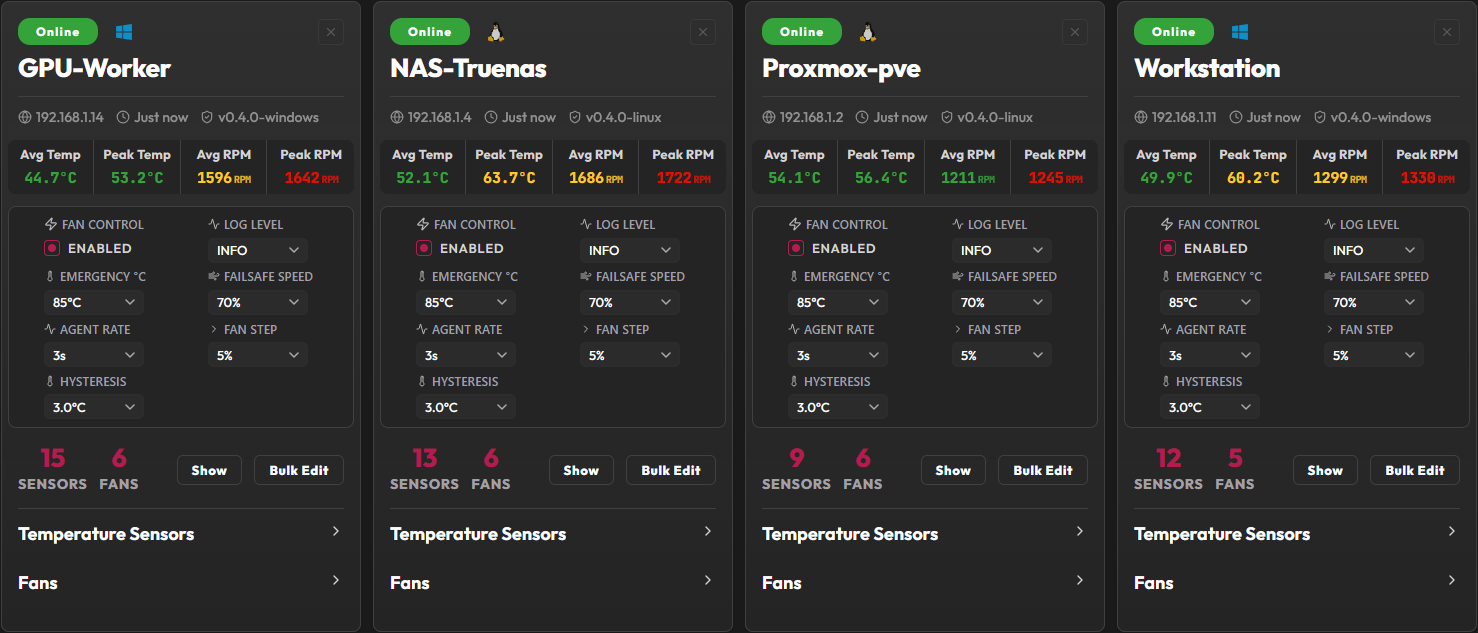 Agent widget |
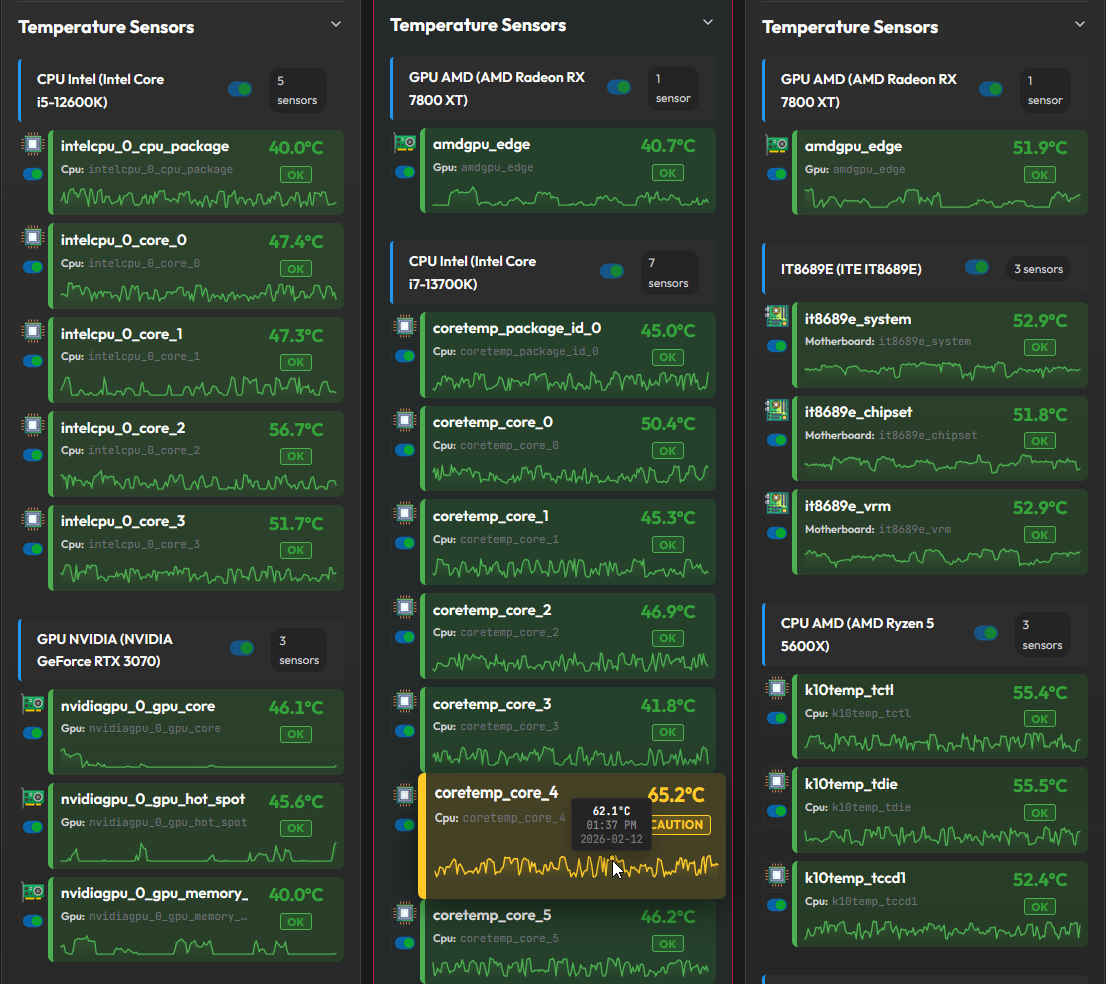 Temperature sensors |
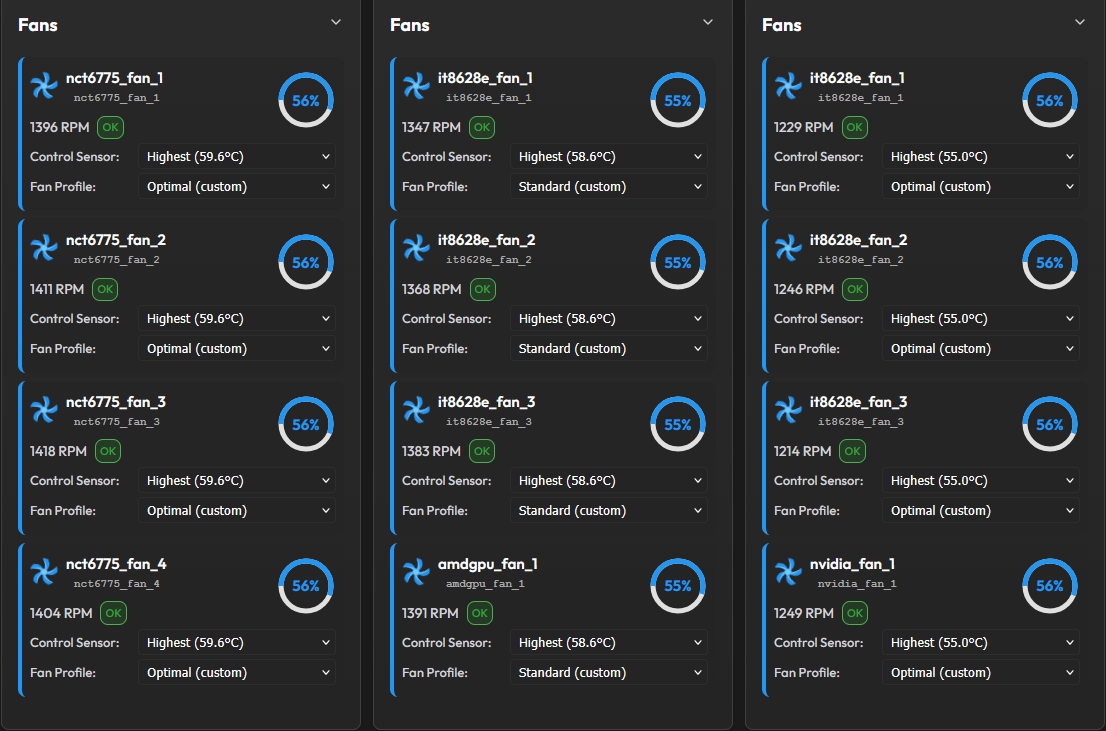 Fan control with RPM feedback |
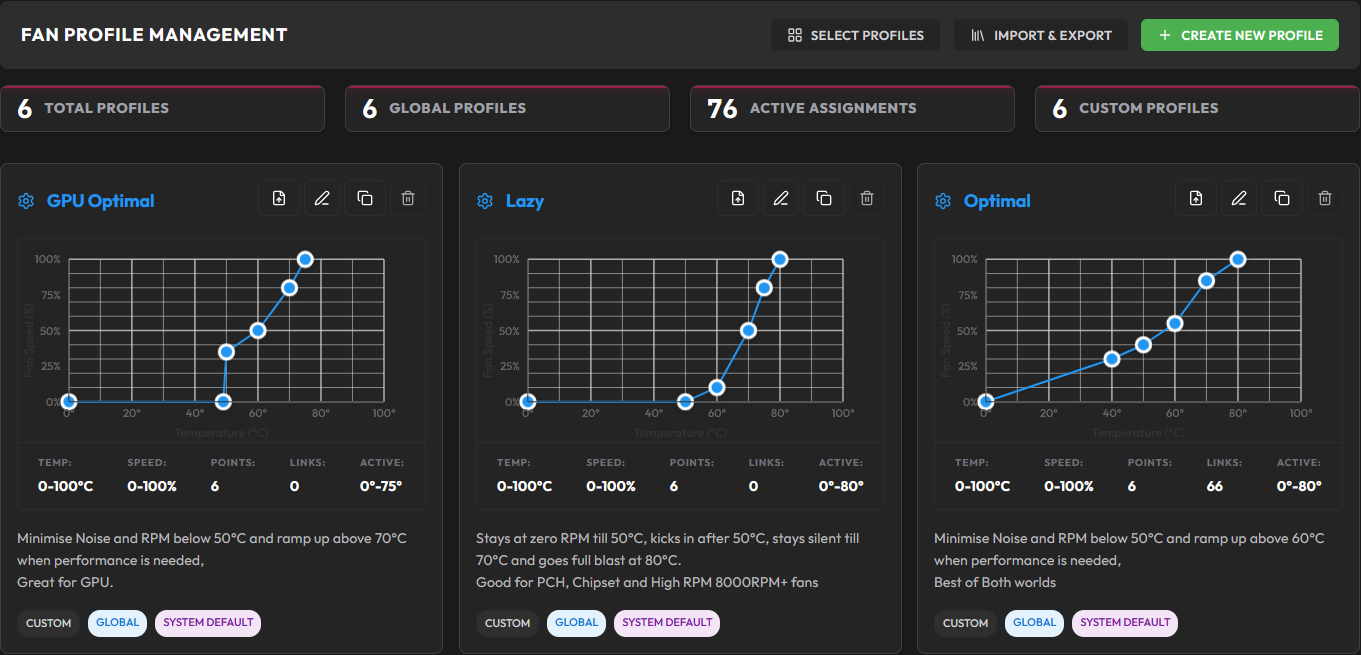 Fan profiles |
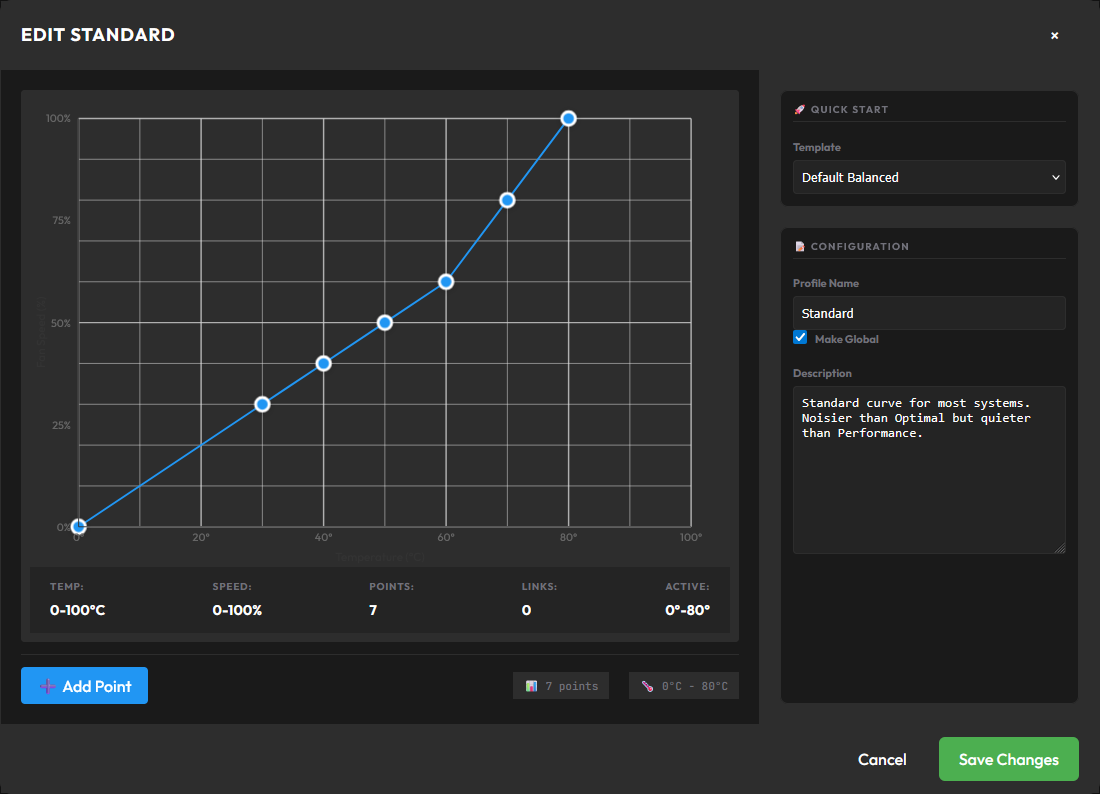 Customisable profile editor |
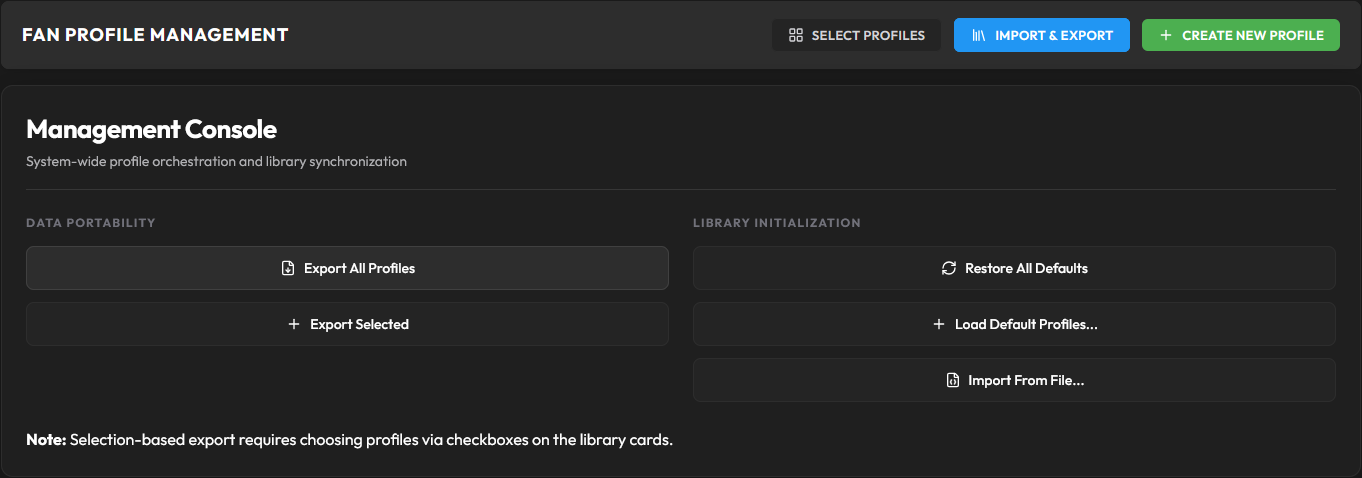 Profile import / export |
Quick Start
Overview :
- Deploy the backend server (Docker)
- Install appropriate agent on each machine you want to control (Linux, Windows, IPMI/BMC)
- Open the dashboard and start tuning your fan curves!
 Server (Docker)
wget -O compose.yml https://github.com/Anexgohan/pankha/releases/latest/download/compose.yml
wget -O .env https://github.com/Anexgohan/pankha/releases/latest/download/example.env
# edit .env first: set PANKHA_HUB_IP (this server's LAN IP) and your database credentials
docker compose pull && docker compose up -d
Open the dashboard at http://localhost:3143 (or your configured PANKHA_PORT).

 Linux Agent (Rust)
A. Recommended - one-line install via Deployment AIO
In the dashboard, open the Deployment tab, work through the numbered steps, and copy the generated command. It will look like:
# This is an example
wget -qO- "http://<pankha-ip>:<port>/api/deploy/linux?token=<token>" | bash
# or
curl -sSL "http://<pankha-ip>:<port>/api/deploy/linux?token=<token>" | bash
The script auto-detects your CPU architecture, downloads the matching binary, applies the config you set in the GUI, and installs the systemd service.
B. Manual install
Show x64 / ARM64 manual install (wget or curl)

 Intel / AMD x64 :
with wget:
wget -O pankha-agent https://github.com/Anexgohan/pankha/releases/latest/download/pankha-agent-linux_x64
chmod +x pankha-agent
or with curl:
curl -fsSLo pankha-agent https://github.com/Anexgohan/pankha/releases/latest/download/pankha-agent-linux_x64
chmod +x pankha-agent
 ARM64 (Raspberry Pi 5, etc.) :
with wget:
wget -O pankha-agent https://github.com/Anexgohan/pankha/releases/latest/download/pankha-agent-linux_arm64
chmod +x pankha-agent
or with curl:
curl -fsSLo pankha-agent https://github.com/Anexgohan/pankha/releases/latest/download/pankha-agent-linux_arm64
chmod +x pankha-agent
Then configure (works for both):
sudo ./pankha-agent --setup
List all commands: ./pankha-agent --help

 Windows Agent (.NET 8) :
Download pankha-agent-windows_x64.msi from the latest release. The installer sets up the background service and the tray app. Right-click the tray icon → Configure... → set the backend URL. Done. Control your fans and monitor your temperatures from the dashboard!

 IPMI Agent (enterprise servers) :
For rack servers whose fans are owned by the BMC (Dell iDRAC, Supermicro, and more). In the dashboard's Deployment tab, pick the IPMI platform and your server's BMC profile, then run the generated command on the server - vendor commands come from swappable profiles, and unsupported hardware can be profiled with the built-in Profile Builder.

 How Pankha Fan Control works


A central backend (Docker container with Node.js, PostgreSQL, and a WebSocket hub) coordinates lightweight agents running on each machine you want to control.
Components
- Backend - Node.js + Express + WebSocket + PostgreSQL, deployed as a single Docker container
- Frontend - React + TypeScript + Vite, served directly as a Web GUI Dashboard on
http://<IP>:<PORT> - Linux agent - single Rust binary using <15MB RAM and <1% CPU,
sysfshardware access, zero runtime dependencies - Windows agent - self installing .NET 8 service using <25MB RAM and <1% CPU, capable of full LibreHardwareMonitor access to all sensors and fans on any Windows machine
- IPMI agent - Rust binary for BMC-controlled servers (Dell iDRAC, Supermicro, and more); drives fan zones through
ipmitoolusing swappable vendor profiles
How it works
- Agents push sensor and fan readings to the backend over WebSocket at a configurable interval (default 3 seconds); the backend computes deltas and broadcasts changes only when needed to minimise bandwidth.
- The backend evaluates your fan curves and sends control commands back to agents in real time
- Frontend connects to the backend to display real-time sensor readings and fan speeds, and to send profile updates and config and user changes back to the backend
- If the backend is unreachable, agents enter failsafe mode - a configurable safe fan speed with a local emergency-temperature override
graph LR
    Browser["Your browser<br/>(dashboard - desktop or phone)"]

    subgraph SRV["Pankha Fan Control server - one per network (Docker)"]
        direction TB
        Logic["Control logic<br/>fan curves, calibration, safety"]
        DB[("PostgreSQL<br/>history")]
        Logic <--> DB
    end

    subgraph FLEET["Your machines - one lightweight agent each"]
        direction TB
        Win["Windows agent<br/>gaming PC, workstation"]
        Lin["Linux agent<br/>NAS, homelab node, Raspberry Pi"]
        Ipmi["IPMI agent<br/>rack server (BMC)"]
    end

    Browser <-->|live updates| Logic
    Logic <-->|"sensor data up,<br/>fan commands down"| Win
    Logic <--> Lin
    Logic <--> Ipmi
    Win --> HW1(["fans + sensors"])
    Lin --> HW2(["fans + sensors"])
    Ipmi --> HW3(["fans + sensors"])

    style Logic fill:#1565c0,stroke:#333,color:#fff

 Documentation



 Contributing & Community
- Discussions - GitHub Discussions for questions, ideas, and hardware reports
- Issues - GitHub Issues for bugs and feature requests
- Discord - coming soon
- Pull Requests welcome - fork the repo, branch as
feature/<name>, open a PR. CI runs typecheck (frontend + backend),cargo checkon the Rust agents, and a Docker build before review.
License
Pankha Fan Control is licensed under AGPL-3.0 . Commercial licensing is also available - see LICENSE-COMMERCIAL.md.