
Andarius/piou has 317 GitHub stars and 7 forks. GitHot measured 0 stars in 24 hours, 0 in 7 days, and +1 in 15 days. Last checked 2026-11-18 01:32 UTC. Last push 2026-11-12.
What you can do
- FastAPI-like developer experience with type hints
- Custom formatters (Rich-based by default)
- Nested command groups / sub-commands
- Derived options for reusable argument patterns
Measured star growth
- in 24h
- 0
- in 7 days
- 0
- in 15 days
- +1
- in 1 month
- Collecting history
Net star changes over overlapping periods, not daily totals. Missing measurements are left blank. Stars measure attention, not software quality.
About
A CLI tool to build beautiful rich text command-line interfaces with type validation.
Developer ToolsREADME.md
Original
Piou




A CLI tool to build beautiful command-line interfaces with type validation.
Quick Example
from piou import Cli, Option

cli = Cli(description="A CLI tool")


@cli.command(cmd="foo", help="Run foo command")
def foo_main(
    bar: int = Option(help="Bar positional argument (required)"),
    baz: str = Option("-b", "--baz", help="Baz keyword argument (required)"),
    foo: str | None = Option(None, "--foo", help="Foo keyword argument"),
):
    """
    A longer description on what the function is doing.
    """
    pass


if __name__ == "__main__":
    cli.run()

Installation
pip install piou
Or with uv:
uv add piou
Or with conda:
conda install piou -c conda-forge
Raw Formatter
By default, Piou uses Rich for beautiful terminal output. If you prefer plain text output, you can use the raw formatter:
# Force raw output via environment variable
PIOU_FORMATTER=raw python your_cli.py --help
Documentation
Full documentation is available at andarius.github.io/piou.
Features
- FastAPI-like developer experience with type hints
- Custom formatters (Rich-based by default)
- Nested command groups / sub-commands
- Derived options for reusable argument patterns
- Async command support
- Type validation and casting
- Interactive TUI mode with command suggestions and history
- Structured JSON help (
--help-json) for tooling and programmatic CLI discovery - Shell completion for bash, zsh and fish (
--completions)
Why Piou?
I could not find a library that provided:
- The same developer experience as FastAPI
- Customization of the interface (to build a CLI similar to Poetry)
- Type validation / casting
Typer is the closest alternative but lacks the possibility to format the output in a custom way using external libraries (like Rich).
Piou provides all these possibilities and lets you define your own Formatter.
Async Commands
Commands can be async functions — piou detects coroutines and runs them automatically, no manual asyncio.run() needed:
from piou import Cli, Option

cli = Cli(description="Async example")


@cli.command(cmd="fetch", help="Fetch data")
async def fetch(url: str = Option(help="URL to fetch")):
    import niquests

    async with niquests.AsyncSession() as client:
        r = await client.get(url)
        print(r.status_code)


if __name__ == "__main__":
    cli.run()
This works the same way for commands inside command groups.
Shell Completion
Any piou CLI can complete its commands, options and Literal/static choices in bash, zsh and fish, with help text
shown as descriptions in zsh and fish. Add one line to your shell config (my-cli being your installed script):
source <(my-cli --completions bash)          # ~/.bashrc
source <(my-cli --completions zsh)           # ~/.zshrc, after compinit
my-cli --completions fish | source           # ~/.config/fish/config.fish
Completion is dynamic: on <TAB> the shell re-runs your CLI with _PIOU_COMPLETE=<shell>, which prints candidates
instead of running a command. Command bodies never run. The script is registered for the running script's name; pass
another one when calling through a wrapper, an alias or python -m (my-cli --completions zsh my-alias). From Python,
cli.completion_script("zsh", prog="my-cli") returns the same script.
Callable choices run on every <TAB>, so they are off by default: enable them with
Cli(complete_dynamic_choices=True) when they are cheap, or per user with export PIOU_COMPLETE_DYNAMIC=1 (an
explicit complete_dynamic_choices= wins over the env var). A choices function that fails gives no candidates.
Interactive TUI Mode
Piou includes an optional interactive TUI (Text User Interface) mode powered by Textual. This provides a rich terminal experience with command suggestions, history, and inline completions.
Installation
pip install piou[tui]

# With auto-reload support for development
pip install piou[tui-reload]
Usage
Enable TUI mode by setting tui=True when creating your CLI:
from piou import Cli, Option

cli = Cli(description="My Interactive CLI", tui=True)


@cli.command(cmd="hello", help="Say hello")
def hello(name: str = Option(..., help="Name to greet")):
    print(f"Hello, {name}!")


if __name__ == "__main__":
    cli.run()
Or via the --tui flag:
python my_cli.py --tui
Or via the PIOU_TUI=1 environment variable:
PIOU_TUI=1 python my_cli.py
TUI Features
- Command suggestions: Type
/to see available commands with descriptions - Subcommand navigation: Use
:to navigate subcommands (e.g.,/stats:uploads) - Inline completions: See argument placeholders as you type
- Command history: Navigate previous commands with up/down arrows (persisted across sessions)
- Rich output: ANSI colors and formatting preserved in output
- Keyboard shortcuts:
Tab- Confirm selected suggestionUp/Down- Navigate suggestions or historyCtrl+C- Clear input (press twice to exit)Escape- Quit
- Dev mode: Auto-reload commands when source files change (see below)

Dev Mode with Auto-Reload
For faster development iteration, enable dev mode to automatically reload your commands when source files change:
pip install piou[tui-reload]
Then use the --tui-reload flag:
python my_cli.py --tui-reload
Or via environment variable:
PIOU_TUI_DEV=1 python my_cli.py --tui
When enabled, Piou watches your command source files and hot-reloads them on save. You can also toggle reload mode at runtime with the /tui-reload command.
To run custom code after each reload (e.g., refresh cached data), use the @cli.tui_on_reload decorator:
@cli.tui_on_reload
def on_reload():
    print("Code reloaded!")
Advanced Example: HTTP Benchmark
The TUI mode supports mounting custom Textual widgets for rich interactive displays. This example benchmarks HTTP libraries with live progress grids:
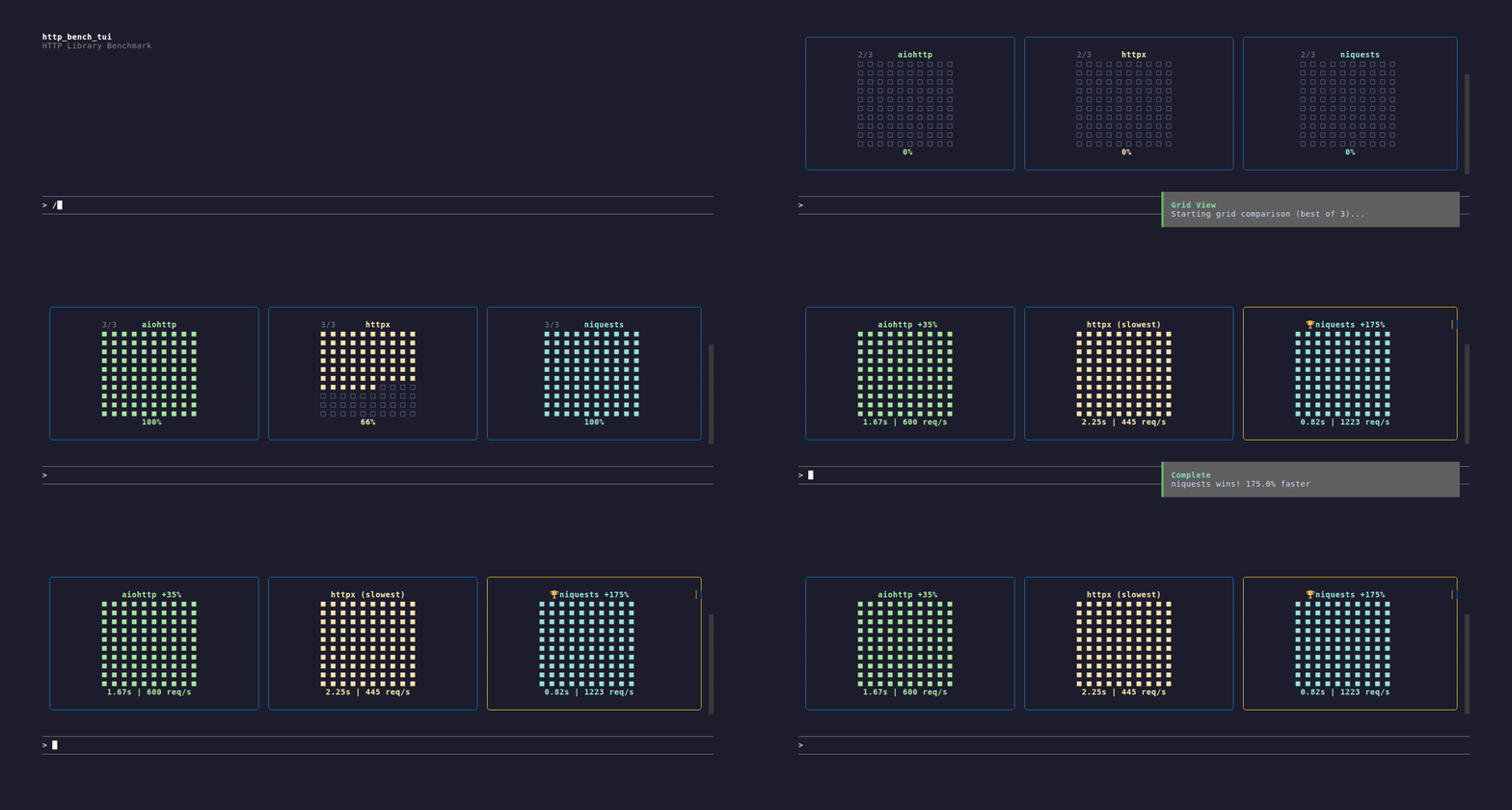
See examples/http_bench_tui.py for the full implementation using TuiContext and custom widgets.
Development
See CONTRIBUTING.md for setup, checks and pull request conventions.
Running Tests
uv run pytest
Generating Documentation
# Build docs
uv run --group docs mkdocs build

# Serve locally
uv run --group docs mkdocs serve
Generating Screenshots and GIFs
Terminal recordings are created with VHS. Install it first:
# Ubuntu/Debian
sudo apt install vhs ttyd

# macOS
brew install vhs

# Or via Go
go install github.com/charmbracelet/vhs@latest
Then generate recordings from tape files:
vhs docs/static/tui-demo.tape
Tape files are located in docs/static/ and define scripted terminal sessions that produce GIFs.