
AmirSolt/Unity-Polytube
AmirSolt/Unity-Polytube has 54 GitHub stars and 1 forks. GitHot measured 0 stars in 24 hours. Last checked 2026-11-12 04:42 UTC. Last push 2025-11-05.
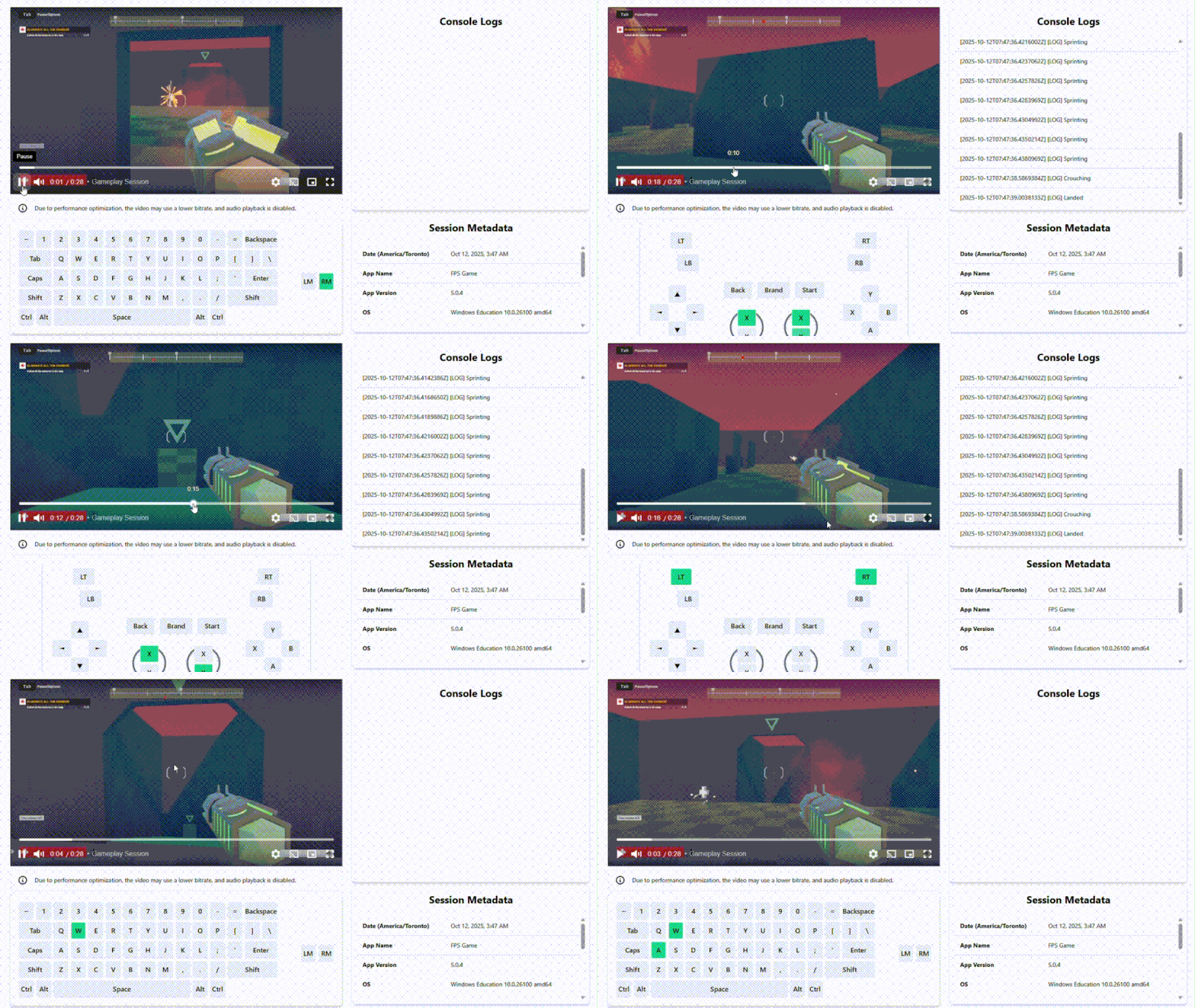
Polytube is an analytics tool that records gameplay sessions for playtesting and debugging. It uses GPU duplication for high performance and minimal impact on system resources, and can automatically upload recordings to the cloud when valid credentials are provided.
What you can do
- Add an option to disable wiping out old sessions.
- A Stop() function to stop the recording manually.
Measured star growth
- in 24h
- 0
- in 7 days
- Collecting history
- in 15 days
- Collecting history
- in 1 month
- Collecting history
Net star changes over overlapping periods, not daily totals. Missing measurements are left blank. Stars measure attention, not software quality.
README.md
Original
Polytube is an analytics tool that records gameplay sessions for playtesting and debugging. It uses GPU duplication for high performance and minimal impact on system resources, and can automatically upload recordings to the cloud when valid credentials are provided. This Unity packge provides an easy to use wrapper around polytube.exe.
Documentation | Polytube core
Unity Instructions (4 Steps)
1. Add the package
Download the project as a ZIP file from GitHub: https://github.com/AmirSolt/Unity-Polytube/archive/refs/heads/main.zip
Extract the ZIP and place the folder named
com.polytube.sessionrecorderinside your Unity project’sPackages/directory.
2. Add the polytube.exe
Download the latest stable polytube.exe: https://github.com/AmirSolt/Polytube/releases
Place the downloaded
polytube.exefile inside your Unity project’sAssets/StreamingAssets/directory.
3. Start recording
Call the following method from your code:
using Polytube.SessionRecorder;

Polytube.SessionRecorder.Main.Start();
This starts recording the game window and saves the files to Application.temporaryCachePath.
The recording will close immediately inside the editor since there's no game window.
🚨 IMPORTANT: Make sure to obtain proper consent agreements before recording. Respect user's privacy,
4. (Discontinued) Enable cloud uploads
If you provide an ApiId and ApiKey, the recordings will automatically upload to the cloud.
Example:
using Polytube.SessionRecorder;

Polytube.SessionRecorder.Main.Start(new Dictionary<string, string>{
  {"--api-id", "<YOUR API ID>"},
  {"--api-key", "<YOUR API KEY>"}
});
5. Stop recording
You can gracefully stop the recording at any time by calling:
using Polytube.SessionRecorder;

Polytube.SessionRecorder.Main.Stop();
Notes
Do not close the program manually
The recorder is designed to shut down automatically when the target window closes. Do not kill the process abruptly.
Proper consent forms
Make sure you comply with privacy laws in every region where your software will be released. If your application uses cloud storage and doesn't meet these regulations, it could be banned or restricted.
It's designed to record till the last momment
Since the recorder, polytube.exe runs in a different process it will keep recording even if your game crashes. Once the game window is closed for any reason it will stop recording and close all services.
Wipes out previous recordings
Currently, the recorder wipes out any previous recordings, so you don't have to worry about storage space.
Documentation
Functions
Start(Dictionary<string, string> userFlags=null)
This function starts recording the game window and saves the files to Application.temporaryCachePath.
It uses Application.productName to find the game window. This function won't work in the editor.
You can add flag parameters to control the behaviour of the recorder. See https://github.com/AmirSolt/Polytube for more information.
Stop()
This gracefully kills the polytube.exe process making sure all recordings and uploads are finalized.
Upcoming features
- Add an option to disable wiping out old sessions.
- A
Stop()function to stop the recording manually.
Explore related projects
Asabeneh/30-Days-Of-Python
The 30 Days of Python programming challenge is a step-by-step guide to learn the Python programming language in 30 days. This challenge may take more than 100 days. Follow your own pace. These videos may help too: https://www.youtube.com/channel/UC7PNRuno1rzYPb1xLa4yktw
78,618 starsgrafana/grafana
The open and composable observability and data visualization platform. Visualize metrics, logs, and traces from multiple sources like Prometheus, Loki, Elasticsearch, InfluxDB, Postgres and many more.
77,859 starsredis/redis
For developers, who are building real-time data-driven applications, Redis is the preferred, fastest, and most feature-rich cache, data structure server, and document and vector query engine.
77,472 starsapache/superset
Apache Superset is a Data Visualization and Data Exploration Platform
75,495 stars